

TasmoFleet
Docker app from NoFutureKid's Repository
Overview
Readme
View on GitHub

TasmoFleet
A self-hosted fleet manager for Tasmota devices: inventory, live state, firmware updates, configuration backups and fleet-wide commands in one Go binary with an embedded SQLite database.





Try the demo: the real UI with a simulated fleet of 60 devices, saved as static pages (actions are disabled). The design prototype the UI was built from is public too.
TasmoFleet is an independent project and is not affiliated with, endorsed by or sponsored by Tasmota or its maintainers. "Tasmota" is the name of the firmware this tool manages; the TasmoFleet logo is original and unrelated to the Tasmota logo.
Why
TasmoFleet started as a replacement for TasmoAdmin on a home fleet of a few dozen devices. What it does differently:
- Updates run on the server, as a persisted job per device (backup, OTA URL, upgrade, wait for the reboot, verify), with bounded parallelism. Closing the browser does not stop an update, and an update interrupted by a restart resumes. TasmoAdmin drives updates from the open browser tab.
- A safety guard before every
OtaUrlandUpgrade: it refuses unknown hardware, an image whose chip family does not match the device (checked against the image header and the file name), safeboot images, and a variant change you did not choose explicitly. 1 MB ESP8266 devices go throughtasmota-minimalfirst. - Live state over MQTT (optional): online state, power and telemetry arrive as they happen and the pages update without reloading. Without MQTT every feature works over HTTP polling.
- Policy and compliance: rules such as
PowerOnState 0orTelePeriod 300per chip family, tag or device, a drift view per device, and "make compliant" as a transaction. - Backups with diff and restore: the raw
.dmpplus decoded JSON (with decode-config, bundled in the image), scheduled and before every update, compared side by side, restored onto the same or a replacement device. - Bulk actions as transactions with logs: updates, commands, backups and policy fixes on many devices run as one transaction, with a log per device, cancel and retry of the failed ones.
- Sign-in with OIDC single sign-on, trusted forward-auth headers, or local accounts; roles (admin, operator) and an audit log of every change.
- Import from TasmoAdmin:
devices.csvandMyConfig.json, in the UI or withtasmofleet import tasmoadmin.
Features
- Inventory and discovery: devices found via MQTT announcements or an HTTP scan of your device networks are proposed, not added silently; address changes are detected.
- Firmware from upstream (GitHub releases, ota.tasmota.com) or your own uploads, cached, checked by its image header and served to devices over plain HTTP from a separate port.
- Device pages: overview, power control, console with a command policy, settings, backups, drift, state and transaction history.
- Notifications of finished updates and failed backups by webhook (e.g. a Home Assistant webhook trigger) or e-mail (Resend API).
- Prometheus metrics and an example Grafana dashboard (deploy/).
- Light and dark theme, phone layout, works behind a reverse proxy under a base path.
- Automation stays in Home Assistant (or wherever you run it): TasmoFleet manages devices, it does not switch them on schedules.
What TasmoFleet changes on your devices
Nothing on its own. Everything TasmoFleet does in the background only reads: status polling
(single Status N queries, never Status 0), the policy live check, scheduled backups (config
download and status snapshot), and discovery (MQTT announcements, HTTP scan).
A device is only changed when someone starts an action in the UI: a firmware update, "make compliant" for the policy, a console or bulk command, a power toggle, a restart, a restore or a settings edit. Each of these is recorded in the audit log.
There is no read-only mode or view-only role yet: both roles can change devices. Admins can do everything; operators can run updates, backups, power toggles and the allowlisted commands, but cannot edit the inventory, settings or users.
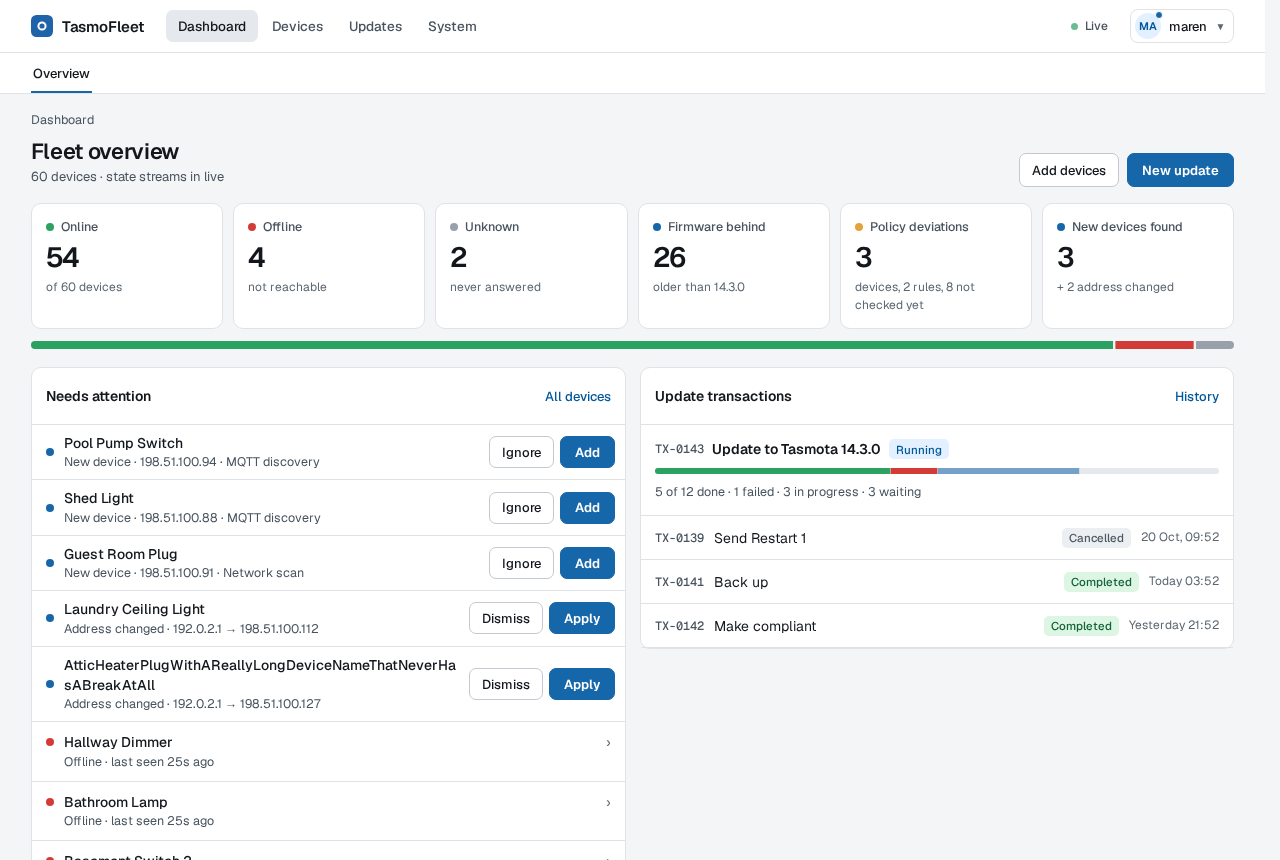
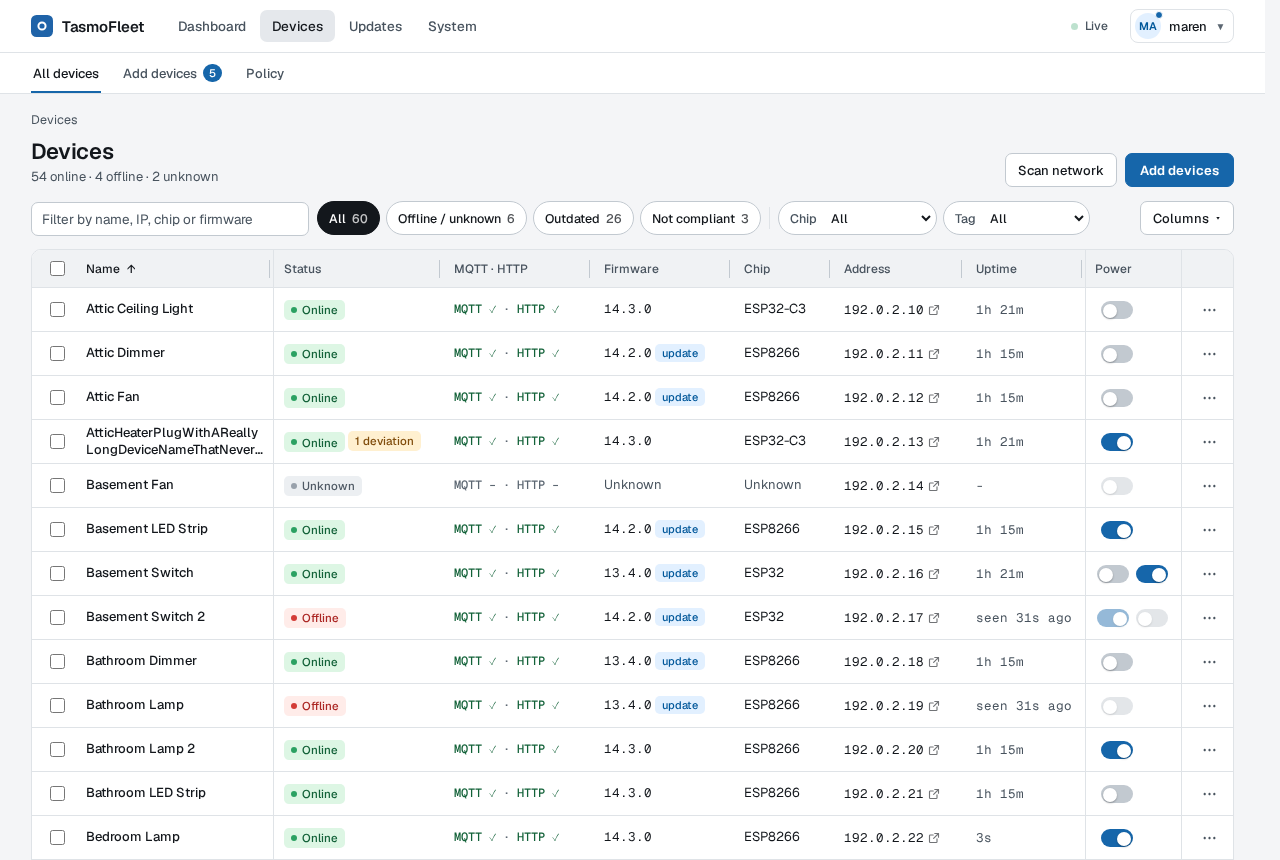
| Dashboard | Device list |
|---|---|
 |
 |
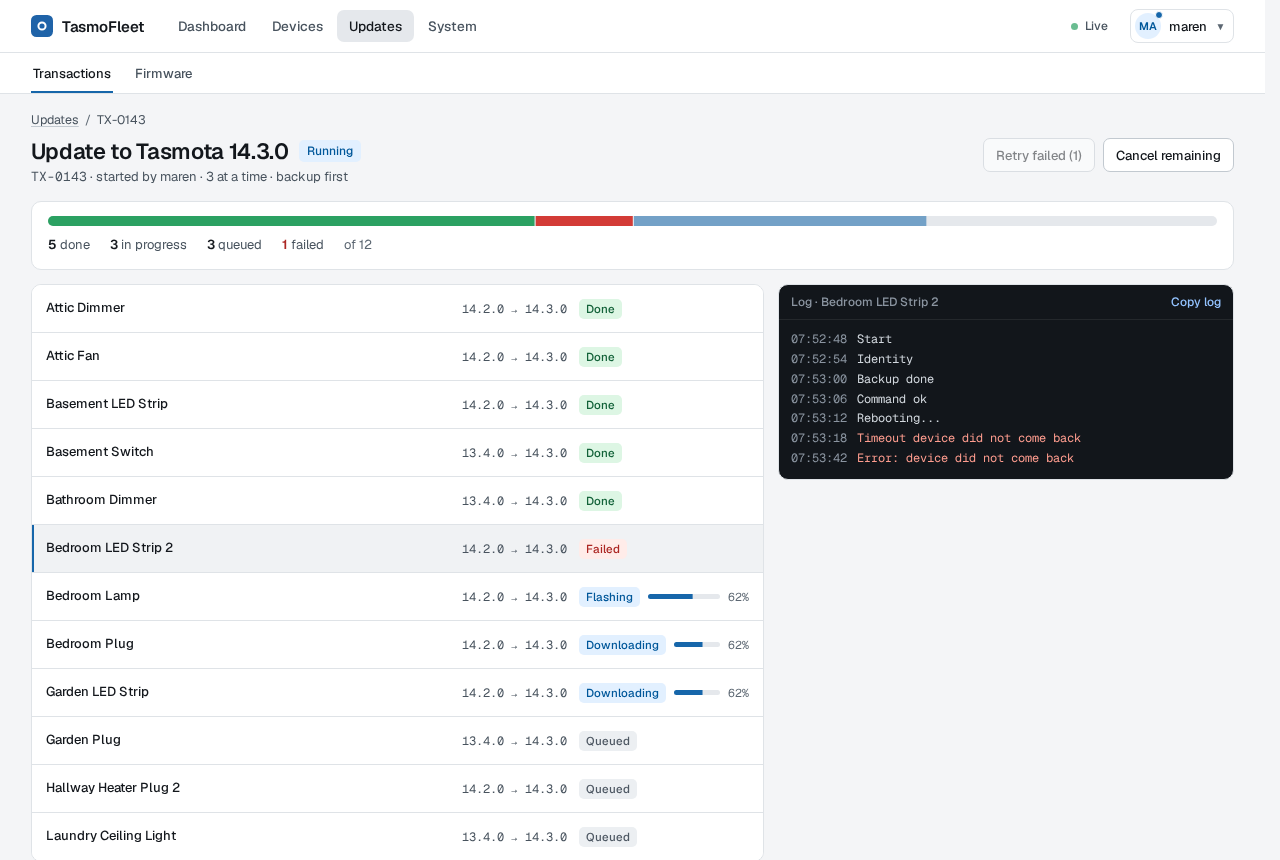
| Running update transaction | Device page (dark theme) |
 |
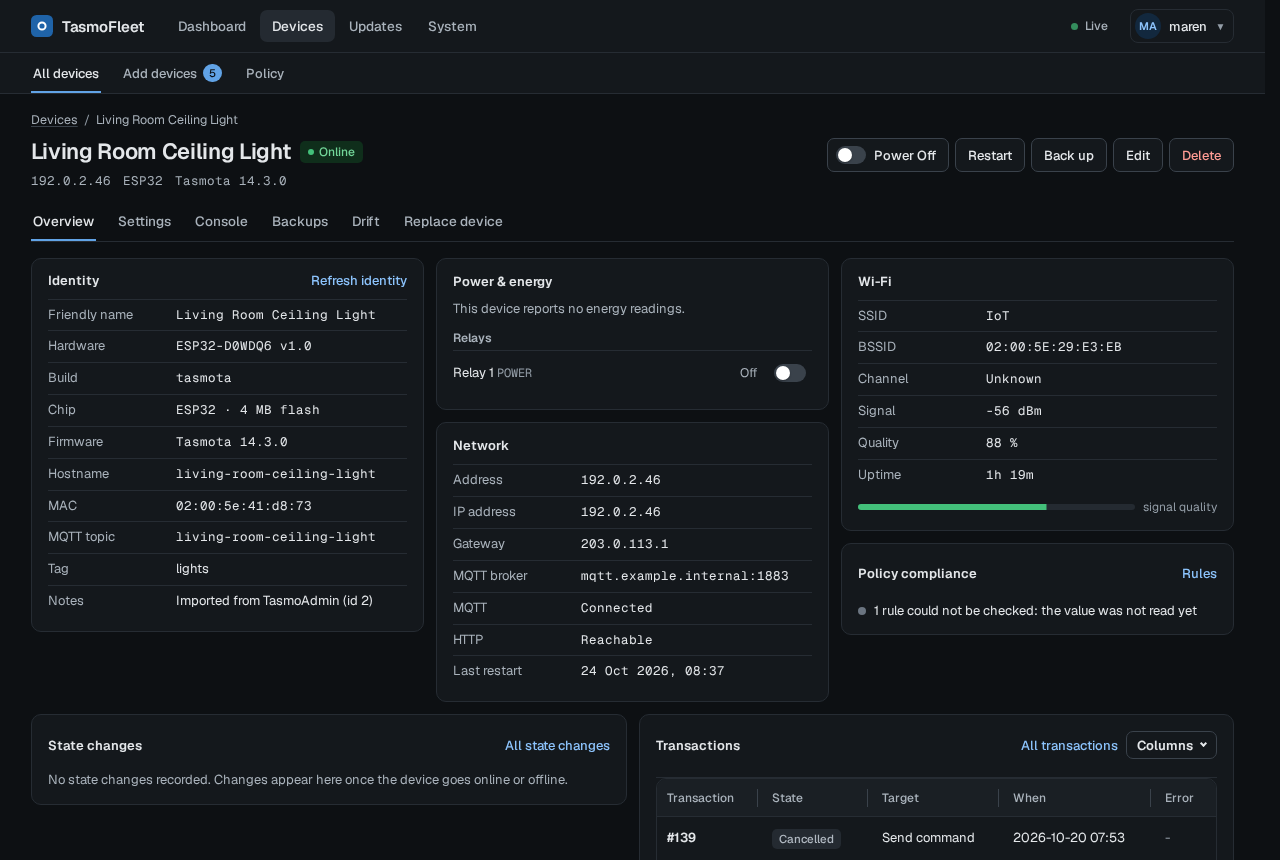 |
All screenshots show simulated devices.
Quick start (Docker)
docker run -d --name tasmofleet \
  -p 8443:8443 -p 80:80 \
  -e TASMOFLEET_LISTEN=:8443 \
  -e TASMOFLEET_TLS_SELF_SIGNED=true \
  -v tasmofleet-data:/data \
  ghcr.io/nofuturekid/tasmofleet:latest
docker logs tasmofleet 2>&1 | grep -o '/setup/account?token=[^"]*'
Open https://<host>:8443 followed by the printed /setup/account?token=... path, accept the
self-signed certificate, set the admin password and follow the setup. The link is valid until
the admin has a password; each start prints a fresh one until then.
Port 80 serves firmware to the devices (they fetch it over plain HTTP); it can be any port the
devices can reach. Set the URL the devices use (e.g. http://<host-ip>) on the System settings
page; until then firmware updates are off.
The same with Docker Compose:
services:
  tasmofleet:
    image: ghcr.io/nofuturekid/tasmofleet:latest
    container_name: tasmofleet
    restart: unless-stopped
    ports:
      - "8443:8443" # UI (HTTPS, self-signed)
      - "80:80" # firmware for the devices (plain HTTP)
    environment:
      TASMOFLEET_LISTEN: ":8443"
      TASMOFLEET_TLS_SELF_SIGNED: "true"
      # TZ: "Europe/Berlin" # local time instead of UTC (logs, times the app formats)
    volumes:
      - tasmofleet-data:/data
volumes:
  tasmofleet-data:
The container runs as UID 65532. A named volume (as above) works out of the box. For a bind
mount (-v /srv/tasmofleet:/data) make the directory writable for that user first, otherwise
Docker creates it as root and TasmoFleet refuses to start with data dir /data is not writable:
mkdir -p /srv/tasmofleet && chown -R 65532:65532 /srv/tasmofleet
Alternatively set an explicit user: "<uid>:<gid>" in Compose (or --user) that owns the
directory. Set TZ (e.g. Europe/Berlin) to get local time instead of UTC.
With Compose, the setup link is in docker compose logs tasmofleet.
Unraid: a template is in deploy/unraid/tasmofleet.xml (copy
it to /boot/config/plugins/dockerMan/templates-user/); it runs plain HTTP behind a reverse
proxy with its own IP on br0.
Configuration
The environment only holds bootstrap settings (listeners, data directory, trusted proxies, sign-in mode); everything else, single sign-on included, is set in the UI and stored in the database. A value set in the environment locks its field in the UI.
- All variables: deploy/unraid/tasmofleet.env.example
- Reverse proxy, OIDC (Authentik), Prometheus, Grafana and Unraid examples: deploy/.
Behind a reverse proxy, run plain HTTP on
:8080withTASMOFLEET_TRUSTED_PROXIESandTASMOFLEET_PUBLIC_URL. - Lost passwords and emergency access: docs/runbooks/emergency-access.md
Status
Pre-1.0 (v0.11.x), single maintainer. It runs a home fleet of a few dozen devices every day, but expect breaking changes before 1.0; they are listed in CHANGELOG.md. Your data is migrated forward; configuration and routes may change. Questions and ideas are welcome in Discussions, bug reports in the issues.
Documentation
- Design and behaviour: docs/spec/2026-10-18-tasmofleet-design.md
- Security notes per feature: docs/security/
- Research (Tasmota OTA behaviour, TasmoAdmin lessons): docs/research/
- Roadmap: ROADMAP.md
Development
make check   # templ, fmt, vet, staticcheck, golangci-lint, unit tests, govulncheck, build
make ci      # everything CI runs, incl. race, integration, mutation and e2e tests
make demo    # the static demo (dist/demo); make demo-media renews docs/media
Requires Go 1.27. The e2e tests need Node.js (make e2e-deps, then
npx playwright install chromium once). See CONTRIBUTING.md and
CLAUDE.md (rules for AI agents and humans).
How it is built (AI disclosure)
TasmoFleet is built with Claude Code: most code, tests and docs were written by it. The maintainer sets direction, reviews the changes and tests them on a real fleet of Tasmota devices. The safety-critical parts (firmware selection, the OTA state machine) run under mutation testing in addition to unit, integration and Playwright tests against a device simulator.
License
GNU Affero General Public License v3.0 or later (AGPL-3.0-or-later). If you
run a modified version as a network service, you must offer its source to its users; the
About page links to the source code. Third-party notices are in NOTICE.
Categories
Related apps
Explore more like this
Explore allDetails
ghcr.io/nofuturekid/tasmofleet:latestRuntime arguments
- Web UI
https://[IP]:[PORT:8443]/- Network
bridge- Shell
sh- Privileged
- false
- Extra Params
--health-start-period=10s
Template configuration
Web UI and API. Serves a self-signed certificate by default; put a reverse proxy in front for a trusted one (see the Trusted proxies variable).
- Target
- 8443
- Default
- 8443
- Value
- 8443
Device-facing firmware server (plain HTTP; ESP8266 devices cannot use TLS). Tasmota devices download firmware from this port during an update. Choose any free host port that the devices can reach, and enter the resulting http://SERVER-IP:PORT/ URL as the firmware URL on the System settings page. Host port 80 is used by the Unraid web interface.
- Target
- 80
- Default
- 8081
- Value
- 8081
Database, secret.key, firmware cache and backups. Back it up as a whole: without secret.key the stored device passwords cannot be decrypted. The container runs as UID/GID 65532 (not nobody 99:100): run 'chown -R 65532:65532 /mnt/user/appdata/tasmofleet' once if the folder is not writable.
- Target
- /data
- Default
- /mnt/user/appdata/tasmofleet
- Value
- /mnt/user/appdata/tasmofleet
Listener for UI and API inside the container. Must match the container port of the Web UI port mapping above.
- Target
- TASMOFLEET_LISTEN
- Default
- :8443
- Value
- :8443
Serve a self-signed certificate on the UI listener. Set to false only when Trusted proxies is set (reverse proxy terminates TLS) and change UI listen to :8080 plus the container port of the Web UI mapping.
- Target
- TASMOFLEET_TLS_SELF_SIGNED
- Default
- true
- Value
- true
Listener of the device-facing firmware server inside the container. Keep :80 to match the Firmware server port mapping.
- Target
- TASMOFLEET_FIRMWARE_LISTEN
- Default
- :80
- Value
- :80
Only behind a reverse proxy or with single sign-on: external URL of the UI, e.g. https://tasmofleet.example.com. Used as OIDC redirect and logout target. Leave empty otherwise.
- Target
- TASMOFLEET_PUBLIC_URL
Only behind a reverse proxy: comma separated CIDRs of the proxy, e.g. 192.168.1.10/32. Forwarded headers and header authentication are trusted only from these peers. Leave empty otherwise.
- Target
- TASMOFLEET_TRUSTED_PROXIES
Password of the first local admin ('admin') on a fresh install; it must be changed at the first sign-in. Empty: a random one is written to initial-admin-password in the appdata folder.
- Target
- TASMOFLEET_INITIAL_ADMIN_PASSWORD
Bearer token required on /metrics for remote Prometheus scrapers. Empty: only local scrapes are answered.
- Target
- TASMOFLEET_METRICS_TOKEN
debug, info, warn or error. Leave empty to choose it on the settings page; a value here locks it. Logs are JSON on stdout.
- Target
- TASMOFLEET_LOG_LEVEL