
All apps · 0 apps

Tapo-rest-sc
Docker app from jterpstra's Repository
Overview
A lightweight REST API for fetching power data from Tapo smart devices, packaged for Docker deployment.
This project uses tapo-rest by Clément Nerma as the backend for device communication. The Dockerfile and deployment approach are inspired by the official tapo-rest Docker setup.
Note:
Before creating this container, create a folder (tapo-rest-sc) in your appdata share for the configuration files for this application.
Create two config files
- config.json
- devices.json
Reference the docs for the required configuration - https://github.com/snarkbe/tapo-rest-sc
Readme
View on GitHubTapo Device Power REST API
A lightweight, pure-Python REST API for controlling Tapo smart devices and fetching their power data, packaged for Docker deployment.
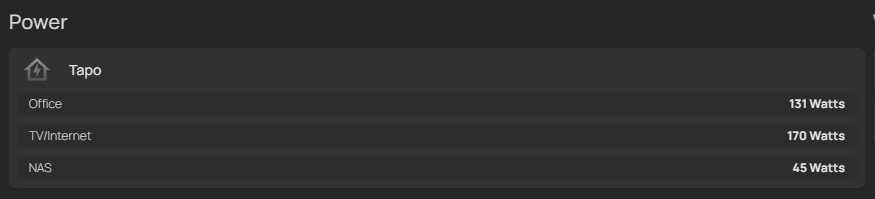
My goal was to retrieve data usage for several Tapo smart plugs in 1 single response, to use in a custom API service widget in my Homepage dashboard:
Syntax
- Power:
    - Tapo:
        icon: mdi-home-lightning-bolt-outline
        widgets:
            - type: customapi
              url:  http://<taporestsc_url>:5000/get_all_device_power
              refreshInterval: 5000 # in milliseconds
              display: dynamic-list
              mappings:
                    name: device
                    label: data.current_power
                    suffix: Watts
Result
Features
- One endpoint returning the current power of every configured device, plus a computed total
- Chained plugs: subtract one device's consumption from another's, so nothing is counted twice
- A REST surface for controlling and querying individual devices, documented automatically on
/docs - Speaks to devices directly over your LAN with python-kasa — no bundled binary, no sidecar process, no cloud round-trip
- Expired device sessions are re-established transparently instead of failing the request
- Dockerized, and architecture-independent
Quick Start
1. Clone this Repository
git clone <this-repo-url>
cd <this-repo-directory>
2. Prepare Configuration
Copy the sample and fill it in:
cp app/config.sample.json app/config.json
app/config.json is gitignored — it holds your Tapo credentials and API keys. See Configuration.
3. Build the Docker Image
docker build -t taposc .
4. Run the Container
The app directory must be mounted, since it holds the configuration:
docker run -d -p 5000:5000 -v ./app:/app -e TZ=Europe/Brussels --name tapo taposc
Run only one client against your plugs. Tapo devices accept a single local session per device: whichever client authenticated most recently wins, and the other one starts getting
Session timeoutuntil it reconnects. Stop any older tapo-rest container before starting this one.
Configuration
There is exactly one configuration file: app/config.json. Earlier versions
of this project used two (config.json for the tapo-rest URL and password, and
devices.json for the device list). Both are gone: app/devices.json is now
app/config.json, and the old tapo_api_url / login_password keys no longer
exist, because there is no separate tapo-rest process to point at any more.
Start from the committed template — it is a complete, working configuration:
{
    "tapo_credentials": {
        "email": "your-tapo-account@example.com",
        "password": "your-tapo-account-password"
    },
    "devices": [
        { "name": "Living room plug", "device_type": "P110", "ip_addr": "192.168.1.10" },
        { "name": "Washer",           "device_type": "P115", "ip_addr": "192.168.1.11" },
        { "name": "TV corner",        "device_type": "P110", "ip_addr": "192.168.1.12",
          "substract": "Living room plug" }
    ]
}
| Key | Meaning |
|---|---|
tapo_credentials |
Your Tapo account email and password — the same ones you use in the Tapo app. Devices are contacted locally over your LAN; these only authenticate you to them. |
devices[].name |
Any name you like — this is what the widget's device field shows. Names containing a / are addressed on the API by their slug, which GET /devices publishes. |
devices[].device_type |
Normally one of L510 L520 L530 L535 L610 L630 L900 L920 L930 P100 P105 P110 P110M P115 P300 P304 P304M P316. Nothing dispatches on it — the protocol is negotiated with the device — so a newer model still works, with a warning in the log. |
devices[].ip_addr |
The device's address on your LAN. Give it a DHCP reservation. |
devices[].substract |
Optional. The name of another configured device whose power is subtracted from this one — for plugs chained behind one another. Never goes below zero. |
Do I need an API key?
Probably not. /get_all_device_power — the endpoint the Homepage widget
calls — is unauthenticated, exactly as it has always been. Your widget needs
no key, no header and no change.
An API key only guards the routes that can change a device or reveal your
setup: /devices/… and /reload-config. Add one only if you want to switch
devices on and off over HTTP, from a script or Home Assistant. Until you do,
those routes answer 403 and everything else works normally.
To add one, generate a key and put it in app/config.json:
openssl rand -hex 32
{
    "tapo_credentials": { "…": "…" },
    "server": {
        "api_keys": [
            { "name": "Home Assistant", "key": "paste-the-generated-key-here" }
        ]
    },
    "devices": [ "…" ]
}
Keys must be at least 32 characters and alphanumeric only — no dashes or underscores. The service refuses to start if a key does not qualify, rather than running with a weak one.
Environment variables
| Variable | Effect |
|---|---|
TAPO_EMAIL / TAPO_PASSWORD |
Override tapo_credentials in the file. See the warning below. |
TAPO_API_KEYS |
Comma-separated API keys, added to any in the file. |
TAPOSC_CONFIG |
Full path to the configuration file, instead of app/config.json. |
TAPOSC_PORT |
Port to listen on. Defaults to 5000. |
TAPOSC_LOG_LEVEL |
DEBUG, INFO (default), WARNING, … |
TZ |
The container's timezone, e.g. Europe/Brussels. Only affects get-*-energy-data, whose day and month boundaries are local ones. Without it the container runs in UTC and a "day" starts at 00:00 UTC. |
⚠️
TAPO_EMAILandTAPO_PASSWORDbeat the configuration file. If both are set, the environment wins andtapo_credentialsinconfig.jsonis ignored. That bites when you rotate your Tapo password: editing the file alone changes nothing, and the service keeps trying the old credentials from the environment. The startup log says so explicitly when it happens:TAPO_EMAIL and TAPO_PASSWORD set in the environment, overriding 'tapo_credentials' in /app/config.json. Editing that file alone will not change how this service authenticates -- change the environment variable, or unset it to let the file win.Pick one source and stick to it. Either keep the credentials in
config.jsonand set neither variable, or set both variables and leavetapo_credentialsout of the file. Mixing them is what causes surprises.There is no
AUTH_PASSWORD. It existed when this project talked to a separate tapo-rest process over HTTP; nothing reads it now. Delete it from your container configuration. Its replacement, if you want the/actionsroutes, is an API key — see Do I need an API key?.
Upgrading from an older version of this project
Two steps, both on your mounted app/ directory:
- Rename
devices.jsontoconfig.json. Its contents already have the right shape —tapo_credentials,devicesand anysubstractkeys are read as-is, and the oldserver_passwordis parsed and ignored. If you forget, the old filename is still read, with a warning in the log. - Delete the old
config.jsonfirst, the one holdingtapo_api_urlandlogin_password. Nothing reads those keys any more, and leaving that file in place would shadow the renamed one. The service detects it and says so instead of failing obscurely. - Clear out the old environment variables.
AUTH_PASSWORDis dead. And note thatTAPO_EMAIL/TAPO_PASSWORD, which earlier versions of this project ignored, are now read and take precedence over the file — so leaving them set silently makesconfig.jsoncredentials inert.
You do not need to add an API key unless you want the /devices/… routes.
API Usage
Aggregated power — no API key needed
This is what the Homepage widget at the top of this README calls. It takes no
Authorization header.
GET
/get_all_device_powerA JSON array with one entry per configured device, in configuration order, followed by a syntheticTotal Consumptionentry.[ { "data": { "current_power": 74 }, "device": "UPS", "status": "success" }, { "data": { "current_power": 81, "subtraction_info": { "adjusted_power": 81, "original_power": 155, "subtracted_device": "UPS", "subtracted_power": 74 } }, "device": "TV", "status": "success" }, { "data": { "current_power": 155, "included_devices": ["UPS", "TV"] }, "device": "Total Consumption", "status": "success" } ]A device that cannot be reached gets
"status": "failed"and is left out of the total, rather than counted as zero.GET
/— redirects to/get_all_device_power.
Device routes — API key required
The device is a path segment, and every route expects an
Authorization: Bearer <api key> header:
curl -H 'Authorization: Bearer <your API key>' \
     'http://localhost:5000/devices/Washer/power'
Browse and try them on /docs — the interactive documentation is generated
from the code, so it is always current. /openapi.json has the raw schema.
| Method | Route | What it does |
|---|---|---|
GET |
/devices |
The configured devices, each with the slug it also answers to. |
GET |
/devices/{name} |
Device info, as the device reports it. |
GET |
/devices/{name}/usage |
Runtime and power-on statistics. |
POST |
/devices/{name}/on |
Switch on. |
POST |
/devices/{name}/off |
Switch off. |
POST |
/devices/{name}/light |
Set brightness (1–100), hue (0–360) with saturation (0–100), color_temp (Kelvin) and/or effect. |
GET |
/devices/{name}/power |
Instantaneous watts. |
GET |
/devices/{name}/energy |
Cumulative energy counters. |
GET |
/devices/{name}/energy/history |
interval=hourly|daily|monthly (default daily), start_date=YYYY-MM-DD, optional end_date for hourly. Each reading comes back paired with the moment it starts. |
GET |
/devices/{name}/children |
The outlets of a power strip. |
POST |
/reload-config |
Re-read config.json without restarting. |
A device only accepts what it physically supports — asking a plug to change
colour answers 400 Device 'Washer' (P115) does not support the 'Light' feature.
Nothing is hard-coded per model: python-kasa asks the device.
Two things worth knowing:
/lightapplies its settings in order and does not roll them back. If the brightness lands and the effect then fails, the answer is a400but the brightness has already changed. Theappliedfield of a successful response lists exactly what was set.Descriptive names are fine, but a
/in a name cannot survive a URL path —%2Fis decoded before routing. Every device therefore also answers to a slug, whichGET /devicespublishes:{ "name": "UPS: NAS / Router / Fiber", "slug": "ups-nas-router-fiber", "device_type": "P115", "ip_addr": "192.168.0.103" }curl -H 'Authorization: Bearer <key>' \ 'http://localhost:5000/devices/ups-nas-router-fiber/power'The exact name always wins, so
/devices/Washer/powerkeeps working. Nothing needs renaming:/get_all_device_powerstill reports the full name, so your dashboard labels are untouched. If two names reduce to the same slug the service says so in the log and neither claims it — use their exact names.
# Dim a bulb to 40% and turn it deep blue
curl -X POST -H 'Authorization: Bearer <key>' \
     'http://localhost:5000/devices/Bulb/light?brightness=40&hue=240&saturation=100'

# Yesterday's hourly energy, local day boundaries (set TZ on the container)
curl -H 'Authorization: Bearer <key>' \
     'http://localhost:5000/devices/Washer/energy/history?interval=hourly&start_date=2026-08-09'
Errors are JSON {"detail": …}: 401 without a usable Authorization header,
403 for a bad key, 404 for an unknown device, 400 when the device cannot do
what was asked, 422 for a malformed parameter, 502 when the device itself
fails or is unreachable.
Only the plug types are exercised against real hardware here. The bulb, light strip and power strip routes are implemented but untested — reports welcome.
Moving off the old /actions routes
Earlier versions reproduced the routes of
tapo-rest, which this project once
bundled as a binary. They have been removed and now answer 404.
/get_all_device_power is unaffected — the Homepage widget needs no change.
| Old | New |
|---|---|
GET /actions/<model>/on?device=X |
POST /devices/X/on |
GET /actions/<model>/off?device=X |
POST /devices/X/off |
GET /actions/<model>/get-device-info?device=X |
GET /devices/X |
GET /actions/<model>/get-device-usage?device=X |
GET /devices/X/usage |
GET /actions/<model>/get-current-power?device=X |
GET /devices/X/power |
GET /actions/<model>/get-energy-usage?device=X |
GET /devices/X/energy |
GET /actions/<model>/get-{hourly,daily,monthly}-energy-data?device=X&start_date=D |
GET /devices/X/energy/history?interval={hourly,daily,monthly}&start_date=D |
GET /actions/<model>/set-brightness?device=X&level=N |
POST /devices/X/light?brightness=N — now 1–100, not 0–255 |
GET /actions/<model>/set-hue-saturation?device=X&hue=H&saturation=S |
POST /devices/X/light?hue=H&saturation=S |
GET /actions/<model>/set-color-temperature?device=X&color_temperature=K |
POST /devices/X/light?color_temp=K |
GET /actions/<model>/set-color?device=X&color=HotPink |
POST /devices/X/light?hue=330&saturation=58 — named presets are gone |
GET /actions/<model>/set-lighting-effect?device=X&lighting_effect=E |
POST /devices/X/light?effect=E |
GET /actions/<model>/get-child-device-list?device=X |
GET /devices/X/children |
GET /actions |
GET /openapi.json, or /docs |
GET /refresh-session?device=X |
removed — expired sessions are re-established on the next request |
X above is the device name, or its slug when the name contains a /.
One response shape changed: on/off answer {"name": …, "on": …} instead of
an empty body. energy/history keeps the
{entries, start_date_time, interval_length} shape, so every reading still
arrives with its own start time rather than as a bare array to date yourself.
Project Structure
.
├── app/
│   ├── config.sample.json  # Committed template -- copy this
│   └── config.json         # Your real configuration (gitignored, not in the repo)
├── taposc.py               # FastAPI application entrypoint
├── tapo_config.py          # Configuration loading and validation
├── tapo_devices.py         # python-kasa device layer and operations
├── tapo_power.py           # /get_all_device_power
├── tapo_api.py             # /devices/... and /reload-config
├── tapo_state.py           # Shared config + device registry
├── tests/                  # Test suite
├── start.sh                # Entrypoint script
├── requirements.txt        # Runtime dependencies
├── requirements-dev.txt    # Test dependencies
├── Dockerfile              # Docker build instructions
└── README.md               # This file
Running Locally
python -m venv .venv && . .venv/bin/activate
pip install -r requirements-dev.txt
uvicorn taposc:app --host 0.0.0.0 --port 5000
pytest
Credits & Inspiration
- tapo-rest by Clément Nerma, which earlier versions of this project bundled as a binary and whose REST API they reproduced
- python-kasa, which now does the talking to the devices
This project is not affiliated with TP-Link or Tapo.
License
This project is provided as-is, with no warranty.
Requirements
Create 2 files, config.json and devices.json. Reference the docs for the required configuration
Categories
Related apps
Explore more like this
Explore allDetails
ghcr.io/snarkbe/tapo-rest-sc:mainRuntime arguments
- Network
bridge- Shell
sh- Privileged
- false
Template configuration
Folder for configuration files.
- Target
- /app
- Value
- /mnt/user/appdata/tapo-rest-sc
Your Tapo email address
Your Tapo password
AUTH_PASSWORD - This value needs to be same as in config.json