
All apps · 0 apps

Tapeory
Docker app from Tunefish's Repository
Overview
Readme
View on GitHubTapeory

Design, store, and print Brother P-touch labels from your browser.
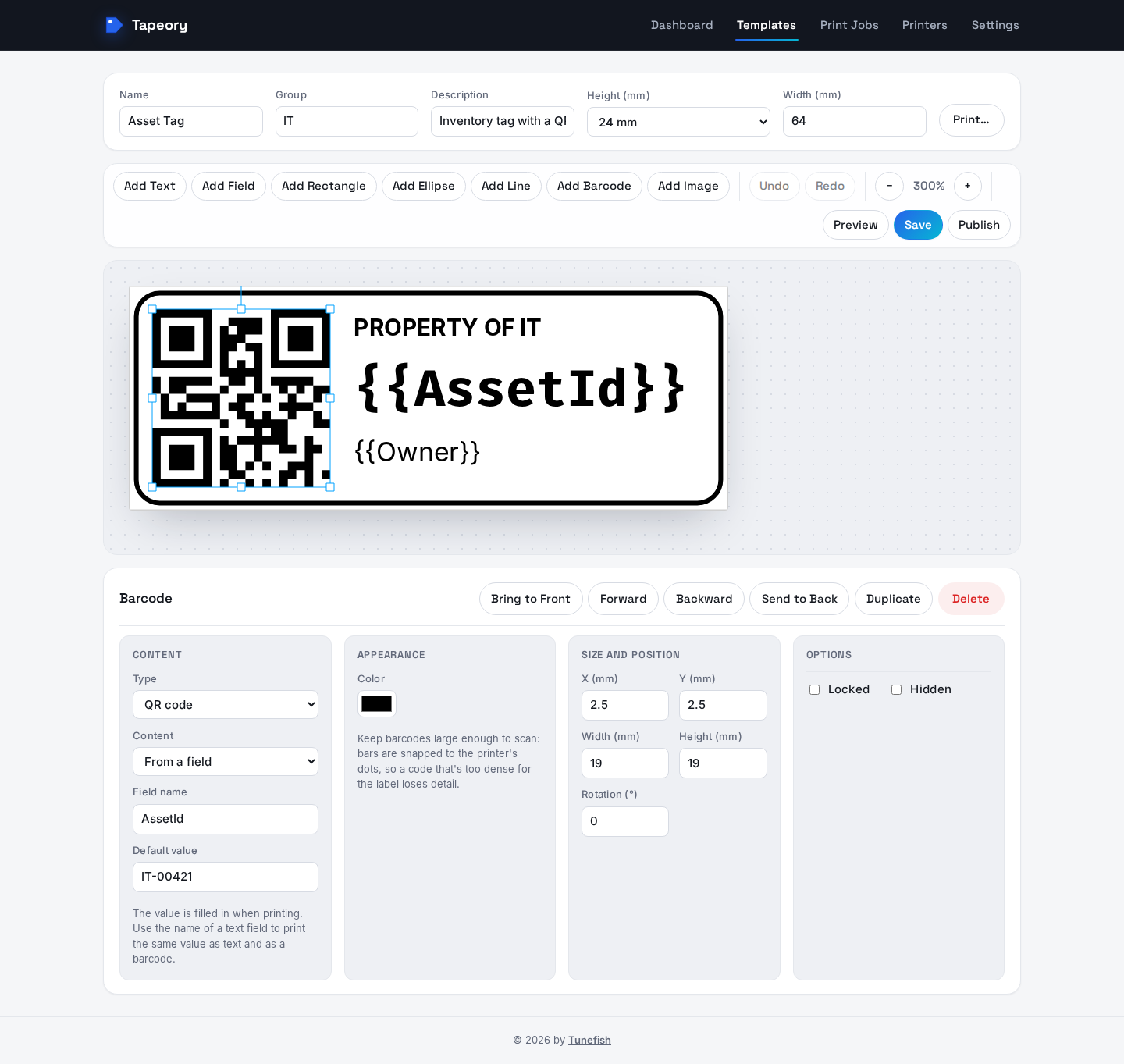
Tapeory is a self-hosted web app for label templates. Design a label in the browser editor, add
named fields like "Name" or "Room", and fill them in when you print. You can also import
existing P-touch Editor .lbx files. It runs as a single Docker container next to MySQL, and
every template, upload, and print job stays on your own server.
[!WARNING] Early release (0.2). This is the first stable release, but Tapeory is still young. Designing, storing, importing, and rendering labels work and are covered by tests. Printing is new: Tapeory prints on Brother P-touch PT network printers with a 128-pin head (PT-P750W, PT-E550W, PT-P710BT, PT-P700) using Brother's raster protocol. Other printers, including the QL series, aren't supported yet. See Known limitations.
 |
 |
| Dashboard | Template library |
 |
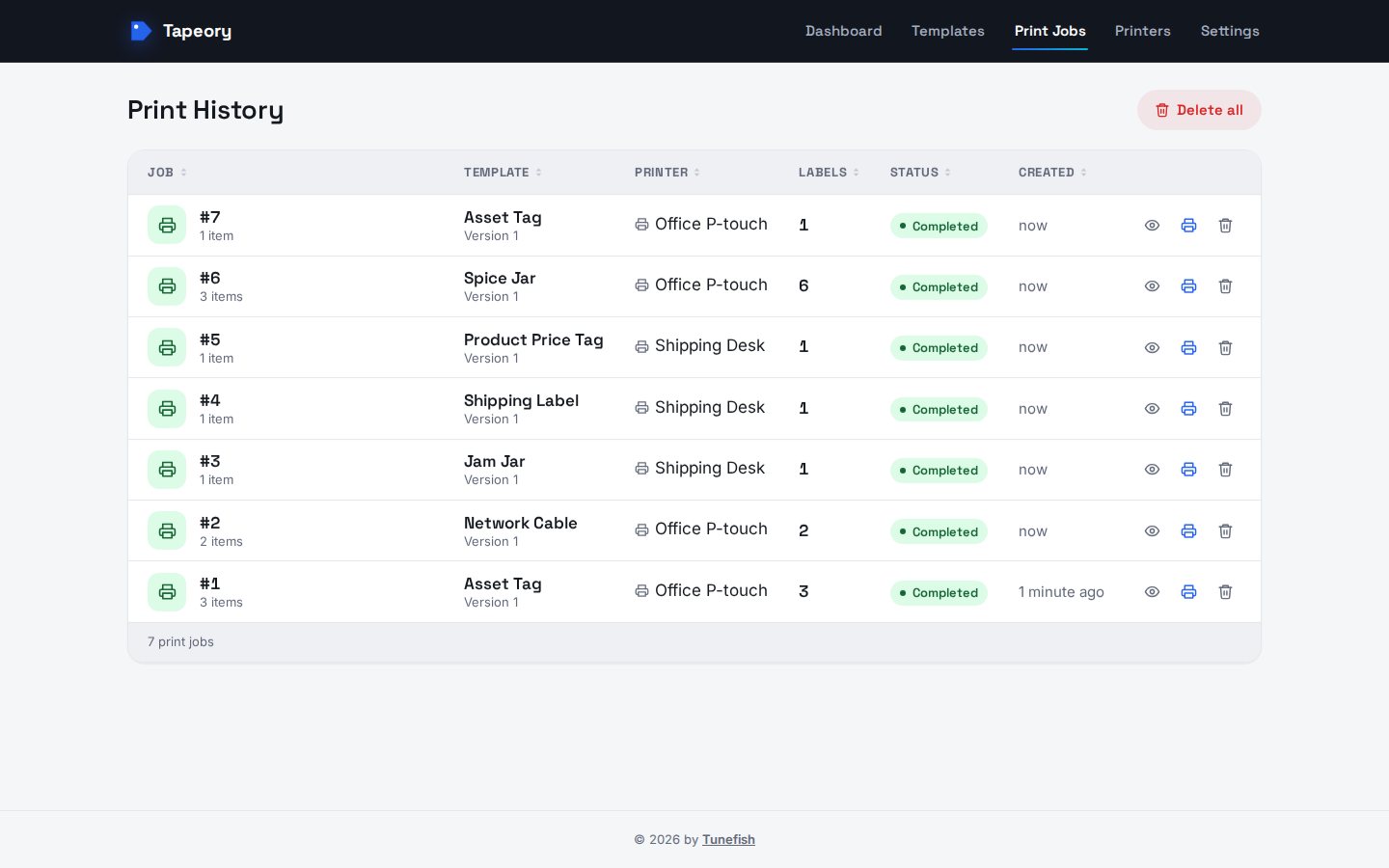 |
| Printing with a rendered preview | Print history |
Features
Label editor
- Canvas editor with text, dynamic fields, rectangles, lines, and images (PNG, JPEG, WebP, SVG; TIFF and BMP are converted to PNG)
- Move, resize, and rotate objects; change layer order; lock, hide, duplicate, and delete
- Undo/redo, zoom, arrow-key nudging, and keyboard shortcuts
- Text fitting for each text box: overflow, shrink to fit, or wrap at spaces and shrink
- Brother media presets: TZe/HGe tape, HSe heat-shrink tube, DK continuous and die-cut rolls
- Preview mode that fills dynamic fields with sample values
- The editor uses the server's own fonts, so the preview matches the printed output. Thirteen Google Fonts ship with Tapeory (Roboto, Open Sans, Lato, Montserrat, Inter, IBM Plex Sans and Serif, Roboto Slab, Bebas Neue, League Spartan, Quicksand, Comic Neue, Fira Code), so they're there on every system
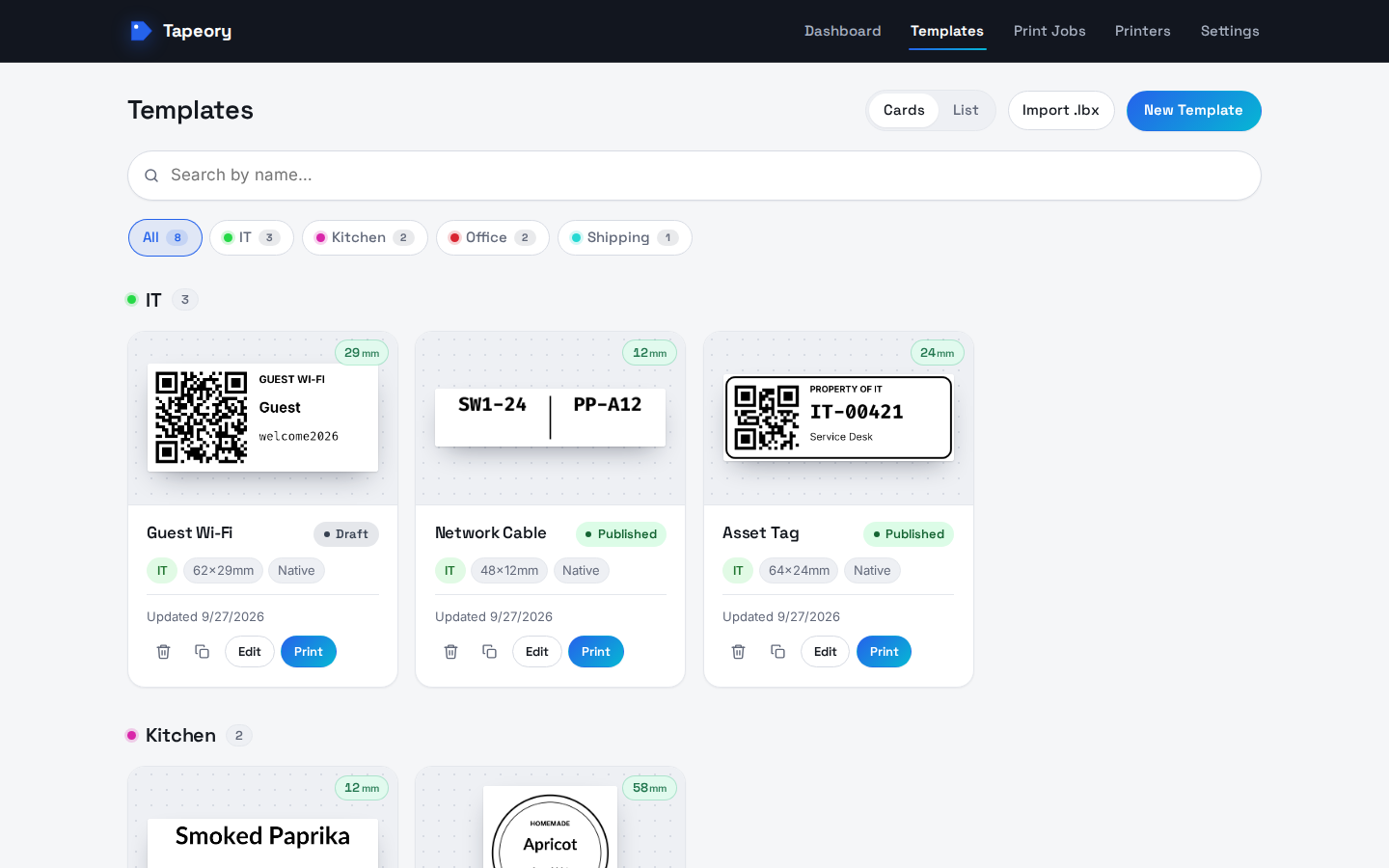
Templates
- Draft, published, and archived states, with an immutable version history
- Duplicate a template from the card or list view
- Groups (case- and accent-insensitive) with bulk rename, plus thumbnails
- Export and import in Tapeory's native JSON format
.lbximport: converts text objects, database-merge fields, and images from P-touch Editor files. Anything it can't convert is listed as a warning, and the original file stays available for download.
Printing
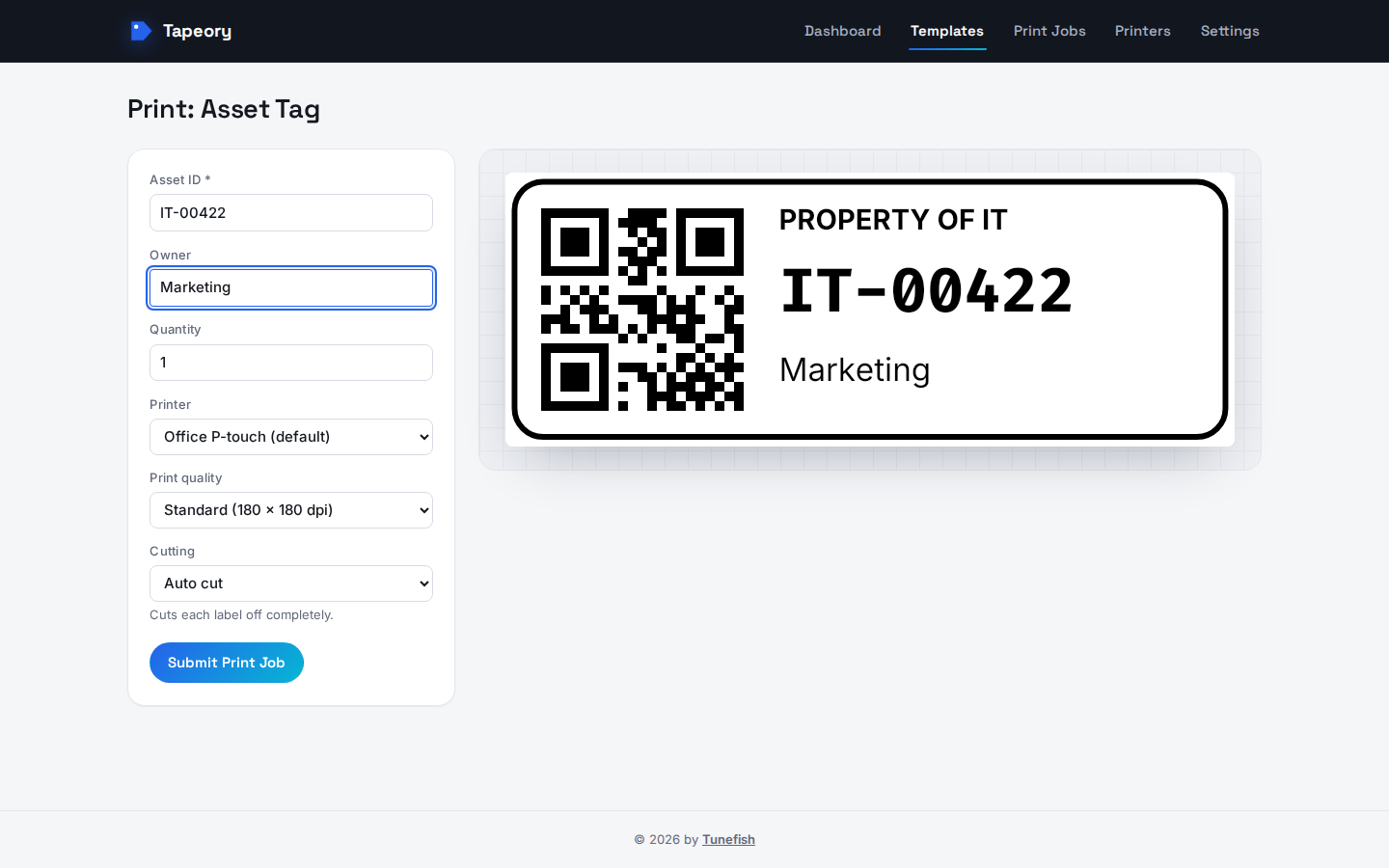
- Print form with values for each field, quantity, printer choice, print quality, cutting (auto cut, half cut, cut at end, chain printing, cut marks), and a preview that updates as you type
- Server-side rendering to PNG (300 DPI) and PDF with SkiaSharp
- Background print queue, with a job history and per-label previews
- Printing on Brother PT printers in Brother's raster format, in standard (180 × 180 dpi) or, where the model supports it, high (180 × 360 dpi) quality. The tape width follows the label height.
- Tape detection: Tapeory reads which tape the printer has loaded, warns in the print form when it doesn't match the template, and stops the job before printing onto the wrong tape
- Live print status from the printer (over SNMP): sending, printing, and finished once the printer's label counter confirms the labels came out, or the printer's own error, such as no tape or an open cover
- Printing through a CUPS/IPP print server queue, with the job followed until CUPS reports it done
- Printer management: IP address, hostname, print server, or USB entries, a default printer, and connection tests and test prints
App
- First-start setup screen for the database connection (no connection string needed)
- Database and label backups created and restored from the Settings page, stored on the server
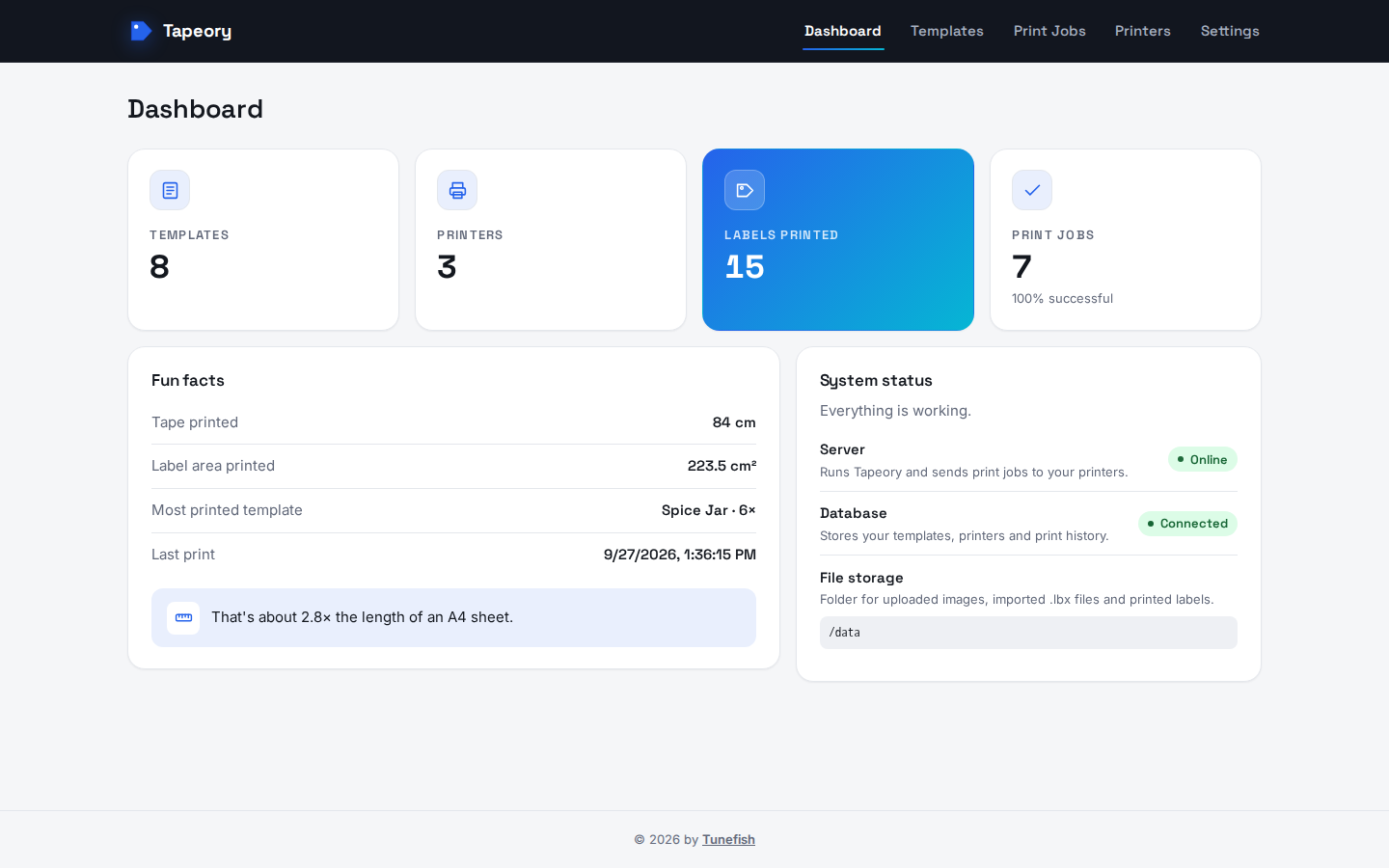
- Dashboard with usage statistics
- 5 UI languages: English, German, French, Italian, and Spanish
- Light, dark, or system theme; millimetres or inches
- Runs on
linux/amd64andlinux/arm64, with an Unraid Community Applications template
Quick start (Docker)
Requirements: Docker and Docker Compose.
git clone https://github.com/Tunefish92/Tapeory.git tapeory && cd tapeory
cp .env.example .env
# edit .env: set MYSQL_ROOT_PASSWORD and MYSQL_PASSWORD to real values
docker compose pull
docker compose up -d
This runs the prebuilt image ghcr.io/tunefish92/tapeory (for amd64 and arm64) next to a
MySQL 8.4 container. The same image is on Docker Hub as
tunefish92/tapeory; set
TAPEORY_IMAGE=tunefish92/tapeory:latest in .env to pull from there instead. To build the image from your checkout instead, run
docker compose up -d --build.
The app (web UI and API together) runs at http://localhost:8080, or at whatever
TAPEORY_PORT you set in .env.
Docker without Compose
If you already have a MySQL 8 or MariaDB server, the app container is all you need:
docker run -d --name tapeory \
  -p 8080:8080 \
  -v /path/to/tapeory-data:/data \
  -e PUID=1000 -e PGID=1000 \
  --restart unless-stopped \
  ghcr.io/tunefish92/tapeory:latest
Create an empty database and a user for it on your server. Then open http://<host>:8080 and
enter the connection details there.
Storage folder permissions
The container starts as root only long enough to give the storage folder to PUID:PGID
(default 1000:1000), then runs the app as that user. Set both to the host user that should own
the files: run id on the host to see yours; on Unraid, use 99 and 100. If you run the
container with --user, it skips this step, and the folder must already be writable by that
user.
Image tags
| Tag | Contents |
|---|---|
latest |
Latest build of main |
0.2.1, 0.2 |
A release (from Git tags such as v0.2.1) |
sha-<commit> |
One specific commit |
Both registries get the same tags: ghcr.io/tunefish92/tapeory (GitHub Container Registry) and
tunefish92/tapeory (Docker Hub). For a stable install, pin a release tag with TAPEORY_IMAGE
in .env.
Fonts
Tapeory ships thirteen Google Fonts with the app itself (Roboto, Open Sans, Lato, Montserrat, Inter, IBM Plex Sans and Serif, Roboto Slab, Bebas Neue, League Spartan, Quicksand, Comic Neue, Fira Code, each Regular and Bold), so they work the same in Docker and in a local run. The image also includes the Liberation fonts (same letter widths as Arial, Times New Roman and Courier New) and DejaVu. Beyond these, the editor and the renderer can use only fonts installed in the container. To add more, build your own image on top of this one:
FROM ghcr.io/tunefish92/tapeory:latest
RUN apt-get update && apt-get install -y --no-install-recommends fonts-noto-core \
 && rm -rf /var/lib/apt/lists/*
First start: database connection
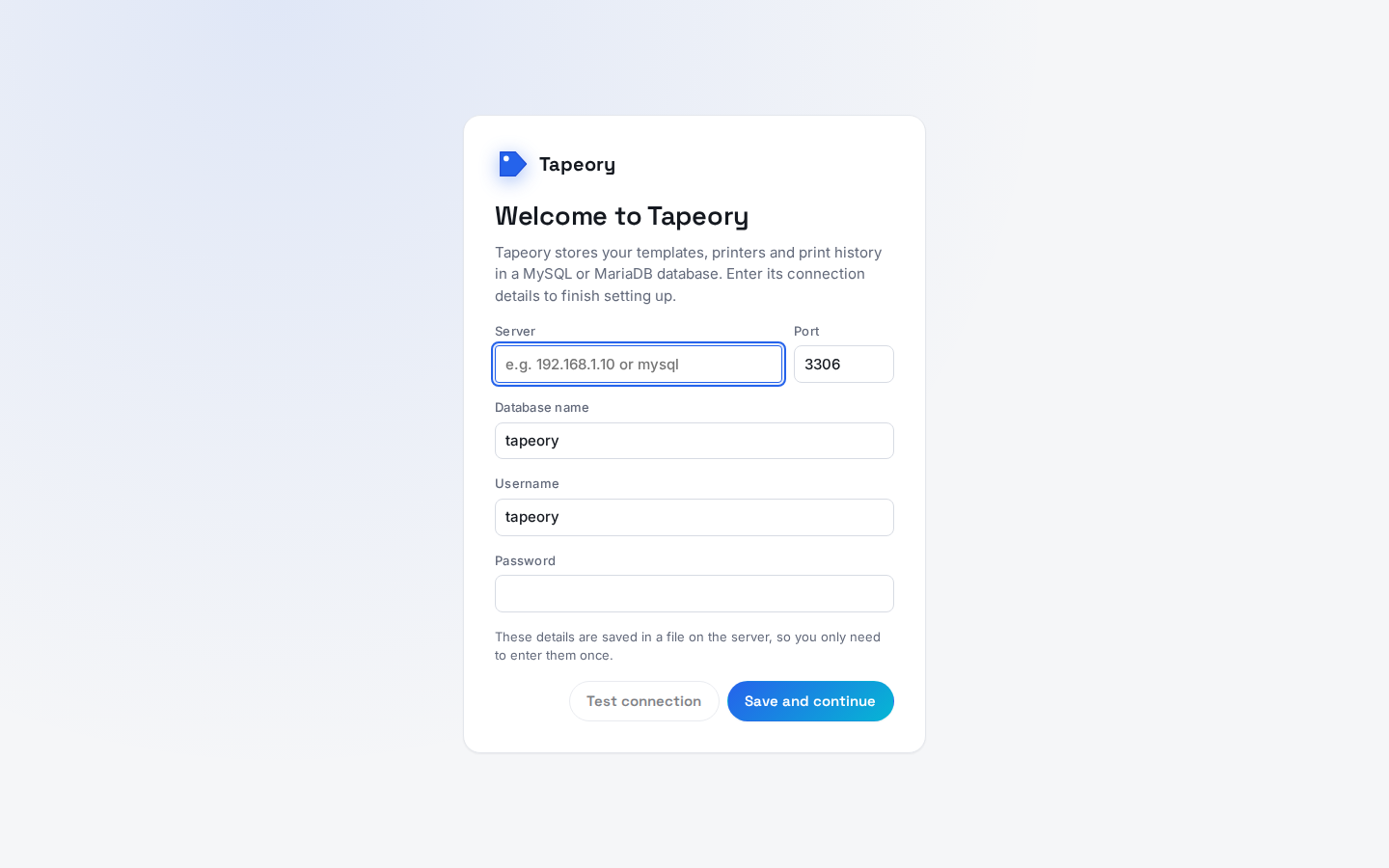
On first start, Tapeory asks for its database connection in the browser. With the bundled
docker-compose.yml, enter:
| Field | Value |
|---|---|
| Server | mysql |
| Port | 3306 |
| Database name | MYSQL_DATABASE from .env (default tapeory) |
| Username | MYSQL_USER from .env (default tapeory) |
| Password | MYSQL_PASSWORD from .env |
Test connection checks the details without saving them. Save and continue creates the
tables and saves the connection to config/database.json in the storage folder (/data in the
container), so you only enter it once. The file holds the password in plain text and only the
container user can read it. To change the connection later, edit or delete that file and restart
the container. After a connection is saved, the setup endpoints stop accepting new details.
If ConnectionStrings__Default is set (as an environment variable or in appsettings*.json),
it takes precedence over the file and Tapeory skips the setup screen.
Configuration
docker-compose.yml reads these environment variables from .env:
| Variable | Default | Purpose |
|---|---|---|
MYSQL_ROOT_PASSWORD |
— (required) | MySQL root password |
MYSQL_DATABASE |
tapeory |
Database name |
MYSQL_USER |
tapeory |
Application database user |
MYSQL_PASSWORD |
— (required) | Application database user's password |
TAPEORY_PORT |
8080 |
Host port the app is served on |
TAPEORY_STORAGE_HOST_PATH |
./tapeory-data |
Host folder mapped to the app's /data, which holds templates, uploads, and rendered print output |
PUID / PGID |
1000 / 1000 |
User and group that own the storage folder; the app runs as this user |
TAPEORY_AUTO_MIGRATE |
true |
Apply database migrations on startup |
TAPEORY_IMAGE |
ghcr.io/tunefish92/tapeory:latest |
Image to run; set it to pin a release |
ASPNETCORE_ENVIRONMENT |
Production |
ASP.NET Core environment name |
The app container also understands ConnectionStrings__Default: a database connection string
that skips the first-start setup screen. docker-compose.yml doesn't forward it, so add it under
api.environment if you want it.
Everything else is set in the web UI and stored in MySQL or the browser: printers, templates, language, theme, units, and the default printer.
Printers
Add printers on the Printers page, then pick one when printing. Tapeory prints on Brother P-touch PT printers with a 128-pin head (PT-P750W, PT-E550W, PT-P710BT, PT-P700); enter the model so Tapeory knows which print qualities it offers.
- Directly over the network (connection type IP address or hostname): Tapeory sends the job to the printer's raw port, usually 9100, and follows it over SNMP until the printer's label counter confirms it printed. Give the printer a fixed IP address (a DHCP reservation).
- Through a CUPS print server (connection type print server): enter the server's address,
port 631, and the queue name, as in
http://<server>:631/printers/<queue>. Tapeory sends the job to that queue over IPP as raw data, so the queue's driver passes it through unchanged. In CUPS, set the queue's connection to AppSocket/HP JetDirect withsocket://<printer IP or hostname>:9100; queues that CUPS found automatically (dnssd://… .local) often can't reach the printer, especially when CUPS runs in a container. Without a queue name, Tapeory sends to the server's raw port instead.
Test Connection checks that the printer (or the CUPS queue) answers, and Test Print prints a small label centred on the tape; its size can be set in the printer's settings.
Upgrading
git pull                                      # updates docker-compose.yml and .env.example
docker compose pull && docker compose up -d   # or: docker compose up -d --build
Database migrations apply automatically on startup. To apply them yourself, set
TAPEORY_AUTO_MIGRATE=false. Before starting the container, run the migrations from a
development machine:
dotnet ef database update --project Tapeory.Api --connection "<connection string>". With
auto-migrate off, the first-start setup only saves the connection and doesn't create tables.
See CHANGELOG.md for what changed between versions.
Backup and restore
From the app
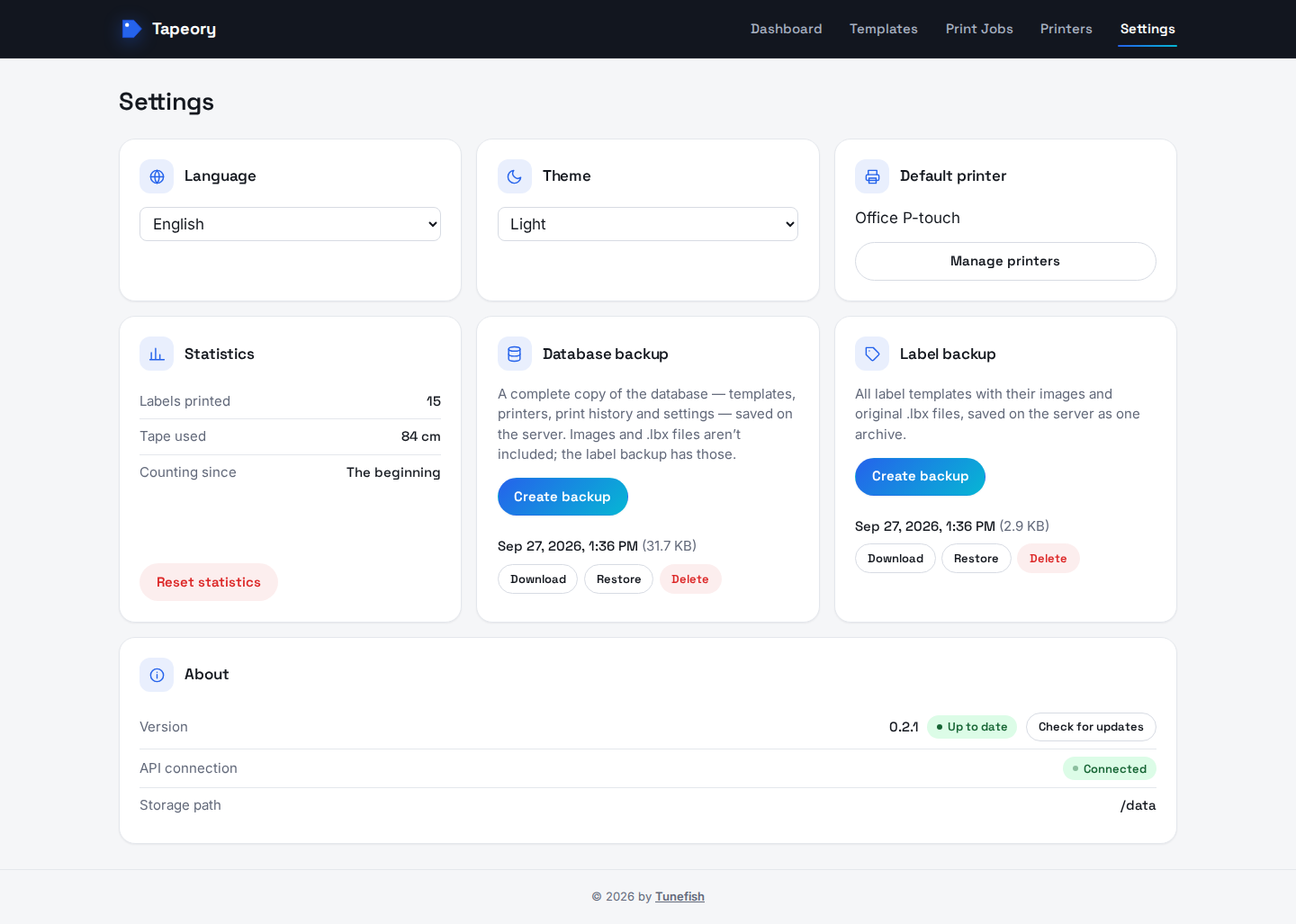
Settings has two backup cards. Both save their backups on the server, in the storage folder's
backups/ folder. Each backup can be downloaded, restored, or deleted there.
| Card | What it contains | Restoring it |
|---|---|---|
| Database backup | A full SQL dump of the database: templates with all versions, printers, print history, settings | Replaces the whole database. Any newer migrations are applied afterwards, so backups from older Tapeory versions work too. |
| Label backup | A .zip of all templates (current version, fields, group, tags, status) plus their images, preview images and original .lbx files |
Replaces all current templates with the ones in the backup. Print history is kept. |
Before every restore, Tapeory backs up the current state and lists it as "Before restore", so you
can undo a restore by restoring that backup. The database dump doesn't contain the files in the
storage folder (images, .lbx originals); those are covered by the label backup, or by backing
up the storage folder as described below.
Backups stored in the storage folder are lost along with it, so download the important ones or back up the storage folder somewhere else as well.
Manually
Back up two things:
- the MySQL database
- the storage folder (
TAPEORY_STORAGE_HOST_PATH). It holds the template, upload, and print files the database points to, plusconfig/database.jsonwith the database password. Keep this backup somewhere private.
Backup:
# Database
docker compose exec mysql sh -c 'exec mysqldump -u root -p"$MYSQL_ROOT_PASSWORD" "$MYSQL_DATABASE"' > tapeory-db-backup.sql

# Storage folder (default location; adjust if you changed TAPEORY_STORAGE_HOST_PATH)
tar -czf tapeory-storage-backup.tar.gz -C ./tapeory-data .
Restore (onto a fresh install with the same .env):
docker compose up -d mysql
docker compose exec -T mysql sh -c 'exec mysql -u root -p"$MYSQL_ROOT_PASSWORD" "$MYSQL_DATABASE"' < tapeory-db-backup.sql

rm -rf ./tapeory-data && mkdir -p ./tapeory-data
tar -xzf tapeory-storage-backup.tar.gz -C ./tapeory-data

docker compose up -d --build
Always back up and restore the database and the storage folder together. If they come from different points in time, the database can point at files that no longer exist, and some stored files won't appear in the app.
Unraid
Tapeory has a Community Applications template (unraid/tapeory.xml). It
needs a separate MySQL/MariaDB container, so install Unraid's official mariadb template first.
The template asks for a storage path and a web UI port, and sets PUID=99 and PGID=100, so
files in the storage path belong to Unraid's usual nobody:users. You enter the database
connection in the web UI on first start (see First start).
To install it before it's listed in the Apps tab: on the Docker tab, click Add Container,
add https://github.com/Tunefish92/Tapeory under Template repositories at the bottom, save,
and pick Tapeory from the Template list.
On the Docker page, the container shows the Tapeory icon, and its menu has a WebUI entry that
opens the app. The image carries both as labels (net.unraid.docker.icon and
net.unraid.docker.webui), so they also work for a container started without the template,
for example with Compose.
Support
Ask questions and share ideas in GitHub Discussions, and report bugs as issues. Please include your Tapeory version (Settings page), your printer model, and the container log.
Known limitations
- Only Brother PT printers with a 128-pin head can print (PT-P750W, PT-E550W, PT-P710BT, PT-P700). QL printers and 360 dpi PT models (such as the PT-P900 series) aren't supported yet.
- Print status needs SNMP. Tapeory reads it with the
publiccommunity, which Brother printers enable by default. Without SNMP, jobs are marked done once they're sent. - Tape detection needs SNMP too, and works only for printers reached directly (not through a print server); without it, the tape width simply follows the label height.
- USB printers can be added, but Tapeory can't send jobs to them yet.
- Barcodes and QR codes aren't available in the editor yet.
.lbximport converts text, merge fields, and images. Barcodes and shapes are reported as warnings instead of being converted.- No user accounts or authentication. Anyone who can reach the port can use the app, so keep it on a trusted network or behind a reverse proxy that adds authentication.
Local development
Requirements: .NET 10 SDK, Node.js 22+, and either Docker (for a local MySQL container) or a MySQL 8 server.
Run each step in its own terminal:
docker compose -f docker-compose.dev.yml up -d --wait mysql
dotnet run --project Tapeory.Api                # API on http://localhost:5215
cd Tapeory.Web && npm install && npm run dev     # web app on http://localhost:5173
On Arch-based distributions, the .NET SDK packages don't include ASP.NET Core; install
dotnet-sdk, aspnet-runtime and aspnet-targeting-pack.
Run both at the same time: the frontend dev server proxies /api/* to http://localhost:5215
(see Tapeory.Web/vite.config.ts). Open http://localhost:5173. On first run, enter the local
MySQL container's details in the setup screen: server localhost, port 3306, and tapeory
as the database, username, and password. They're saved to
Tapeory.Api/local-storage/config/database.json (gitignored).
Running tests
dotnet test Tapeory.slnx          # backend; integration tests need Docker running (Testcontainers)
cd Tapeory.Web && npm test        # frontend
On every push and pull request to main, GitHub Actions:
- runs both test suites and type-checks and builds the frontend
- builds the Docker image, starts it, and checks that it answers, fixes the storage folder owner, runs as the app user, and ships its fonts
Pushes to main and version tags (v*) then publish a multi-arch image (amd64, arm64) to
GitHub Container Registry. If the repository variable DOCKERHUB_USERNAME and the secret
DOCKERHUB_TOKEN are set, the same image also goes to Docker Hub, and the Docker Hub page's
overview is updated from docs/dockerhub.md. The token needs the
"Read, Write, Delete" scope, because editing a repository's description requires it. To republish main without a
new commit, use Run workflow on the CI workflow in the Actions tab.
To release a version, update CHANGELOG.md, then push a tag: git tag v0.2.1 && git push --tags.
Tech stack
- Backend: ASP.NET Core (.NET 10), EF Core with Pomelo MySQL, SkiaSharp and Svg.Skia for rendering
- Frontend: React 19, TypeScript, Vite, Konva / react-konva, react-i18next
- Tests: xUnit and Testcontainers (backend); Vitest and React Testing Library (frontend)
Project layout
Tapeory.Api/: ASP.NET Core backend (REST API, rendering, background print queue, EF Core migrations)Tapeory.Web/: React + TypeScript frontend (Vite)Tapeory.Api.Tests/: backend unit and integration testsunraid/: Unraid Community Applications template and iconca_profile.xml: repository profile for Unraid Community Applicationsdocs/screenshots/: the screenshots in this README.github/workflows/: CI pipeline
Media gallery
1 / 4Install Tapeory on Unraid in a few clicks.
Find Tapeory in Community Apps on your Unraid server, review the template, and click Install. Unraid handles the Docker app or plugin setup from the published template.
Requirements
Categories
Download Statistics
Related apps
Explore more like this
Explore allDetails
tunefish92/tapeory:latestRuntime arguments
- Web UI
http://[IP]:[PORT:8080]/- Network
bridge- Shell
sh- Privileged
- false
Template configuration
Port the Tapeory web UI and API are served on.
- Target
- 8080
- Default
- 8080
- Value
- 8080
Templates, uploads, rendered labels, backups, and the saved database connection. Back this up regularly.
- Target
- /data
- Default
- /mnt/user/appdata/tapeory
- Value
- /mnt/user/appdata/tapeory
Optional. Leave empty to enter the database connection in the web UI on first start (it's saved to the storage path). If set, e.g. server=192.168.1.10;port=3306;database=tapeory;user=tapeory;password=CHANGE_ME; it overrides that and the setup screen is skipped.
- Target
- ConnectionStrings__Default
User ID that owns the storage path; the app runs as this user. Unraid default: 99 (nobody).
- Default
- 99
- Value
- 99
Group ID that owns the storage path. Unraid default: 100 (users).
- Default
- 100
- Value
- 100
Automatically apply pending database migrations on container start.
- Target
- TAPEORY_AUTO_MIGRATE
- Default
- true
- Value
- true