
All apps · 0 apps

Taggarr
Docker app from grtgbln's Repository
Overview
Readme
View on GitHub

[!TIP]
Don't feel like watching subs?
You have no idea which of your content is dubbed?
Or not sure if Sonarr got the right dub?
Don't worry, I got you covered.
So finally.. you'll be able to filter by dubbed shows.
Started this project for the exact same questions. I felt other people could make use of it as well and here we are.
Taggarr is a tool for scanning and tagging your media content whether if your media is dubbed in your language you desire or not. If Taggarr finds another language other than Original Language and your Target Languages, it will mark it as "wrong-dub" using Sonarr and Kodi standard tagging system.
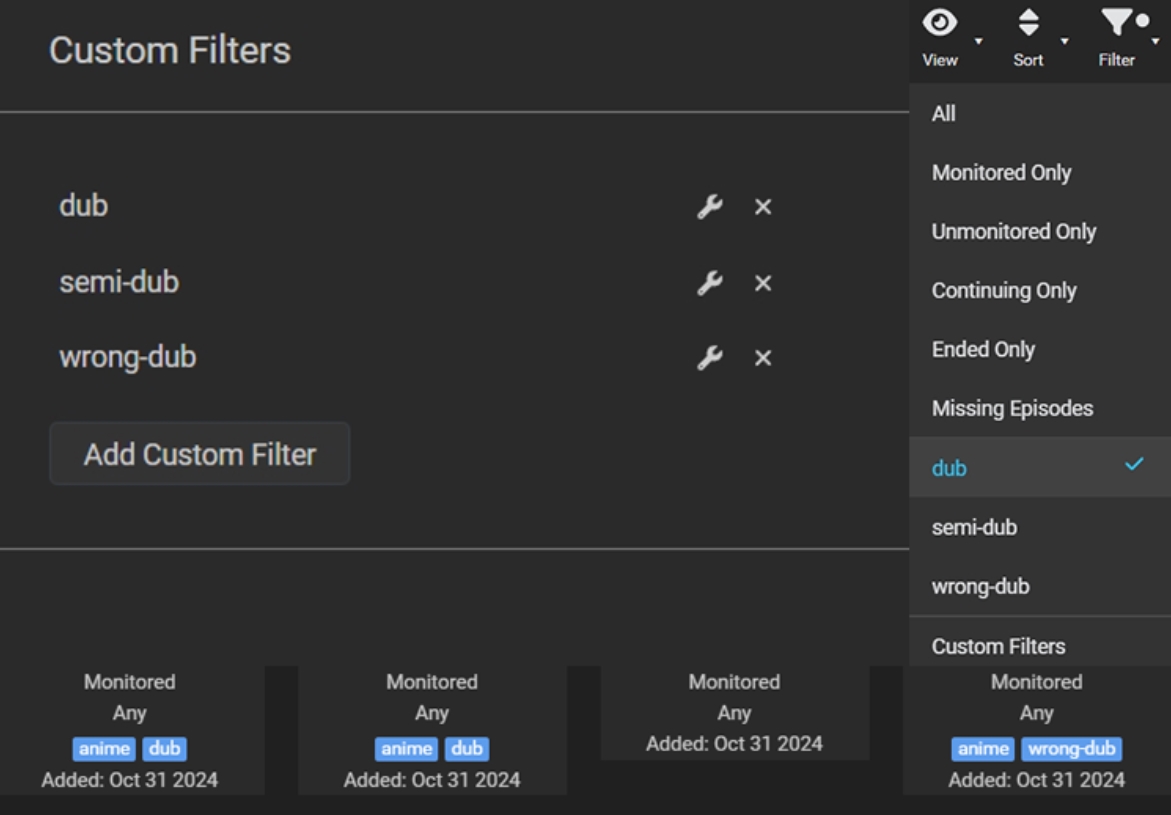
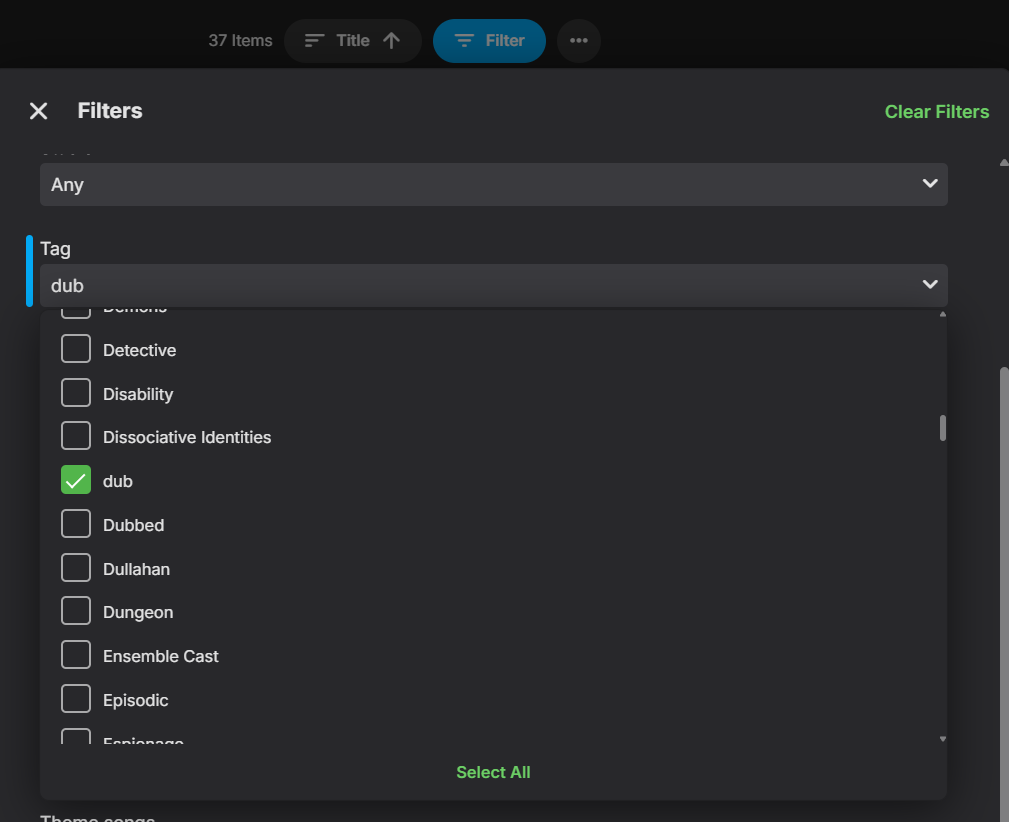
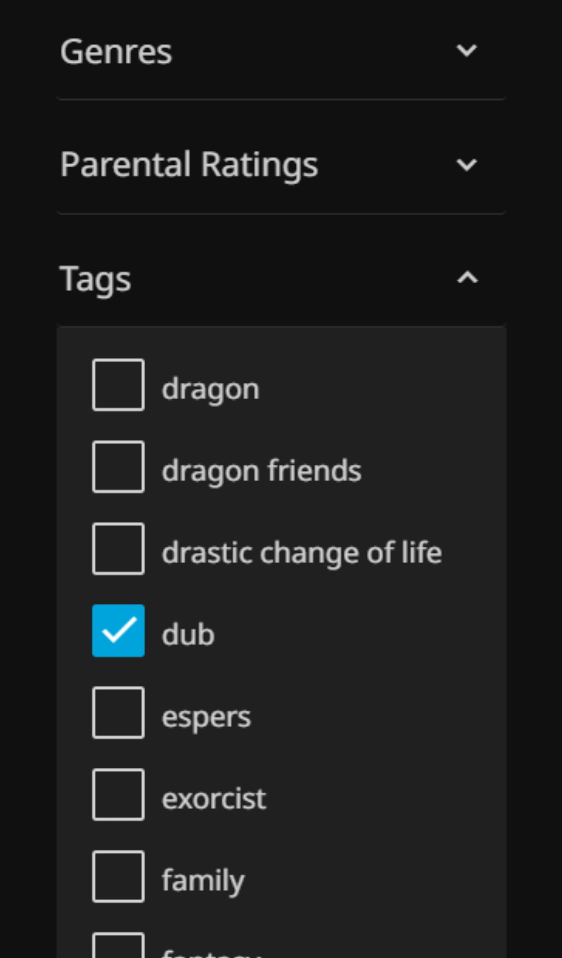
This way, you can filter your shows based on if they're dubbed or not, using tags within your Sonarr (for managing) or any media player that supports tagging (for watching). Taggarr will also save all the information in a JSON file and will tell you which show, season, episode and language is the wrong-dub.
IMPORTANT + QUICK START
[!IMPORTANT]
- Sonarr
Make sure you haveMETADATAturned on with KODI/Emby Standard and all checkboxes are turned on.- Docker
Pull the Docker image fromdocker.io/basshous3/taggarr:latest- Configs
Make sure to use/tvas path to your CONTAINER (not host). Check out example of yaml configs below.- Media players
After tags are applied they should work in the media players, if not, scan TV's library metadata usingReplace all metadatamethod (leaveReplace Imagesunchecked).
HOW IT WORKS
[!NOTE]
NO TAGThe show is only in its original language.DUBThe show contains ALL of your target languages.SEMI-DUBThe show missing at least one of your target languages or some episodes are missing the dub.WRONG-DUBThe show is missing your target languages and contains another language (excluding original language).ADD_TAG_TO_GENREThe tag list in the media players can be massive. This function will add the tagDubin the genre section only forDUBshows. From version 0.4.19.




| Upcoming Updates | ||
|---|---|---|
| Support for all languages | Support for Radarr | Filter scanning by genre |
 |
 |
|
| Support for multiple volumes | UI | Tag in genre |

|
|
|
Found this project helpful? Hit the star ⭐️ at the top right corner.
Do you appreciate the time and effort it took to make this?
You can support me with a cup of coffee, every little helps.

INFO
[!NOTE] Features:
- Taggarr will save the information of your media in a JSON file located at the root folder of your TV media.
- Taggarr uses a lightweight scanning method, it reads the name of audio tracks. It DOES NOT scan the audio of your content.
- Once your library was scanned and indexed in the JSON file, it will only scan for new or modified folders.
QUICK_MODE(Bool)Checks only first video of every season.TARGET_LANGUAGES(Str)Seperated via comma, you can add multiple languages as your target.TARGET_GENRE(Str)Filter scan by genre. ie.Anime.TAG_DUB(Str)Optional custom tag.TAG_SEMI(Str)Optional custom tag.TAG_WRONG_DUB(Str)Optional custom tag.RUN_INTERVAL_SECONDS(Int)Custom time interval. Default is every 2 hours.DRY_RUN(Bool)Not sure? Try it first, without writing any tags, JSON file will still be saved.WRITE_MODE(Int)Something not working or changed your mind? Don't worry I got you covered.WRITE_MODE=0Works like usual.WRITE_MODE=1Rewrites everything, all tags and JSON file.WRITE_MODE=2Removes everything, all tags and JSON file.START_RUNNING(Bool)Start the container without initiating scan for CLI usage.ADD_TAG_TO_GENRE(Bool)Adds the tagDubin the genre section only forDUBshows.
DISCLAIMER
[!WARNING]
- Currently supporting only Sonarr. Support for Radarr will come in the upcoming updates as well.
- This project is still in very early stages and can have bugs. Currently only tested on Linux.
- Coding is only a hobby of mine and I am still learning, use this program at your own discretion.
- Make sure to read the documentation properly.
CONFIGURATION EXAMPLE
name: Taggarr
services:
  taggarr:
      image: docker.io/basshous3/taggarr:latest
      container_name: taggarr
      environment:
        - SONARR_API_KEY=your_api_key #REQUIRED
        - SONARR_URL=http://sonarr:8989 #REQUIRED
        - RUN_INTERVAL_SECONDS=7200 #OPTIONAL - default is 2 hours.
        - START_RUNNING=true #OPTIONAL
        - QUICK_MODE=false #OPTIONAL
        - DRY_RUN=false #OPTIONAL
        - WRITE_MODE=0 #OPTIONAL - 0=NONE, 1=REWRITE, 2=REMOVE
        - TAG_DUB=dub #OPTIONAL
        - TAG_SEMI=semi-dub #OPTIONAL
        - TAG_WRONG_DUB=wrong-dub #OPTIONAL
        - LOG_LEVEL=INFO #OPTIONAL - DEBUG/INFO/WARNING/ERROR
        - TARGET_GENRE=Anime #OPTIONAL - default is all genres
        - TARGET_LANGUAGES=english, french # Supports multiple languages, comma-separated en, fr, de, etc. are also acceptable entries
        - ADD_TAG_TO_GENRE=true #OPTIONAL
      volumes:
        - /path/to/your/TV:/tv # Make sure to point your media path host to "/tv" container path
        - /var/log/taggarr:/logs # OPTIONAL - recommended path for logs
      restart: unless-stopped
      logging:
        driver: json-file
        options:
          max-size: "10m"
          max-file: "3"
JSON FILE WITH TARGET LANGUAGES ENGLISH AND FRENCH
"/tv/Example Show 1": {
    "display_name": "Example Show 1",
      "tag": "semi-dub",
      "last_scan": "2025-06-26T19:22:11.769510Z",
      "original_language": "japanese",
      "seasons": {
        "Season 1": {
          "episodes": 1,
          "original_dub": ["E01"],
          "dub": ["E01:en"],
          "missing_dub": ["E01:fr"],
          "unexpected_languages": [],
          "last_modified": 1749519136.4969385,
          "status": "semi-dub"
        },
        "Season 2": {
          "episodes": 1,
          "original_dub": ["E01"],
          "dub": ["E01:en"],
          "missing_dub": ["E01:fr"],
          "unexpected_languages": [],
          "last_modified": 1749518483.8193643,
          "status": "semi-dub"
        },
        "Season 3": {
          "episodes": 1,
          "original_dub": ["E01"],
          "dub": [],
          "missing_dub": ["E01:en, fr"],
          "unexpected_languages": [],
          "last_modified": 1750725575.362786,
          "status": "original"
        }
      },
      "last_modified": 1749519136.4969385
    },
"/tv/Example Show 2": {
    "display_name": "Example Show 2",
      "tag": "dub-en,fr",
      "last_scan": "2025-06-26T19:23:55.967659Z",
      "original_language": "french",
      "seasons": {
        "Season 1": {
          "episodes": 1,
          "original_dub": ["E01"],
          "dub": ["E01:en, fr"],
          "missing_dub": [],
          "unexpected_languages": [],
          "last_modified": 1749517909.2880175,
          "status": "fully-dub"
        }
      },
      "last_modified": 1749517909.2880175
},
SCREENSHOTS ON HOW TO USE TAG FILTERING
Sonarr
Emby & Jellyfin
Download Statistics
Total Downloads Over Time
Related apps
Explore more like this
Explore allDetails
basshous3/taggarr:latestRuntime arguments
- Network
bridge- Privileged
- false
Template configuration
Path to your TV media files for analysis (e.g. /mnt/user/tv)
- Target
- /tv
URL to your Sonarr instance (e.g. http://sonarr:8989)
- Target
- SONARR_URL
API key for your Sonarr instance
- Target
- SONARR_API_KEY
Enable dry run mode to see what actions would be taken without making any changes.
- Target
- DRY_RUN
- Default
- false|true
Tag to apply for dubs.
- Target
- TAG_DUB
- Default
- dub
- Value
- dub
Tag to apply for semi-dubs.
- Target
- TAG_SEMI
- Default
- semi-dub
- Value
- semi-dub
Tag to apply for wrong dubs.
- Target
- TAG_WRONG_DUB
- Default
- wrong-dub
- Value
- wrong-dub
Whether to add the tag to the genre.
- Target
- ADD_TAG_TO_GENRE
- Default
- true|false
Genre to target for analysis (e.g. anime, movie, show).
- Target
- TARGET_GENRE
Comma-separated list of target languages (e.g. en, fr, ja).
- Target
- TARGET_LANGUAGES
- Default
- en,fr
- Value
- en,fr
Interval, in seconds, between runs (default: 7200 seconds = 2 hours)
- Target
- RUN_INTERVAL_SECONDS
- Default
- 7200
- Value
- 7200
Path to store logs
- Target
- /logs
- Default
- /mnt/user/appdata/taggarr/logs
- Value
- /mnt/user/appdata/taggarr/logs
Whether to start running immediately after container starts.
- Target
- START_RUNNING
- Default
- true|false
- Target
- QUICK_MODE
- Default
- false|true
Write mode for tags: 0 = None, 1 = Rewrite, 2 = Remove.
- Target
- WRITE_MODE
- Default
- 0|1|2
Logging level for the application.
- Target
- LOG_LEVEL
- Default
- INFO|WARNING|ERROR|DEBUG