

Sure-Worker
Docker app from Yusseiin's Repository
Overview
Readme
View on GitHubAsk DeepWiki
View performance data on Skylight


Deutsch | Español | Français | 日本語 | 한국어 | Português | Русский | 中文
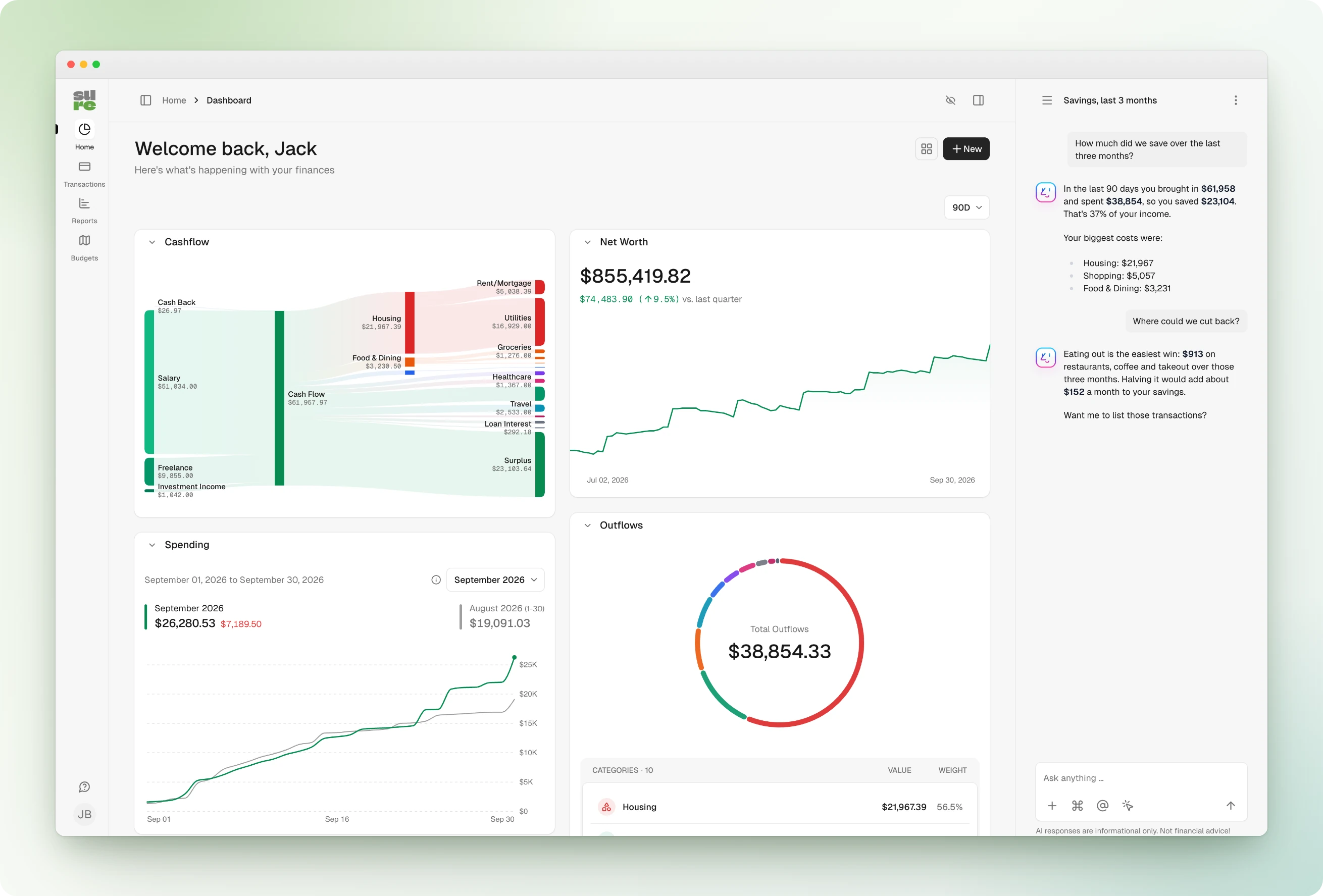
Sure: The personal finance app for everyone
Get involved: Discord • Website • Issues
[!IMPORTANT] This repository is a community fork of the now-abandoned Maybe Finance project.
Learn more in their final release doc.
Backstory
The Maybe Finance (archived/abandoned repo) team spent most of 2021–2022 building a full-featured personal finance and wealth management app. It even included an “Ask an Advisor” feature that connected users with a real CFP/CFA — all included with your subscription.
The business end of things didn't work out, and so they stopped developing the app in mid-2023.
After spending nearly $1 million on development (employees, contractors, data providers, infra, etc.), the team open-sourced the app. Their goal was to let users self-host it for free — and eventually launch a hosted version for a small fee.
They actually did launch that hosted version … briefly.
That also didn’t work out — at least not as a sustainable B2C business — so now here we are: hosting a community-maintained fork to keep the codebase alive and see where this can go next.
Join us!
Hosting Sure
Sure is a fully working personal finance app that can be self hosted with Docker. Sure can be accessed from a browser, the macOS desktop app, the mobile app, API clients, and LLM agents. See Sure Clients for an overview.
Forking and Attribution
This repo is a community fork of the archived Maybe Finance repo. You’re free to fork it under the AGPLv3 license — but we’d love it if you stuck around and contributed here instead.
To stay compliant and avoid trademark issues:
- Be sure to include the original AGPLv3 license and clearly state in your README that your fork is based on Maybe Finance but is not affiliated with or endorsed by Maybe Finance Inc.
- "Maybe" is a trademark of Maybe Finance Inc. and therefore, use of it is NOT allowed in forked repositories (or the logo)
Performance Issues
With data-heavy apps, inevitably, there are performance issues. We've set up a public dashboard showing the problematic requests seen on the demo site, along with the stacktraces to help debug them.
https://www.skylight.io/app/applications/s6PEZSKwcklL/recent/6h/endpoints
Any contributions that help improve performance are very much welcome.
Local Development Setup
If you are trying to self-host the app, read this guide to get started.
The instructions below are for developers to get started with contributing to the app.
Requirements
- See
.ruby-versionfile for required Ruby version - PostgreSQL >9.3 (latest stable version recommended)
- Redis > 5.4 (latest stable version recommended)
Getting Started
cd sure
cp .env.local.example .env.local
bin/setup
bin/dev

# Optionally, load demo data
rake demo_data:default
Visit http://localhost:3000 to view the app.
If you loaded the optional demo data, log in with these credentials:
- Email:
user@example.com - Password:
Password1!
For further instructions, see guides below.
Setup Guides
- Mac dev setup
- Linux dev setup
- Windows dev setup
- Dev containers - visit this guide
One-click Install
Render expects each button target branch to have a render.yaml at the repository root. The branch-ready Blueprint files live in branches/<branch-name>/render.yaml in a separate repo and can be copied to each corresponding branch root.
| Option | What it deploys | latest |
stable |
|---|---|---|---|
| Sure - No AI | Sure web, Sidekiq worker, Render Postgres, and Render Key Value. AI tokens are intentionally blank. | Deploy to Render | Deploy to Render |
| Sure - Simple AI | Sure with OpenAI-backed AI settings, pgvector-ready Postgres, Sidekiq, and Render Key Value. Render prompts for the OpenAI token. | Deploy to Render | Deploy to Render |
| Sure - External AI | Sure with external assistant settings plus AlphaClaw, which manages the OpenClaw gateway on Render. | Deploy to Render | Deploy to Render |
License and Trademarks
Maybe and Sure are both distributed under an AGPLv3 license.
- "Maybe" is a trademark of Maybe Finance, Inc.
- "Sure" is not, and refers to this community fork.
Requirements
Categories
Related apps
Explore more like this
Explore allDetails
ghcr.io/we-promise/sure:stableRuntime arguments
- Network
sure-net- Shell
bash- Privileged
- false
Template configuration
Must be the same path used by the Sure container.
- Target
- /rails/storage
- Default
- /mnt/user/appdata/sure/storage
- Value
- /mnt/user/appdata/sure/storage
Required. Must be identical to the value in the Sure container.
- Target
- SECRET_KEY_BASE
MUST be identical to the value in the Sure container. Set all three or none (leave blank only if blank there too).
- Target
- ACTIVE_RECORD_ENCRYPTION_PRIMARY_KEY
MUST be identical to the value in the Sure container. Set all three or none (leave blank only if blank there too).
- Target
- ACTIVE_RECORD_ENCRYPTION_DETERMINISTIC_KEY
MUST be identical to the value in the Sure container. Set all three or none (leave blank only if blank there too).
- Target
- ACTIVE_RECORD_ENCRYPTION_KEY_DERIVATION_SALT
Same as the Sure container.
- Target
- DB_HOST
- Default
- postgres17_sure
- Value
- postgres17_sure
Same as the Sure container.
- Target
- DB_PORT
- Default
- 5432
- Value
- 5432
Same as the Sure container.
- Target
- POSTGRES_DB
- Default
- sure_production
- Value
- sure_production
Same as the Sure container.
- Target
- POSTGRES_USER
- Default
- sure_user
- Value
- sure_user
Same as the Sure container.
- Target
- POSTGRES_PASSWORD
Same as the Sure container.
- Target
- REDIS_URL
- Default
- redis://redis_sure:6379/1
- Value
- redis://redis_sure:6379/1
Host name Sure is reached at (e.g. sure.example.com). Used to build links in emails.
- Target
- APP_DOMAIN
Enables self-hosting features. Leave true.
- Target
- SELF_HOSTED
- Default
- true
- Value
- true
Same as the Sure container.
- Target
- RAILS_ASSUME_SSL
- Default
- false
- Value
- false
Same as the Sure container.
- Target
- RAILS_FORCE_SSL
- Default
- false
- Value
- false
Address emails are sent from (e.g. sure@example.com). Must be allowed by your SMTP server.
- Target
- EMAIL_SENDER
SMTP server host name (e.g. smtp.example.com). Leave blank to disable email.
- Target
- SMTP_ADDRESS
465 for SMTPS (TLS Enabled = true) or 587 for STARTTLS (TLS Enabled = false).
- Target
- SMTP_PORT
- Default
- 465
- Value
- 465
SMTP login user name.
- Target
- SMTP_USERNAME
SMTP login password.
- Target
- SMTP_PASSWORD
Exactly 'true' = TLS from the start (SMTPS, port 465). Anything else = STARTTLS when offered (port 587).
- Target
- SMTP_TLS_ENABLED
- Default
- true
- Value
- true
Exactly 'true' disables SMTP certificate verification. Last resort only.
- Target
- SMTP_TLS_SKIP_VERIFY
- Default
- false
- Value
- false
Same as the Sure container.
- Target
- EXCHANGE_RATE_PROVIDER
- Default
- yahoo_finance
- Value
- yahoo_finance
Same as the Sure container.
- Target
- SECURITIES_PROVIDER
- Default
- yahoo_finance
- Value
- yahoo_finance
Same as the Sure container.
- Target
- TWELVE_DATA_API_KEY
IANA timezone for the daily price import (e.g. Europe/Rome). Unknown names fall back to UTC. Use the same value in Sure and Sure-Worker. Values saved in Settings > Self-Hosting take precedence.
- Target
- MARKET_DATA_SYNC_TIMEZONE
- Default
- UTC
- Value
- UTC
HH:MM (24h, in the Market Data Sync Timezone) for the daily price import, Monday to Friday. Use the same value in Sure and Sure-Worker.
- Target
- MARKET_DATA_SYNC_TIME
- Default
- 22:00
- Value
- 22:00
1 = import security prices daily (Monday to Friday), 0 = off. Do not leave blank (blank means off). Values saved in Settings > Self-Hosting take precedence. Use the same value in Sure and Sure-Worker.
- Target
- MARKET_DATA_SYNC_ENABLED
- Default
- 1|0
- Value
- 1
Forces the AI assistant type for the whole instance. Blank = each family chooses in Settings > Self-Hosting. builtin = in-app chat using the OpenAI fields. external = your own agent (also needs EXTERNAL_ASSISTANT_URL / EXTERNAL_ASSISTANT_TOKEN). mcp_only = no in-app chat at all (sidebar, toggle and mobile tab hidden), MCP stays available for your own agent; background categorization keeps working. Use the same value in Sure and Sure-Worker.
- Target
- ASSISTANT_TYPE
- Default
- |builtin|external|mcp_only
Same as the Sure container (AI jobs run in the worker).
- Target
- OPENAI_ACCESS_TOKEN
Same as the Sure container.
- Target
- OPENAI_MODEL
Same as the Sure container.
- Target
- OPENAI_URI_BASE
Only for Assistant Type external: your agent's OpenAI-compatible chat endpoint, e.g. https://your-agent/v1/chat/completions. Use the same value in Sure and Sure-Worker.
- Target
- EXTERNAL_ASSISTANT_URL
Only for Assistant Type external: API token for your agent. Use the same value in Sure and Sure-Worker.
- Target
- EXTERNAL_ASSISTANT_TOKEN
Only for Assistant Type external: model name. Blank = openclaw/main. Use the same value in Sure and Sure-Worker.
- Target
- EXTERNAL_ASSISTANT_MODEL
AI provider for chat and background AI jobs: openai (OpenAI or any OpenAI-compatible API such as Ollama) or anthropic (native Anthropic API, needs Anthropic API Key). Setting it here locks the choice on the Settings page. Use the same value in Sure and Sure-Worker.
- Target
- LLM_PROVIDER
- Default
- openai|anthropic
- Value
- openai
Only for LLM Provider anthropic. Use the same value in Sure and Sure-Worker.
- Target
- ANTHROPIC_API_KEY
Only for LLM Provider anthropic. Blank = Sure's default Claude model. Use the same value in Sure and Sure-Worker.
- Target
- ANTHROPIC_MODEL
Token budget for OpenAI-compatible models. Blank = Settings page value or 2048. Raise it for larger local models (e.g. 8192). Use the same value in Sure and Sure-Worker.
- Target
- LLM_CONTEXT_WINDOW
Seconds per LLM request. Blank = Settings page value or 60. Raise for slow local models (e.g. 300 for Ollama on CPU). Use the same value in Sure and Sure-Worker.
- Target
- OPENAI_REQUEST_TIMEOUT
Seconds the chat waits for a full answer before showing no response. Blank = Settings page value or 90 (minimum 30). Raise for slow local models. Use the same value in Sure and Sure-Worker.
- Target
- AI_RESPONSE_TIMEOUT
AI document search. Blank = hosted OpenAI when an OpenAI token is set. pgvector = store embeddings in postgres17_sure (needs an embeddings endpoint below). Best set before the first start of Sure, as its table is created by a database migration. Use the same value in Sure and Sure-Worker.
- Target
- VECTOR_STORE_PROVIDER
- Default
- |pgvector|openai
OpenAI-compatible embeddings endpoint for pgvector, e.g. http://ollama:11434/v1. Blank = OpenAI URI Base, then OpenAI. Use the same value in Sure and Sure-Worker.
- Target
- EMBEDDING_URI_BASE
Embedding model name. Do not leave blank. Use the same value in Sure and Sure-Worker.
- Target
- EMBEDDING_MODEL
- Default
- mxbai-embed-large
- Value
- mxbai-embed-large
Must match the embedding model (1024 for mxbai-embed-large). Do not leave blank or change after pgvector data exists. Use the same value in Sure and Sure-Worker.
- Target
- EMBEDDING_DIMENSIONS
- Default
- 1024
- Value
- 1024
Optional. Client ID from brandfetch.com for bank and merchant logos. Set it here rather than on the Settings page (a blank value here can clear a key saved there). Use the same value in Sure and Sure-Worker.
- Target
- BRAND_FETCH_CLIENT_ID