
All apps · 0 apps

SupabaseStudio
Docker app from Raccommode's Repository
Overview
Readme
View on GitHub


Supabase
Supabase is the Postgres development platform. We're building the features of Firebase using enterprise-grade open source tools.
- Hosted Postgres Database. Docs
- Authentication and Authorization. Docs
- Auto-generated APIs.
- Functions.
- File Storage. Docs
- AI + Vector/Embeddings Toolkit. Docs
- Dashboard

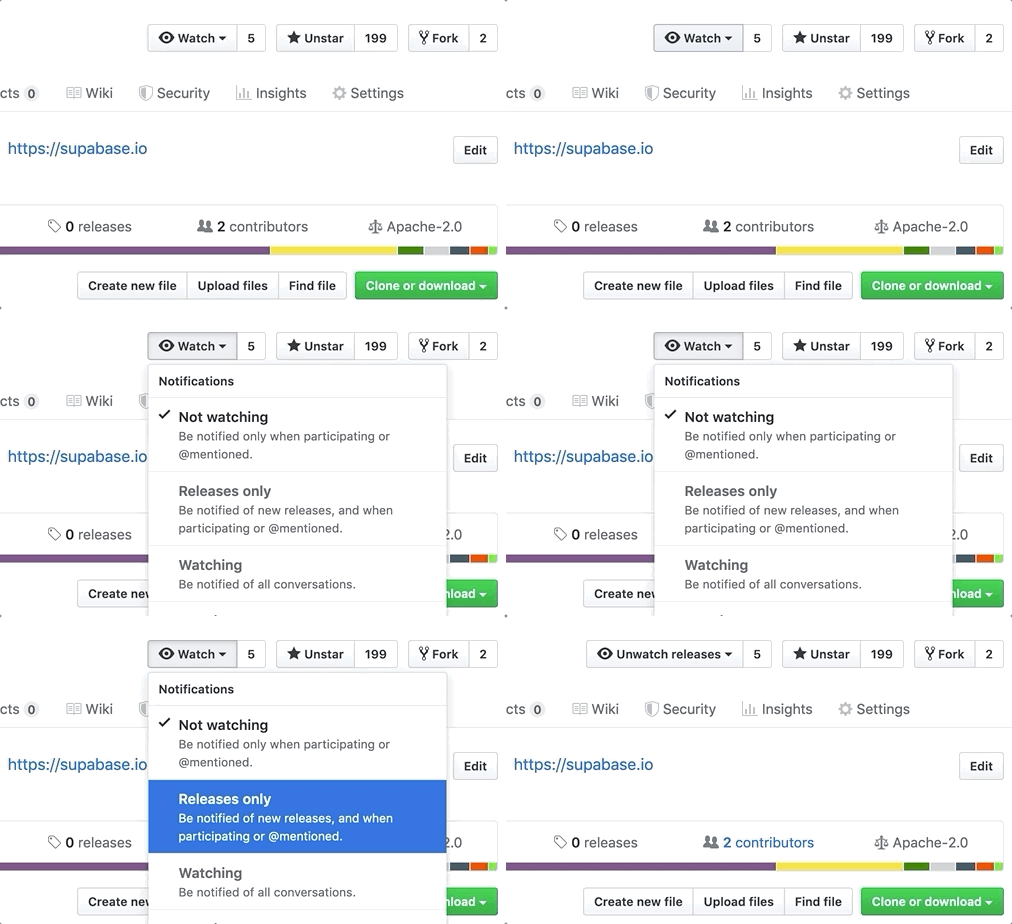
Watch "releases" of this repo to get notified of major updates.
Documentation
For full documentation, visit supabase.com/docs
To see how to Contribute, visit Getting Started
Community & Support
- Community Forum. Best for: help with building, discussion about database best practices.
- GitHub Issues. Best for: bugs and errors you encounter using Supabase.
- Email Support. Best for: problems with your database or infrastructure.
- Discord. Best for: sharing your applications and hanging out with the community.
How it works
Supabase is a combination of open source tools. We’re building the features of Firebase using enterprise-grade, open source products. If the tools and communities exist, with an MIT, Apache 2, or equivalent open license, we will use and support that tool. If the tool doesn't exist, we build and open source it ourselves. Supabase is not a 1-to-1 mapping of Firebase. Our aim is to give developers a Firebase-like developer experience using open source tools.
Architecture
Supabase is a hosted platform. You can sign up and start using Supabase without installing anything. You can also self-host and develop locally.
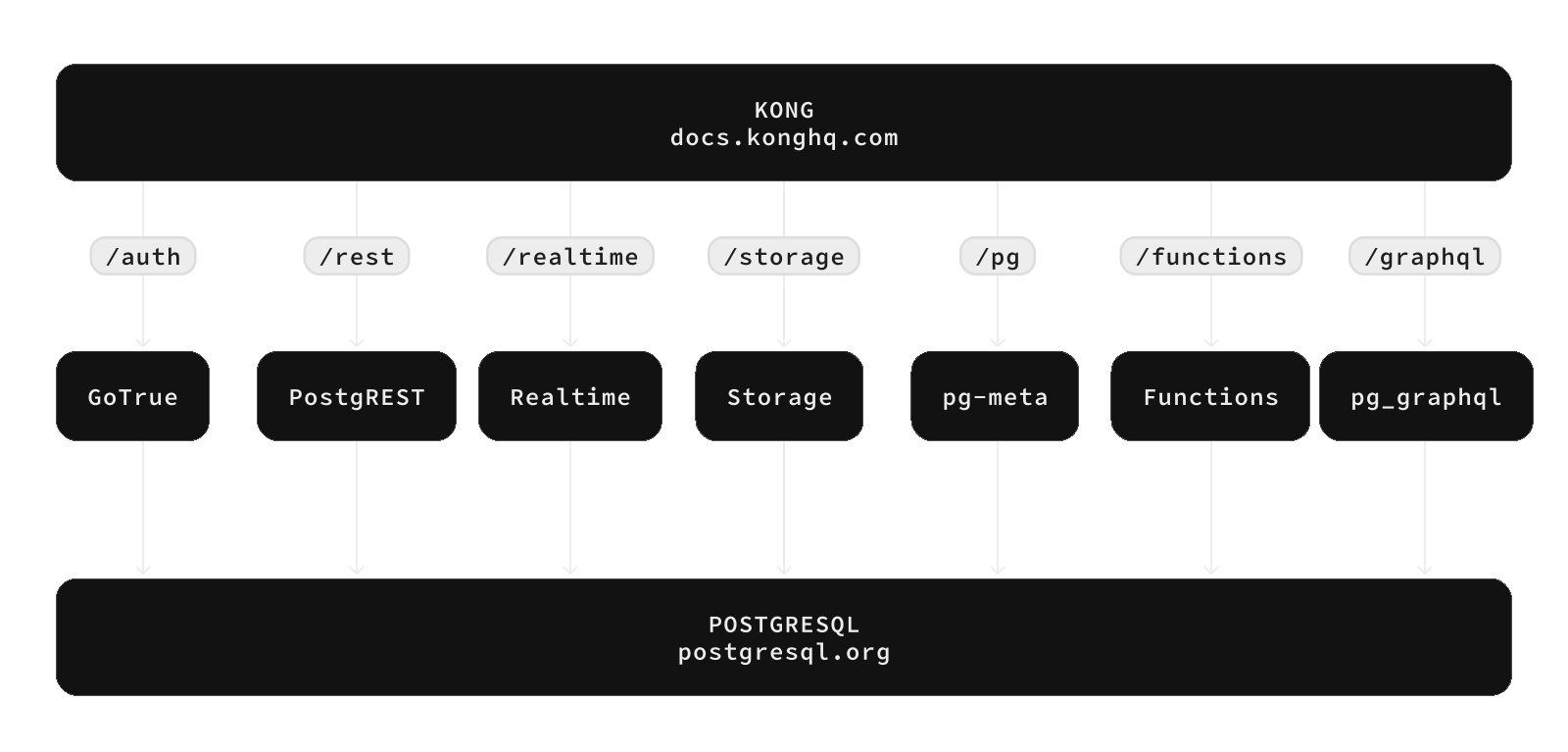
- Postgres is an object-relational database system with over 30 years of active development that has earned it a strong reputation for reliability, feature robustness, and performance.
- Realtime is an Elixir server that allows you to listen to PostgreSQL inserts, updates, and deletes using websockets. Realtime polls Postgres' built-in replication functionality for database changes, converts changes to JSON, then broadcasts the JSON over websockets to authorized clients.
- PostgREST is a web server that turns your PostgreSQL database directly into a RESTful API.
- GoTrue is a JWT-based authentication API that simplifies user sign-ups, logins, and session management in your applications.
- Storage a RESTful API for managing files in S3, with Postgres handling permissions.
- pg_graphql a PostgreSQL extension that exposes a GraphQL API.
- postgres-meta is a RESTful API for managing your Postgres, allowing you to fetch tables, add roles, and run queries, etc.
- Envoy is a cloud-native, high-performance edge and service proxy.
Client libraries
Our approach for client libraries is modular. Each sub-library is a standalone implementation for a single external system. This is one of the ways we support existing tools.
| Language | Client | Feature-Clients (bundled in Supabase client) | ||||
|---|---|---|---|---|---|---|
| Supabase | PostgREST | GoTrue | Realtime | Storage | Functions | ⚡️ Official ⚡️ |
| JavaScript (TypeScript) | supabase-js | postgrest-js | auth-js | realtime-js | storage-js | functions-js |
| Flutter | supabase-flutter | postgrest | supabase_auth | supabase_realtime | supabase_storage | supabase_functions |
| Swift | supabase-swift | postgrest-swift | auth-swift | realtime-swift | storage-swift | functions-swift |
| Python | supabase-py | postgrest-py | gotrue-py | realtime-py | storage-py | functions-py | 💚 Community 💚 |
| C# | supabase-csharp | postgrest-csharp | gotrue-csharp | realtime-csharp | storage-csharp | functions-csharp |
| Go | - | postgrest-go | gotrue-go | - | storage-go | functions-go |
| Java | - | - | gotrue-java | - | storage-java | - |
| Kotlin | supabase-kt | postgrest-kt | auth-kt | realtime-kt | storage-kt | functions-kt |
| Ruby | supabase-rb | postgrest-rb | - | - | - | - |
| Rust | - | postgrest-rs | - | - | - | - |
| Godot Engine (GDScript) | supabase-gdscript | - | - | - | - | - |
Badges

[](https://supabase.com)
<a href="https://supabase.com">
  <img
    width="168"
    height="30"
    src="https://supabase.com/badge-made-with-supabase.svg"
    alt="Made with Supabase"
  />
</a>

[](https://supabase.com)
<a href="https://supabase.com">
  <img
    width="168"
    height="30"
    src="https://supabase.com/badge-made-with-supabase-dark.svg"
    alt="Made with Supabase"
  />
</a>
Translations
- Arabic | العربية
- Albanian / Shqip
- Bangla / বাংলা
- Bulgarian / Български
- Catalan / Català
- Croatian / Hrvatski
- Czech / čeština
- Danish / Dansk
- Dutch / Nederlands
- English
- Estonian / eesti keel
- Finnish / Suomalainen
- French / Français
- German / Deutsch
- Greek / Ελληνικά
- Gujarati / ગુજરાતી
- Hebrew / עברית
- Hindi / हिंदी
- Hungarian / Magyar
- Nepali / नेपाली
- Indonesian / Bahasa Indonesia
- Italiano / Italian
- Japanese / 日本語
- Korean / 한국어
- Lithuanian / lietuvių
- Latvian / latviski
- Malay / Bahasa Malaysia
- Norwegian (Bokmål) / Norsk (Bokmål)
- Persian / فارسی
- Polish / Polski
- Portuguese / Português
- Portuguese (Brazilian) / Português Brasileiro
- Romanian / Română
- Russian / Pусский
- Serbian / Srpski
- Sinhala / සිංහල
- Slovak / slovenský
- Slovenian / Slovenščina
- Spanish / Español
- Simplified Chinese / 简体中文
- Swedish / Svenska
- Thai / ไทย
- Traditional Chinese / 繁體中文
- Turkish / Türkçe
- Ukrainian / Українська
- Vietnamese / Tiếng Việt
- List of translations
Media gallery
Requirements
Categories
Download Statistics
Total Downloads Over Time
Related apps
Explore more like this
Explore allDetails
supabase/studio:latestRuntime arguments
- Web UI
http://[IP]:[PORT:3000]- Network
bridge- Shell
sh- Privileged
- false
Template configuration
Supabase Studio web interface port. Container port: 3000. The official full stack normally exposes Studio through Kong on port 8000.
- Target
- 3000
- Default
- 3000
- Value
- 3000
Persistent SQL snippets folder used by Studio.
- Target
- /app/snippets
- Default
- /mnt/user/appdata/supabase-studio/snippets
- Value
- /mnt/user/appdata/supabase-studio/snippets
Folder where Studio manages Edge Functions source files.
- Target
- /app/edge-functions
- Default
- /mnt/user/appdata/supabase-studio/edge-functions
- Value
- /mnt/user/appdata/supabase-studio/edge-functions
Interface Studio listens on inside the container.
- Target
- HOSTNAME
- Default
- 0.0.0.0
- Value
- 0.0.0.0
Internal URL for the Supabase postgres-meta service.
- Target
- STUDIO_PG_META_URL
- Default
- http://meta:8080
- Value
- http://meta:8080
Internal URL for the Supabase API gateway service.
- Target
- SUPABASE_URL
- Default
- http://kong:8000
- Value
- http://kong:8000
Public URL clients use to reach the Supabase API gateway, for example http://UNRAID-IP:8000 or https://supabase.example.com.
- Target
- SUPABASE_PUBLIC_URL
- Default
- http://localhost:8000
- Value
- http://localhost:8000
Hostname for the Supabase Postgres service as seen from Studio.
- Target
- POSTGRES_HOST
- Default
- db
- Value
- db
Supabase Postgres or Supavisor session port.
- Target
- POSTGRES_PORT
- Default
- 5432
- Value
- 5432
Supabase Postgres database name.
- Target
- POSTGRES_DB
- Default
- postgres
- Value
- postgres
Database password generated for the Supabase stack.
- Target
- POSTGRES_PASSWORD
Studio postgres-meta encryption key. Generate a unique value before production use.
- Target
- PG_META_CRYPTO_KEY
Comma-separated Postgres schemas exposed through PostgREST.
- Target
- PGRST_DB_SCHEMAS
- Default
- public,storage,graphql_public
- Value
- public,storage,graphql_public
Maximum rows returned by REST API requests.
- Target
- PGRST_DB_MAX_ROWS
- Default
- 1000
- Value
- 1000
Extra schemas added to the PostgREST search path.
- Target
- PGRST_DB_EXTRA_SEARCH_PATH
- Default
- public
- Value
- public
Default organization name shown in Studio.
- Target
- DEFAULT_ORGANIZATION_NAME
- Default
- Default Organization
- Value
- Default Organization
Default project name shown in Studio.
- Target
- DEFAULT_PROJECT_NAME
- Default
- Default Project
- Value
- Default Project
JWT secret generated for the Supabase stack.
- Target
- AUTH_JWT_SECRET
Legacy anon API key generated by the Supabase key script.
- Target
- SUPABASE_ANON_KEY
Legacy service role API key. Never expose this key to client-side code.
- Target
- SUPABASE_SERVICE_KEY
Opaque publishable API key for newer self-hosted Supabase setups.
- Target
- SUPABASE_PUBLISHABLE_KEY
Opaque secret API key for newer self-hosted Supabase setups. Never expose this key to client-side code.
- Target
- SUPABASE_SECRET_KEY
Internal URL for the Supabase analytics service.
- Target
- LOGFLARE_URL
- Default
- http://analytics:4000
- Value
- http://analytics:4000
Deprecated compatibility variable. Set to the same value as Logflare Public Token when the Studio image expects it.
- Target
- LOGFLARE_API_KEY
Logflare public access token generated for the Supabase stack.
- Target
- LOGFLARE_PUBLIC_ACCESS_TOKEN
Logflare private access token generated for the Supabase stack.
- Target
- LOGFLARE_PRIVATE_ACCESS_TOKEN
Enable the Studio logs interface. Use true or false.
- Target
- NEXT_PUBLIC_ENABLE_LOGS
- Default
- true
- Value
- true
Analytics backend provider used by Studio. The official Docker stack defaults to postgres.
- Target
- NEXT_ANALYTICS_BACKEND_PROVIDER
- Default
- postgres
- Value
- postgres
Path inside the container where Studio manages SQL snippets.
- Target
- SNIPPETS_MANAGEMENT_FOLDER
- Default
- /app/snippets
- Value
- /app/snippets
Path inside the container where Studio manages Edge Functions.
- Target
- EDGE_FUNCTIONS_MANAGEMENT_FOLDER
- Default
- /app/edge-functions
- Value
- /app/edge-functions
Optional OpenAI API key used by the Supabase Studio AI assistant.
- Target
- OPENAI_API_KEY