
All apps · 0 apps

Subvert
Docker app from c4artz' Repository
Overview
Readme
View on GitHubSubvert


Generate subtitles, chapters, and summaries of videos in seconds with the help of OpenAI.
🚧 This is very much a work-in-progress, please create issues for bugs if they appear 🚧
Getting started
You'll need:
- Docker installed on your local machine
- An OpenAI API key
Subvert is self-contained in a single Docker image and can be started with a one-line command:
docker run -it -p 80:8080 -e OPENAI_API_KEY=sk-123abc aschmelyun/subvert
This will boot up a server running the application and make it available to your machine at http://localhost.
How it works
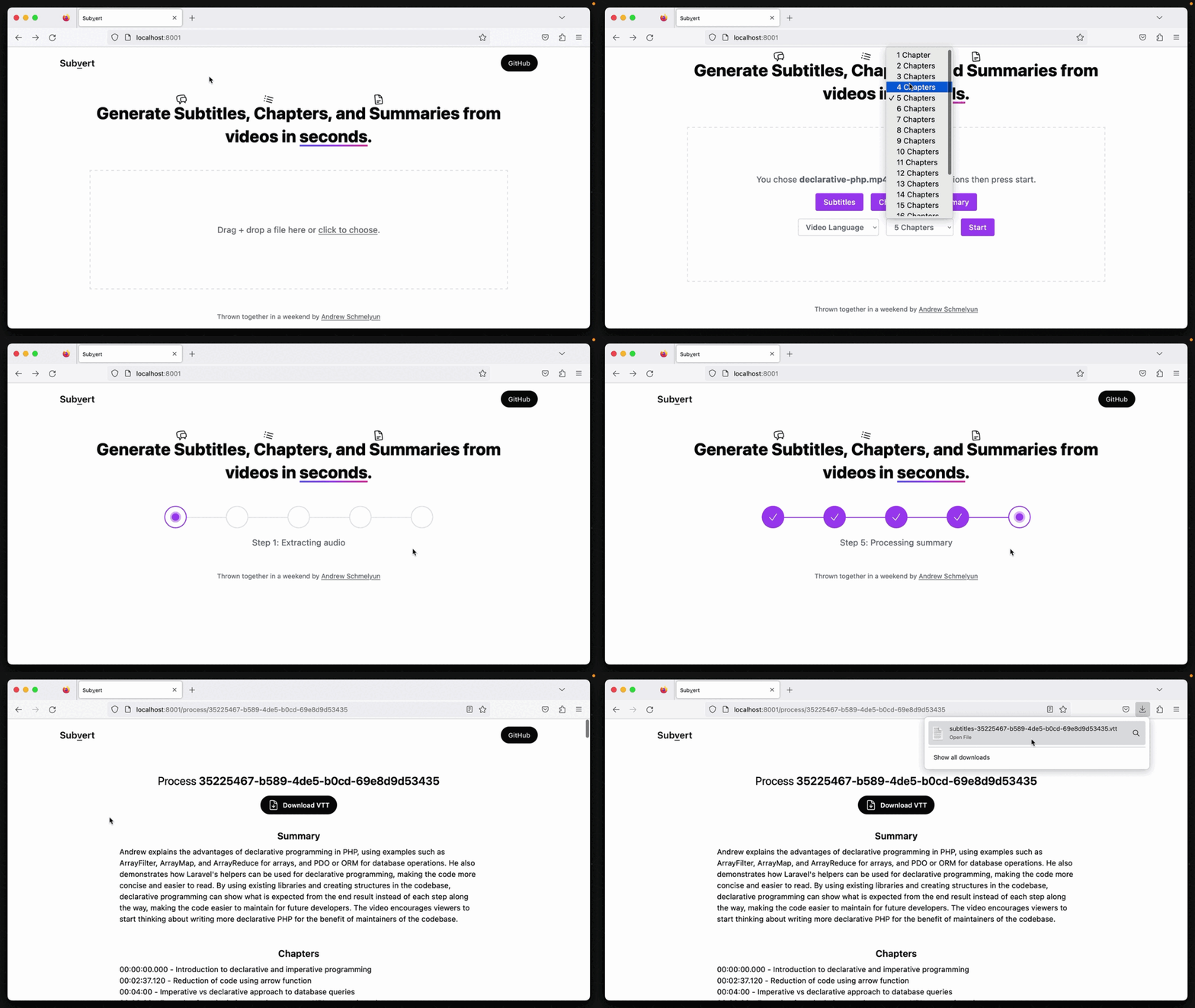
After selecting a video file to process, you have the option of choosing whether you also want to generate chapters and a summary.
Your video is sent to an API where the audio is extracted from it using FFMpeg, and then sent to OpenAI's Whisper model for transcription into the common vtt format.
If you chose to select chapters or a summary, that transcript is then sent to a ChatGPT model for processing into concise chapters of the length you wanted, and a brief summary that would fit in something like a YouTube description.
Configuration
You can adjust a few parameters in the container by passing in environment variables with your command using additional -e flags. Here are the current ones you can add:
OPENAI_API_KEY(required) - Sets the key responsible for communication with OpenAI's APIs. No default.UPLOAD_MAX_FILESIZE- Changes PHP's UPLOAD_MAX_FILESIZE setting. Default:256MMEMORY_LIMIT- Changes PHP's MEMORY_LIMIT setting. Default:512M
Starting from source
Alternative, if you have PHP 8.1+ and npm installed on your local machine, you can boot the application up directly from the source code instead.
First, check out this repo to your desired location. Then, navigate to the src directory and run:
./startup.sh
Alternatively, you can run the commands inside of the startup.sh script individually for the same result.
Deploying
Because this project is contained in a single Dockerfile, it can be deployed immediately to any server provisioned with Docker. Alternatively, the Subvert Docker image can be ran on cloud instances via AWS, Azure, GCP, Fly.io, etc.
Note: This image currently only exposes the insecure :80 http port.
License
The MIT License (MIT). Please see License File
Categories
Download Statistics
Total Downloads Over Time
Related apps
Explore more like this
Explore allLinks
Details
aschmelyun/subvertRuntime arguments
- Web UI
http://[IP]:[PORT:80]- Network
bridge- Shell
sh- Privileged
- false
Template configuration
https://platform.openai.com/account/api-keys
Subvert will be available on this port
- Target
- 80
- Default
- 80
Changes PHP's UPLOAD_MAX_FILESIZE setting. Default is 256M
- Target
- UPLOAD_MAX_FILESIZE
- Default
- 1G
Changes PHP's MEMORY_LIMIT setting. Default is 512M
- Target
- MEMORY_LIMIT
- Default
- 2G