
apps.header.allAppsCount

SubSyncarr
apps.detail.types.app from hernandito's Repository
apps.detail.sections.overview
Readme
View on GitHubSubSyncarr
THIS IS STILL UNDER DEVELOPMENT
NEEDS A LOT OF ADJUSTMENTS AND FIXES.

Fix out-of-sync subtitles from your couch.
Search your Kodi, Plex, Emby, or Jellyfin library with poster art, scan for subtitle files, and fix timing with one click.



What It Does
SubSyncarr connects to your Kodi, Plex, Emby, or Jellyfin media library, scrapes your movies and TV shows, and gives you a clean web interface to fix subtitle timing — and now download subtitles directly from multiple providers — all from your phone, tablet, or browser.
Have you ever sat down to watch a movie or show and find that the subs are out of sync? You hunt for other subs and struggle to find something that works. With SubSyncarr, a movie/series search, a couple button clicks, and in about 3 minutes, you will have a properly synchronized subtitle; all without leaving the couch!
It uses ffsubsync under the hood, which analyzes the audio track of your video and aligns the subtitle timing to match speech patterns. It works with any language combination — English audio with English subs, Spanish audio with English subs, or any other pairing.
Key Features
- Kodi, Plex, Emby & Jellyfin support — connect to any of the four major media servers; switch anytime from Settings
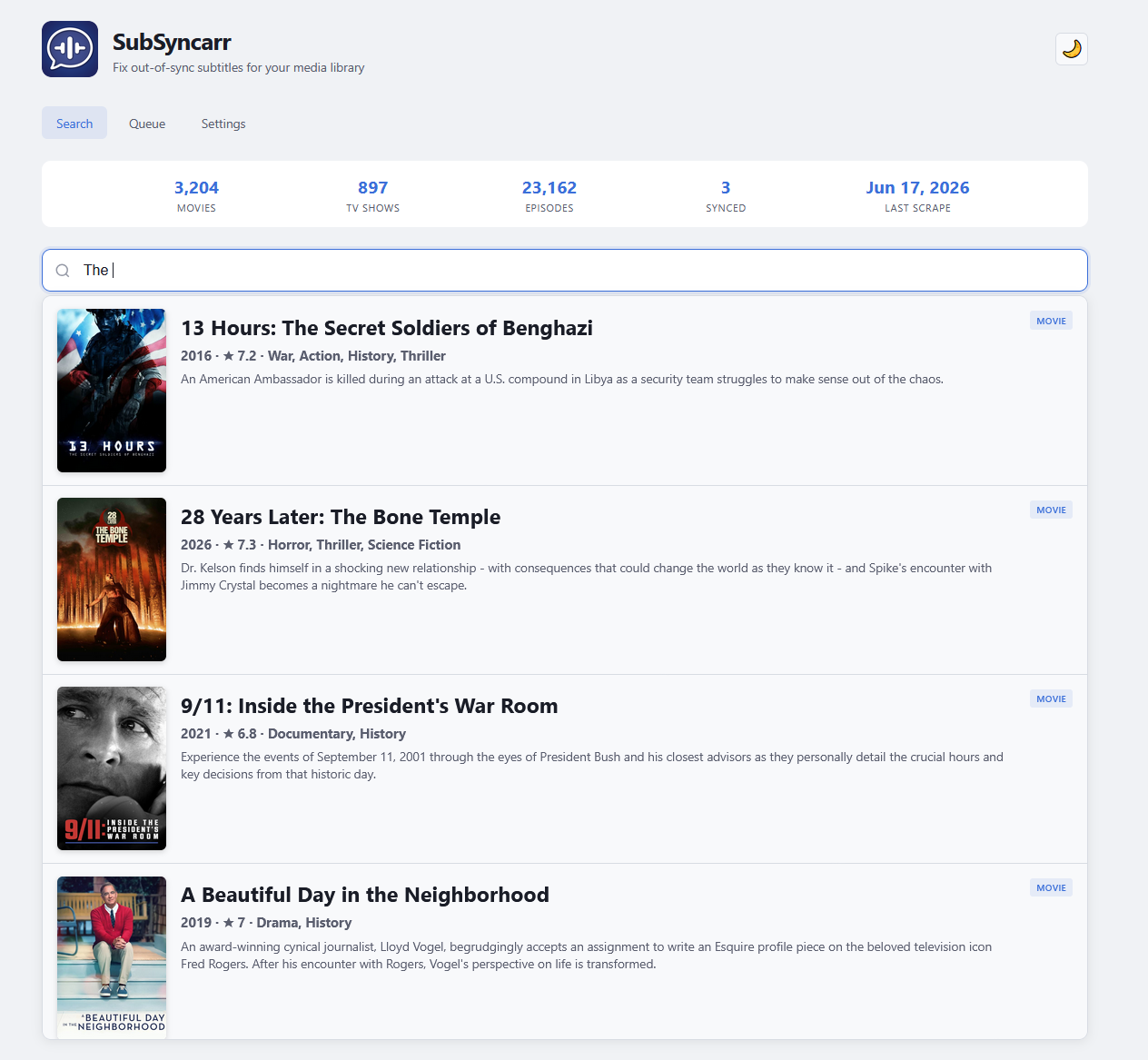
- Search with poster art — type a movie or TV show name and see results with posters, ratings, genres, and plot summaries
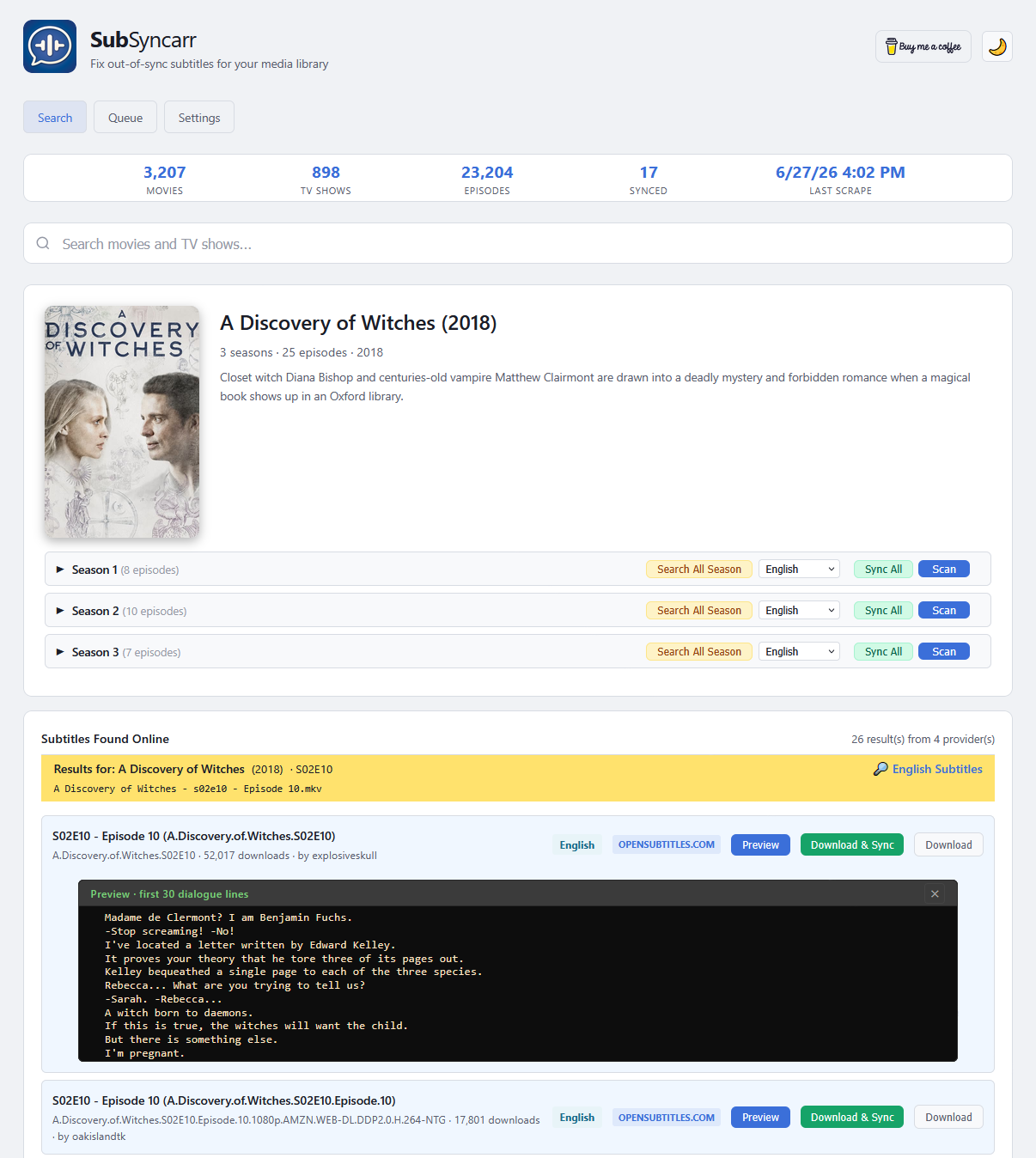
- Download subtitles — search and download from OpenSubtitles.com, SubDL, Gestdown, YIFY, Podnapisi, and Addic7ed, in any language
- Download & Sync in one click — find a subtitle, download it, and auto-sync the timing in a single step
- Per-episode or whole-season search — grab subtitles for the one episode you're watching, or the entire season at once
- Multi-language — download English, Spanish, French, and 18+ other languages; each saved with the correct language suffix (.en.srt, .es.srt)
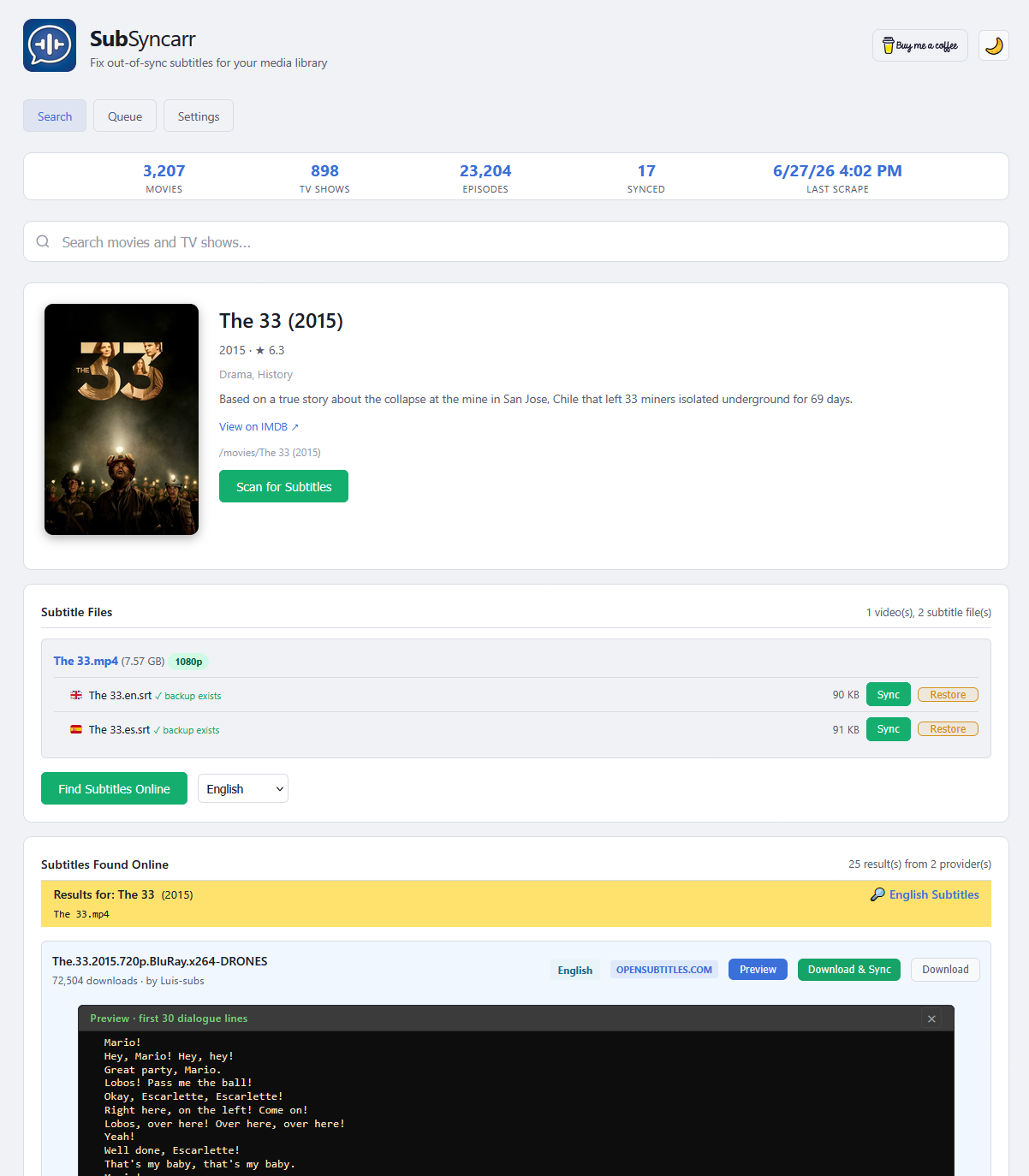
- Smart folder scanning — detects external subtitle files (.srt, .ass, .ssa, .sub, .vtt) and shows embedded tracks for reference
- One-click sync — ffsubsync analyzes the audio and corrects subtitle timing automatically
- Your existing Subtitles are SAFE — every subtitle is backed up before modification, with one-click restore
- Batch TV season sync — fix an entire season's subtitles in one click
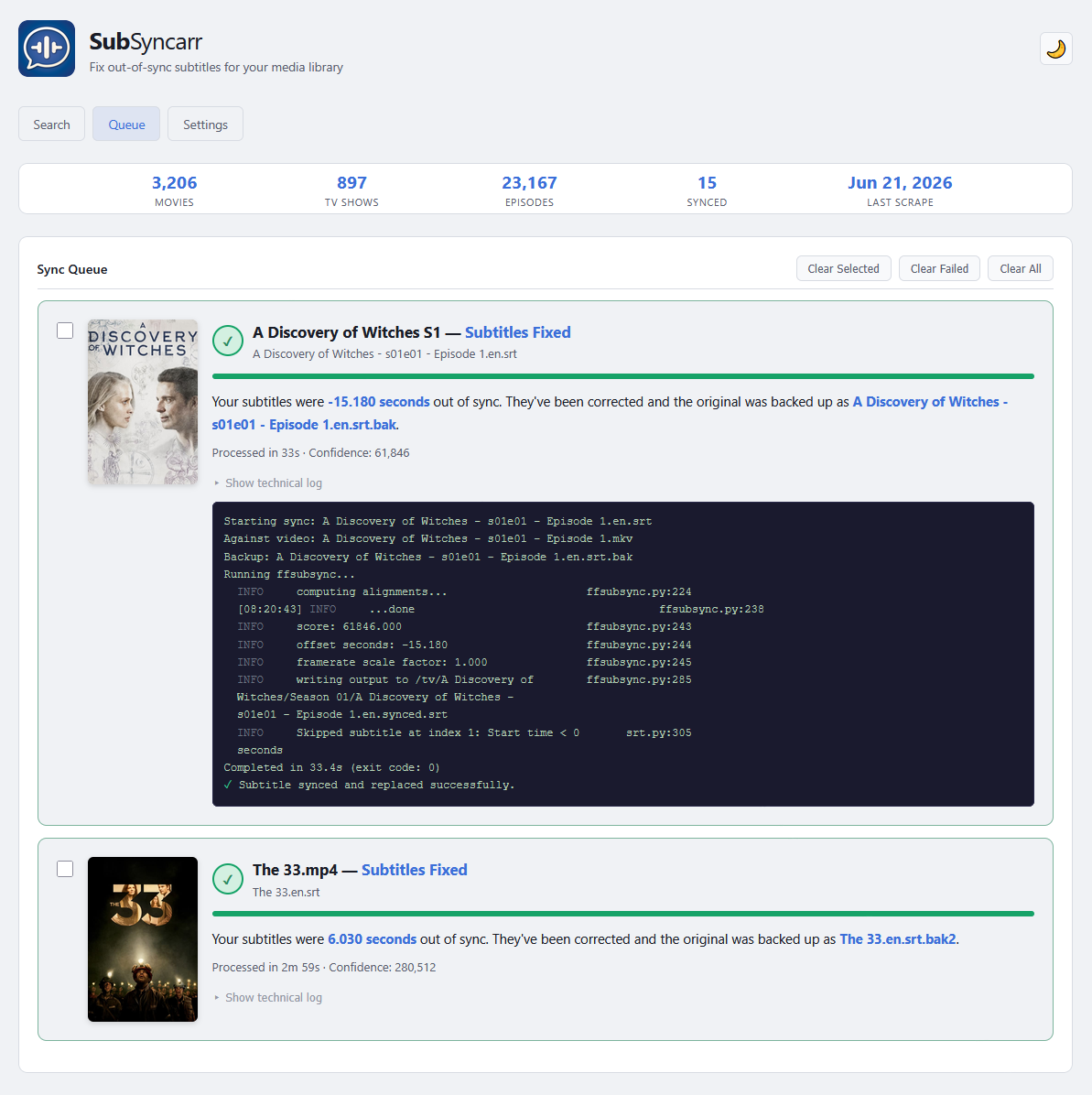
- Live sync queue — animated progress bar, elapsed timer, human-readable results, and per-job management (clear selected/failed/all)
- Auto-detection — automatically detects your library paths during setup
- Couch-friendly — large posters, big tap targets, designed for phone and tablet use
- Does NOT touch embedded subtitles — these subs are assumed to be correct as they come from the source
- Themes — quickly toggle between Light and Dark theme
Screenshots
Search & Select a Movie
Search and Select a TV Show
Click Sync
Sync In Progress
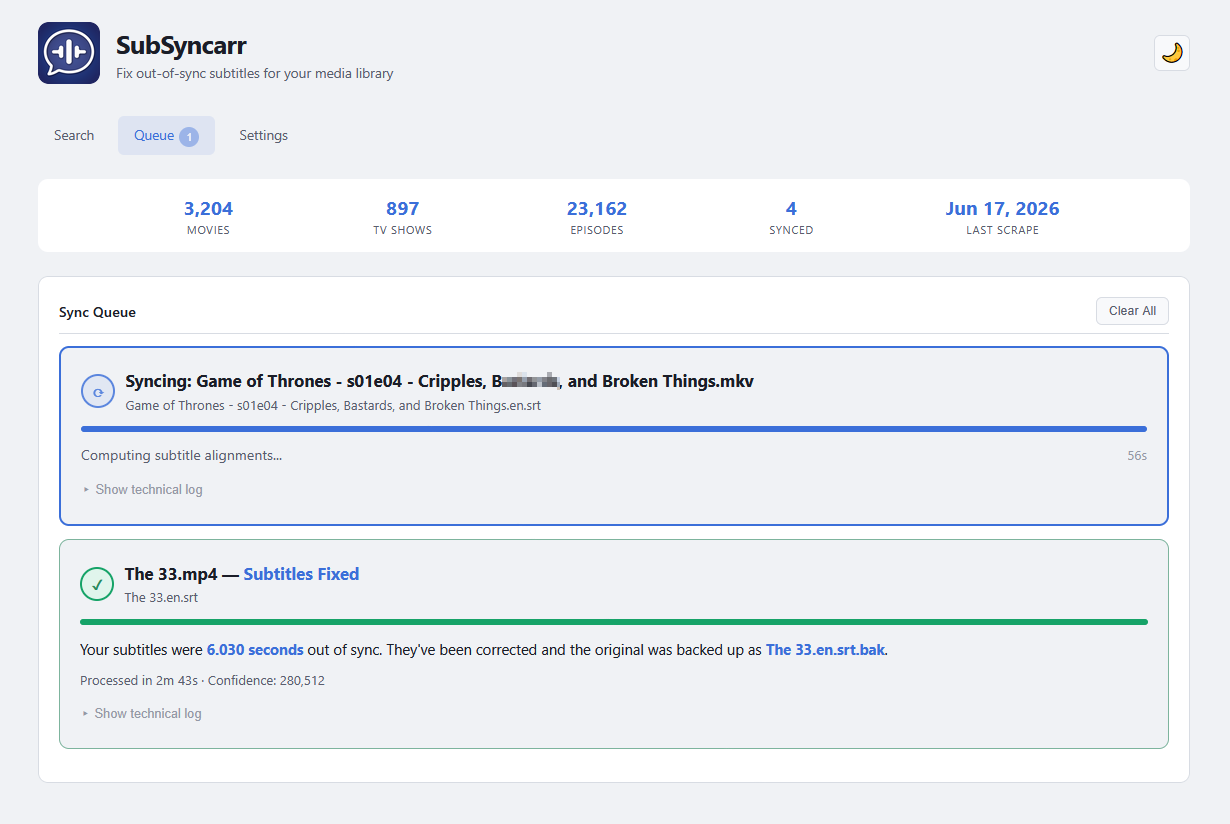
Sync Complete
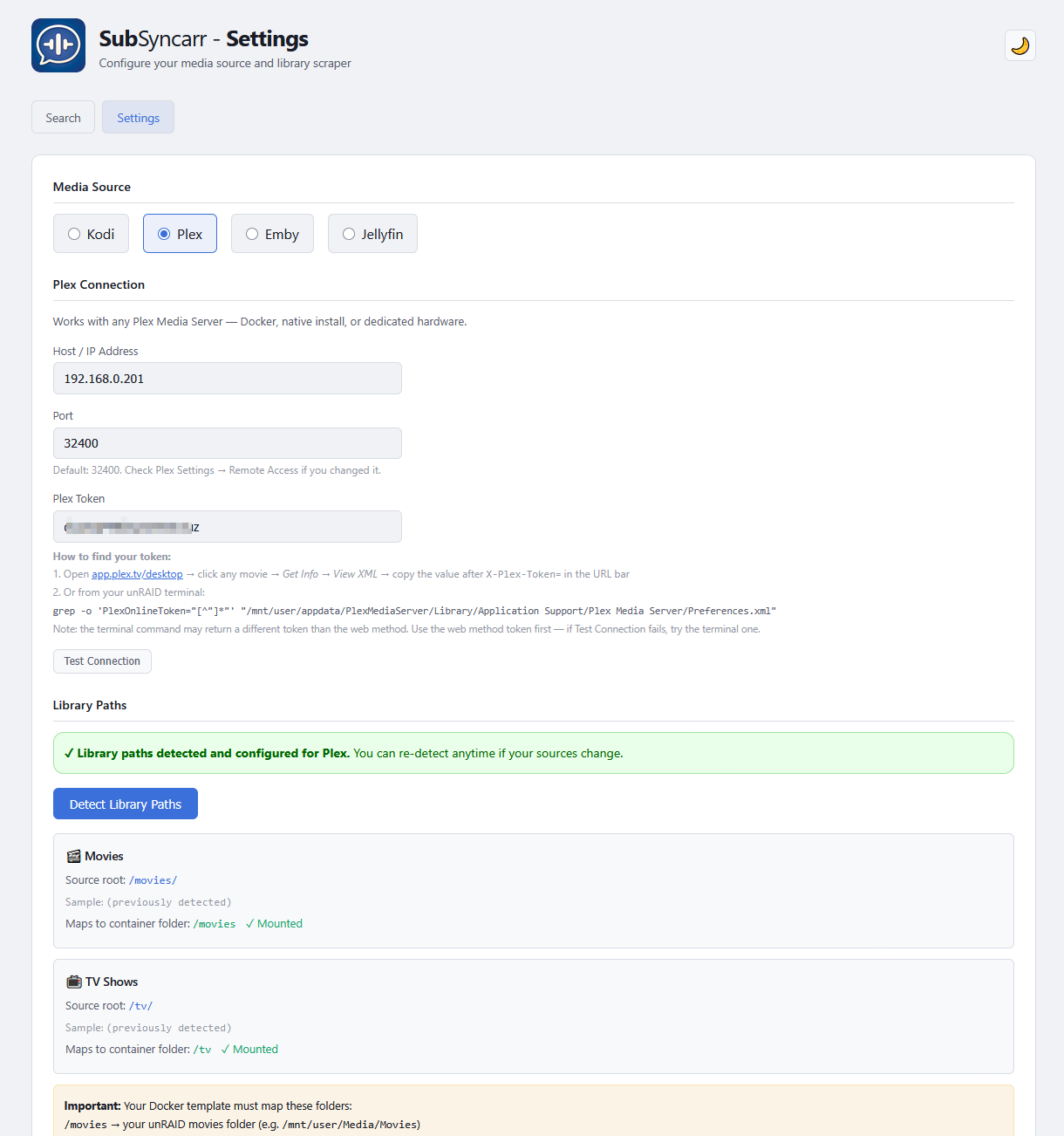
Settings — Auto-Detection Wizard
Installation
unRAID (Community Applications)
Search for SubSyncarr in Community Applications and click Install. Configure:
| Field | Value |
|---|---|
| Movies Folder | Your unRAID movies path (e.g. /mnt/user/Media/Movies) |
| TV Shows Folder | Your unRAID TV shows path (e.g. /mnt/user/Media/TV) |
| Config | /mnt/user/appdata/subsyncarr |
| WebUI Port | 5889 |
Docker Run
docker run -d \
  --name subsyncarr \
  -p 5889:5889 \
  -v /path/to/appdata/subsyncarr:/config \
  -v /path/to/movies:/movies \
  -v /path/to/tv:/tv \
  -e TZ=America/New_York \
  -e SCRAPE_INTERVAL=12 \
  hernandito/subsyncarr:latest
Docker Compose
services:
  subsyncarr:
    image: hernandito/subsyncarr:latest
    container_name: subsyncarr
    ports:
      - 5889:5889
    volumes:
      - /path/to/appdata/subsyncarr:/config
      - /path/to/movies:/movies
      - /path/to/tv:/tv
    environment:
      - TZ=America/New_York
      - SCRAPE_INTERVAL=12
    restart: unless-stopped
First-Time Setup
- Open
http://YOUR-IP:5889— you'll be redirected to Settings - Select your media source: Kodi, Plex, Emby, or Jellyfin
If using Kodi:
- Enter your Kodi host, port, username, and password
- Make sure HTTP control is enabled in Kodi: Settings → Services → Control → "Allow remote control via HTTP"
If using Plex:
- Enter your Plex server IP and port (default 32400)
- Enter your Plex token (see How to find your Plex token below)
If using Emby:
- Enter your Emby server IP and port (default 8096)
- Create an API key: Emby Dashboard → Settings → Advanced → API Keys → click + → name it "SubSyncarr"
If using Jellyfin:
- Enter your Jellyfin server IP and port (default 8096)
- Create an API key: Jellyfin Dashboard → Advanced → API Keys → click + → name it "SubSyncarr"
Then for both:
- Click Test Connection to verify
- Click Detect Library Paths — SubSyncarr queries your media server and auto-detects where your media lives
- Verify both Movies and TV show green ✓ checkmarks (confirms Docker volumes are mapped correctly)
- Click Save Settings
- Click Scrape Library Now — this takes 2-3 minutes for large libraries
- Go to the Search page and start fixing subtitles!
How to Find Your Plex Token
Method 1 — From Plex Web (recommended):
- Open app.plex.tv/desktop in your browser and sign in
- Navigate to any movie in your library
- Click the ⋮ menu → Get Info → View XML
- A new tab opens — look at the URL bar and copy the value after
X-Plex-Token=
Method 2 — From your unRAID terminal:
grep -o 'PlexOnlineToken="[^"]*"' "/mnt/user/appdata/PlexMediaServer/Library/Application Support/Plex Media Server/Preferences.xml"
How It Works
- Search — type a movie or TV show name
- Scan — click the result, then "Scan for Subtitles" to see what files exist in the folder
- Sync — click the Sync button next to any external subtitle file
- Wait — ffsubsync extracts the audio, analyzes speech patterns, and aligns the subtitle timing (1-3 minutes for movies, 30-60 seconds for TV episodes)
- Done — the corrected subtitle replaces the original, with a backup created automatically
What ffsubsync does under the hood
It extracts the audio track, creates a speech-vs-silence fingerprint, does the same with the subtitle timing, and uses FFT to find the best alignment. It handles:
- Constant offset — subtitles are X seconds early/late throughout
- Frame-rate drift — subtitles start fine but gradually desync
- Segment shifts — different cuts of the same film
It does NOT transcribe audio — it's language-agnostic and works with any language combination.
What it does NOT touch
- Embedded subtitle tracks are never modified — they're displayed for reference only
- Video files are never modified
- Only external sidecar subtitle files (.srt, .ass, .ssa, .sub, .vtt) are processed
Configuration
| Environment Variable | Default | Description |
|---|---|---|
TZ |
America/New_York |
Container timezone |
SCRAPE_INTERVAL |
12 |
Auto-scrape interval in hours (6, 12, or 24) |
PUID |
99 |
User ID (99 = nobody on unRAID) |
PGID |
100 |
Group ID (100 = users on unRAID) |
| Volume | Purpose |
|---|---|
/config |
Persistent database and settings |
/movies |
Your movies folder |
/tv |
Your TV shows folder |
Roadmap
- Kodi library scraping (movies + TV episodes)
- Plex library scraping (movies + TV episodes)
- Emby library scraping (movies + TV episodes)
- Jellyfin library scraping (movies + TV episodes)
- Poster-rich search with plot summaries
- One-click subtitle sync with ffsubsync
- Batch TV season sync
- Backup and restore system
- Auto-detection of library paths (all sources)
- Light/dark theme
- Subtitle download from 6 providers (OpenSubtitles.com, SubDL, Gestdown, YIFY, Podnapisi, Addic7ed)
- Download + sync in one step
- Per-episode and whole-season subtitle search
- Multi-language download with correct language suffixes (.en.srt, .es.srt, etc.)
- Queue management (clear selected / failed / all)
- 🔜 Subtitle Health Scanner — background scan of your entire library against your preferred language combinations, flagging missing or potentially-unsynced subtitles for batch processing
- 🔜 More subtitle providers (by request via GitHub issues)
Subtitle Providers
| Provider | Auth | Best For | Status |
|---|---|---|---|
| OpenSubtitles.com | API key + login | Everything, hash matching | Stable |
| SubDL | API key | Curated, high quality | Stable |
| Gestdown | None | TV series, European | Stable |
| YIFY Subtitles | None | Movies | Stable |
| Podnapisi | None | International | Depends on site uptime |
| Addic7ed | Optional login | TV series | Experimental (may be rate-limited) |
To enable providers: Settings → Subtitle Providers → check the ones you want, enter any required API keys, and click Test to verify.
Support
If you find SubSyncarr useful, consider starring the repo ⭐
For bugs and feature requests, please open an issue.
License
MIT License
apps.marketingCta.appInstallTitle
apps.marketingCta.appInstallDescription
apps.detail.sections.categories
apps.downloadStats.title
apps.detail.sections.related
apps.detail.related.exploreCategories
apps.detail.related.exploreAllapps.detail.sections.links
apps.detail.sections.details
hernandito/subsyncarr:latestapps.detail.sections.runtime
- apps.detail.details.webui
http://[IP]:[PORT:5889]/- apps.detail.details.network
bridge- apps.detail.details.shell
bash- apps.detail.details.privileged
- false
- apps.detail.details.extraParams
--restart=unless-stopped
apps.detail.sections.configuration
Web interface port for SubSyncarr
- apps.detail.config.target
- 5889
- apps.detail.config.default
- 5889
- apps.detail.config.value
- 5889
Persistent config, database, and settings. Do not share with other containers.
- apps.detail.config.target
- /config
- apps.detail.config.default
- /mnt/user/appdata/subsyncarr
- apps.detail.config.value
- /mnt/user/appdata/subsyncarr
Your unRAID movies folder. Must match your media server movie source folder.
- apps.detail.config.target
- /movies
- apps.detail.config.default
- /mnt/user/Media/Movies
- apps.detail.config.value
- /mnt/user/Media/Movies
Your unRAID TV shows folder. Must match your media server TV source folder.
- apps.detail.config.target
- /tv
- apps.detail.config.default
- /mnt/user/Media/TV Shows
- apps.detail.config.value
- /mnt/user/Media/TV Shows
How often to auto-scrape your media library for new content (in hours). Options: 6, 12, or 24.
- apps.detail.config.target
- SCRAPE_INTERVAL
- apps.detail.config.default
- 12
- apps.detail.config.value
- 12
Your timezone for correct timestamps. Examples: America/New_York, America/Chicago, America/Los_Angeles, Europe/London
- apps.detail.config.target
- TZ
- apps.detail.config.default
- America/New_York
- apps.detail.config.value
- America/New_York
User ID for file permissions. Default 99 (nobody) works for most unRAID setups.
- apps.detail.config.default
- 99
- apps.detail.config.value
- 99
Group ID for file permissions. Default 100 (users) works for most unRAID setups.
- apps.detail.config.default
- 100
- apps.detail.config.value
- 100