
All apps · 0 apps

streamflow
Docker app from streamflow's Repository
Overview
Readme
View on GitHubStreamFlow on Unraid
The Docker template installs the stable StreamFlow image through Unraid DockerMan. Community Applications listing is pending submission and review.
StreamFlow requires an existing Dispatcharr instance reachable from its container.
Install with DockerMan
Until the template is listed in Community Applications, save
templates/streamflow.xml from this repository as
/boot/config/plugins/dockerMan/templates-user/my-streamflow.xml on Unraid.
If that filename already exists, keep the existing user template and save this
one with a different my- filename.
- Open Docker -> Add Container and select streamflow under the user templates.
- Use a unique container name if another StreamFlow instance already exists.
- Review WebUI Port and Appdata. The defaults are host port
5000and/mnt/user/appdata/streamflow. Separate installations need separate ports and data directories. - Expand Show more settings and review PUID and PGID if your share
permissions require different IDs. Defaults are
99:100. - Click Apply, then use the container's WebUI action.
- Complete StreamFlow's setup wizard with the reachable Dispatcharr address and
your credentials.
localhostinside this bridge-network container refers to StreamFlow itself. - Wait for initial synchronization and startup to complete before scheduling work. Starting with StreamFlow 2.7.1, the required background workers start after successful setup without a container or host restart.
The /app/data mapping persists the database, configuration, regex rules and
playback history across container recreation. Keep this mapping when updating.
Change the host port in DockerMan; the container's HTTP port remains 5000.
Updates and development builds
Use the normal Docker -> Check for Updates -> Update flow. Port, storage and other container settings remain editable through Docker -> Edit.
The default repository is ghcr.io/krinkuto11/streamflow:latest. To test a
development build, edit Repository to
ghcr.io/krinkuto11/streamflow:dev. The template also declares dev as an
alternate branch for Community Applications. Review development changes before
updating and keep a filesystem copy of your persistent data before changing
release tracks.
Optional GPU acceleration
The template uses CPU probing by default. GPU acceleration can help decode streams during quality analysis; network requests and some detection filters still use the CPU. The GPU must be supported by the host driver and the image's FFmpeg build. Keep Privileged off.
NVIDIA
Install/configure the Nvidia-Driver plugin from Unraid's Apps tab, following its instructions. Under Settings -> Nvidia Driver, confirm the GPU is detected and copy its GPU UUID.
Open Docker -> StreamFlow -> Edit and switch to Advanced View. Append
--runtime=nvidiato Extra Parameters, keeping any existing parameters.Use Add another Path, Port, Variable, Label or Device, choose Variable, and add these keys and values:
Key Value NVIDIA_VISIBLE_DEVICESThe GPU UUID from the plugin, or 0for the first GPUNVIDIA_DRIVER_CAPABILITIEScompute,utility,videoClick Apply. This recreates the container with its saved Appdata mapping.
Enable acceleration in StreamFlow as described below; select CUDA or Auto, with Device left blank for the default exposed GPU.
The variables and runtime follow the Unraid GPU guide and NVIDIA's container documentation.
Intel or AMD through DRI/VAAPI
- Confirm the Unraid host has a working GPU driver and a render device under
/dev/dri, such as/dev/dri/renderD128. Device numbering can differ. - Open Docker -> StreamFlow -> Edit. Use Add another Path, Port, Variable,
Label or Device, choose Device, and set Value to
/dev/dri. - If the render device only allows its owning group to access it, set PGID
under Show more settings to that numeric group ID. You can read it in the
Unraid terminal with
stat -c '%g' /dev/dri/renderD128; use your actual node. Review the Appdata share permissions before changing the group: the image assigns its persistent files to the configured PUID/PGID at startup. - Click Apply, then select VAAPI or Auto in StreamFlow. Set Device
to the actual render-node path, for example
/dev/dri/renderD128.
Availability depends on the GPU, codec and driver. QSV is an Intel option that should only be selected after a successful probe on that host. FFmpeg listing a method does not prove that the device can decode a stream.
Enable and verify in StreamFlow
- Open Stream Checker -> Stream Checker Configuration -> Edit -> Stream Analysis and find Hardware Acceleration.
- Enable Hardware Acceleration, choose the mode/device for your GPU, keep CPU Fallback enabled, and click Save Configuration.
- Run one targeted quality check and inspect the hardware status and logs for initialization errors or CPU fallback before running a large batch.
Where to find the acceleration settings
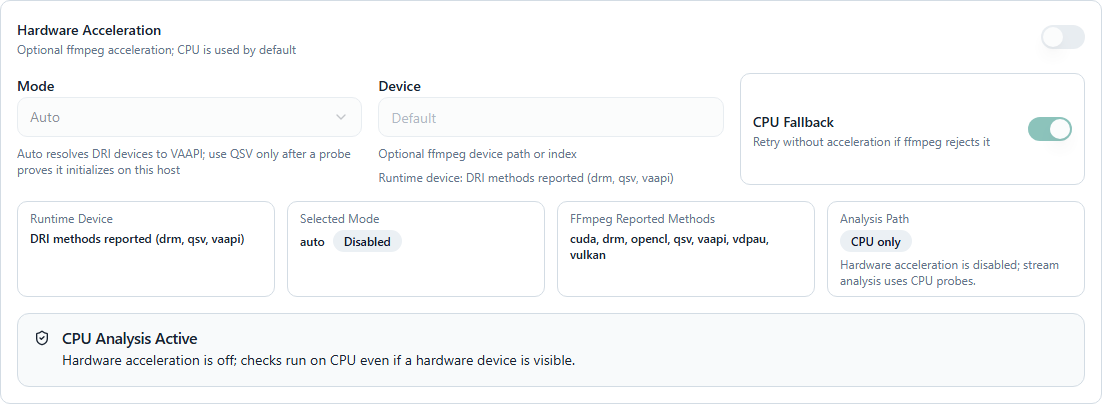
To return to CPU probing, disable Hardware Acceleration and save. You can also remove the GPU device/variables and NVIDIA runtime parameter through DockerMan, preserving the port and Appdata mapping. See the hardware acceleration guide for further details.
For application support, use GitHub issues.
Community Applications submission
The public repository contains an Apache-2.0 license, ca_profile.xml and one
Docker application template at templates/streamflow.xml. The profile, icon,
screenshots, project and support URLs refer to this repository. Screenshots use
example data.
After these files are merged into main, sign in to the
Community Applications submission portal
with an Unraid account and enter https://github.com/krinkuto11/streamflow.
Run Validate and Scan, resolve any reported issues and submit the
repository for review. The template's canonical raw URL must be publicly
reachable on main before submission.
The catalog scan and moderation decision are separate from local XML checks and the DockerMan installation test. Do not describe StreamFlow as available in Community Applications until its listing is published.
Media gallery
1 / 2Requirements
Categories
Related apps
Explore more like this
Explore allDetails
ghcr.io/krinkuto11/streamflow:latestRuntime arguments
- Web UI
http://[IP]:[PORT:5000]- Network
bridge- Shell
bash- Privileged
- false
Template configuration
Host port for the StreamFlow web interface. Change this if port 5000 is already in use.
- Target
- 5000
- Default
- 5000
- Value
- 5000
Persistent database, settings, regex rules and playback history. Use a separate directory for each StreamFlow installation.
- Target
- /app/data
- Default
- /mnt/user/appdata/streamflow
- Value
- /mnt/user/appdata/streamflow
User ID used to run StreamFlow. The default is Unraid's nobody user.
- Default
- 99
- Value
- 99
Group ID used to run StreamFlow. The default is Unraid's users group.
- Default
- 100
- Value
- 100