
StrawDroid
Docker app from junkerderprovinz's Repository
Overview
Readme
View on GitHub







A real Android emulator on a Selkies desktop, so an app can be installed, driven and broken without an APK ever touching a phone.
))
))
))
))
))
Always downloads the latest build
A one-knight job: I build it, keep it running, work through the issues and add what people ask for, until nothing is missing. It is free, with no accounts, no telemetry, no ads and no paid tier. No asterisk anywhere. Nothing readable ever leaves your own walls. Forged on evenings and weekends, with heart and stubbornness.
If it has earned a place on your server or computer, toss a coin to your knight: it helps cover the costs and keeps the project alive. It also makes this knight's heart beat a little faster. Three ways below, whichever suits you.
))
))
))
Table of Contents
1. What it looks like
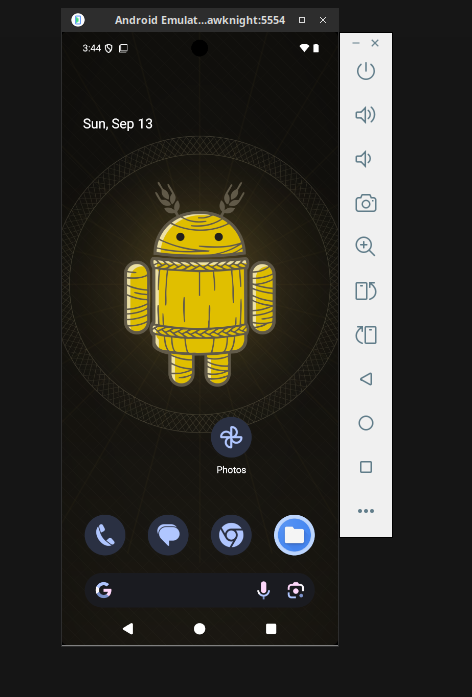
Android 16 on the Selkies desktop, in a browser. The strip beside the phone is the emulator's own toolbar, and the terminal is one right-click away.
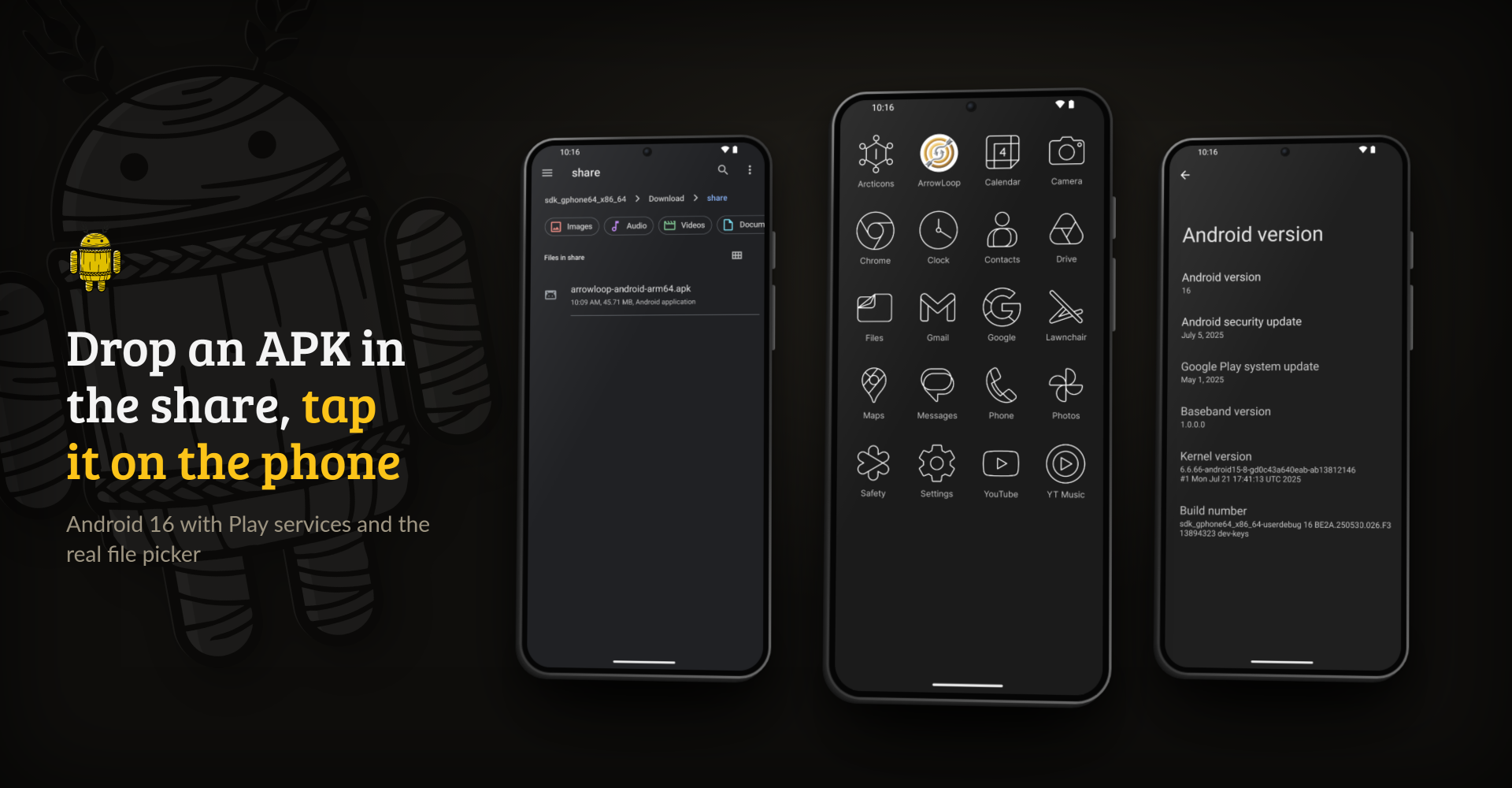
Anything dropped into /share turns up under Download/share, so a build can be installed by tapping it. The app drawer shows it installed, and the device says what it is: Android 16.
2. What it does
A straw droid is a practice dummy shaped like an Android phone: built like the real thing so somebody can strike at it without anybody getting hurt.
- The real emulator. It runs the same AVD Android Studio starts, headless on a Selkies desktop. It has a battery, a motion sensor and a power HAL, so Doze and Android's limits on background work behave as they do on a phone. Android in a container such as ReDroid or Waydroid has none of these, and there Doze never fires.
- The screen in a browser. The desktop arrives over WebRTC, encoded on the box's own GPU, so scrolling and transitions look the way they will on a phone.
- Deploys like a phone on a cable.
adbreaches the device over the network, and Android Studio installs and debugs on it as on any other device. - Android 16, API 36,
google_apis, x86_64. The newest level is also the strictest about background work. The image carries Play services and the real DocumentsUI, the folder picker an app asks for a folder with. For faults that only show on an older level, Android 14 (API 34) is published as well, under thelatest-api34tag. - A phone in full. The SIM takes calls and SMS, and its number is one that SMS apps accept. The back camera shows whatever
sk cameraputs in front of it: a QR code, a picture, a video or a light flashing Morse code. The front camera shows the emulator's test scene, every sensor the image offers is on (heart rate and wrist tilt among them), Bluetooth is on, and the phone's sound plays in the browser tab. The microphone hears a sound file played withsk mic, or your own voice once the microphone is switched on in the Selkies sidebar. - Tools for testing on board. Shizuku (Apache-2.0) is started again after every boot, for apps that need the shell's privileges, and PCAPdroid (GPL-3.0) shows which hosts an app talks to.
TEST_TOOLS=falsekeeps both off the device. - Root when a test needs it.
ROOT=truegives apps root throughsu, for testing an app's root mode. SELinux is permissive then, unlike on most rooted phones, so it stays off unless a test asks for it. - Nothing lost on stop. When the container stops, Android writes its files to disk first, so whatever a test did just before a
docker stopis still there after the next start. - APKs from a share. A folder mounted at
/shareshows up on the device underDownload/share, and theskhelper in the container's terminal installs from it. - A device that stays.
/configholds the AVD with its apps, permissions and test data. On first boot it gets a wallpaper, dark mode, an empty home screen, the Lawnchair launcher (Apache-2.0) and the Arcticons line icons by Donnnno (GPL-3.0). Whatever you change afterwards stays as you set it.
3. Getting started
StrawDroid needs /dev/kvm. On bare metal it is simply there. Without it the emulator does not start, and the container log says so.
docker run -d --name StrawDroid \
  --device=/dev/kvm --shm-size=2gb --cpus="4" --memory="8g" \
  -e PUID=99 -e PGID=100 \
  -p 3001:3001 -p 5555:5555 \
  -v /path/to/config:/config \
  junkerderprovinz/strawdroid:latest
PUID and PGID should be the user that owns /path/to/config on the host. The values above are Unraid's nobody:users; on a plain Linux box $(id -u) and $(id -g) are usually right. On Unraid use templates/strawdroid.xml, which puts the container on its own IP so no port mapping is needed.
Flutter apps need one setting on the host. Their renderer makes the emulator reserve tens of terabytes of address space, of which it uses a few gigabytes. In Linux's default overcommit mode a reservation that large is refused, and the emulator crashes as soon as a Flutter app draws. sysctl -w vm.overcommit_memory=1 on the host fixes it; on Unraid, add that line to /boot/config/go to keep it after a reboot. The setting belongs to the host, so the container cannot change it, but its log warns while it is still 0.
A graphics card makes it fast. Without one the emulator draws on the CPU. That works on any box, but taps and scrolling lag behind. With EMULATOR_GPU=auto, the default, it draws on whichever card is passed in: for Intel or AMD graphics add --device=/dev/dri, for NVIDIA add --runtime=nvidia -e NVIDIA_VISIBLE_DEVICES=all (on Unraid this needs the Nvidia Driver plugin). The READY block at the end of the container log names the renderer Android ended up on; SwiftShader or llvmpipe there means the CPU.
The container does not restart on its own. An emulator is a virtual machine and holds about 6 GB of memory even when idle, so start it when you need it and stop it after.
On Windows and on a desktop Linux, the two start scripts at the top check KVM and start the container. Docker is required either way. On Windows the script also switches on nested virtualisation for WSL2 and loads KVM there, on every run, because Docker Desktop rebuilds its WSL machine whenever it restarts. Right-click start-windows.ps1 and choose Run with PowerShell; if the execution policy stops it, powershell -ExecutionPolicy Bypass -File start-windows.ps1 runs it once. On Linux, chmod +x start-linux.sh && ./start-linux.sh. Both are plain text, so read them before you run them.
Once it runs:
| Screen | https://<address>:3001/, with a self-signed certificate to accept once. No login. |
| Deploy | adb connect <address>:5555, then Android Studio treats it as an ordinary device. |
| Force Doze | adb -s <address>:5555 shell dumpsys deviceidle force-idle |
| Undo it | adb -s <address>:5555 shell dumpsys deviceidle unforce |
The container log ends on a banner with these lines and the real address filled in.
Mount a folder read-only at /share to install builds from it. On the device it is copied to Download/share every 30 seconds (SHARE_MIRROR_SECONDS), up to 2048 MB (SHARE_MIRROR_MAX_MB). In the container's terminal, sk does the rest:
sk list                    the APKs on the share, newest first
sk install <name>.apk      install one, keeping the earlier build's data
sk push <file|dir>         copy test files into the device's Downloads
sk doze on | off           force deep idle, or release it
sk sms <number> <text>     an incoming SMS from that number
sk call <number>           an incoming call from that number
sk geo <lat> <lon> [alt]   put the device at that position, altitude in metres
sk route test-track        drive the GPS along a GPX track at its own pace,
                           or with --kmh, --speedup and --loop
sk pin 1357 | off          set or remove the screen lock PIN
sk finger enroll | touch   add a fingerprint, or touch the sensor with it
sk sensor pressure 950     set a sensor, or list them without arguments
sk seed                    test contacts, photos with GPS, music with BPM tags,
                           a video, documents, a score, a song, a GPS track, a
                           calendar event and barcode pictures on the device
sk camera qr-otp           what the back camera sees: a QR code or a picture
sk camera video <file>     a video instead, mp4 or webm, played in a loop
sk camera blink SOS [wpm]  a light flashing the text in Morse code
sk mic [--loop] <file>     what the microphone hears: a WAV, MP3, OGG or FLAC
                           file, or a click track such as click-120-bpm
sk mic off                 silence again
sk home pixel | lawnchair  the home screen app; widgets show only on pixel
sk expose <port>           reach a port the device listens on from the network
sk lang de-AT              switch the system language
sk dark on | off           dark or light theme
sk snap save <name>        save the whole device, and load, rm or list snapshots
sk reset                   back to the snapshot called "clean" in seconds
sk netlog start <package>  record which hosts an app talks to, through PCAPdroid
sk netlog stop             stop and list them
sk shot | sk record [s]    a screenshot or a screen recording
sk shell [...]             a shell on the device
Screenshots, recordings and network captures land in /config/captures. A snapshot lives with the AVD in /config and takes about 2.5 GB.
The device profile and the emulated RAM are read on the first boot only. To change them later, remove the AVD from /config/.android/avd.
Cameras, sound, the phone number and the test tools take effect on every start: EMULATOR_CAMERA_BACK (video, picture, emulated or none) and EMULATOR_CAMERA_FRONT (emulated or none), EMULATOR_AUDIO, TEST_TOOLS and ROOT (true or false), and EMULATOR_PHONE_NUMBER. The Unraid template explains each one.
4. How AI is used here
One knight builds this, and AI is one of the tools I work with, the same way I work with an editor or a compiler. It helps me write code and documentation and it checks my work, and that saves me a good many evenings. It does not make the decisions, though. I read and understand everything before it ships, and if something here breaks, that is on me and not on the tool.
You do not have to take my word for it. The code is open and every release note is written by hand. The issue tracker shows how problems actually get handled, including the ones I got wrong the first time. If you find something that is not right, open an issue and I will look at it.
5. Support this project
Problems, wishes or suggestions? You're welcome to open an issue.
A one-knight job: I build it, keep it running, work through the issues and add what people ask for, until nothing is missing. It is free, with no accounts, no telemetry, no ads and no paid tier. No asterisk anywhere. Nothing readable ever leaves your own walls. Forged on evenings and weekends, with heart and stubbornness.
If it has earned a place on your server or computer, toss a coin to your knight: it helps cover the costs and keeps the project alive. It also makes this knight's heart beat a little faster. Three ways below, whichever suits you.
Requirements
Categories
Download Statistics
Related apps
Explore more like this
Explore allDetails
ghcr.io/junkerderprovinz/strawdroid:latestRuntime arguments
- Web UI
https://[IP]:[PORT:3001]/- Network
br0.20- Shell
bash- Privileged
- false
- Extra Params
--restart=no --device=/dev/kvm --shm-size=2gb --cpus="4" --memory="8g"
Template configuration
The desktop the emulator draws on, over WebRTC. Self-signed certificate - accept it once. HTTPS is the default because browsers only allow seamless clipboard over HTTPS.
- Target
- 3001
- Default
- 3001
- Value
- 3001
Optional fallback. The WebUI defaults to HTTPS on 3001.
- Target
- 3000
- Default
- 3000
- Value
- 3000
Reached from a development machine with: adb connect container-ip:5555 . The emulator's own adb binds to loopback, so a forwarder inside the container hands this port to it; without that the port would appear open and never complete a handshake.
- Target
- 5555
- Default
- 5555
- Value
- 5555
The AVD itself, plus installed apps, granted permissions and anything a test wrote. The ONLY persistent mount by design. Without it every restart is a factory reset, which also throws away the folder permission an app was granted through the SAF picker - one of the things being tested.
- Target
- /config
- Default
- /mnt/user/appdata/strawdroid
- Value
- /mnt/user/appdata/strawdroid
Read-only. Drop an APK into this share from anywhere on the network and it appears ON THE DEVICE under Download/share, where the stock Files app and the SAF picker both find it - so it can be installed by tapping it on the phone, without a terminal. Mirrored rather than mounted, because an emulated phone is a virtual machine and a host directory is not reachable from inside it by any mount; the mirror compares sizes and timestamps and only sends what differs. From the container's terminal instead: sk list to see them, sk install name.apk to put one on the device, sk push file for test files. Read-only on purpose: this rig runs unfinished code, which has no business writing to a share full of everything else.
- Target
- /share
- Default
- /mnt/user/download
- Value
- /mnt/user/download
How the emulator draws. auto uses a graphics card when one is passed in and the CPU otherwise, which works everywhere but is slow. Intel or AMD: add --device=/dev/dri to Extra Parameters. NVIDIA: add --runtime=nvidia to Extra Parameters and set NVIDIA_VISIBLE_DEVICES below; this needs the Nvidia Driver plugin. host forces the GPU, swiftshader_indirect forces the CPU. The READY block at the end of the log names the renderer Android ended up on.
- Target
- EMULATOR_GPU
- Default
- auto
- Value
- auto
Only with an NVIDIA card and --runtime=nvidia in Extra Parameters: all, or the card's UUID from the Nvidia Driver plugin page. Empty leaves the card out.
- Target
- NVIDIA_VISIBLE_DEVICES
Which device the emulator pretends to be. Decides screen size and density, which is what a layout is actually judged against. Read on FIRST boot only: the AVD is created once and then kept, so changing this later needs the AVD removed from /config/.android/avd.
- Target
- EMULATOR_DEVICE
- Default
- pixel_6
- Value
- pixel_6
Memory given to the emulated phone. Read on FIRST boot only, same as the device profile. Below about 1536 Android 14 boots badly or not at all.
- Target
- EMULATOR_RAM
- Default
- 2048
- Value
- 2048
The SIM's number, digits only. The emulator's own default, 555-521-5554, is not a valid number to libphonenumber, so SMS apps that check numbers hide it. The default here is libphonenumber's US example number. Incoming SMS and calls come from the container's terminal: sk sms number text, sk call number.
- Target
- EMULATOR_PHONE_NUMBER
- Default
- 12015550123
- Value
- 12015550123
picture shows a QR code that sk camera swaps for another code or a picture of your own, so scanning apps can be tested. emulated shows the emulator's moving test scene. none removes the camera, for testing how an app copes without one. imagefile:path and videofile:path show a picture or a video from inside the container.
- Target
- EMULATOR_CAMERA_BACK
- Default
- picture
- Value
- picture
Same choices as the back camera.
- Target
- EMULATOR_CAMERA_FRONT
- Default
- emulated
- Value
- emulated
true sends the phone's sound to the browser tab, through the desktop's own audio. false starts the emulator without audio.
- Target
- EMULATOR_AUDIO
- Default
- true
- Value
- true
true installs Shizuku and PCAPdroid once on each new device and starts the Shizuku server again after every boot, so apps that need it find it running. PCAPdroid shows which hosts an app talks to, without root. false leaves both alone.
- Target
- TEST_TOOLS
- Default
- true
- Value
- true
true gives apps root through su, for testing an app's root mode. The first start with it reboots the phone once to make the system partition writable. SELinux runs permissive then, unlike on most rooted phones, so leave it false unless a test needs root.
- Target
- ROOT
- Default
- false
- Value
- false
Passed to the emulator verbatim, for the occasional one-off (-writable-system, -dns-server, -netdelay). Empty is the ordinary case.
- Target
- EMULATOR_EXTRA_ARGS
The name of the virtual device inside /config. Changing it creates a SECOND device rather than renaming the first, which is a way to keep two side by side.
- Target
- AVD_NAME
- Default
- strawdroid
- Value
- strawdroid
Optional. Leave EMPTY together with the password for no login. Set both to enable login.
- Target
- CUSTOM_USER
Optional. Leave EMPTY together with the username for no login.
- Target
- PASSWORD
X11 keyboard layout for the streamed desktop (us, de, ...). Typing into the emulator is half of what this rig is for.
- Target
- KEYBOARD_LAYOUT
- Default
- us
- Value
- us
Container timezone. It reaches the emulated Android too, which matters for anything scheduled by the clock.
- Target
- TZ
- Default
- Europe/Vienna
- Value
- Europe/Vienna
User the desktop and the emulator run as. Default 99 (nobody on Unraid).
- Target
- PUID
- Default
- 99
- Value
- 99
Group. Default 100 (users on Unraid).
- Target
- PGID
- Default
- 100
- Value
- 100