

stockinfo
Docker app from UnraidUser-3287583290's Repository
Overview
No official APIs: the default sources justETF and Yahoo Finance do not offer a public API for this data. StockInfo reads their public web pages through the open-source libraries justetf-scraping and yfinance. Whoever runs StockInfo is responsible for using the configured sources in line with the providers' terms.
Do not put StockInfo on the internet. It has no login — anyone who can reach it can change or delete your data. Use it only in your home network. From outside, connect to your home network with a VPN, for example WireGuard or Tailscale.
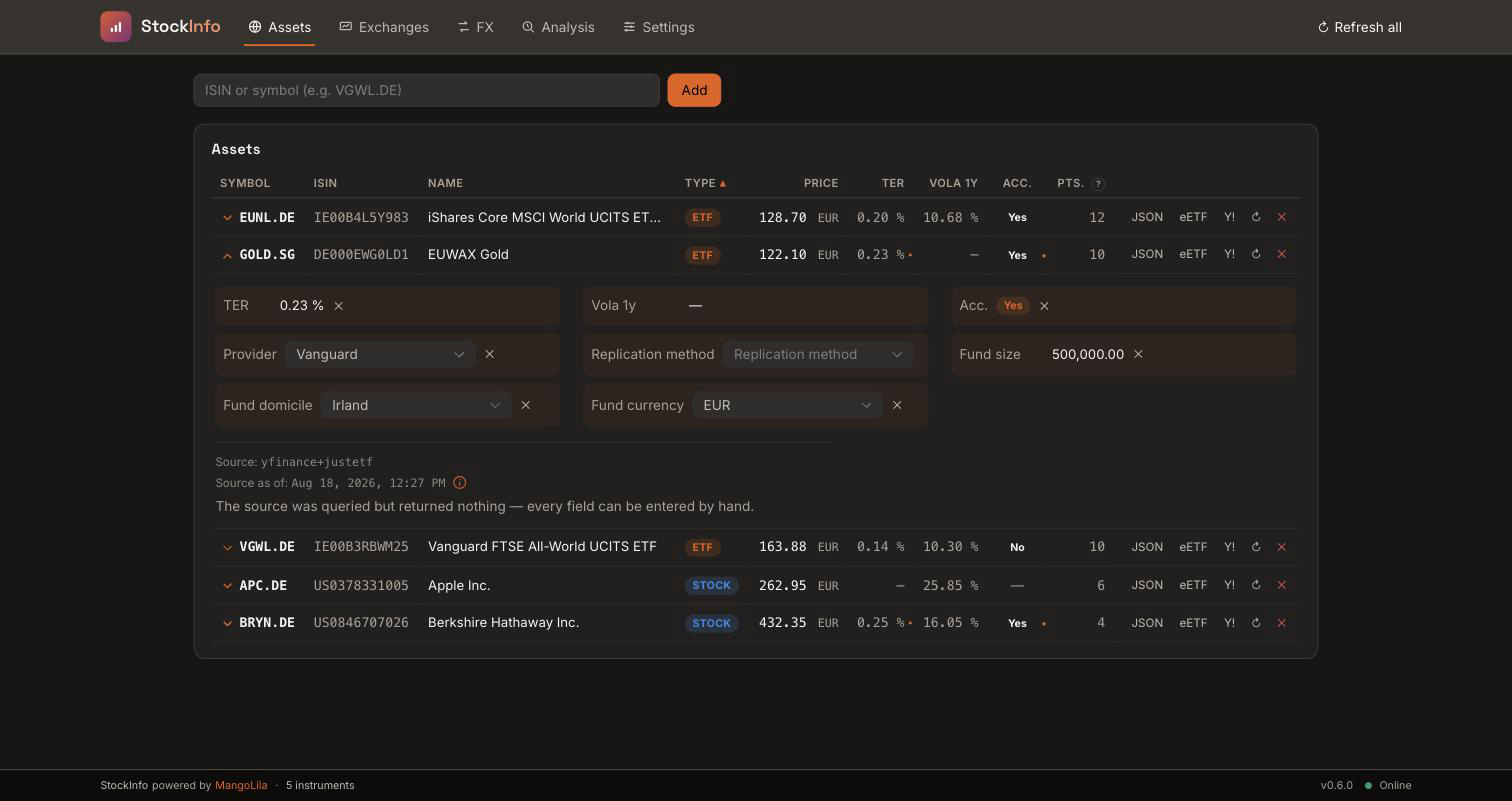
Whatever the sources do not deliver can be entered by hand in the expandable detail area of a row — provider, replication, fund size, domicile, currency, TER, volatility and accumulating/distributing. The source always wins: a manual value fills a gap, it never overwrites, and it applies again as soon as the source goes quiet.
Timezone: the "Timezone" setting (TZ) defaults to UTC — set it to your local zone for correct log timestamps. Valid values (TZ identifier column): https://en.wikipedia.org/wiki/List_of_tz_database_time_zones
OpenFIGI (optional): resolves an ISIN to the ticker at your preferred exchange (see "Default exchange"). It works without an API key, but only within OpenFIGI's low anonymous rate limit — once exceeded, resolution falls back to Yahoo search, which may return a different exchange or currency. A free key raises the limit and makes resolution reliable; enter it under "OpenFIGI API key". Register and create a key: https://www.openfigi.com/api
Support: StockInfo is built for its author's own use and shared free of charge. Issues are read, but there is no promise of a reply, a fix or a new feature.
Readme
View on GitHub
StockInfo
Self-hosted stock and ETF quotes with a REST API and a web dashboard.
English · Deutsch
Features · Quick start · Configuration · Docker guide · Developer guide
StockInfo fetches stock and ETF quotes, keeps them in a local database and serves them as JSON. You query by ISIN or by symbol and exchange; the answer contains price, currency, time, name and, for ETFs, metrics such as TER, provider and fund size.
A web dashboard shows your instruments, price charts and fund metrics, in English and German. Scripts, spreadsheets and other apps use the REST API.
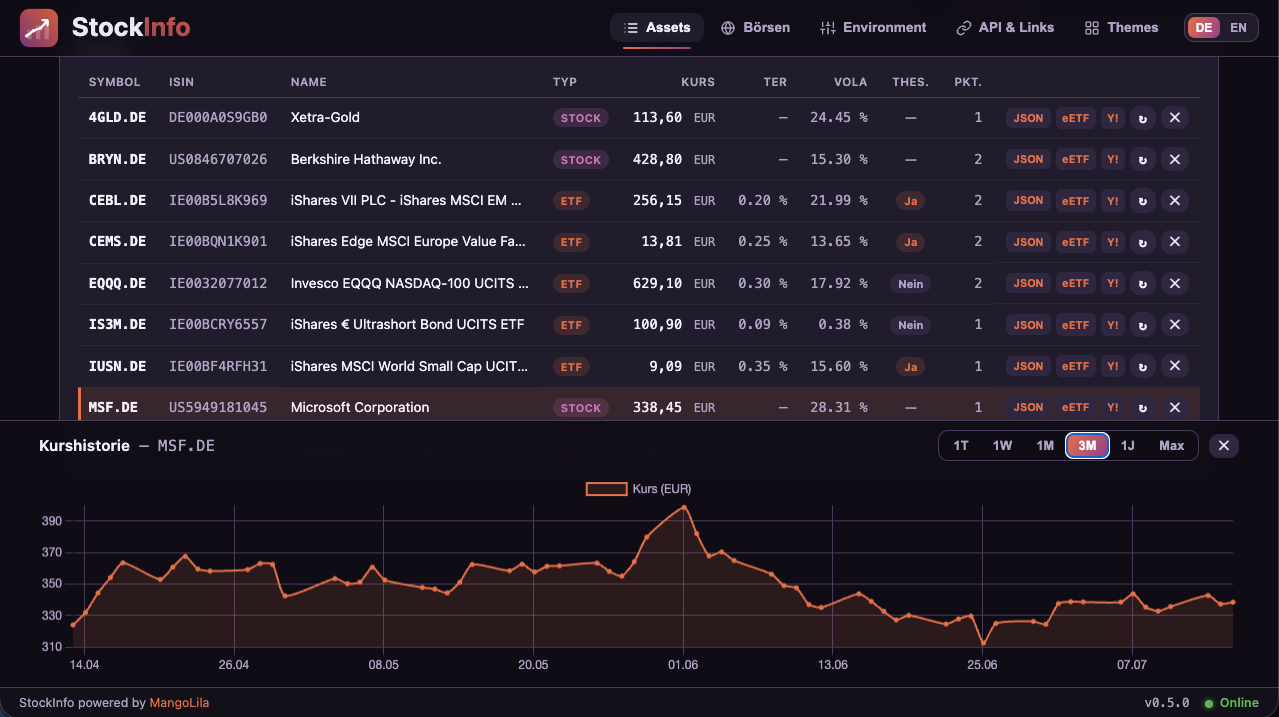
The Assets page: every instrument with its latest price and metrics. The price history of the selected row is docked at the bottom.
[!WARNING] StockInfo has no login: anyone who can reach it can change or delete its data. Do not put it on the internet. Run it only in your home network and connect from outside through a VPN, for example WireGuard or Tailscale.
Contents
- Features
- Data sources
- StockPortfolio: the companion app
- Quick start
- Configuration
- Development
- Further documentation
- Support
- License
Features
- Quotes by ISIN or symbol – European and US stocks and ETFs; the preferred exchange is configurable (default Xetra).
- Automatic updates – a background job refreshes all known instruments at a set interval; repeated requests are answered from the local database.
- Price history – an intraday curve and end-of-day closes from one week to "max".
- Fund and stock metrics – volume and 1-year volatility; for ETFs also TER, provider, replication, fund size, domicile, fund currency and distribution policy.
- Your own values – fill in what no source provides; a source value always takes precedence.
- Assets page – sortable columns, links to each instrument's profile on extraETF and Yahoo Finance, and the JSON answer of each request to copy.
- Exchange rates – the FX page and
GET /fxconvert between currencies. - Live analysis – the Analysis page measures each configured source role by role, bypassing the cache.
- Trading venues – the Exchanges page lists exchange suffixes, regions and currencies.
- Settings – Appearance (14 themes), Language (English, German, or follow the browser), API & Links, Backups of the database, Environment (current configuration) and About.
- Configurable sources and plugins – replace or extend the default sources, or run on a file you maintain yourself.
Your own values
Whatever the sources do not deliver can be entered by hand in the expandable detail area of a row. A manual value fills a gap and never overwrites a source value; it applies again as soon as the source stops providing one. This is the intended route for TER and fund size of ETFs outside Europe, which no free source states reliably.
Data sources
The default setup uses these free sources:
| Source | Used for |
|---|---|
| Yahoo Finance | prices, currency, volume, name and daily closes for stocks and ETFs; fund provider for ETFs outside Europe |
| justETF | metrics of European (UCITS) ETFs: TER, provider, replication, fund size in millions of EUR, 1-year volatility, distribution policy |
| OpenFIGI | finds the listing of an ISIN at your preferred exchange |
| Yahoo search | fallback when OpenFIGI cannot resolve an instrument |
Sources are set in sources.yaml next to the database. A bundled file source
can supply data you maintain yourself, as a fallback or on its own.
See source configuration and the plugin author guide.
No official APIs. justETF and Yahoo Finance offer no public API for this
data. StockInfo reads their public web pages through the open-source
libraries justetf-scraping and yfinance. justETF's terms of use, for
example, forbid automated price queries and excessive load.
StockInfo fetches no prices from justETF, only fund data: once per ETF every
METADATA_TTL_DAYS (default 7), plus when you refresh a single instrument by
hand.
Whoever runs StockInfo is responsible for using these sources in line with the providers' terms.
To avoid them, remove them from sources.yaml or
use the file-only profile.
StockPortfolio: the companion app
StockInfo works on its own. The optional StockPortfolio manages your own portfolios: it values your positions, shows how far they are from their target allocation and calculates rebalancing trades. It needs StockInfo for every price, exchange rate and fund metric.
flowchart LR
    Browser --> SP["StockPortfolio"]
    Browser --> SI["StockInfo<br/>(dashboard + REST API)"]
    Scripts["Scripts, spreadsheets"] --> SI
    SP -- "prices, FX rates,<br/>fund data, history" --> SI
    SI --> DB[("SQLite<br/>/data")]
    SI --> SRC["Yahoo Finance, justETF,<br/>OpenFIGI, your files"]
| StockInfo | StockPortfolio | |
|---|---|---|
| Purpose | Quotes, price history, fund metrics | Portfolios, valuation, rebalancing |
| Runs on its own | Yes | No – needs StockInfo |
| Docker image | mangolila/stockinfo |
mangolila/stockportfolio |
Set up StockInfo first, then StockPortfolio.
StockPortfolio's setup guide explains how to point it at your StockInfo address.
Quick start
You need Docker. The image contains the backend, the dashboard and all dependencies.
docker run -d \
  --name stockinfo \
  --restart unless-stopped \
  -p 127.0.0.1:8000:8000 \
  -v stockinfo-data:/data \
  mangolila/stockinfo:latest
Open http://localhost:8000/ for the dashboard and http://localhost:8000/docs for the interactive API documentation. A first query:
curl http://localhost:8000/quote/IE00B3RBWM25
The example is reachable only from the Docker host. The Docker guide explains access from your home network, Docker Compose, data and permissions, updates, backups and security.
For Unraid, see the Unraid guide.
Configuration
| Setting | Default | Meaning |
|---|---|---|
Port 8000/tcp |
8000 |
Dashboard and REST API; map it to any host port |
/data volume |
– | Database, source configuration and backups; keep it when updating |
DEFAULT_EXCHANGE |
XETR |
Preferred exchange for ISIN queries (MIC code) |
REFRESH_INTERVAL_HOURS |
6 |
Interval of the background refresh |
OPENFIGI_API_KEY |
empty | Optional key for a higher OpenFIGI rate limit |
All settings are described in the Docker guide.
Development
Setup, commands, the REST API reference, tests and the release process are described in the developer guide.
Further documentation
- Docker guide – container setup, configuration, security, backups and updates
- Unraid guide – installation through Unraid Apps
- Source configuration – source chains, file source and plugins (German)
- Plugin author guide – writing your own source
- REST contract – what the API promises (German)
- Developer guide – setup, REST API, tests and releases
- Changelog and release notes – changes per release
Support
StockInfo is built for its author's own use and shared free of charge.
Issues and pull requests are read, but there is no promise of a reply, a fix or a new feature.
License
Copyright © 2026 Michael Mitterer. MangoLila GmbH is the provider and licensor.
StockInfo is licensed under the EUPL 1.2, version 1.2 only. It permits personal and commercial use, changes, redistribution, sale and hosting without a paid license.
If you redistribute StockInfo or a changed version, or offer it as a network service, keep the copyright and license notices, mark your changes and provide the corresponding source under the license's copyleft rules.
The warranty and liability exclusions in EUPL Articles 7 and 8 also apply to consumers, as far as the law permits. Mandatory rights remain unaffected, including liability for intent, gross negligence, personal injury and product liability. No additional guarantee is given.
The independent plugin_api/ package remains under
MIT. Third-party components retain their own
licenses.
Contact: office@MangoLila.at.
Details: LICENSE · German license text · Provider and consumer declaration · Third-party notices
Media gallery
1 / 3Categories
Download Statistics
Related apps
Explore more like this
Explore allDetails
mangolila/stockinfo:latestRuntime arguments
- Web UI
http://[IP]:[PORT:8000]/- Network
bridge- Shell
bash- Privileged
- false
Template configuration
Host port for dashboard + API (container listens internally on 8000). StockInfo has no login: never open this port on your router; use it in your home network or via VPN.
- Target
- 8000
- Default
- 8000
- Value
- 8000
Persistent path for the SQLite cache DB (survives container updates).
- Target
- /data
- Default
- /mnt/user/appdata/stockinfo
- Value
- /mnt/user/appdata/stockinfo
Interval of the periodic background refresh of all instruments.
- Target
- REFRESH_INTERVAL_HOURS
- Default
- 6
- Value
- 6
Age at which a quote is re-fetched on request.
- Target
- CACHE_TTL_HOURS
- Default
- 6
- Value
- 6
Refresh cycle for ETF metadata (TER, provider …).
- Target
- METADATA_TTL_DAYS
- Default
- 7
- Value
- 7
Preferred exchange (MIC) for ISIN lookups — worldwide. Examples: XETR (Xetra/EUR), XNAS (Nasdaq/USD), XNYS (NYSE/USD), XTSE (Toronto/CAD), XLON (London/GBp), XTKS (Tokyo/JPY), XASX (Sydney/AUD). The quote currency follows from the chosen exchange.
- Target
- DEFAULT_EXCHANGE
- Default
- XETR
- Value
- XETR
If true, only the Default exchange is used — no Yahoo fallback. An ISIN with no listing there returns 404 instead of a substitute exchange/currency. Recommended for non-EUR instances that want honest "not available" over a wrong currency.
- Target
- STRICT_EXCHANGE
- Default
- false
- Value
- false
Age at which a foreign-exchange rate (GET /fx, used to convert mixed-currency portfolios) is re-fetched. FX moves continuously — keep this short.
- Target
- FX_TTL_HOURS
- Default
- 1
- Value
- 1
Optional key for a higher OpenFIGI rate limit (empty = without).
- Target
- OPENFIGI_API_KEY
Container timezone for log timestamps. Default UTC — set your local zone, e.g. Europe/Vienna or America/New_York.
- Target
- TZ
- Default
- UTC
- Value
- UTC