

SteamBee
Docker app from ill-yes' Repository
SteamBee is a self-hosted operations console for managing your own Steam accounts, with a browser UI, multi-account control, QR/mobile approval, encrypted refresh-token storage,…
Requirements
Overview
Readme
View on GitHubSteamBee

 GitHub Release GitHub Release Date GitHub Last Commit License: AGPL-3.0-or-later
Container: GHCR Platforms Buy Me a Coffee
SteamBee is a self-hosted operations console for managing your own Steam accounts through a Docker-friendly, single-user interface.
Legacy playtime boosting remains available for compatibility, but it is a high-risk capability rather than the product direction. It may violate Steam or game-service rules; operational safety controls do not make automation compliant. Review Product Context before using it.
Steam login prioritizes QR/mobile approval. A one-time credential fallback is available only to obtain an encrypted refresh token; SteamBee does not store Steam passwords or Steam Guard shared secrets.
The repository and container image keep the stable technical slug steam-bee
for package names, Compose services, volumes, and image tags. The public product
name is SteamBee.
SteamBee is not affiliated with, endorsed by, or sponsored by Valve Corporation or Steam.
Quick links: Screenshots · ✨ Features · 🚀 Quick Start · Deployment · Operations · Notifications · Development · 🔒 Security · ☕ Support
Screenshots
These screenshots use synthetic demo accounts and fake SteamIDs.
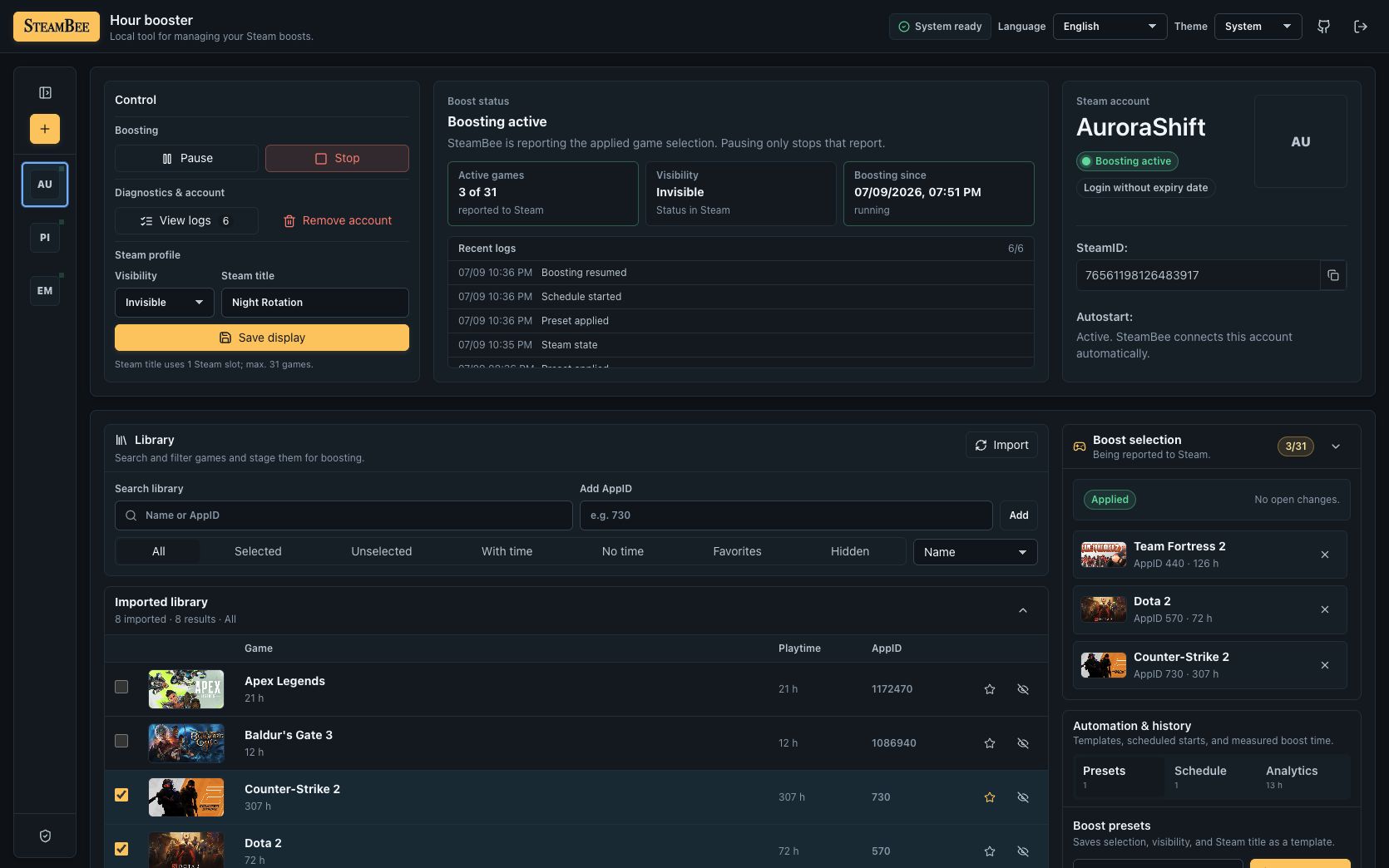
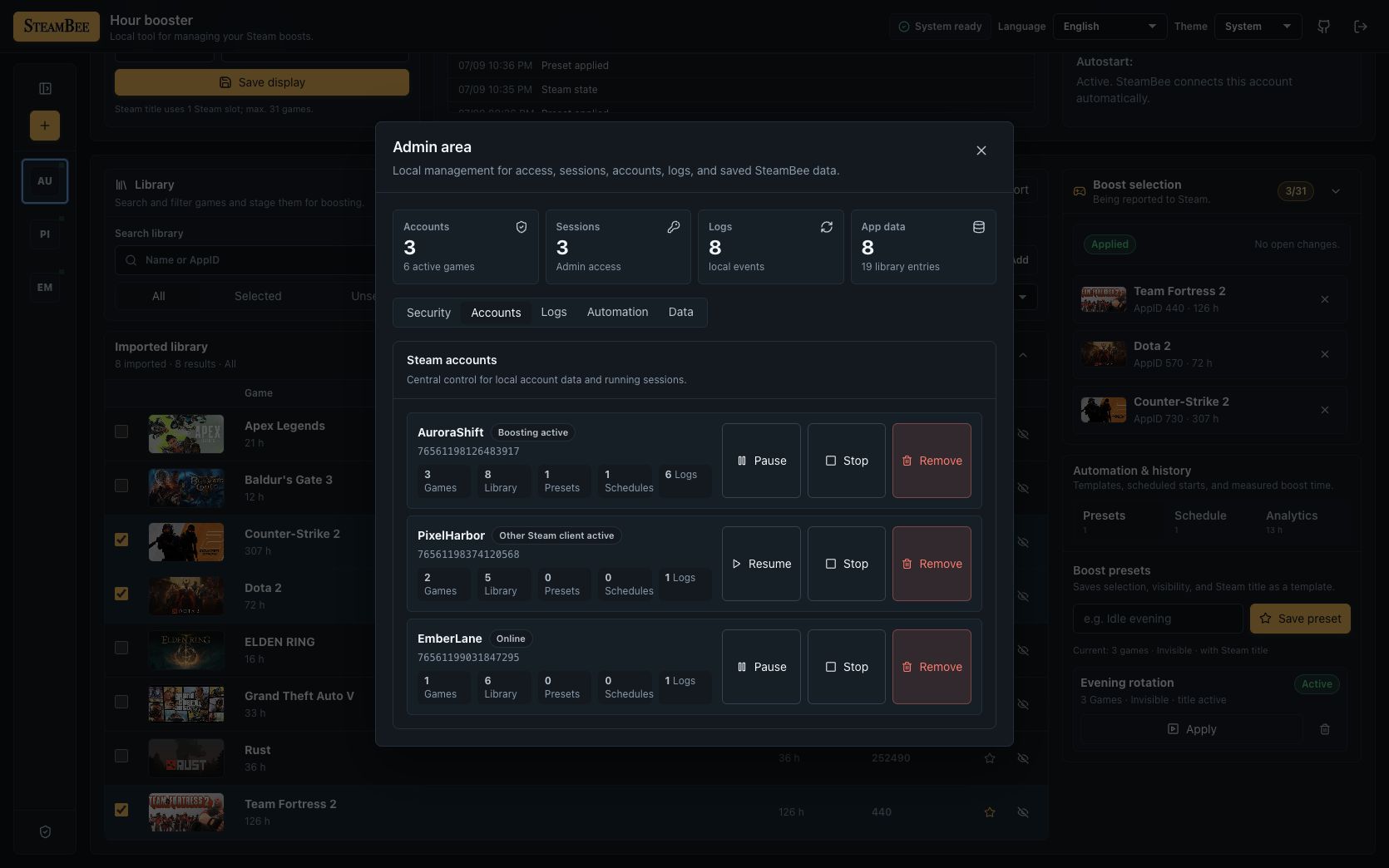
|
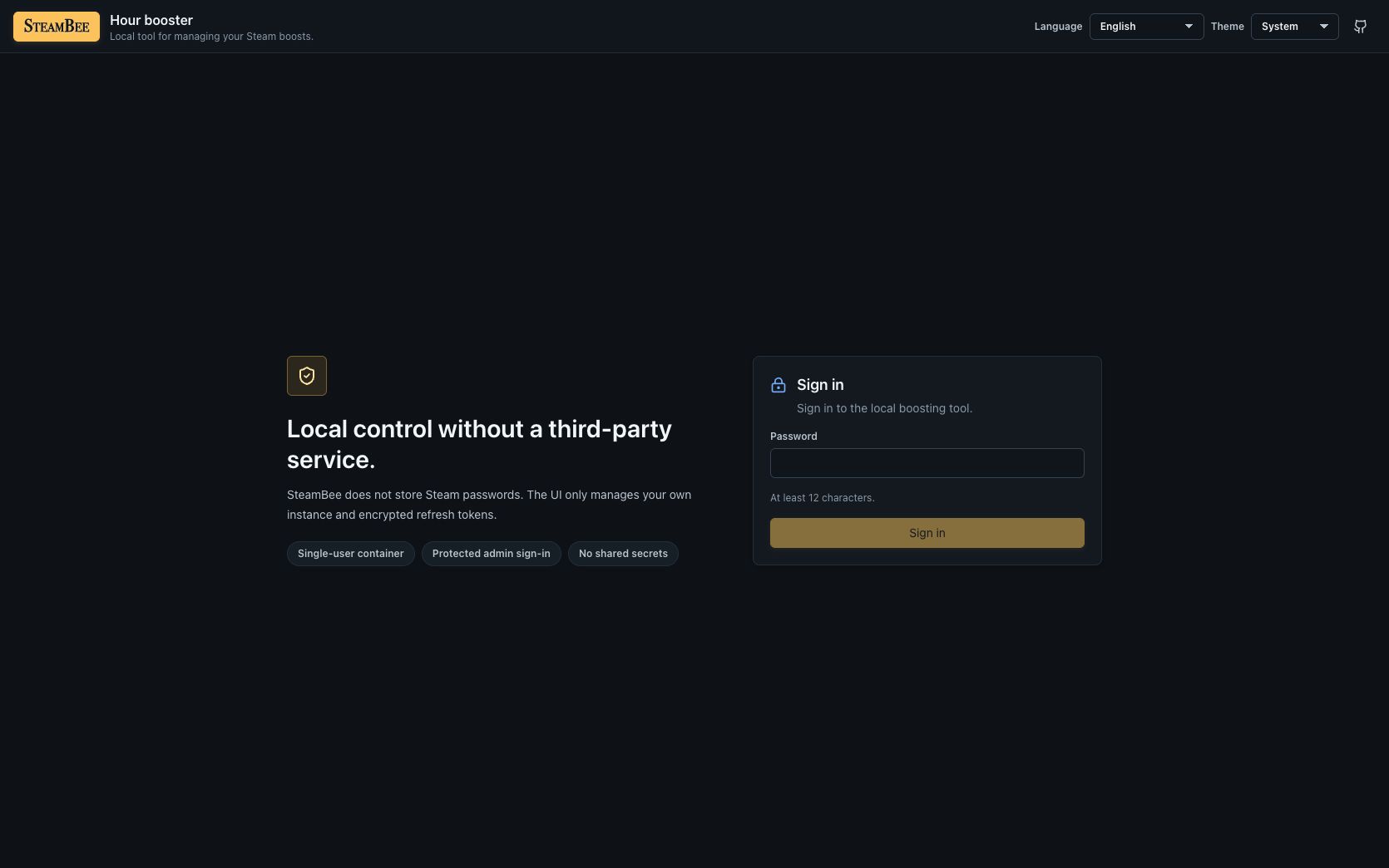
|
✨ Features
| Feature | What it does |
|---|---|
| 🛡️ Admin setup | One-time-token-protected admin setup with a cookie-based management UI. |
| 👥 Own accounts | Multiple own Steam accounts in one container. |
| 📱 QR login | QR login via steam-session. |
| 🔑 Credential fallback | One-time username/password + Steam Guard fallback without password persistence. |
| 🔐 Token storage | Encrypted refresh-token storage in /data. |
| 🎮 Game library | Library import with manual AppID fallback. |
| ⏯️ Session controls | Start, pause, resume, and stop per account. |
| 👤 Steam presence | Persona state and optional custom game title. |
| 📅 Planning and history | Presets, a weekly schedule timeline, playtime statistics, session history, and local logs. |
| 🩺 Recovery health | Recovery health with last Steam contact, retry timing, error class, token expiry, and library-snapshot age. |
| 🔄 Session recovery | Automatic recovery when another Steam session temporarily owns the account: two retries five minutes apart, then a 60-minute cooldown, repeated until Steam reports the account free. A restart begins a fresh retry cycle. |
| ⏱️ Safety limits | Session safety limits with a fail-closed disconnect fallback; limits can pause but never start a session, and daily/weekly limits use explicit UTC calendar boundaries. |
| 🗓️ Schedule preview | Seven-day schedule preview, overlap winners, skip-next, and pause-until. |
| 🗂️ Account groups | Account groups with per-account bulk results for pause and stop only. |
| 🔔 Notifications and webhooks | Local browser notifications and optional generic webhooks with private-network target blocking, bounded retries, and redacted payloads. |
| 🎯 Playtime goals | Read-only playtime goals based on manually refreshed library snapshots. |
| 💾 Recovery exports | Passphrase-encrypted recovery exports and a preflighted offline restore tool. |
| 🔒 Single-instance lease | A single-instance lease that prevents two processes from operating the same /data directory. |
| 📡 Live updates | SSE status/log updates. |
| 🎁 Free-game offers | Temporary free-game offers with opt-in browser notifications and owned-game filtering. |
| 🧭 Account hub | An account hub for games, inventory, card farming, offers, and account safety. |
| 🃏 Inventory and market | Steam Community inventory shown as badge card sets with a sell basket, wallet-bound pricing strategies, a market listings table that follows Steam Mobile confirmations, confirmed bulk sales and cancellation, fee previews, progress, and a stop control. |
| 🌾 Card farming | Optional two-phase card farming on a board of running, upcoming and skipped games, with selectable farming order (including card value), pinned games, license-based refund protection, resume after restarts, effective activity tracking, and the existing safety controls. |
| 🎨 Appearance | Additional built-in themes and local font preferences, without custom backgrounds. |
| 🐳 Docker Compose | Docker Compose setup for a VPS, Unraid, or any generic Docker host. |
| 📦 Prebuilt image | Optional prebuilt image deployment through GitHub Container Registry. |
🚀 Quick Start
Requirements:
- Docker Engine with the Docker Compose v2 plugin.
- A Docker host capable of running
linux/amd64orlinux/arm64images. - An HTTPS reverse proxy when SteamBee is exposed beyond a trusted LAN or VPN; see Deployment and Configuration.
Prebuilt Image (Recommended)
The public GHCR image is the shortest path for VPS and Unraid deployments. The
included image Compose file follows the mutable latest stable channel and
works without a .env file. Pin an exact version for repeatable deployments:
git clone https://github.com/ill-yes/steam-bee.git
cd steam-bee
docker compose -f compose.image.yml up -d
SteamBee is available on http://127.0.0.1:3000 by default. Compose binds to
localhost so a host-based reverse proxy can publish it safely.
First-Time Setup
The commands below use compose.image.yml. If you built from source, omit
-f compose.image.yml.
On a fresh instance, read the one-time setup token from the logs and enter it with the new admin password:
docker compose -f compose.image.yml logs steam-bee | grep "SteamBee setup token"
The generated token is also stored as /data/setup.token with mode 0600 and
is removed after successful setup. It is printed only when first generated;
read the file after a later restart with:
docker compose -f compose.image.yml exec steam-bee cat /data/setup.token
Set SETUP_TOKEN only for automated provisioning. Configured tokens must have
8 to 256 characters and are deliberately not printed.
SteamBee stores its database, encryption secret, encrypted refresh tokens, and
Steam client data in persistent /data storage. The default Compose setup uses
the named volume steam-bee-data; preserve it across updates, include it in
your backup plan, and never bind /data to the checked-out repository. See
Operations and Data for storage and backup guidance.
📚 Documentation
- Deployment and Configuration covers source builds, image tags and verification, environment settings, and reverse proxies.
- Operations and Data covers runtime commands, persistent storage, Unraid, backups, restores, and updates.
- Back Up and Restore links directly to the recovery procedures.
- Security Policy documents supported deployment boundaries and vulnerability reporting.
- Contributing covers repository hygiene, local checks, and contribution licensing.
- Translations explains locale ownership and the community-translation status.
- Steam Tools covers free offers, inventory, market actions, card farming, and appearance preferences.
- Achievement Editor Feasibility explains the currently unsupported write integration.
- Product Context and Design define the product boundaries and visual system.
Development & Contributing
Local Development
Requirements:
- Node.js 26.12.1 (matching CI and the container image).
- Corepack with the repository-pinned pnpm version.
- Docker Engine with Docker Compose v2 for container-related changes.
npm install --global corepack@0.36.0
corepack enable
pnpm install
pnpm dev
Corepack selects the integrity-pinned pnpm version from package.json.
Installation, CI, and Docker builds also verify the exact version. The workspace
keeps a single-document project lockfile for GitHub's dependency scanning;
pnpm's automatic version switching is disabled while Corepack verification and
the dependency security policies remain enabled.
The server listens on http://localhost:3000 and serves the built web app in
production. In development, run the web app separately if you want Vite HMR:
pnpm --filter @steam-bee/web dev
Read CONTRIBUTING.md for repository hygiene and local checks, and CLA.md before opening a pull request.
🔒 Security
Read SECURITY.md before exposing SteamBee outside localhost.
Security boundaries:
- No hosted multi-user mode.
- No Steam password persistence.
- No Steam Guard shared-secret persistence.
- No Docker socket or shell command surface.
- No forced kicking of real Steam sessions.
[!WARNING] Valve's Steam Subscriber Agreement, revised April 20, 2026, expressly prohibits automation used to artificially increase playtime or obtain rewards or progress without genuine user input. SteamBee's legacy boosting and scheduling functions fall inside that high-risk area and can lead to account restrictions or termination. The operations and safety features above reduce operational failure modes; they do not make automated playtime boosting compliant. Review the current Steam Subscriber Agreement before running the software. This notice is not legal advice.
License
SteamBee is licensed under the GNU Affero General Public License v3.0 or later
(AGPL-3.0-or-later). The AGPL is a network-copyleft license: if you modify
SteamBee and let users interact with it over a network, you must make the
corresponding source code of that modified version available under the same
license.
Commercial use is allowed when the AGPL is followed. If you need to use, modify, distribute, host, rebrand, or embed SteamBee without AGPL obligations, contact the project owner for a separate commercial license.
See LICENSE, NOTICE, and COMMERCIAL-LICENSE.md.
☕ Support SteamBee
If SteamBee is useful to you, you can support its continued development on Buy Me a Coffee. Support is entirely optional.
Media gallery
1 / 3Categories
Related apps
Explore more like this
Explore allLinks
Details
ghcr.io/ill-yes/steam-bee:latestRuntime arguments
- Web UI
http://[IP]:[PORT:3000]/- Network
bridge- Shell
sh- Privileged
- false
- Extra Params
--entrypoint=/usr/local/bin/steam-bee-entrypoint --user=0:0 --pids-limit=256 --cap-drop=ALL --cap-add=CHOWN --cap-add=DAC_READ_SEARCH --cap-add=SETGID --cap-add=SETPCAP --cap-add=SETUID --security-opt=no-new-privileges=true --read-only --tmpfs=/tmp:rw,noexec,nosuid,nodev,size=64m --stop-timeout=30 --log-opt=max-size=10m --log-opt=max-file=3
Template configuration
HTTP port for the SteamBee management UI.
- Target
- 3000
- Default
- 3000
Dedicated SteamBee data directory. Ownership is validated and initialized automatically for PUID/PGID; do not select the appdata parent.
- Target
- /data
- Default
- /mnt/user/appdata/steambee
Numeric user ID used after appdata initialization. Unraid default: 99 (nobody).
- Default
- 99
Numeric group ID used after appdata initialization. Unraid default: 100 (users).
- Default
- 100
Initialize /data ownership for PUID/PGID, then permanently drop root privileges. Keep enabled on Unraid.
- Target
- STEAM_BEE_DATA_INIT
- Default
- true
Keep false or set verified proxy IP addresses/narrow CIDRs as seen by SteamBee. Numeric hop counts and true aliases are rejected.
- Target
- TRUST_PROXY
- Default
- false
Set to true when SteamBee is served through HTTPS.
- Target
- COOKIE_SECURE
- Default
- false
Logging level: fatal, error, warn, info, debug, trace, or silent.
- Target
- LOG_LEVEL
- Default
- info
Log incoming HTTP requests.
- Target
- LOG_REQUESTS
- Default
- true
Suppress routine health and status requests in the logs.
- Target
- LOG_QUIET_REQUESTS
- Default
- true
Optional fixed setup token of 8 to 256 characters. Leave empty to generate one automatically.
- Target
- SETUP_TOKEN
Days to retain events. Set to 0 to disable automatic cleanup.
- Target
- EVENT_RETENTION_DAYS
- Default
- 90