

StaXX
Plugin from Quadcom
Overview
StaXX manages your Docker containers with standard compose files instead of Unraid's own template format, and draws those compose files as an ordinary form so you never have to edit indented text.
Nearly every project publishes a compose file. StaXX takes one as it is, runs it, and shows its settings — ports, folders, variables, health checks, start-up order — as boxes you can change, with the author's own comments as the help text beside them. The file underneath stays a plain compose file that still runs anywhere.
It also brings in what you already run: your existing Unraid apps, Compose Manager projects and loose containers are imported as copies, with the originals left untouched. Built-in search covers Community Applications, Docker Hub and the images already on your server, and shows you the compose file before anything starts. Every save is kept and every image that has run is kept, so a change can always be undone.
Requires Unraid 7.2.0 or newer.
Readme
View on GitHub
Docker on Unraid, built on compose files
Why this exists
Unraid describes containers in its own template format. Almost nothing else does. When a project publishes its setup — and nearly all of them publish a compose file — you cannot just use it: you retype it into a template, field by field, and hope you read it right.
The obvious fix is to run compose files directly. That works right up until you want to change a port, and find yourself editing indented text where one stray space breaks the file.
StaXX takes the compose file as it is and draws it as a form. Change the port in a box. The file underneath stays an ordinary compose file that still runs anywhere.
What it does
- Paste in a project's own compose file and it runs — no retyping into a template, no conversion step.
- Never read a line of it if you don't want to. Twenty-odd groups of settings — ports, folders, variables, health checks, start-up order — as ordinary form fields, with the file beside them if you prefer. The author's own comments become the help text next to each box.
- Change things without the fear. There is an Undo button, every save is kept, and every image that has actually run is kept, so a bad decision is one click back.
- Bring in what you already run. One window lists your existing Unraid apps, Compose Manager projects and loose containers, and imports them as copies — the originals stay put, and one click puts them back.
- Search 3,700 apps without leaving the page. Community Applications, Docker Hub and the images already on your server; pick one and get a compose file to look over before anything starts.
The 60-second start
Copy this address:
https://raw.githubusercontent.com/quadcom/Staxx/main/staxx.plg
In Unraid, go to Plugins → Install Plugin, paste it in, and press Install. That is the whole of it. You get a plugin Unraid looks after like any other: it survives a reboot, it appears on your Plugins page, and it will tell you when there is a newer version.
You do not need Community Applications for this, and StaXX is not in it — see Limitations.
Open Docker → Stacks. The first thing it does is ask where it should keep its data — one folder holding your stacks, the zips of any you remove, and its own settings. It suggests a sensible place and explains the choice; take the suggestion if you are in a hurry.
After that, make a folder inside the stacks folder of the place you chose, drop a compose file in
it, and it is there. Or press Apps and pick something.
New to the page? The user guide explains what you are looking at.
To remove it again, use Remove on the Plugins page. Your settings and your stacks are left alone; deleting the data store folder is a separate, deliberate act.
A tour of what's here
Every item below has its own page in the user guide — enough here to see whether StaXX does what you need.
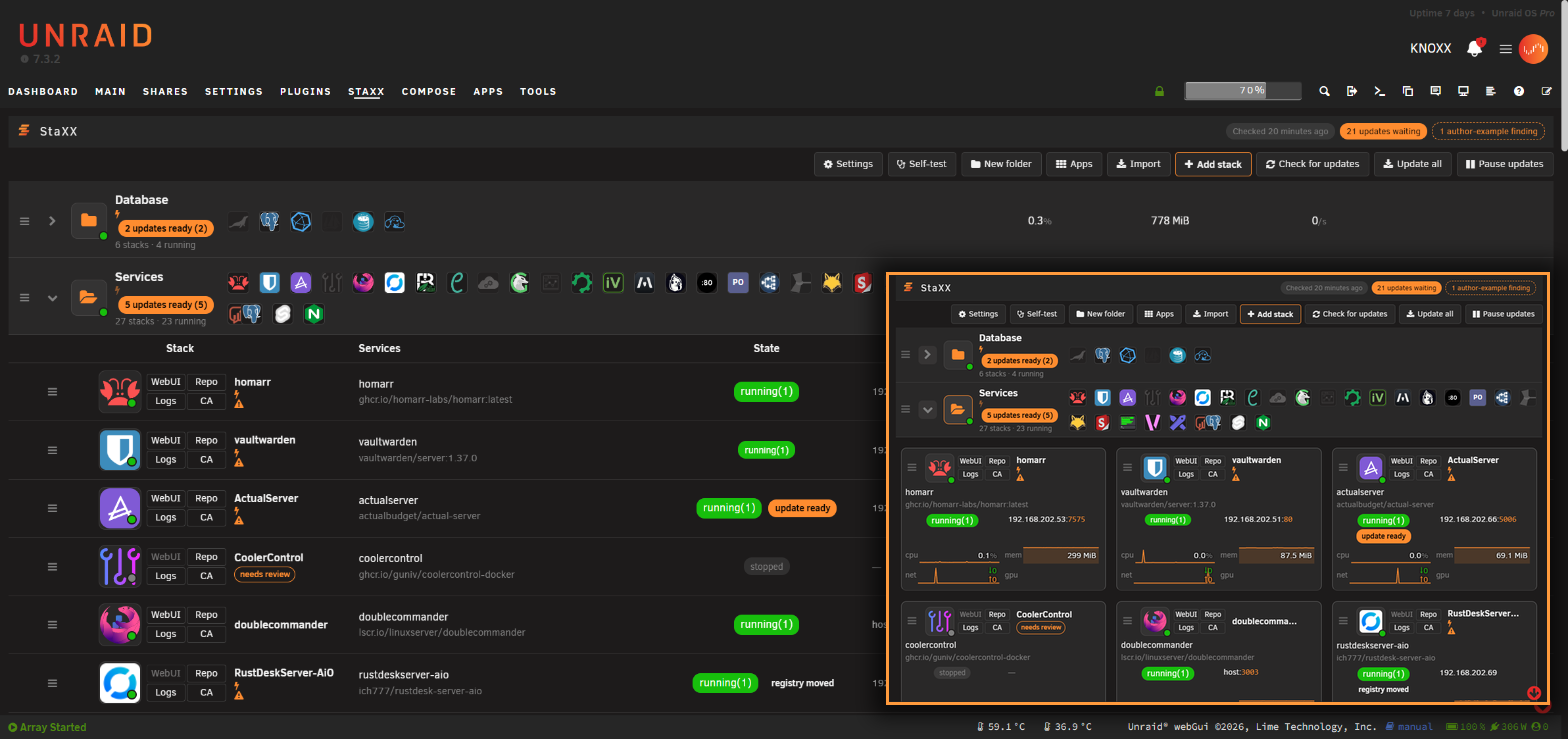
- The stacks page shows every container, with live figures, health, update state and which ports you can actually reach at a glance — hover an update pill to see both versions, when it was last checked and when it is next due; see what every mark means.
- It fits the screen it is on — desktop, tablet or phone. The list turns from a table into cards as the screen narrows, and the editor and settings come with it.
- The editor shows one file three ways — form, file, or both side by side — with the author's comments turned into help text; see editing a stack.
- Health checks can be worked out for you: where nothing is watching a running container, StaXX finds a real question to ask that image, tries it inside the container first, and tells you what the answer would actually prove — see letting StaXX work out a health check.
- One house layout puts every file in the same order as it arrives, so your stacks all read the same way. Order only — nothing you wrote is rewritten, and comments stay with what they annotate; see tidying a file.
- Adding an app searches Community Applications, Docker Hub and your own server's images, and hands you a compose file to check before anything starts; see adding an app.
- Starting from scratch gives you a working skeleton from nothing but a name; see making a stack from scratch.
- Bringing in what you already run copies your existing Unraid apps, Compose Manager projects and loose containers, leaving the originals untouched; see bringing in a container.
- Folders group stacks that belong together and can be started, stopped or updated as one; see working with folders.
- Passwords and their scrambled form are generated for you, in the box that needs them; see passwords and hashes.
- Hiding your values blanks out anything marked secret so a stack can be screenshotted safely; see hiding your values.
- Checking for updates compares your images against their registries on a schedule you set; see checking for updates.
- Going back keeps every saved file and every image build that has run, so a bad change is one click undone; see recovery and redundancy.
- A safety copy of every stack lives on the flash drive too, now including its values file, so restoring one hands back a complete stack rather than one missing its settings.
- Sharing a stack exports a copy with your passwords, keys and paths taken out, ready to drop onto somebody else's StaXX; see sharing a stack.
- The settings panel is where almost everything about StaXX lives — where it appears, where your data is kept, icons, updates and sign-ins, with a picture of each option so you can see what you're choosing before you click it; see the settings panel.
What it promises
- Never require non-standard syntax. A file StaXX writes runs unmodified anywhere Docker Compose does.
- Never lose what the author wrote. Comments, shortcuts, values and intent survive an edit. A file that is genuinely wrong gets fixed, and you are told what changed.
- Degrade gracefully. A file with no extras still produces a usable form.
- Own the render. Layout and controls are drawn by StaXX, not injected into another page.
Limitations
- In beta. The core is settled and in daily use, but expect the occasional rough edge, and read the changelog before updating.
- Requires Unraid 7.2 or later. Docker Compose is installed by StaXX if the server does not already have one.
- Graphics figures cover Intel and AMD cards; Nvidia shows none, though a container given an Nvidia card is still labelled as such.
- Without a Docker Hub read-only token, update checks are limited to roughly ten images an hour.
- A stack has to be started by hand once before it can start at boot.
- Getting an archived stack back means unzipping it yourself.
Configuration (optional)
Everything here has a switch on the settings page, so this is reference only. Settings live in
staxx.cfg in your data store, except three lines that stay on the flash drive so they are readable
before the array starts — see where StaXX keeps its things.
| Key | Default | What it does |
|---|---|---|
STORE_ROOT |
(blank) | The one folder StaXX keeps everything in — stacks in stacks, removed ones zipped into archives. Blank means you have not chosen yet. |
HEADER_MENU |
false |
true gives StaXX its own button in the top bar instead of a tab under Docker. |
TAKEOVER_DOCKER_TAB |
false |
true replaces the Docker button entirely. No stock Unraid file is modified either way. |
CATCH_INSTALLS |
true |
What happens when something is installed from Unraid's own Apps page: true brings it in as a stack, prompt asks first, false leaves it to Unraid. |
ICON_FETCH |
true |
Whether StaXX finds an icon for a service that has none. |
IMAGE_LOOKUP |
true |
Read an image's documentation when adding it, for a fuller starting file. |
WATCH_EXAMPLES |
true |
Compare your file with the publisher's own example during an update check. |
SHELL_ENABLED |
true |
The root command line inside a container. false removes it everywhere. |
UPDATE_CHECK / UPDATE_CHECK_TIME |
daily / 04:00 |
How often to look, and when. off never looks. |
UPDATE_MODE / UPDATE_DELAY_HOURS |
notify / 24 |
off shows only, notify says so, auto installs after the delay. Any stack can overrule this in its own file. |
UPDATE_WINDOW + _START / _END |
true, 03:00–05:00 |
Only install automatically inside a quiet window. |
UPDATE_NOTIFY |
off |
Unraid notifications: found, or applied as well. |
UPDATE_RETAIN |
2 |
How many previous builds of each image to keep for a rollback. |
UPDATE_KEEP_IMAGES |
yes |
no still remembers the version numbers but no longer keeps the image files on disk; a rollback downloads that version again, which only works while the source still has it. |
STORAGE_ALERT_PERCENT / STORAGE_ALERT_DAYS |
85 / 30 |
When to show a notice pointing at Scan stored images: storage this full, or clutter sitting unused this many days. Nothing is ever removed on a schedule. |
HUB_USER / HUB_TOKEN |
(blank) | A Docker Hub read-only token. Without one, checks are limited to roughly ten images an hour. |
CRYPT_MODE decides whether the password-hashing helper stays running (always) or starts only
when needed (ondemand). The PWGEN_* keys are the password generator's own remembered choices,
set from its panel rather than here. Comments in this file must start with a semicolon.
For contributors
The plugin is plain PHP and browser JavaScript with no client-side libraries, talking to the page
through a single endpoint. src/staxx/ mirrors the install paths on the server; docs/ and
schema/ describe the file format StaXX reads and writes.
Licence
GPL-2.0, matching unraid/webgui.
Credits
StaXX uses work by these people and projects. Settings, About lists the same credits inside StaXX.
- hernandito's animated folder icons: offered in the Dashboard tile's icon picker, used with the author's permission. StaXX ships none of these files; your server downloads the one you pick.
- ground7's animated icons, MIT licence, copyright 2020 Josiah Hutchinson.
- Dashboard Icons by homarr-labs, Apache-2.0. The logos remain their owners' trademarks.
- Tabler Icons by Paweł Kuna, MIT licence.
- selfh.st icons, CC-BY-4.0, for the app icons on stacks and the selfh.st logos tab in the Dashboard tile's icon picker.
- Docker Compose, Apache-2.0, Docker Inc., which StaXX installs when a server has none.
- Community Applications, whose app feed and images the importer reads.
Prior art
Studied while scoping this. None of their code is used here.
- Compose Manager Plus — compose engine, header-menu toggle
- FolderView3 — collapsible grouping
- unraid-plugin-composerize — template → compose conversion
Media gallery
1 / 3Categories
Download Statistics
Downloads by Month
Related apps
Explore more like this
Explore allLinks
Details
https://raw.githubusercontent.com/quadcom/Staxx/main/staxx.plg