

Stashboard
Docker app from mrnogoodlee356's Repository
Overview
Needs a PostgreSQL 15 or newer database: install the PostgreSQL app from Community Applications first (for example postgresql17), create a database and user for Stashboard, then fill in the Database fields below. Setup in the web UI connects Stash, Whisparr and the catalog.
Readme
View on GitHubStashboard
Stashboard is a self-hosted console that discovers scenes from a supported catalog provider, sends acquisitions to Whisparr, and validates availability against your local Stash library.






What Stashboard Does
Discover scenes through a configured catalog provider during first-run setup.
Submit and track acquisition requests through Whisparr.
Check local Stash availability so you can see what is already in your library.
Browse FansDB next to StashDB (or the other way round): add the second provider in Settings → Integrations as an optional browse provider. Requests keep going through your chosen provider.
Get Discord, ntfy or webhook notifications when requests start downloading, land in your library, or fail (Settings → Notifications).
Watch your Stash library in Stashboard: a built-in player with resume, scrub previews, quality choice, picture-in-picture and AirPlay/Chromecast. Progress and play counts sync back to Stash, and a Continue Watching rail picks up where you left off. Files your browser can't play are converted by Stash on the fly, so Stash's live transcoding should be enabled.
New scenes on autopilot (Settings → Automation): when Whisparr imports a scene, Stashboard has Stash scan for it, identify it on StashDB and generate its previews. Add Stashboard's webhook in Whisparr to make it instant; otherwise it notices new imports on its own within about 15 minutes.
Match & rename (Library tools): matches scenes Stash couldn't identify using every source it can reach: your main catalog (StashDB), every other stash-box set up in Stash (FansDB, ThePornDB…), ThePornDB from its API key, and finally Stash's own scrapers. It tries video fingerprints first, then the file name, and shows the likely matches with covers and reasons so you can pick one. You can also search StashDB yourself. "Match all" saves only the sure matches and can run every night. The renamer moves matched files into a pattern such as
{studio}/{date} - {title}. It shows a preview first, can run automatically after each match, leaves Whisparr's own files alone, and the last run can be undone.Send to Whisparr: scenes you match to StashDB that Whisparr shows as missing are handed to Whisparr's Manual Import, so Whisparr counts them as downloaded and takes over the file (move, or hardlink/copy). "Send them now" catches up on everything Stash has that Whisparr is missing. If Stash and Whisparr see your media under different paths, set the folder mapping on the Match tab and tap "Save and check".
Empty folders (Rename tab): removes folders left empty after renames, Unmatched moves and Whisparr moves, and has a one-tap cleanup for the whole library. It never removes library or Whisparr root folders. Stashboard needs to see your media for this: mount the same media path into the Stashboard container as Stash uses (for example host
/mnt/user/data→ container/data).Repair Whisparr (Rename tab): when Whisparr shows scenes as missing because it's looking in the wrong folder, this points them back at the right root folder without moving anything, rescans, and re-imports the rest from where Stash has them.
Pick a release: on a requested scene, see every release your indexers found (quality, size, seeders, age, why Whisparr would skip it) and download the one you want.
App Lock (Settings → Privacy): require a PIN to reopen Stashboard after it's been in the background, enforced by the server. Face ID works too when Stashboard is opened over HTTPS with a domain name. Stashboard also tries to cover the screen when you leave, but iOS can still show a preview in the app switcher.
Install it on your phone: in Safari use Share → Add to Home Screen; in Chrome use Install app.
Screenshots
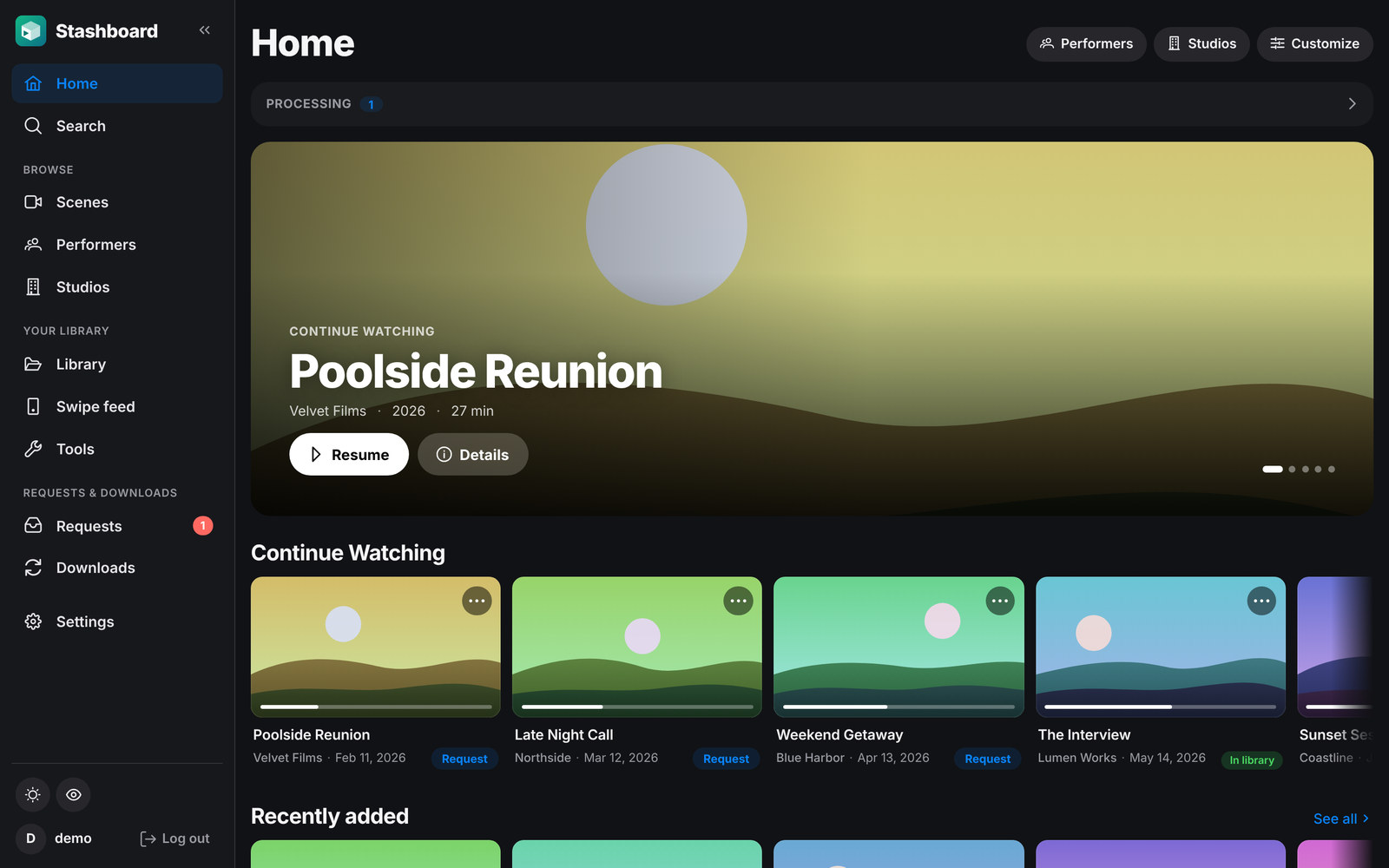
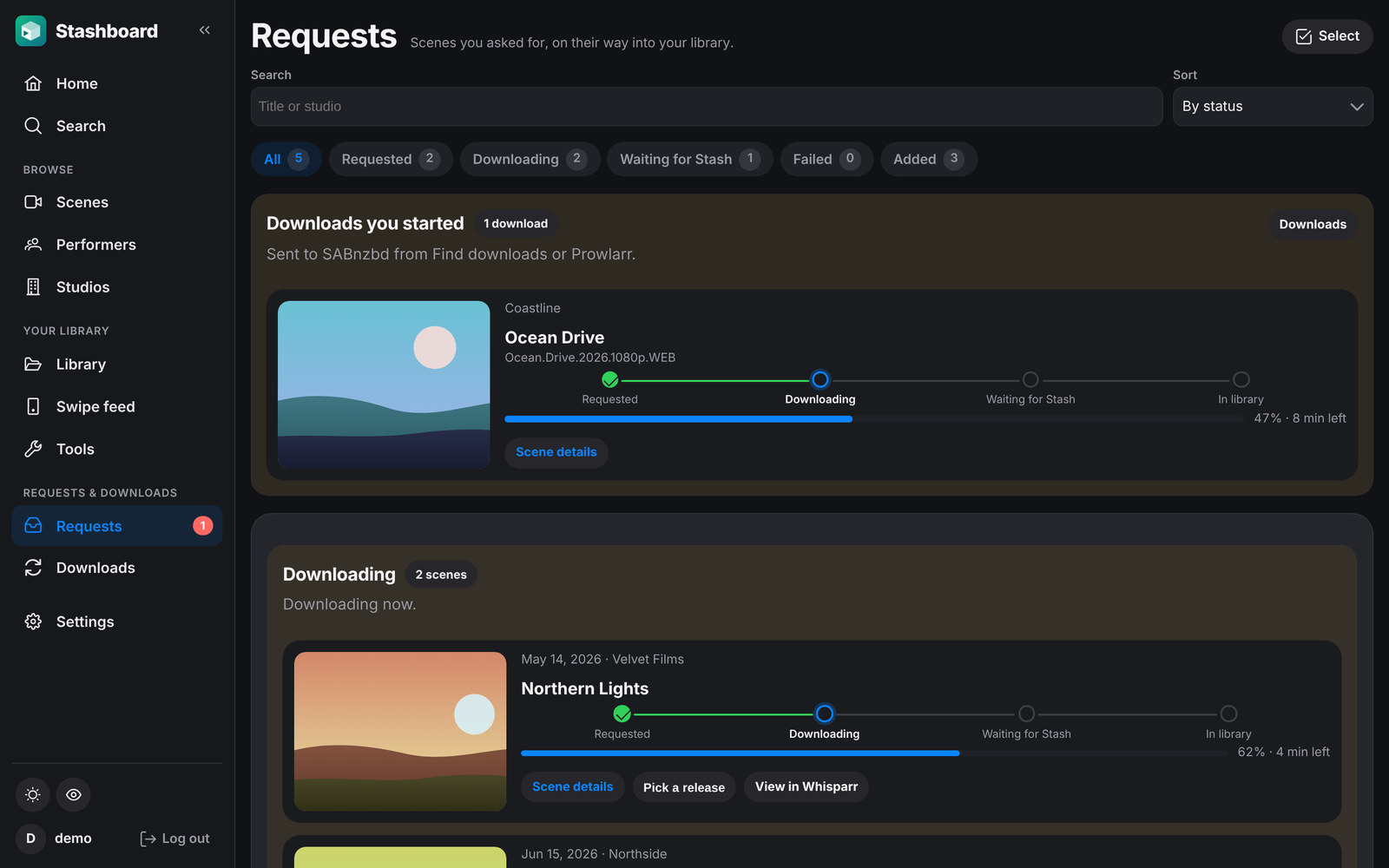
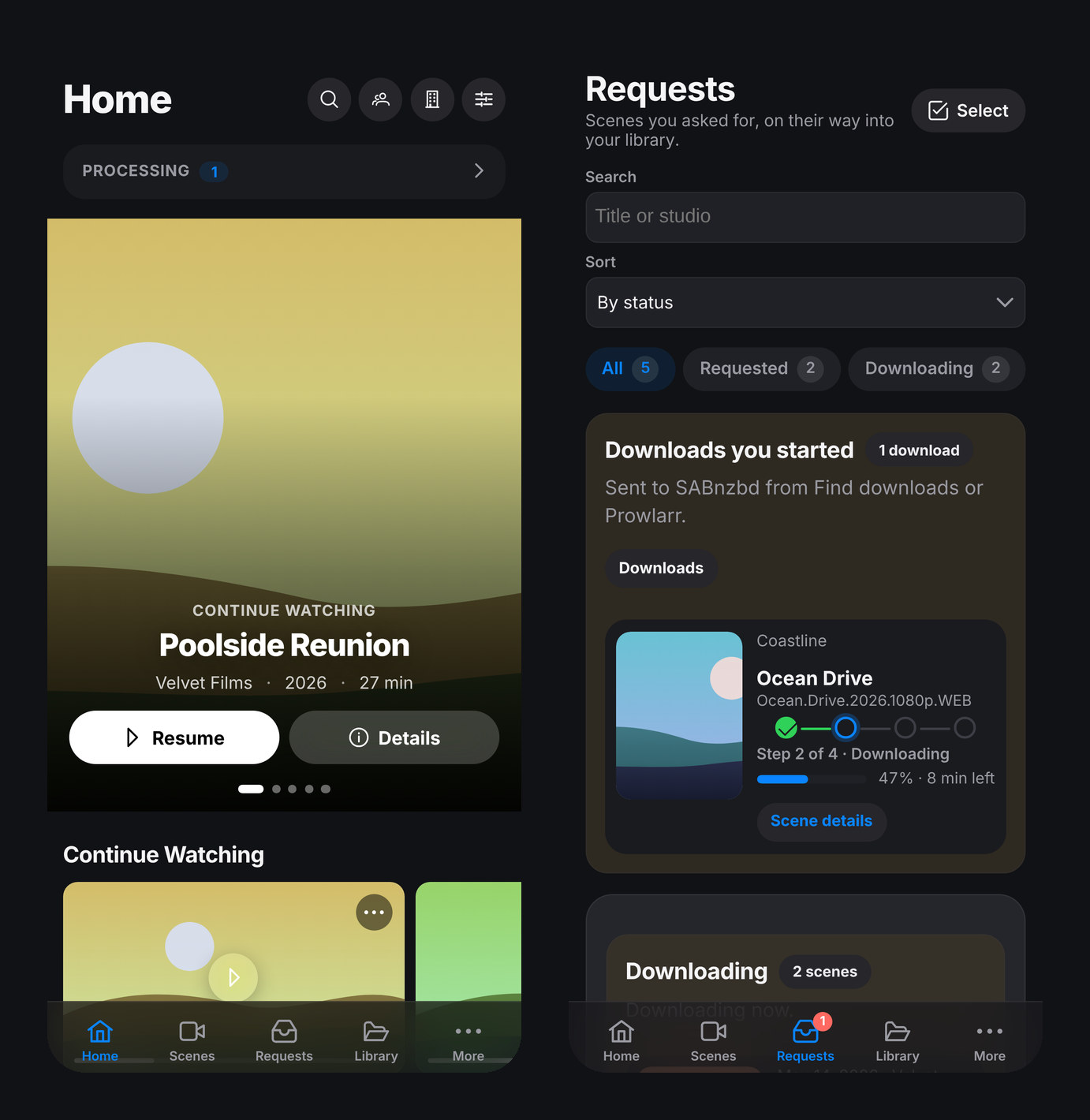
Screenshots use sample data.
What You Need
- Docker and Docker Compose on the machine that will run Stashboard
- An existing Stash instance that Stashboard can reach
- An existing Whisparr instance that Stashboard can reach
- A supported catalog provider to configure during setup: StashDB or FansDB
Self-Hosted Quick Start
Normal self-hosted installs do not require a repo checkout or a separate .env file. Create an empty folder, save the following as compose.yaml, change the database password once before first start, and optionally change the host port or pin the image tag. This snippet matches infrastructure/compose/compose.example.yaml.
x-db-env: &db-env
  POSTGRES_DB: stashboard
  POSTGRES_USER: stashboard
  # Change this once before your first start.
  POSTGRES_PASSWORD: change-this-password

services:
  postgres:
    image: postgres:17-alpine
    environment:
      <<: *db-env
    volumes:
      - stashboard_postgres_data:/var/lib/postgresql/data
    healthcheck:
      test: ['CMD-SHELL', 'pg_isready -U $$POSTGRES_USER -d $$POSTGRES_DB']
      interval: 5s
      timeout: 5s
      retries: 10
      start_period: 10s
    restart: unless-stopped

  app:
    # Change latest to an exact release like v0.1.0 if you want to pin upgrades.
    image: ghcr.io/mrnogood356/stashboard:latest
    depends_on:
      postgres:
        condition: service_healthy
    volumes:
      - stashboard_app_data:/var/lib/stashboard
    environment:
      <<: *db-env
      DATABASE_HOST: postgres
      DATABASE_URL: ""
      HOST: 0.0.0.0
      PORT: 3000
      DATABASE_MIGRATION_MAX_ATTEMPTS: 30
      DATABASE_MIGRATION_RETRY_DELAY_SECONDS: 2
      # Optional advanced override. Leave unset to let Stashboard generate and persist
      # a unique session secret for this install in the app data volume.
      # SESSION_SECRET: your-own-long-random-secret
      # Optional: uncomment if catalog provider checks time out on IPv4-only Docker networks.
      # NODE_OPTIONS: --no-network-family-autoselection
      # Optional: a code the first visitor must enter to create the admin account.
      # Set it if the page can be reached before you've signed up.
      # SETUP_CODE: pick-a-long-code
      # The user Stashboard runs as. It can only rename and clean up media this user
      # may change, so match your media's owner (Unraid: 99/100; most Linux: 1000/1000).
      PUID: 99
      PGID: 100
    ports:
      # Change the left side if port 3000 is already in use on the host.
      - "3000:3000"
    restart: unless-stopped

volumes:
  stashboard_postgres_data:
    name: stashboard_postgres_data
  stashboard_app_data:
    name: stashboard_app_data
Both services reuse the same POSTGRES_* values from x-db-env, so you change the database password in one place only. On first boot, Stashboard automatically generates a unique session secret for that install and persists it in the app data volume. You only need to set SESSION_SECRET yourself if you want an advanced manual override.
Then start Stashboard with:
docker compose up -d
Open http://localhost:3000.
On the first visit, Stashboard opens a bootstrap screen until you create the single local admin account. After that, unauthenticated visits land on the login screen and normal app and API usage require that session.
If StashDB or FansDB Save & Test repeatedly fails with ETIMEDOUT on an IPv4-only Docker network, add
NODE_OPTIONS: --no-network-family-autoselection to the app service environment and restart the container.
Tag guidance:
latestis the newest stable release and the recommended default.vX.Y.Zpins an exact release.edgefollows unreleased builds frommainand is meant for early adopters.
Optional Settings
| Variable | Default | What it does |
|---|---|---|
TRUST_PROXY |
unset | Set when Stashboard sits behind a reverse proxy: 1 for one proxy in front, or the proxy's address or network (such as 172.18.0.0/16). Login throttling then sees each visitor's real address, and HTTPS through the proxy marks the sign-in cookie Secure. Let only the proxy reach the app's port. true trusts any address and isn't recommended. |
SESSION_COOKIE_SECURE |
auto | The sign-in cookie is marked Secure whenever you visit over HTTPS. Set true or false to force it. |
SETUP_CODE |
unset | A code the first visitor must enter to create the admin account. Set it if the page can be reached before you've signed up. |
DATABASE_PORT |
5432 |
Postgres port used when DATABASE_URL is derived from the POSTGRES_* values. |
MEDIA_CACHE_TTL_HOURS |
24 |
How long Stash screenshots and logos are kept in the image cache. |
MEDIA_CACHE_MAX_MB |
512 |
Size cap for the image cache; the oldest images are removed first. |
MEDIA_CACHE_DISABLED |
unset | Set to true to turn the image cache off. |
PUID / PGID |
99 / 100 |
The user and group Stashboard runs as (it starts as root only to hand its data folder to them). Folder cleanup and renames only work on media this user may change, so match your media's owner: 99/100 on Unraid, usually 1000/1000 elsewhere. PUID=0 keeps running as root. |
CONTENT_SECURITY_POLICY |
enforce |
Browser Content-Security-Policy. By default the browser blocks anything the policy doesn't allow; set to report-only to only report violations in the browser console, or off to send no policy. |
STASHBOARD_SECRET_KEY |
unset | The key that encrypts saved API keys and tokens in the database. Without it, Stashboard makes one on first start and keeps it in the app data volume (secret-key). Set it only if you want to manage the key yourself; changing it later means entering your API keys again. |
ALLOW_EMBEDDING |
unset | Set to true to let dashboards such as Organizr or Homarr show Stashboard in an iframe. By default other sites can't frame it. |
The image cache lives in the app data volume (/var/lib/stashboard/media-cache).
Updating
For the standalone compose.yaml install, pull the newest stable release and restart:
docker compose pull
docker compose up -d
If you pin releases, change the image tag in compose.yaml to the target vX.Y.Z first, then run the same commands. Stashboard applies Prisma migrations automatically when the app container starts.
Stashboard no longer runs as root: it runs as PUID/PGID (default 99/100) and takes ownership of its data volume on the first start. If your media isn't owned by 99/100, set PUID and PGID to its owner, or folder cleanup won't be able to remove anything.
Rollback
To roll back, change the image tag in compose.yaml back to a known-good vX.Y.Z, then pull and restart:
docker compose pull
docker compose up -d
Rolling back the app image does not automatically roll back database schema changes. Take a database backup before upgrades, and be cautious about rolling back across releases that may have already applied newer migrations. If an older image cannot start cleanly against the migrated schema, restore the pre-upgrade database backup before retrying the rollback.
Backups
Persistent PostgreSQL data lives in the named Docker volume from your compose file. The standalone example uses stashboard_postgres_data, and the repo-managed compose file uses sp_postgres_data. The app container also uses a small data volume for the generated session secret and the key that encrypts saved API keys (secret-key): stashboard_app_data in the standalone example and sp_app_data in the repo-managed compose file. Keep the two together: a database restored without its secret-key still works, but you'll have to enter your API keys and tokens again. Settings → Account & backup can also save every setting, keys included, to one file. Back up the database volume or take a logical database dump before upgrades. For a full restore, preserve:
- the
stashboard_postgres_dataDocker volume - the
stashboard_app_dataDocker volume - your
compose.yaml
One practical logical backup command is:
docker compose exec -T postgres sh -c 'pg_dump -U "$POSTGRES_USER" "$POSTGRES_DB"' > stashboard-backup.sql
Local Development
If you want to run the repo locally instead of the published image:
- install dependencies with
pnpm install - copy
.env.exampleto.envand setSESSION_SECRET - start Postgres with
pnpm run dev:db - run the backend with
pnpm run backend - run the frontend with
pnpm run web
If an older local database says migration 20260402142846 was modified after it was applied, run pnpm run db:repair-runtime-health-migration once, then rerun pnpm prisma migrate dev.
Contributing
For repo structure, release automation, CI expectations, PR conventions, and contributor deployment notes, see CONTRIBUTING.md.
How It's Made
Stashboard is built with heavy help from AI coding tools (Anthropic's Claude Code). Changes are reviewed and tested before they're merged: every pull request runs the full test suite and an automated code review, and features are checked in a browser. Bug reports are very welcome; please open an issue.
Credits
Stashboard is based on Stasharr Portal by enymawse, and like it is licensed under the GNU General Public License v3.0.
Requirements
Related apps
Explore more like this
Explore allLinks
Details
ghcr.io/mrnogood356/stashboard:latestRuntime arguments
- Web UI
http://[IP]:[PORT:3000]/- Network
bridge- Shell
sh- Privileged
- false
Template configuration
The port you open Stashboard on.
- Target
- 3000
- Default
- 3000
- Value
- 3000
Session secret, logs and the image cache. Give Stashboard a folder of its own.
- Target
- /var/lib/stashboard
- Default
- /mnt/user/appdata/stashboard
- Value
- /mnt/user/appdata/stashboard
Optional. The same media folder Stash and Whisparr use, mapped to the same path they see, so renames and empty-folder cleanup work.
- Target
- /data
- Default
- /mnt/user/data
- Value
- /mnt/user/data
Your server's IP. The PostgreSQL container's name works only when both containers are on the same custom Docker network.
- Target
- DATABASE_HOST
PostgreSQL port.
- Target
- DATABASE_PORT
- Default
- 5432
- Value
- 5432
The database Stashboard uses. It creates its tables on first start.
- Target
- POSTGRES_DB
- Default
- stashboard
- Value
- stashboard
A PostgreSQL user that owns that database.
- Target
- POSTGRES_USER
- Default
- stashboard
- Value
- stashboard
That user's password.
- Target
- POSTGRES_PASSWORD
User Stashboard runs as. 99 is Unraid's nobody, which owns media by default.
- Default
- 99
- Value
- 99
Group Stashboard runs as. 100 is Unraid's users group.
- Default
- 100
- Value
- 100
Optional. When set, creating the first admin account also needs this code, so nobody who reaches a fresh install first can claim it.
- Target
- SETUP_CODE
Leave empty to mark the sign-in cookie Secure whenever you visit over HTTPS. true or false forces it.
- Target
- SESSION_COOKIE_SECURE
Behind a reverse proxy, set to 1 (one proxy in front) or the proxy's address or network, such as 172.18.0.0/16, so login throttling sees each visitor's real address. Then let only the proxy reach this port.
- Target
- TRUST_PROXY
error, warn, info, debug or trace. Settings, Logs can also change it while running.
- Target
- LOG_LEVEL
- Default
- info
- Value
- info