
All apps · 0 apps

Starr-Proxy
Docker app from grtgbln's Repository
Overview
Readme
View on GitHub

Starr Proxy
Note
Feel free to join the Notifiarr discord and ask questions in the #starrproxy channel or help out with templates. We only make them as users add new apps that dont have them
Navigation
Purpose
Provide access scoped apikeys & stop letting every 3rd party app and script have full access to your starr instance(s)!
Some apps only need one or two endpoints but have full access/control over everything, needlessly.
Access logs per app are generated so you can see everytime the app hits the proxy, allowed and rejected requests, etc
App templates
There are some pre-built templates that enable just the api access the app actually needs so they are quick and easy to setup. More will be added in time for the common 3rd party apps.
Current templates
- Autobrr
- Bazarr
- Cleanuparr
- Cross-seed
- DAPS
- Homepage
- Kometa
- LunaSea
- Maintainerr
- Nabarr
- Notifiarr
- Nzb360
- Omegabrr
- Organizr
- Postarr
- Prowlarr
- Qui*
- Recyclarr*
- Ruddarr
- Seerr*
- TitleCardMaker
- Unmanic
- Unpackerr
Removed templates
- Huntarr: For obvious reasons.
- Jellyseerr: Superseded by Seerr (merged with Overseerr into one project).
- Overseerr: Superseded by Seerr (automatic migration on first startup).
* This app has a requirement of unique URLs instead of using a unique URL + API key combo so this means you will need to add a fake base to the url if you use multiple instances. Example: http://10.1.0.100:9090/radarr1 or http://starrproxy:80/radarr2
Automation
When the app is first opened, it checks for a key file in /config and if it is not present, it creates it with a 32 char apikey. Since automation will not open the UI this file will need to be created automatically as well. Create /config/key and add a 32 character key to it.
All internal api requests will authenticate with either:
Header: "X-Api-Key: <starrproxy-apikey>"
Parameter: "?apikey=<starrproxy-apikey>"
If you need to auto add starr apps and 3rd party apps you can do that via the api endpoint /api/addstarr. Send a curl post request to the starr proxy url with the json header and the payload below
{
    "name": "notifiarr",
    "starr": "radarr",
    "url": "http://<starr-ip>:<starr-port>",
    "apikey": "<starr-apikey>",
    "template": "notifiarr"
}
The template variable is not required but if you do not use an existing template then the app will have no starr api access initially.
An example curl would be:
curl -i -H "Content-Type:application/json" -d "{\"name\":\"notifiarr\",\"starr\":\"radarr\",\"url\":\"http://<starr-ip>:<starr-port>\",\"apikey\":\"<starr-apikey>\",\"template\":\"notifiarr\"}" "http://10.1.0.128:9090/api/addstarr?apikey=<starrproxy-apikey>"
Responses will be json
Success:
{
    "proxied-scope": "notifiarr's template access (25 endpoints)",
    "proxied-url": "http://10.1.0.128:9090",
    "proxied-key": "c54696c9a238336712454dc7aa088190"
}
Errors:
{
    "error": "Starr Proxy: no apikey provided"
    "error": "Starr Proxy: provided apikey is not valid for internal api access"
    "error": "Starr Proxy: missing required fields for addstarr endpoint. Optional: template | Required: name, starr, url, apikey"
    "error": "Starr Proxy: invalid internal api route"
    "error": "Starr Proxy: provided apikey is not valid or has no access"
    "error": "Starr Proxy: name field is required, should be the name of the 3rd party app/script"
    "error": "Starr Proxy: url field is required, should be the local url to the starr app"
    "error": "Starr Proxy: apikey field is required, should be the apikey to the starr app"
    "error": "Starr Proxy: starr field is required, should be one of: lidarr, radarr, readarr, sonarr, whisparr"
    "error": "Starr Proxy: starr field is not valid, should be one of: lidarr, radarr, readarr, sonarr, whisparr"
    "error": "Starr Proxy: could not connect to the starr app (radarr)"
    "error": "Starr Proxy: requested template (fake-template) does not exist for radarr, provide a valid template or leave it blank"
}
Installation
Image tags
:main— release channel, updated when a build is cut frommain.:develop— tracks thedevelopbranch directly, rebuilt on every merge todevelop. May be ahead of:mainbetween releases; use it if you need a fix that's merged but not yet released on:main.
Both tags carry standard org.opencontainers.image.* labels (.created, .revision) — check those on a pulled image if you need to know exactly what's in it.
Compose example
services:
  starrproxy:
    container_name: starrproxy
    image: ghcr.io/notifiarr/starrproxy:main
    restart: unless-stopped
    ports:
      - 9090:80/tcp
    environment:
      - TZ=America/New_York
    volumes:
      - /volume1/data/docker/starrproxy/config:/config
Run example
docker run \
  -d \
  --name "/starrproxy" \
  --hostname "/starrproxy" \
  --volume "/volume1/data/docker/starrproxy/config:/config:rw" \
  --restart "unless-stopped" \
  --publish "9090:80/tcp" \
  --network "bridge" \
  --env "TZ=America/New_York" \
  "ghcr.io/notifiarr/starrproxy:main"
Environment variables
Volumes
Name: App config, Host: /volume1/data/docker/starrproxy/config, Container: /config
Ports
Inside: 80, Outside: 9090
Variables
Name: TZ, Key: TZ, Value: America/New_York
Screenshots
When viewing the access log for an allowed app, an endpoints tab contains all the endpoints referenced in the log and if the app has access or not. Clicking the red x allows access.
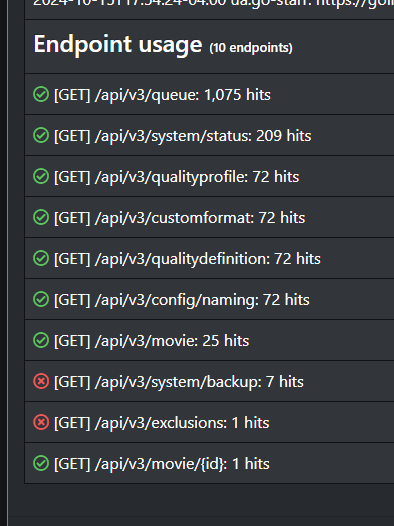
Easily view apps, what they access, etc

Some basic stats
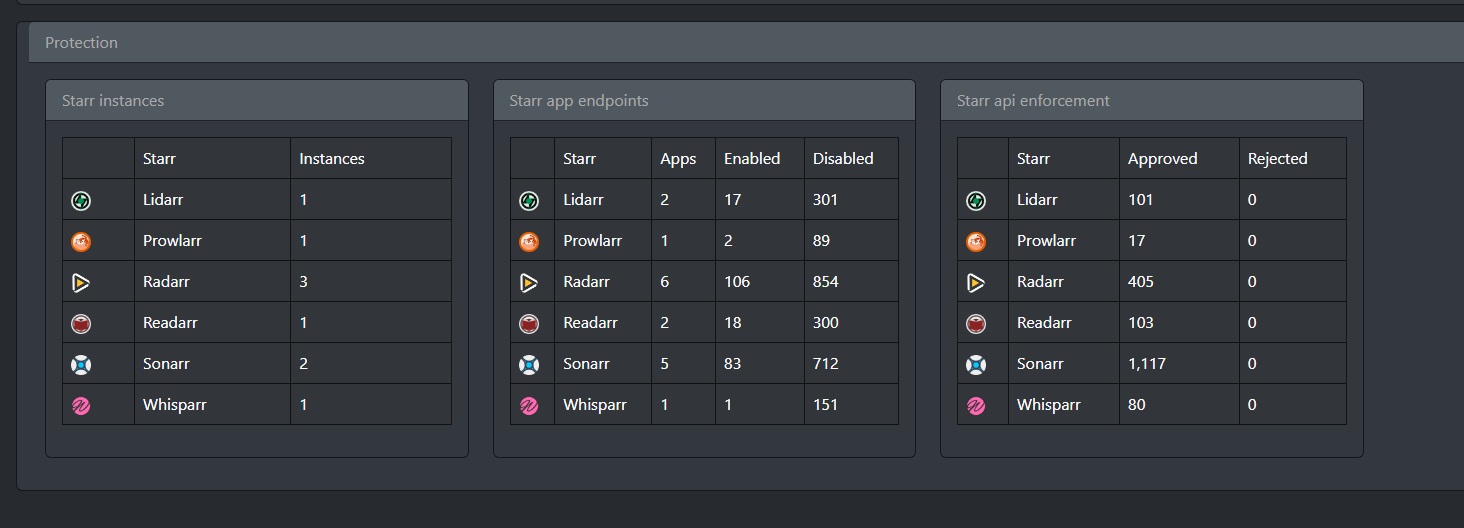
Media gallery
1 / 3Related apps
Explore more like this
Explore allDetails
ghcr.io/notifiarr/starrproxy:mainRuntime arguments
- Web UI
http://[IP]:[PORT:80]/- Network
bridge- Privileged
- false
Template configuration
Container Port: 80
- Target
- 80
- Default
- 9090
- Value
- 9090
Path to configuration files
- Target
- /config
- Default
- /mnt/user/appdata/starr_proxy/config
- Value
- /mnt/user/appdata/starr_proxy/config