
All apps · 0 apps

srt-router
Docker app from Stoatworks Labs' Repository
Overview
Readme
View on GitHubsrt-router
AI-assisted project. This codebase was created with Claude (Anthropic), directed and reviewed by a human author. The relay/crosspoint engine and web UI have been exercised locally — including integration tests that relay real SRT and NDI protocol traffic end-to-end and a live crosspoint switch via the web UI, see Status — but not yet run against real-world third-party SRT/NDI encoders/decoders or over an actual (non-loopback) network path. Review before relying on it for anything live.
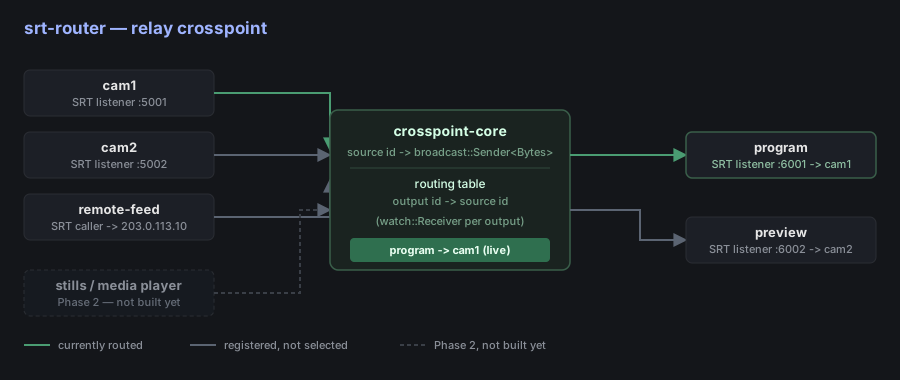
A crosspoint-based SRT router: any number of SRT inputs, any number of SRT outputs, and a router-style crosspoint (each output picks exactly one source, switchable live) connecting them — the same mental model as a broadcast video router, applied to SRT streams instead of SDI/HDMI.
A 45-second tour, driven over the router's own REST API against config/example.toml — the same config as the screenshot below.
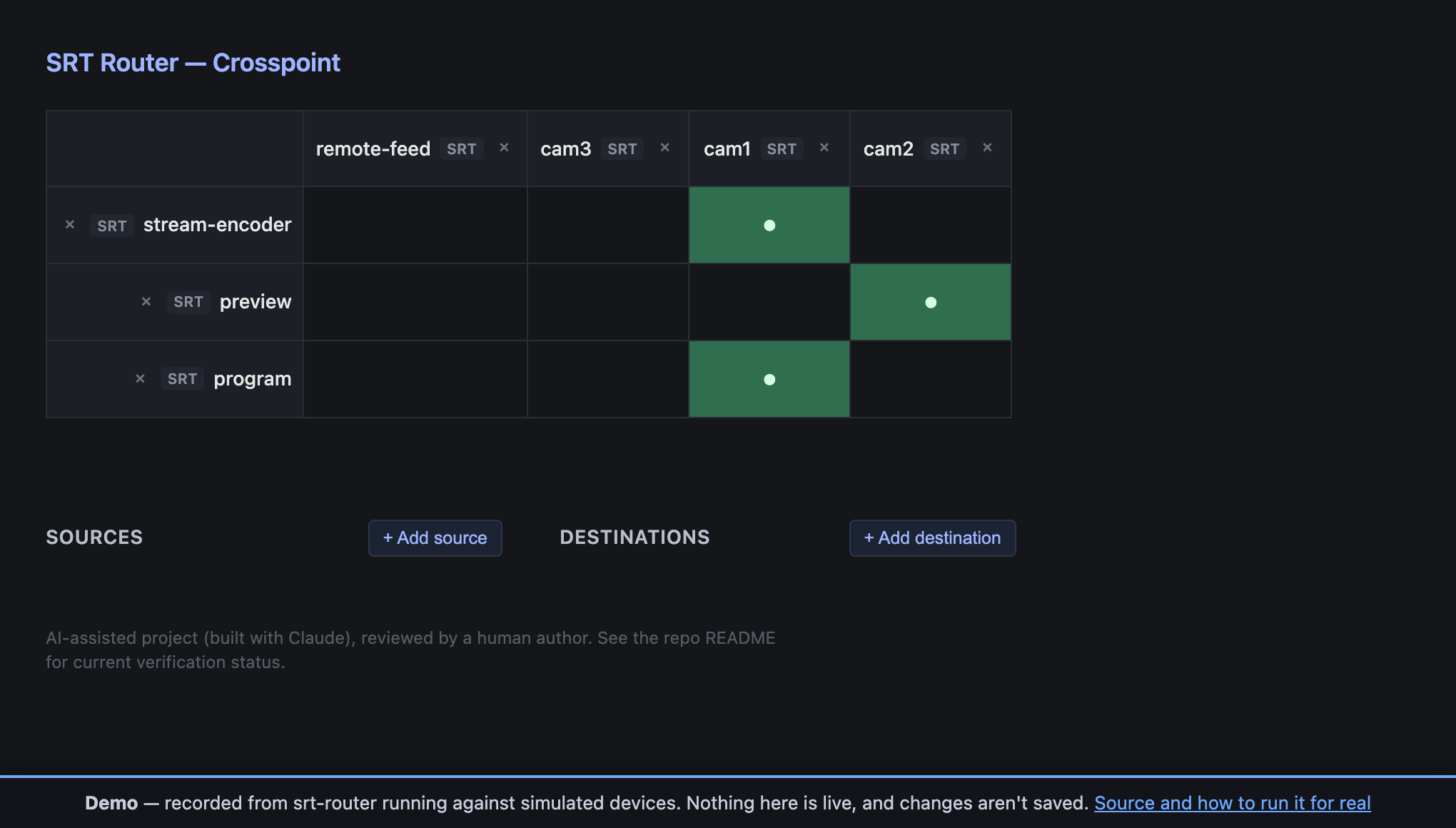
The web UI above is a real screenshot of the router running locally against config/example.toml, not a mockup — captured while verifying the routing/persistence/websocket/add-remove behavior described in Status below.
Try the crosspoint: https://srt-router-demo.stoatworks-labs.com — the real UI, in your browser, and the grid genuinely switches. Every switch replays the router's own recorded response to that exact crosspoint change. Nothing there is relaying a stream and nothing is saved; the router has to be on the network with your SRT endpoints to do anything real. See demo/README.md for how it's built.
Download
v0.2.4 — prebuilt for macOS, Windows and Linux. Pick your platform:
macOS — Universal (Apple Silicon + Intel)
| Build | Download | Size |
|---|---|---|
| .dmg disk image (app) | srt-router-0.2.4-macos-app.dmg |
13 MB |
| .pkg installer (app) | srt-router-0.2.4-macos-app.pkg |
13 MB |
| Universal (Apple Silicon + Intel) · .tar.gz archive | srt-router-macos-universal.tar.gz |
5.1 MB |
Windows — x64, ARM64
| Build | Download | Size |
|---|---|---|
| x64 · .exe installer | SRT.Router_0.2.4_x64-setup.exe |
3.7 MB |
| x64 · .msi installer | SRT.Router_0.2.4_x64_en-US.msi |
6.3 MB |
| x64 · .zip archive | srt-router-windows-x86_64.zip |
2.2 MB |
| ARM64 · .zip archive | srt-router-windows-aarch64.zip |
2.1 MB |
Linux — x64, ARM64
| Build | Download | Size |
|---|---|---|
| x64 · .deb package (Debian/Ubuntu) | srt-router_0.2.4_amd64.deb |
2.8 MB |
| ARM64 · .deb package (Debian/Ubuntu) | srt-router_0.2.4_arm64.deb |
2.9 MB |
| x64 · .rpm package (Fedora/RHEL) | srt-router-0.2.4-1.x86_64.rpm |
2.9 MB |
| ARM64 · .rpm package (Fedora/RHEL) | srt-router-0.2.4-1.aarch64.rpm |
3.0 MB |
| x64 · AppImage | SRT.Router_0.2.4_amd64.AppImage |
83 MB |
| x64 · .tar.gz archive | srt-router-linux-x86_64.tar.gz |
2.8 MB |
| ARM64 · .tar.gz archive | srt-router-linux-aarch64.tar.gz |
2.8 MB |
All builds, checksums and release notes: github.com/stoatworks-labs/srt-router/releases.
macOS builds are signed and notarised and open normally. The Windows builds are unsigned, so SmartScreen warns once — see Windows SmartScreen & Defender Firewall for the one-time click-through.
What it does
By default, routing is a pure relay: the crosspoint moves opaque payload
chunks from an input SRT connection to an output SRT connection with no
decode/re-encode, so switching is effectively free (no transcode cost, no
added latency beyond SRT's own buffering). That's the right behavior for the
common case — plain stream switching — but it's not the only thing a
source can be. The engine's source abstraction is intentionally payload-only
(see docs/architecture.md), so special-purpose
sources that actually generate a stream — a still image, a local media
player, a scaler tap on another source — register into the same crosspoint
as a "source" without the engine caring that they're not relayed SRT.
Built: crates/media-io runs ffmpeg as a child process for all
three (stills/media-player/scaler), publishing plain MPEG-TS Bytes — the
same wire format an SRT relay carries — so a stills slate can feed a live
SRT output directly, no transcoding step required. No SDK, no Cargo
feature: just ffmpeg on PATH at runtime. See Status.
Control is a local web UI backed by a small REST API: a crosspoint grid (click a cell to route that output from that source), plus Add source/Add destination menus and a remove control on every row/column for adding or tearing down SRT inputs/outputs at runtime — not just what was in the TOML config at startup. No auth/TLS — this is meant to run on a trusted operations network, the same trust model as a hardware router's control port.
Transports beyond SRT: crates/ndi-io is a real, tested NDI transport
and crates/omt-io is the same idea for
OMT — a genuinely open, MIT-licensed
alternative to NDI — implemented via hand-written FFI against the real SDK
(requires OMT_LIB_DIR, no bindgen). Both are fully wired into the router:
usable from the TOML config and the runtime add-source/add-destination
REST API and the web UI's Add source/Add destination menus. NDI is on by
default — it loads its runtime at run time and needs no SDK to build; OMT
stays behind an opt-in omt Cargo feature because it still links at build
time (cargo run --features omt). crates/media-io (stills/media-player/scaler, see
What it does) needs no feature — just ffmpeg on PATH.
Every input/output entry — TOML or REST — now needs an explicit
transport = "srt" | "ndi" | "omt" | "media" tag; see
config/example.toml.
Status
Phase 1: relay-only crosspoint + web UI, dynamic add/remove — done. Phase 2 (current): special-purpose (non-relay) sources — done. Working:
- SRT input/output as either
listener(this router waits for a connection) orcaller(this router dials out), each reconnecting on its own if the connection drops. - The crosspoint engine (
crates/core) — output-follows-route-change behavior is unit tested. - A local web UI (
crates/web) — grid of outputs x sources, click to route, updated live over a websocket (GET /ws) with a REST poll (GET /api/state) as first paint / fallback. - Runtime add/remove:
POST/DELETE /api/manage/sourcesand/api/manage/outputs(crates/router/src/management.rs) spawn or tear down an SRT input/output on the fly — the same code path the static TOML config uses at startup, so a config-declared source is exactly as removable as one added later. Backed bytokio_util::sync::CancellationTokenper task (added tosrt-io) so removal actually stops the task and frees the socket, not just forgets about it. The web UI exposes this as Add source/Add destination forms plus a remove control per row/column. - Routing changes optionally persist to disk (
[state]in the config) and reload on restart, overriding each output'sdefault_source. crates/ndi-io: a real NDI transport, with its own integration test driving a real NDI sender and receiver against it, consistently passing. Fully wired intosrtrouter's TOML config, the runtime add/remove REST API, and the web UI's Add source/Add destination menus. Built by default: itssysmodule loads the NDI runtime withdlopen, so nothing needs the proprietary SDK at build time and NDI is present in every cross-compiled release. (It previously usedgrafton-ndi, which linked the SDK at build time — that kept the feature off for every release target, so released binaries had no NDI at all.) A machine with no NDI runtime still builds and runs the router; only an NDI endpoint fails, and the message names the download.crates/omt-io: a real, tested OMT transport via hand-written FFI against the OMT SDK (OMT_LIB_DIR, no bindgen), with its own relay integration test. Wired in exactly the same way as NDI — TOML config, REST API, web UI menus — behind an opt-inomtCargo feature (cargo run --features omt). It composes with NDI, which is on by default; an explicittransporttag on every input/output disambiguates them even where their endpoint shapes are otherwise identical (NDI's and OMT'sSender { name }, in particular — see docs/roadmap.md for why that mattered).crates/media-io: stills, a local media player, and a decode/rescale/ re-encode scaler tap, each running realffmpegas a child process and publishing plain MPEG-TSBytes— no envelope, no proprietary SDK, no Cargo feature (justffmpegonPATH). Fully wired into the TOML config, the REST API, and the web UI's Add source menu (source-only — none of these make sense as an output). Amediasource routes straight into an SRT output with no transcoding step, since they share the same raw-MPEG-TS payload class; the web crate's cross-kind route check encodes that explicitly rather than requiring exact kind-string equality. Scaler additionally consumes another registered source's ownBytes(subscribe, pipe into ffmpeg's stdin) — the one non-relay path here that really does transcode.- CI (GitHub Actions) runs
fmt --check,clippy -D warnings, and the full test suite on every push/PR — SRT (+media) only (ndi-io/omt-ioneed real SDKs CI can't install, so they're real workspace members but excluded fromdefault-members;media-ioneeds onlyffmpeg, which CI installs explicitly — see docs/architecture.md). - Verified locally, not just compiled:
cargo testpasses — the default build (SRT + media + NDI) and--features omtboth build and pass clean — including integration tests (crates/srt-io/tests/relay.rs,crates/ndi-io/tests/relay.rs,crates/omt-io/tests/relay.rs,crates/media-io/tests/relay.rs) that relay real protocol traffic (or, for media-io, real ffmpeg-produced MPEG-TS, byte-checked for valid sync bytes) end-to-end through the crosspoint — one SRT test also exercises a live re-route mid-stream over an already-established connection, and one media-io test proves the scaler recovers once its upstream source appears late. Separately confirmed by hand: running the binary againstconfig/example.tomlbinds real UDP/SRT listener sockets (vialsof), adding a source through the web UI binds a new one live and removing it frees the port (also vialsof), the REST API and a real browser click both drive live crosspoint changes, the websocket push updates the grid with no client-side polling, a persisted route survives a real process restart, adding an OMT source/destination through the running web UI produces the correctomt-badged rows on the grid, and adding real stills/media-player/scaler sources through the running web UI (backed by real generated test images/video) producesmedia-badged rows that route cleanly into a live SRT output.
Not yet done: no test against a real third-party SRT/NDI/OMT encoder or decoder, or over a real (non-loopback) network path — only local testing so far, still the main open gap. Also missing: auth on the web UI/API, external control API/Companion integration. See docs/roadmap.md for the full phased plan.
Quick start
cargo run --bin srtrouter -- --config config/example.toml
Then open http://localhost:8080 for the crosspoint grid. Edit
config/example.toml (or point --config at your own
file) to declare your actual inputs/outputs — see the comments in that file
for the config format.
Desktop app
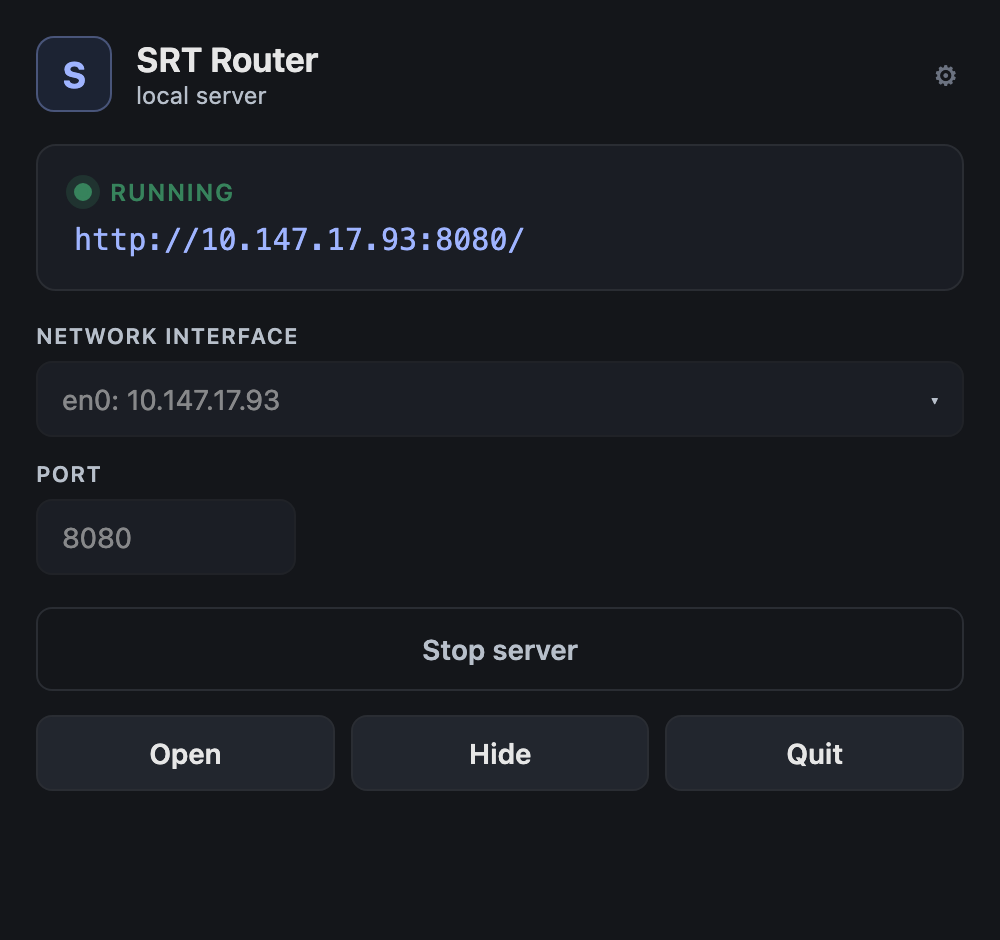
Prefer not to touch the terminal? A small menu-bar app lets you pick the network
interface + port, Start/Stop the server, and open the web UI. The srtrouter
server is bundled inside, so it's a single download — nothing to install or wire
up. Grab the .dmg from
Releases, or see
launcher/ to build it.
Architecture
See docs/architecture.md for the source/output/ crosspoint model and how the relay-vs-generated source distinction is meant to extend later without changing the core engine.
Windows SmartScreen & Defender Firewall
macOS builds are Developer ID-signed and notarised by Apple — they open normally, with no Gatekeeper warning and no quarantine step. The Windows binaries are not code-signed, so Windows still warns you the first time.
- Windows — SmartScreen shows "Windows protected your PC" → More info → Run anyway.
- Windows Defender Firewall — first launch pops "Allow SRT Router to communicate on these networks". Tick Private (and Domain on a managed network) — SRT Router needs it to serve the web UI on the interface you pick and accept inbound SRT streams. Deny it and the UI won't load from another machine and inbound SRT callers will time out.
- Linux — no signing gate.
Per-artifact steps, self-signing, checksum verification and the Defender Firewall reset procedure: docs/UNSIGNED.md.
Roadmap / TODO
Full phased plan in docs/roadmap.md. Main open items:
- Real-world testing — against a third-party SRT/NDI/OMT encoder/decoder and over a real (non-loopback) network path; the main open gap.
- NDI and OMT live in the web UI, config, and REST API — disambiguated by an explicit
transporttag per input/output. NDI ships by default (runtime loaded withdlopen, no SDK needed to build); OMT stays behind an opt-inomtfeature. - Special-purpose sources — stills, local media player, scaler tap, all built on real
ffmpegchild processes and live in the web UI's Add source menu, config, and REST API. - Auth/TLS on the web UI/API.
- External control API / Bitfocus Companion integration.
Control it from Companion
companion-module-srt-router is a Bitfocus Companion connection module for this app.
Takes, cycles and salvos on the crosspoint, plus runtime add/remove — with crosspoint tally and source-side tally.
Crosspoint presets are generated from the router's own sources and outputs once the module connects, one section per output, so a row of buttons is one section dragged onto a page.
It is not in the official Companion module store — install it via Settings → Developer modules path.
Trademarks and third-party licences
NDI® is a registered trademark of Vizrt NDI AB. See https://ndi.video. This project is not affiliated with or endorsed by Vizrt.
The NDI runtime is obtained separately under Vizrt's own terms and is not redistributed here. NDI Tools are not redistributed either — get them from https://ndi.video/tools.
H.264, H.265 and AAC are separately licensable formats. The NDI SDK grant does not cover them, and the obligation sits with whoever ships a product using them.
This project is built on other people's work — see ATTRIBUTIONS.md.
Install srt-router on Unraid in a few clicks.
Find srt-router in Community Apps on your Unraid server, review the template, and click Install. Unraid handles the Docker app or plugin setup from the published template.
Categories
Related apps
Explore more like this
Explore allDetails
ghcr.io/stoatworks-labs/srt-router:latestRuntime arguments
- Web UI
http://[IP]:8091/- Network
host- Shell
sh- Privileged
- false
Template configuration
Configuration files.
- Target
- /app/config
- Default
- /mnt/user/appdata/srt-router/config
- Value
- /mnt/user/appdata/srt-router/config
Persistent application data.
- Target
- /app/state
- Default
- /mnt/user/appdata/srt-router/data
- Value
- /mnt/user/appdata/srt-router/data