

Spinmatch
Docker app from Yoshiofthewire's Repository
Overview
Readme
View on GitHubSpinmatch
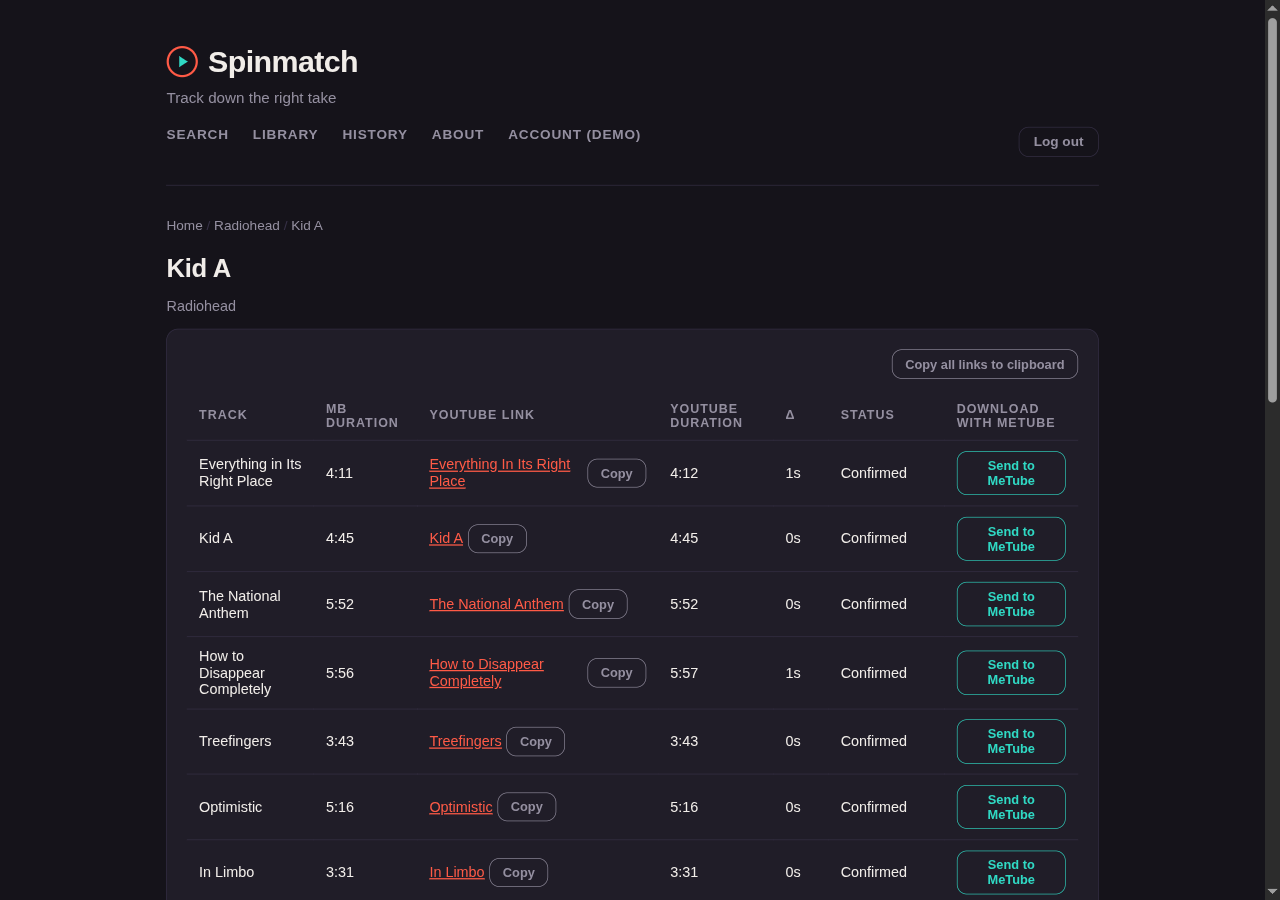
Spinmatch searches MusicBrainz for an artist, an album, or a song. It shows album art and tracklists, and it finds a YouTube link for a track. Spinmatch compares the duration of the video against the track length that MusicBrainz records, and reports whether the two agree.
Point Spinmatch at a music folder and it becomes a collection manager as well: it indexes your files, finds the albums with gaps in them, repairs tags, lists duplicates, and suggests artists you do not have yet.
Spinmatch only finds and verifies YouTube links. It does not download audio.
Contents
- Finding and verifying a track
- Your library
- Playlists
- Adding new files: the Ingest page
- History
- First-run login
- Single sign-on (OIDC)
- API tokens
- Prerequisites
- Installing yt-dlp
- Configuration
- Running locally
- Backing up
- Running in production
- Running with Docker
- Running on Unraid
- Tests
- License
Finding and verifying a track
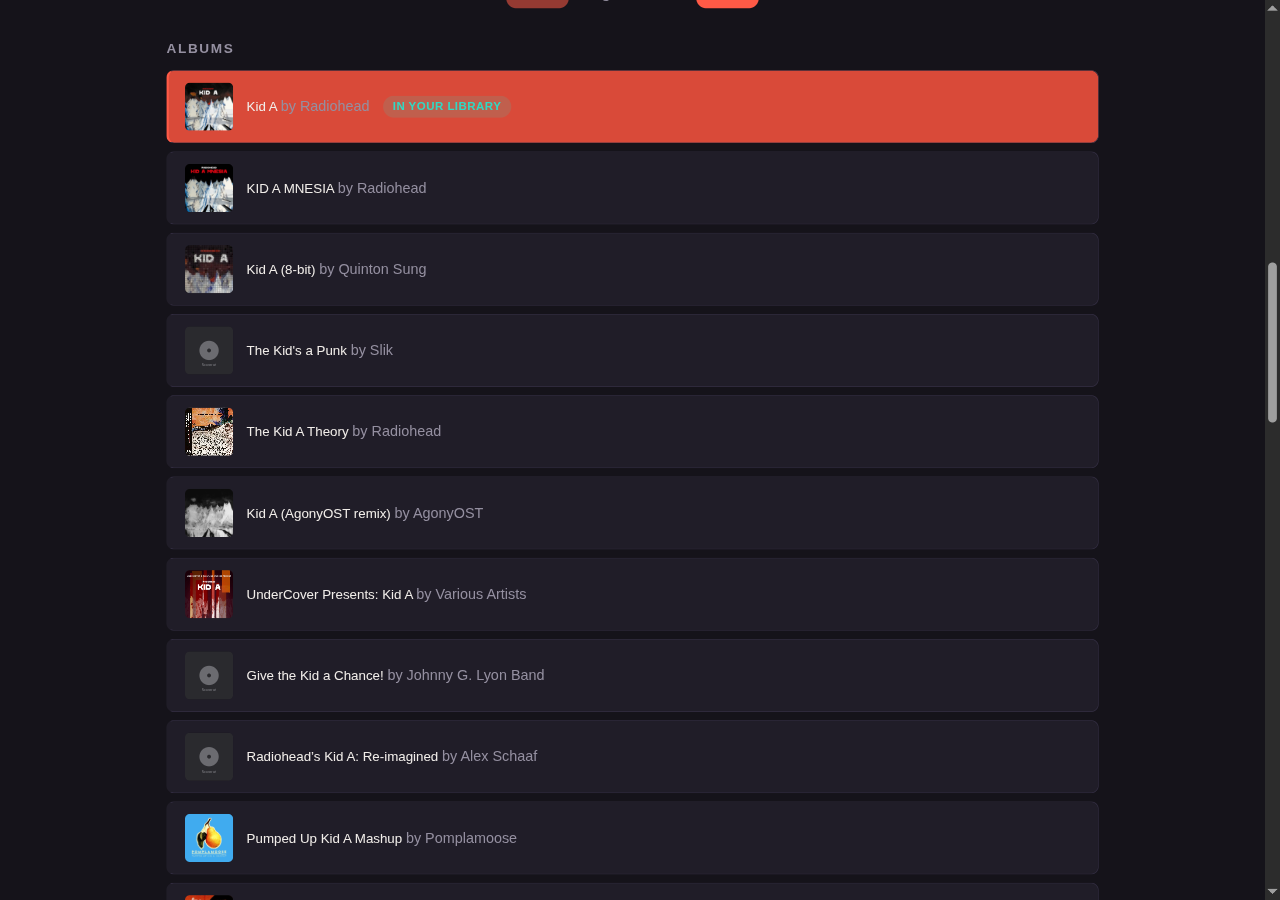
The Search page queries MusicBrainz and groups the results into artists, albums, and songs. A song row carries its own Find on YouTube button, so a single track needs no further navigation. An album or a song that your library already holds carries an In your library badge. That check is local SQL with no upstream request.
Open an album to get its official tracklist. Each row has a Find on YouTube button, and Find all on YouTube runs the whole record. A bulk run streams its results one row at a time, so you see each match as it arrives instead of waiting for the last one.
For every track, Spinmatch asks yt-dlp for the top YouTube results, then sorts them by how close
the video length is to the length that MusicBrainz records:
- Within five seconds, the row reads Confirmed.
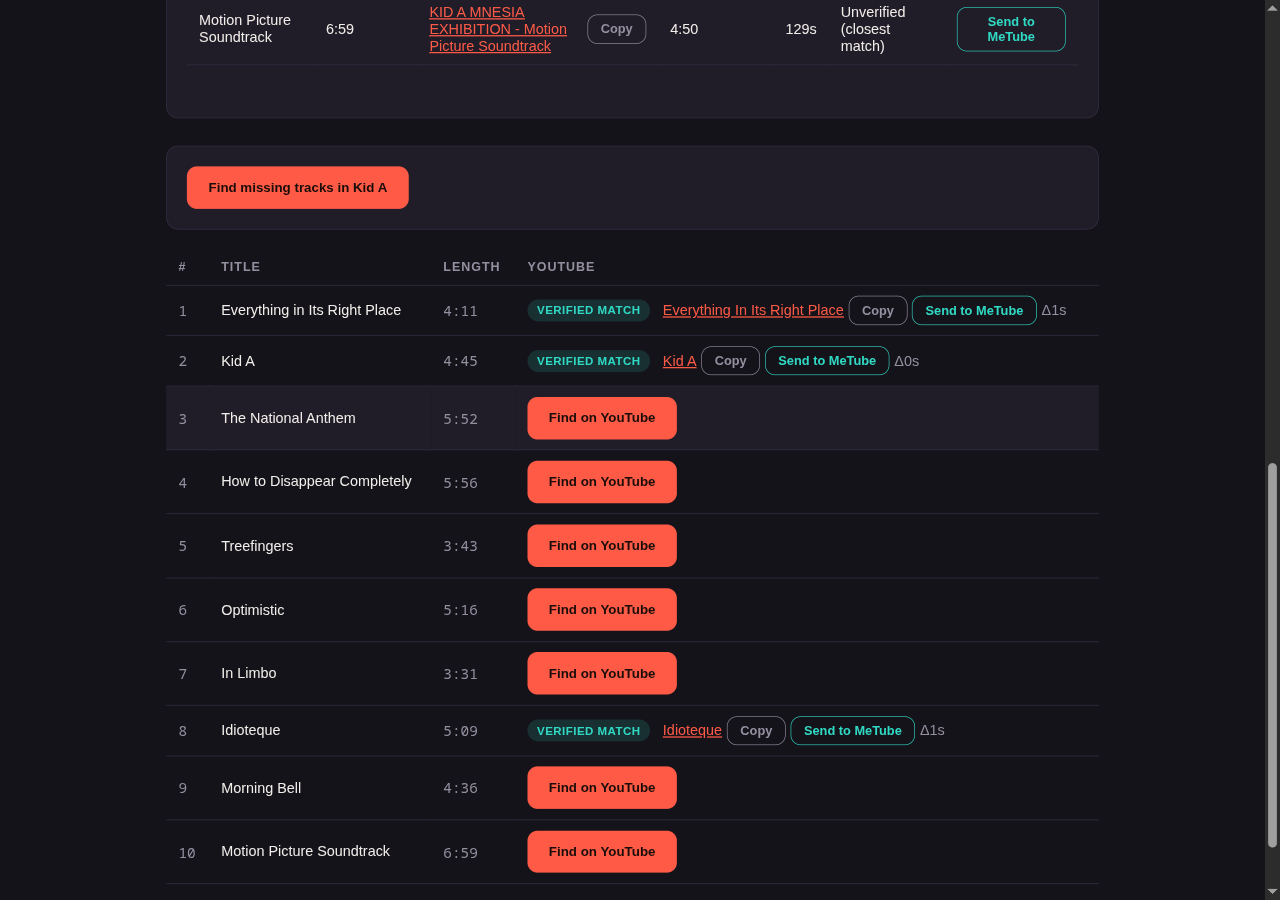
- Outside five seconds, Spinmatch still shows the closest candidate, marked Unverified (closest match), with the difference beside it. The last row below is a good example: the only result for "Motion Picture Soundtrack" is 129 seconds short of the album version, so Spinmatch says so instead of calling it a match.
- With no results at all, the row says so and offers nothing.
Your library
Set MUSIC_DIR and Spinmatch indexes that directory into a local SQLite database and adds a
Your Library page. The index records the artist, album, title, duration, track number, disc
number, year, genre, format, and file size. It also records whether the file has embedded cover art,
and the date when Spinmatch first saw the track.
Spinmatch builds the index at startup. A background scan and a filesystem watcher then keep it current, so Spinmatch detects a change that you make outside the app without a restart. The scan runs in a worker thread. The tag reads and database writes for each file therefore happen off the main event loop. The app stays responsive during a scan of a large collection of 100k tracks or more.
The Library page header shows the scan status: a live file count while a scan runs, and otherwise when the last scan finished, when the next one is due, and whether the watcher is on. A failed scan shows a short error there; the server log has the details.
The Library page has ten tabs:
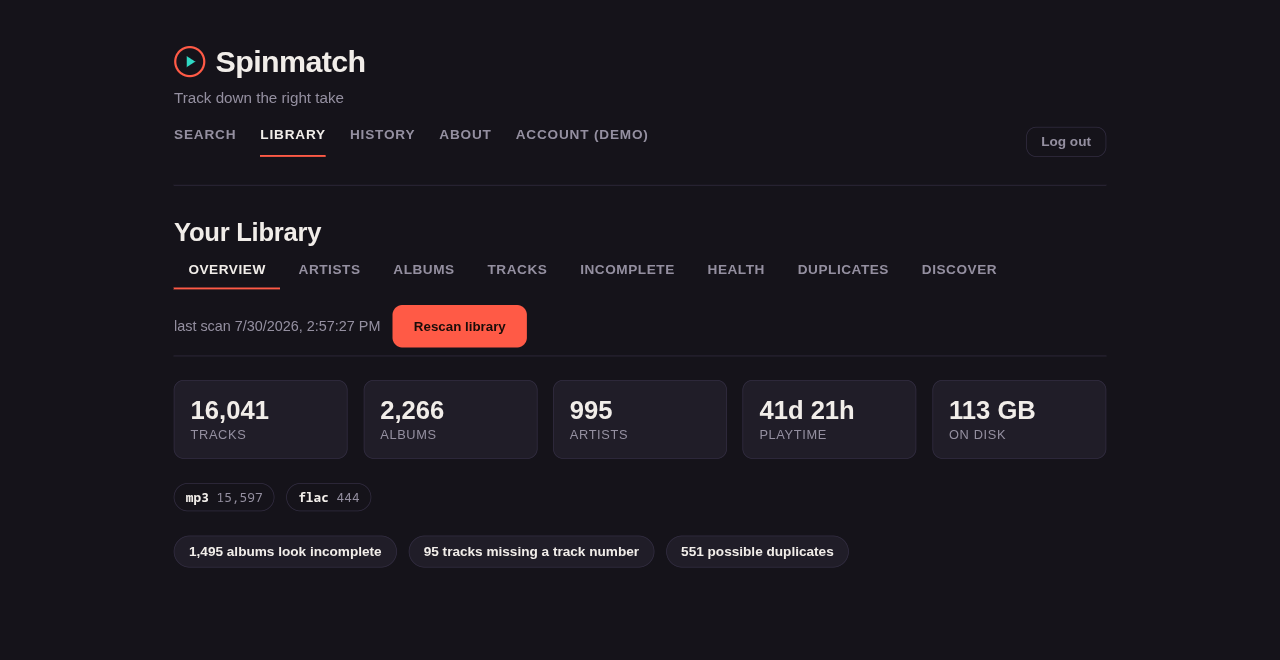
Overview — the track, album, and artist counts, the total playtime, the total size on disk, and a format breakdown. It also has shortcuts into the reports below.
Artists — searchable, and sortable by name, album count, track count, or playtime. Open an artist to see their albums.
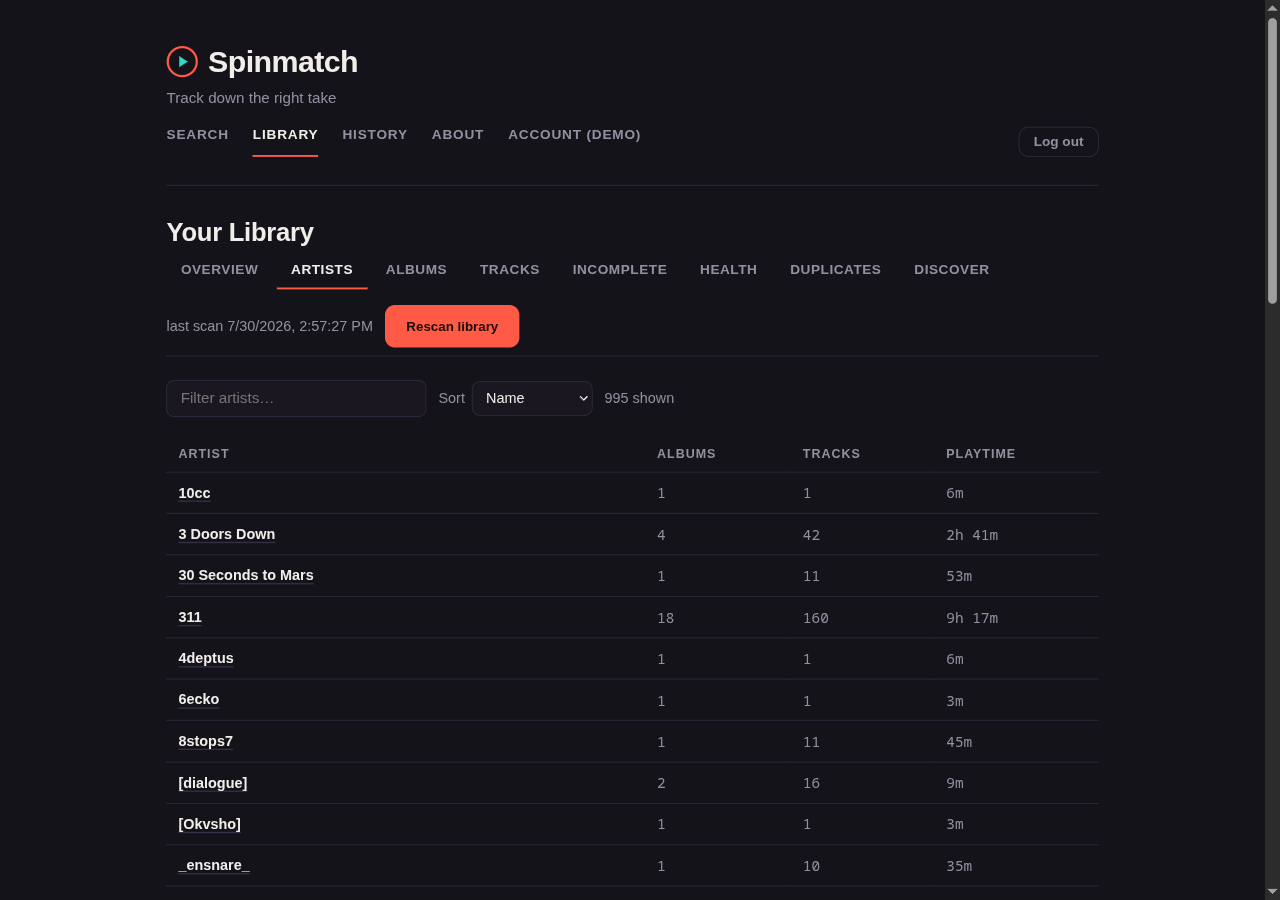
Albums — a grid of cover art, sortable by artist, title, year, track count, or date added. It has an "incomplete only" filter. Spinmatch reads album art from the files on demand, so it extracts nothing to disk and reads only the covers on the screen. Spinmatch uses the art that the audio file embeds. If the file embeds none, Spinmatch serves a
cover,folder, orfrontimage from the album directory instead. A library that keeps art beside the music therefore still gets covers.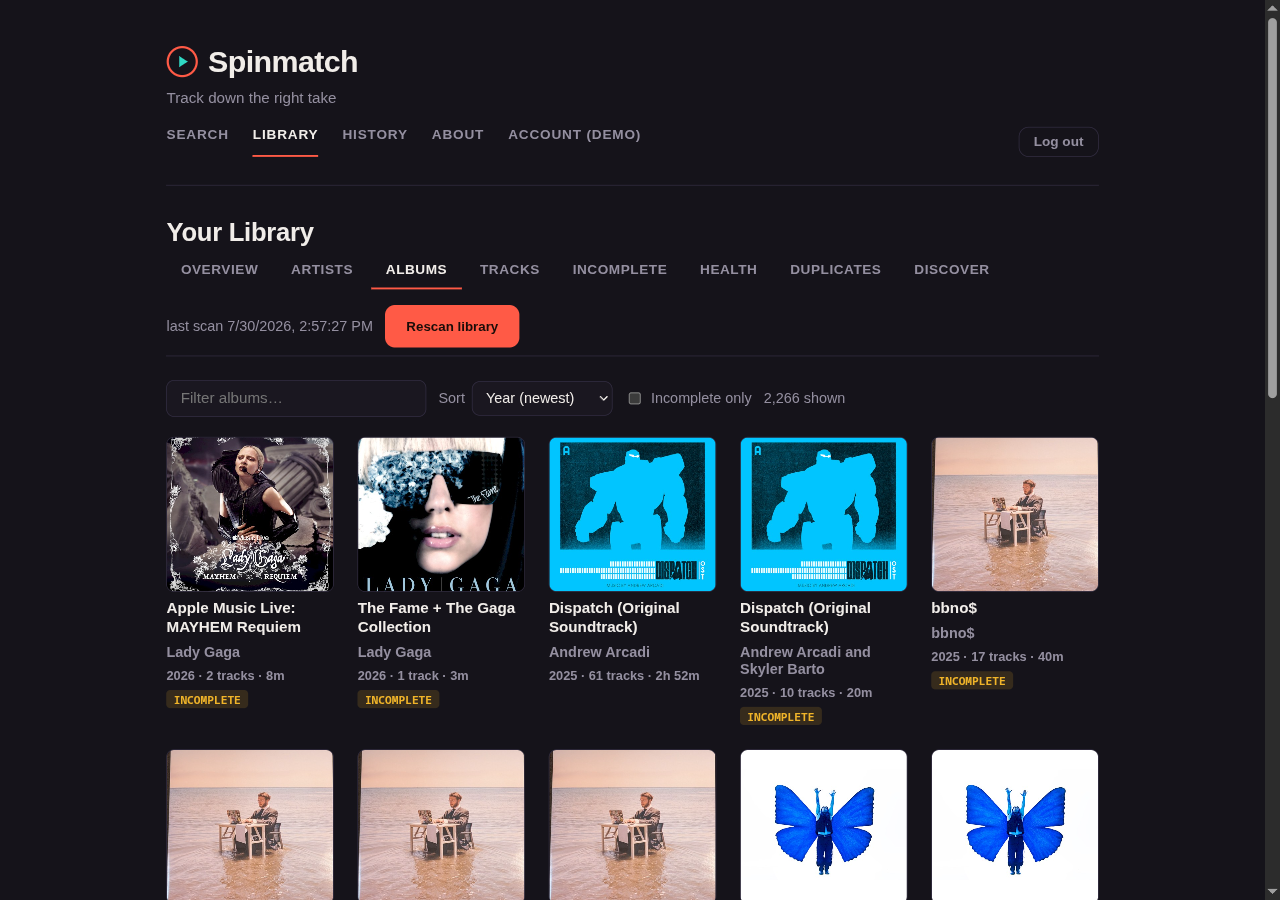
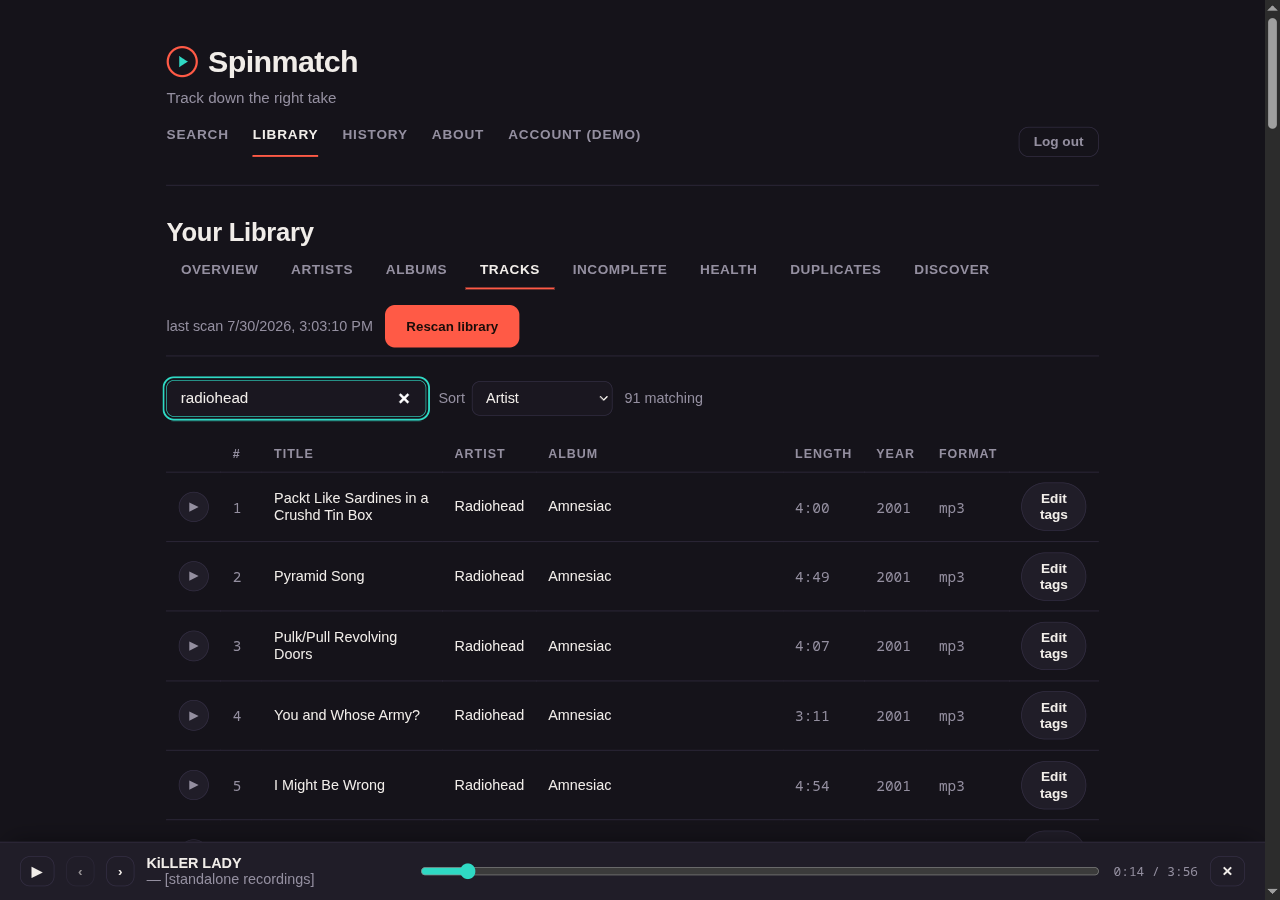
Tracks — the whole collection in one sortable, searchable table. The server pages this table, so it stays responsive at any library size. Each row has an Edit tags action that opens the editor in place.
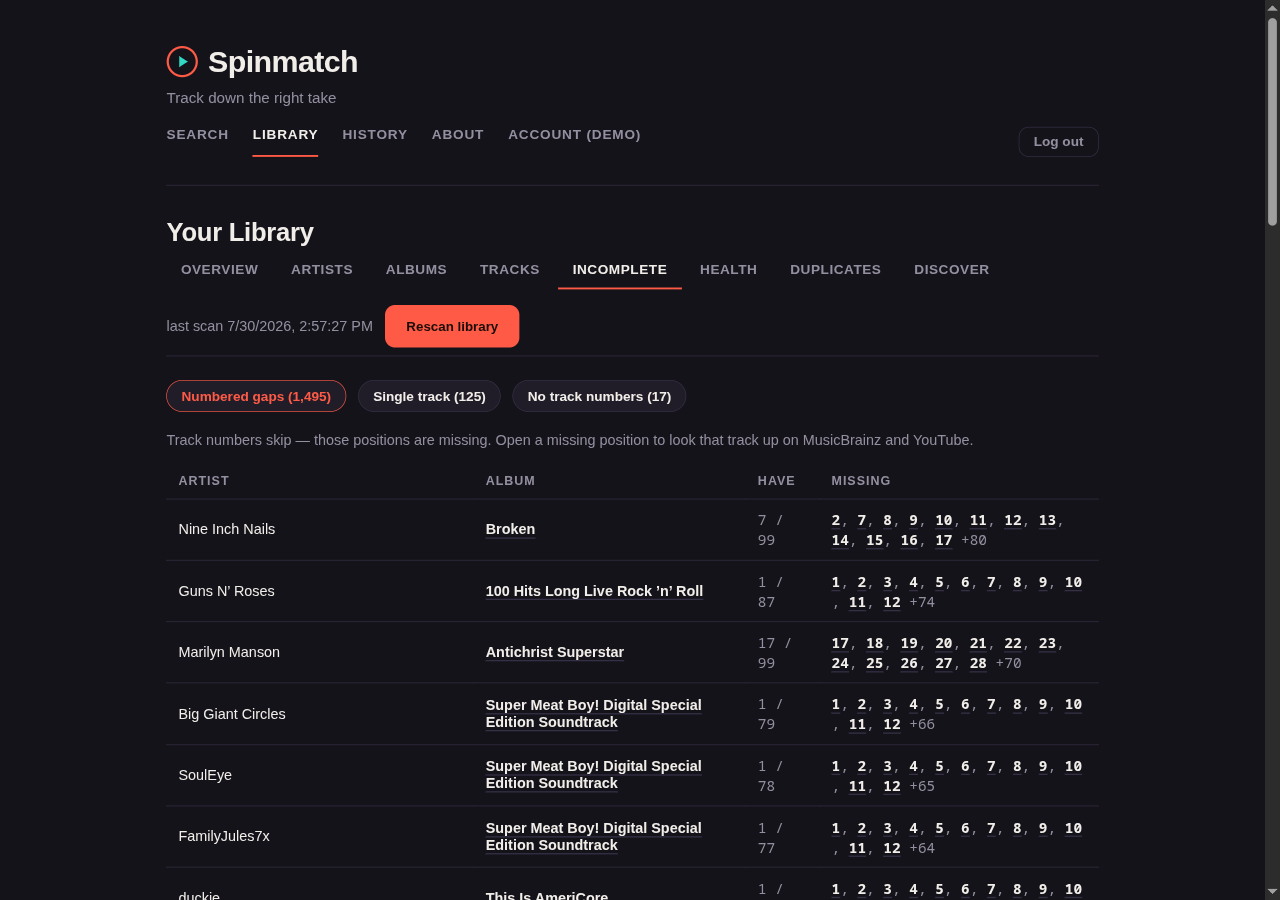
Incomplete — albums that look unfinished. Spinmatch computes this tab from the index alone and makes no network request. It reports three cases:
- A gap in the numbering. You have 1, 2, and 4 of 4, so 3 is absent.
- One file filed as a whole album.
- An album with no track numbers, where Spinmatch cannot judge completeness.
Each absent position opens the album view, where Find this track searches for it.
Health — tag hygiene. This tab counts the tracks that have no artist, album, title, track number, duration, or cover art. Check it, because the matching described below uses the artist and the title. An empty artist tag is invisible to that matching.
"No album tag" and "No title tag" count files whose album or title the rest of the app displays. The scanner uses the directory name and the filename as a fallback, so the browse views have something to group and label by. The Health tab is where you learn that the file itself has neither value. Those rows show the value in grey, mark it (from folder) or (from filename), and print the path below it.
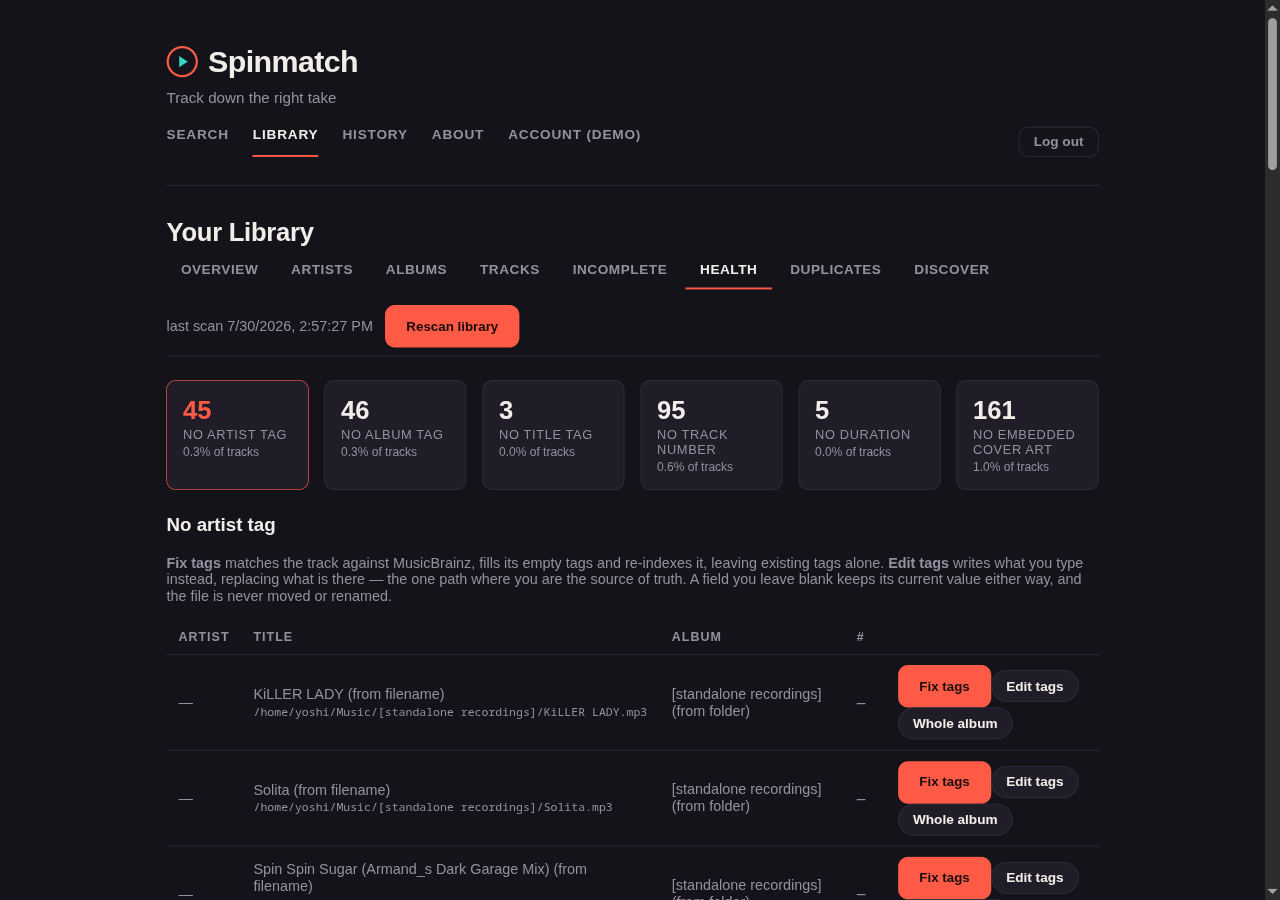
Each count opens the tracks behind it, and most rows offer two actions.
Fix tags selects the correct MusicBrainz recording, either from the tags of the file or from a search that you make. Spinmatch then adds the values that are absent: artist, title, album, year, track number, disc number, and cover art. By default it fills only the tags that are empty, and it never replaces a value that you already have.
Edit tags is the reverse. You type the values, and Spinmatch writes them over what the file has. This is the one path in the app where you are the source of truth instead of MusicBrainz. That is what makes it the correct tool here. These rows are files whose tags are absent, and that is exactly what a MusicBrainz search has nothing to search on. See Editing tags by hand.
Neither action ever removes a tag, and neither one moves or renames the file. An absent duration is the exception. It means that Spinmatch could not decode the audio stream, so the file is damaged instead of badly tagged, and Spinmatch offers no repair.
When the tags of a file are too empty to search on, the picker uses the path of the file instead.
Artist/Album/05 - Title.flacis metadata too. A Whole album button opens the album-wide repair that the next section describes.With
ACOUSTID_API_KEYset, the panel also offers Identify by audio. Spinmatch makes a fingerprint of the file with Chromaprint and asks AcoustID what the recording is. This is the only way to identify a file whose tags and path are both useless. A fingerprint does not depend on the metadata that you are about to repair. It is therefore also the one source that may replace an existing value instead of only filling an empty one. That is what repairs a file tagged as the wrong song.Two check boxes control the replacement. Both are clear by default, and Spinmatch offers them for fingerprint matches only. One replaces the text tags. The other replaces the embedded cover art. They are separate on purpose, because the correct title and someone else's cover art are different wishes. The button is per track instead of automatic, because a fingerprint starts a subprocess over the audio and spends one rate-limited AcoustID request.
Duplicates — the same artist, album, and title indexed at more than one path. Spinmatch shows the track number, length, format, size, and full path of every copy beside each other. Each copy also gets a play button, so you can compare them. The album is part of the match. A song on two different releases is therefore not a duplicate, and Spinmatch does not list it. An album track that is also on a compilation is the common example. What remains is real redundancy: a FLAC and a 128k MP3 of the same album track, or a directory copied twice.
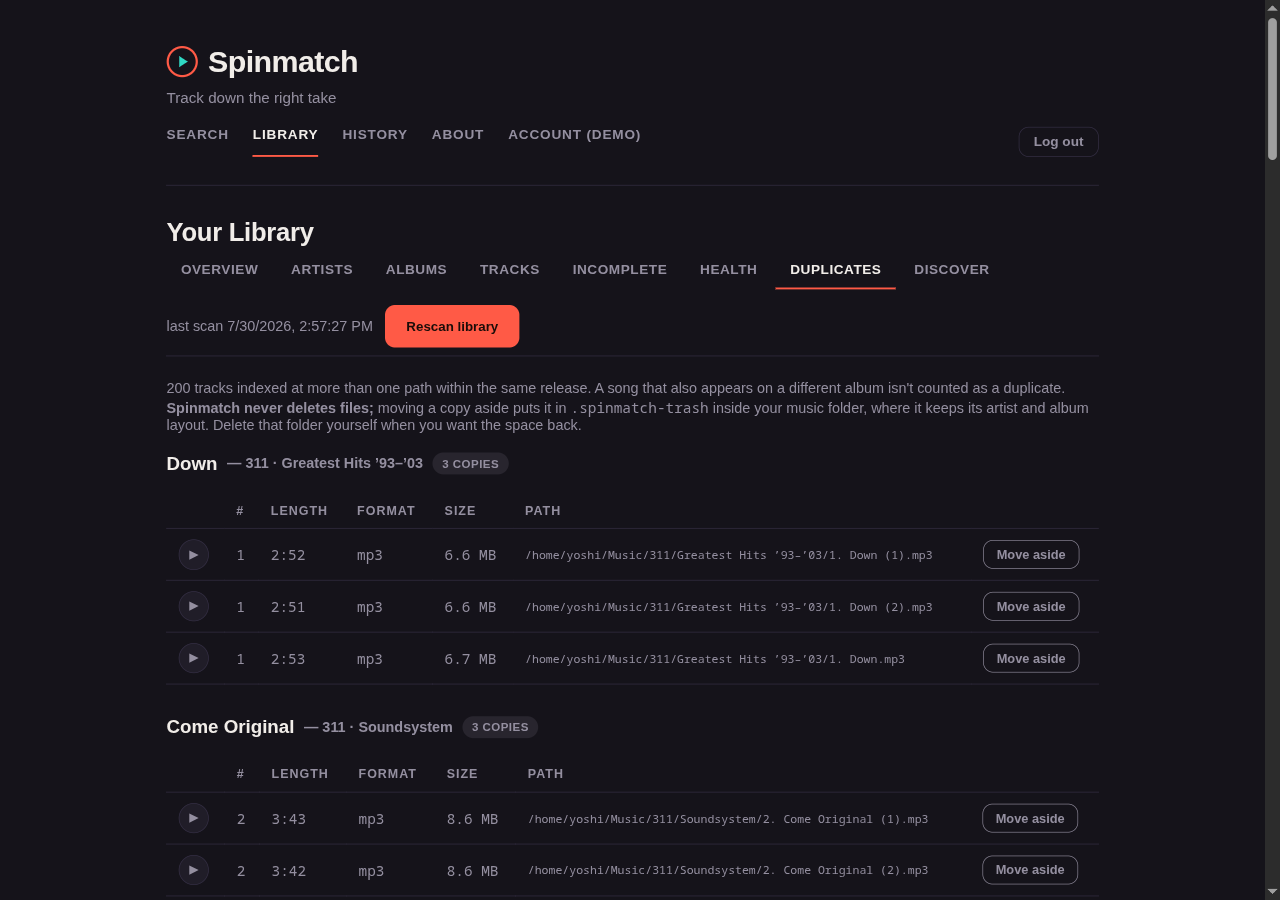
Each copy also gets a Move aside button. It moves that file into a
.spinmatch-trashfolder inside your music folder, keeping the same artist and album layout, soMusic/Nick Cave/Tender Prey/01 - The Mercy Seat.flacbecomesMusic/.spinmatch-trash/Nick Cave/Tender Prey/01 - The Mercy Seat.flac. Spinmatch never deletes a file. The move frees no space, which is the point: you clean up now, check the folder later, and delete it yourself when you are sure. Spinmatch has no button that empties the trash.Spinmatch refuses to move aside the last copy of a track, so a group can never be emptied by accident. An Undo appears next to a copy you have just moved and puts it straight back. Undo is there while the page is open; after that, use the Trash tab.
Changes — every tag write Spinmatch has made to your library, newest first, each with an Undo. See Undoing a tag change.
Trash — everything in
.spinmatch-trash, with each file's original path, size, and date, and the total space the trash holds. Restore moves a file back to its original path and indexes it again, even months later. If something now sits at that path, Spinmatch leaves the file in the trash and says so. Spinmatch never empties the trash: to free the space, delete files from.spinmatch-trashyourself, outside Spinmatch.Discover — the one view that looks outward. It shows artists and records connected to the ones that you own the most of. See Discovery.
Beside the Rescan library button, each artist page and album page has a Rescan this artist/album action. That action re-reads only those directories, which is useful directly after you repair tags or add a file. Spinmatch reads the whole directory instead of only the files that it already knows, so it also finds new tracks.
Repairing a whole album's tags
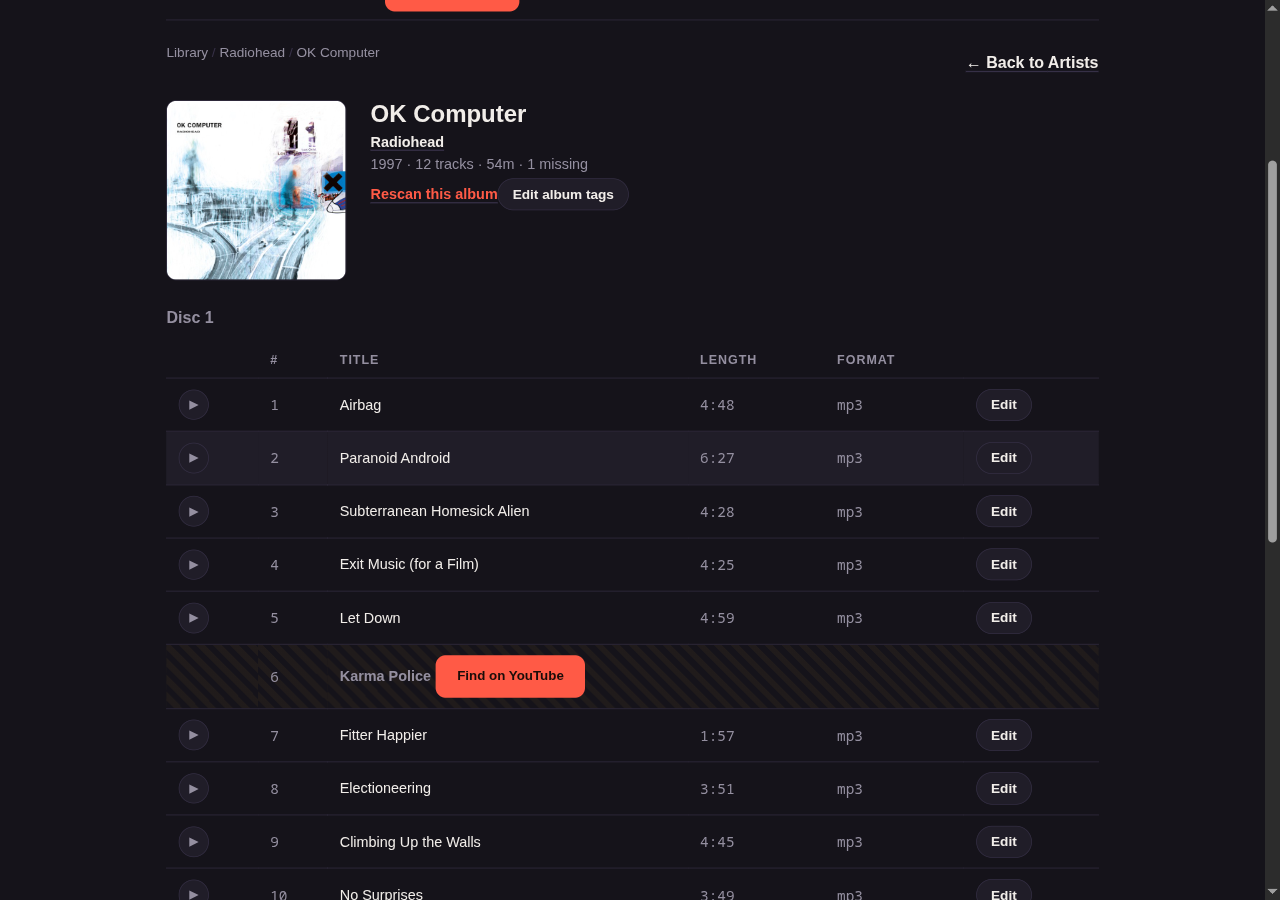
An album page shows the tracklist with each gap in it marked. The screenshot below is after Find this track on position 6: Spinmatch asked MusicBrainz what belongs there, got "Karma Police", and turned the gap into a YouTube search you can run.
Each album page also has a Fix this album's tags panel. It is the bulk equivalent of the per-track action in the Health tab. A repair of one file at a time through MusicBrainz costs one to three rate-limited lookups, so a few hundred files take about twenty minutes. A repair that resolves the album once costs two lookups for the whole tracklist. There are two sources, because they fail in opposite directions:
- From file paths — reads the artist, album, track number, and title from the location of each file. It makes no network request, and it works on files that have no tags at all, which is exactly the population of the Health tab.
- From MusicBrainz — resolves the album once and matches your files against its official tracklist. It matches by track number when every file has one, and by listing order when they do not. It uses the listing order only when both lists have the same length, so it never moves a partial album onto the wrong titles.
Both sources show a full preview first. The preview lists every file and every proposed value, and marks what Spinmatch would write against what the file already has. Spinmatch writes nothing until you select rows and press Apply. The same rules as the single-track Fix tags action hold. Spinmatch fills only empty fields, and it moves and renames nothing. To write your own values across an album, use Edit album tags below.
Editing tags by hand
Every path above derives what to write, from a MusicBrainz recording, an official tracklist, or the path of the file. Each one fills only what is empty. This section describes the other half. Here the values come from you, and Spinmatch writes them over what the file already has.
One track at a time. An Edit tags action is on every row of the Tracks tab, and on every track in an album tracklist. It is also beside Fix tags in the Health drill-down. The editor opens in place, below the row that you selected. It has the seven writable fields: artist, title, album, track number, disc, year, and genre.
A whole album at once. Each album page has an Edit album tags panel. Spinmatch applies the artist, album, year, genre, and disc values to every track that you leave selected. The title and the track number stay per row, because one title across a whole record is never what anyone means. A field whose tracks disagree shows (varies) and starts empty, so you cannot replace twelve different values with one by accident.
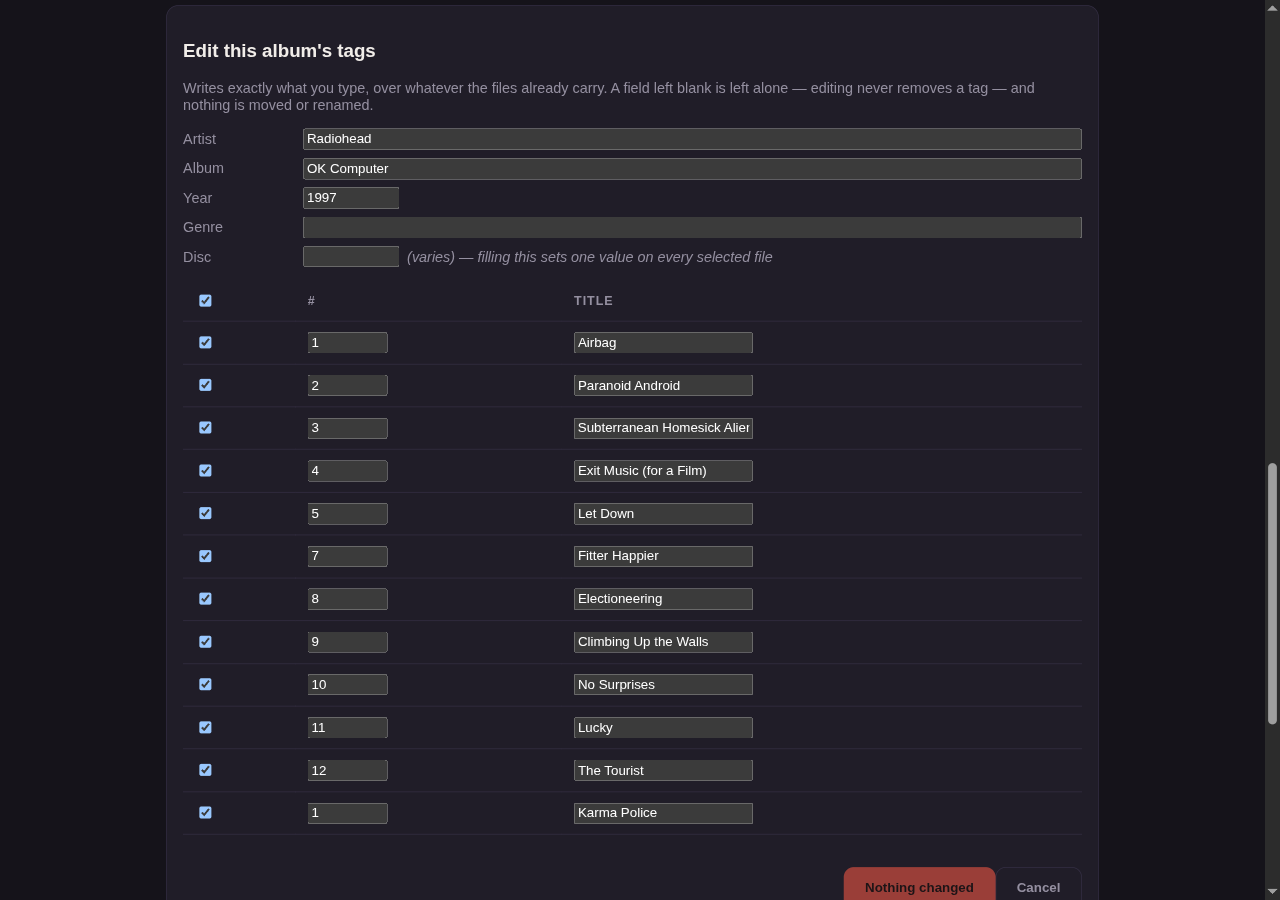
Three points are worth your attention, because they surprise people:
- A field that you leave blank keeps its current value. An edit replaces a value, but it never removes a tag. Spinmatch cannot empty a field, on purpose. If you clear a box, the panel says so on the row instead of doing nothing silently. To remove a tag, clear it in an external tag editor and then rescan.
- Spinmatch writes nothing until you confirm it. When you press Save, Spinmatch shows the pending changes as a plain list of the old value, the new value, and the number of files. It writes only when you press Write these tags. This is the one path whose values come from a keyboard instead of a lookup. If you got it wrong anyway, see Undoing a tag change.
- A change to the artist or the album changes the tags only. Spinmatch never moves or renames a file, so the directory on disk keeps its old name. The From file paths repair source reads that directory, so it continues to propose the name that you changed away from. The panel warns you as soon as you edit either field.
Both paths write in place and re-index the file immediately. They report the result for each file. A file that is read-only or absent appears as a failure, and Spinmatch still writes the rest of the album.
Undoing a tag change
Spinmatch records the old tags (and the old embedded cover) of every file it changes from the Library: hand edits of a track or an album, MusicBrainz fixes, and whole-album repairs. Each of those actions can be undone once from the Changes tab; album edits and repairs also show an Undo under their result. Undo puts back what was there, including emptying a field that was empty before, and an artist or genre that held several values. Only the front cover is restored.
- Undo never overwrites a later change. If a file was edited again, by Spinmatch or anything else, or is no longer there, undo skips it and lists it. The rest of the change is still undone.
- Not covered: the Ingest page, and moving duplicates aside (that has its own Undo).
- Safe to retry. If a file fails (a permissions error, say) or Spinmatch stops partway, run Undo again: files already restored are skipped.
- Kept for 90 days, and at most the 500 newest changes.
MusicBrainz checks
Four MusicBrainz checks sit above the offline reports. Each one runs only when you press its button, so a slow or unreachable MusicBrainz never blocks a page.
Missing albums (artist view) — compares the studio discography of the artist against what you own. It shows each absent record with its cover art and year. Each record links to the existing release-group page, where you can verify the tracks against YouTube. A match from a local artist name to MusicBrainz is a fuzzy search. When the match is ambiguous, Spinmatch asks you to select one instead of guessing, and it remembers your choice.
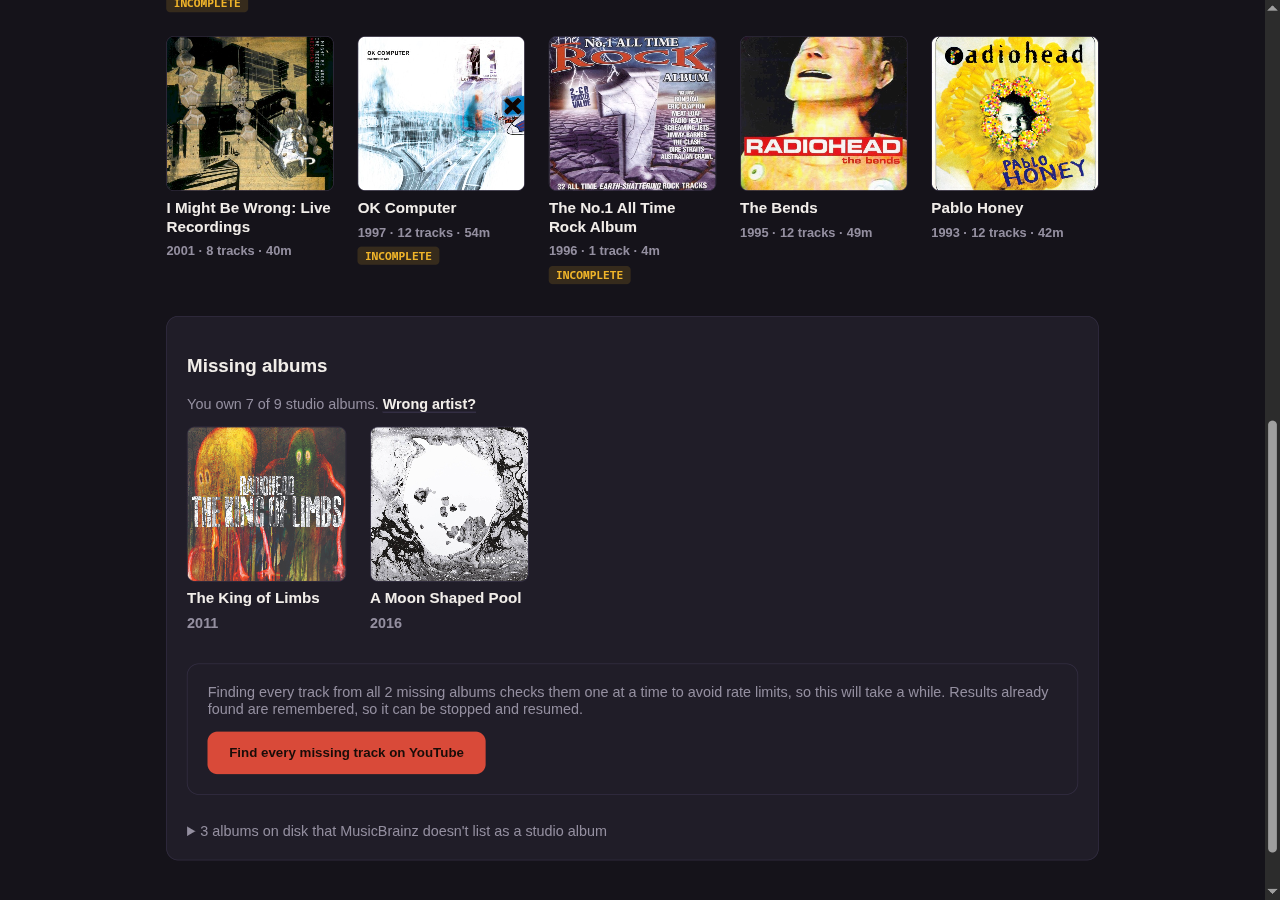
Joined credits get a second attempt. About a quarter of a real collection is rows such as
Justice & Thundercat,Grabbitz feat. REZZ, orNine Inch Nails / Stephen Morris and Gillian Gilbert. None of these match a MusicBrainz artist. Spinmatch used to abandon them, even when it held hundreds of tracks by the first artist in the name. When the whole name does not match, Spinmatch retries with the primary artist, and the panel reports which artist it matched through.Two rules stop that fallback from inventing a match, and both are essential:
- The fallback runs only after the whole name fails. A real band name that matches on its own,
such as
She & HimorSimon & Garfunkel, is therefore never split. - Spinmatch accepts the primary artist only when you already own that artist under that exact
name. This matters more than it appears to. MusicBrainz has real artists named
Florence,Earth, andWind. A split ofFlorence + The MachineorEarth, Wind & Firethat trusted the name would therefore match the wrong act with complete confidence. A requirement that the segment is already on disk makes the fallback verify itself.
Spinmatch rewrites nothing on disk and merges no rows. This affects only how it resolves a name upstream, so Wrong artist? undoes a wrong match, as it does anywhere else.
- The fallback runs only after the whole name fails. A real band name that matches on its own,
such as
Find this track (album view) — appears on each gap in the tracklist. A gap in the numbering knows only a position, and you cannot search YouTube for "track 4". Spinmatch therefore asks MusicBrainz what sits at that position, and then sends the named track to the usual YouTube lookup. The action is per row, and it is cheap on several rows. Spinmatch fetches the tracklist of the album once and reuses it, so only the first row reaches the network. If the position is past the end of the official tracklist, Spinmatch says so. A gap at 14 on a record of 12 tracks is a wrong track number on a file that you already have. Edit tags is the repair for that.
Check tracklist (album view) — compares one album against its official tracklist. This finds what the track-number check cannot: an album numbered 1 to 10 with no gaps that in fact has 12 tracks. Each absent track gets the usual Find on YouTube button. Find all missing on YouTube does the whole gap in one pass. It uses the same streaming, one-at-a-time matching as the release-group page. It covers only the tracks that you do not own, so Spinmatch searches for nothing that you have.
Find every missing track on YouTube (artist view) — a sweep of the whole discography. It covers every track of every album that the artist has and you do not, in one streaming run. This is several minutes of work at one lookup per second. Spinmatch therefore writes each result to a small cache on disk as it arrives. If you stop the run and return later, it continues instead of starting again. Spinmatch reports and skips an album whose tracklist it cannot read. A rate limit stops the run.
Discovery
Every other library view finds gaps in records that you already know about. The Discover tab is the reverse. It reaches music that you do not have from music that you do:
Find similar artists — starts from the ten artists that you own the most of, less any whose name Spinmatch cannot resolve to a MusicBrainz artist, and follows two signals. Sounds like comes from ListenBrainz, where a listening history overlaps with yours. Connected to comes from the relationship graph of MusicBrainz, which records shared members, side projects, and collaborations. Each suggestion reports which of your artists led to it and by which signal. Spinmatch ranks the suggestions by how many of your artists agree, and it removes anything already in your library.
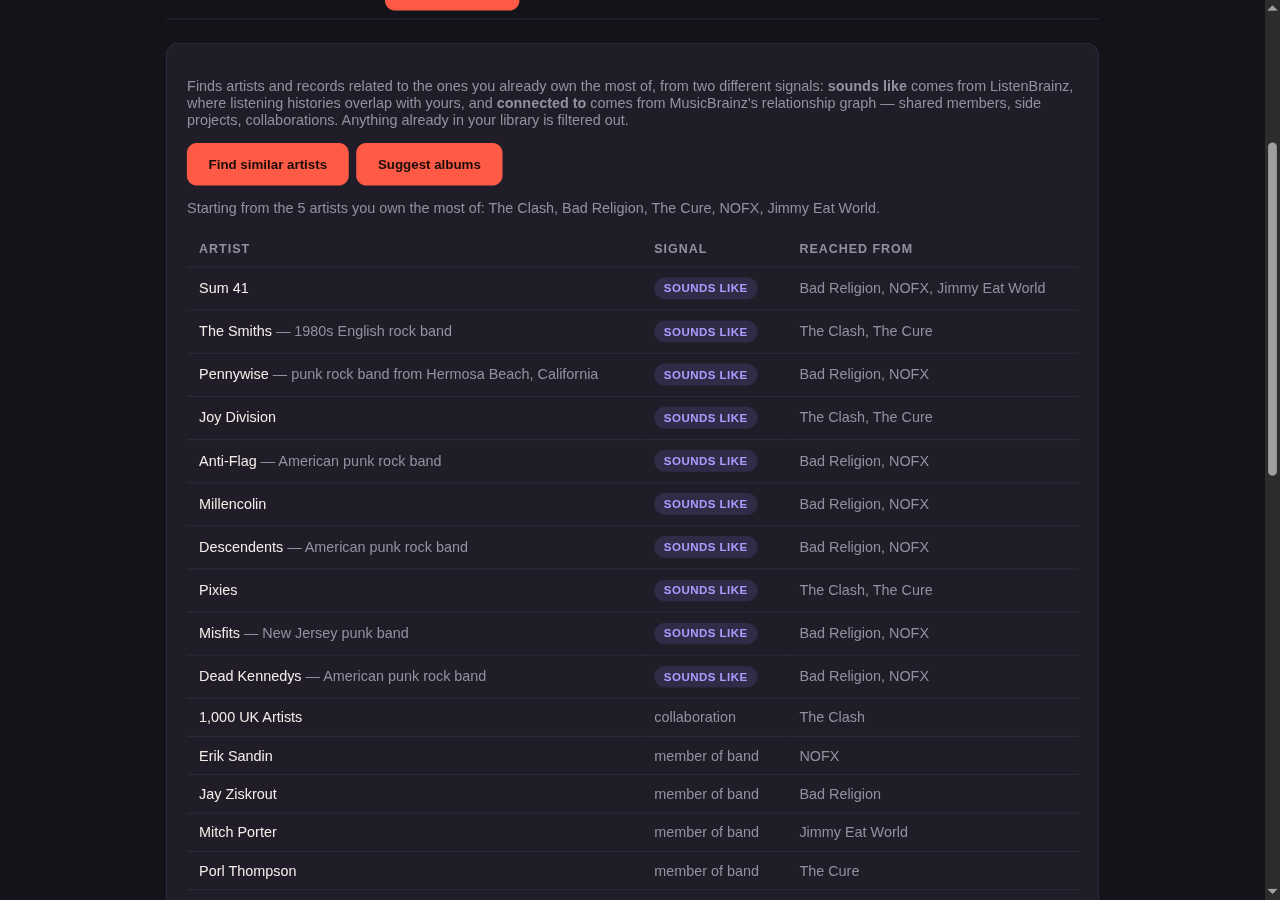
Suggest albums — the same idea, one step further. It lists the studio discographies of the first few discovered artists, without the records that you already own. Each cover links to the release-group page, where the existing verify flow continues.
Spinmatch keeps the two signals separate instead of combining them, because they make different claims. MusicBrainz records facts, not taste. A "member of band" edge is a documented connection, and it finds side projects that listening data ranks poorly or not at all. ListenBrainz is the reverse. It knows nothing about who played on what, but it knows that a listener of Portishead also plays Massive Attack. An artist that both signals reach is the strongest result here, and Spinmatch marks it.
Both signals come from MetaBrainz, both use the same artist ids, and neither needs an API key. Spinmatch never sends your listening habits anywhere, because it only ever asks which artist is similar to a given artist id.
The similar-artist endpoint of ListenBrainz is on an experimental subdomain, so Spinmatch supports
its absence instead of treating it as a failure. Discovery then uses the relationship graph alone and
reports that on the page. Set LISTENBRAINZ_ENABLED=0 to disable it deliberately. Spinmatch caches
both lookups for a month, and it never caches an outage. Without that rule, a short outage would look
like "this artist has no neighbors" for weeks.
A collection concentrated in one scene still returns little. That is an honest answer, not a fault.
Search results and artist pages also know your library. Spinmatch marks an album or song that you already have with In your library. That check is local SQL with no upstream request, and it matches in the same way as gap detection. "Kid A (Deluxe Edition)" on disk therefore still counts as ownership of "Kid A". An artist page is also a coverage view, because it shows the whole studio discography with the records that you own marked.
An album page reached from a search still has the original gap detection. Spinmatch matches by artist and track title, and it normalizes both. The normalization ignores case, punctuation, featured-artist suffixes, and a suffix in brackets such as "(Remastered 2011)" or "[Live]". A remaster that you own is therefore not reported as absent. Larger tag differences, such as "The Beatles" against "Beatles", can still make a track that you own appear as absent. Results therefore depend on the tag hygiene of your files. See the Health tab.
The preview player
Spinmatch also has a small preview player. Press play on any track to stream it from disk, with seeking and with next and previous across the list that you started from. It appears as a bar at the foot of the page, and the Tracks tab screenshot above shows it in use.
This is a preview on purpose. It is a way to confirm that a file is what its tags claim, and it is
not a music server. There is no queue management, no transcoding, and no playback outside the
Library page. Point Navidrome or Jellyfin at MUSIC_DIR for those features.
Playlists
MUSIC_DIR also enables a Playlists page. A playlist is a named, ordered list of tracks, held
alongside the rest of the library index.
There are three ways to add tracks to a playlist:
- From the library. Every row on the Tracks tab, and every row of an album's tracklist, has an Add to playlist button. You already named the track, so there is nothing to review.
- From a pasted list. The playlist's Paste tab takes one track per line, as
Artist - Titleor as a title alone, and matches each line against the index. It works offline: it matches against your files only and makes no MusicBrainz or ListenBrainz request. A line that matches nothing can still be added — it becomes a gap. See below. - From discovery. The playlist's Suggest tab proposes tracks the way Find similar artists does: pick one or more artists that you already own, and Spinmatch draws tracks by the artists connected to them that you also own. Nothing is added until you review the proposal and press Add selected.
Import .m3u on the Playlists page creates a new playlist from an .m3u or .m3u8 file (UTF-8,
up to 5000 entries). Each entry is matched by its path first: an absolute path inside MUSIC_DIR, a
path relative to MUSIC_DIR, or a file:// URL. Windows backslashes are accepted. An entry that
points outside MUSIC_DIR is never looked up as a path. Otherwise the #EXTINF line's
Artist - Title is matched the way a pasted line is, so a playlist exported on another computer
still finds your copies. An entry with no #EXTINF and no library path keeps its file name as a
label only and stays a gap; matching on a bare file name would pick up the wrong track.
Choosing tracks
The Suggest tab offers two selection methods:
- Popular ordinarily ranks tracks by ListenBrainz popularity. That API is currently disabled
upstream — as of 2026-08-02 it answers every request with HTTP 500 and the message "Popularity API
currently disabled due to high load on the server." Until MetaBrainz turns it back on, Popular
orders by album year and then track number instead: a chronological walk of what you own by an
artist, not a claim about what is popular. Spinmatch says this on the page rather than presenting a
release-date ordering as a popularity ranking. If the endpoint returns, Popular starts using it
again with no change on your part. This is the same honesty the Discovery section
above already applies to the experimental
labs.subdomain. - Chance shuffles each artist's tracks and draws at random. An optional "Favour popular tracks within the shuffle" checkbox narrows the shuffle, per artist, to their most popular tracks first, for an artist where popularity data exists.
Both methods draw round-robin across the artists connected to your seeds rather than filling one
artist to its cap before touching the next, so the result is spread across artists instead of
proportional to how much of one you happen to own. That cap exists so that a handful of artists you
own heavily cannot fill the whole playlist by themselves: ceil(target / artists) + 5. Requesting 50
tracks drawn from 5 artists therefore caps each one at ceil(50 / 5) + 5 = 15. The computed number is
shown on screen beside the results, because it can behave oddly at a small target or a large artist
count and you should be able to see why.
A duration filter excludes anything shorter than 60 seconds or longer than 12 minutes by default; both limits are fields on the Suggest tab. A track with no readable duration is excluded outright, never kept. The Health tab already establishes what a missing duration means: the scanner could not decode the audio stream, so the file is damaged, not merely untagged.
Gaps
A playlist can hold a track that you do not own. A row with no local file behind it shows as a gap, with a Find this track link into a Search for it. A pasted line that matched nothing takes this shape, and so does a track whose file has since left the library.
A gap fills itself in once a matching file lands in your library, with nothing further to do. A playlist item stores its artist and title as text, not a reference to a specific file, and every read of a playlist resolves those items against the library index fresh. Once a file with a matching artist and title exists on disk, the same row resolves to it on the next visit to the page.
Exporting
A playlist page offers two exports:
- Export m3u writes an Extended M3U to the root of your music folder, named after the playlist. Each entry's path is relative to that root, so the file still works when you read it from another machine or under a different mount point. A gap is written as a comment line instead of a path, so the file stays a complete record of the playlist instead of a silently shortened one. If a file is already at that path, Spinmatch reports it and waits for you to confirm the replacement: nothing records which playlist wrote which m3u, and the file may be one Spinmatch never wrote at all.
- Export to player copies the playlist's tracks into a folder at
DROPOFF_DIR, flat, one file per track. Each filename is numbered so that a player which sorts by filename plays them back in playlist order. Spinmatch checks free space atDROPOFF_DIRbefore it copies anything, and refuses to start if the playlist would not fit. Exporting a playlist that already has a folder there asks for confirmation first: Replace deletes what is there and writes the export fresh, and nothing is copied until you confirm. Two playlist names can reduce to the same folder name once the characters a filesystem will not take are removed; when that folder is another playlist's last export, Spinmatch refuses and names the other playlist rather than offering to replace it. An export also refuses to start if any of its tracks is not readable, so a music folder that has gone offline cannot delete the last export and copy nothing back. This action is hidden unlessDROPOFF_DIRis set. See Configuration.
Adding new files: the Ingest page
Set INGEST_DIR as well as MUSIC_DIR to add an Ingest page. Put new audio in INGEST_DIR, as
single files or as whole album directories. Spinmatch tags each file and moves it into a
{Artist}/{Album}/{Track} - {Title} structure below MUSIC_DIR. A track with no album goes to
{Artist}/Singles/. A multi-disc release gets a disc prefix in each track name. If a file is
identical to one already in the library, Spinmatch leaves it in place instead of making a duplicate.
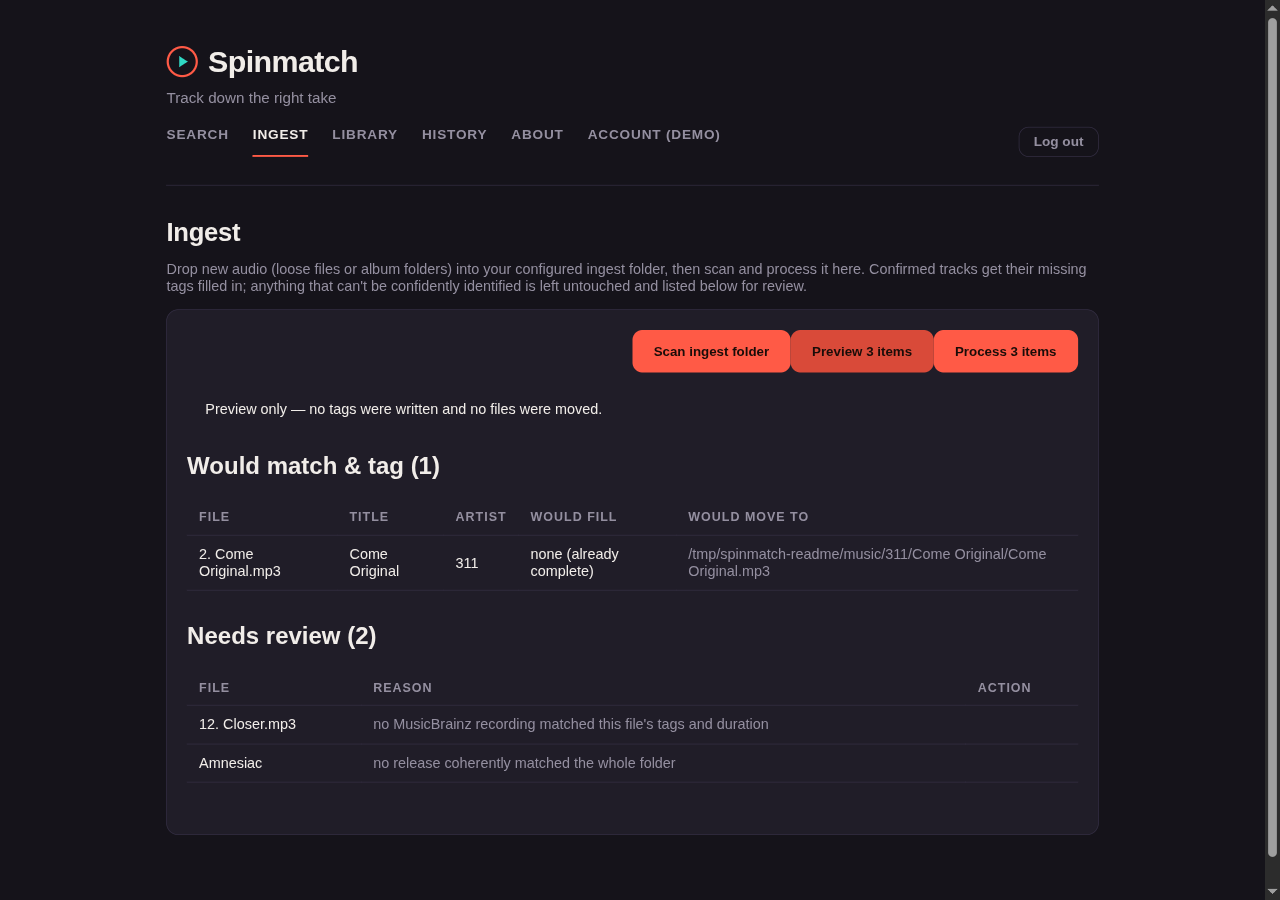
The page has three buttons, in the order you use them:
- Scan ingest folder — lists what is there. It reaches no network and touches no file.
- Preview N items — resolves every item against MusicBrainz and reports what it would do. No tag is written and no file is moved.
- Process N items — the same run, for real.
Set ACOUSTID_API_KEY to enable automatic identification. Spinmatch makes a fingerprint of
each track with Chromaprint and asks
AcoustID what the recording is. It then compares the result against the
track length from MusicBrainz before it tags and moves the file. Spinmatch handles an album
directory as one unit. It tags and moves that directory only when one release accounts for every
file in it. In all other cases it leaves the whole directory for your review.
Get a free AcoustID API key at
acoustid.org/new-application. fpcalc, the command-line
program of Chromaprint, must be installed and on PATH. The Docker image installs fpcalc for you.
For local use, install it with your package manager, for example apt install chromaprint or
brew install chromaprint. If fpcalc is in another directory, set FPCALC_PATH.
Without ACOUSTID_API_KEY, ingest matches on the tags that the files already have. AcoustID key
registration has been unavailable for some time, so you may not be able to get a key. Spinmatch
searches MusicBrainz for the artist and title of the file. It accepts a result only when the title
agrees, and when the MusicBrainz length is within five seconds of the length of the file. This is
the same "confirm before any change" rule that the fingerprint path uses, without the fingerprint.
Album directories work the same way. Spinmatch matches the album and artist tags against a release
group whose whole tracklist agrees by duration. Track-number tags, when they exist, set the running
order instead of the filenames. This path makes no fingerprint, so it does not need fpcalc.
Spinmatch leaves any file that it cannot identify with confidence in INGEST_DIR. It lists that
file on the Ingest page as "needs review". Spinmatch never deletes a file, and it never moves an
unmatched item without your review. It also never guesses.
You can resolve a single unmatched file directly from the needs-review list, after a real run. A
Find a match button opens a picker. Select one of the offered candidates, or search MusicBrainz
yourself by artist and title. With ACOUSTID_API_KEY set, the candidates are the lower-confidence
results from AcoustID. Without it, the candidates are what MusicBrainz returns for the tags of the
file. Spinmatch then tags and moves the file in the same way as an automatic match. A directory that
matched no release as a whole is not offered a picker, because the unit that failed is the whole
folder. Spinmatch does not change a file that is not audio.
History
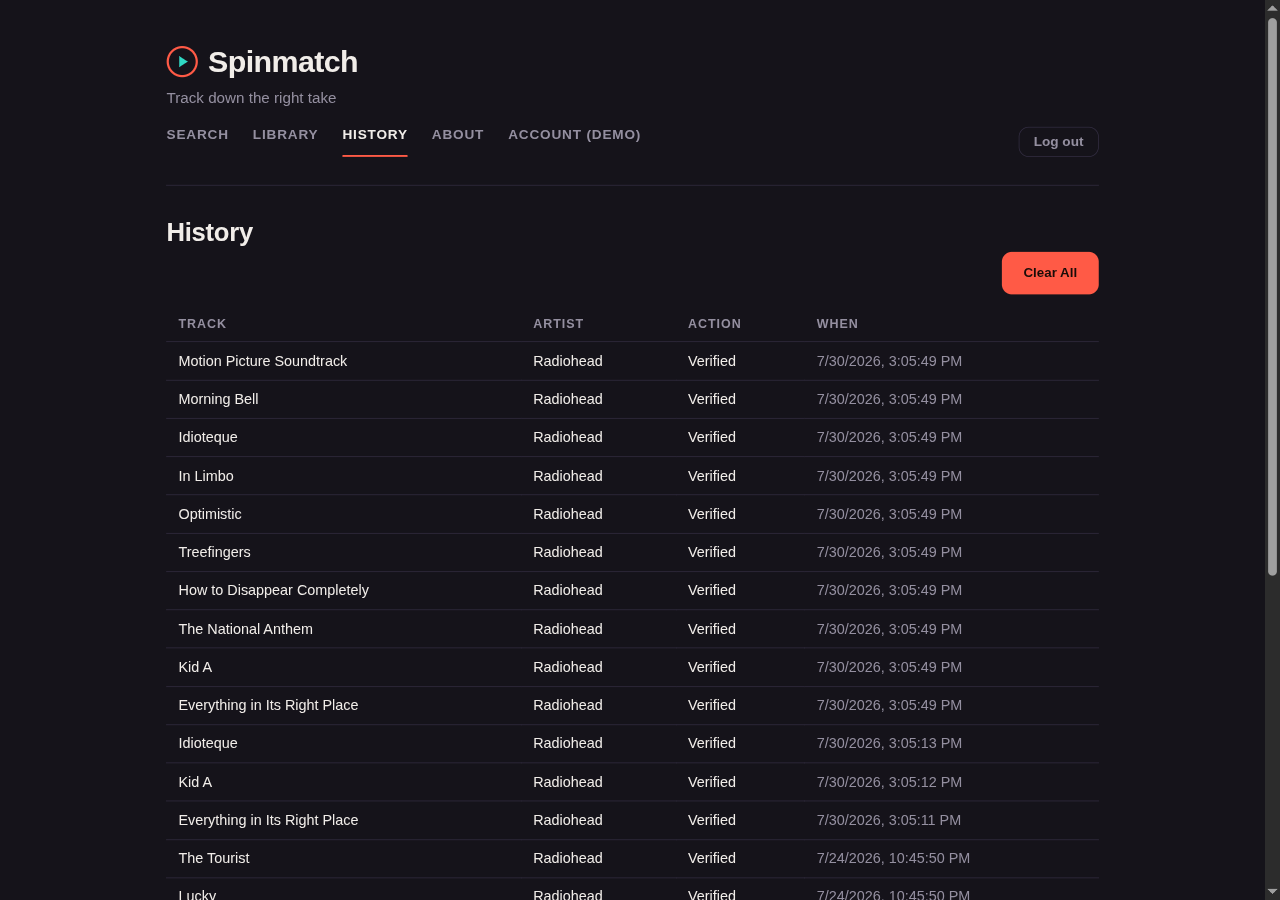
The History page lists what you have verified and ingested, with a timestamp for each. A verification shows its result (Confirmed, Unverified or No results) and links to the YouTube video it found. The server records every single verify, every album or missing-track sweep, and every file an ingest run moves into the library (a preview records nothing), so the list is the same in every browser you sign in from. It keeps the newest 5000 entries, and Clear All, after a confirm, empties it for everyone. The Library's Overview tab shows the latest five.
Earlier versions kept this list in your browser. The first time you open Spinmatch after upgrading, that browser's list is copied to the server and then removed from the browser. Entries already copied are skipped, so opening several tabs or browsers at once does not duplicate them.
An About page carries the same summary, a note about yt-dlp rate limits, and the full license
text.
First-run login
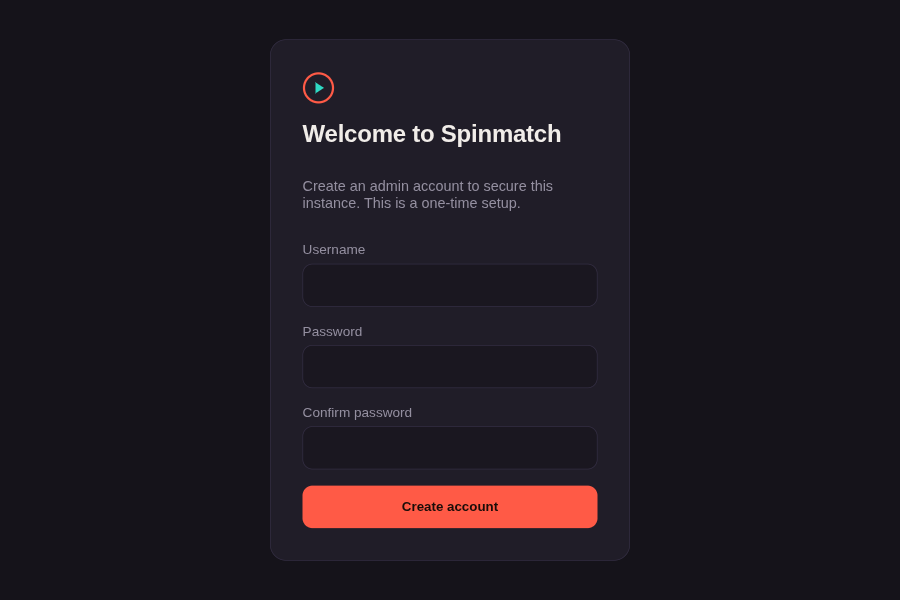
One admin account protects the whole app. The first time you open Spinmatch, it shows a setup screen. Enter the setup token, a username, and a password of 8 characters or more. Spinmatch then logs you in. After setup, every visit shows a login screen.
The setup token stops whoever reaches a fresh install first from claiming it. While no admin exists, the server prints a new one-time token to its log at every start:
docker logs spinmatch 2>&1 | grep 'First-run setup token'
The token lives in memory only. It is spent by a successful setup; restart to get a fresh one. All /api routes need a valid session or API token,
except /api/health and /api/config.
Spinmatch stores the password as an Argon2id hash (64 MiB, 3 passes). A hash from an older
version is upgraded at your next login. It uses the same SQLite database as the library
index (LIBRARY_DB, default /data/db/library.db). Keep that path on a persistent volume. No
extra configuration is necessary, because the login is always active.
To change your password, use the Account page. The page asks for your current password. A password change logs out every other browser and device. The tab that you use stays logged in.
If you forget your password, stop the app and delete the app_auth row. You can delete the
whole database file instead, then start the app and take the new setup token from its log. Each session
cookie names the admin that it belongs to. A new admin also gets a new token-signing secret. A
cookie from before the reset therefore stops working immediately.
A session is a stateless cookie with a life of 30 days. Log out deletes the cookie and revokes the token on the server. A copy of that cookie on another machine therefore stops working too. Spinmatch has one account only, so a logout logs you out on every device. A password change does the same.
Running behind a reverse proxy
Set TRUST_PROXY=1. You can also give a subnet, or any other value that the Express
trust proxy setting accepts. Without this
setting, Spinmatch ignores the X-Forwarded-* headers. That is correct for a directly exposed
process, but wrong behind a proxy for two reasons:
- The login rate limit uses the client IP address as its key. Behind a proxy, every request appears to come from the proxy, so all clients share one limit.
- Spinmatch marks the session cookie
Securefrom the scheme of the request. A proxy that terminates TLS sends a plain HTTP request to Spinmatch.
Set this value only when you control a proxy in front of the app. The setting makes the app trust a header that any client can send.
Permitted values are a hop count (1), true, false, a subnet (10.0.0.0/8), or a named preset
(loopback). If the value is not valid, the server stops at startup and prints a message. It does
not start with the setting silently inactive.
Single sign-on (OIDC)
Spinmatch can sign the admin in through any standards OpenID Connect provider, such as Authentik, Authelia, Keycloak or KyIdentity. It is off until you set all four required variables. If you set some but not all, the server refuses to start and names the missing ones.
| Variable | What it does |
|---|---|
OIDC_ISSUER |
The provider's issuer URL, exactly as its /.well-known/openid-configuration reports it, trailing slash included. |
OIDC_CLIENT_ID |
The client ID you registered for Spinmatch. |
OIDC_CLIENT_SECRET |
Its client secret (sent with HTTP Basic auth). |
OIDC_REDIRECT_URI |
The callback URL, below. Spinmatch never derives it from the request's Host header. |
OIDC_POST_LOGOUT_URI |
Optional. Where the provider sends you after Log out, if it supports that. Register it too. |
OIDC_ONLY |
Optional. 1 refuses password login once an identity is linked. |
Register a confidential client with the authorization code flow, PKCE (S256) and RS256 ID tokens, and these URLs (replace the host with yours):
- Redirect URI:
https://spinmatch.example/api/auth/oidc/callback - Back-channel logout URI:
https://spinmatch.example/api/auth/oidc/backchannel-logout
All URLs must be HTTPS. Plain http:// is accepted only for localhost, 127.0.0.1 and [::1].
Linking. Sign in with your password, open Account, and choose Link identity under
Single sign-on. Spinmatch sends you to the provider and stores the issuer and subject (sub)
it returns. After that, Sign in with SSO on the login page works for that identity only.
Spinmatch never matches on email or username, so another account at the same provider is refused
with "This identity isn't linked to Spinmatch". Unlink removes the link.
Logging out. Log out signs out every Spinmatch session, as before, then sends the browser to the provider's end-session page when it advertises one. When the provider ends your session, it can post a back-channel logout token to the URL above. Spinmatch checks the token's signature and claims, refuses a repeat of the same token, and signs out every session.
OIDC_ONLY. With OIDC_ONLY=1 and an identity linked, password login returns 403. Setup and
password change still work. If the provider is down or the link is lost, unset OIDC_ONLY and
restart the server, then sign in with your password.
API tokens
Scripts and other tools use an API token instead of the login. Create one in the API tokens section of the Account page. The page shows the token once, at creation. Spinmatch stores only its SHA-256 hash, so a lost token cannot be recovered: revoke it and create another.
curl -H "Authorization: Bearer spm_…" http://host:3000/api/library/stats
Each token has one of two scopes:
- Read-only (the default) allows
GETandHEADrequests only. It also cannot open the streams that do work, such as ingest processing or a missing-tracks check. - Full access allows every method on the library, playlist, search, verify, ingest and history
routes. A request with a token needs no
Originheader, because a browser never sends a token on its own.
No token can use /api/auth (status, login, logout, password) or /api/tokens, whatever its scope.
Those need a signed-in session. A request that carries a token is treated as a token request even if
it also carries a session cookie. An invalid or revoked token is refused with 401 and never falls
back to the cookie. After 20 failed token attempts in 5 minutes, an IP address is locked out of token
access for the rest of that window.
Tokens are separate credentials. Log out and a password change do not revoke them. Use Revoke or Revoke all tokens on the Account page. Recreating the admin account (see above) revokes every token.
A token is sent in clear text with every request, like a password. Use HTTPS (for example through a reverse proxy) whenever Spinmatch is reachable from outside your LAN.
Prerequisites
- Node.js 26 or later, the version the Docker image ships.
yt-dlp, installed and onPATH.
Installing yt-dlp
Spinmatch runs yt-dlp as a subprocess to find and verify YouTube matches. No API key and no daily
quota are necessary. Install yt-dlp with one of these commands:
pipx install yt-dlp   # recommended: isolated, easy to upgrade with `pipx upgrade yt-dlp`
pip install --user yt-dlp
brew install yt-dlp   # macOS
To confirm that yt-dlp is on PATH, run yt-dlp --version. If you install it in a directory
that is not on PATH, set YTDLP_PATH in .env to the full path of the program.
yt-dlp reads the YouTube site directly instead of an official API. A large number of lookups can
therefore cause a temporary rate limit from YouTube. The Find all on YouTube album action is the
most likely cause. Spinmatch makes one lookup at a time to reduce this risk. If a rate limit occurs,
wait and then try again. Run yt-dlp -U to get the newest anti-bot-detection fixes.
Configuration
Copy .env.example to .env and enter your values. The minimum is one line:
MB_CONTACT_EMAIL=you@example.com
MB_CONTACT_EMAIL is necessary. The
MusicBrainz API usage policy requires a
real contact email in the User-Agent string of every request. Without it, MusicBrainz can block
the IP address of the app. The server refuses to start without it.
Every other variable is optional. .env.example carries the same list with longer comments.
| Variable | Default | What it does |
|---|---|---|
MB_CONTACT_EMAIL |
— | Required. Your contact address, sent to MusicBrainz in the User-Agent. |
PORT |
3000 |
The port the server listens on. |
MB_APP_NAME, MB_APP_VERSION |
Spinmatch, 0.1.0 |
The other two parts of the User-Agent. |
YTDLP_PATH |
yt-dlp |
Path to the yt-dlp program, when it is not on PATH. |
MUSIC_DIR |
unset | Your music folder. Setting it enables Your Library. |
INGEST_DIR |
unset | The drop folder. Set it and MUSIC_DIR to enable Ingest. |
DROPOFF_DIR |
unset | The folder that Export to player copies into. Optional; unset hides that action. Set it and MUSIC_DIR to enable Export to player. Keep it outside MUSIC_DIR — a folder inside it puts the copies on the music volume, where the scanner indexes them as duplicates of the tracks they came from. |
LIBRARY_DB |
data/library.db |
The SQLite file. It always holds the login, plus the library index when MUSIC_DIR is set. The Docker image sets it to /data/db/library.db. |
ACOUSTID_API_KEY |
unset | Turns on fingerprint identification, for ingest and for Identify by audio. |
FPCALC_PATH |
fpcalc |
Path to the Chromaprint program, when it is not on PATH. |
LISTENBRAINZ_ENABLED |
1 |
Set to 0 to drop the "sounds like" half of Discovery. |
TRUST_PROXY |
unset | See Running behind a reverse proxy. |
OIDC_* |
unset | See Single sign-on (OIDC). |
PUID, PGID |
1000, 1000 |
Docker only. See File ownership. |
ACOUSTID_MIN_SCORE |
0.5 |
The lowest AcoustID confidence, from 0 to 1, that counts as a fingerprint match. |
ARTIST_AUTO_ACCEPT_SCORE |
90 |
The MusicBrainz artist-search score, from 0 to 100, at or above which Spinmatch resolves a name without asking you. |
DURATION_TOLERANCE_MS |
5000 |
How far a candidate length may differ from the expected length during ingest. |
INGEST_HOST_DIR, MUSIC_HOST_DIR, DB_HOST_DIR |
./ingest, ./music, ./db |
Docker Compose only. The host folders bind-mounted at the three container paths. The app never reads them. |
The three matching thresholds exist so that they can be tuned without a code change. The defaults are the values that the app shipped with. They govern ingest and artist resolution only. The five-second window that decides Confirmed against Unverified on a YouTube match is separate and fixed.
Enabling the library and the Ingest page
Both features are configuration, not a flag. MUSIC_DIR alone enables Your Library. MUSIC_DIR
and INGEST_DIR together also enable Ingest. To disable either one, set its variable to an empty
string.
The Docker image sets INGEST_DIR and MUSIC_DIR to /data/ingest and /data/music.
docker-compose.yml and the Unraid template already mount those two paths. Under Docker, the volume
mapping is therefore the whole configuration. Mount the host directories that you want, and the
pages appear. Outside Docker, both variables are empty by default, so both features stay optional.
The index lives at LIBRARY_DB, default /data/db/library.db. As with MUSIC_DIR, this path
must be on a mounted volume under Docker and Unraid. Otherwise Spinmatch rebuilds the index every
time you recreate the container, which is harmless but slow. In Docker Compose, set DB_HOST_DIR to
the host directory to bind-mount for it, default ./db.
Upgrading: the first scan after an update re-reads the tags of every file once, to fill the
columns that this version adds. On a large collection that takes a few minutes. It runs in the
background, and it runs once. Spinmatch keeps the date when each track first entered your library. A
later upgrade also deletes an unused verified_tracks table from an early schema. No data that you
can see changes.
The built-in node:sqlite module of Node is still experimental. On some versions of Node you
therefore see a single ExperimentalWarning: SQLite is an experimental feature on stderr at startup.
It is expected and harmless.
Running locally
npm install
npm run dev
This runs the Express backend and the Vite dev server together. The backend uses
--env-file=../.env, so it reads .env from the root of the repository. Open
http://localhost:5173.
Backing up
Account → Download database backup saves a copy of Spinmatch's database. It holds your playlists, history, tag-edit undo, MusicBrainz links, API tokens (hashed) and settings. Your music files are not in it; back those up as you already do.
The copy also holds your password hash, so keep it private. It needs a signed-in session; API tokens can't download it. It leaves out the secret that signs session cookies, so a leaked backup can't be used to sign in; a restored copy makes a new one, and everyone signs in again.
To restore, stop Spinmatch, replace library.db (in Docker, the file in your /data/db volume) with
the downloaded file, delete any library.db-wal and library.db-shm beside it, and start Spinmatch
again.
Running in production
npm install
npm run build
npm start
npm start runs the Express server directly, and reads .env through --env-file. The server
serves the built client from client/dist on $PORT, default 3000.
Running with Docker
cp .env.example .env   # fill in your values
docker compose up --build
The app is then at http://localhost:3000. The container builds the client and runs the server in one image. No separate frontend container is necessary.
File ownership (PUID / PGID)
The container starts as root, prepares its own database directory, and then changes to an
unprivileged user id before it runs the server. It never answers a request as root. This process
runs yt-dlp and fpcalc as subprocesses, and it parses tags out of files that you downloaded from
anywhere. None of that work should run as root with your music library mounted read-write. The
change of user id also means that the ingest flow writes files owned by you instead of by root.
Your media player can therefore still write to them.
PUID and PGID select that user id. The default is 1000:1000:
PUID=1000     # `id -u` on most Linux hosts; 99 on Unraid (nobody)
PGID=1000     # `id -g` on most Linux hosts; 100 on Unraid (users)
This matters because a bind mount keeps the ownership of the host. Nothing that the image does at build time can change that ownership. Set these values to the owner of the directories that you mounted.
The container changes the owner of /data/db for you at every start. That directory is the private
storage of the app, and it holds the SQLite index and your login. It deliberately does not touch your
music and ingest directories. A recursive change of owner across a music library is slow, is not the
decision of the container, and cannot be undone. If either directory is not writable, correct it
yourself:
sudo chown -R 1000:1000 ./ingest ./music
If the container cannot make the database directory writable, the server reports the problem at
startup and exits. It does not answer every request with a 500. Read docker logs for a message
that names the path, the user id that the server runs as, and the current owner.
An explicit --user still works, and it takes priority. The same applies to user: in
docker-compose.yml. The entrypoint detects that it is already unprivileged and does nothing. In
that case it can change no owner for you, so the mounts must already be writable.
Are you upgrading from a version that ran as root? Your
dbdirectory belongs to root, and the server refuses to start until that changes. The entrypoint corrects this automatically. If you pinned--user, runsudo chown -R 1000:1000 ./dbonce.
Running on Unraid
A published image is at ghcr.io/yoshiofthewire/spinmatch:latest. The build runs automatically on
every push to main, and within an hour of a new release of yt-dlp appearing.
To install with Community Applications:
- Open the Apps tab.
- Search for Spinmatch.
- Click Install.
To add the same template by hand, without Community Applications:
- Open the Docker tab.
- Click Add Container.
- Change the template list to Enter URL.
- Paste this URL:
https://raw.githubusercontent.com/Yoshiofthewire/unraid_docker_apps/main/Spinmatch.xml
Both methods give you
Spinmatch.xml,
with the repository, port, paths, and environment variables already set. That file is in
unraid_docker_apps beside the other
templates, and not in this repository.
Set MB Contact Email at minimum. The mapped paths Ingest Directory, Music Directory, and
Library DB Directory are the host directories bind-mounted at the container paths
/data/ingest, /data/music, and /data/db. A path mapping alone tells the app nothing. The
template therefore also ships the matching INGEST_DIR, MUSIC_DIR, and LIBRARY_DB variables,
under Show more settings, which point at those container paths. Leave those variables unchanged
unless you change a container path.
Point Music Directory at your existing music share to enable the library and ingest features described above. Also set AcoustID API Key if you want automatic track identification. Without that key, ingest still works with manual matching only. Point Library DB Directory at a persistent appdata path, so the collection index survives a rebuild of the container. Spinmatch uses that index as soon as you set Music Directory, and it needs no separate switch.
The template sets PUID and PGID, under Show more settings, to nobody:users of Unraid,
which is 99:100. That pair owns a standard Unraid share. Leave both values unchanged unless you
know that something else owns yours. See File ownership above for what
they do, and for what happens when they are wrong.
Tests
npm test
This runs the server suite (Node's built-in test runner), then the client suite (Vitest with
Testing Library in jsdom). Neither makes a live network request: undici's MockAgent stands in for
MusicBrainz, yt-dlp calls are mocked, and the client stubs fetch. Run one suite with
npm run test -w server or npm run test:run -w client.
License
MIT. See LICENSE.
The screenshots in this file come from a real library. Cover art in them belongs to its respective copyright holders and appears here only to show what the app looks like.
Categories
Related apps
Explore more like this
Explore allDetails
ghcr.io/yoshiofthewire/spinmatch:latestRuntime arguments
- Web UI
http://[IP]:[PORT:3000]/- Network
bridge- Shell
sh- Privileged
- false
Template configuration
Port the web UI listens on
- Target
- 3000
- Default
- 3000
- Value
- 3000
User id the server runs as. Unraid's shares are owned by nobody:users (99:100), which is the default here — leave it alone unless you know your shares are owned by something else. It must be a uid that can write the Library DB Directory below, and the Music/Ingest directories if you use them. Upgrading from a version that ran as root? The container fixes up the DB directory itself on start; your music share is left alone.
- Default
- 99
- Value
- 99
Group id the server runs as. Pairs with PUID above; 100 is Unraid's `users` group.
- Default
- 100
- Value
- 100
Drop-folder for unsorted audio (loose files or whole album folders) to be identified and filed into Music Directory. Only used if MB Contact Email, Music Directory, and this path are all set. AcoustID API Key is optional on top of that — without it, files are matched by the tags they already carry, and anything that can't be confirmed is listed for manual review.
- Target
- /data/ingest
- Default
- /mnt/user/appdata/spinmatch/ingest
- Value
- /mnt/user/appdata/spinmatch/ingest
Your organized music library. Confirmed ingested tracks are moved here into an {Artist}/{Album}/{Track} - {Title} structure. Point this at your existing music share.
- Target
- /data/music
- Default
- /mnt/user/Music
- Value
- /mnt/user/Music
Storage for the SQLite library index (library.db) that powers the collection dashboard and album gap detection. Must be a persistent, mounted path so the index survives container rebuilds.
- Target
- /data/db
- Default
- /mnt/user/appdata/spinmatch/db
- Value
- /mnt/user/appdata/spinmatch/db
Required: a real contact email, per the MusicBrainz API usage policy (https://musicbrainz.org/doc/MusicBrainz_API/Rate_Limiting). Every request identifies itself with this address; MusicBrainz may block the app's IP without it.
- Target
- MB_CONTACT_EMAIL
Application name sent in the MusicBrainz User-Agent header.
- Target
- MB_APP_NAME
- Default
- Spinmatch
- Value
- Spinmatch
Application version sent in the MusicBrainz User-Agent header.
- Target
- MB_APP_VERSION
- Default
- 0.1.0
- Value
- 0.1.0
Optional: enables automatic track identification for the local library ingest feature (which itself just needs Ingest Directory and Music Directory above). Get a free key at https://acoustid.org/new-application. Leave blank and ingest still works, falling back to matching files by their existing tags (confirmed against MusicBrainz by title and duration), with anything unconfirmed listed for manual review.
- Target
- ACOUSTID_API_KEY
Path (inside the container) to the SQLite library index. Should point into Library DB Directory above so it persists across container rebuilds. The collection dashboard is enabled automatically whenever Music Directory is set.
- Target
- LIBRARY_DB
- Default
- /data/db/library.db
- Value
- /data/db/library.db
Path (inside the container) to the ingest drop-folder. Must match the container side of Ingest Directory above — the path mapping alone doesn't tell the app where to look, this variable does. Clearing it disables the Ingest page.
- Target
- INGEST_DIR
- Default
- /data/ingest
- Value
- /data/ingest
Path (inside the container) to the organized music library. Must match the container side of Music Directory above — the path mapping alone doesn't tell the app where to look, this variable does. Clearing it disables both the Ingest and Library pages.
- Target
- MUSIC_DIR
- Default
- /data/music
- Value
- /data/music
Set to 1 when Spinmatch sits behind a reverse proxy you control (SWAG, Nginx Proxy Manager, Traefik, Cloudflare Tunnel). It makes the app trust X-Forwarded-For, so the login rate limit sees real client IPs instead of lumping everyone into one bucket, and X-Forwarded-Proto, so the session cookie is marked Secure when your users are on HTTPS even though the proxy talks plain HTTP to the container. Leave blank if you reach the container directly by IP and port — when it is set, the app trusts headers that any client can send.
- Target
- TRUST_PROXY
Path/name of the yt-dlp binary. The image installs yt-dlp on PATH already; only change this if you've customized the container.
- Target
- YTDLP_PATH
- Default
- yt-dlp
- Value
- yt-dlp
Path/name of the fpcalc (Chromaprint) binary used for acoustic fingerprinting. The image installs it on PATH already; only change this if you've customized the container.
- Target
- FPCALC_PATH
- Default
- fpcalc
- Value
- fpcalc