
All apps · 0 apps

speedtest-monitor
Docker app from GreiteTurtle's Repository
Overview
Readme
View on GitHub

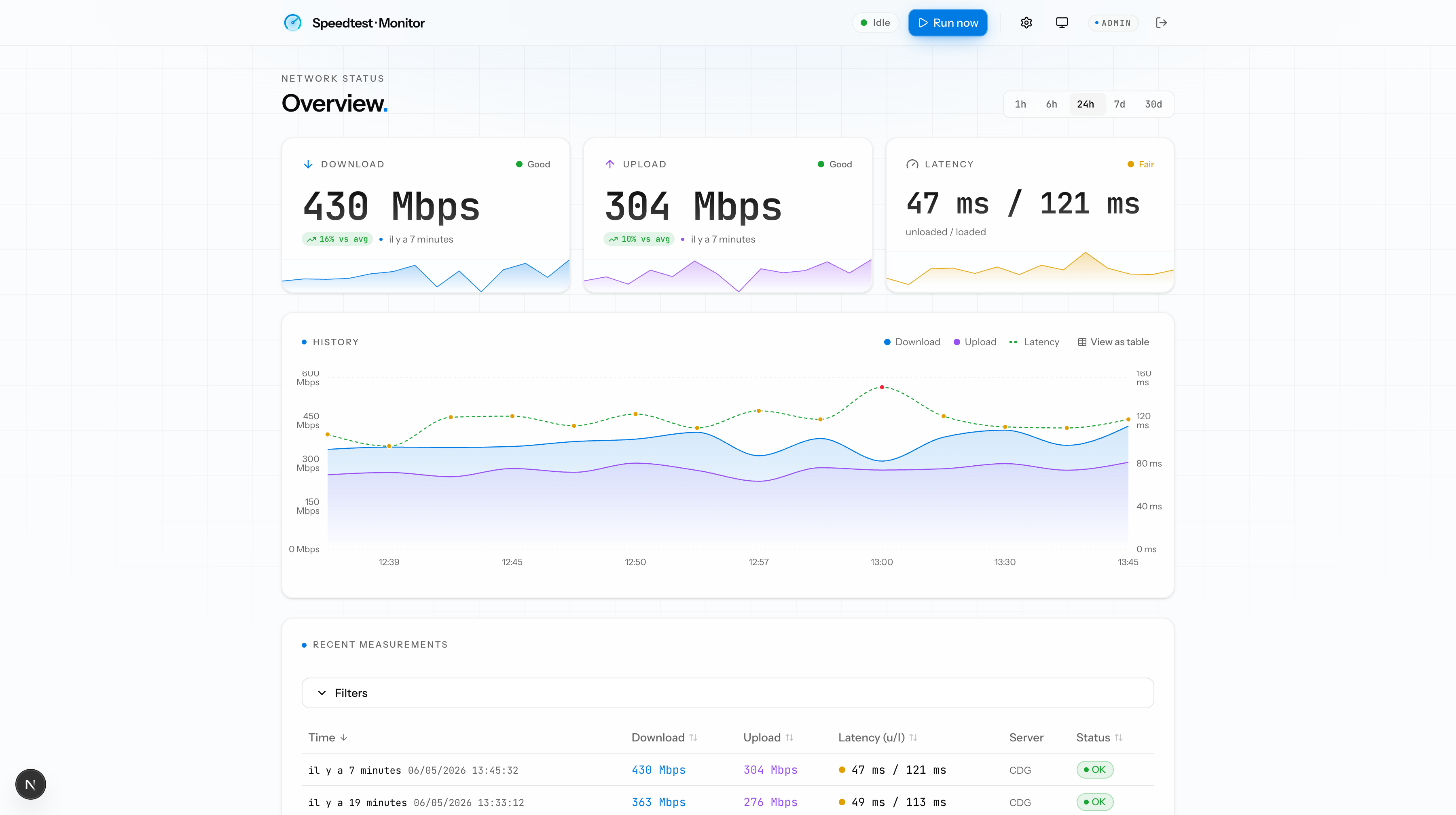
Self-hosted internet speed monitor. Runs @cloudflare/speedtest on a configurable schedule, stores every measurement in SQLite, and serves a dashboard with live updates over WebSocket.
Stack
- Runtime: Bun 1.x
- Package manager: Bun 1.4
- Framework: Next.js 16 (App Router) + TypeScript 7 + Biome 2 + Tailwind v4
- UI: Astryx design system (
@astryxdesign/core, exact-pinned) with a custom pre-built theme (lib/astryx-theme.ts->bun run theme:build) - Custom server (
server.ts): hosts Next.js and awsWebSocket endpoint on the same port - Scheduler: plain
setInterval, reprogrammable at runtime from the UI - DB: Drizzle ORM 0.45 +
bun:sqlite(built-in) - Measurement engine:
@cloudflare/speedtest(HTTP-only, no browser) - Tests: Bun native (
bun test) - Runtime image:
oven/bun:1-slim
Run with Docker
docker compose up -d --build
open http://localhost:3000
Configuration:
| Variable | Default | Purpose |
|---|---|---|
SPEEDTEST_INTERVAL_MINUTES |
15 |
Default interval used if the DB has no override |
SPEEDTEST_DB_PATH |
/data/speedtest.db |
SQLite file path (volume-persisted) |
SPEEDTEST_LOG_LEVEL |
INFO |
Minimum level written to the log file: DEBUG, INFO, WARNING or ERROR |
SPEEDTEST_LOG_DIR |
/data/logs |
Directory for app.log and its rotated copies (volume-persisted in Docker, ./logs outside) |
SPEEDTEST_LOG_MAX_SIZE_MB |
5 |
Size at which app.log is rotated to app.log.1 |
SPEEDTEST_LOG_MAX_FILES |
5 |
Rotated files kept (app.log.1 … app.log.N); older ones are deleted |
SPEEDTEST_TEST_DURATION_S |
10 |
Duration of each download/upload phase (seconds). Raise for multi-Gbps links so TCP can ramp up and the sample is not dominated by slow-start. |
SPEEDTEST_PARALLEL_STREAMS |
8 |
Parallel HTTP streams per phase. More streams help saturate high-bandwidth links (try 16 on 10 Gbps). |
SPEEDTEST_DOWNLOAD_MB_PER_REQUEST |
100 |
Download payload size (MB) per request. |
SPEEDTEST_UPLOAD_MB_PER_REQUEST |
25 |
Upload payload size (MB) per request. Lower it (e.g. 5) on slow uplinks: bytes only count when a request completes, so oversized payloads can yield upload produced no bytes. |
SPEEDTEST_LOCALE |
en-US |
BCP 47 locale for dates/times in the dashboard and alert emails (e.g. fr-FR, de-DE) |
SPEEDTEST_TIMEZONE |
UTC |
IANA timezone for dates/times in the dashboard and alert emails (e.g. Europe/Paris) |
PORT |
3000 |
HTTP + WebSocket port |
TZ |
- | Container system timezone (log lines only; display uses SPEEDTEST_TIMEZONE) |
PUID |
1001 |
UID the server runs as; /data is chowned to it at startup (linuxserver.io-style). Unraid: 99 |
PGID |
1001 |
GID the server runs as. Unraid: 100 |
Change the interval at any time via the UI (/settings) - it is persisted in SQLite and takes effect immediately without a restart.
Alerts
speedtest-monitor can notify you when your connection degrades or fails, and again when it recovers. Alerts are fully opt-in - nothing fires until you enable them and set at least one threshold.
Configure destinations (env vars)
All destinations are optional. A destination is available iff its required env vars are set.
| Destination | Required env | Optional env |
|---|---|---|
| Webhook (generic) | SPEEDTEST_WEBHOOK_URL |
SPEEDTEST_WEBHOOK_HEADERS (JSON) |
| ntfy | SPEEDTEST_NTFY_URL (full URL incl. topic) |
SPEEDTEST_NTFY_TOKEN |
| Discord | SPEEDTEST_DISCORD_WEBHOOK |
- |
| Slack | SPEEDTEST_SLACK_WEBHOOK |
- |
| Email (SMTP) | SPEEDTEST_SMTP_HOST, SPEEDTEST_SMTP_FROM, SPEEDTEST_SMTP_TO |
SPEEDTEST_SMTP_PORT (587), SPEEDTEST_SMTP_SECURE (auto), SPEEDTEST_SMTP_USER, SPEEDTEST_SMTP_PASS |
| - | - | SPEEDTEST_PUBLIC_URL (dashboard link in emails) |
Configure rules (UI)
In /settings, toggle "Enable alerts", set any subset of thresholds
(download, upload, latency, bufferbloat, failure streak), and enable the
destinations you want. Each destination has a "Send test" button to verify
wiring without waiting for a real incident.
Semantics
- Fire on transition only. Once a condition enters ALERTING it will not re-fire until it first recovers. No spam during prolonged outages.
- Per-condition state. Download dropping while latency is fine -> one alert. Latency spiking later -> a second independent alert.
- Failure streak. Counts consecutive measurements with status error/timeout ending at the current one - useful when the connection actually goes down.
- Secrets stay in env. Destination credentials are never persisted to
the SQLite DB and never returned by
/api/alerts/rules.
Authentication
speedtest-monitor requires authentication for all routes. Two roles exist:
- admin - full access, can manage users, change settings, configure alerts, trigger manual measurements
- viewer - read-only access: dashboard, history, settings in read-only mode
Required environment
AUTH_SECRET=<run: openssl rand -base64 32>
BETTER_AUTH_URL=https://speedtest.example.com   # required when served behind a reverse proxy
Missing AUTH_SECRET is a fatal boot error. BETTER_AUTH_URL defaults to
http://localhost:${PORT} when unset, which is fine for local dev but must be
overridden in production so callbacks and OIDC redirects work.
First run: create the first admin
Pick one of the following three paths. They are independent; the most recent write wins.
Path A: env seed (recommended for docker-compose)
SPEEDTEST_ADMIN_EMAIL=admin@example.com
SPEEDTEST_ADMIN_PASSWORD=<at least 10 chars>
The seed runs at every boot and is idempotent: the admin is created if absent, promoted to admin if demoted, and rehashed if the password env var has changed.
Path B: setup wizard
Visit /setup on first boot. The page is only accessible while no user exists. You can
create your admin account from the form.
Path C: OIDC admin claim
Set SPEEDTEST_OIDC_ADMIN_EMAIL=you@example.com in addition to the OIDC env vars below.
On first OIDC sign-in with that email, the account is auto-promoted to admin.
OIDC single sign-on (optional)
SPEEDTEST_OIDC_ISSUER=https://auth.example.com
SPEEDTEST_OIDC_CLIENT_ID=speedtest
SPEEDTEST_OIDC_CLIENT_SECRET=...
SPEEDTEST_OIDC_DISPLAY_NAME=SSO           # label on the sign-in button
SPEEDTEST_OIDC_ADMIN_EMAIL=you@example.com
SPEEDTEST_OIDC_ALLOW_NEW_USERS=true       # "false" = only admin-created users may sign in via OIDC
SPEEDTEST_DISABLE_PASSWORD_LOGIN=false    # "true" = SSO only: no password form, no /setup wizard
SPEEDTEST_DISABLE_PASSWORD_LOGIN=true is ignored unless OIDC is configured. Email/password
sign-in is rejected server-side and /setup is disabled, so bootstrap the first admin with
SPEEDTEST_OIDC_ADMIN_EMAIL (Path C). Do not combine it with
SPEEDTEST_OIDC_ALLOW_NEW_USERS=false on an empty database: nobody could sign in.
Register https://<your-host>/api/auth/callback/oidc as the redirect URI in your
provider. Upgrading from v1.18.1 or earlier: the path used to be
/api/auth/oauth2/callback/oidc - update the redirect URI in your provider or SSO
sign-in will fail after the upgrade (better-auth 1.7 moved generic OAuth to the
standard social callback path).
Tested with Authelia, Authentik, and Keycloak (any OIDC-compliant provider should work).
Known issue: since v1.13.0, accounts created through OIDC sign-in are stored with provider
localand no OIDC subject - an upstream better-auth change (1.6.21) stopped OAuth profile sync from writinginput: falseuser fields. Admin promotion viaSPEEDTEST_OIDC_ADMIN_EMAILstill works (it runs server-side); the only visible effect is the Users card labeling those accounts LOCAL.
User management
Admins manage users from /settings under the "Users" card. Add a user with an initial
password (no email invite in v1). Admins can change roles, reset passwords, and delete
users. The last remaining admin cannot be demoted or deleted.
Upgrading from a pre-auth version
- Set
AUTH_SECRETin your environment before starting the upgraded container. - Pick a bootstrap path (A, B, or C above).
- Scripts and cURL commands that previously called
/api/*anonymously will now receive401 Unauthorized. Add an authenticated session cookie or migrate to the session-aware clients.
Upgrading from the next-auth release
The auth stack moved from next-auth v5 beta to Better Auth. Same env vars, but:
- Set
BETTER_AUTH_URLto your public origin (AUTH_TRUST_HOSTis no longer used). - On first boot, the existing
userstable is copied into the newuser/accounttables. Argon2id password hashes verify without re-hashing. - Sessions are now stored in the database (no longer JWT), so every user must sign in again after the upgrade.
- User ids changed from auto-increment integers to UUIDs. Any external script that hard-coded a numeric user id needs to be updated.
Upgrading from a pre-better-auth version
Deployments on a version older than v1.10.0 must first upgrade to an intermediate release (v1.10.0 up to the release before this one) so the boot-time account backfill runs, before upgrading further. The legacy users table is now dropped by migration 0006 and the backfill no longer exists. Measurements are unaffected, and the admin account can be re-seeded afterwards via /setup or the SPEEDTEST_ADMIN_EMAIL/SPEEDTEST_ADMIN_PASSWORD env vars.
Upgrading the measurement engine
The 0.2+ release swaps the measurement backend from fast.com (via the
fast-cli + Chromium browser) to Cloudflare Speed Test (HTTP only). On
first boot after the upgrade:
- Three new nullable columns (
jitter_ms,packet_loss_pct,user_isp) are added to themeasurementstable. Historical rows keep themnull- the data was never captured. - Post-upgrade rows record the Cloudflare edge code (e.g.
CDG) inserver_locationsinstead of Netflix Fast's location strings (e.g.Paris, FR | Saint Denis, FR). - Absolute speed numbers may differ slightly vs. pre-upgrade runs because the CDN behind the test is different. The trend is still directly comparable.
- The container image shrinks by roughly 700 MB; no Chromium, no
fonts-liberation, no sandbox requirement.
Development
bun install
bun run db:generate        # generate drizzle migrations
bun run dev                # bun server.ts -> http://localhost:3003
bun test                   # bun native unit tests
bun run lint               # biome check .
bun run tsc                # tsc --noEmit
bun run build              # drizzle generate + fetch releases + build email templates + next build
bun run theme:build        # rebuild lib/speedtest.* after editing lib/astryx-theme.ts (CI fails if out of sync)
bun run test:a11y:page     # axe audit of /login with forced color scheme (--scheme light|dark, --cookie for authed pages)
End-to-end check
Run these from your host machine (the Docker image ships no curl).
# trigger one measurement (~20s)
curl -X POST http://localhost:3003/api/measurements/run

# read history
curl 'http://localhost:3003/api/measurements?range=24h' | jq

# tail the WebSocket stream
websocat ws://localhost:3003/ws

# change interval (live)
curl -X PATCH http://localhost:3003/api/settings \
  -H 'content-type: application/json' \
  -d '{"intervalMinutes":5}'
API
All routes require an authenticated session (cookie or OIDC). Mutating routes require the admin role.
| Route | Method | Description |
|---|---|---|
/api/health |
GET | Liveness probe (no auth) |
/api/measurements?range=6h|12h|24h|7d|30d |
GET | History for the given range |
/api/measurements/table |
GET | Paginated history with server-side sort/filter (used by the dashboard table) |
/api/measurements/run |
POST | Trigger a manual run (409 if already running) |
/api/settings |
GET | Current interval + env default |
/api/settings |
PATCH | { intervalMinutes: 1..1440 } |
/api/alerts/rules |
GET / PUT | Read or upsert the alert rule set |
/api/alerts/test |
POST | Send a synthetic alert to a destination to verify wiring |
/api/users |
GET / POST | List users / create a user (admin) |
/api/users/[id] |
PATCH / DELETE | Update role or delete a user (admin) |
/api/users/[id]/reset-password |
POST | Reset a user's password (admin) |
/api/account/password |
PATCH | Change your own password |
/api/auth/setup |
POST | First-run admin creation (only while no user exists) |
/api/auth/[...all] |
* | Better Auth endpoints (sign-in, callback, session, ...) |
/ws |
WebSocket | Pushes measurement, running events |
Tests
Unit tests live next to the code they cover (lib/**/*.test.ts, components/**/*.test.ts). Run with:
bun test
Covered areas: the setInterval scheduler, measurement DTO mapping, range and pagination query parsing, alert evaluation and per-condition state machine, alert dispatch and formatting, alert email rendering, every destination adapter (webhook, ntfy, Discord, Slack, SMTP), auth bootstrap and config, password hashing, OIDC providers, and user management.
Reverse proxy
The WebSocket lives on /ws. Make sure your proxy forwards the Upgrade header:
location /ws {
  proxy_pass http://speedtest:3000;
  proxy_http_version 1.1;
  proxy_set_header Upgrade $http_upgrade;
  proxy_set_header Connection "upgrade";
}
Media gallery
Categories
Related apps
Explore more like this
Explore allDetails
ghcr.io/greite/speedtest-monitor:latestRuntime arguments
- Web UI
http://[IP]:[PORT:3000]/- Network
bridge- Shell
sh- Privileged
- false
Template configuration
HTTP + WebSocket port served by the app.
- Target
- 3000
- Default
- 3000
- Value
- 3000
Persistent storage for the SQLite database (speedtest.db).
- Target
- /data
- Default
- /mnt/user/appdata/speedtest-monitor
- Value
- /mnt/user/appdata/speedtest-monitor
REQUIRED. Secret used to sign session cookies. Generate with: openssl rand -base64 32
Public URL of the dashboard, used by Better Auth for sign-in callbacks and OIDC redirects (e.g. https://speedtest.example.com). REQUIRED when running behind a reverse proxy. Defaults to http://localhost:PORT if unset - fine for direct local access only.
Default measurement interval in minutes (1-1440). Can be changed at runtime from /settings without restarting.
- Default
- 15
- Value
- 15
First-run admin email (optional). When set together with SPEEDTEST_ADMIN_PASSWORD, the admin is auto-seeded on every boot (idempotent). Leave empty to use the /setup wizard instead.
First-run admin password (optional, min 10 chars). Used together with SPEEDTEST_ADMIN_EMAIL. Updating this value rehashes the admin password on the next boot.
Public URL of the dashboard (e.g. https://speedtest.example.com). Used to build deep links in alert emails. Leave empty if unused.
BCP 47 locale for dates and times in the dashboard and alert emails (e.g. en-US, fr-FR, de-DE). Requires v1.13.0 or later.
- Default
- en-US
- Value
- en-US
IANA timezone for dates and times in the dashboard and alert emails (e.g. Europe/Paris, America/New_York). Requires v1.13.0 or later.
- Default
- UTC
- Value
- UTC
Duration of each download/upload phase in seconds. Raise to 20-30 for multi-Gbps links so TCP slow-start does not dominate the sample.
- Default
- 10
- Value
- 10
Parallel HTTP streams per phase. Increase (e.g. 16) on very high-bandwidth links to saturate the pipe.
- Default
- 8
- Value
- 8
Absolute path to the SQLite database file. Must live under the App Data volume.
- Default
- /data/speedtest.db
- Value
- /data/speedtest.db
Internal HTTP port. Only change if you know what you are doing - must match the WebUI port mapping above.
- Default
- 3000
- Value
- 3000
UID the server runs as. The App Data path is chowned to it at startup. 99 = nobody (Unraid default). Requires v1.20.1 or later.
- Default
- 99
- Value
- 99
GID the server runs as. 100 = users (Unraid default). Requires v1.20.1 or later.
- Default
- 100
- Value
- 100
Generic webhook URL for alerts (optional). Leave empty if unused.
Optional JSON object of extra headers for the generic webhook (e.g. {"Authorization":"Bearer xxx"}).
Full ntfy URL including the topic, e.g. https://ntfy.sh/my-topic. Leave empty if unused.
Optional ntfy access token (for protected topics).
Discord webhook URL for alerts (optional).
Slack incoming webhook URL for alerts (optional).
SMTP server hostname for email alerts (optional). Required together with SPEEDTEST_SMTP_FROM and SPEEDTEST_SMTP_TO to enable email.
SMTP port. Defaults to 587 (STARTTLS).
- Default
- 587
- Value
- 587
'true' for implicit TLS (port 465), 'false' for STARTTLS, leave empty for auto-detect from port.
SMTP username (optional, for authenticated SMTP).
SMTP password (optional, for authenticated SMTP).
Sender address for alert emails, e.g. speedtest@example.com.
Recipient address for alert emails (single address or comma-separated list).
OIDC issuer URL (optional), e.g. https://auth.example.com. Required together with the client id/secret to enable SSO.
OIDC client id (optional).
OIDC client secret (optional).
Label shown on the OIDC sign-in button.
- Default
- SSO
- Value
- SSO
Email of the user to auto-promote to admin on first OIDC sign-in.
'true' to auto-create accounts on first OIDC sign-in, 'false' to require admin pre-provisioning.
- Default
- true
- Value
- true