

speedketchup
Docker app from gatispei's Repository
Overview
Readme
View on GitHubSpeedKetchup
Run periodic internet speed test, store, display results with builtin web server.
Introduction
This aims to be small, efficient all-in-one program (statically linked, includes web assets) written in rust. The intent is to allow monitoring of your internet connection as easy as possible. You can use speedketchup for one-off test or keep it running continuously to spot any changes in your internet connection.
Prebuilt executables for some platforms:
| platform | executable | upx-compressed executable |
|---|---|---|
| linux x86_64 | 469k | 204k |
| linux i686 | 459k | 208k |
| linux aarch64 | 460k | 195k |
| linux arm | 460k | 204k |
| linux mips | 658k | 232k |
| linux mipsel | 658k | 236k |
| windows x86_64 | 442k | 188k |
| macos universal (x86_64 + aarch64) | 699k |
Builtin web server
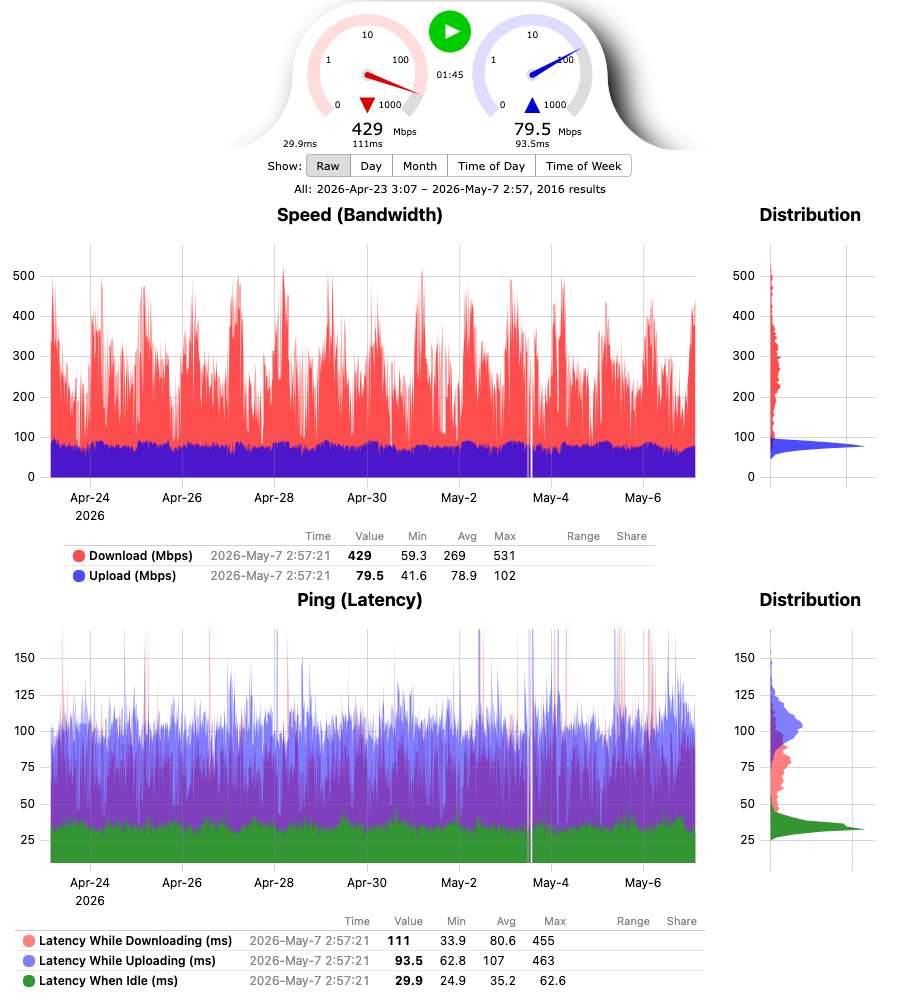
Features
- automatic speedtest server selection based on latency or run against specific speedtest server
- uses HTTP protocol for all operations on network, skips speedtest servers that only serve over HTTPS
- tiny list of rust dependencies: std, libc, roxmltree + xmlparser
- results are stored in human readable .csv, and optionally written to InfluxDB or anything else that takes its line protocol
- optionally published over MQTT, with Home Assistant discovery
- builtin web-server to display results with uPlot charts:
- speed and latency charts, each with a distribution chart of the displayed results next to it
- every result, or daily, monthly, time of day or time of week averages
- legend with min/avg/max of the displayed results and the share of results in the hovered value range
- sortable table of the results with every recorded detail, including errors
- updates in place when a test finishes, keeping the zoom and the picked view
- prometheus metrics of the last test at
/metrics: download and upload speed, idle and loaded latency, server and isp, test and failure counts - all web assets are included in the program binary
- linux version statically linked with musl - not dependent on system libc, essentially a single binary container
- acts as a speedtest server itself. Not registered with official speedtest.net, but can be passed as speedtest server to supporting clients
Command Line
usage: speedketchup [options]
	-h|--help: print this
	-v|--version: print version
	-i|--interval <minutes>: test interval in minutes, 10 by default
	-f|--file <filename>: file to store test results in, speedketchup-results.csv by default
	-a|--address <local_addr>: address to listen on for incoming connections, 127.0.0.1 by default
		local_addr: use 0.0.0.0 to accept connections on all addresses
	-p|--port <port>: port to listen on for incoming connections, 8080 by default
	-s|--server <server_host[:server_port]>: speedtest server to use, avoids automatic server selection if specified
		server_host: domain_name|ipv4_addr|ipv6_addr
		server_port: port number, 8080 by default
	-dd|--download-duration <seconds>: how long to test download speed, 0 disables test, 10 seconds by default
	-ud|--upload-duration <seconds>: how long to test upload speed, 0 disables test, 10 seconds by default
	-dc|--download-connections <number>: how many parallel connections to make for download, 8 connections by default
	-uc|--uplaod-connections <number>: how many parallel connections to make for upload, 8 connections by default
	-iu|--influx-url <url>: also write every result to this InfluxDB line protocol write url, http only
		eg http://influxdb:8086/api/v2/write?org=home&bucket=speedketchup
	-it|--influx-token <token>: token for the influx url, sent as 'Authorization: Token <token>'
	-mq|--mqtt <host[:port]>: also publish every result to this mqtt broker, with home assistant discovery
		port: 1883 by default, plain mqtt only
	-mu|--mqtt-user <user>: user name for the mqtt broker
	-mp|--mqtt-password <password>: password for the mqtt broker

every option can also be given as an environment variable, command line options
take precedence:
	SPEEDKETCHUP_INTERVAL, SPEEDKETCHUP_FILE, SPEEDKETCHUP_ADDRESS,
	SPEEDKETCHUP_PORT, SPEEDKETCHUP_SERVER, SPEEDKETCHUP_DOWNLOAD_DURATION,
	SPEEDKETCHUP_UPLOAD_DURATION, SPEEDKETCHUP_DOWNLOAD_CONNECTIONS,
	SPEEDKETCHUP_UPLOAD_CONNECTIONS, SPEEDKETCHUP_INFLUX_URL,
	SPEEDKETCHUP_INFLUX_TOKEN, SPEEDKETCHUP_MQTT, SPEEDKETCHUP_MQTT_USER,
	SPEEDKETCHUP_MQTT_PASSWORD
Metrics
/metrics serves the last test in the prometheus text format:
download and upload speed in bits per second, idle, download and upload latency
in seconds, the server and isp as labels on speedketchup_last_test_info, and
test and failure counts. Run with -a 0.0.0.0 so the scraper can reach it.
scrape_configs:
  - job_name: speedketchup
    static_configs:
      - targets: ["speedketchup-host:8080"]
Anything that scrapes prometheus or OpenMetrics endpoints can collect it, for example:
- Prometheus, and the long term stores fed by it: Thanos, Cortex, Grafana Mimir
- VictoriaMetrics and vmagent
- Grafana Alloy (formerly Grafana Agent), for Grafana Cloud
- OpenTelemetry Collector with the prometheus receiver
- Telegraf with the prometheus input, for InfluxDB and the other Telegraf outputs
- Netdata with its prometheus collector
- Zabbix with an HTTP agent item and prometheus preprocessing
- Elastic Metricbeat with the prometheus module
- Datadog Agent with the OpenMetrics check
- Checkmk with its prometheus integration
InfluxDB
With --influx-url every result is also written as one
line protocol
point, right after it is saved to the csv:
speedketchup,server=LIVAS/Riga/Latvia,server_host=speedtest.livas.lv:8080,isp=Tele2 download_mbps=40.6,upload_mbps=39.0,latency_idle_ms=44.2,latency_download_ms=71.7,latency_upload_ms=98.9,client_ip="203.0.113.7" 1792775257000000000
The values are rounded like in the csv, fields of a disabled test are left out,
and a failed test is a point with just an error string field. A write that
fails is logged and not retried, the csv still has the result.
The url is the complete write url, so the same option covers every server that
takes line protocol over http. Put the token in --influx-token or
SPEEDKETCHUP_INFLUX_TOKEN, it is sent as Authorization: Token <token>:
| server | write url |
|---|---|
| InfluxDB 2 | http://influxdb:8086/api/v2/write?org=home&bucket=speedketchup + token |
| InfluxDB 3 Core / Enterprise | http://influxdb:8181/api/v2/write?bucket=speedketchup + token |
| InfluxDB 1 | http://influxdb:8086/write?db=speedketchup, add &u=user&p=password with auth enabled |
| VictoriaMetrics | http://victoriametrics:8428/write, it has no strings, client_ip and error turn up as series that are always 0 |
| QuestDB | http://questdb:9000/write |
| Telegraf influxdb_listener | http://telegraf:8186/write, and from there to any Telegraf output |
Only http is supported, for InfluxDB Cloud or anything else behind https write to a local Telegraf and let it forward.
MQTT and Home Assistant
With --mqtt every result is also published to an MQTT broker, with
Home Assistant discovery
messages, so a SpeedKetchup device shows up in Home Assistant by itself:
download and upload speed, latency idle and while downloading and uploading,
the time of the last test, a problem sensor that is on when the last test
failed, and the server and isp.
With the Mosquitto broker add-on of Home Assistant, the broker is the Home Assistant host and the user is a Home Assistant user, best one made for it:
speedketchup -mq homeassistant.local -mu speedketchup -mp <password>
The result goes to speedketchup/state as json, the discovery configs under
homeassistant/, all retained, so a Home Assistant that restarts gets them
from the broker. The speed and latency sensors go unavailable when there was no
successful test for two intervals. The sensors of a test disabled with -dd 0
or -ud 0 are removed. speedketchup connects for every result and disconnects
when the broker has acknowledged it. Only plain mqtt is supported, no TLS.
Building
A plain make gives you a binary for the machine you are on.
The release binaries are smaller than that: they are built on a pinned rust
nightly with -Z build-std, -Zlocation-detail=none and
-Cpanic=immediate-abort, which rebuilds the standard library without the
panic formatting machinery.
make release   # every released binary, needs a mac
make macos     # just the macos universal binary
make linux     # just the linux + windows binaries
The linux and windows binaries are cross built inside the container image in
build/Dockerfile - make linux builds that image and re-enters make inside
it, so the only thing needed on the host is container
on macos, or CONTAINER=docker (or podman) anywhere else. The image carries the
cross toolchains, a musl built for the tier 3 mips targets, upx and qemu-user -
every binary is run once before the build is considered done. Everything lands
in ./bin.
Container
Official container image: gatispei/speedketchup on Docker Hub.
The image is FROM scratch: one layer holding the statically linked binary and
an empty /data for the results volume, nothing else. No shell, no libc, no
base image underneath. Built for linux/amd64, linux/386, linux/arm64 and
linux/arm/v6.
make image
That cross builds the binaries and assembles the manifest with the same
container runtime as the rest of the build. With docker, point it at buildx:
make image IMAGE_BUILD="docker buildx build".
docker volume create speedketchup
docker run -p 8080:8080 -v speedketchup:/data gatispei/speedketchup
QNAP
Packages for x86_64, arm_64 and arm-x41 QNAP NAS are attached to every release. To install and update SpeedKetchup from the App Center, add the repository in App Center > Settings > App Repository:
https://speedketchup.com/qnap/repo.xml
The packages are not signed by QNAP, so on QTS 4.5 and later first tick
"Allow installation of applications without a valid digital signature" in
App Center > Settings > General. The web page is on port 8288, the settings are in
speedketchup.conf in the SpeedKetchup folder.
make qpkg
builds the packages from the linux binaries in ./bin with QNAP's QDK.
Alternatives
- https://www.speedtest.net/apps/cli - official speedtest cli tool, binary only
- https://github.com/sivel/speedtest-cli - speedtest cli tool in python
- https://github.com/nelsonjchen/speedtest-rs - speedtest cli tool in rust
- https://github.com/YuLinLee/speedtest - speedtest cli tool in c
- https://github.com/barrycarey/Speedmon - periodic speed test runner in python with various storage backends
Media gallery
Categories
Download Statistics
Related apps
Explore more like this
Explore allLinks
Details
gatispei/speedketchupRuntime arguments
- Web UI
http://[IP]:[PORT:8080]/- Network
bridge- Privileged
- false
Template configuration
Web page with the test results.
- Target
- 8080
- Default
- 8080
- Value
- 8080
Where the test results csv file is stored.
- Target
- /data
- Default
- /mnt/user/appdata/speedketchup
- Value
- /mnt/user/appdata/speedketchup
Minutes between the speed tests.
- Target
- SPEEDKETCHUP_INTERVAL
- Default
- 10
- Value
- 10
Speedtest server host[:port] to always test against, empty picks the server with the lowest latency for every test.
- Target
- SPEEDKETCHUP_SERVER
Seconds to test the download speed, 0 skips the download test.
- Target
- SPEEDKETCHUP_DOWNLOAD_DURATION
- Default
- 10
- Value
- 10
Seconds to test the upload speed, 0 skips the upload test.
- Target
- SPEEDKETCHUP_UPLOAD_DURATION
- Default
- 10
- Value
- 10
Parallel connections for the download test.
- Target
- SPEEDKETCHUP_DOWNLOAD_CONNECTIONS
- Default
- 8
- Value
- 8
Parallel connections for the upload test.
- Target
- SPEEDKETCHUP_UPLOAD_CONNECTIONS
- Default
- 8
- Value
- 8
InfluxDB line protocol write url to also write every result to, http only, eg http://influxdb:8086/api/v2/write?org=home&bucket=speedketchup. Empty writes nowhere.
- Target
- SPEEDKETCHUP_INFLUX_URL
Token for the InfluxDB write url.
- Target
- SPEEDKETCHUP_INFLUX_TOKEN
MQTT broker host[:port] to also publish every result to, with Home Assistant discovery, plain mqtt only, port 1883 by default. Empty publishes nowhere.
- Target
- SPEEDKETCHUP_MQTT
User name for the MQTT broker.
- Target
- SPEEDKETCHUP_MQTT_USER
Password for the MQTT broker.
- Target
- SPEEDKETCHUP_MQTT_PASSWORD