
All apps · 0 apps

slskdn
Docker app from slskdN's Repository
Overview
slskdN is a feature-rich Soulseek web client and an unofficial batteries-included fork of slskd.
FEATURES:
- Auto-replace stuck downloads with alternative sources
- Wishlist / background search with auto-download
- Smart source ranking based on speed, queue, and history
- User notes and download history badges
- Block users from search results
- Multiple download destinations
- Delete files on disk from UI
- Push notifications (Ntfy, Pushover, Pushbullet)
- Tabbed browse sessions
- Clear all searches button
- And more...
No scripts required. Everything built-in.
Readme
View on GitHubslskdN(OT)
The batteries-included Soulseek web client
slskdN is an unofficial fork of slskd.
🚧 Rust rewrite testers wanted
slskr is an independent Rust implementation targeting slskdN feature parity and Soulseek-network compatibility. It is the forward-looking daemon/API/Web UI stack for testers who can run live searches, browse peers, transfer files, or stress a long-lived node. Please report findings in snapetech/slskr or join the Discord.
Support slskdN development through PayPal or Ko-fi.
Releases • Rust Rewrite Preview • Issues • Features • Quick Start • Discord














What is slskdN?
slskdN(OT) (as in, NOT slskd), is a richly feature-added, unofficial fork of slskd. While slskd focuses on being a lean, API-first daemon that lets users implement advanced features via external scripts, slskdN takes the opposite approach:
Everything built-in. No scripts required.
If you've ever seen a feature request closed with "this can be done via the API with a script" and thought "but I just want it to work"—slskdN is for you. The Big 'N' also stands for the Big Network we have integrated and layered into slskdN that extends the client functionality and network in ways that we think improve trust, fidelity, security, and quality.
Screenshots
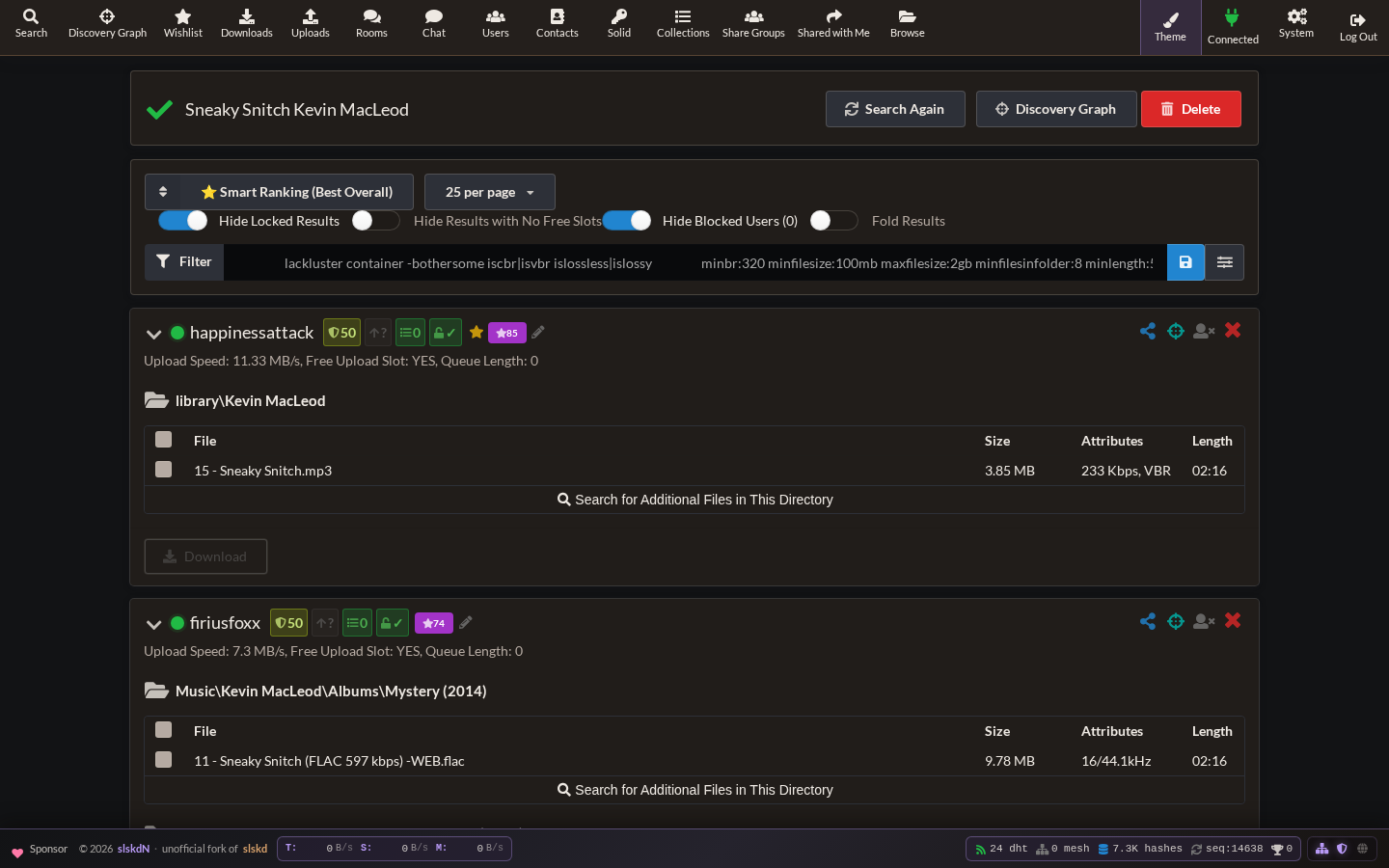
Smart-ranked search results |
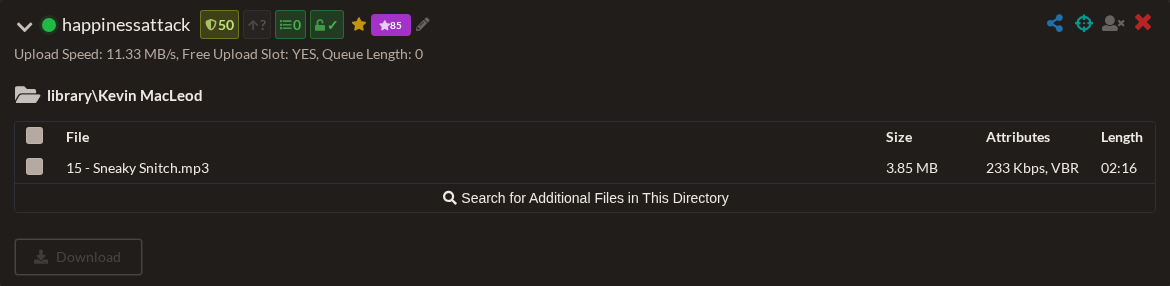
Expanded source card with ranking signals |
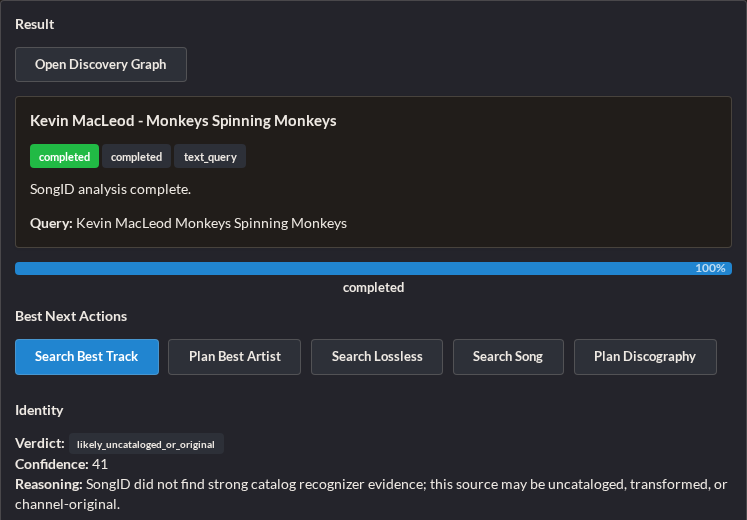
SongID handoff from a YouTube source |
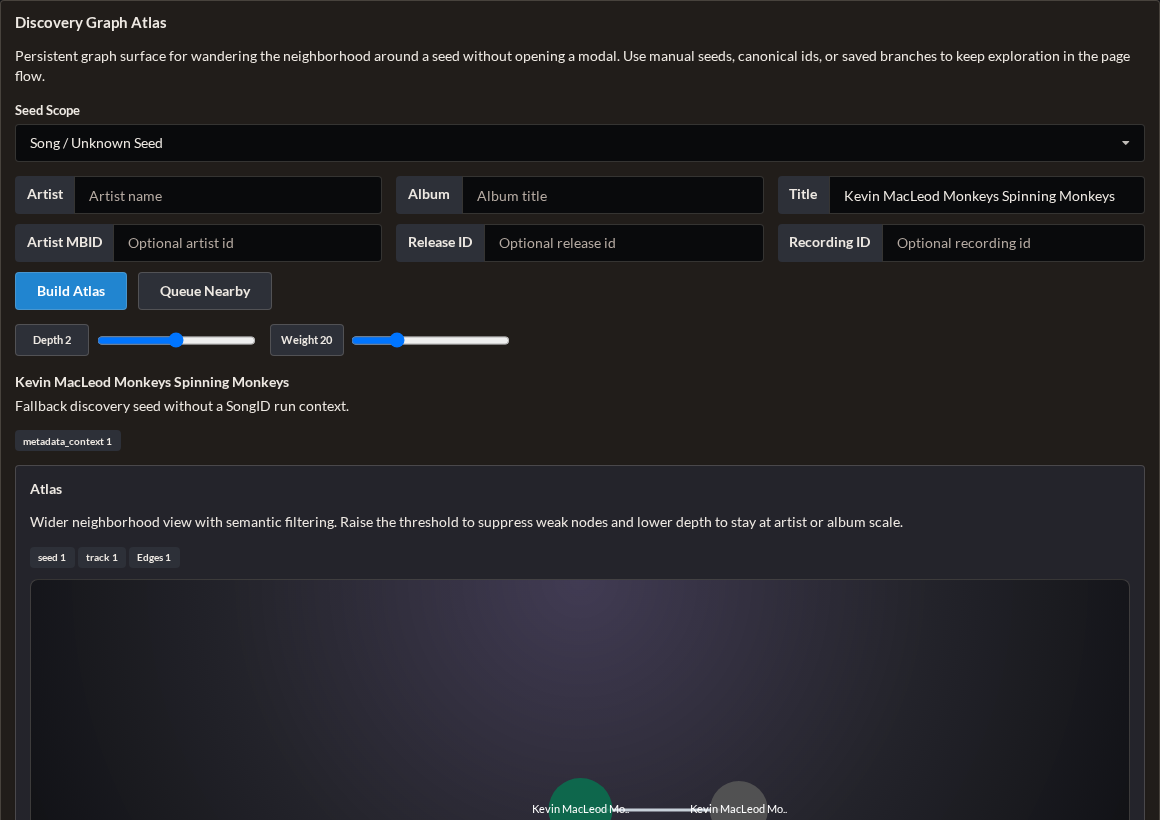
Discovery Graph Atlas candidate neighborhood |
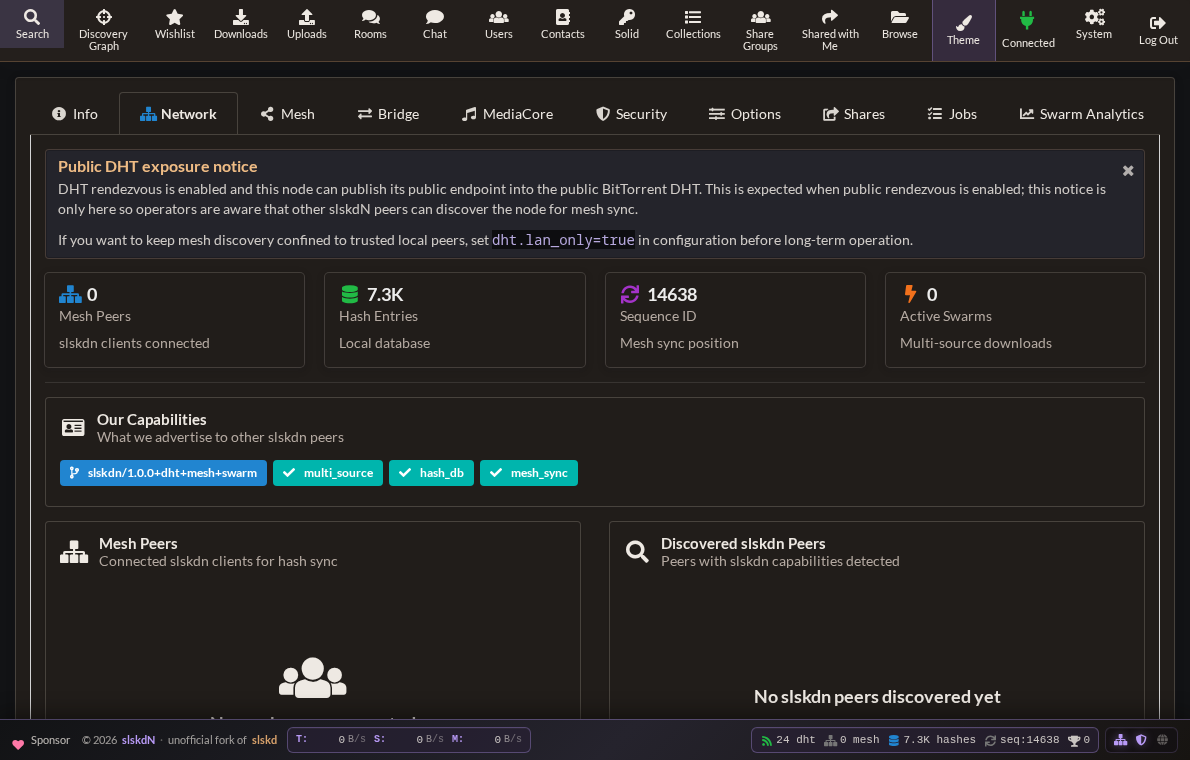
Network health, DHT, mesh, and capability status |
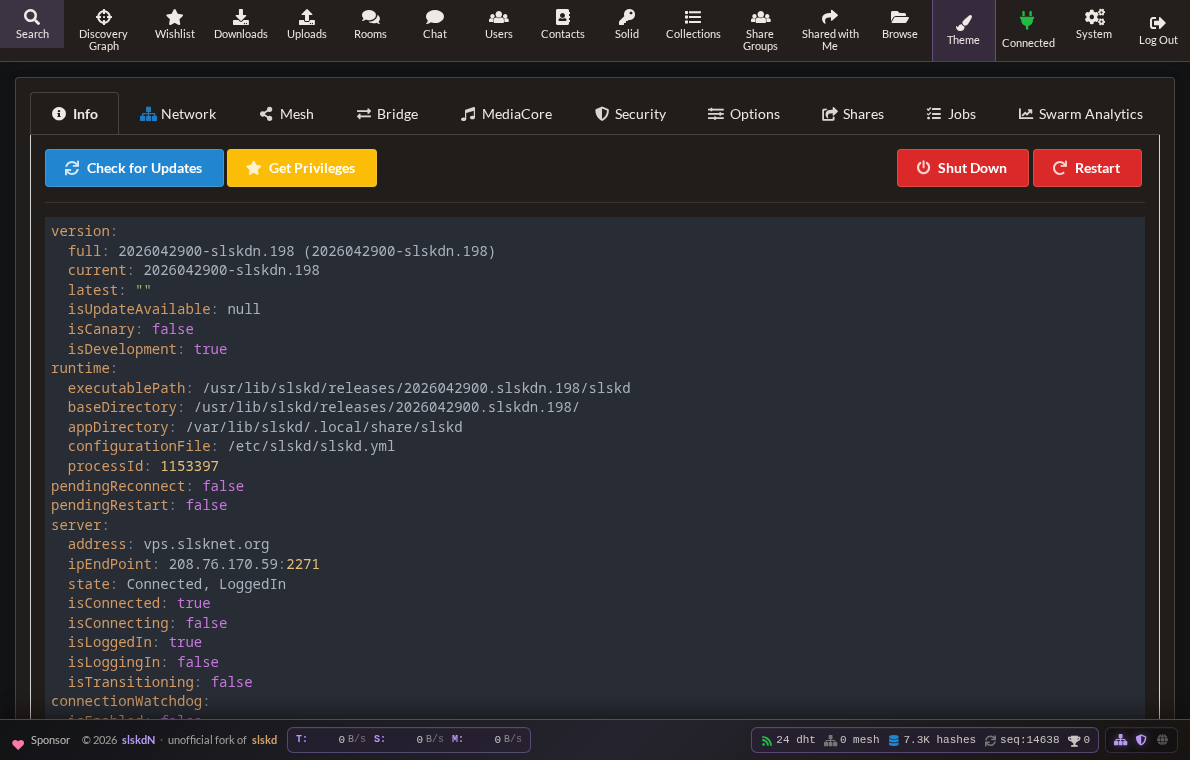
System overview and slskdN build details |
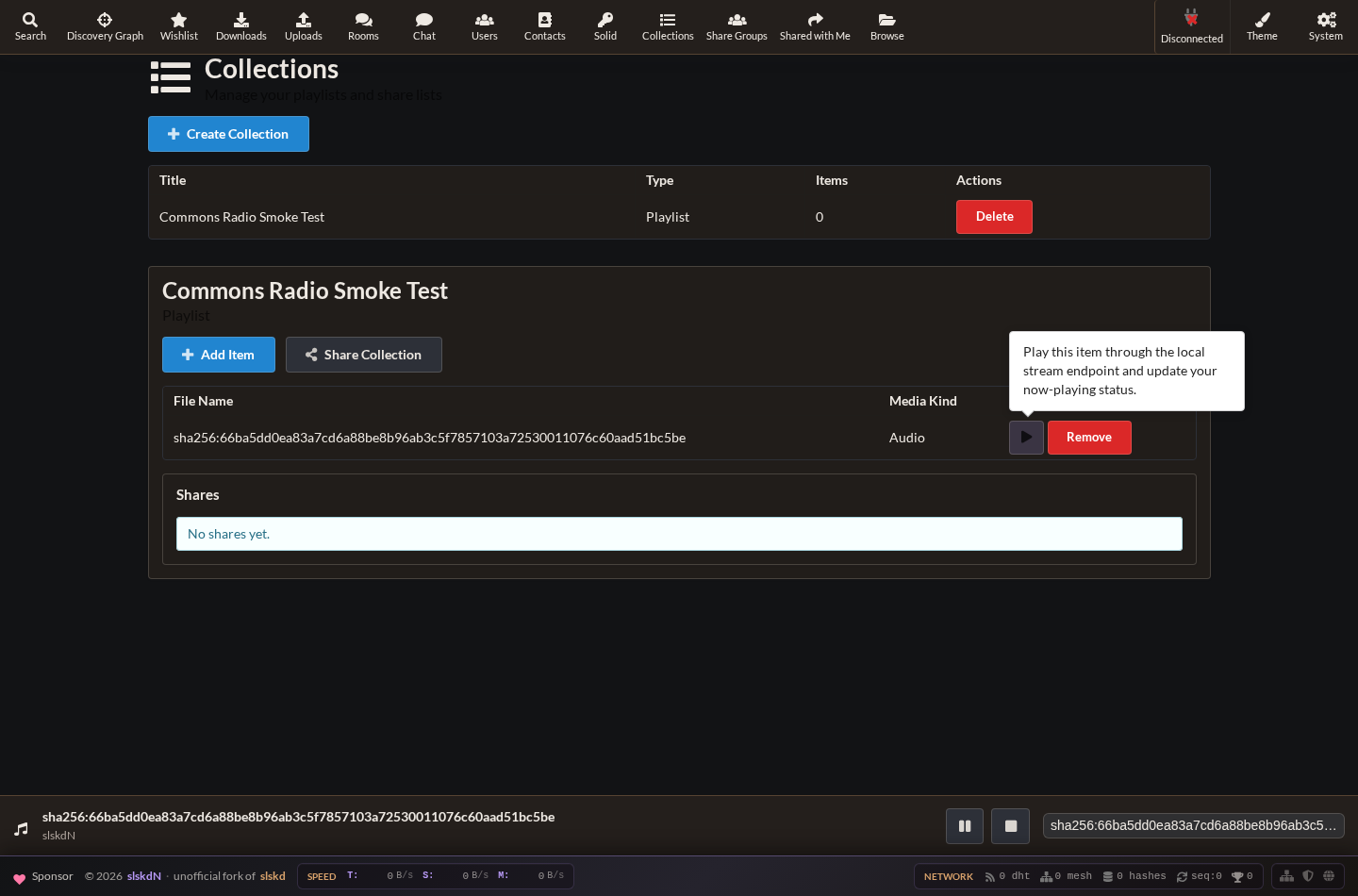
Collections playlist streaming through the integrated player |
Features
🌌 Discovery Graph / Constellation
A live, navigable similarity topology for music discovery and identity context.
- Typed graph neighborhoods for SongID, MusicBrainz targets, and search-result seeds
- Near means meaningfully near — nodes are connected with weighted, explainable edges
- Actions, not wallpaper — recenter, queue nearby, pin, compare, save branch
- Current surfaces — SongID mini-map and modal, MusicBrainz graph launcher, search-result graph glyphs, search-list/detail launchers, an in-page atlas panel, and a dedicated
/discovery-graphroute
🎧 SongID
Native identification pipeline that turns messy sources into ranked acquisition paths.
- Input sources — YouTube URLs, Spotify URLs, direct text queries, and server-side local files
- Evidence fusion — MusicBrainz, AcoustID, SongRec, transcripts, OCR, comments, chapters, provenance, perturbation probes, Panako, Audfprint, Demucs stems
- Forensic + identity context — lane-level forensic matrix (identity, provenance, spectral, descriptor, lyrics, structural, generator family, confidence), synthetic vs identity assessments,
topEvidenceFor/topEvidenceAgainst,qualityClass,knownFamilyScore,perturbationStability, and C2PA provenance hints keep the UI explainable even when the source is suspicious - Queue-native execution — durable background queue, fixed worker concurrency, persisted runs, live progress over SignalR
- Infinite queue + configurable workers — the SongID queue accepts unbounded submissions, stores queue position/worker slot in SQLite, recovers runs after restart, and respects
--songid-max-concurrent-runs/SONGID_MAX_CONCURRENT_RUNSso exactlyXworkers process runs at a time - Result actions — search song, prepare album, download album, plan discography, batch top-candidate fan-out
- Ranked acquisition & mix planning — track/album/discography options leverage
SongIdScoring.ComputeIdentityFirstOverallScore,Split Into Track Planshandles mixes, and candidate fan-outs (Search Top Candidates) keep identity/quality/Byzantine ordering front and center - Identity-first planning — synthetic / AI-origin heuristics are surfaced as context, not used to override strong catalog identity
🔄 Auto-Replace Stuck Downloads
Downloads get stuck. Users go offline. Transfers time out. Instead of manually searching for alternatives, slskdN does it automatically.
- Toggle switch in Downloads header ("Auto-Replace")
- Detects stuck downloads (timed out, errored, rejected, cancelled)
- Searches network for alternatives, filters by extension and size (canonical default 0%; exact size)
- Ranks by size match, free slots, queue depth, speed
- Auto-cancels stuck download and enqueues best alternative
- Persists a request-level replacement budget across restarts (
max_retries, default 3;0means unlimited) - Keeps failed terminal rows available for review and manual retry instead of silently deleting them
--auto-replace-enabled --auto-replace-max-size-diff-percent 5.0 --auto-replace-interval 60
Auto-replace and download auto-retry are separate controls. Auto-replace searches
for a different source; transfers.download.auto_retry re-queues failed
downloads and is enabled by default. Its max_attempts budget is also tracked
against the persisted download request, so a daemon restart does not reset the
same request's automatic retry budget.
⭐ Wishlist / Background Search
Save searches that run automatically in the background. Never miss rare content again.
- New Wishlist item in navigation sidebar
- Add searches with custom filters and max results
- Low-result Wishlist/Lidarr searches retry with up to two bounded term-removal variants when Soulseek returns fewer than 10 peers and files; known operator-suppressed terms (e.g.,
Linkin,Metallica) are removed first regardless of position, then generic leading-term removal catches newly-suppressed terms; manual and auto-replace searches stay exact, and mesh receives the raw query - Use structured metadata filters such as
mp3 minbr:320 OR aac minbr:256 OR m4a minbr:256; bulk-edit filters on selected existing items atomically without re-adding them - Toggle auto-download, configurable interval, track matches and run history
- Manual "Run Now" button for each search
- Discography Concierge handoff — missing tracks from an artist coverage map can be promoted into conservative Wishlist searches without starting immediate searches or downloads
--wishlist-enabled --wishlist-interval 60 --wishlist-auto-download --wishlist-max-results 100
📁 Multiple Download Destinations
Configure multiple download folders, set one daemon-wide default, and choose a different folder from the Download to selector on Search Results or Browse. The browser remembers manual selections; wishlist, automatic, and API downloads without an explicit selection use the configured default.
destinations:
  folders:
    - name: "Music"
      path: "/downloads/music"
      default: true
    - name: "Audiobooks"
      path: "/downloads/audiobooks"
Create and mount each path with write access, then restart slskdN after changing
the YAML or container mounts. If no folder is marked default: true,
directories.downloads remains the default. See
Multiple Download Destinations
for setup and UI instructions, and
Docker Download Permissions for
container UID/GID and bind-mount troubleshooting.
🗑️ Clear All Searches
One-click cleanup for your search history.
- Red "Clear All" button in top-right of search list
- Removes all completed searches, real-time UI update via SignalR
🧠 Smart Search Result Ranking
Intelligent sorting that considers multiple factors to show best sources first.
- New default sort: "⭐ Smart Ranking (Best Overall)"
- Combines: Upload speed (40pts), Queue length (30pts), Free slot (15pts), History (+/-15pts)
- Purple badge shows smart score next to each username
- Also adds "File Count" sort option
📊 User Download History Badges
See at a glance which users you've successfully downloaded from before.
- 🟢 Green = 5+ successful downloads | 🔵 Blue = 1-4 successful | 🟠 Orange = More failures
- Hover for exact counts
🚫 Block Users from Search Results
Hide specific users from your search results.
- Click user icon (👤✕) to block, "Hide Blocked Users (N)" toggle
- Block list stored in localStorage, persists across sessions
🗑️ Delete Files on Disk
Clean up unwanted downloads directly from the UI.
- "Remove and Delete File(s) from Disk" button in Downloads
- Deletes file AND removes from list, cleans empty parent directories
💾 Save Search Filters
Set your preferred search filters once and forget them.
- Enter filters (e.g.
isLossless minbr:320), click Save icon - Filters auto-load for all future searches
🔍 Advanced Search Filters & Page Size
Power user filtering with a visual interface.
- Visual Filter Editor: Bitrate, Duration, File Size (Min/Max), CBR/VBR/Lossless toggles
- Text syntax: include words normally, exclude with
-term, restrict formats withext:flac,mp3, and combine quality filters likeminbr:320,minbd:16,minsr:44100,minfs:100mb,maxfs:2gb,minlen:180,minfif:8,islossless,islossy,iscbr, orisvbr - Page Size: 25, 50, 100, 200, 500 results per page
- Settings persist across sessions
📝 User Notes & Ratings
Keep track of users with persistent notes and color-coded ratings.
- Add notes from Search Results or Browse views
- Assign color ratings (Red, Green, etc.), mark as "High Priority"
💬 Improved Chat Rooms
Enhanced interaction in chat rooms.
- Right-click users: Browse Files, Private Chat, Add Notes
- Unified Messages workspace combines direct messages, joined rooms, and pod room channels into persistent multi-panel conversation windows.
- Pod direct channels are kept out of the visible conversation list so they do not duplicate normal Soulseek DMs.
📂 Multi-Select Folder Downloads
Download multiple folders at once with checkbox selection.
- In Browse view, check folders and click "Download Selected"
- Recursively collects all files in folders/subfolders
📱 Ntfy & Pushover Notifications
Get notified on your phone when important things happen.
- Native support for Ntfy and Pushover
- Notifications for Private Messages and Room Mentions
📑 Tabbed Browsing
Browse multiple users at once.
- Open multiple users in separate tabs, state preserved per tab
- Browse data cached per-user
🧠 Unified Smart Source Ranking
All automatic downloads use intelligent source selection based on your history.
- Tracks success/failure rates per user, used by auto-replace and wishlist
- API endpoint at
/api/v0/ranking
🎵 Now Playing / Scrobble Integration
Show what you're listening to in your Soulseek profile — automatically updated from Plex, Jellyfin, or any media player.
- Webhook at
POST /api/v0/nowplaying/webhookaccepts Plex, Jellyfin/Emby, Tautulli, and generic JSON - Auto-updates your Soulseek user description:
🎵 Listening to: Artist – Title - REST API (
GET/PUT/DELETE /api/v0/nowplaying) for manual or scripted control
🎛️ Integrated Web Player & Listening Parties
Play local shared/downloaded audio, collections, and pod listen-along sessions directly in the Web UI. No separate streaming server is required.
- Footer-safe player drawer with collapse/expand, previous/next, rewind, fast-forward, stop, browser-local mute, and browser Media Session controls
- Collections browser modal for picking tracks from playlists/share lists, plus Files browser modal for searchable shared/downloaded local audio
- Integrated
GET /api/v0/streams/{contentId}range playback for local audio content IDs with normal auth/share-token and stream-limit boundaries - Local audio can resolve from configured share and download roots, keeping browser playback inside slskdN instead of a separate media server
- MilkDrop visualizer with inline, full-window, and fullscreen modes
- 10-band browser-local equalizer with persisted presets
- Lightweight spectrum analyzer and oscilloscope for lower-GPU visual feedback
- Optional external visualizer launcher for configured host-side tools such as MilkDrop3
- Tracked native WebGL MilkDrop3-compatible engine project for portable in-app visualizer parity
- Synced lyrics pane using LRCLIB lookups from the current artist/title
- Optional ListenBrainz now-playing and scrobble submission with a token stored in browser localStorage
- Optional five-second crossfade between queue items
- Document Picture-in-Picture spectrum window on browsers that support it
- Karaoke-style center-channel vocal reduction toggle
- Pod listening parties publish metadata-only play/pause/seek/stop messages, while the opt-in global radio registry can list parties across the mesh
📖 Docs: Listening Party and Player
🚫 Cancel Transfers on Ban
When you add a user to the blacklist, their active downloads and uploads are cancelled immediately — no restart required.
📁 File Type Restrictions per Group
Control which file types each upload group can request.
transfers:
  groups:
    user_defined:
      FriendsOnly:
        upload:
          allowed_file_types: [".flac", ".mp3", ".opus"]
📊 Prometheus Metrics Dashboard
Built-in metrics UI in the System section. View transfer counts, search rates, memory usage, and all slskd_* metrics — no external Grafana required.
- System → Metrics tab
- KPI panels: Transfers, Search, Process, Network
- Full raw metrics table with descriptions
🏅 User Score Badges Everywhere
Reputation and stats badges (upload speed, queue length, free slot) appear next to usernames in chat messages, room user lists, search results, browse view, and transfers.
📱 PWA & Mobile Support
Install slskdN as an app on your phone.
- Add to Home Screen on iOS/Android, standalone mode
- The integrated player uses inline browser audio, safe-area-aware footer spacing, and Media Session controls where supported.
🧭 Discovery Surfaces
Discovery surfaces are direct tools, not approval queues.
- Manual Search opens results directly.
- SongID produces ranked song, album, and discography actions from evidence.
- Discovery Graph exposes related tracks, albums, and artists without requiring a separate approval tab.
🛠️ System Admin Surfaces
The System area now contains guided operator panels instead of forcing every advanced setting through raw YAML.
- Policies — webhooks/scripts, transfer slots/speed/retry/schedules, auto-replace, auth/API keys/JWT/HTTPS/rate limits, DHT, rescue mode, retention, and share-cache/media-probe settings
- Experience — browser-local preferences for Search, Player, and Messages
- Integrations — VPN, Lidarr, metadata providers, notifications, source feeds, FTP, Servarr readiness, and media-server execution contracts
- Source Providers — read-only provider capability and acquisition-profile priority catalog
- Automation Center — visible recipes, local enablement, impact labels, and dry-run history
- Setup Health / Diagnostic Bundles — readiness checks and redacted support snapshots
🚀 Advanced Features
The following advanced features are available in this fork. Maturity varies by feature; check the status table below and the current security notes before exposing experimental mesh, gateway, federation, or remote-access features.
🚀 Multi-Source Swarm Downloads
Resilient acquisition built on top of the regular Soulseek path — not in place of it.
- Default downloads are unchanged. The standard single-source Soulseek flow handles normal transfers; acceleration only runs when enabled from the Downloads header or when called explicitly by an integration.
- First-class Downloads toggle — the Downloads section exposes an
Acceleratedswitch. When off, underperformance rescue is suppressed. When on, queued-too-long, slow, or stalled downloads can be rescued under the same network-health guardrails. - Conservative entry points: explicit user/API call, Downloads
Acceleratedrescue after underperformance, andLibraryHealthRemediationServiceauto-fix for bad transcodes. - Trust-aware policy split:
- Mesh-overlay peers (other slskdN nodes): protocol-aware → parallel chunked downloads.
- Public Soulseek peers: not protocol-aware → sequential failover (one peer at a time, resume offset preserved on stall) so no chunk-by-chunk cancellation noise lands on Nicotine+/SoulseekQt UIs.
- Hard floor before chunking — declines multi-source unless ≥2 sources share a verified content hash, or all sources are mesh-overlay.
- SHA-256 verification with a persistent per-peer-per-day probe budget — ensures bit-identity across sources without hammering any single uploader with verification or discovery hash probes.
- HashDb mesh gossip fills the protocol-level gap that Soulseek has no content hashes.
- Observability — Prometheus counters for cancellations, probes, hard-floor fallbacks, and failover events surface the network impact directly.
📖 Design docs: Scope, mechanics, and network impact • Architecture • Roadmap • Rescue mode • Scheduling
📊 Swarm Analytics & Insights
Understand swarm performance and make data-driven optimizations.
- Analytics service — success rates, speed, duration, and chunk efficiency
- Peer rankings — reputation, RTT, throughput, and success metrics
- System UI dashboard — trends, recommendations, and summaries
🌐 DHT Peer Discovery & Mesh Networking
Discover other slskdN users through a public BitTorrent DHT rendezvous layer, then form a separate encrypted mesh overlay connection.
- Public DHT rendezvous — standard BitTorrent DHT
get_peers/announce_peeroperations under well-known slskdN rendezvous infohashes; it discovers overlay endpoints but does not transfer files - Mesh DHT — slskdN Kademlia-style metadata and service discovery carried over the mesh overlay, separate from the public BitTorrent DHT
- Mesh overlay network — TLS-protected slskdN peer connections for search, synchronization, service calls, and mesh file/chunk transfers
- Operator-independent mesh search — mesh peers receive the raw search terms and search their own local indexes; Soulseek server/operator term suppression and this node's incoming
filters.search.requestrules are not applied to mesh results. User-selected file and peer filters still apply locally in the UI. - This mesh path is separate from the optional native Soulseek rendezvous path; normal Soulseek search, social, and origin-transfer paths remain available
- Private/obfuscated mesh transport selection — mesh routing can prefer configured Tor/I2P or anti-DPI transports such as WebSocket, HTTP tunnel, obfs4, or meek while falling back to normal mesh routing when unavailable
- Hash database sync — Epidemic protocol for content verification database
- Peer greeting service — Auto-discovery and handshake
- Runtime capability handshakes — slskdN peers can exchange signed capability descriptors over Soulseek peer-message connections, allowing mesh, swarm, and overlay support to be discovered before falling back to the legacy capability file.
- Soulseek mesh rendezvous — an explicit opt-in can publish the public
slskdn-mesh-v1Soulseek interest tag and use the native similar-user graph to find other mesh-capable slskdN accounts. - NAT detection — UPnP/NAT-PMP port mapping
- System -> Mesh discovery tools — publish/remove the rendezvous interest, discover candidates, and inspect runtime peer capability records from the Web UI.
- Live status bar — Real-time DHT nodes, mesh peers, hash counts in UI footer
📖 Design docs: MeshCore research • Mesh architecture • Runtime sync notes
📖 DHT/mesh terminology: DHT and Mesh Architecture
🕶️ Soulseek Type-1 Obfuscation Options
First-class Soulseek peer-message, distributed-message, and file-transfer obfuscation posture for compatible clients.
- Default-on compatibility mode — keeps regular peer, distributed, and transfer paths available and adds type-1 obfuscated reachability
- Prefer mode — prefers obfuscated outbound peer, distributed, and transfer dials only when peer metadata advertises a compatible type-1 endpoint
- Negotiation fallback — if an obfuscated distributed or transfer candidate connects but fails setup, regular direct/indirect candidates remain available before the operation fails
- Only mode reserved — obfuscated-only reachability is intentionally rejected while the runtime preserves legacy-client fallback
- Visible status — System → Network reports enablement, mode, advertised ports, fallback posture, and runtime activation state
- Active runtime support — slskdN’s vendored runtime now advertises type-1 metadata, accepts obfuscated peer, distributed, and transfer handshakes, and can prefer compatible outbound obfuscated dials
- Shared listen port by default — obfuscated connections share the same TCP port as regular Soulseek peer connections (distinguished per-connection); nothing extra to forward unless you opt into a dedicated obfuscation port
- Scoped transport — obfuscation applies to Soulseek peer-message, distributed-message, and file-transfer streams while regular fallback stays available
- Server transport wrapping deferred — the official Soulseek server connection is not wrapped by type-1 obfuscation; future SOCKS/pluggable-transport work is tracked separately from native Soulseek
P/D/Fsupport
📖 Guide: Soulseek type-1 obfuscation • Configuration
🧭 Soulseek Native Discovery
Native Soulseek interests, recommendations, similar users, and multi-recipient messages are available as explicit opt-in workflows.
- Search → Soulseek Discovery — manage interests, load personal/global recommendations, branch from item recommendations, inspect similar users, and send raw seeds into normal searches or review-only Wishlist entries
- Native discovery API — exposes liked/hated interests, recommendations, global recommendations, user interests, similar users, item recommendations, item-similar users, mesh rendezvous, and runtime peer capability records under
/api/v0/soulseek/* - Federated Taste toggle — optionally folds native Soulseek recommendations into privacy-filtered taste recommendations without treating them as verified metadata
- User-card interests — lazy-loads liked/hated native interests for a peer only when opened
- Messages batch send — uses the native multi-recipient private-message command and persists one local conversation per recipient
- Runtime capability bridge — capability lookup checks signed peer capability descriptors before falling back to
@@slskdn/__caps__.json - Backward-compatible behavior — no native discovery command is emitted unless the UI or an authenticated API caller explicitly invokes it
- Safety limiter buckets — discovery calls are rate-limited separately from manual searches, browse requests, transfers, and rooms
📖 Guide: Soulseek native discovery
🔒 Security Hardening
Active zero-trust hardening work with defense-in-depth controls:
- NetworkGuard — Rate limiting, connection caps per IP
- ViolationTracker — Auto-escalating bans for bad actors
- PathGuard — Directory traversal prevention (always enabled)
- ContentSafety — Magic byte verification, quarantine suspicious files
- PeerReputation — Behavioral scoring system
- CryptographicCommitment — Pre-transfer hash commitment
- ProofOfStorage — Random chunk challenges
- ByzantineConsensus — 2/3+1 voting for multi-source verification
- Security dashboard — Real-time monitoring in Web UI (System → Security tab)
📖 Design docs: Security implementation • Guidelines • Database poisoning • Adversarial resilience
🎵 MusicBrainz Integration & Library Health
Optional metadata enrichment and library quality checks.
- MusicBrainz Client — Query recordings, releases, artists
- Album Targets — MBID-based album tracking and completion monitoring
- Discography Concierge — Map an artist MBID into release/track coverage, mark tracks as verified, Wishlist-seeded, ambiguous, or missing, and seed missing tracks into Wishlist on demand
- Chromaprint Integration — Audio fingerprinting for identification
- AcoustID API — Fingerprint-to-MBID lookups
- Auto-Tagging Pipeline — Automatic metadata tagging from MusicBrainz
- Library Health Scanner — Detects transcodes, quality issues, missing tracks
- Remediation Service — Auto-fix via automatic re-download of better quality
⚠️ Privacy tradeoff. MusicBrainz and AcoustID are third-party services. When enabled, slskdN sends per-track fingerprints, MBIDs, and/or query terms from your node's IP to
musicbrainz.organdapi.acoustid.org. These services log requests. If you don't want your library activity observable by those hosts:
- Leave AcoustID disabled (
integrations.acoustId.enabled: false, the default) — this disables fingerprint uploads.- Point MusicBrainz at a self-hosted mirror or a VRS/VPN egress by changing
integrations.musicBrainz.baseUrl.- Or disable the auto-tagging / library-health features that trigger the lookups.
📖 Design docs: Canonical scoring • Library health • Advanced fingerprinting • Music discovery federation plan
🎛️ Built-in Lidarr Integration
Lidarr is a first-class slskdN integration. No Lidarr plugin is required: slskdN talks to Lidarr's supported HTTP API, turns Wanted/Missing albums and tracks into quality-aware Wishlist searches, downloads through the normal Soulseek queue, and can hand completed files back to Lidarr for safe import.
- Wanted sync — pulls Lidarr Wanted/Missing albums into slskdN Wishlist searches
- Suppressed-term recovery — exact artist/album queries run first; low-result Wishlist searches consult a registry of known operator-suppressed terms (e.g.,
Linkin,Metallica) and remove those first, then fall back to bounded leading-term variants; explicit query syntax and mesh searches remain untouched - Quality-aware searches — derives independent multi-format/bitrate Wishlist branches from the Lidarr quality profile, such as
mp3 minbr:320 OR aac minbr:256 OR m4a minbr:256 OR flac; automatic selection uses codec-aware quality and album coverage, and the configured filter remains the fallback - Edition matching — checks each candidate against the track count, duration, and edition of the release Lidarr actually monitors before auto-downloading, so a same-named "Sessions"/live/deluxe edition doesn't get grabbed and rejected by Lidarr's import; strictness is configurable via
integrations.lidarr.edition_match_mode(excludeby default, orprefer/off) - Duplicate-download prevention — skips a candidate that matches a recently completed download elsewhere by title and duration, so a rejected import that leaves a track "missing" doesn't pile up copies in a different folder on the next sync
- Partial-album reconciliation — tracks albums with existing files and creates one bounded Wishlist target per missing track instead of searching the complete album again
- Durable tracking — remembers Lidarr album and track IDs, updates existing targets, and disables stale targets during later syncs
- Optional auto-download — Lidarr-created Wishlist items can immediately enter the normal slskdN download flow
- Safe post-download import — completed directories are submitted to Lidarr's manual-import command only when Lidarr returns clean, unambiguous matches; both UI manual actions report candidate/safe/rejected counts and can retry even when automatic import is disabled
- Manual fallback — ambiguous or rejected candidates are intentionally left for Lidarr's interactive Manual Import screen
- Path mapping — rewrite slskdN download paths to the path Lidarr sees in Docker, host, or split-volume setups
- Operator API — verify status, run wanted sync, and trigger import from
/api/v0/integrations/lidarr/*
📖 Guide: Lidarr integration
🛡️ VPN Binding & Port Forward Agent
Host-side companion for users who need Soulseek traffic to use a VPN while keeping the web UI local.
- Fail-closed routing — route the slskdN service UID through a dedicated VPN routing table with a blackhole fallback
- Local UI preserved — web UI/API traffic can stay reachable on LAN while Soulseek traffic uses VPN egress
- Dynamic forwarded ports — slskdN consumes a local Gluetun-compatible API and advertises the current forwarded port
- WireGuard full mode — outbound WireGuard plus per-port ingress namespaces, DNAT, NAT-PMP renewal, and static-forward support
- External tunnel mode — OpenVPN, Tailscale, and other Linux tunnel interfaces can be used when the tunnel is already managed by another service
- Self-hosted CGNAT relay — keep slskdN, configuration, and shares at home while a bounded public VPS forwards one Soulseek TCP port over the existing Tailscale network or a dedicated WireGuard tunnel
- Tailscale-native path — use the VPS as an exit node for only the slskdN container; no second WireGuard tunnel or remote slskdN instance is required
- Manual or installer setup — real VPN configs stay out of git; redacted examples and step-by-step installation live with the agent
📖 Guides: slskdN VPN agent • Self-hosted relay • Tester checklist
📦 Pod System (Decentralized Communities)
Topic-based micro-communities over the mesh overlay.
- Pod creation/management — Private, Unlisted, or Listed visibility
- Mesh-DHT pod discovery — Find pods by name, focus, or tags
- Decentralized chat — Pod messaging over mesh overlay
- Soulseek chat bridge — Bridge legacy Soulseek rooms to pods
- Gold Star Club — Strictly opt-in for each daemon.
feature.Pods: truedoes not opt anyone into Gold Star: the reserved pod is created and published, and the local Soulseek username is auto-enrolled, only when the daemon environment contains the exact valueSLSKDN_POD_GOLD_STAR_CLUB_AUTOJOIN=true. An unset, malformed, or non-truevalue causes no Gold Star startup side effects. This is a local deployment setting; it does not opt other users or testers in. Users can later leave the pod from the Web UI, but leaving is irrevocable and permanently revokes local Gold Star status. See Runtime Feature Gates and Network Defaults. - Pod APIs — Full REST API for pod operations
📖 Design docs: PodCore research • Chat bridge • Gold Star Club • API design
🌐 Solid Integration (WebID & Solid-OIDC)
Optional integration with Solid for decentralized identity and Pod-backed metadata storage.
- WebID resolution — Resolve WebID profiles and extract OIDC issuer information
- Solid-OIDC Client ID Document — Serves compliant JSON-LD document at
/solid/clientid.jsonld(dereferenceable per Solid-OIDC spec) - SSRF hardening — Comprehensive security controls:
- Host allow-list (
AllowedHosts) — Empty list denies all remote fetches by default (SSRF protection) - HTTPS-only enforcement — Configurable
AllowInsecureHttpfor dev/test only - Private IP blocking — Automatically blocks localhost,
.localdomains, and RFC1918/link-local IPs - Response limits — Configurable max response size (1MB default) and timeout (10s default)
- Host allow-list (
- RDF parsing — Uses dotNetRDF library for parsing WebID profiles (Turtle and JSON-LD formats)
- API endpoints —
GET /api/v0/solid/statusandPOST /api/v0/solid/resolve-webid - Frontend UI — New "Solid" navigation item and settings page for WebID resolution testing
- Security by default — Feature enabled by default but non-functional until
AllowedHostsis configured (SSRF safety)
Configuration:
feature:
  Solid: true  # Enable Solid integration (default: true)

solid:
  allowedHosts: []  # Empty = deny all remote fetches (SSRF safety)
                     # Add hostnames like ["your-solid-idp.example", "your-pod-provider.example"]
  timeoutSeconds: 10
  maxFetchBytes: 1000000
  allowInsecureHttp: false  # ONLY for dev/test. Keep false in production
  redirectPath: "/solid/callback"
Future extensions (planned):
- Full OIDC Authorization Code + PKCE flow
- Token storage (encrypted via Data Protection)
- DPoP proof generation
- Pod metadata read/write (playlists, sharelists)
- Type Index / SAI registry discovery
- Access control (WAC/ACP) writers
📖 Design docs: Solid implementation map • User guide
🎭 VirtualSoulfind & Shadow Index
Decentralized content discovery without relying solely on the Soulseek network.
- Shadow Index — Decentralized MBID→peers metadata mapping; the mesh DHT stores bounded hints and the mesh overlay carries peer requests and content
- Traffic Observer — Observes search results and extracts MBIDs
- Privacy Controls — Username pseudonymization, configurable retention
- Disaster Mode — Mesh-only operation when Soulseek unavailable
- Scene System — Topic-based micro-networks for niche content
📖 Design docs: VirtualSoulfind v2 • Implementation design • User guide • Content domains
📈 Observability & Telemetry
Visibility into performance and network behavior.
- OpenTelemetry tracing —
telemetry.tracingconfig with console, Jaeger, or OTLP exporters - Component activity sources — transfers, mesh, HashDb, and search tracing
🔧 Service Fabric
Experimental service layer for opt-in mesh-based applications.
- Service descriptors — Signed Ed25519 descriptors for service discovery
- Service directory — Mesh-DHT service registry carried over the mesh overlay
- Service router — Routes requests to service providers
- HTTP gateway — API key + CSRF authentication for services
- Service wrappers — Pods, VirtualSoulfind, introspection wrapped as services
📖 Design docs: Service Fabric tasks • Security audit • How it works
Quick Start
Getting started is simple.
Arch Linux (AUR)
Drop-in replacement for slskd — preserves your existing config at
/etc/slskd/slskd.yml and data under /var/lib/slskd/.
yay -S slskdn              # build from source (recommended)
yay -S slskdn-bin          # Binary package
sudo systemctl enable --now slskd
Access at http://localhost:5030
The packaged systemd service runs as slskd:slskd. To edit
/etc/slskd/slskd.yml or manage /var/lib/slskd/downloads as your normal user
without sudo, add your account to the service group and start a new session:
sudo usermod -aG slskd "$USER"
newgrp slskd
If an Arch upgrade fails on python-torchaudio with Cannot resume, slskdn itself is fine — it was blocked only by an optional dependency workflow in AUR. Use the package helper documented at:
- packaging/aur/README.md#optional-fix-for-pythontorchaudio-download-failures
bash ./scripts/fix-python-torchaudio-no-resume.sh
This issue is Arch/AUR-only; other platforms are unaffected by this script.
Linux Release Zip
For Linux GitHub releases, use the bundled installer helper instead of manually unpacking a zip over an existing slskd service install. It rewrites the systemd unit to the extracted release tree so you do not keep launching an older package-managed binary by accident.
wget https://github.com/snapetech/slskdn/releases/download/0.24.5-slskdn.133/install-linux-release.sh
sudo SLSKDN_VERSION=0.24.5-slskdn.133 bash install-linux-release.sh
The installer places the release under /opt/slskdn, keeps config at /etc/slskd/slskd.yml, and points slskd.service at the extracted release.
For non-AUR systemd installs, the same service-group model applies: the daemon
runs as slskd:slskd, and adding your login to the slskd group gives you
non-root access to the config and download paths after a new login session.
Homebrew (macOS/Linux)
brew tap snapetech/slskdn https://github.com/snapetech/slskdn
brew install snapetech/slskdn/slskdn
Nix (Flake)
nix profile install github:snapetech/slskdn
Snap (Linux)
sudo snap install slskdn
Windows (Winget)
winget install snapetech.slskdn
Windows (Chocolatey)
choco install slskdn
With Docker
docker run -d \
  -p 5030:5030 -p 50300:50300 \
  -e SLSKD_SLSK_USERNAME=your_username \
  -e SLSKD_SLSK_PASSWORD=your_password \
  -v /path/to/downloads:/downloads \
  -v /path/to/app:/app \
  --name slskdN \
  ghcr.io/snapetech/slskdn:latest
Add -p 50300:50300/udp if you enable mesh/DHT rendezvous (off by default) — it shares the
Soulseek listen port's number for DHT, mesh overlay control, and QUIC traffic.
For the default consolidated setup, the public port budget is one TCP forward: regular Soulseek, type-1 obfuscated traffic, and mesh TCP rendezvous share it. If public DHT/mesh/QUIC rendezvous is enabled, add one UDP forward using the same port number. A VPN provider may map a different public port to the local listener; the VPN integration advertises that public port without rebinding the local Soulseek socket.
With Docker Compose
version: "3"
services:
  slskdN:
    image: ghcr.io/snapetech/slskdn:latest
    container_name: slskdN
    ports:
      - "5030:5030"
      - "50300:50300"
    environment:
      - SLSKD_SLSK_USERNAME=your_username
      - SLSKD_SLSK_PASSWORD=your_password
    # If you enable mesh/DHT rendezvous (off by default), also publish 50300/udp: it shares
    # the same port number as the Soulseek TCP listen port for DHT, mesh overlay control, and
    # QUIC traffic. A provider may use a different public forwarded port while the app keeps
    # its local listener on 50300. See docs/getting-started.md#first-run-ports.
    volumes:
      - ./app:/app
      - ./downloads:/downloads
      - ./music:/music:ro
    restart: unless-stopped
From Source
git clone https://github.com/snapetech/slskdn.git && cd slskdn
./scripts/setup-git-hooks.sh
curl -sSL https://dot.net/v1/dotnet-install.sh | bash -s -- --channel 8.0
export PATH="$HOME/.dotnet:$PATH"
dotnet run --project src/slskd/slskd.csproj
./scripts/setup-git-hooks.sh installs the repo's local pre-commit and pre-push checks by setting git config --local core.hooksPath .githooks.
Comparison with slskd
| Feature | slskd 0.24.5 | slskdN |
|---|---|---|
| Core Soulseek functionality | ✅ | ✅ |
| Web UI & REST API | ✅ | ✅ |
| Auto-replace stuck downloads | ❌ | ✅ |
| Wishlist/background search | ❌ | ✅ |
| Multiple download destinations | ❌ | ✅ |
| Clear all searches | ❌ | ✅ |
| Smart result ranking | ❌ | ✅ |
| User download history badges | ❌ | ✅ |
| Block users from search | ❌ | ✅ |
| Delete files on disk | ❌ | ✅ |
| Batch-aware delete cleanup | ❌ | ✅ |
| Save default filters | ❌ | ✅ |
| Documented advanced filter syntax | ❌ | ✅ |
| Multi-select folder downloads | ❌ | ✅ |
| Ntfy/Pushover notifications | ❌ | ✅ |
| Tabbed browsing | ❌ | ✅ |
| Smart source ranking | ❌ | ✅ |
| User notes & ratings | ❌ | ✅ |
| PWA support | ❌ | ✅ |
| Now Playing / Scrobble | ❌ | ✅ |
| Cancel transfers on ban | ❌ | ✅ |
| File type restrictions per group | ❌ | ✅ |
| Prometheus metrics UI | ❌ | ✅ |
| User score badges everywhere | ❌ | ✅ |
| Transfer peer browse links | ❌ | ✅ |
| Conservative queue-position refresh | ❌ | ✅ |
| Multi-source downloads | ❌ | ✅ |
| DHT mesh networking | ❌ | ✅ |
| Soulseek native discovery | ❌ | ✅ |
| Runtime capability handshakes | ❌ | ✅ 🧪 |
| Soulseek P/D/F type-1 obfuscation | ❌ | ✅ 🧪 |
| Security hardening | ❌ | ✅ |
| MusicBrainz integration | ❌ | ✅ |
| Built-in Lidarr integration | ❌ | ✅ |
| Library health scanner | ❌ | ✅ |
| Pod communities | ❌ | ✅ 🧪 |
| VirtualSoulfind v2 | ❌ | ✅ 🧪 |
| Service fabric | ❌ | ✅ 🧪 |
| Open to community feedback | ✅ | ✅ |
🧪 = Experimental feature, in main build.
Configuration
slskdN uses the same config format as slskd, with additional options:
soulseek:
  username: your_username
  password: your_password
  listen_port: 50300

directories:
  downloads: /downloads
  incomplete: /downloads/incomplete

shares:
  directories:
    - /music

web:
  port: 5030
  authentication:
    username: admin
    password: change_me

# slskdN-specific features
auto_replace:
  interval_seconds: 300
  size_threshold_percent: 0 # exact-size alternatives; raise this to allow a difference
  max_retries: 3 # replacement attempts per download request; 0 = unlimited
transfers:
  download:
    # Legacy auto-replace aliases remain accepted; prefer the top-level block above.
    auto_replace_stuck: true
    auto_replace_threshold: 5.0
    auto_replace_interval: 60
  wishlist:
    enabled: true
    interval: 60
    auto_download: false

destinations:
  folders:
    - name: "Music"
      path: "/downloads/music"
      default: true
    - name: "Audiobooks"
      path: "/downloads/audiobooks"

integrations:
  lidarr:
    enabled: true
    url: "http://lidarr:8686"
    api_key: "<lidarr-api-key>"
    sync_wanted_to_wishlist: true
    auto_download: false
    auto_import_completed: true

# Experimental API gates and independent runtime controls
security:
  enabled: true
  profile: Standard  # Minimal, Standard, Maximum, or Custom

mesh:
  enable_dht: true
  enable_overlay: true
  enable_soulseek_capability_handshake: true
  enable_soulseek_rendezvous: false
  probe_soulseek_rendezvous_capabilities: true
  dht:
    bootstrap_nodes: 60
  overlay:
    udp_port: 50301
    quic_port: 50302
mesh.enable_soulseek_rendezvous intentionally defaults off because enabling it publishes the recognizable slskdn-mesh-v1 interest tag on the configured Soulseek account. Runtime capability handshakes are separate and do not publish that interest by themselves.
The networked feature.* defaults are enabled. Setting a feature false gates
both its APIs and corresponding hosted-service activation; dht.enabled: false
also skips DHT initialization and its startup wait. See Runtime Feature Gates
and Network Defaults for explicit reduction
profiles and DHT controls.
Detailed documentation for configuration options can be found in docs/config.md, and an example of the YAML configuration file can be reviewed in config/slskd.example.yml.
Documentation
| Document | Description |
|---|---|
| Features Overview | Complete feature list and configuration |
| Advanced Features | Deep dives for major slskdN features |
| How It Works | Technical architecture and design |
| Multi-Source Downloads | Network impact analysis |
| DHT and Mesh Architecture | Distinguishes public BitTorrent DHT rendezvous, mesh DHT metadata, and overlay data transfers |
| DHT Rendezvous Design | Peer discovery architecture |
| slskNet.Runtime Sync Notes | Vendored runtime features, slskdN integration decisions, and license impact |
| Documentation Audit | Current documentation gaps and remediation priorities |
| Lidarr Integration | First-class plugin-free Lidarr wanted sync, download handoff, and safe post-download import |
| VPN Agent | Fail-closed VPN routing, port forwarding, WireGuard/OpenVPN/Tailscale modes |
| Self-Hosted Relay | Tailscale-first public VPS ingress and scoped exit-node routing for CGNAT homes |
| Self-Hosted Relay Tester Guide | Release installation, OCI/home configuration, acceptance checks, and diagnostic evidence |
| System Admin Surfaces | Guided System UI for policies, integrations, diagnostics, provider catalog, and local experience preferences |
| Pods, Rooms, and Messages | User-facing path for Gold Star, pods, rooms, unified messages, and listen-along |
| SongID and Discovery | Native identification, evidence review, Discovery Graph, and remaining research scope |
| Security Specs | Security feature details |
| Implementation Roadmap | Development status |
| Configuration | All configuration options |
| Building | Build instructions |
| Docker | Container deployment |
| Docker Download Permissions | Writable bind mounts for download destinations |
| Test Coverage Summary | Current test counts and coverage |
| Test Coverage Assessment | Coverage rationale and gaps |
Experimental Feature Status
Features in the master branch:
| Feature Category | Status | Notes |
|---|---|---|
| Auto-Replace | ✅ Stable | Mature fork feature |
| Wishlist | ✅ Stable | Mature fork feature |
| Smart Ranking | ✅ Stable | Mature fork feature |
| User Notes | ✅ Stable | Mature fork feature |
| UI Enhancements | ✅ Stable | Status bars, network monitoring |
| Now Playing / Scrobble | ✅ Stable | Plex, Jellyfin, generic JSON |
| Cancel on Ban | ✅ Stable | Runtime blacklist enforcement |
| File Type Restrictions | ✅ Stable | Per-group upload filtering |
| Prometheus Metrics UI | ✅ Stable | Built-in KPI dashboard |
| User Score Badges | ✅ Stable | Chat, rooms, transfers |
| Multi-Source Downloads | 🟡 Beta | Conservative guardrails; verify current release behavior before broad use |
| DHT Peer Discovery | 🟡 Experimental | Functional mesh overlay; operator exposure and network behavior require care |
| Soulseek Mesh Rendezvous | 🟡 Experimental | Explicit opt-in via public slskdn-mesh-v1 interest tag; capability probing is available in System -> Mesh |
| Runtime Capability Handshake | 🟡 Experimental | Signed slskdN descriptors over Soulseek peer messages with legacy capability-file fallback |
| Soulseek Native Discovery | 🟡 Experimental | Opt-in interests, recommendations, similar users, item discovery, and batch private messages through native Soulseek commands |
| Soulseek Type-1 Obfuscation | 🟡 Experimental | Peer-message (P), distributed-message (D), and file-transfer (F) streams can use type-1 obfuscation with regular fallback retained |
| Security Hardening | 🟡 Active hardening | Controls exist, with open audit follow-ups tracked in security docs |
| MusicBrainz Integration | 🟡 Beta | Core lookup is available; fingerprinting/auto-tagging depend on optional tooling and third-party services |
| Discography Concierge | 🟡 Experimental | Artist MBID coverage map and manual Wishlist seeding |
| Library Health Scanner | ✅ Stable | Quality detection and remediation |
| SongID | 🟡 Experimental | Native source identification, ranked song/album/discography handoff |
| Discovery Graph / Constellation | 🟡 Experimental | Navigable similarity topology across SongID, MusicBrainz, and search |
| System Policies / Experience | 🟡 Beta | Guided configuration and browser-local preferences; live execution backfills vary by feature |
| Native MilkDrop3 WebGL/WebGPU | 🟡 Experimental | Explicit selectable backend; WebGL2/WebGPU parity depends on device and preset-pack validation |
| PodCore | 🟡 Experimental | Functional, API may evolve |
| VirtualSoulfind v2 | 🟡 Experimental | Shadow index, disaster mode |
| Service Fabric | 🟡 Experimental | Generic service layer |
Reverse Proxy
slskdN may require extra configuration when running it behind a reverse proxy. Refer to docs/reverse_proxy.md for a short guide.
Contributing
We welcome contributions from everyone—first-timers and veterans alike. No prior commit history required.
- Pick an issue from our Issue Tracker
- Fork the repo and create a feature branch
- Submit a PR with your changes
cd src/slskd && dotnet watch run     # Backend
cd src/web && npm install && npm start  # Frontend
For experimental features, see:
- SECURITY-GUIDELINES.md - Security requirements
- CURSOR-WARNINGS.md - LLM implementation risk assessment
- SERVICE_FABRIC_TASKS.md - Task breakdowns
Upstream Contributions
Features that prove stable may be submitted as PRs to upstream slskd. Our auto-replace feature was first: slskd PR #1553. We aim to be a proving ground, not a permanent fork. We believe good software comes from open dialogue—not just with established contributors, but with everyone who has something to offer. Our door is always open.
Versioning
slskdN follows slskd's version numbers with a suffix: 0.24.1-slskdN.1 = First slskdN release based on slskd 0.24.1
License
GNU Affero General Public License v3.0, same as slskd.
Key requirements:
- Source code must be made available when running the software over a network
- Derivative works must also be AGPL-3.0 licensed
- Copyright notices and license information must be preserved
The vendored slskNet.Runtime sync adds BouncyCastle.Cryptography for Ed25519 peer descriptor signing. Its NuGet metadata declares MIT, and the package notes a modified Bzip2 component under Apache-2.0; these permissive dependencies do not change slskdN's AGPL-3.0 licensing.
Acknowledgments
slskdn is built on the excellent work of others:
Upstream Project
slskdN is an unofficial fork of slskd by jpdillingham and contributors.
- slskd is a modern, headless Soulseek client with a web interface and REST API
- Licensed under AGPL-3.0
- We maintain the same license and contribute our changes back to the community
- Philosophy: slskd focuses on a lean core with API-driven extensibility; slskdn focuses on batteries-included features
Why we forked: To build experimental features (mesh networking, multi-source downloads, advanced automation) that go beyond slskd's core mission. We deeply respect the upstream project and its maintainer's design philosophy.
Protocol & Network
- Soulseek Protocol - The P2P file-sharing protocol created by Nir Arbel
- slskNet.Runtime - The slskdN-maintained Soulseek.NET-derived runtime library
- The Soulseek community
Metadata & Discovery
- MusicBrainz - Open music encyclopedia for metadata enrichment
- Cover Art Archive - Album art for verified releases
- AcoustID - Audio fingerprinting service
Use of AI in This Project
This project was built in partnership with tools, not replacements for people. Throughout its development, we made deliberate use of AI-powered assistants—most notably Cursor and several leading large language models—as part of the day-to-day engineering workflow.
These systems helped in three main ways:
| Area | How AI Assisted |
|---|---|
| Research & Exploration | Quickly surfacing prior art, sketching out alternative designs, and pressure-testing edge cases that would have taken much longer to explore alone. |
| Automation & Busywork | Generating initial scaffolding, refactoring repetitive patterns, and handling mechanical changes that are important but rarely insightful. |
| Thinking Partner | Serving as a second pair of eyes on tricky problems, helping articulate trade-offs, and translating rough ideas into shapes that could be implemented and tested. |
What these tools did not do is replace responsibility. Every behavior that matters—protocol decisions, data flows, failure modes, and user-visible effects—was reviewed, edited, or rewritten by a human before it landed in this repository. The models accelerated the work and helped make the project possible at this scope, but accountability for the result sits squarely with the maintainer.
If you're reading this code, you should assume that:
- ✅ AI tools were used as collaborators in research, drafting, and mechanical edits
- ✅ The final form of the project reflects human judgment, testing, and ongoing maintenance
In other words: this is an AI-assisted project, not an AI-generated one.
📈 Development Statistics
Based on slskd 0.24.1 with extensive enhancements:
- Commits ahead: 4,473+ commits
- New systems: 7 major subsystems (Mesh, Swarm, Security, Pods, MediaCore, VirtualSoulfind, Service Fabric)
- New features: 132+ individual features
- Test coverage: ~2,678 total tests (~2,671 passing, 2-3 skipped)
- Documentation: 100+ markdown files
- Files changed: 450+ files
slskdN — For users who'd rather download music than learn Python.
"built on the backs of giants" 🍦🤖✨
Install Slskdn on Unraid in a few clicks.
Find Slskdn in Community Apps on your Unraid server, review the template, and click Install. Unraid handles the Docker app or plugin setup from the published template.
Requirements
Categories
Download Statistics
Related apps
Explore more like this
Explore allDetails
ghcr.io/snapetech/slskdn:latestRuntime arguments
- Web UI
http://[IP]:[PORT:5030]/- Network
bridge- Shell
bash- Privileged
- false
- Extra Params
--restart=unless-stopped
Template configuration
Port for the web interface
- Target
- 5030
- Default
- 5030
- Value
- 5030
Port for HTTPS (uses self-signed cert)
- Target
- 5031
- Default
- 5031
- Value
- 5031
Port for incoming Soulseek connections (must be forwarded in router)
- Target
- 50300
- Default
- 50300
- Value
- 50300
Optional TCP port for the slskdN mesh overlay
- Target
- 50305
- Default
- 50305
- Value
- 50305
Optional UDP port shared by public DHT and UDP/QUIC mesh traffic
- Target
- 50305
- Default
- 50305
- Value
- 50305
Optional QUIC data overlay port; used only when overlay_data is enabled
- Target
- 50401
- Default
- 50401
- Value
- 50401
Application data, config, and databases
- Target
- /app
- Default
- /mnt/user/appdata/slskdn
- Value
- /mnt/user/appdata/slskdn
Choose the Unraid share and directory where downloaded files are saved
- Target
- /downloads
Optional read-only Unraid share containing the music you want to share
- Target
- /music
User ID for file permissions (run 'id' in terminal)
- Default
- 1000
- Value
- 1000
Group ID for file permissions (run 'id' in terminal)
- Default
- 1000
- Value
- 1000
Your timezone (e.g., America/New_York, Europe/London)
- Target
- TZ
- Default
- America/Chicago
- Value
- America/Chicago
Your Soulseek username (or set in web UI)
- Target
- SLSKD_SLSK_USERNAME
Your Soulseek password (or set in web UI)
- Target
- SLSKD_SLSK_PASSWORD
Container application-data directory; keep /app with the App Data mapping above
- Target
- SLSKD_APP_DIR
- Default
- /app
- Value
- /app
Container bind address; keep 0.0.0.0 for Unraid access
- Target
- SLSKD_HTTP_ADDRESS
- Default
- 0.0.0.0
- Value
- 0.0.0.0
Must match the Web UI Port container mapping above
- Target
- SLSKD_HTTP_PORT
- Default
- 5030
- Value
- 5030
Must match the HTTPS Port container mapping above
- Target
- SLSKD_HTTPS_PORT
- Default
- 5031
- Value
- 5031
Must match the Soulseek Port container mapping above
- Target
- SLSKD_SLSK_LISTEN_PORT
- Default
- 50300
- Value
- 50300
File-creation umask inside the container
- Target
- SLSKD_UMASK
- Default
- 0022
- Value
- 0022
Optional override; normally use the Downloads path mapping above
- Target
- SLSKD_DOWNLOADS_DIR
- Default
- /downloads
- Value
- /downloads
Optional override for incomplete files in the writable App Data mapping
- Target
- SLSKD_INCOMPLETE_DIR
- Default
- /app/incomplete
- Value
- /app/incomplete
Web UI username; change from the default
- Target
- SLSKD_USERNAME
- Default
- slskd
- Value
- slskd
Web UI password; change from the default
- Target
- SLSKD_PASSWORD
- Default
- slskd
- Value
- slskd
Optional Docker startup hardening; set true to enforce restrictive app-data permissions
- Target
- SLSKD_STRICT_APP_DIR_PERMISSIONS
Image runtime setting; leave 0 unless intentionally debugging the process
- Target
- DOTNET_EnableDiagnostics
- Default
- 0
- Value
- 0
Image runtime extraction directory
- Target
- DOTNET_BUNDLE_EXTRACT_BASE_DIR
- Default
- /.net
- Value
- /.net
Image runtime GC setting
- Target
- DOTNET_gcServer
- Default
- 0
- Value
- 0
Image runtime GC setting
- Target
- DOTNET_gcConcurrent
- Default
- 1
- Value
- 1
Image runtime memory limit; change only for advanced tuning
- Target
- DOTNET_GCHeapHardLimit
- Default
- 0x80000000
- Value
- 0x80000000
Image runtime memory tuning
- Target
- DOTNET_GCConserveMemory
- Default
- 9
- Value
- 9
Optional alternate configuration file path; leave blank to use /app/slskd.yml
Optional Docker environment override; leave blank to use image and YAML defaults
Optional Docker environment override; leave blank to use image and YAML defaults
Optional Docker environment override; leave blank to use image and YAML defaults
Optional Docker environment override; leave blank to use image and YAML defaults
Optional Docker environment override; leave blank to use image and YAML defaults
Optional Docker environment override; leave blank to use image and YAML defaults
Optional Docker environment override; leave blank to use image and YAML defaults
Optional Docker environment override; leave blank to use image and YAML defaults
Optional Docker environment override; leave blank to use image and YAML defaults
Optional Docker environment override; leave blank to use image and YAML defaults
Optional Docker environment override; leave blank to use image and YAML defaults
Optional Docker environment override; leave blank to use image and YAML defaults
Optional Docker environment override; leave blank to use image and YAML defaults
Optional semicolon-separated literal terms that block outbound downloads; leave blank to use image and YAML defaults
Optional Docker environment override; leave blank to use image and YAML defaults
Optional Docker environment override; leave blank to use image and YAML defaults
Optional Docker environment override; leave blank to use image and YAML defaults
Optional Docker environment override; leave blank to use image and YAML defaults
Optional Docker environment override; leave blank to use image and YAML defaults
Optional Docker environment override; leave blank to use image and YAML defaults
Optional Docker environment override; leave blank to use image and YAML defaults
Optional Docker environment override; leave blank to use image and YAML defaults
Optional Docker environment override; leave blank to use image and YAML defaults
Optional Docker environment override; leave blank to use image and YAML defaults
Optional Docker environment override; leave blank to use image and YAML defaults
Optional Docker environment override; leave blank to use image and YAML defaults
Optional Docker environment override; leave blank to use image and YAML defaults
Optional Docker environment override; leave blank to use image and YAML defaults
Optional Docker environment override; leave blank to use image and YAML defaults
Optional Docker environment override; leave blank to use image and YAML defaults
Optional Docker environment override; leave blank to use image and YAML defaults
Optional Docker environment override; leave blank to use image and YAML defaults
Optional Docker environment override; leave blank to use image and YAML defaults
Optional Docker environment override; leave blank to use image and YAML defaults
Optional Docker environment override; leave blank to use image and YAML defaults
Optional Docker environment override; leave blank to use image and YAML defaults
Optional Docker environment override; leave blank to use image and YAML defaults
Optional Docker environment override; leave blank to use image and YAML defaults
Optional Docker environment override; leave blank to use image and YAML defaults
Optional Docker environment override; leave blank to use image and YAML defaults
Optional Docker environment override; leave blank to use image and YAML defaults
Optional Docker environment override; leave blank to use image and YAML defaults
Optional Docker environment override; leave blank to use image and YAML defaults
Optional Docker environment override; leave blank to use image and YAML defaults
Optional Docker environment override; leave blank to use image and YAML defaults
Optional Docker environment override; leave blank to use image and YAML defaults
Optional Docker environment override; leave blank to use image and YAML defaults
Optional Docker environment override; leave blank to use image and YAML defaults
Optional Docker environment override; leave blank to use image and YAML defaults
Optional Docker environment override; leave blank to use image and YAML defaults
Optional Docker environment override; leave blank to use image and YAML defaults
Optional Docker environment override; leave blank to use image and YAML defaults
Optional Docker environment override; leave blank to use image and YAML defaults
Optional Docker environment override; leave blank to use image and YAML defaults
Optional Docker environment override; leave blank to use image and YAML defaults
Optional Docker environment override; leave blank to use image and YAML defaults
Optional Docker environment override; leave blank to use image and YAML defaults
Optional Docker environment override; leave blank to use image and YAML defaults
Optional Docker environment override; leave blank to use image and YAML defaults
Optional Docker environment override; leave blank to use image and YAML defaults
Optional Docker environment override; leave blank to use image and YAML defaults
Optional Docker environment override; leave blank to use image and YAML defaults
Optional Docker environment override; leave blank to use image and YAML defaults
Optional Docker environment override; leave blank to use image and YAML defaults
Optional Docker environment override; leave blank to use image and YAML defaults
Optional Docker environment override; leave blank to use image and YAML defaults
Optional Docker environment override; leave blank to use image and YAML defaults
Optional Docker environment override; leave blank to use image and YAML defaults
Optional Docker environment override; leave blank to use image and YAML defaults
Optional Docker environment override; leave blank to use image and YAML defaults
Optional Docker environment override; leave blank to use image and YAML defaults
Share the mapped Music Library at /music by default; use semicolons for multiple paths
- Default
- /music
- Value
- /music
Optional Docker environment override; leave blank to use image and YAML defaults
Optional Docker environment override; leave blank to use image and YAML defaults
Optional Docker environment override; leave blank to use image and YAML defaults
Optional Docker environment override; leave blank to use image and YAML defaults
Optional Docker environment override; leave blank to use image and YAML defaults
Optional Docker environment override; leave blank to use image and YAML defaults
Optional Docker environment override; leave blank to use image and YAML defaults
Optional Docker environment override; leave blank to use image and YAML defaults
Optional Docker environment override; leave blank to use image and YAML defaults
Optional Docker environment override; leave blank to use image and YAML defaults
Optional Docker environment override; leave blank to use image and YAML defaults
Optional Docker environment override; leave blank to use image and YAML defaults
Optional Docker environment override; leave blank to use image and YAML defaults
Optional Docker environment override; leave blank to use image and YAML defaults
Optional Docker environment override; leave blank to use image and YAML defaults
Optional Docker environment override; leave blank to use image and YAML defaults
Optional Docker environment override; leave blank to use image and YAML defaults
Optional Docker environment override; leave blank to use image and YAML defaults
Optional Docker environment override; leave blank to use image and YAML defaults
Optional Docker environment override; leave blank to use image and YAML defaults
Optional Docker environment override; leave blank to use image and YAML defaults
Optional Docker environment override; leave blank to use image and YAML defaults
Optional Docker environment override; leave blank to use image and YAML defaults
Optional Docker environment override; leave blank to use image and YAML defaults
Optional Docker environment override; leave blank to use image and YAML defaults
Optional Docker environment override; leave blank to use image and YAML defaults
Optional Docker environment override; leave blank to use image and YAML defaults
Optional Docker environment override; leave blank to use image and YAML defaults
Optional Docker environment override; leave blank to use image and YAML defaults
Optional Docker environment override; leave blank to use image and YAML defaults
Optional Docker environment override; leave blank to use image and YAML defaults
Optional Docker environment override; leave blank to use image and YAML defaults
Optional Docker environment override; leave blank to use image and YAML defaults
Optional Docker environment override; leave blank to use image and YAML defaults
Optional Docker environment override; leave blank to use image and YAML defaults
Optional Docker environment override; leave blank to use image and YAML defaults
Optional Docker environment override; leave blank to use image and YAML defaults
Optional Docker environment override; leave blank to use image and YAML defaults
Optional Docker environment override; leave blank to use image and YAML defaults