
All apps · 0 apps

Slipmat
Docker app from alexjsp's Repository
Overview
Host networking is required: Sonos discovery is multicast and the speakers call back into Slipmat for live updates, neither of which crosses a bridge network.
Readme
View on GitHub

Slipmat
Self-hosted control and automation for Sonos.
One tap to put the right music in the right rooms, at the right volumes.
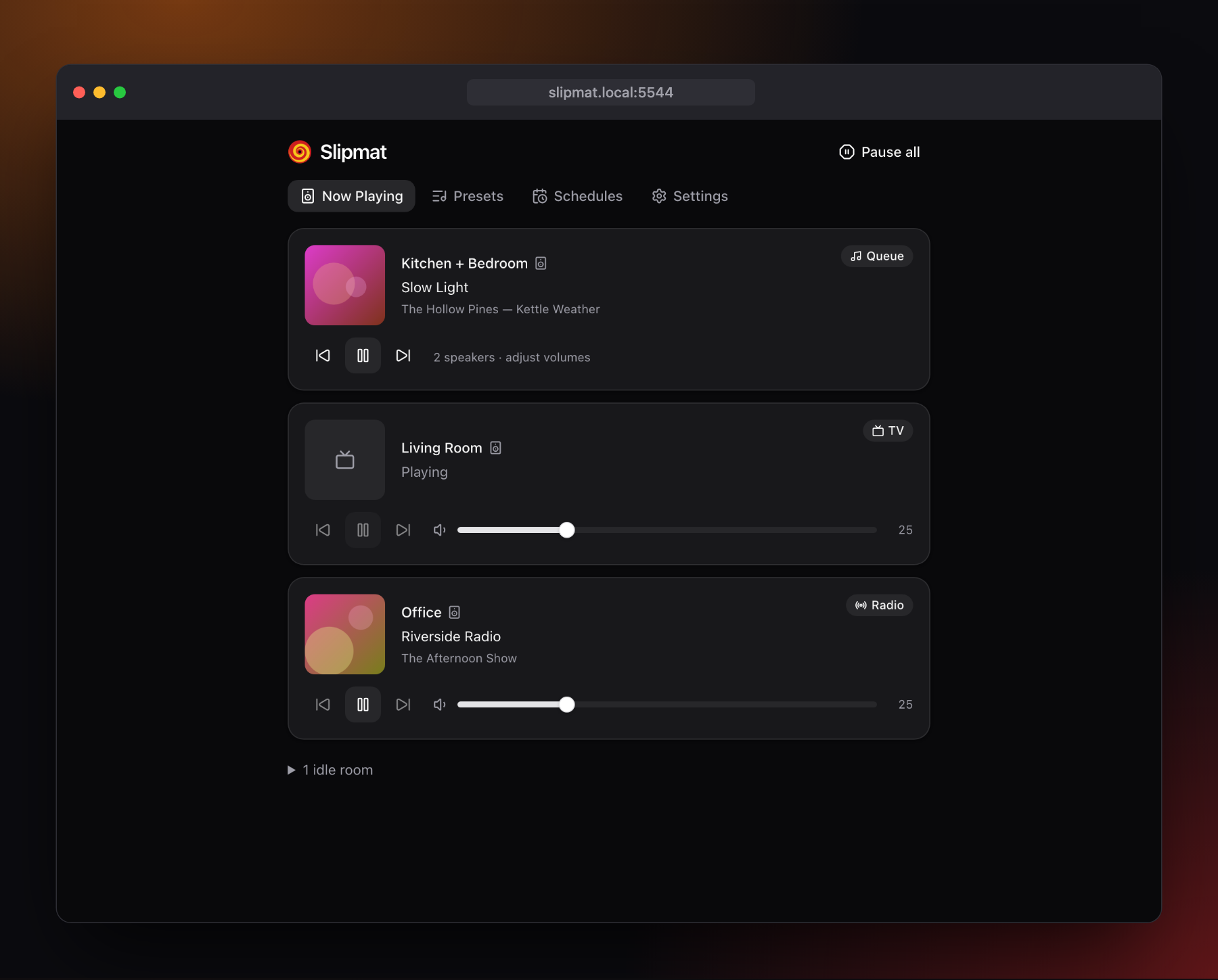
Slipmat runs on your own server and talks to your speakers directly over the local network. There's no cloud and no Sonos account involved, and nothing leaves the house.
Its heart is presets. A preset groups a set of speakers, sets each one's volume, and starts a queue shuffled together from as many playlists, albums and favourites as you like. Start one from the web UI, from a webhook (Shortcuts, Stream Deck, Node-RED), on a schedule, or with a HomeKit switch that also shows whether it's playing.
Everyday playback
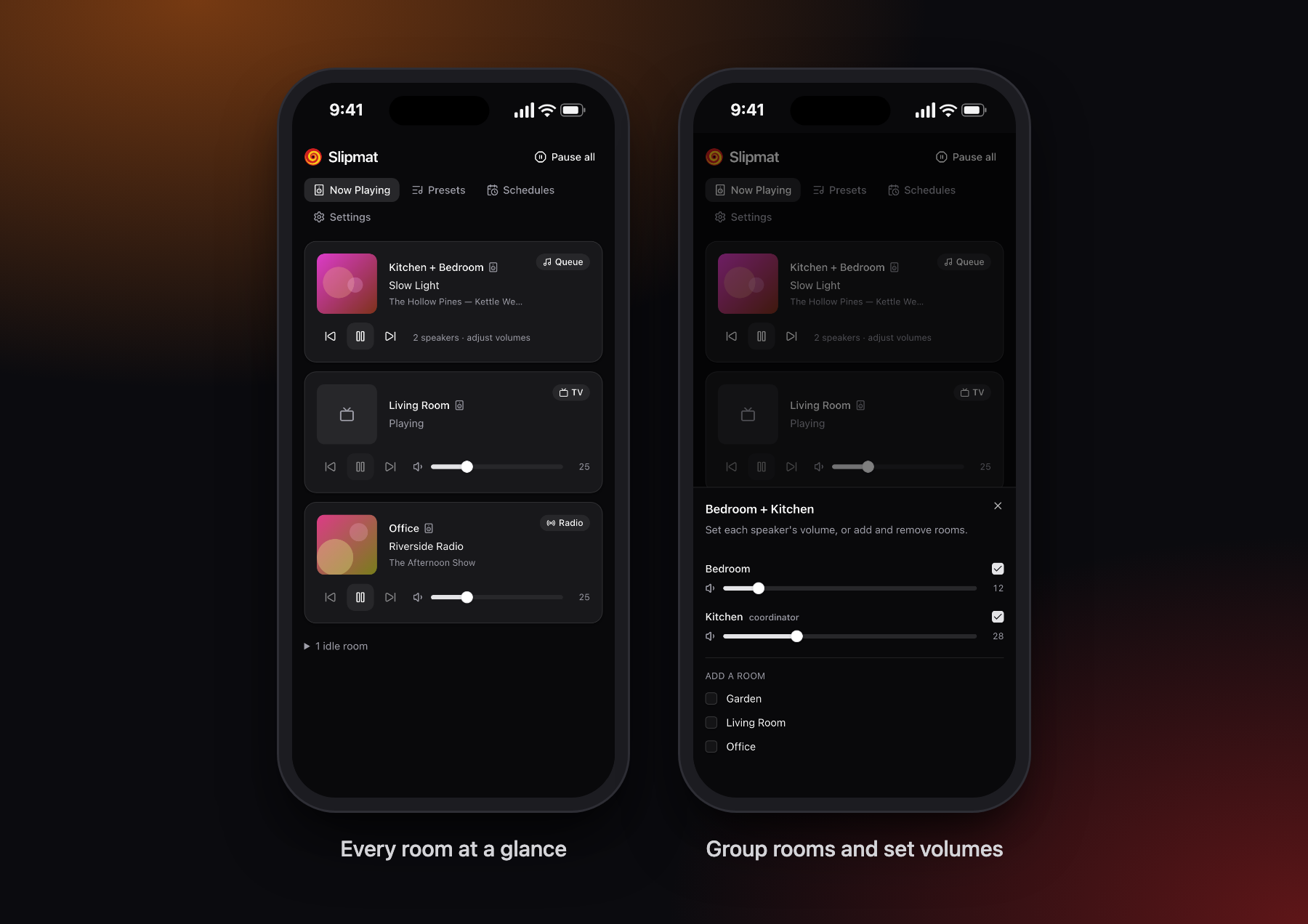
- Every room on one screen, with artwork, transport controls and volume.
- Group and ungroup rooms, and set each speaker's volume within a group.
- Pause all stops the music everywhere and leaves TV audio alone.
- Works as well on a phone as on a desktop.
Presets
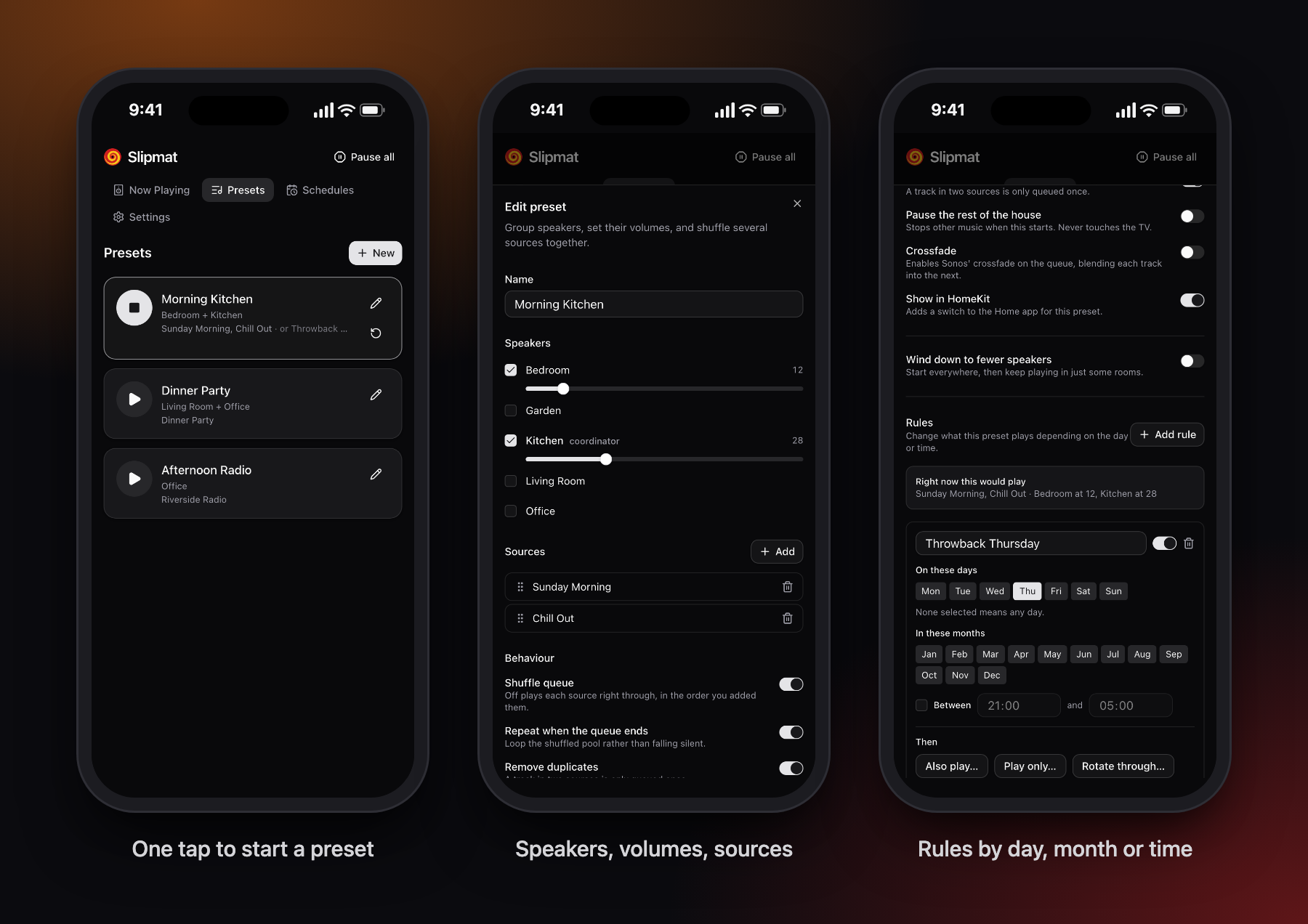
- Speakers and volumes: pick the rooms, set a volume for each, and choose which one leads.
- Many sources, one queue: Sonos playlists, favourites and your music library, shuffled together, with duplicates removed.
- Rules: change what a preset plays by day, month or time of day. Add Christmas music in December, rotate through a different playlist each day, or play quieter after 9pm. The editor shows what the preset would play right now.
- Starts fast: sound begins within about a second, and the rest of the queue fills in behind it.
- Wind down: start in every room, then carry on in just a few.
- Optional crossfade, repeat, and pausing the rest of the house.
Sources and integrations
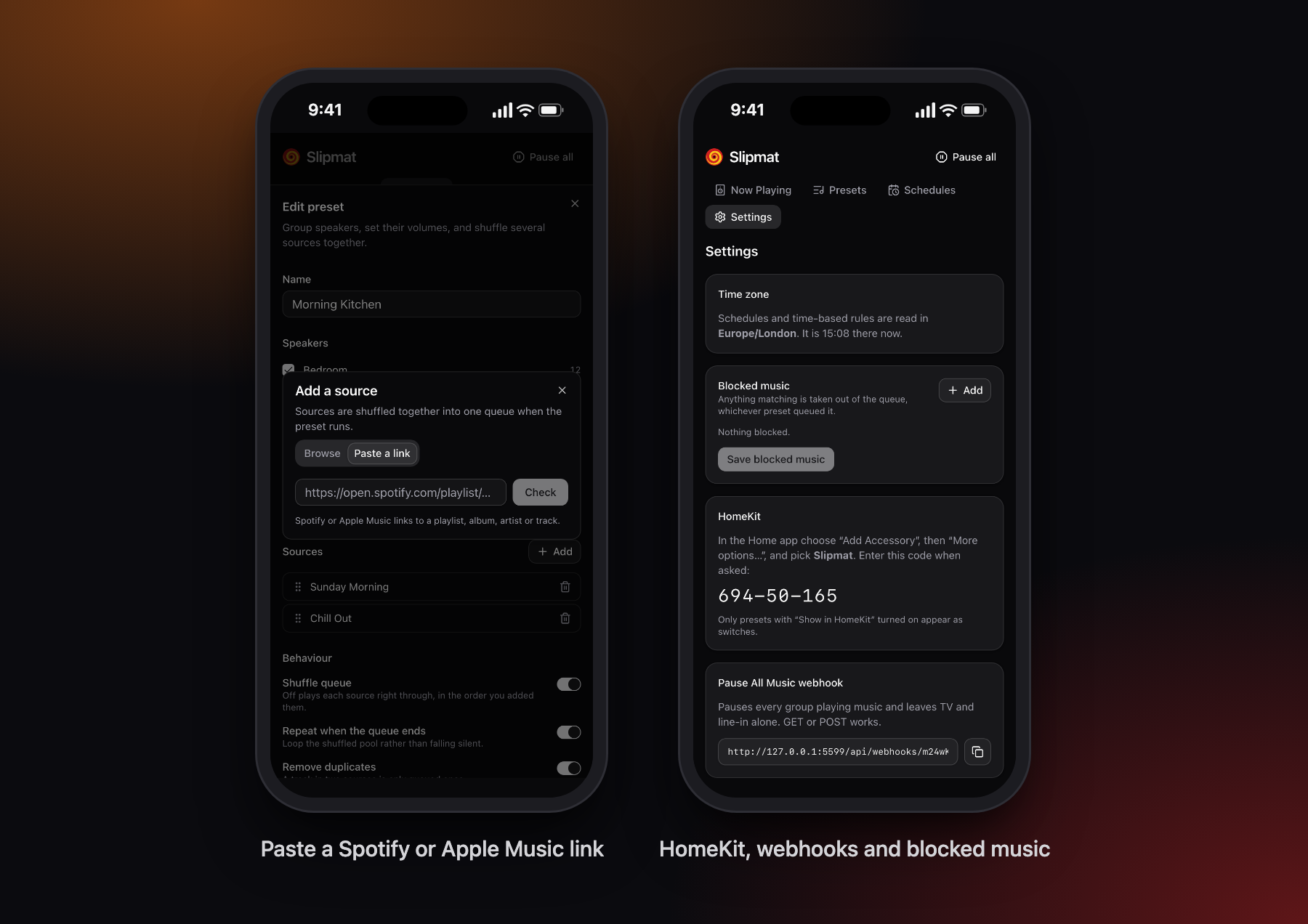
- Paste a link to a Spotify or Apple Music playlist, album, artist or track.
- Schedules start or stop presets at set times, with sleep timers, and can pause music when the TV comes on.
- Webhooks for every preset and for Pause All, using GET or POST.
- HomeKit: an optional built-in bridge, with no Homebridge needed, that shows presets as switches in the Home app.
- Blocked music: tracks, artists or albums that should never play, whichever preset queued them.
Running it
Unraid
Install Slipmat from Community Applications. Until it's listed there, fetch the template on the server and pick it from Docker → Add Container → Template:
wget -O /boot/config/plugins/dockerMan/templates-user/my-Slipmat.xml \
  https://raw.githubusercontent.com/alexjsp/unraid-community-apps/main/templates/slipmat.xml
Docker Compose
curl -O https://raw.githubusercontent.com/alexjsp/slipmat/main/compose.yml
docker compose up -d
Settings go in a .env beside it; every one is optional.
Docker
docker run -d --name slipmat \
  --network host \
  -v /path/to/appdata/slipmat:/data \
  ghcr.io/alexjsp/slipmat:latest
Then open http://<host>:5544.
latest is the most recent release. To follow every change on main instead, use edge, or pin
a version such as 1.0.0 or 1.0.
--network host is required
Not a convenience — three things depend on it:
- SSDP discovery is multicast and doesn't cross a Docker bridge network.
- UPnP events: the speakers dial back into Slipmat's callback URL, so they need a routable address for it.
- HomeKit (if enabled) advertises over mDNS.
If discovery still can't get through, set SLIPMAT_SEED_IP to any one speaker's IP address —
Slipmat finds the rest of the household from there.
Docker Desktop on macOS has no real host networking. Develop natively with just dev instead.
Configuration
See .env.example for the full list. The ones that matter:
| Variable | Default | Notes |
|---|---|---|
SLIPMAT_PASSWORD |
— | Optional. Setting it turns authentication on; unset means no login. |
SLIPMAT_SESSION_SECRET |
generated | Signs login sessions. Generated and stored on first run if unset. |
SLIPMAT_PORT |
5544 |
|
SLIPMAT_SEED_IP |
— | Discovery fallback. |
SLIPMAT_HOMEKIT |
0 |
Set to 1 to enable the embedded HomeKit bridge. |
SLIPMAT_HOMEKIT_PIN |
generated | Pairing code. Generated on first run if unset, and shown in Settings. |
PUID / PGID |
10001 |
User and group the server runs as. /data is handed to them on start. |
Authentication is optional
Slipmat runs without a login by default, and that's deliberate rather than an oversight: Sonos has no authentication of its own, so anything already on your network can control the speakers. Putting a password in front of Slipmat wouldn't change that.
Set SLIPMAT_PASSWORD to turn it on. Worth doing if you expose Slipmat beyond the LAN, or if not
everyone in the house should be able to edit presets.
Two protections apply either way:
- Webhook URLs always carry a per-preset secret token rather than relying on a session, so they work from Shortcuts, Node-RED and the like. Regenerate a token from the preset editor if one leaks.
- A host-header allowlist blocks DNS rebinding, which is the one thing a browser on your network can do to an open LAN service.
Development
SLIPMAT_FAKE_SONOS=1 runs against an invented household instead of real speakers. It's what the
screenshots above were taken from: just readme-images regenerates them.
Requires Node 24+, pnpm and just.
just install
just dev        # API on :5544, UI on :5545 with a proxy to the API
just check      # lint, typecheck, test
⚠️ Tests never touch real speakers. They run against the fake Sonos layer. Anything that would mutate real hardware needs an explicit ask first — see
CLAUDE.md.
just release tags a new version, offering the next major, minor or patch, and CI publishes it
as latest once the checks pass. Pushes to main publish edge only.
Personal recipes, such as a deploy to your own server, can go in a gitignored
local/local.just; the justfile imports it when it exists.
Prior art
jishi/node-sonos-http-api pioneered this shape and
its preset semantics were a useful reference. Slipmat is built on
@svrooij/sonos instead — actively maintained, fully
typed, with the event subscriptions the preset state tracking needs.
License
Media gallery
1 / 4Requirements
Categories
Related apps
Explore more like this
Explore allDetails
ghcr.io/alexjsp/slipmat:latestRuntime arguments
- Web UI
http://[IP]:[PORT:5544]/- Network
host- Shell
sh- Privileged
- false
Template configuration
Presets, schedules, settings and the source cache (a small SQLite database), plus HomeKit pairing data if enabled.
- Target
- /data
- Default
- /mnt/user/appdata/slipmat
- Value
- /mnt/user/appdata/slipmat
Port the web UI and API listen on. With host networking this is a port on the Unraid server itself.
- Target
- SLIPMAT_PORT
- Default
- 5544
- Value
- 5544
Optional. Setting a password turns on login for the web UI and API. Webhooks keep working through their own secret URLs either way.
- Target
- SLIPMAT_PASSWORD
Comma-separated hostnames you reach Slipmat by, such as a domain behind a reverse proxy. IP addresses, localhost, *.local and *.ts.net always work; anything else is refused to block DNS rebinding.
- Target
- SLIPMAT_ALLOWED_HOSTS
Optional. The IP of any one speaker, for networks where discovery can't get through (VLANs, multicast filtering). Slipmat finds the rest of the system from it.
- Target
- SLIPMAT_SEED_IP
Optional IANA time zone (for example Europe/London) for schedules and time-based rules. Defaults to the container's time zone, and can also be changed in Settings.
- Target
- SLIPMAT_TZ
Set to 1 to expose presets as HomeKit switches.
- Target
- SLIPMAT_HOMEKIT
- Default
- 0
- Value
- 0
Optional pairing code for the HomeKit bridge, in the form 123-45-678. Left blank, one is generated on first run and shown in Settings.
- Target
- SLIPMAT_HOMEKIT_PIN
Name of the bridge as it appears in the Home app.
- Target
- SLIPMAT_HOMEKIT_NAME
- Default
- Slipmat
- Value
- Slipmat
Optional. The server address speakers should send live updates to, when the server has several network interfaces and Slipmat guesses the wrong one.
- Target
- SLIPMAT_CALLBACK_HOST
One of trace, debug, info, warn, error.
- Target
- SLIPMAT_LOG_LEVEL
- Default
- info
- Value
- info
User the server runs as. /data is handed to this user on start.
- Default
- 99
- Value
- 99
Group the server runs as.
- Default
- 100
- Value
- 100