
All apps · 0 apps

skgate
Docker app from helvio's Repository
Overview
Readme
View on GitHub
skgate
Use your Grok subscription as an OpenAI-compatible API, and serve your MCP servers from one OAuth-protected gateway.
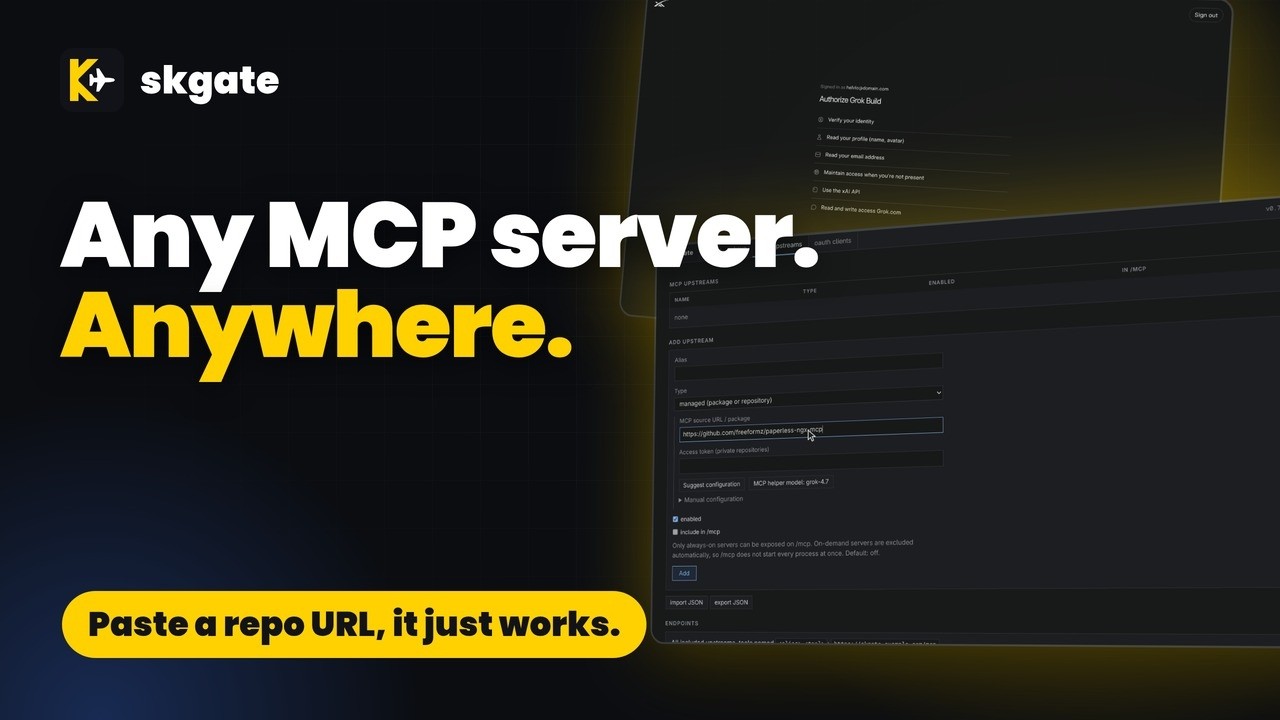
Yes, all MCP servers: everyone's welcome. skgate can run them for you too, so no more stacks. It just works.
Name Origin
skgate /ɛsˈkɑːɡeɪt/ (ess-KAH-gate)
"sk" is what most AI API keys start with, or so I perceive it, and "gate" is for gateway. Bit rubbish as names go, but it's ours.
The plane in the logo is an inside joke. The public wouldn't understand it, and I'm not about to explain it. Sorry.
Quick start
Before you start: an OIDC provider with a confidential client for skgate (admin login is OIDC only). Just trying it on one machine? docs/quickstart.md runs skgate with a bundled provider and no accounts.
Grok is the best fit: works with your subscription, no API key. But skgate also speaks to OpenAI, Anthropic, Gemini, Mistral, DeepSeek, Groq, OpenRouter, Ollama and any OpenAI-compatible endpoint. Point your apps at one skgate URL and switch their AI provider in one place, with no app changes.
# docker-compose.yml
services:
  skgate:
    container_name: skgate
    image: ghcr.io/helv-io/skgate:latest
    restart: always
    ports:
      - 8080:8080
    environment:
      - PUBLIC_URL=https://skgate.example.com
      - OIDC_ISSUER=https://auth.example.com
      - OIDC_CLIENT_ID=skgate
      - OIDC_CLIENT_SECRET=change-me
    volumes:
      - ./data:/data
    healthcheck:
      test: ["CMD", "/skgate", "healthcheck"]
      interval: 30s
      timeout: 5s
      retries: 3
docker compose up -d- Open
https://skgate.example.com/adminand sign in through your OIDC provider. - status > Grok > Sign in: open the shown address, enter the code, approve.
- keys > enter a name > Create key. Copy the
sk-...key; it is shown once. - Use it: base URL
https://skgate.example.com/v1, API keysk-...(see Examples).- The base URL is forgiving:
/v1,/api,/api/v1and the bare host all reach the same API, so use whichever form your client expects.
- The base URL is forgiving:
Image tags:
latest: proxy + managed MCP servers (Node.js, Python, uv, .NET, Go, git)slim: proxy only
Upgrade: back up ./data, then docker compose pull && docker compose up -d.
Examples
curl: models and a chat completion
export SKGATE=https://skgate.example.com KEY=sk-...
curl -s $SKGATE/v1/models -H "Authorization: Bearer $KEY"
curl -s $SKGATE/v1/chat/completions -H "Authorization: Bearer $KEY" \
  -H 'Content-Type: application/json' \
  -d '{"model":"<id from /v1/models>","messages":[{"role":"user","content":"Say hi"}]}'
OpenAI client
export OPENAI_BASE_URL=https://skgate.example.com/v1 OPENAI_API_KEY=sk-...
from openai import OpenAI

client = OpenAI()  # reads the two variables above
r = client.chat.completions.create(model="grok-latest", messages=[{"role": "user", "content": "Say hi"}])
print(r.choices[0].message.content)
Model alias: one name that always points at the newest model
Map grok-latest to the latest available model. Change the target in this one place and every app using grok-latest is upgraded at once, with no client config changes.
Grok > Details > Model aliases: alias grok-latest, target the newest model in the list (for example grok-4.7), Save.
client sends   {"model": "grok-latest", ...}
skgate sends   {"model": "grok-4.7", ...}
Aliases are listed first in /v1/models.
Add an MCP server with Suggest configuration
Needs the latest image and Grok signed in. The first time, Pick MCP helper model next to the button opens the model picker right on the page.
mcp upstreams > Add upstream > Type managed (package or repository):
MCP source URL / package, one of:
Source Runs as @modelcontextprotocol/server-everythingnpm package, npxpypi:mcp-server-timePyPI package, uvxhttps://github.com/example-org/notes-mcpgit repo: clone, install, run (private: Access token) Suggest configuration. skgate fetches the README and manifests (
package.json,pyproject.toml,server.json), the MCP helper model proposes command, args, install step and env names (marked secret or not, required or optional), and the Manual configuration fields are filled in with a confidence and any warnings. Nothing is saved yet. Point it at the repo, fill in the variables it needs, and it just works.Set an alias, fill in the variables you need (empty ones are not passed to the server), Save. The server is at
https://skgate.example.com/mcp/<alias>.
If the button is greyed out, hover it: sign in to Grok on status, or use Pick MCP helper model beside it.
MCP client: one upstream or all of them
| URL | Serves |
|---|---|
https://skgate.example.com/mcp/<alias> |
One upstream; tool names unchanged |
https://skgate.example.com/mcp |
Every upstream marked In /mcp; tools prefixed <alias>- |
Hosted connectors use OAuth (leave client ID and secret empty). Scripts and CLIs send a key:
{"mcpServers": {"skgate": {"type": "http", "url": "https://skgate.example.com/mcp/<alias>",
  "headers": {"Authorization": "Bearer sk-..."}}}}
On-demand MCP servers: no RAM while idle
On a RAM-constrained homelab, idle MCP servers should cost nothing. Managed servers (npx, uvx, git) are child processes of skgate. By default (Lifecycle on-demand) one starts on its first request and stops after 10 minutes without requests; the next request starts it again.
before   3 MCP servers = 3 containers, always running
after    1 skgate container; 0 server processes while idle, 1 per server in use
stopped --request--> starting --> running --10 min idle--> stopped
- Default is on-demand; Lifecycle
always-onstarts the server at boot instead. - The first request after a stop waits until the server answers
initialize(up to 60 s). - A server with a request in flight is never stopped. Stopping is SIGTERM, then SIGKILL after 5 s.
- Idle time is
idleTimeoutSecondsin import JSON (default 600; not in the form):
{"mcpServers": {"time": {"command": "uvx", "args": ["mcp-server-time"], "skgate": {"idleTimeoutSeconds": 120}}}}
- The aggregated
/mcpincludes remote and always-on upstreams marked In /mcp. On-demand servers are left out, so/mcpnever starts them. Point a client at/mcp/<alias>to use one. - Remote upstreams have no process; there is nothing to idle.
- An admin Stop keeps a server stopped until Start or Restart.
Managed MCP server: npx (stdio)
mcp upstreams > import JSON > paste > Import. Needs the latest image.
{"mcpServers": {"everything": {"command": "npx", "args": ["-y", "@modelcontextprotocol/server-everything"]}}}
Served at https://skgate.example.com/mcp/everything. For Python servers use "command": "uvx", "args": ["<package>"].
Managed MCP server: git repository
mcp upstreams > import JSON > paste > Import. skgate clones the repo, runs install, then the command.
{"mcpServers": {"notes": {"command": "node", "args": ["server.js"],
  "skgate": {"gitUrl": "https://github.com/example-org/notes-mcp.git", "gitRef": "main", "install": "npm ci"}}}}
Remote MCP server
mcp upstreams > Add upstream > Type remote (URL), or import:
{"mcpServers": {"docs": {"type": "http", "url": "https://mcp.example.com/mcp",
  "headers": {"Authorization": "Bearer ..."}}}}
Features
| Feature | What it does |
|---|---|
| Grok sign-in | Device code or browser paste-back; tokens refresh |
| Model aliases | grok-latest maps to the newest model; change the target once |
| API | /v1, /api/v1, /api, no prefix; SSE (docs) |
| Virtual keys | Hashed; tokens in/out per key (docs) |
| MCP | Remote, stdio and git servers behind OAuth 2.1 (docs) |
| REST APIs as tools | Give an OpenAPI description, pick the operations, and MCP clients get them as tools (docs) |
Comparison
| Provider | Own subscription sign-in in third-party tools | In skgate |
|---|---|---|
| xAI Grok | ✅ announced for OpenCode, more planned [1] | ✅ (independent, not an xAI product) |
| OpenAI | ✅ "Sign in with ChatGPT" since 2026-09-29; hosted apps need approval [2] | ❌ |
| Anthropic Claude | ❌ not offered to third parties [3] | ❌ use the API |
| Google Gemini | ❌ CLI login not for reuse [4] | ❌ use an API key |
| GitHub Copilot | ⚠️ OpenCode partnership only [5] | ❌ |
As of 2026-10-02; check each provider's terms.
Sources
- xAI, Use Grok in OpenCode
- OpenAI, Sign in with ChatGPT
- Anthropic, Legal and compliance
- Google, Gemini CLI terms
- GitHub, Copilot now supports OpenCode
Configuration
Set under environment: (or env_file); placeholders in .env.example.
| Variable | Default | Purpose |
|---|---|---|
PUBLIC_URL |
http://localhost:8080 |
Public origin, no trailing slash. |
OIDC_ISSUER |
Issuer URL, equal to the provider's discovery issuer. |
|
OIDC_CLIENT_ID, OIDC_CLIENT_SECRET |
Confidential client credentials. | |
OIDC_SCOPES |
openid profile email groups |
Requested scopes. |
OIDC_REDIRECT_URL |
PUBLIC_URL/admin/oidc/callback |
Callback registered at the provider. |
OIDC_ALLOWED_EMAILS, OIDC_ALLOWED_GROUPS |
empty | Comma lists limiting who is admin. |
MCP_OAUTH_REQUIRE_CONSENT |
true |
Approve/Deny page after login at /authorize. |
SECRETS_KEY |
random secrets.key file |
Encrypts stored upstream secrets. 32-byte base64 or a passphrase. |
GITHUB_TOKEN |
empty | Optional GitHub token for Suggest when it reads a repository. An upstream's own access token takes precedence. Raises GitHub's rate limit. |
LISTEN_ADDR |
:8080 |
Listen address. |
DB_PATH |
/data/skgate.db |
SQLite file. |
LOG_LEVEL |
info |
info or debug. |
LOG_LINES |
1000 |
Lines of output kept per managed process (its current and previous run, at most 512 KB). |
TZ |
UTC |
Time zone for the UI and logs, for example America/New_York. |
PUID, PGID |
1000 |
Run-as ids; never 0. |
MANAGED_DIR |
/data/managed |
Work dirs and clones of managed upstreams. |
MANAGED_MAX_PROCS |
0 |
Concurrent managed processes; 0 is unlimited. |
Grok needs no variables; its base URL and aliases are in its Details dialog.
Everything lives in /data (skgate.db, secrets.key): back up both.
Reverse proxy
Set PUBLIC_URL to the public https origin. No forward-auth on /v1, /mcp, /authorize, /token, /register, /.well-known. Only Traefik is tested by the author; open an issue with feedback.
Traefik
services:
  skgate:
    container_name: skgate
    image: ghcr.io/helv-io/skgate:latest
    restart: always
    network_mode: web   # existing Docker network shared with Traefik; no ports needed
    environment:
      - PUBLIC_URL=https://skgate.example.com   # the public https origin
      - OIDC_ISSUER=https://auth.example.com
      - OIDC_CLIENT_ID=skgate
      - OIDC_CLIENT_SECRET=change-me
    volumes:
      - ./data:/data
    healthcheck:
      test: ["CMD", "/skgate", "healthcheck"]
      interval: 30s
      timeout: 5s
      retries: 3
    labels:
      # no forward-auth middleware on /v1, /mcp, /authorize, /token, /register, /.well-known
      - traefik.enable=true
      - traefik.http.routers.skgate.rule=Host(`skgate.example.com`)
      - traefik.http.routers.skgate.entryPoints=websecure
      - traefik.http.services.skgate.loadbalancer.server.port=8080
nginx
server {
    listen 443 ssl;
    http2 on;
    server_name skgate.example.com;
    ssl_certificate     /etc/ssl/skgate/fullchain.pem;
    ssl_certificate_key /etc/ssl/skgate/privkey.pem;

    client_max_body_size 32m;                         # skgate accepts up to 32 MB

    location / {
        proxy_pass http://skgate:8080;
        proxy_http_version 1.1;
        proxy_set_header Connection "";
        proxy_set_header Host $host;                  # keep Host
        proxy_set_header X-Forwarded-For $remote_addr;
        proxy_set_header X-Forwarded-Proto $scheme;
        proxy_buffering off;                          # SSE streaming
        proxy_read_timeout 3600s;                     # long streams
        proxy_send_timeout 3600s;
    }
}
Caddy
skgate.example.com {
    # Host and X-Forwarded-* are set by default; no body limit, no response timeout
    reverse_proxy skgate:8080 {
        flush_interval -1                             # SSE streaming
    }
}
HAProxy
defaults
    mode http
    timeout connect 5s
    timeout client  1h                                # long streams
    timeout server  1h
    timeout tunnel  1h

frontend https
    bind :443 ssl crt /etc/haproxy/certs/skgate.pem alpn h2,http/1.1
    option forwardfor                                 # X-Forwarded-For; Host is kept, responses are not buffered
    http-request set-header X-Forwarded-Proto https
    default_backend skgate

backend skgate
    option httpchk GET /healthz
    server skgate skgate:8080 check
Apache
# a2enmod ssl proxy proxy_http headers
<VirtualHost *:443>
    ServerName skgate.example.com
    SSLEngine on
    SSLCertificateFile    /etc/ssl/skgate/fullchain.pem
    SSLCertificateKeyFile /etc/ssl/skgate/privkey.pem

    # keep Host
    ProxyPreserveHost On
    RequestHeader set X-Forwarded-Proto "https"
    # long streams
    ProxyTimeout 3600
    # flushpackets: no buffering (SSE)
    ProxyPass        / http://skgate:8080/ flushpackets=on
    ProxyPassReverse / http://skgate:8080/
</VirtualHost>
OIDC setup
| Client setting | Value |
|---|---|
| Type | Confidential, client_secret_basic or client_secret_post |
| Flow | Authorization code with PKCE S256 |
| Redirect URI | https://skgate.example.com/admin/oidc/callback |
| Scopes | openid profile email groups (if groups is rejected: OIDC_SCOPES=openid profile email) |
| ID token | Asymmetric signature (RS, PS, ES, EdDSA); discovery issuer equal to OIDC_ISSUER |
Without OIDC_* the admin answers 503. Every user your provider lets in is an admin: restrict the provider, or set OIDC_ALLOWED_EMAILS / OIDC_ALLOWED_GROUPS. Hints for Authelia, Authentik, Keycloak, Zitadel and Pocket ID: docs/oidc.md.
Security notes
- Virtual keys are stored as SHA-256 hashes; upstream credentials are AES-256-GCM encrypted.
/authorizeneeds an admin session.- Managed upstreams run admin-supplied commands; use the
slimimage to disable them. - A key can be allowed in the URL (
?key=) for clients that cannot send headers. It is off per key by default, because URLs leak into logs, history and referrers.
More: operations.
Built with AI assistance
skgate is built with AI assistance: coding agents write much of the code, tests and docs. The author reviews the changes and runs skgate.
Development
go build ./... && go vet ./... && go test ./...
docs/development.md. Contributors and agents: AGENT.md.
License
MIT, see LICENSE.
Install Skgate on Unraid in a few clicks.
Find Skgate in Community Apps on your Unraid server, review the template, and click Install. Unraid handles the Docker app or plugin setup from the published template.
Related apps
Explore more like this
Explore allDetails
ghcr.io/helv-io/skgate:latestRuntime arguments
- Web UI
http://[IP]:[PORT:8080]/admin- Network
bridge- Shell
sh- Privileged
- false
- Extra Params
--health-cmd="/skgate healthcheck" --health-interval=30s --health-timeout=5s --health-retries=3
Template configuration
Port of the web UI and the MCP, OAuth and /v1 endpoints.
- Target
- 8080
- Default
- 8080
- Value
- 8080
Database (skgate.db), encryption key (secrets.key) and managed upstream data. Back this up.
- Target
- /data
- Default
- /mnt/user/appdata/skgate
- Value
- /mnt/user/appdata/skgate
The public https address clients use to reach skgate, no trailing slash. Example: https://skgate.example.com
- Target
- PUBLIC_URL
Issuer URL of your OIDC provider, for admin sign-in. Example: https://auth.example.com
- Target
- OIDC_ISSUER
Client ID of the confidential client you created for skgate. Redirect URI: PUBLIC_URL/admin/oidc/callback
- Target
- OIDC_CLIENT_ID
- Default
- skgate
- Value
- skgate
Client secret for the OIDC client above.
- Target
- OIDC_CLIENT_SECRET
Comma list. Only these OIDC users may sign in as admin. Empty: every user your OIDC provider admits is an admin.
- Target
- OIDC_ALLOWED_EMAILS
Comma list of OIDC groups allowed to sign in as admin. Empty: no group restriction.
- Target
- OIDC_ALLOWED_GROUPS
For log timestamps and dates, for example America/New_York.
- Target
- TZ
User ID skgate runs as (Unraid: nobody = 99).
- Default
- 99
- Value
- 99
Group ID skgate runs as (Unraid: users = 100).
- Default
- 100
- Value
- 100
info or debug.
- Target
- LOG_LEVEL
- Default
- info
- Value
- info