
All apps · 0 apps

simple-rta
Docker app from Stoatworks Labs' Repository
Overview
Readme
View on GitHubsimpleRTA
AI-assisted project. This codebase was created with Claude Code (Anthropic), directed and reviewed by a human author. The analysis chain is verified numerically — 29 tests pin the power normalisation at every transform size and through every window, the band-integration invariants, and the agreement between the band levels and the spectrum they come from — and the running app is checked against its own pink-noise source, which a constant-percentage-bandwidth display must draw flat. It has not been verified against a calibrated measurement microphone or a reference analyser, and no absolute SPL claim is made: the dB offset field is an unverified user-supplied number, and there is no microphone correction.
A real-time audio analyser that runs entirely in a browser tab.
simple-rta.stoatworks-labs.com
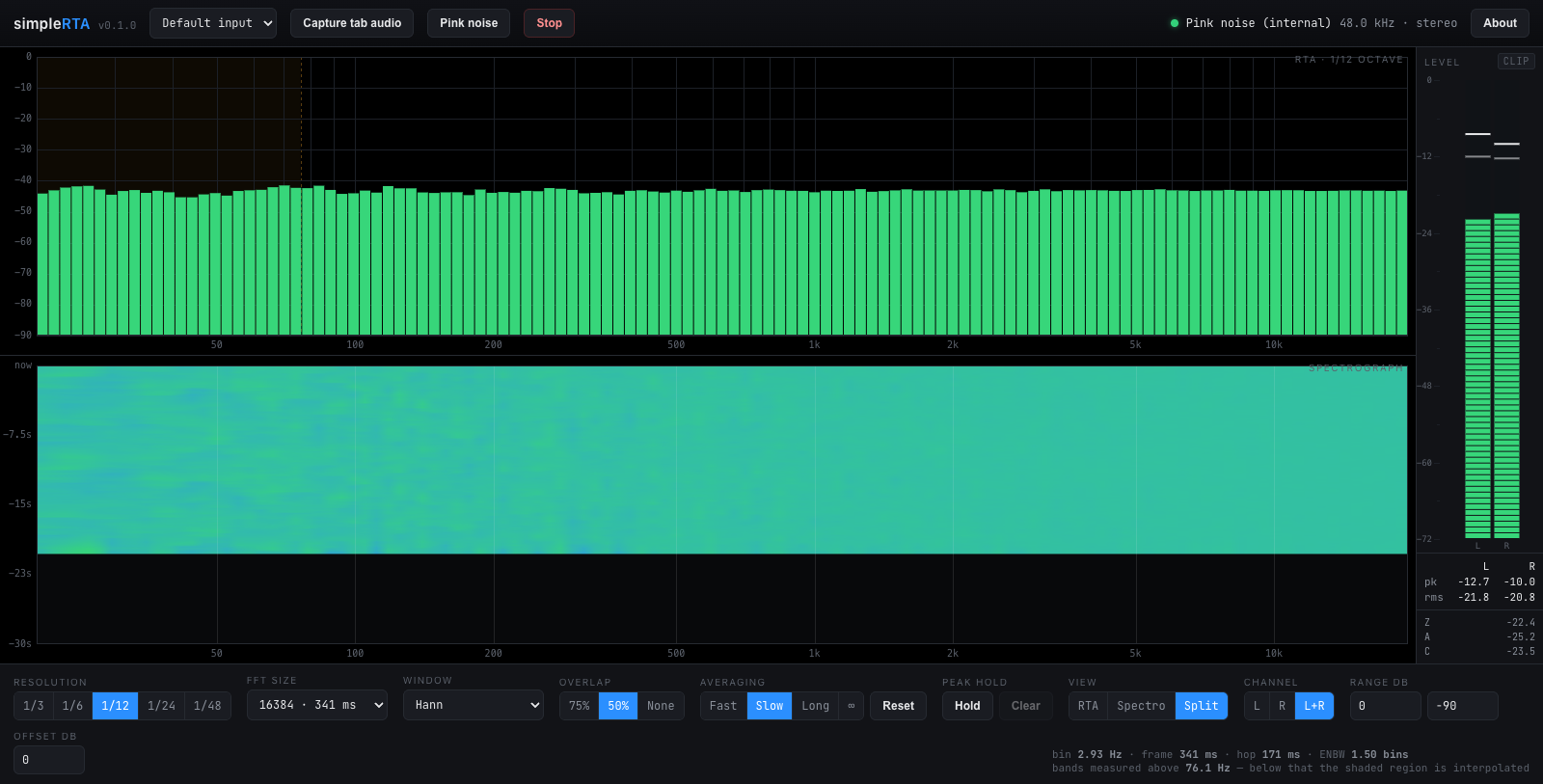
Split view on the built-in pink noise. Pink noise is flat on a constant-percentage-bandwidth display, so a correct analyser draws a level line — which is what makes this the picture worth checking a change against.
- RTA at 1/3, 1/6, 1/12, 1/24 or 1/48 octave
- FFT size 2048 to 65536, with a selectable analysis window and overlap
- Peak hold per band, and exponential or infinite averaging
- Peak frequency readout across the top of the RTA — the tallest band and its level, refined to a fraction of a bin when a tone is what tops it
- Spectrograph sharing the RTA's frequency axis
- Full-height bargraph meter — peak, RMS, peak hold and a latching clip indicator, plus broadband Z / A / C readouts
No backend, no accounts, no telemetry. The audio is analysed on the page and never leaves the browser.
Sources
An audio input — a microphone, a measurement mic on an interface, or a return from a console. The browser's echo cancellation, noise suppression and automatic gain are all switched off, so what you see is the signal rather than the voice pipeline the browser would otherwise hand you.
Tab audio — captures what another browser tab is playing. Pick a tab in the picker and tick "Share tab audio". Whole-window and full-screen shares carry no audio on most platforms. Chrome and Edge only.
Pink noise — generated in the page and analysed without going anywhere near the speakers. Pink noise is flat on a constant-percentage-bandwidth display, so this is the check that the analyser reads level before you trust what it says about a room.
Reading the display
Levels are dBFS, on the convention that a full-scale sine reads 0 dB. The offset field adds a constant to everything shown, so if you have a reference of known level you can dial the scale into SPL — nothing verifies that number, and no microphone correction is applied.
The shaded region
At the fine resolutions the low bands are narrower than the transform can actually resolve. Below the frequency stated under the controls, neighbouring bands report shares of a single measurement rather than independent ones, and the RTA shades that part of the graph. It is not a fault: it is the arithmetic of asking a 341 ms transform for 1/48-octave detail at 30 Hz. Lengthen the transform, or use a coarser resolution, and the shading recedes.
| Resolution | 16384-point transform, 48 kHz | 65536-point |
|---|---|---|
| 1/3 octave | resolved from 20 Hz | 20 Hz |
| 1/12 octave | 76 Hz | 19 Hz |
| 1/48 octave | 304 Hz | 76 Hz |
Which window
Hann for anything ordinary. Blackman-Harris to see a quiet tone next to a loud one — it buys −92 dB sidelobes at the cost of a wider main lobe. Flat-top when the amplitude of a tone matters more than its frequency; it is accurate to about 0.01 dB wherever the tone falls between bins, and has poor frequency resolution in exchange. Rectangular only for signals that are periodic within the frame.
Development
npm install
npm run dev
npm test
npm run build
The screenshots in this file are taken from the running application, never composited:
node scripts/shoot.mjs --url https://simple-rta.stoatworks-labs.com
Headless Chrome starts the pink-noise source with a real mouse gesture — a
synthetic click() confers no user activation, and an AudioContext will not
start without one — then lets the analyser settle before capturing.
See AGENTS.md for the measurement model and the traps, and CLAUDE.md for the command reference.
Run your own copy
simpleRTA is a static page, so hosting it yourself is one container serving the built files — the same files the hosted copy serves, running somewhere that still works when the venue has no internet.
Docker. The image is built by this repo's docker.yml workflow on every
push and published as ghcr.io/stoatworks-labs/simple-rta:
docker run -d --name simple-rta --restart unless-stopped -p 8525:80 ghcr.io/stoatworks-labs/simple-rta:latest
Or docker compose up -d with the docker-compose.yml
in this repo, which maps the same port. Either way it is then at
http://localhost:8525/.
Unraid. Search Community Applications for simpleRTA — the template is
templates/simple-rta.xml
in stoatworks-unraid, which is what the CA feed reads.
Stoatworks Burrow lists it under Self-hosted, with the compose file a click away.
The Dockerfile, docker-compose.yml, docker/ and the workflow are
generated from fleet.json in stoatworks-unraid. Change them there and
regenerate rather than editing them here.
This project is built on other people's work — see ATTRIBUTIONS.md.
Licence
MIT. See LICENSE.
Install simple-rta on Unraid in a few clicks.
Find simple-rta in Community Apps on your Unraid server, review the template, and click Install. Unraid handles the Docker app or plugin setup from the published template.
Categories
Related apps
Explore more like this
Explore allDetails
ghcr.io/stoatworks-labs/simple-rta:latestRuntime arguments
- Web UI
http://[IP]:[PORT:80]/- Network
bridge- Shell
sh- Privileged
- false
Template configuration
Host port for the web interface.
- Target
- 80
- Default
- 8525
- Value
- 8525