

Simple Folders
Plugin from gcarstoiu
Overview
Readme
View on GitHubSimple Folders
Group Docker containers into folders on the Unraid Docker page.
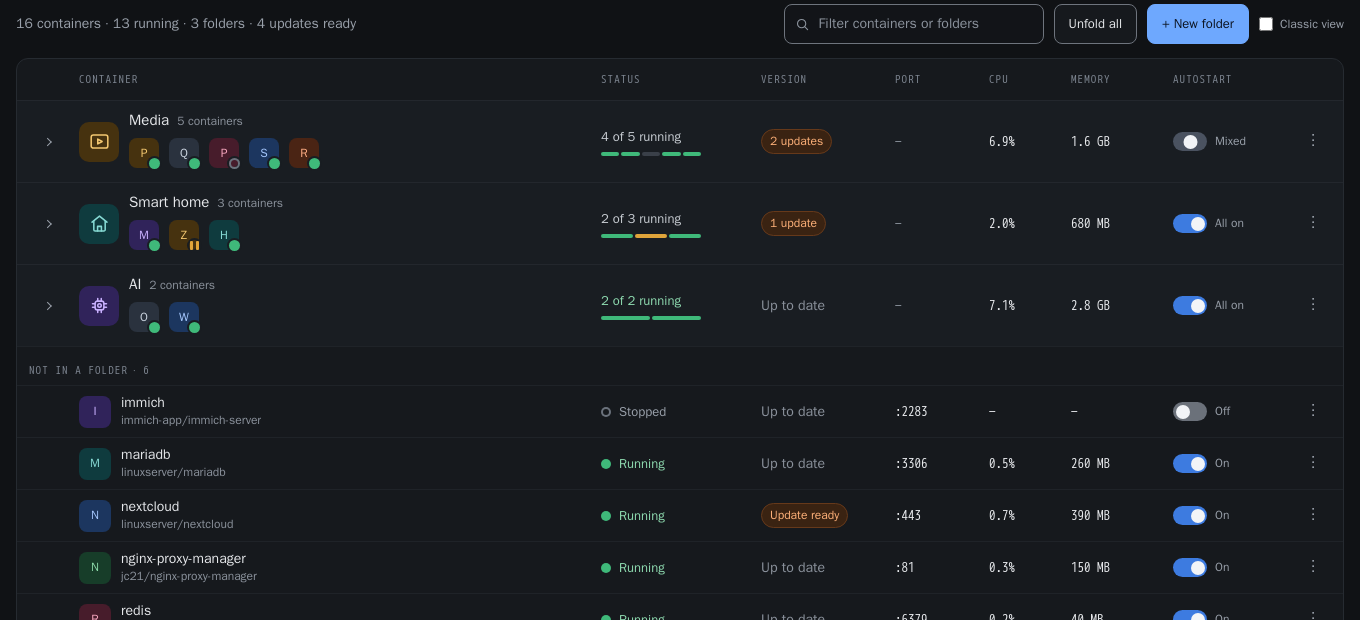
Fold a folder away behind a single row that still shows every member's icon, unfold it to see the full container rows in start order, and run start, stop, restart, pause, resume, update or force update across a whole folder — one container at a time, in the order you chose.
Supports Unraid 7.2 – 7.4.
What it does
- Folders on the Docker page. A folded folder shows its name, its member count and an icon strip with every member — no cap, no "+3". Clicking any of those icons opens that container's own menu. Unfold to get the full rows, numbered in start order.
- Folder-wide commands from the folder's icon or its ⋮ menu: start, stop, restart, pause/resume, check for updates, update, force update, open every WebUI. They run sequentially, honouring the folder's delay between starts and reverse-order stop. Only one job runs at a time.
- Folders that fill themselves. Give a folder a name pattern, or label a
container
simple.folders=<folder>, and matching containers join automatically — including containers created later. - Start order that actually applies at boot. A folder's order and delay are
written into Unraid's own
/var/lib/docker/unraid-autostart, so the array starts containers in the same order the folder uses. No second, competing order to keep in sync. - Folder icons from a built-in set, from one of the member containers, or searched across Dashboard Icons and selfh.st — both libraries' published indexes, so results are real files rather than guessed names — and stored locally so they still render with no internet.
- Drag to rearrange. Grab a row anywhere — its name, its icon, or the grip at the left: reorder a container that is in no folder (this writes Unraid's own display order, so the stock table agrees), drag one onto a folder to move it there, between two members to set where it starts in the folder, or down to "Not in a folder" to take it out. Drag a folder to reorder the folders. Pointer Events, so touch works as well as a mouse — and every one of those moves is also in the menus and the editor, which is what keyboard users have.
- The classic Docker actions at the foot of the table: add a container, start/stop/pause/resume everything, check for and apply updates, container size. Stop and Pause confirm first.
- Classic view. One switch puts Unraid's standard table back, untouched.
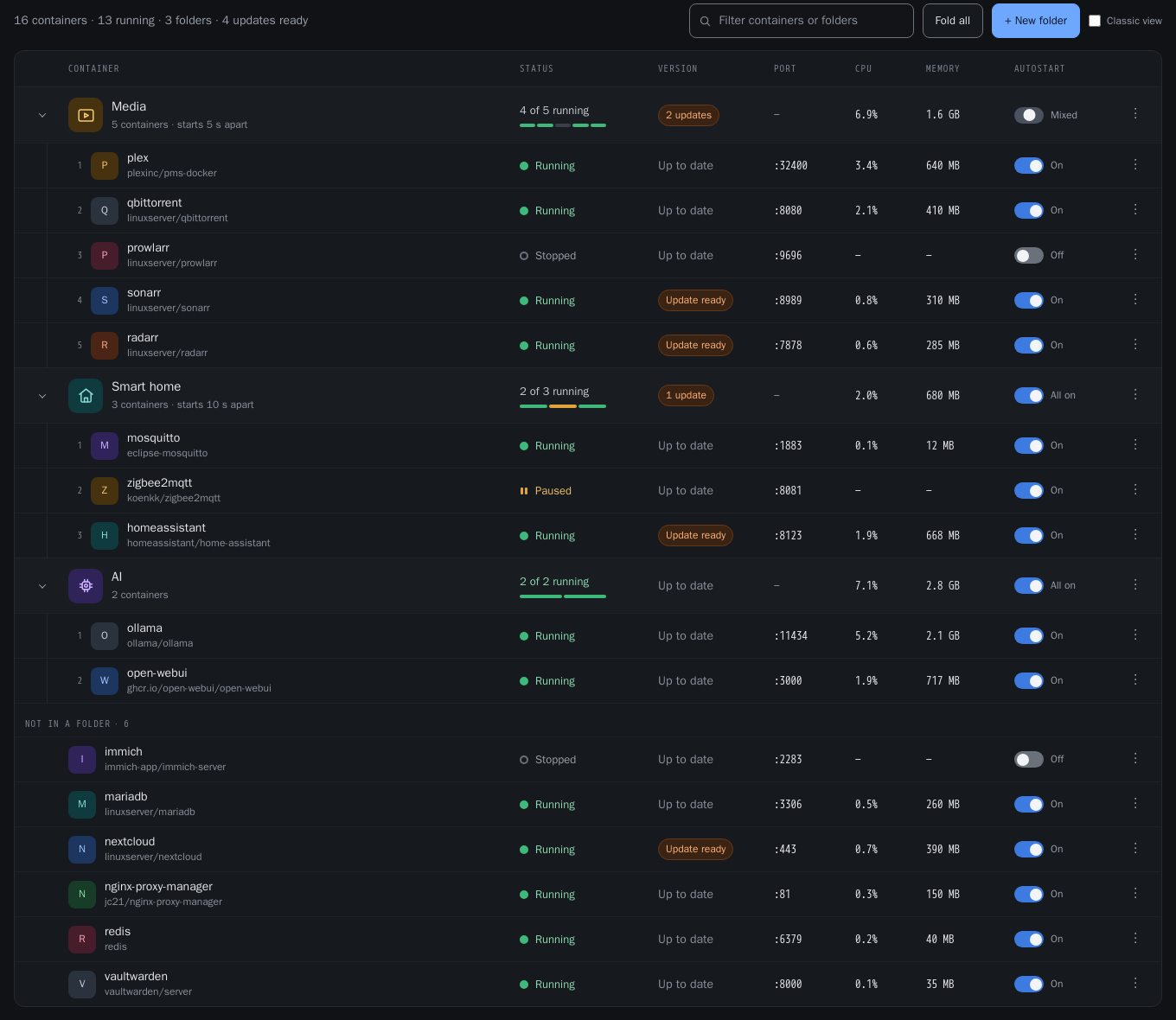
Editing or deleting a folder never stops, removes or recreates a container. Deleting one only removes the grouping; its containers keep running and move to "Not in a folder".
Install
Community Applications — search for Simple Folders.
Manually — Plugins → Install Plugin, and paste:
https://raw.githubusercontent.com/gcarstoiu/simple.folders/main/simple.folders.plg
Then open the Docker tab.
Uninstalling
Removing the plugin restores the stock Docker page and touches no container.
Folder definitions stay in /boot/config/plugins/simple.folders/ so a
reinstall picks them up; delete that directory to erase them.
How it fits into Unraid
The plugin adds a page file with Menu="Docker", which emhttp renders inside
the Docker tab after the stock container table. No core file is patched.
It reads containers through Unraid's own DockerClient / DockerTemplates
classes and acts through Unraid's own endpoints:
| What | Unraid's own code we call |
|---|---|
| start / stop / restart / pause / resume | dynamix.docker.manager/include/Events.php |
| check for updates | include/DockerUpdate.php |
| update and force update | scripts/update_container |
| autostart flag and start delay | include/UpdateConfig.php |
| live CPU and memory | the dockerload nchan channel |
It deliberately does not parse the HTML that include/DockerContainers.php
renders. That markup changed substantially between 7.2.1 and 7.4, and scraping
it is the usual reason folder plugins break on an Unraid upgrade. The
endpoints above were verified byte-identical across that same range.
Update and force update are the same operation — update_container always
pulls and recreates, restoring each container's previous running state. The
two menu items differ only in which containers they target.
Where things live
| Path | What |
|---|---|
/boot/config/plugins/simple.folders/folders.json |
folder definitions (flash, survives reboots) |
/boot/config/plugins/simple.folders/icons/ |
downloaded folder icons |
/usr/local/emhttp/plugins/simple.folders/ |
the plugin itself (RAM; rebuilt each boot) |
browser localStorage |
which folders you have open, and Classic view |
Fold state is per-viewer on purpose, so two people looking at the same server do not fight over each other's open folders.
Development
No build step — the plugin is plain PHP, CSS and ES5-compatible JavaScript
that runs as-is from src/.
Local harness
harness/ is a mock Unraid: stub implementations of every endpoint the plugin
calls, 16 fake containers matching the design, a fake dockerload stream, and
a faithful copy of Unraid's global CSRF gate — so code that forgets the token
fails locally instead of on your server.
./harness/serve.sh # http://localhost:8089
It uses a local php if there is one, otherwise php:8.3-cli-alpine in
Docker (matching the PHP that Unraid 7.2–7.4 ship).
| Variable | Effect |
|---|---|
HARNESS_LATENCY |
seconds per simulated docker action (default 0.6, 0 = instant) |
HARNESS_FAIL |
force failures, e.g. sonarr:stop,radarr:* |
Useful URLs: ?theme=white|black|azure|gray, ?folded=all,
?nostream=1 (stop the live stream so a headless browser can settle),
/_reset (wipe state).
Tests
./harness/serve.sh &
./harness/test/run.sh          # all
./harness/test/run.sh filter   # just the matching ones
python3 tools/contrast.py      # WCAG check on both token sets
run.sh walks design/DESIGN_SPEC.md §15's acceptance checklist with real
clicks and keystrokes, driving a headless Chrome over CDP, and writes a
screenshot per state to harness/test/shots/.
Packaging
./pkg_build.sh # -> archive/simple.folders-<version>.txz, md5 into the .plg
Bump the version in one place: the <!ENTITY version> line in
simple.folders.plg.
Design
design/ holds the handoff this was built from — DESIGN_SPEC.md is the
source of truth for behaviour, with the prototype and screenshots beside it.
Known deviations, all deliberate:
- Fonts. The spec asks for IBM Plex Sans/Mono. Shipping a webfont into someone else's UI is the wrong trade, so the host theme's face is inherited and only the sans/mono distinction is kept.
- Control contrast. The handed-over tokens put the control border and the
switch "off" track at about 1.4:1 against their backgrounds, below WCAG
1.4.11's 3:1 for control boundaries. Both were darkened/lightened until they
pass;
tools/contrast.pyenforces it. - Light themes. The tokens were dark-only.
styles/tokens.cssderives a light set for Unraid'swhiteandazurethemes. - Update progress. Phases come from polling the server, not from parsing
update_container's log — that log is translated on non-English servers.
Picking this up again
Hard-won constraints. Each of these shipped as a bug first; none is obvious from the code alone, and all of them are easy to undo by accident.
Never parse DockerContainers.php's row HTML. It changed substantially
between 7.2.1 and 7.4 and is the usual reason folder plugins break on
upgrade. Read containers through DockerClient/DockerTemplates instead;
those are stable across the range.
Require DockerClient.php at file scope, never inside a function. It
declares $dockerManPaths, $driver, $docroot and $dockercfg at its top
level and thirteen of its methods reach for them with global. An include
takes the scope of whatever included it, so requiring it in a function makes
them locals and every lookup resolves to null.
Asset mtimes must change between releases. autov() cache-busts on
filemtime. pkg_build.sh derives the archive mtime from the version for
exactly this reason — a fixed one made three releases install correctly and
change nothing, because browsers kept the old JavaScript. The build refuses
to run if that derivation stops varying.
Keep the unapi class on the mount and the overlay layer. Unraid guards
88 element rules with :where(:not(.unapi *)). Without it, its button rule
repaints every control (uppercase, min-width: 86px, an orange border). The
element reset in table.css is the second line of defence and is scoped
.sf-root button (0,1,1) on purpose: component rules are .sf-root .sf-xxx
(0,2,0) so they still win. A tie decided by load order is not a guarantee.
Take pointer capture only once a drag starts, not on pointerdown.
Capture retargets pointerup, and a browser only fires click when press
and release share a target — capturing early silently kills every click in
the row.
Don't call Unraid's UserPrefs.php. It saves the display order and
re-sorts unraid-autostart to match, which would undo the start order a
folder owns. Order.php writes the display order alone.
Every POST is CSRF-gated by local_prepend.php (a php.ini
auto_prepend_file). jQuery's $.post is patched to add the token; fetch
is not, so api.js sends X-CSRF-Token. The harness reproduces this, which
is the point — otherwise code passes locally and 403s on hardware.
Apply behaviour to both container sources. sf_containers() returns
early for the harness fixture reader. Logic added after that early return is
never exercised by the tests; the display order shipped doing nothing that
way.
Where things stand
Submitted to Community Applications and awaiting manual moderator review.
Until it is listed, installation is the .plg URL above, which is also how
updates reach existing installs.
Open: <Support> points at GitHub issues; the Unraid convention for plugins
is a forum support thread, and if one is created it should be pointed at in
both templates/simple.folders.xml and ca_profile.xml. The plugin has only
ever run on one server — the APIs it uses were verified identical in the
7.2.1 and 7.4.0-rc.2.1 sources, but 7.3.x hardware is untested.
Licence
GPL-2.0. See LICENSE.
The plugin interoperates with, and calls into, Unraid's GPL-2.0 Docker manager.
It bundles no third-party artwork. Container icons come from Unraid's own resolution. Folder icons are either the built-in glyph set (original to this project), a container's own icon, or a file the user chooses to download.
Icon search reads, and downloads on the user's request, from two libraries:
| Library | Licence |
|---|---|
| Dashboard Icons | Apache-2.0 |
| selfh.st/icons | CC BY 4.0 |
Both permit redistribution; CC BY 4.0 requires attribution, which is given here, in Settings → Simple Folders, and beside the search itself. Individual logos remain the property of their respective owners — neither the libraries' licences nor this one grant any trademark rights.
Media gallery
1 / 2Categories
Download Statistics
Downloads by Month
Related apps
Explore more like this
Explore allDetails
https://raw.githubusercontent.com/gcarstoiu/simple.folders/main/simple.folders.plg