

SelfThreatMap
Docker app from S3lfcod3r's Repository
Overview
Readme
View on GitHub
Live attack map straight from your local CrowdSec database.
Live-Angriffskarte direkt aus deiner lokalen CrowdSec-Datenbank.
Version License Backend Web Deploy Ko-fi
📰 What's new / Neuigkeiten → CHANGELOG.md
🇬🇧 English
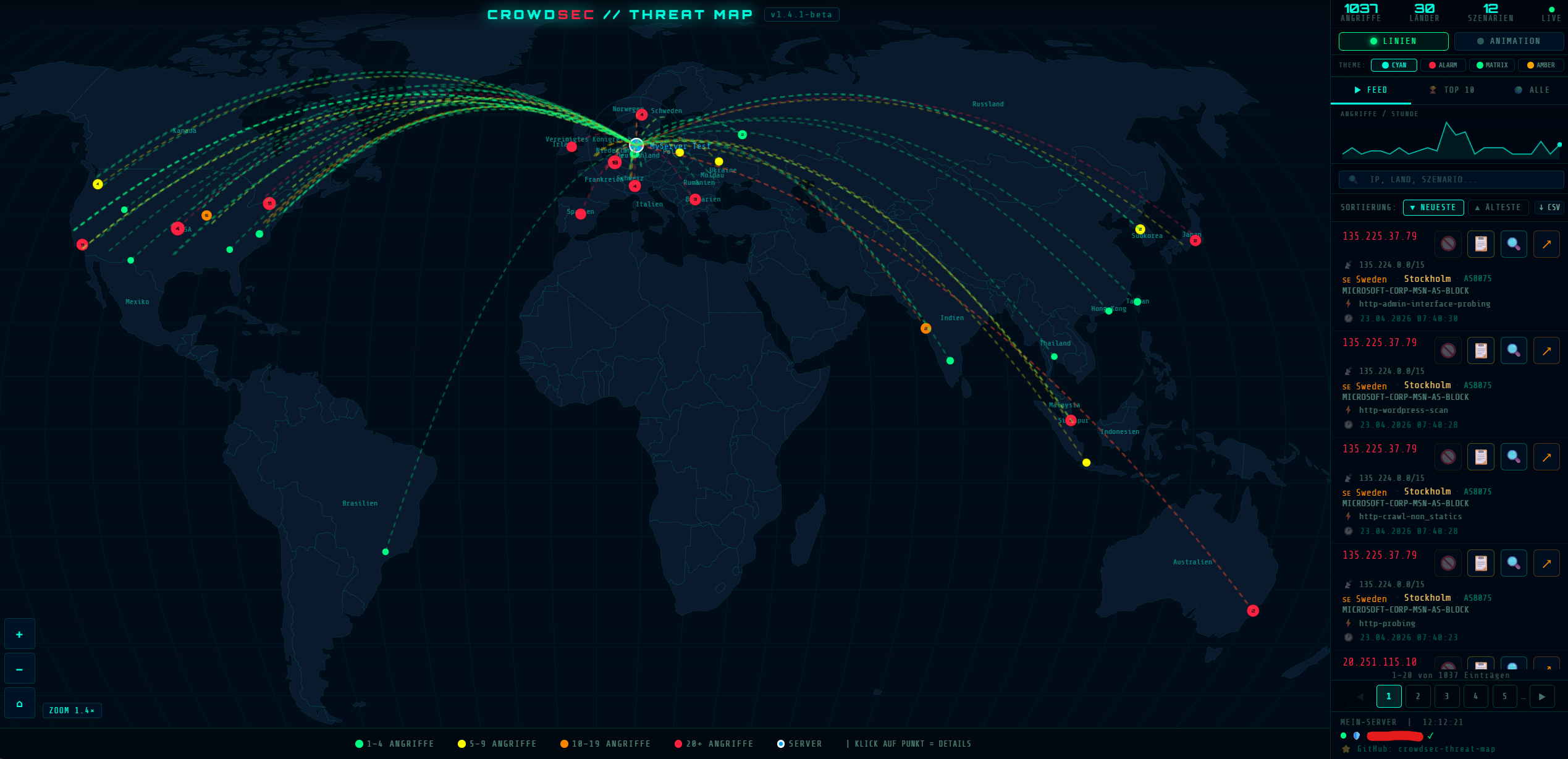
SelfThreatMap shows the attacks from your local CrowdSec database live on a world map — all attack points are visible on load, city names appear when you zoom in. It is a dashboard on top of an existing CrowdSec installation; it does not detect or block anything itself (that stays CrowdSec's job), but it can lift bans with one click.
Part of the Self family (SelfMailer, SelfStream, SelfArchiver, SelfDashboard …) — same design system, same deploy style (GHCR → Unraid). Built on the original CrowdSec Threat Map.
TL;DR — world map with 30+ flight-path styles · 50+ profiles · search, ban status & unban · dynamic self-IP whitelist · login + optional 2FA · 12 languages · works offline
📑 Table of contents
Features · Flight-path styles · Architecture · Quick start · Unraid · Configuration · Security · Tech stack · Development · Roadmap
✨ Features
🌍 Map
- Interactive world map with animated attack paths (D3.js) — all attack points visible on load
- 30+ flight-path styles — Honeypot arc (default, like the Honeypot64 live map), rocket, comet, laser, particle stream, arcs, impact rings and more
- 50+ one-click profiles — presets bundling style + theme + animation + density + mode (e.g. "All attacks (console)", "Static heatmap", "Comet rain", "Matrix mode", "Brute-force hunt"); your pick is remembered across reloads
- Attack-origin views — "Countries" opens a ranked list of every country (+ top cities) you were attacked from; the "ORIGINS" toggle plots every origin as a point, coloured by count, with collision-free labels (country names zoomed out, city names zoomed in), live
- Auto-fit zoom, city names visible all the way in (up to 25×)
- Replay loop — play the whole time window on an endless loop (24H / 48H, 0.5× / 1× / 2×)
- 10 colour themes — Cyan, Alarm, Matrix, Amber, Arctic, Cyber, Inferno, Mono, Synth, Ocean
📊 Feed & actions
- Real-time search by IP, country, city, scenario, ASN; scenario and country filters as chips
- Ban status & one-click unban straight from the dashboard (deletes decision and alert)
- Sparkline, top 10, live feed with pagination and CSV export
- IP lookups (CrowdSec CTI, Shodan, Censys, RIPE, RIPEstat, Criminal IP) from the context menu
- Dynamic IP whitelist — whitelists your own changing public IP every 15 min (no self-ban)
🎨 Platform
- 12 European languages (DE, EN, FR, ES, IT, PT, NL, PL, SV, DA, CS, EL) with in-app flag dropdown, remembered in the browser · fully responsive
- Fully self-contained — d3 and world-map data bundled locally; works offline, no external CDN calls
- Self design — dark teal/cyan theme from the shared Self brand kit
🚀 Flight-path styles
The signature feature: how each attack travels from its origin to your server. Pick from 30+ animated styles under Settings → Flight-path style (default: Rocket), with a live preview. Implemented in assets/js/rocket-styles.js — easy to extend.
| Group | Styles |
|---|---|
| Rockets | Rocket · Twin rocket · Arrow · Data packet |
| Comets & trails | Comet · Comet + sparks · Meteor · Fading trail · Gradient trail · Mist trail · Spark trail |
| Beams & lasers | Laser pulse · Constant beam · Neon tube · Lightning · Plasma orb |
| Particles & dots | Particle stream · Tracer · Bead chain · Fireflies · Inward pull · Echo ghosts · Double helix |
| Lines & special | Clean arc · Twin line · Morse dash · Sine wave · Pulse ring · Impact ring · Hologram |
| Classic (legacy) | Classic · Console (dashed arcs) · Minimal |
🧭 Architecture
Browser ──▶ nginx :8080 ──┬─ /auth/*, login, setup, settings ──▶ auth.py (/config/auth.json)
                          ├─ / (dashboard, protected via auth_request)
                          └─ /metrics, /unban, /whitelist-status
                                          │
                                          ▼
                          crowdsec_exporter.py (127.0.0.1:9456)
                             │ reads crowdsec.db + GeoLite2-City.mmdb (read-only)
                             │ writes whitelist YAML (postoverflows)
                             └─ CrowdSec Local API (HTTP, machine login) → unban
🚀 Quick start (Docker)
docker run -d \
  --name selfthreatmap \
  --restart unless-stopped \
  -p 8080:8080 \
  -v /path/to/selfthreatmap/config:/config \
  -v /path/to/crowdsec/data:/crowdsec/data:ro \
  -v /path/to/crowdsec/postoverflows:/crowdsec/postoverflows \
  -e SERVER_LAT=52.5200 \
  -e SERVER_LON=13.4050 \
  -e SERVER_NAME=Berlin \
  -e LANGUAGE=en \
  -e CROWDSEC_LAPI_URL=http://crowdsec:8080 \
  -e CROWDSEC_LAPI_MACHINE_ID=selfthreatmap \
  -e CROWDSEC_LAPI_PASSWORD='long-password' \
  ghcr.io/s3lfcod3r/selfthreatmap:latest
Open http://<host>:8080 → create your admin user + password. Two-factor (TOTP) is optional — enable it afterwards under Settings by scanning the QR code (Google Authenticator / SelfAuthenticator). Compose file: docker/docker-compose.yml.
🔑 Unban via CrowdSec LAPI (no Docker socket): create a dedicated machine inside the CrowdSec container and pass its credentials:
docker exec crowdsec cscli machines add selfthreatmap --password 'long-password' -f /dev/null(-f /dev/nullmatters — otherwise CrowdSec's ownlocal_api_credentials.yamlis overwritten.) Without these values the map works, but unban is disabled.
💡 Tip: coordinates — right-click in Google Maps → "What's here?". CrowdSec data path:
docker inspect crowdsec | grep -A5 "Mounts".
💡 GeoIP / city names: without a GeoIP database only country points are shown. Download MaxMind GeoLite2-City for free, put
GeoLite2-City.mmdbinto the CrowdSec data folder and restart the container.
📦 Unraid
Unraid → Apps → search selfthreatmap → install → fill in SERVER_LAT / SERVER_LON and the CrowdSec data path → Apply. Or add the template from
https://raw.githubusercontent.com/s3lfcod3r/selfthreatmap/main/unraid/selfthreatmap.xml.
Dashboard: http://YOUR-UNRAID-IP:8080.
⚠️ Mount
/config: account, 2FA and session key live in/config/auth.json— without this volume your user is gone after an update.
⚙️ Configuration
Environment variables (no common prefix).
| Variable | Required | Default | Purpose |
|---|---|---|---|
SERVER_LAT / SERVER_LON |
✅ | 0.0 |
Your server coordinates (the map's home point) |
SERVER_NAME |
– | MeinServer |
Display name of the home marker |
LANGUAGE |
– | de |
Default UI language: de or en (12 languages in the app) |
CROWDSEC_LAPI_URL |
– | http://crowdsec:8080 |
CrowdSec Local API, e.g. http://192.168.1.7:8080 |
CROWDSEC_LAPI_MACHINE_ID / CROWDSEC_LAPI_PASSWORD |
for unban | – | Credentials of a dedicated CrowdSec machine (cscli machines add) |
CROWDSEC_DB_PATH |
– | /crowdsec/data/crowdsec.db |
CrowdSec SQLite database |
CROWDSEC_MMDB_PATH |
– | /crowdsec/data/GeoLite2-City.mmdb |
GeoIP database (city names) |
CACHE_TTL / DAYS_BACK |
– | 60 / 365 |
Metric cache (s) and history window (days) |
WHITELIST_ENABLED |
– | true |
Dynamic self-IP whitelist |
WHITELIST_FILE |
– | /crowdsec/postoverflows/s01-whitelist/my-whitelist.yaml |
Whitelist file |
WHITELIST_INTERVAL |
– | 900 |
Whitelist check interval (s); each run also lifts a ban on your own IP via the LAPI. A changed whitelist file takes effect at the next CrowdSec restart |
AUTH_ENABLED |
– | true |
Login (+ optional 2FA) for the whole dashboard |
COOKIE_SECURE |
– | false |
true when served over HTTPS only |
CONFIG_DIR |
– | /config |
Where account + 2FA data is stored |
SESSION_TTL |
– | 86400 |
Session lifetime (s) |
LOGIN_MAX_FAILS / LOGIN_LOCKOUT_SECONDS |
– | 5 / 900 |
Lockout after failed logins |
🛡️ Security
- Login + optional 2FA (TOTP) for the whole dashboard via nginx
auth_request; first account is created in the browser — no secrets in env vars - Signed session cookie (
HttpOnly,SameSite=Strict); login rate limit and lockout after 5 failures (15 min) - Unban fails closed — only with a valid session; rate-limited; IPs validated
- Exporter listens only on
127.0.0.1; no CORS*; CSP,Permissions-Policy,X-Frame-Options: DENY - All backend fields are escaped in feed, tooltips and panels (XSS fixed); generic error messages instead of stack traces
- No external CDN — everything bundled locally
- No Docker socket: unban talks to the CrowdSec Local API with a dedicated machine account — the container has no access to the Docker host
- Deliberate trade-off (documented): that machine account can delete CrowdSec decisions — treat port 8080 like an admin UI, keep it on LAN/VPN, put it behind HTTPS (
COOKIE_SECURE=true) if reachable from outside
Security update history → CHANGELOG.md (entries marked 🔒).
🧱 Tech stack
| Part | Tech |
|---|---|
| Backend | Python 3.12 (stdlib) · crowdsec_exporter.py · auth.py · own MMDB reader |
| Web | HTML · JavaScript · D3.js · topojson (bundled) · Self brand tokens |
| Proxy | nginx (auth_request, rate limits, gzip) |
| Deploy | Docker (python:3.12-alpine) · GHCR · Unraid |
🛠️ Development
docker build -f docker/Dockerfile -t selfthreatmap .
docker compose -f docker/docker-compose.yml up -d
Style engine: assets/js/rocket-styles.js · profiles: assets/js/profiles.js · origins: assets/js/origins.js · translations: assets/i18n/.
🗺️ Roadmap
- 30+ flight-path styles, 50+ profiles, 10 themes, replay loop
- Attack-origin views, 12 languages, offline bundle
- Login + optional 2FA, security hardening
- Fast MMDB reader with IP cache and background refresh
- Test the 2.9.1 UI in the browser
🇩🇪 Deutsch
SelfThreatMap zeigt Angriffe aus deiner lokalen CrowdSec-Datenbank live auf einer Weltkarte — beim Aufruf sind alle Angriffspunkte sichtbar, beim Reinzoomen erscheinen Stadtnamen. Es ist ein Dashboard auf einer bestehenden CrowdSec-Installation; selbst erkennt oder blockt es nichts (das bleibt Aufgabe von CrowdSec), es kann aber Bans per Klick aufheben.
Teil der Self-Familie (SelfMailer, SelfStream, SelfArchiver, SelfDashboard …) — gleiches Design-System, gleicher Deploy-Stil (GHCR → Unraid). Basiert auf der ursprünglichen CrowdSec Threat Map.
Kurz — Weltkarte mit 30+ Bahn-Stilen · 50+ Profile · Suche, Ban-Status & Unban · dynamische Whitelist der eigenen IP · Login + optionale 2FA · 12 Sprachen · läuft offline
📑 Inhaltsverzeichnis
Funktionen · Bahn-Stile · Architektur · Schnellstart · Unraid · Konfiguration · Sicherheit · Tech-Stack · Entwicklung · Roadmap
✨ Funktionen
🌍 Karte
- Interaktive Weltkarte mit animierten Angriffsbahnen (D3.js) — beim Laden alle Angriffspunkte sichtbar
- Über 30 Bahn-Stile — Honeypot-Bogen (Standard, wie die Honeypot64-Live-Karte), Rakete, Komet, Laser, Partikel-Strom, Bögen, Einschlag-Ringe u. v. m.
- 50+ Ein-Klick-Profile — Voreinstellungen, die Stil + Theme + Animation + Dichte + Modus bündeln (z. B. „Alle Angriffe (Console)“, „Heatmap pur“, „Kometen-Regen“, „Matrix-Modus“, „Brute-Force-Jagd“); die Wahl bleibt nach dem Neuladen erhalten
- Herkünfte-Ansichten — „LÄNDER“ öffnet die Rangliste aller Länder (+ Top-Städte), aus denen du angegriffen wurdest; der Schalter „HERKÜNFTE“ zeigt jeden Herkunftsort als Punkt, nach Anzahl gefärbt, mit überlappungsfreien Beschriftungen (Länder herausgezoomt, Städte beim Reinzoomen), live
- Auto-Fit-Zoom, Stadtnamen bis ganz nah sichtbar (bis 25×)
- Replay-Schleife — das ganze Zeitfenster als Endlosschleife abspielen (24H / 48H, 0,5× / 1× / 2×)
- 10 Farbthemen — Cyan, Alarm, Matrix, Amber, Arctic, Cyber, Inferno, Mono, Synth, Ocean
📊 Feed & Aktionen
- Echtzeit-Suche nach IP, Land, Stadt, Szenario, ASN; Szenario- und Länderfilter als Chips
- Ban-Status & Unban per Klick direkt aus dem Dashboard (löscht Decision und Alert)
- Sparkline, Top 10, Live-Feed mit Seiten und CSV-Export
- IP-Abfragen (CrowdSec CTI, Shodan, Censys, RIPE, RIPEstat, Criminal IP) aus dem Kontextmenü
- Dynamische IP-Whitelist — setzt deine eigene wechselnde öffentliche IP alle 15 Min auf die Whitelist (kein Selbst-Ban)
🎨 Plattform
- 12 europäische Sprachen (DE, EN, FR, ES, IT, PT, NL, PL, SV, DA, CS, EL) mit Flaggen-Auswahl in der App, im Browser gemerkt · voll responsive
- Komplett eigenständig — d3 und Weltkarten-Daten lokal mitgeliefert; läuft offline, keine externen CDN-Aufrufe
- Self-Design — dunkles Teal/Cyan-Theme aus dem gemeinsamen Self-Brand-Kit
🚀 Bahn-Stile
Das Herzstück: wie jeder Angriff von der Quelle zu deinem Server fliegt. Über 30 animierte Stile unter Einstellungen → Bahn-Stil (Standard: Rakete), mit Live-Vorschau. Code: assets/js/rocket-styles.js — leicht erweiterbar.
| Gruppe | Stile |
|---|---|
| Raketen | Rakete · Doppel-Rakete · Pfeil · Datenpaket |
| Kometen & Schweife | Komet · Komet + Funken · Meteor · Schweif-Fade · Verlauf-Trail · Nebel-Trail · Funken-Schweif |
| Strahlen & Laser | Laser-Puls · Laser konstant · Neon-Tube · Blitz · Plasma-Kugel |
| Partikel & Punkte | Partikel-Strom · Tracer (MG) · Punkt-Kette · Glühwürmchen · Sog / Implosion · Echo-Geister · Doppelhelix |
| Linien & Spezial | Reiner Bogen · Doppellinie · Morse-Strich · Sinus-Welle · Impuls-Welle · Einschlag-Ring · Hologramm |
| Klassisch (alt) | Klassisch · Console (gestrichelte Bögen) · Minimal |
🧭 Architektur
Browser ──▶ nginx :8080 ──┬─ /auth/*, Login, Einrichtung, Einstellungen ──▶ auth.py (/config/auth.json)
                          ├─ / (Dashboard, geschützt per auth_request)
                          └─ /metrics, /unban, /whitelist-status
                                          │
                                          ▼
                          crowdsec_exporter.py (127.0.0.1:9456)
                             │ liest crowdsec.db + GeoLite2-City.mmdb (nur lesend)
                             │ schreibt Whitelist-YAML (postoverflows)
                             └─ CrowdSec Local API (HTTP, Maschinen-Login) → Unban
🚀 Schnellstart (Docker)
docker run -d \
  --name selfthreatmap \
  --restart unless-stopped \
  -p 8080:8080 \
  -v /pfad/zu/selfthreatmap/config:/config \
  -v /pfad/zu/crowdsec/data:/crowdsec/data:ro \
  -v /pfad/zu/crowdsec/postoverflows:/crowdsec/postoverflows \
  -e SERVER_LAT=52.5200 \
  -e SERVER_LON=13.4050 \
  -e SERVER_NAME=Berlin \
  -e LANGUAGE=de \
  -e CROWDSEC_LAPI_URL=http://crowdsec:8080 \
  -e CROWDSEC_LAPI_MACHINE_ID=selfthreatmap \
  -e CROWDSEC_LAPI_PASSWORD='langes-passwort' \
  ghcr.io/s3lfcod3r/selfthreatmap:latest
http://<host>:8080 öffnen → Admin-Benutzer + Passwort anlegen. Zwei-Faktor (TOTP) ist optional — danach unter Einstellungen per QR-Code aktivieren (Google Authenticator / SelfAuthenticator). Compose-Datei: docker/docker-compose.yml.
🔑 Unban über die CrowdSec-LAPI (kein Docker-Socket): im CrowdSec-Container eine eigene Maschine anlegen und deren Zugangsdaten übergeben:
docker exec crowdsec cscli machines add selfthreatmap --password 'langes-passwort' -f /dev/null(-f /dev/nullist wichtig — sonst wird CrowdSecs eigenelocal_api_credentials.yamlüberschrieben.) Ohne diese Werte läuft die Karte, Unban ist dann deaktiviert.
💡 Tipp: Koordinaten — Rechtsklick in Google Maps → „Was ist hier?“. CrowdSec-Datenpfad:
docker inspect crowdsec | grep -A5 "Mounts".
💡 GeoIP / Stadtnamen: Ohne GeoIP-Datenbank werden nur Länderpunkte angezeigt. MaxMind GeoLite2-City kostenlos laden,
GeoLite2-City.mmdbin den CrowdSec-Datenordner legen, Container neu starten.
📦 Unraid
Unraid → Apps → selfthreatmap suchen → installieren → SERVER_LAT / SERVER_LON und den CrowdSec-Datenpfad eintragen → Anwenden. Oder die Vorlage von
https://raw.githubusercontent.com/s3lfcod3r/selfthreatmap/main/unraid/selfthreatmap.xml
hinzufügen. Dashboard: http://DEINE-UNRAID-IP:8080.
⚠️
/configeinbinden: Konto, 2FA und Sitzungsschlüssel liegen in/config/auth.json— ohne dieses Volume ist dein Benutzer nach einem Update weg.
⚙️ Konfiguration
Umgebungsvariablen (ohne gemeinsames Präfix).
| Variable | Pflicht | Standard | Zweck |
|---|---|---|---|
SERVER_LAT / SERVER_LON |
✅ | 0.0 |
Koordinaten deines Servers (Heimatpunkt der Karte) |
SERVER_NAME |
– | MeinServer |
Anzeigename des Heimat-Markers |
LANGUAGE |
– | de |
Standardsprache: de oder en (12 Sprachen in der App) |
CROWDSEC_LAPI_URL |
– | http://crowdsec:8080 |
CrowdSec Local API, z. B. http://192.168.1.7:8080 |
CROWDSEC_LAPI_MACHINE_ID / CROWDSEC_LAPI_PASSWORD |
für Unban | – | Zugang einer eigenen CrowdSec-Maschine (cscli machines add) |
CROWDSEC_DB_PATH |
– | /crowdsec/data/crowdsec.db |
CrowdSec-SQLite-Datenbank |
CROWDSEC_MMDB_PATH |
– | /crowdsec/data/GeoLite2-City.mmdb |
GeoIP-Datenbank (Stadtnamen) |
CACHE_TTL / DAYS_BACK |
– | 60 / 365 |
Metrik-Cache (s) und Zeitraum (Tage) |
WHITELIST_ENABLED |
– | true |
Dynamische Whitelist der eigenen IP |
WHITELIST_FILE |
– | /crowdsec/postoverflows/s01-whitelist/my-whitelist.yaml |
Whitelist-Datei |
WHITELIST_INTERVAL |
– | 900 |
Prüfintervall der Whitelist (s); jeder Lauf hebt zusätzlich einen Ban auf die eigene IP per LAPI auf. Eine geänderte Whitelist-Datei greift beim nächsten CrowdSec-Neustart |
AUTH_ENABLED |
– | true |
Login (+ optionale 2FA) für das ganze Dashboard |
COOKIE_SECURE |
– | false |
true, wenn nur über HTTPS erreichbar |
CONFIG_DIR |
– | /config |
Speicherort für Konto + 2FA |
SESSION_TTL |
– | 86400 |
Gültigkeit der Sitzung (s) |
LOGIN_MAX_FAILS / LOGIN_LOCKOUT_SECONDS |
– | 5 / 900 |
Sperre nach Fehl-Logins |
🛡️ Sicherheit
- Login + optionale 2FA (TOTP) für das ganze Dashboard über nginx
auth_request; das erste Konto wird im Browser angelegt — keine Geheimnisse in Umgebungsvariablen - Signiertes Sitzungs-Cookie (
HttpOnly,SameSite=Strict); Begrenzung der Login-Versuche und Sperre nach 5 Fehlversuchen (15 min) - Unban nur mit gültiger Sitzung (sonst gesperrt); mit Durchsatzbegrenzung; IPs werden geprüft
- Exporter lauscht nur auf
127.0.0.1; kein CORS*; CSP,Permissions-Policy,X-Frame-Options: DENY - Alle Backend-Felder werden in Feed, Tooltips und Panels escaped (XSS behoben); allgemeine Fehlermeldungen statt Stacktraces
- Kein externes CDN — alles lokal mitgeliefert
- Kein Docker-Socket: Unban spricht mit eigenem Maschinen-Konto die CrowdSec Local API an — der Container hat keinen Zugriff auf den Docker-Host
- Bewusster Kompromiss (dokumentiert): Dieses Maschinen-Konto kann CrowdSec-Entscheidungen löschen — behandle Port 8080 wie eine Admin-Oberfläche, nur im LAN/VPN nutzen, bei Erreichbarkeit von außen hinter HTTPS legen (
COOKIE_SECURE=true)
Verlauf der Sicherheitsupdates → CHANGELOG.md (Einträge mit 🔒).
🧱 Tech-Stack
| Teil | Technik |
|---|---|
| Backend | Python 3.12 (Standardbibliothek) · crowdsec_exporter.py · auth.py · eigener MMDB-Leser |
| Web | HTML · JavaScript · D3.js · topojson (mitgeliefert) · Self-Marken-Tokens |
| Proxy | nginx (auth_request, Durchsatzgrenzen, gzip) |
| Deploy | Docker (python:3.12-alpine) · GHCR · Unraid |
🛠️ Entwicklung
docker build -f docker/Dockerfile -t selfthreatmap .
docker compose -f docker/docker-compose.yml up -d
Stil-Engine: assets/js/rocket-styles.js · Profile: assets/js/profiles.js · Herkünfte: assets/js/origins.js · Übersetzungen: assets/i18n/.
🗺️ Roadmap
- 30+ Bahn-Stile, 50+ Profile, 10 Themes, Replay-Schleife
- Herkünfte-Ansichten, 12 Sprachen, Offline-Paket
- Login + optionale 2FA, Sicherheitshärtung
- Schneller MMDB-Leser mit IP-Cache und Hintergrund-Aktualisierung
- Oberfläche von 2.9.1 im Browser testen
☕ Support / Unterstützen
🇬🇧 This project is free for private use and built in my spare time. If it saves you time, a coffee keeps the next update coming. No pressure, a ⭐ on the repo helps too!
🇩🇪 Dieses Projekt ist für private Nutzung kostenlos und entsteht in meiner Freizeit. Wenn es dir Zeit spart, hält ein Kaffee das nächste Update am Laufen. Kein Muss, ein ⭐ auf dem Repo hilft auch!
⚖️ Lizenz / License
🇩🇪 Alle Rechte vorbehalten. © 2026 s3lfcod3r / SelfCoder
Du darfst die Software privat und nicht-kommerziell installieren und benutzen (z. B. im Homelab, über Docker oder Unraid).
Ohne schriftliche Erlaubnis verboten: kommerzielle Nutzung · Kopieren · Verändern · Weitergeben · Einbauen in eigene Projekte (auch Closed Source) · Verkaufen.
Details: LICENSE
🇬🇧 All rights reserved. © 2026 s3lfcod3r / SelfCoder
You may install and use the software privately and non-commercially (e.g. in your home lab, via Docker or Unraid).
Not permitted without written permission: commercial use · copying · modifying · redistributing · incorporating into other projects (including closed source) · selling.
Details: LICENSE
SelfThreatMap · part of the Self family · Teil der Self-Familie
made with 🗺️ for self-hosting
Requirements
Categories
Related apps
Explore more like this
Explore allDetails
ghcr.io/s3lfcod3r/selfthreatmap:latestRuntime arguments
- Web UI
http://[IP]:[PORT:8080]/- Network
bridge- Shell
sh- Privileged
- false
Template configuration
Port für das Web-Dashboard — frei wählbar, z.B. 8080, 5757, etc.
- Target
- 8080
Persistenter Speicher für Benutzerkonto + 2FA-Einstellungen (auth.json). WICHTIG: Ohne dieses Volume ist der angelegte Login nach einem Container-Update weg. Empfohlen: /mnt/user/appdata/selfthreatmap
- Target
- /config
- Default
- /mnt/user/appdata/selfthreatmap
- Value
- /mnt/user/appdata/selfthreatmap
Pfad zum CrowdSec data-Verzeichnis (enthält crowdsec.db und optional GeoLite2-City.mmdb). Tipp: docker inspect crowdsec | grep -A5 Mounts
- Target
- /crowdsec/data
Pfad zum postoverflows-Verzeichnis. Wird für die dynamische IP-Whitelist benötigt (WHITELIST_ENABLED=true). Kann leer gelassen werden wenn Whitelist deaktiviert.
- Target
- /crowdsec/postoverflows
Breitengrad eures Servers — erscheint als Zielpunkt auf der Karte. Tipp: Rechtsklick auf Google Maps → Was ist hier?
- Target
- SERVER_LAT
- Default
- 0.0
- Value
- 0.0
Längengrad eures Servers — erscheint als Zielpunkt auf der Karte. Tipp: Rechtsklick auf Google Maps → Was ist hier?
- Target
- SERVER_LON
- Default
- 0.0
- Value
- 0.0
Anzeigename eures Servers im Dashboard (z.B. Hamburg, Berlin, Homelab).
- Target
- SERVER_NAME
- Default
- MeinServer
- Value
- MeinServer
Oberflächensprache des Dashboards: de (Deutsch) oder en (Englisch).
- Target
- LANGUAGE
- Default
- de
- Value
- de
Adresse der CrowdSec Local API, z. B. http://192.168.1.7:8080 (CrowdSec mit eigener IP auf br0) oder http://crowdsec:8080 (gleiches Docker-Netz). Wird für IP-Unban und die Ban-Entfernung der dynamischen Whitelist genutzt — ein Docker-Socket ist nicht mehr nötig.
- Target
- CROWDSEC_LAPI_URL
- Default
- http://crowdsec:8080
- Value
- http://crowdsec:8080
Name einer eigenen CrowdSec-Maschine. Anlegen im CrowdSec-Container: cscli machines add selfthreatmap --password 'LANGES-PASSWORT' -f /dev/null (das -f /dev/null ist wichtig, sonst werden die Zugangsdaten von CrowdSec selbst überschrieben). Leer = Unban deaktiviert.
- Target
- CROWDSEC_LAPI_MACHINE_ID
- Default
- selfthreatmap
- Value
- selfthreatmap
Passwort der oben genannten CrowdSec-Maschine (aus cscli machines add … --password).
- Target
- CROWDSEC_LAPI_PASSWORD
Verhindert Selbst-Ban bei wechselnder IP (typisch bei deutschen Heimanschlüssen). Eigene IP wird alle 15 Minuten in die Whitelist-Datei geschrieben (greift ab dem nächsten CrowdSec-Neustart); ein Ban auf die eigene IP wird bis dahin per LAPI entfernt.
- Target
- WHITELIST_ENABLED
- Default
- true
- Value
- true
Pfad zur Whitelist-YAML innerhalb des Containers. Nur ändern wenn ihr einen anderen Postoverflows-Pfad nutzt.
- Target
- WHITELIST_FILE
- Default
- /crowdsec/postoverflows/s01-whitelist/my-whitelist.yaml
- Value
- /crowdsec/postoverflows/s01-whitelist/my-whitelist.yaml
Wie oft die eigene IP geprüft und ggf. gewhitelistet wird. Standard: 900 Sekunden (15 Minuten).
- Target
- WHITELIST_INTERVAL
- Default
- 900
- Value
- 900
Wie lange die Metrik-Daten gecacht werden bevor sie neu aus der DB geladen werden. Standard: 60 Sekunden.
- Target
- CACHE_TTL
- Default
- 60
- Value
- 60
Wie viele Tage Angriffs-Historie angezeigt wird. Standard: 365 Tage.
- Target
- DAYS_BACK
- Default
- 365
- Value
- 365
Schützt das gesamte Dashboard mit Benutzername + Passwort + optionaler 2FA. Benutzer/Passwort werden beim ERSTEN Aufruf im Browser angelegt, 2FA danach in den Einstellungen (QR-Code). Nur auf false setzen, wenn die Map in einem komplett isolierten LAN läuft.
- Target
- AUTH_ENABLED
- Default
- true
- Value
- true
Auf true setzen, wenn das Dashboard ausschließlich über HTTPS (Reverse-Proxy) erreichbar ist. Dann wird das Login-Cookie nur verschlüsselt übertragen.
- Target
- COOKIE_SECURE
- Default
- false
- Value
- false