
All apps · 0 apps

SelfDashboard
Docker app from Svensen's Repository
Overview
Readme
View on GitHub





SelfDashboard at a glance
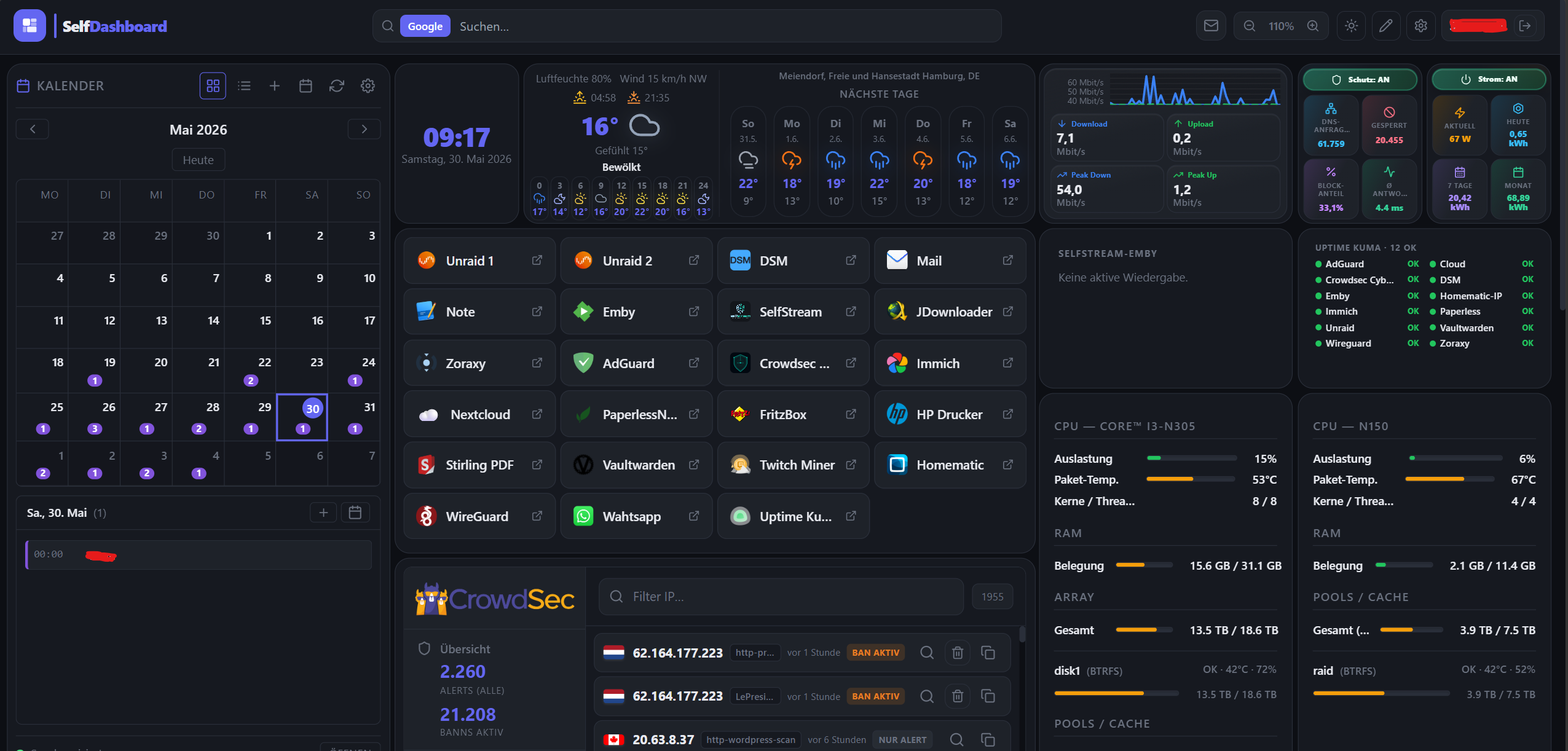
A real homelab layout — every widget is a plugin, freely arrangeable and configurable.
SelfDashboard is your personal control center for homelab and self-hosting: one Docker container, one browser tab — instead of a dozen open admin UIs.
| Visible in the screenshot | What you get |
|---|---|
| 📅 Calendar | Events (CalDAV/ICS), month view right on the dashboard |
| 🕐 Clock & weather | Local time; weather with day blocks (0–6 … 18–24) + 7-day forecast (from tomorrow) |
| 🔖 Bookmark grid | Quick access to Unraid, DSM, Emby, Nextcloud, Vaultwarden, … |
| 🛡️ CrowdSec | Alerts and active bans at a glance |
| 🌐 Network / AdGuard | Protection status, DNS stats (tiles fill the widget) |
| ⚡ FRITZ! energy | Smart-outlet power: now, today, 7 days, month (TR-064) |
| 🖥️ Unraid (2×) | CPU, RAM, array/pool, and disks per server (Unraid 7.2+ GraphQL) |
| 📺 Kiosk / wall tablet | Public view-only URL /kiosk — full-screen widgets for guests/tablets (optional password) |
| 📺 Emby / SelfStream | Active streams — separate widgets or Selfstream-Emby combined list |
| 💚 Uptime Kuma | Status-page monitors (up / down / pending) in a compact list |
| ✉️ Navbar mail | Unread IMAP badge (install E-Mail plugin from the store) — click opens webmail |
Everything supports drag & drop, multiple dashboards (e.g. /dashboard/home, /dashboard/server), 6 themes, EN/DE — widgets come from the volume-only plugin system (install via Plugin Store or ZIP, update without rebuilding the image). See How SelfDashboard is built.
🇬🇧 English
Contents: What is it · How it's built · What's new (v2.0.0) · Plugins · Quick Start · Docker & Unraid · Login & users · Kiosk · Env vars · Troubleshooting
What is SelfDashboard?
See the overview above for a full screenshot walkthrough.
SelfDashboard is a clean, modular, self-hosted home dashboard with a powerful plugin system — running as a single Docker container. Manage multiple dashboards, customize every detail, and add widgets for your self-hosted services.
Plugins are not bundled in the image. You install them from the Plugin Store (GitHub) or ZIP into a mounted folder (/app/plugins/custom). The Docker image only ships the core app (UI, store, shared APIs). Details: docs/PLUGINS.md · docs/PLUGIN_DEV.md.
How it compares
Heimdall, Homarr, Dashy and Homepage are all great projects — SelfDashboard just focuses on something different: live widgets with real backends, built-in auth, and a kiosk mode, all configured in the UI.
| SelfDashboard | Heimdall | Homarr | Homepage | |
|---|---|---|---|---|
| Widgets with real backend | ✅ plugin system | ⚠️ limited | ⚠️ some | ⚠️ via API/YAML |
| Configuration | UI, no YAML | UI | UI | YAML files |
| Login + 2FA + multi-user | ✅ built in | ❌ | ⚠️ partial | ❌ |
| Kiosk mode | ✅ | ❌ | ❌ | ❌ |
| Encrypted credentials | ✅ AES-256-GCM | — | — | — |
A good fit if you want
- Live, interactive widgets (Docker control, FRITZ!Box, CrowdSec, calendar, mail) — not just links
- Multi-user with real auth / 2FA and a wall-tablet kiosk
- To configure everything in the UI instead of editing config files
Maybe not for you if
- You just want a simple bookmark/start page (Heimdall or Homepage are lighter for that)
- You can't run a Docker container, or prefer a purely static config-file workflow
- You need a large, established plugin ecosystem today — SelfDashboard's is younger and still growing
Note: plugin server code runs with the app's privileges (no sandbox yet) — only install plugins you trust.
How SelfDashboard is built
flowchart TB
  subgraph image["Docker image (core)"]
    UI["Next.js UI · Plugin Store · dashboards"]
    CORE["Built-in APIs: calendar, mail, docker, crowdsec, fritzbox, weather, …"]
    GW["Gateway /api/plugins/{id}/…"]
  end
  subgraph vol["Volume /app/plugins/custom"]
    W["per plugin: plugin.json + widget.js (+ server.mjs for some)"]
  end
  subgraph gh["GitHub branch e.g. main"]
    IDX["plugins-pack/plugins-index.json"]
    PACK["plugins-pack/{id}/widget.js (+ server.mjs)"]
  end
  gh -->|"Store: Install / Update"| vol
  vol -->|"browser loads widget.js"| UI
  W --> GW
  CORE --> UI
| Layer | Location | Purpose |
|---|---|---|
| Core app | Docker image ghcr.io/…/selfdashboard (:latest) |
Dashboard UI, settings, logging, plugin store, most /api/* routes |
| Installed plugins | Host → /app/plugins/custom/<id>/ |
Widgets the browser runs (widget.js); survives image updates |
| Plugin catalog | GitHub plugins-pack/ on branch main (configurable) |
plugins-index.json + files the store downloads on install/update |
| Plugin source (dev) | plugins-pack/<id>/ (index.tsx, widget.js, optional server.ts) |
Store ships UI + bundled server.mjs; image builtins remain fallback |
| App data | Host → /app/data |
dashboard.json, calendar DB, central log |
App update vs plugin update
| You change… | New Docker image? | What to do |
|---|---|---|
A plugin (widget.js and/or server.mjs on GitHub) |
No | Plugin Store → Update (or Update all) → Ctrl+F5 |
| SelfDashboard core (UI, APIs, store, loader) | Yes | docker pull + restart container; keep /app/data and /app/plugins/custom mounts |
What's new — v2.0.0
Security & hardening (Docker image)
- Non-root container (PUID/PGID) — runs as a configurable unprivileged user (Unraid default 99/100); the entrypoint fixes volume ownership on start. Match CrowdSec's PUID/PGID to read
crowdsec.dbdirectly. - Encrypted credentials everywhere — calendar, mail and widget passwords/tokens (AdGuard, Pi-hole, FRITZ!, Speedtest, …) are sealed with AES-256-GCM; the browser only sees ciphertext. Set a fixed
SELFDASHBOARD_SECRET_KEYso they survive updates. - SSRF protection in every proxy plugin (DNS-resolved, blocks loopback / link-local / cloud-metadata); TOTP replay protection; reproducible
npm cibuild + container HEALTHCHECK.
New plugins
- Philips Hue (Beta) — control lights & rooms in the Hue-app style: per-room toggle, brightness slider, real light colour, colour picker.
- Homematic / RaspberryMatic (Beta) — heating thermostats (target temp + Auto/Manual/Boost), switches, dimmers (on/off + colour), window contacts, sensors, system variables and programs; auto-grouped by CCU room (drag-and-drop sortable, multi-column), devices renamable. JSON-RPC login, no add-on required.
- FRITZ! Smart Home (Beta) — FRITZ!DECT thermostats (target temp), smart plugs (on/off + watt), window contacts and sensors via the AHA-HTTP interface; PBKDF2 SID login.
- Bambu Lab Camera (Beta) — live camera image from Bambu Lab printers: P1/A1 directly (local, port 6000) or any MJPEG/snapshot URL (e.g. X1 via go2rtc); auto-refreshing, access code stored encrypted, LAN-only addresses.
- Jellyfin — active sessions (own widget) · Selfstream · Emby · Jellyfin — combined stream list with a configurable title.
- 8 new integrations (Beta): Plex, Proxmox VE, TrueNAS, Home Assistant, OPNsense, UniFi Controller, Nginx Proxy Manager, OpenMediaVault, plus Speedtest Tracker.
- Auto-index store — drop a plugin folder into
plugins-pack/<id>/and push;plugins-index.jsonregenerates automatically (no manual index editing).
CrowdSec 1.5.x
- Attack world map (real GeoIP dots, point/arc view) · separate local bans vs. community (CAPI) bans counts · optional alert list beside the map.
Full API/plugin notes: docs/CHANGELOG.md.
Documentation
| Topic | Document |
|---|---|
| Install & update plugins | docs/PLUGINS.md |
| Write & publish plugins | docs/PLUGIN_DEV.md |
| Plugin architecture | docs/PLUGIN_ARCHITECTURE.md |
| Plugin distribution model | docs/PLUGIN_DISTRIBUTION.md |
| Plugins as volume + ZIP | docs/CUSTOM_PLUGINS_VOLUME.md |
| Plugin performance (dev) | docs/PLUGIN_PERFORMANCE.md |
| Builtin servers in git / CI | docs/PLUGINS_IN_REPO.md |
| Docker image build | docs/DOCKER_BUILD.md |
| Per-plugin setup (EN/DE) | docs/plugins/README.md |
| Recent API/plugin changes | docs/CHANGELOG.md |
| Error log | docs/LOGGING.md |
Features
Recent plugin and API changes are summarized in docs/CHANGELOG.md.
| Feature | Description |
|---|---|
| 🧩 Plugin System | Volume-only widgets — install from GitHub store or ZIP; no widgets baked into the image |
| 🔄 Plugin updates | Store compares versions; badge + Update all — no image rebuild; Ctrl+F5 after update |
| 📋 Multiple Dashboards | Create unlimited dashboards, each with its own URL (/dashboard/home, /dashboard/server) |
| 🎨 6 Color Themes | Dark, Light, Nord, Catppuccin, Dracula, Solarized |
| 🖌️ Custom Colors | Override any color individually per dashboard |
| 🖼️ Custom Logo | Upload your own logo per dashboard |
| 🖼️ Background images | Design: navbar wallpaper + dashboard (1 or 2 JPG/PNG images) with readability overlay |
| 🌍 Multilingual | German & English interface |
| 🖱️ Drag & Drop | Move and resize widgets freely |
| 📐 Widget Controls | Per-widget zoom, padding and height adjustments |
| 🔍 Dashboard Zoom | Scale the entire dashboard (60%–150%) |
| 📏 Grid Spacing | Adjust widget gap and outer padding |
| 🔗 Navbar Options | Show icon only, text only, or both — toggle dashboard tabs |
| 📱 Responsive layout | Phone / tablet / desktop grid based on dashboard width; optional per-widget overrides in ⚙️ → Layout: phone & tablet; compact navbar search (full-width row) on narrow viewports |
| 🐳 Single Container | Next.js 15, no external database (embedded SQLite for auth), no Redis needed |
| 📋 Central error log | Settings → Logs: app, API, and plugin errors (filter, export, 3–30 day retention) — automatic for every registered plugin |
| ✉️ Navbar mail (IMAP) | Unread badge in the navbar — multiple accounts, Synology/MailPlus-friendly, encrypted passwords, webmail link on click |
| 🔐 Login & multi-user | SQLite auth, admin/user roles, plugin whitelist, optional TOTP 2FA |
| 🔒 Secure by default | Non-root container, AES-256-GCM-encrypted credentials, SSRF guard on all proxy plugins |
| 📺 Kiosk mode | Public /kiosk URL — view-only full-screen dashboard for wall tablets; optional password (admin configures under Settings → Users → Kiosk) |
| 🖥️ Unraid Ready | Community Apps template included |
Plugins
Widgets are not bundled in the image — install them from the Plugin Store or upload a ZIP. Each plugin has its own README (EN/DE) under plugins-pack/<id>/.
Install & folders: docs/PLUGINS.md · Develop plugins: docs/PLUGIN_DEV.md
Plugins marked (Beta) are new integrations that have not yet been tested against every server version — feedback (with the service version) is welcome.
| Plugin | Category | Description | |
|---|---|---|---|
 |
AdGuard Home | Network | DNS stats, protection toggle |
 |
Apple Music | Media | In-browser player (Beta) |
| 🔖 | Bookmarks | Utility | Quick links with groups |
| 📅 | Calendar | Productivity | CalDAV + ICS |
| 🕐 | Clock | Utility | Time, date, timezone |
 |
CrowdSec | Security | Alerts, bans, world map (optional) |
 |
Docker | System | Containers via socket |
 |
Emby | Media | Active sessions |
| 📈 | FRITZ! WAN | Network | Throughput chart |
| ⚡ | FRITZ! Energy | Network | Smart plug kWh |
 |
FRITZ! Smart Home | Utility | Thermostats, plugs, contacts (AHA) (Beta) |
 |
Google Home / Nest | Utility | Nest thermostats, sensors, device status (SDM API) (Beta) |
 |
Home Assistant | Utility | Selected entities (Beta) |
 |
Homematic | Utility | Heating, switches, sensors, rooms (RaspberryMatic) (Beta) |
 |
Bambu Lab Camera | Utility | Live printer camera (P1/A1 local or stream URL) (Beta) |
| 🖼️ | Iframe | Utility | Embed URLs |
 |
Jellyfin | Media | Active sessions |
| ✉️ | Productivity | Navbar IMAP badge | |
 |
Nginx Proxy Manager | Network | Proxy hosts overview (Beta) |
 |
OpenMediaVault | Storage | System info via RPC (Beta) |
 |
OPNsense | Network | Version, gateways (Beta) |
| 📦 | Parcel Tracking | Utility | DHL / Hermes / DPD tracking, no API key |
 |
Philips Hue | Utility | Lights & rooms control (Beta) |
 |
Pi-hole | Network | Pi-hole v6 stats |
 |
Plex | Media | Active sessions (Beta) |
 |
Proxmox VE | System | Nodes, VMs/LXC (Beta) |
 |
Reolink Camera | Utility | Live camera, AI/motion badges, PTZ (Beta) |
| 📝 | Scratchpad | Utility | Short notes |
| ✉️ | SelfMailer | Productivity | Unread across all SelfMailer mailboxes |
| 📺 | Selfstream | Media | Live IPTV |
| 📺 | Selfstream · Emby · Jellyfin | Media | Combined stream list |
 |
Spotify | Media | Now playing, controls, seek, volume, search & device picker |
 |
Speedtest Tracker | Network | Latest down/up/ping (Beta) |
 |
TrueNAS | Storage | System + pool status (Beta) |
 |
UniFi Controller | Network | WLAN/LAN/WAN status (Beta) |
 |
Unraid | System | Unraid 7.2+ GraphQL overview |
|
Unraid Docker | System | Containers via Unraid API |
 |
Uptime Kuma | Network | Status-page monitors |
| 🌤️ | Weather | Utility | Open-Meteo (proxy), day blocks + 7-day |
 |
WireGuard | Network | wg-easy peers — who's online now + handshake history & transfer (Beta) |
| 🔀 | Zoraxy | Network | Reverse-proxy host overview (Beta) |
All plugin READMEs are bilingual (EN/DE). Brand logos via homarr-labs/dashboard-icons.
Quick Start
Required: map /app/data and /app/plugins/custom. Without the plugins folder, the store can install files but they will not persist.
Image tags: Unraid template uses ghcr.io/kabelsalatundklartext/selfdashboard:latest. The plugin catalog is loaded from GitHub branch main (SELFDASHBOARD_PLUGINS_GITHUB_REF, normally left as-is).
Non-root container (PUID/PGID): the app runs non-root, by default as PUID/PGID 99/100 (Unraid nobody:users). On start, the entrypoint remaps to your PUID/PGID and chowns /app/data + /app/plugins/custom automatically (opt-out: SELFDASHBOARD_SKIP_CHOWN=1). CrowdSec tip: set PUID/PGID to the same values as your CrowdSec container — then SelfDashboard owns and reads crowdsec.db directly, surviving nightly backups that restart CrowdSec (no chmod needed).
Option 1 — Unraid Community Apps (recommended)
- Open Community Apps → search for SelfDashboard
- Install — set Config Storage, Plugins Storage, port (default
3000) - Open
http://YOUR-IP:3000 - Plugin Store → From GitHub — install widgets you need (Calendar, Bookmarks, …)
- Click + to place widgets on the dashboard → Ctrl+F5 if a widget stays blank
- Done ✓
Option 2 — Docker run
docker run -d \
  --name selfdashboard \
  --restart unless-stopped \
  -p 3000:3000 \
  -e TZ=Europe/Berlin \
  -v /mnt/user/appdata/selfdashboard:/app/data \
  -v /mnt/user/appdata/selfdashboard/plugins:/app/plugins/custom \
  -v /var/run/docker.sock:/var/run/docker.sock \
  ghcr.io/kabelsalatundklartext/selfdashboard:latest
(**/app/data* → dashboard.json, calendar, logs. /app/plugins/custom → installed plugins. Store → From GitHub or ZIP, then Ctrl+F5. Docker socket optional — Docker plugin only. CrowdSec mount optional — CrowdSec plugin only.)*
Option 3 — docker-compose
git clone https://github.com/kabelsalatundklartext/selfdashboard.git
cd selfdashboard
docker-compose up -d
Docker & Unraid template
| Mount / setting | Content |
|---|---|
/app/data |
Per-user dashboards (users/), auth DB (auth/), calendar, central log — back up regularly |
/app/plugins/custom |
Installed plugins (<id>/plugin.json, widget.js, optional server.mjs) — back up with appdata |
| GitHub env vars | Pre-set in :latest image: repo kabelsalatundklartext/selfdashboard, ref main, path plugins-pack |
| Docker Socket (optional) | Local host only — Docker plugin |
| CrowdSec Data (optional) | crowdsec.db read-only — CrowdSec plugin |
Unraid: unraid/selfdashboard.xml on branch main — Config Storage, Plugins Storage (both required for a normal setup).
After a plugin update: Store → Update → Ctrl+F5. After an app update: pull new image, restart — layouts and installed plugins stay on the volumes.
Login & multi-user
SelfDashboard requires login. On first start (no users yet) you are redirected to /setup to create the admin account. Existing dashboard.json in appdata is migrated to that admin automatically (backup: dashboard.json.pre-auth-migrated).
| Topic | Details |
|---|---|
| Roles | admin — full access, plugin store, user management · user — only whitelisted plugins |
| User data | /app/data/users/<id>/dashboard.json per user |
| Auth data | /app/data/auth/auth.db (users, sessions, plugin whitelist) |
| Admin UI | Settings → Users — create/delete users, reset passwords, plugin checkmarks, kiosk config |
| Self-service | Settings → Users — change password, enable 2FA (TOTP) |
| 2FA | Optional authenticator at login — setup under Settings → Users |
| Forgot password (no email) | Env reset: SELFDASHBOARD_AUTH_RESET_PASSWORD → restart (see below) |
| Backup | Back up all of /app/data (at least auth/ + users/) |
| Dev only | SELFDASHBOARD_AUTH_DISABLED=1 disables auth (never in production) |
Admin locked out (forgot password)
There is no email reset (would need SMTP — not typical for homelab). Simplest: env reset on Unraid:
Env password reset (recommended on Unraid) — edit container, add variable:
SELFDASHBOARD_AUTH_RESET_PASSWORD= your new password (min. 8 chars)- optional:
SELFDASHBOARD_AUTH_RESET_USER=admin(default: first admin) - or one field:
SELFDASHBOARD_AUTH_RESET=admin:NewPassword - Restart container → sign in → clear the variable(s) → restart again
Direct CLI (shell access):
docker exec selfdashboard node /app/scripts/auth-reset-password.mjs --username admin --password 'NewSecurePass'Second admin — reset password under Settings → Users.
Dashboard Management
Each dashboard gets its own URL. Navigate between dashboards via the tab bar in the navbar or through Settings → Dashboards.
| Action | How |
|---|---|
| Create dashboard | Settings → Dashboards → New Dashboard |
| Switch dashboard | Click tab in navbar or Settings → Dashboards → Open |
| Hide tab from navbar | Settings → Dashboards → 👁️ toggle per dashboard |
| Delete dashboard | Settings → Dashboards → 🗑️ |
| Rename / change icon | Settings → Dashboards → ✏️ |
Widget Controls
In Edit Mode (✏️ button), hover over any widget to see controls:
| Control | Function |
|---|---|
| ⠿ Drag handle | Move widget |
🔍 − 100% + |
Zoom widget content |
↔ − 8 + |
Inner padding |
↕ − 4 + |
Widget height |
| ⚙️ | Plugin settings |
| ✕ | Remove widget |
| Resize grip (corner/edge) | Resize width and height freely |
Responsive layout (phone, tablet & desktop)
The dashboard uses three layout bands based on the dashboard grid width (the track that holds the widgets — not only the outer browser window):
| Band | Approx. width | Behaviour |
|---|---|---|
| Phone | < 768 px | Single stacked column; each widget uses layoutPhone height overrides when set, otherwise the desktop layout height. |
| Tablet | 768 – 1023 px | 12-column grid like desktop; optional layoutTablet overrides (w, h, x, y, minH) merge with layout. |
| Desktop | ≥ 1024 px | Full desktop layout — what you usually edit when resizing widgets on a large screen. |
How to tune it: enter Edit mode (✏️), open a widget’s ⚙️ settings. Below the plugin-specific options, “Layout: phone & tablet” lets you set optional phone row height / min height and tablet position & size. Leave fields empty to keep using the desktop layout values for that band.
On narrow viewports (about ≤ 1024 px) the navbar web search moves to a second row at full width so it is not squeezed into the corner next to zoom and actions.
Plugins can optionally read the layoutMode prop ('phone' \| 'tablet' \| 'desktop') for their own responsive UI — see docs/PLUGIN_DEV.md.
Kiosk mode (wall tablet)
Public view-only display for a wall-mounted tablet or guest browser — separate from the normal logged-in dashboard.
| Topic | Details |
|---|---|
| Display URL | http://YOUR-IP:3000/kiosk — no admin login, full-screen widgets, no navbar |
| Configure (admin) | Settings → Users → Kiosk / wall tablet — enable, pick dashboard, optional password, session duration (2 h … unlimited) |
| Edit widgets | Log in as admin → /dashboard/<id> (e.g. /dashboard/kiosk) → edit mode — same as any dashboard |
| Do not confuse | /kiosk = display only · /dashboard/kiosk = edit with login |
| Plugins | Only widgets on the chosen kiosk dashboard are loaded (works in any browser, no SelfDashboard account needed when passwordless) |
| HTTP / LAN | Cookies work on HTTP by default; set SELFDASHBOARD_SECURE_COOKIES=1 only behind HTTPS |
Ideal for a kitchen display, wall tablet, or shared screen on your LAN.
Settings Overview
General — Language (DE/EN), dashboard title, navbar web search, navbar mail badge, navbar display style, dashboard tab visibility
Users — Change password, 2FA (TOTP), kiosk / wall tablet (admin). Admins also manage users and plugin whitelist here.
Dashboards — Create, edit, delete dashboards. Toggle tab visibility per dashboard. Set emoji or custom PNG icon.
Design — Navbar display style; grid spacing; navbar background (JPG/PNG + overlay); dashboard background (off / 1 image / 2 images side by side + overlay); logo upload; color theme; custom color overrides
Email — IMAP accounts, navbar badge, poll interval, connection test
Logs (Protokoll) — Central error log for support and debugging: filter by level, source, plugin; download .txt / JSONL; retention 3 / 7 / 30 days. Every plugin registered via registerPlugin logs render failures and failed /api/* calls automatically. Mail uses the same log with plugin id mail. Details: docs/LOGGING.md.
Environment Variables
| Variable | Default | Description |
|---|---|---|
TZ |
Europe/Berlin |
Timezone |
NODE_ENV |
production |
Node.js environment |
SELFDASHBOARD_DATA_DIR |
/app/data (in the official image) |
Directory inside the container where dashboard.json is stored. Must match your /app/data bind-mount unless you intentionally use another path. |
SELFDASHBOARD_SECRET_KEY |
auto-generated file in data dir | Central secret key for encrypting all stored credentials: calendar, mail and widget passwords/tokens (AdGuard, Pi-hole, FRITZ!, Speedtest, …). Strongly recommended: set a fixed value in Docker so credentials survive image updates and volume moves. Once set, never change it — sealed secrets become unreadable. (Legacy alias SELFDASHBOARD_CALENDAR_KEY still works as a fallback.) |
MAIL_DATA_DIR |
<plugins/custom>/mail |
Directory for mail.json (optional override) |
SELFDASHBOARD_PLUGINS_CUSTOM |
<app>/plugins/custom |
Installed plugins (Unraid: map host folder here) |
SELFDASHBOARD_PLUGINS_GITHUB_REPO |
kabelsalatundklartext/selfdashboard in :latest image |
GitHub repo for store (owner/repo) |
SELFDASHBOARD_PLUGINS_GITHUB_REF |
main |
Branch/tag for plugins-pack/ |
SELFDASHBOARD_PLUGINS_GITHUB_PATH |
plugins-pack |
Path in repo to plugin files |
CROWDSEC_DATA_DIR |
/crowdsec-data |
Allowed root for DB paths (CrowdSec widget only; optional) |
CROWDSEC_GEOIP_PATH |
— | Full path to GeoLite2-*.mmdb if not in the data folder (optional) |
CROWDSEC_DB_PATH |
— | Default DB file if widget path is empty (optional) |
CROWDSEC_CONTAINER |
crowdsec |
Docker container name for optional unban via cscli (optional) |
SELFDASHBOARD_SECURE_COOKIES |
off | Set 1 to mark session/kiosk cookies Secure (HTTPS only). Default: off (HTTP on LAN works). Set this to 1 when exposing the app over HTTPS. |
SELFDASHBOARD_INSECURE_COOKIES |
— | Set 1 to force non-Secure cookies (same as default on HTTP). |
SELFDASHBOARD_TRUST_PROXY |
off | Set 1 only when a reverse proxy in front of the app sets X-Forwarded-For/X-Real-IP. When off, those (client-spoofable) headers are ignored for rate limiting. Account brute-force protection works regardless (persistent per-account lockout). |
SELFDASHBOARD_AUTH_RESET_PASSWORD |
— | One-shot admin password reset on container start (see Login & multi-user) |
Security notes
SelfDashboard is built for a trusted home LAN. A security review (2026-06) hardened the auth and plugin surfaces; the points below matter if you expose the app beyond your LAN.
Hardened in code:
- Login brute-force: failed attempts are now counted persistently per account in SQLite (10 / 15 min → temporary lockout). This survives restarts and is independent of the client IP, so spoofing
X-Forwarded-Forno longer bypasses it. - Spoofable proxy headers are ignored unless
SELFDASHBOARD_TRUST_PROXY=1(set this only behind a real reverse proxy). - Admin actions require completed MFA: user/role/plugin-grant management is blocked for sessions that have not passed the second factor.
- Rate limits added to change password and disable TOTP.
- TOTP secrets are encrypted at rest (AES-256-GCM via
SELFDASHBOARD_SECRET_KEY), so a leakedauth.dbalone cannot mint valid 2FA codes. Existing enrollments are upgraded transparently. - Docker container actions (start/stop/restart) now require an admin with completed MFA — read-only listing stays available to widget users.
- Plugin pack extraction validates every zip entry against path traversal (zip-slip) and enforces entry-count limits; uploads have a hard entry cap.
- Plugin SVG assets are served with
Content-Disposition: attachment,X-Content-Type-Options: nosniffand a locked-down CSP, preventing stored XSS via uploaded SVGs.
Operator responsibilities / when exposing publicly:
- Use HTTPS and set
SELFDASHBOARD_SECURE_COOKIES=1. The default is off so plain-HTTP LAN setups keep working — but over the internet, session cookies must be Secure. - Plugin code runs with full server privileges. Uploaded/remote plugin
server.mjsfiles execute in the Node process — there is no sandbox. Only install plugins you trust, and treat the admin account as equivalent to shell access. - TLS verification for IMAP/FRITZ! can be disabled per connection — leave it on unless you have a specific reason.
- Use a strong admin password and a fixed
SELFDASHBOARD_SECRET_KEY.
Known lower-priority follow-ups (not yet changed): the credential-encryption KDF uses a static salt, and CalDAV lacks DNS-rebinding protection (IMAP/FRITZ! already resolve and check the target IP). These are low risk on a trusted LAN.
Troubleshooting
| Problem | Solution |
|---|---|
| Dashboard not loading | Check logs: docker logs selfdashboard |
500 error after update (SQLITE_READONLY in logs) |
The container runs non-root (PUID/PGID, default 99/100). The entrypoint fixes volume ownership automatically on start; if you set SELFDASHBOARD_SKIP_CHOWN=1, run chown -R <PUID>:<PGID> on your appdata folder yourself. |
CrowdSec: unable to open database file (often after nightly backups) |
Set the container's PUID/PGID to the same values as your CrowdSec container (Unraid default 99/100). Then SelfDashboard reads crowdsec.db as the owner — permanently, no chmod. |
Plugin shows 401 / stats_failed / auth error (AdGuard, Pi-hole, FRITZ!, …) although credentials are correct |
The encryption key changed. Fix once: set a fixed SELFDASHBOARD_SECRET_KEY (long random string) in Docker, restart, then re-enter the plugin's password in its settings and Save. The key never changes again → stays working. (On an older core image, also set SELFDASHBOARD_CALENDAR_KEY to the same value until you pull the new :latest.) |
| Config lost after update | Image updates do not remove your appdata volume; your layout lives in /app/data/users/<userId>/dashboard.json (plus a localStorage cache). If a new browser shows an empty dashboard, check /app/data is mounted and writable (see Docker & Unraid template). |
| Plugin store empty / “GitHub not configured” | Set SELFDASHBOARD_PLUGINS_GITHUB_* or use the official :latest image defaults |
| Widget stuck on “Loading plugin…” | Wait a few seconds; Plugin Store → Reload plugins; check files under /app/plugins/custom/<id>/widget.js |
| Update installed, UI unchanged | Ctrl+F5 (hard reload) — browser caches widget.js |
| Plugin not found after install | Confirm Plugins Storage mount; folder must contain plugin.json + widget.js (not index.tsx) |
| Port already in use | Change host port: -p 3001:3000 |
| Widgets invisible in edit mode | Try refreshing the page |
| Theme not applying | Hard refresh: Ctrl+Shift+R |
CrowdSec widget: crowdsec.db not found |
Set CrowdSec Data (optional) in the Unraid template (host folder with crowdsec.db → /crowdsec-data:ro), or remove the widget if you do not use CrowdSec |
CrowdSec: no country flags / all ?? |
Ensure GeoLite2-City.mmdb (or Country) is in the mounted CrowdSec data folder, or set CROWDSEC_GEOIP_PATH |
| CrowdSec: unban fails | Mount Docker Socket, check container name in plugin settings, enable unban there |
| Mail badge red/yellow, count 0 | Settings → Email → re-enter password → Save. Set fixed SELFDASHBOARD_SECRET_KEY in Docker. Check Logs filter mail |
Mail: ENOTFOUND host:5000 |
IMAP host must be IP/hostname only (e.g. 192.168.1.15), port 993 separate; webmail URL goes in Webmail URL field |
| Mail test OK, navbar empty | Enable Navbar email (General or Email tab); save account; badge needs unread > 0 |
| Mail badge shows mail that is gone in MailPlus | IMAP may still list deleted/read messages until the server cleans up. Use Show unread in email settings to see subjects. After update, SelfDashboard ignores \Deleted and \Seen ghosts. In MailPlus: empty trash / expunge if needed, then Refresh all accounts. |
| MailPlus shows 1 unread, preview listed 2 (old FRITZ mail) | Synology IMAP can keep ancient UNSEEN UIDs. Use Settings → Email → Unread age filter (default 30 days; 0 = off). Preview shows how many were ignored as too old or duplicate Message-ID. |
| Weather: HTTP 404 on plugin API | New app image required — route is in the core app (/api/plugins/weather/…), not a volume-only plugin |
| Weather: no data / API error | Container must reach api.open-meteo.com and geocoding-api.open-meteo.com (HTTPS outbound). Test: http://HOST:PORT/api/plugins/weather/resolve?name=Berlin&language=de → JSON |
| Weather plugin old UI (hourly strip only) | Plugin Store → Weather → Update → Ctrl+F5 (target 1.3.x) |
Unraid: Failed to fetch |
Browser calls Unraid directly (https://NAS/graphql). Not a 7.3-only issue — check API key, URL, HTTPS cert, and CORS / allowed origins for your dashboard URL (e.g. http://192.168.x.x:3010) on each NAS |
| Unraid works on one NAS, not another | Compare API enabled, key permissions, and CORS on the failing box (7.2.3 and 7.3 both supported if GraphQL API is active) |
| Background image not visible | Design → mode not Off; image uploaded; after change Ctrl+F5; very large images are capped (~4–5 MB in config) |
| Kiosk shows login instead of widgets | Use /kiosk, not /dashboard/…. Enable kiosk under Settings → Users → Kiosk |
| Kiosk: “Plugin not found” | Open /kiosk once as admin (updates plugin list), then retry guest browser; Ctrl+F5 |
Home dashboard broken after visiting /kiosk |
Update to latest image (kiosk cookie no longer overrides admin session); Ctrl+F5 |
Technology
- Frontend: Next.js 15, React 18, Tailwind CSS
- State: Zustand — persisted to
localStorage(cache) and todashboard.jsonon the server when/app/data(orSELFDASHBOARD_DATA_DIR) is available - Grid: react-grid-layout
- Container: Node.js 22 Alpine (multi-stage build, Next.js standalone)
- Plugins: Volume-only — dynamic
widget.jsload +pluginRegistry; catalog from GitHubplugins-pack/ - Develop:
npm run devin repo root; publish plugins withnpm run publish:plugin-pack
License
MIT — free to use, modify and share.
🇩🇪 Deutsch
Inhalt: Was ist das · Aufbau · Neu (v2.0.0) · Plugins · Schnellstart · Docker & Unraid · Login · Kiosk · Umgebungsvariablen · Troubleshooting
SelfDashboard im Überblick
Ein reales Homelab-Layout — alle Widgets sind Plugins, frei anordbar und konfigurierbar.
SelfDashboard ist dein persönliches Kontrollzentrum für Homelab und Self-Hosting: ein Docker-Container, ein Browser-Tab — statt zwölf geöffneter Admin-Oberflächen.
| Im Screenshot sichtbar | Was es dir bringt |
|---|---|
| 📅 Kalender | Termine (CalDAV/ICS), Monatsansicht direkt auf dem Dashboard |
| 🕐 Uhr & Wetter | Lokale Zeit; Wetter mit Tagesabschnitten (0–6 … 18–24) + 7-Tage-Vorschau (ab morgen) |
| 🔖 Lesezeichen-Grid | Schnellzugriff auf Unraid, DSM, Emby, Nextcloud, Vaultwarden, … |
| 🛡️ CrowdSec | Alerts und aktive Bans auf einen Blick |
| 🌐 Netzwerk / AdGuard | Schutz-Status, DNS-Statistik (Kacheln füllen das Widget) |
| ⚡ FRITZ! Energie | Steckdose: aktuell, heute, 7 Tage, Monat (TR-064) |
| 🖥️ Unraid (2×) | CPU, RAM, Array/Pool und Festplatten pro Server (Unraid 7.2+ GraphQL) |
| 📺 Kiosk / Wand-Tablet | Öffentliche Nur-Ansicht unter /kiosk — Vollbild für Gäste/Tablet (optional Passwort) |
| 📺 Emby / SelfStream | Aktive Streams — einzeln oder kombiniert als Selfstream-Emby |
| 💚 Uptime Kuma | Status-Page-Monitore (OK / Down / Pending) in kompakter Liste |
| ✉️ Navbar E-Mail | IMAP-Badge (Plugin E-Mail aus dem Store installieren) — Klick öffnet Webmail |
Alles ist Drag & Drop, mehrere Dashboards (z. B. /dashboard/home, /dashboard/server), 6 Themes, DE/EN — Widgets kommen aus dem Volume-only Plugin-System (Store oder ZIP, Updates ohne Image-Rebuild). Siehe Aufbau von SelfDashboard.
Was ist SelfDashboard?
SelfDashboard ist ein sauberes, modulares, selbst gehostetes Home-Dashboard mit einem leistungsstarken Plugin-System — als einzelner Docker-Container. Verwalte mehrere Dashboards, passe jedes Detail an und füge Widgets für deine selbst gehosteten Dienste hinzu.
Plugins stecken nicht im Image. Installation über Plugin-Store (GitHub) oder ZIP nach /app/plugins/custom. Das Image enthält nur die Kern-App (UI, Store, gemeinsame APIs). Details: docs/PLUGINS.md · docs/PLUGIN_DEV.md.
Vergleich
Heimdall, Homarr, Dashy und Homepage sind alle super Projekte — SelfDashboard setzt einfach auf einen anderen Schwerpunkt: Live-Widgets mit echtem Backend, eingebaute Auth und einen Kiosk-Modus, alles in der UI konfiguriert.
| SelfDashboard | Heimdall | Homarr | Homepage | |
|---|---|---|---|---|
| Widgets mit echtem Backend | ✅ Plugin-System | ⚠️ begrenzt | ⚠️ einige | ⚠️ via API/YAML |
| Konfiguration | UI, kein YAML | UI | UI | YAML-Dateien |
| Login + 2FA + Multi-User | ✅ eingebaut | ❌ | ⚠️ teilweise | ❌ |
| Kiosk-Modus | ✅ | ❌ | ❌ | ❌ |
| Verschlüsselte Zugangsdaten | ✅ AES-256-GCM | — | — | — |
Passt gut, wenn du willst
- Live-Widgets, die wirklich was tun (Docker-Steuerung, FritzBox, CrowdSec, Kalender, Mail) — nicht nur Links
- Mehrbenutzer mit echter Auth / 2FA und einen Kiosk fürs Wand-Tablet
- Alles in der UI konfigurieren statt Config-Dateien zu editieren
Vielleicht nichts für dich, wenn
- Du nur eine einfache Lesezeichen-/Startseite willst (dafür sind Heimdall oder Homepage schlanker)
- Du keinen Docker-Container betreiben kannst oder einen rein statischen Config-Datei-Workflow bevorzugst
- Du heute ein großes, etabliertes Plugin-Ökosystem brauchst — das von SelfDashboard ist jünger und wächst noch
Hinweis: Plugin-Server-Code läuft mit den Rechten der App (noch keine Sandbox) — installier nur Plugins, denen du vertraust.
Aufbau von SelfDashboard
flowchart TB
  subgraph image["Docker-Image (Kern)"]
    UI["Next.js UI · Plugin-Store · Dashboards"]
    CORE["Eingebaute APIs: Kalender, Mail, Docker, CrowdSec, FRITZ!, Wetter, …"]
    GW["Gateway /api/plugins/{id}/…"]
  end
  subgraph vol["Volume /app/plugins/custom"]
    W["pro Plugin: plugin.json + widget.js (+ optional server.js)"]
  end
  subgraph gh["GitHub z. B. Branch main"]
    IDX["plugins-pack/plugins-index.json"]
    PACK["plugins-pack/{id}/widget.js (+ server.mjs)"]
  end
  gh -->|"Store: Installieren / Aktualisieren"| vol
  vol -->|"Browser lädt widget.js"| UI
  W --> GW
  CORE --> UI
| Schicht | Ort | Zweck |
|---|---|---|
| Kern-App | Image ghcr.io/…/selfdashboard (:latest) |
UI, Einstellungen, Protokoll, Plugin-Store, die meisten /api/*-Routen |
| Installierte Plugins | Host → /app/plugins/custom/<id>/ |
Widgets im Browser (widget.js); überlebt Image-Updates |
| Plugin-Katalog | GitHub plugins-pack/ auf Branch main (konfigurierbar) |
plugins-index.json + Dateien für Install/Update |
| Plugin-Quellcode (Dev) | plugins-pack/<id>/ (index.tsx, widget.js, optional server.ts) |
Store liefert UI + gebündeltes server.mjs; Image-Builtins als Fallback |
| App-Daten | Host → /app/data |
dashboard.json, Kalender-DB, zentrales Protokoll |
App-Update vs Plugin-Update
| Du änderst… | Neues Docker-Image? | Vorgehen |
|---|---|---|
Ein Plugin (widget.js und/oder server.mjs auf GitHub) |
Nein | Plugin-Store → Aktualisieren (oder Alle aktualisieren) → Strg+F5 |
| SelfDashboard-Kern (UI, APIs, Store, Loader) | Ja | docker pull + Container neu starten; Mounts /app/data und /app/plugins/custom behalten |
Neu — v2.0.0
Sicherheit & Härtung (Docker-Image)
- Non-root-Container (PUID/PGID) — läuft als einstellbarer unprivilegierter User (Unraid-Standard 99/100); der Entrypoint korrigiert die Volume-Rechte beim Start. PUID/PGID wie bei CrowdSec setzen, um
crowdsec.dbdirekt zu lesen. - Verschlüsselte Zugangsdaten überall — Kalender-, Mail- und Widget-Passwörter/-Tokens (AdGuard, Pi-hole, FRITZ!, Speedtest, …) werden mit AES-256-GCM versiegelt; der Browser sieht nur Ciphertext. Festen
SELFDASHBOARD_SECRET_KEYsetzen, damit sie Updates überleben. - SSRF-Schutz in jedem Proxy-Plugin (DNS-aufgelöst, blockt Loopback / Link-Local / Cloud-Metadata); TOTP-Replay-Schutz; reproduzierbarer
npm ci-Build + Container-HEALTHCHECK.
Neue Plugins
- Philips Hue (Beta) — Lampen & Räume im Hue-App-Stil steuern: Toggle pro Raum, Helligkeits-Slider, echte Lichtfarbe, Farbwähler.
- Homematic / RaspberryMatic (Beta) — Heizungsthermostate (Soll-Temp + Auto/Manuell/Boost), Schalter, Dimmer (an/aus + Farbe), Fensterkontakte, Sensoren, Systemvariablen und Programme; automatisch nach CCU-Raum gruppiert (per Drag-and-Drop sortierbar, mehrspaltig), Geräte umbenennbar. JSON-RPC-Login, kein Addon nötig.
- FRITZ! Smart Home (Beta) — FRITZ!DECT-Thermostate (Soll-Temp), Steckdosen (an/aus + Watt), Fensterkontakte und Sensoren über das AHA-HTTP-Interface; PBKDF2-SID-Login.
- Bambu Lab Kamera (Beta) — Live-Kamerabild von Bambu-Lab-Druckern: P1/A1 direkt (lokal, Port 6000) oder beliebige MJPEG-/Snapshot-URL (z. B. X1 via go2rtc); aktualisiert sich automatisch, Zugangscode verschlüsselt, nur LAN-Adressen.
- Jellyfin — aktive Sessions (eigenes Widget) · Selfstream · Emby · Jellyfin — kombinierte Stream-Liste mit einstellbarem Titel.
- 8 neue Integrationen (Beta): Plex, Proxmox VE, TrueNAS, Home Assistant, OPNsense, UniFi Controller, Nginx Proxy Manager, OpenMediaVault, dazu Speedtest Tracker.
- Auto-Index-Store — Plugin-Ordner nach
plugins-pack/<id>/legen und pushen;plugins-index.jsonwird automatisch neu generiert (kein Hand-Editieren des Index).
CrowdSec 1.5.x
- Angriffs-Weltkarte (echte GeoIP-Punkte, Punkt-/Bogen-Ansicht) · getrennte Zähler für lokale Banns und Community-Banns (CAPI) · optionale Alert-Liste neben der Karte.
API-/Plugin-Details: docs/CHANGELOG.md.
Dokumentation
| Thema | Datei |
|---|---|
| Installation & Plugin-Updates | docs/PLUGINS.md |
| Plugins entwickeln & veröffentlichen | docs/PLUGIN_DEV.md |
| Plugin-Architektur | docs/PLUGIN_ARCHITECTURE.md |
| Plugin-Verteilungsmodell | docs/PLUGIN_DISTRIBUTION.md |
| Plugins als Volume + ZIP | docs/CUSTOM_PLUGINS_VOLUME.md |
| Plugin-Performance (Dev) | docs/PLUGIN_PERFORMANCE.md |
| Builtin-Server im Git / CI | docs/PLUGINS_IN_REPO.md |
| Docker-Image bauen | docs/DOCKER_BUILD.md |
| Pro-Plugin-Anleitung (DE/EN) | docs/plugins/README.md |
| Aktuelle API-/Plugin-Änderungen | docs/CHANGELOG.md |
| Fehlerprotokoll | docs/LOGGING.md |
Features
Aktuelle Plugin- und API-Änderungen: docs/CHANGELOG.md.
| Feature | Beschreibung |
|---|---|
| 🧩 Plugin-System | Nur Volume-Plugins — Store (GitHub) oder ZIP; keine Widgets im Image |
| 🔄 Plugin-Updates | Versionsvergleich im Store; Badge + Alle aktualisieren — kein Image-Rebuild; danach Strg+F5 |
| 📋 Mehrere Dashboards | Unbegrenzt viele Dashboards, jedes mit eigener URL (/dashboard/home, /dashboard/server) |
| 🎨 6 Farbthemen | Dark, Light, Nord, Catppuccin, Dracula, Solarized |
| 🖌️ Eigene Farben | Jede Farbe einzeln pro Dashboard anpassbar |
| 🖼️ Eigenes Logo | Logo pro Dashboard hochladen |
| 🖼️ Hintergrundbilder | Design: Navbar-Wallpaper + Dashboard (1 oder 2 JPG/PNG) mit Lesbarkeits-Overlay |
| 🌍 Mehrsprachig | Deutsch & Englisch |
| 🖱️ Drag & Drop | Widgets frei verschieben und skalieren |
| 📐 Widget-Controls | Zoom, Innenabstand und Höhe pro Widget einstellbar |
| 🔍 Dashboard-Zoom | Gesamtes Dashboard skalieren (60%–150%) |
| 📏 Grid-Abstände | Widget-Abstand und Außenrand einstellbar |
| 🔗 Navbar-Optionen | Nur Icon, nur Text oder beides — Dashboard-Tabs ein/ausblendbar |
| 📱 Responsives Layout | Handy / Tablet / Desktop-Raster je nach Dashboard-Breite; optionale Widget-Overrides unter ⚙️ → Layout: Handy & Tablet; Navbar-Suche auf schmalen Viewports in eigener voller Zeile |
| 🐳 Single Container | Next.js 15, keine externe Datenbank (eingebettetes SQLite für Auth), kein Redis nötig |
| 📋 Zentrales Protokoll | Einstellungen → Protokoll: App-, API- und Plugin-Fehler (Filter, Export, 3–30 Tage) — automatisch für jedes registrierte Plugin |
| ✉️ Navbar E-Mail (IMAP) | Ungelesen-Badge in der Navbar — mehrere Konten, Synology/MailPlus, verschlüsselte Passwörter, Webmail per Klick |
| 🔐 Login & Mehrbenutzer | SQLite-Auth, Admin/User-Rollen, Plugin-Whitelist, optional TOTP-2FA |
| 🔒 Sicher per Default | Non-root-Container, AES-256-GCM-verschlüsselte Zugangsdaten, SSRF-Schutz in allen Proxy-Plugins |
| 📺 Kiosk-Modus | Öffentliche URL /kiosk — Nur-Ansicht/Vollbild fürs Wand-Tablet; optional Passwort (Einstellungen → Benutzer → Kiosk) |
| 🖥️ Unraid-ready | Community Apps Template inklusive |
Plugins
Widgets kommen nicht im Image mit — Installation über Plugin-Store oder ZIP. Pro Plugin eine eigene README (DE/EN) unter plugins-pack/<id>/.
Installation & Ordner: docs/PLUGINS.md · Entwicklung: docs/PLUGIN_DEV.md
Mit (Beta) markierte Plugins sind neue Integrationen, die noch nicht gegen jede Server-Version getestet sind — Feedback (mit Versionsangabe) ist willkommen.
| Plugin | Kategorie | Kurzbeschreibung | |
|---|---|---|---|
|
AdGuard Home | Netzwerk | DNS-Statistik, Schutz umschalten |
|
Apple Music | Media | Player im Browser (Beta) |
| 🔖 | Bookmarks | Utility | Schnelllinks mit Gruppen |
| 📅 | Kalender | Productivity | CalDAV + ICS |
| 🕐 | Uhr | Utility | Zeit, Datum, Zeitzone |
|
CrowdSec | Sicherheit | Alerts, Banns, Weltkarte (optional) |
|
Docker | System | Container per Socket |
|
Emby | Media | Aktive Sessions |
| 📈 | FRITZ! Internet | Netzwerk | WAN-Durchsatz-Kurve |
| ⚡ | FRITZ! Energie | Netzwerk | Steckdose kWh/W |
|
FRITZ! Smart Home | Utility | Thermostate, Steckdosen, Kontakte (AHA) (Beta) |
|
Google Home / Nest | Utility | Nest-Thermostate, Sensoren, Gerätestatus (SDM-API) (Beta) |
|
Home Assistant | Utility | Ausgewählte Entitäten (Beta) |
|
Homematic | Utility | Heizung, Schalter, Sensoren, Räume (RaspberryMatic) (Beta) |
|
Bambu Lab Kamera | Utility | Live-Druckerkamera (P1/A1 lokal oder Stream-URL) (Beta) |
| 🖼️ | Iframe | Utility | Webseite einbetten |
|
Jellyfin | Media | Aktive Sessions |
| ✉️ | Productivity | Navbar IMAP-Badge | |
|
Nginx Proxy Manager | Netzwerk | Proxy-Hosts-Übersicht (Beta) |
|
OpenMediaVault | Storage | Systeminfo per RPC (Beta) |
|
OPNsense | Netzwerk | Version, Gateways (Beta) |
| 📦 | Paketverfolgung | Utility | Sendungsverfolgung DHL / Hermes / DPD, ohne API-Key |
|
Philips Hue | Utility | Lampen & Räume steuern (Beta) |
|
Pi-hole | Netzwerk | DNS-Statistik v6 |
|
Plex | Media | Aktive Sessions (Beta) |
|
Proxmox VE | System | Nodes, VMs/LXC (Beta) |
|
Reolink Kamera | Utility | Live-Kamera, KI-/Bewegungs-Badges, PTZ (Beta) |
| 📝 | Notizzettel | Utility | Kurznotizen |
| ✉️ | SelfMailer | Productivity | Ungelesene über alle SelfMailer-Postfächer |
| 📺 | Selfstream | Media | IPTV-Streams live |
| 📺 | Selfstream · Emby · Jellyfin | Media | Kombinierte Stream-Liste |
|
Spotify | Media | Aktueller Titel, Steuerung, Seek, Lautstärke, Suche & Gerätewahl |
|
Speedtest Tracker | Netzwerk | Letzter Down/Up/Ping (Beta) |
|
TrueNAS | Storage | System + Pool-Status (Beta) |
|
UniFi Controller | Netzwerk | WLAN/LAN/WAN-Status (Beta) |
|
Unraid | System | Unraid 7.2+ GraphQL-Übersicht |
|
Unraid Docker | System | Container per Unraid-API |
|
Uptime Kuma | Netzwerk | Status-Page-Monitore |
| 🌤️ | Wetter | Utility | Open-Meteo (Proxy), Tagesabschnitte + 7 Tage |
|
WireGuard | Netzwerk | wg-easy-Peers — wer jetzt online ist + Handshake-Verlauf & Transfer (Beta) |
| 🔀 | Zoraxy | Netzwerk | Reverse-Proxy-Host-Übersicht (Beta) |
Alle Plugin-READMEs sind zweisprachig (DE/EN). Marken-Logos via homarr-labs/dashboard-icons.
Schnellstart
Pflicht: /app/data und /app/plugins/custom mounten. Ohne Plugin-Ordner gehen Store-Installationen beim Neustart verloren.
Image-Tags: Unraid-Template nutzt ghcr.io/kabelsalatundklartext/selfdashboard:latest. Der Plugin-Katalog kommt vom GitHub-Branch main (SELFDASHBOARD_PLUGINS_GITHUB_REF, normalerweise unverändert lassen).
Non-root-Container (PUID/PGID): Die App läuft non-root, standardmäßig als PUID/PGID 99/100 (Unraid nobody:users). Der Entrypoint mappt beim Start auf deine PUID/PGID und chownt /app/data + /app/plugins/custom automatisch (Opt-out: SELFDASHBOARD_SKIP_CHOWN=1). CrowdSec-Tipp: PUID/PGID auf dieselben Werte wie dein CrowdSec-Container setzen — dann besitzt und liest SelfDashboard die crowdsec.db direkt, auch nach nächtlichen Backups, die CrowdSec neu starten (kein chmod nötig).
Option 1 — Unraid Community Apps (empfohlen)
- Community Apps → SelfDashboard suchen
- Installieren — Config Storage, Plugins Storage, Port (Standard
3000) http://DEINE-IP:3000öffnen- Plugin-Store → Von GitHub — benötigte Widgets installieren (Kalender, Lesezeichen, …)
- + — Widgets aufs Dashboard legen → Strg+F5, falls ein Widget leer bleibt
- Fertig ✓
Option 2 — Docker run
docker run -d \
  --name selfdashboard \
  --restart unless-stopped \
  -p 3000:3000 \
  -e TZ=Europe/Berlin \
  -v /mnt/user/appdata/selfdashboard:/app/data \
  -v /mnt/user/appdata/selfdashboard/plugins:/app/plugins/custom \
  -v /var/run/docker.sock:/var/run/docker.sock \
  ghcr.io/kabelsalatundklartext/selfdashboard:latest
(**/app/data* → dashboard.json, Kalender, Protokoll. /app/plugins/custom → installierte Plugins. Store → Von GitHub oder ZIP, dann Strg+F5. Docker-Socket optional — Docker-Plugin. CrowdSec-Mount optional — CrowdSec-Plugin.)*
Option 3 — docker-compose
git clone https://github.com/kabelsalatundklartext/selfdashboard.git
cd selfdashboard
docker-compose up -d
Docker & Unraid-Template
| Mount / Einstellung | Inhalt |
|---|---|
/app/data |
Pro-User-Dashboards (users/), Auth-DB (auth/), Kalender, Protokoll — Backup |
/app/plugins/custom |
Installierte Plugins (<id>/plugin.json, widget.js, optional server.mjs) — mit Appdata sichern |
| GitHub-Env | Im :latest-Image voreingestellt: Repo kabelsalatundklartext/selfdashboard, Ref main, Pfad plugins-pack |
| Docker Socket (optional) | Nur lokaler Host — Docker-Plugin |
| CrowdSec Data (optional) | crowdsec.db read-only — CrowdSec-Plugin |
Unraid: unraid/selfdashboard.xml auf Branch main — Config Storage und Plugins Storage (für den Normalbetrieb beide nötig).
Nach Plugin-Update: Store → Aktualisieren → Strg+F5. Nach App-Update: neues Image pullen, neu starten — Layout und installierte Plugins bleiben auf den Volumes.
Login & Mehrbenutzer
Ein Login ist nötig. Beim ersten Start (noch kein Benutzer) → /setup (Admin anlegen). Bestehendes dashboard.json im Appdata wird diesem Admin zugeordnet (Backup: dashboard.json.pre-auth-migrated).
| Thema | Details |
|---|---|
| Rollen | admin — alles, Plugin-Store, Benutzerverwaltung · user — nur freigegebene Plugins |
| User-Daten | /app/data/users/<id>/dashboard.json pro Benutzer |
| Auth-Daten | /app/data/auth/auth.db (Benutzer, Sessions, Plugin-Whitelist) |
| Admin-UI | Einstellungen → Benutzer — anlegen/löschen, Passwort zurücksetzen, Plugin-Häkchen, Kiosk-Konfiguration |
| Selbst | Einstellungen → Benutzer — Passwort ändern, 2FA (TOTP) |
| 2FA | Optional Authenticator beim Login — einrichten unter Einstellungen → Benutzer |
| Passwort vergessen (ohne E-Mail) | Env-Reset: SELFDASHBOARD_AUTH_RESET_PASSWORD → Restart (siehe unten) |
| Backup | Gesamtes /app/data sichern (mindestens auth/ + users/) |
| Nur Dev | SELFDASHBOARD_AUTH_DISABLED=1 schaltet Auth aus (nicht in Production) |
Admin ausgesperrt (Passwort vergessen)
Kein E-Mail-Reset (bräuchte SMTP — im Homelab unüblich). Am einfachsten auf Unraid: Env-Reset
Passwort per Env (empfohlen) — Container bearbeiten, Variable setzen:
SELFDASHBOARD_AUTH_RESET_PASSWORD= neues Passwort (min. 8 Zeichen)- optional:
SELFDASHBOARD_AUTH_RESET_USER=admin(Standard: erster Admin) - oder kombiniert:
SELFDASHBOARD_AUTH_RESET=admin:NeuesPasswort - Container neu starten → einloggen → Variable leeren → erneut starten
CLI (Shell):
docker exec selfdashboard node /app/scripts/auth-reset-password.mjs --username admin --password 'NeuesPasswort'Zweiter Admin — Einstellungen → Benutzer → Passwort zurücksetzen.
Dashboard-Verwaltung
Jedes Dashboard hat eine eigene URL. Zwischen Dashboards wechseln per Tab in der Navbar oder über Einstellungen → Dashboards.
| Aktion | So geht's |
|---|---|
| Dashboard erstellen | Einstellungen → Dashboards → Neues Dashboard |
| Dashboard wechseln | Tab in Navbar klicken oder Einstellungen → Öffnen |
| Tab ausblenden | Einstellungen → Dashboards → 👁️ Toggle pro Dashboard |
| Dashboard löschen | Einstellungen → Dashboards → 🗑️ |
| Umbenennen / Icon ändern | Einstellungen → Dashboards → ✏️ |
Widget-Controls
Im Bearbeitungsmodus (✏️ Button), über ein Widget hovern um Controls zu sehen:
| Control | Funktion |
|---|---|
| ⠿ Griff | Widget verschieben |
🔍 − 100% + |
Widget-Inhalt zoomen |
↔ − 8 + |
Innenabstand |
↕ − 4 + |
Widget-Höhe |
| ⚙️ | Plugin-Einstellungen |
| ✕ | Widget entfernen |
| Resize-Griff (Ecke/Rand) | Breite und Höhe frei skalieren |
Responsives Layout (Handy, Tablet & Desktop)
Das Dashboard schaltet anhand der Raster-Breite des Dashboards (der Bereich mit den Widgets — nicht nur die Browserfensterbreite) zwischen drei Modi:
| Modus | Ca. Breite | Verhalten |
|---|---|---|
| Handy | < 768 px | Eine Spalte, Widgets untereinander; optional layoutPhone (h, minH) — sonst gilt das Desktop-layout. |
| Tablet | 768 – 1023 px | 12-Spalten-Raster wie Desktop; optional layoutTablet (w, h, x, y, minH) wird mit layout gemischt. |
| Desktop | ≥ 1024 px | Normales Desktop-Layout — typischerweise das, was du am großen Bildschirm per Ziehen skalierst. |
Anpassen: Bearbeiten (✏️) aktivieren, beim Widget ⚙️ öffnen. Unten „Layout: Handy & Tablet“: optional Höhe / Mindesthöhe für die gestapelte Handy-Ansicht sowie Tablet-Position und -Größe. Felder leer lassen = für diesen Modus die Werte vom Desktop-Layout übernehmen.
Bei schmalen Viewports (ca. ≤ 1024 px) liegt die Navbar-Websuche in einer zweiten Zeile in voller Breite, damit sie nicht mit Zoom und Buttons um Platz kämpft.
Plugins können optional die Prop layoutMode ('phone' \| 'tablet' \| 'desktop') nutzen — siehe docs/PLUGIN_DEV.md.
Kiosk-Modus (Wand-Tablet)
Öffentliche Nur-Ansicht für Wand-Tablet oder Gast-Browser — getrennt vom normalen Dashboard mit Login.
| Thema | Details |
|---|---|
| Anzeige-URL | http://DEINE-IP:3000/kiosk — kein Admin-Login, Vollbild, keine Navbar |
| Konfiguration (Admin) | Einstellungen → Benutzer → Kiosk / Wand-Tablet — aktivieren, Dashboard wählen, optional Passwort, Sitzungsdauer (2 Std. … unbegrenzt) |
| Widgets bearbeiten | Als Admin einloggen → /dashboard/<id> (z. B. /dashboard/kiosk) → Bearbeitungsmodus |
| Nicht verwechseln | /kiosk = nur Anzeigen · /dashboard/kiosk = Bearbeiten mit Login |
| Plugins | Nur Widgets vom gewählten Kiosk-Dashboard (funktioniert in jedem Browser) |
| HTTP / LAN | Cookies standardmäßig auch per HTTP; SELFDASHBOARD_SECURE_COOKIES=1 nur hinter HTTPS |
Für Küchendisplay, Wand-Tablet oder gemeinsamen Bildschirm im LAN.
Einstellungen-Übersicht
Allgemein — Sprache (DE/EN), Dashboard-Titel, Navbar-Websuche, Navbar E-Mail, Navbar-Darstellung, Dashboard-Tab-Sichtbarkeit
Benutzer — Passwort ändern, 2FA (TOTP), Kiosk / Wand-Tablet (Admin). Admins verwalten hier zusätzlich Benutzer und Plugin-Freigaben.
Dashboards — Dashboards erstellen, bearbeiten, löschen. Tab-Sichtbarkeit pro Dashboard. Emoji oder PNG-Icon setzen.
Design — Navbar-Darstellung; Grid-Abstände; Navbar-Hintergrund (JPG/PNG + Overlay); Dashboard-Hintergrund (Aus / 1 Bild / 2 Bilder nebeneinander + Overlay); Logo; Farbthema; Farben einzeln anpassen
E-Mail — IMAP-Konten, Navbar-Badge, Abfrage-Intervall, Verbindung testen
Protokoll — Zentrales Fehlerprotokoll für Support und Fehlersuche: Filter nach Stufe, Quelle, Plugin; Download .txt / JSONL; Aufbewahrung 3 / 7 / 30 Tage. Jedes per registerPlugin eingebundene Plugin loggt Render-Fehler und fehlgeschlagene /api/*-Aufrufe automatisch. E-Mail nutzt dasselbe Protokoll mit Plugin-ID mail. Details: docs/LOGGING.md.
Umgebungsvariablen
| Variable | Standard | Beschreibung |
|---|---|---|
TZ |
Europe/Berlin |
Zeitzone |
NODE_ENV |
production |
Node.js Umgebung |
SELFDASHBOARD_DATA_DIR |
/app/data (im offiziellen Image) |
Verzeichnis im Container für dashboard.json. Muss zum /app/data-Bind-Mount passen, außer du nutzt bewusst einen anderen Pfad. |
SELFDASHBOARD_SECRET_KEY |
Datei im Data-Ordner | Zentraler Schlüssel für alle gespeicherten Zugangsdaten: Kalender, E-Mail und Widget-Passwörter/-Tokens (AdGuard, Pi-hole, FRITZ!, Speedtest, …). Dringend empfohlen: festen Wert in Docker setzen, damit Zugangsdaten Image-Updates und Volume-Umzüge überleben. Einmal gesetzt, nie mehr ändern — sonst sind verschlüsselte Werte unlesbar. (Alter Name SELFDASHBOARD_CALENDAR_KEY funktioniert weiter als Fallback.) |
MAIL_DATA_DIR |
<plugins/custom>/mail |
Verzeichnis für mail.json (optional) |
SELFDASHBOARD_PLUGINS_CUSTOM |
<app>/plugins/custom |
Installierte Plugins (Unraid: Host-Ordner hierher mappen) |
SELFDASHBOARD_PLUGINS_GITHUB_REPO |
kabelsalatundklartext/selfdashboard im :latest-Image |
GitHub-Repo für Store (owner/repo) |
SELFDASHBOARD_PLUGINS_GITHUB_REF |
main |
Branch/Tag für plugins-pack/ |
SELFDASHBOARD_PLUGINS_GITHUB_PATH |
plugins-pack |
Pfad im Repo zu den Plugin-Dateien |
CROWDSEC_DATA_DIR |
/crowdsec-data |
Erlaubtes Wurzelverzeichnis für DB-Pfade (nur CrowdSec-Widget; optional) |
CROWDSEC_GEOIP_PATH |
— | Voller Pfad zu GeoLite2-*.mmdb, falls nicht im Data-Ordner (optional) |
CROWDSEC_DB_PATH |
— | Standard-DB-Datei, wenn im Widget kein Pfad gesetzt ist (optional) |
CROWDSEC_CONTAINER |
crowdsec |
Docker-Container-Name für optionales Entsperren per cscli (optional) |
SELFDASHBOARD_SECURE_COOKIES |
aus | 1 = Session/Kiosk-Cookies nur per HTTPS. Standard: aus (HTTP im LAN). Bei HTTPS-Betrieb auf 1 setzen. |
SELFDASHBOARD_INSECURE_COOKIES |
— | 1 = explizit unsichere Cookies (wie Standard bei HTTP). |
SELFDASHBOARD_TRUST_PROXY |
aus | Nur auf 1 setzen, wenn ein Reverse-Proxy davor X-Forwarded-For/X-Real-IP setzt. Sonst werden diese (vom Client fälschbaren) Header beim Rate-Limiting ignoriert. Der Brute-Force-Schutz pro Konto wirkt unabhängig davon (persistente Konto-Sperre). |
SELFDASHBOARD_AUTH_RESET_PASSWORD |
— | Einmal-Passwort-Reset beim Container-Start (siehe Login & Mehrbenutzer) |
Sicherheitshinweise
SelfDashboard ist für ein vertrauenswürdiges Heimnetz gebaut. Ein Security-Review (06/2026) hat die Auth- und Plugin-Flächen gehärtet; die folgenden Punkte sind relevant, sobald du die App über das LAN hinaus erreichbar machst.
Im Code gehärtet:
- Login-Brute-Force: Fehlversuche werden jetzt persistent pro Konto in SQLite gezählt (10 / 15 Min → temporäre Sperre). Das übersteht Neustarts und ist IP-unabhängig — ein gefälschter
X-Forwarded-For-Header umgeht es nicht mehr. - Fälschbare Proxy-Header werden ignoriert, außer
SELFDASHBOARD_TRUST_PROXY=1ist gesetzt (nur hinter echtem Reverse-Proxy). - Admin-Aktionen erfordern abgeschlossene MFA: Benutzer-/Rollen-/Plugin-Verwaltung ist für Sessions ohne zweiten Faktor gesperrt.
- Rate-Limits für Passwort ändern und TOTP deaktivieren ergänzt.
- TOTP-Secrets werden verschlüsselt gespeichert (AES-256-GCM via
SELFDASHBOARD_SECRET_KEY) — eine geleakteauth.dballein erlaubt keine gültigen 2FA-Codes mehr. Bestehende Enrollments werden transparent migriert. - Docker-Container-Aktionen (Start/Stopp/Neustart) erfordern jetzt einen Admin mit abgeschlossener MFA — die reine Liste bleibt für Widget-Nutzer sichtbar.
- Plugin-Pack-Extraktion prüft jeden Zip-Eintrag gegen Path-Traversal (Zip-Slip) und begrenzt die Eintragszahl; Uploads haben ein hartes Limit.
- Plugin-SVG-Assets werden mit
Content-Disposition: attachment,X-Content-Type-Options: nosniffund restriktiver CSP ausgeliefert → kein gespeichertes XSS über hochgeladene SVGs.
Betreiber-Verantwortung / bei öffentlicher Erreichbarkeit:
- HTTPS nutzen und
SELFDASHBOARD_SECURE_COOKIES=1setzen. Standard ist aus, damit reine HTTP-LAN-Setups funktionieren — über das Internet müssen Session-Cookies aber Secure sein. - Plugin-Code läuft mit vollen Server-Rechten. Hochgeladene/Remote-Plugin-
server.mjs-Dateien werden im Node-Prozess ausgeführt — ohne Sandbox. Installiere nur vertrauenswürdige Plugins und behandle den Admin-Account wie Shell-Zugriff. - TLS-Prüfung für IMAP/FRITZ! kann pro Verbindung deaktiviert werden — lass sie an, außer es gibt einen konkreten Grund.
- Nutze ein starkes Admin-Passwort und einen festen
SELFDASHBOARD_SECRET_KEY.
Bekannte nachrangige Punkte (noch nicht geändert): Die KDF der Credential-Verschlüsselung nutzt einen statischen Salt, und CalDAV hat keinen DNS-Rebinding-Schutz (IMAP/FRITZ! lösen die Ziel-IP bereits auf und prüfen sie). Im vertrauenswürdigen LAN geringes Risiko.
Troubleshooting
| Problem | Lösung |
|---|---|
| Dashboard lädt nicht | Logs prüfen: docker logs selfdashboard |
500-Fehler nach Update (SQLITE_READONLY im Log) |
Der Container läuft non-root (PUID/PGID, Standard 99/100). Der Entrypoint korrigiert die Volume-Rechte beim Start automatisch; bei SELFDASHBOARD_SKIP_CHOWN=1 selbst chown -R <PUID>:<PGID> auf den Appdata-Ordner ausführen. |
CrowdSec: unable to open database file (oft nach nächtlichem Backup) |
PUID/PGID des Containers auf dieselben Werte wie dein CrowdSec-Container setzen (Unraid-Standard 99/100). Dann liest SelfDashboard die crowdsec.db als Eigentümer — dauerhaft, ohne chmod. |
CrowdSec-Widget: crowdsec.db nicht gefunden |
CrowdSec Data (optional) im Template setzen (Host-Ordner mit crowdsec.db → /crowdsec-data:ro) oder Mount weglassen und Widget entfernen, wenn du CrowdSec nicht nutzt |
CrowdSec: keine Länder / nur ?? |
GeoLite2-City.mmdb (oder Country) im gemounteten CrowdSec-Ordner ablegen oder CROWDSEC_GEOIP_PATH setzen |
| CrowdSec: Entsperren schlägt fehl | Docker Socket mounten, Container-Name in den Plugin-Einstellungen prüfen, Entsperren dort aktivieren |
Plugin zeigt 401 / stats_failed / Auth-Fehler (AdGuard, Pi-hole, FRITZ!, …) obwohl Zugangsdaten stimmen |
Der Verschlüsselungs-Schlüssel hat sich geändert. Einmal fix: festen SELFDASHBOARD_SECRET_KEY (langer Zufallsstring) in Docker setzen, Container neu starten, dann das Plugin-Passwort in den Einstellungen neu eintippen und Speichern. Der Schlüssel bleibt → läuft dauerhaft. (Bei älterem Core-Image zusätzlich SELFDASHBOARD_CALENDAR_KEY auf denselben Wert setzen, bis du das neue :latest ziehst.) |
| Konfiguration nach Update weg | Image-Updates löschen das Appdata-Volume nicht; dein Layout liegt in /app/data/users/<userId>/dashboard.json (plus localStorage-Cache). Leeres Dashboard im neuen Browser → /app/data gemappt und beschreibbar? (siehe Docker & Unraid-Template) |
| Store leer / „GitHub nicht konfiguriert“ | SELFDASHBOARD_PLUGINS_GITHUB_* setzen oder offizielles :latest-Image mit Defaults nutzen |
| Widget hängt bei „Plugin wird geladen…“ | Kurz warten; Plugin-Store → Plugins neu laden; prüfen: /app/plugins/custom/<id>/widget.js |
| Update installiert, UI unverändert | Strg+F5 — Browser cached widget.js |
| Plugin nicht gefunden nach Install | Plugins Storage gemountet? Ordner braucht plugin.json + widget.js (nicht index.tsx) |
| Port bereits belegt | Host-Port ändern: -p 3001:3000 |
| Widgets im Bearbeitungsmodus unsichtbar | Seite neu laden |
| Theme wird nicht übernommen | Browser-Cache leeren: Strg+Shift+R |
| E-Mail: roter/gelber Punkt, 0 Mails | Einstellungen → E-Mail → Passwort neu → Speichern. Feste SELFDASHBOARD_SECRET_KEY im Container. Protokoll Filter mail |
E-Mail: ENOTFOUND host:5000 |
IMAP-Host nur IP/Name (z. B. 192.168.1.15), Port 993 extra; Webmail-URL ins Feld Webmail-URL |
| Test OK, Navbar leer | Navbar E-Mail einschalten; Konto speichern; Badge nur bei Ungelesen > 0 |
| Badge zeigt Mail, die in MailPlus weg ist | IMAP kann gelöschte/gelesene Mails noch listen. Ungelesen anzeigen in den E-Mail-Einstellungen prüfen. Neuere Version ignoriert \Deleted/\Seen-Geister. In MailPlus Papierkorb leeren/leeren, dann Alle Konten aktualisieren. |
| MailPlus 1 ungelesen, Vorschau zeigte 2 (alte FRITZ-Mail) | Synology-IMAP behält oft alte UNSEEN-UIDs. Einstellungen → E-Mail → Altersfilter ungelesen (Standard 30 Tage, 0 = aus). Vorschau zeigt ignorierte Alt-/Duplikat-Mails. |
| Wetter: HTTP 404 auf Plugin-API | Neues App-Image nötig — Route in der Kern-App (/api/plugins/weather/…), nicht nur Volume-Plugin |
| Wetter: keine Daten / API-Fehler | Container muss api.open-meteo.com und geocoding-api.open-meteo.com erreichen (HTTPS raus). Test: http://HOST:PORT/api/plugins/weather/resolve?name=Berlin&language=de → JSON |
| Wetter-Plugin alte UI (nur Stunden-Leiste) | Plugin-Store → Wetter → Aktualisieren → Strg+F5 (Ziel 1.3.x) |
Unraid: Failed to fetch |
Browser ruft Unraid direkt auf (https://NAS/graphql). Kein „nur 7.3“-Problem — API-Key, URL, HTTPS-Zertifikat und CORS / erlaubte Origins für die Dashboard-URL (z. B. http://192.168.x.x:3010) pro NAS prüfen |
| Unraid auf einem NAS ok, auf anderem nicht | API aktiv?, Key-Rechte?, CORS auf dem betroffenen Server vergleichen (7.2.3 und 7.3 möglich, wenn GraphQL-API läuft) |
| Hintergrundbild fehlt | Design → Modus nicht Aus; Bild hochgeladen; Strg+F5; sehr große Bilder sind begrenzt (~4–5 MB in der Config) |
| Kiosk zeigt Login statt Widgets | /kiosk nutzen, nicht /dashboard/…. Kiosk unter Einstellungen → Benutzer → Kiosk aktivieren |
| Kiosk: „Plugin nicht gefunden“ | Einmal /kiosk als Admin öffnen (Plugin-Liste aktualisieren), dann Gast-Browser; Strg+F5 |
Home-Dashboard kaputt nach /kiosk |
Neuestes Image ziehen (Kiosk-Cookie überschreibt Admin nicht mehr); Strg+F5 |
Technologie
- Frontend: Next.js 15, React 18, Tailwind CSS
- State: Zustand — im
localStorage(Cache) und indashboard.jsonauf dem Server, sobald/app/databzw.SELFDASHBOARD_DATA_DIRverfügbar ist - Grid: react-grid-layout
- Container: Node.js 22 Alpine (Multi-Stage, Next.js standalone)
- Plugins: Nur Volume — dynamisches
widget.js+pluginRegistry; Katalog von GitHubplugins-pack/ - Entwicklung:
npm run devim Repo; Plugins veröffentlichen mitnpm run publish:plugin-pack
Lizenz
MIT — kostenlos nutzbar, veränderbar und weiterzugeben.
Categories
Related apps
Explore more like this
Explore allDetails
ghcr.io/kabelsalatundklartext/selfdashboard:latestRuntime arguments
- Web UI
http://[IP]:[PORT:3000]- Network
bridge- Shell
sh- Privileged
- false
- Extra Params
--group-add=281
Template configuration
Port der Weboberfläche.
- Target
- 3000
- Default
- 3000
- Value
- 3000
Zeitzone, z. B. Europe/Berlin
- Target
- TZ
- Default
- Europe/Berlin
- Value
- Europe/Berlin
App-Daten (/app/data): pro User dashboard.json unter users/, Auth unter auth/auth.db, Kalender, Logs. Backup dieses Host-Ordners empfohlen. Optional: SELFDASHBOARD_DATA_DIR überschreibt den Pfad im Container.
- Target
- /app/data
- Default
- /mnt/user/appdata/selfdashboard
- Value
- /mnt/user/appdata/selfdashboard
Pflicht für Plugin-Verteilung: Host → /app/plugins/custom. Pro Plugin plugin.json und widget.js (Store „Von GitHub“ oder ZIP); API-Plugins zusätzlich server.mjs vom Store. Image-API nur Fallback. Nach Update: Strg+F5.
- Target
- /app/plugins/custom
- Default
- /mnt/user/appdata/selfdashboard/plugins
- Value
- /mnt/user/appdata/selfdashboard/plugins
User-ID, unter der die App läuft. Setze sie auf DENSELBEN Wert wie dein CrowdSec-Container (Unraid-Standard 99 = nobody), damit SelfDashboard die crowdsec.db direkt lesen kann — auch nach nächtlichen Backups. Ohne CrowdSec einfach 99 lassen.
- Default
- 99
- Value
- 99
Gruppen-ID, unter der die App läuft (Unraid-Standard 100 = users). Wie bei PUID: passend zu CrowdSec setzen.
- Default
- 100
- Value
- 100
EMPFOHLEN — fester Schlüssel für ALLE gespeicherten Zugangsdaten (Kalender, E-Mail, Widget-Passwörter wie AdGuard/Pi-hole/FRITZ!/Speedtest). Beliebiger langer Zufallsstring (30+ Zeichen). Ohne ihn hängt die Verschlüsselung an einer Datei im Volume und kann bei Image-Updates verloren gehen. WICHTIG: einmal setzen, NIE mehr ändern — sonst werden gespeicherte Passwörter unlesbar (dann neu eintragen).
- Target
- SELFDASHBOARD_SECRET_KEY
GitHub-Repository für den Plugin-Store (owner/repo). Lädt plugins-pack/plugins-index.json.
- Target
- SELFDASHBOARD_PLUGINS_GITHUB_REPO
- Default
- kabelsalatundklartext/selfdashboard
- Value
- kabelsalatundklartext/selfdashboard
GitHub-Branch oder Tag mit dem Plugin-Katalog (Standard: main). Muss plugins-pack/ mit plugins-index.json enthalten. Normalerweise nicht ändern.
- Target
- SELFDASHBOARD_PLUGINS_GITHUB_REF
- Default
- main
- Value
- main
Ordner im Repo mit Plugin-Dateien (Standard: plugins-pack).
- Target
- SELFDASHBOARD_PLUGINS_GITHUB_PATH
- Default
- plugins-pack
- Value
- plugins-pack
OPTIONAL — leer lassen ohne CrowdSec-Widget. z. B. /mnt/user/appdata/crowdsec/data → /crowdsec-data (read-only). crowdsec.db; optional GeoLite2-*.mmdb. Entsperren: Docker-Socket + Plugin-Einstellung.
- Target
- /crowdsec-data
Optional für Docker-Widget (nur dieser Host). Bei EACCES: --group-add=281 in Extra Parameters anpassen (GID mit stat -c '%g' /var/run/docker.sock prüfen).
- Target
- /var/run/docker.sock
- Default
- /var/run/docker.sock
- Value
- /var/run/docker.sock
OPTIONAL — Admin-Passwort per Env zurücksetzen (wenn vergessen). Neues Passwort setzen (min. 8 Zeichen), Container neu starten, einloggen, dann Variable LEEREN und erneut starten. Optional SELFDASHBOARD_AUTH_RESET_USER=admin (sonst erster Admin). Alternative: SELFDASHBOARD_AUTH_RESET=admin:NeuesPasswort
- Target
- SELFDASHBOARD_AUTH_RESET_PASSWORD
OPTIONAL — Benutzername für Passwort-Reset (mit SELFDASHBOARD_AUTH_RESET_PASSWORD). Leer = erster Admin.
- Target
- SELFDASHBOARD_AUTH_RESET_USER
Normalerweise production.
- Target
- NODE_ENV
- Default
- production
- Value
- production
Wofür: HTTPS aus dem Container (CalDAV, Fritzbox, Pi-hole, Plugin-Store, Wetter, …). Standard (leer): Zertifikate prüfen — empfohlen. Nur 0 bei Zertifikatsfehlern auf internen https://-URLs (self-signed). Dann gilt für alle HTTPS-Aufrufe — unsicher. Nicht nötig für Open-Meteo/GitHub. Besser: gültiges Zertifikat oder eigene CA.
- Target
- NODE_TLS_REJECT_UNAUTHORIZED