

seadex-scout
Docker app from cplieger's Repository
Overview
Readme
View on GitHubseadex-scout





seadex-scout keeps your Sonarr and Radarr anime library in sync with the best releases on SeaDex, the community list of the best release for each show. It shows where a better release exists and leaves downloads to Sonarr and Radarr.
What it does
seadex-scout helps you keep your anime library on SeaDex's recommended releases:
- Tells you when SeaDex lists a better release than yours, or a newer v2 or REPACK of it.
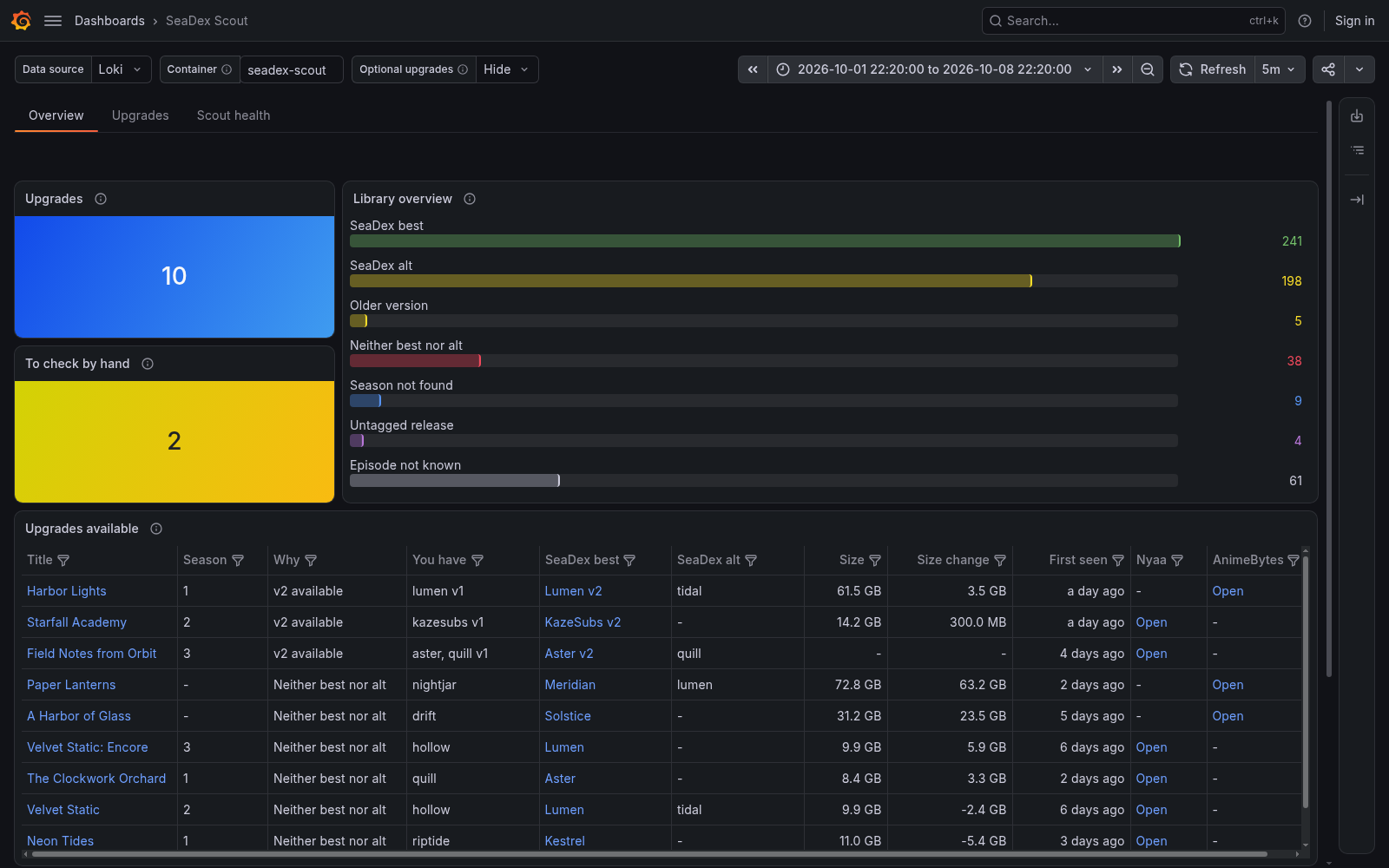
- Shows those upgrades, and how much of your library matches SeaDex, in Grafana.
- Writes an on-demand report comparing each season, film and special you have with SeaDex.
- Can offer SeaDex's picks to Sonarr and Radarr as an indexer, so they download them under your quality rules.
You can leave out remuxes, require dual audio, skip specials and add AnimeBytes releases.
Who it is for
seadex-scout is built for people who keep an anime library in Sonarr or Radarr and want it on the releases SeaDex recommends. It compares the files you already have, one season, film or special at a time. Without it, you would open each show on SeaDex and compare its release groups with your files by hand.
You need a Sonarr instance, a Radarr instance or both, with anime in them. Sonarr 4 and Sonarr 5 both work. Behind a reverse proxy, the proxy must pass the X-Application-Version header, and Sonarr 5 must be reachable on /api/v5. A Sonarr 5 series set to an episode order other than TheTVDB's aired one is not compared. seadex-scout reports through its log, so its alerts come from your Loki and Alertmanager, and its dashboard from Grafana. The monitoring guide sets them up. The optional indexer needs a Prowlarr instance with its Nyaa or AnimeBytes indexer.
seadex-scout is free software under the GPL-3.0-or-later license.
Quick start
The image is on GitHub Container Registry and Docker Hub, for amd64 and arm64. This is the compose.yaml in this repository.
services:
  seadex-scout:
    image: ghcr.io/cplieger/seadex-scout:latest
    container_name: seadex-scout
    restart: unless-stopped
    # Create ./config and run "sudo chown 1000:1000 config" before the first start,
    # or the container restarts in a loop. If you set PUID and PGID in .env, use those numbers.
    user: "${PUID:-1000}:${PGID:-1000}"
    environment:
      - SONARR_URL  # from .env, the address you open Sonarr at, such as http://192.0.2.10:8989
      - SONARR_API_KEY  # from .env, found in Sonarr under Settings, General, API Key
      - RADARR_URL  # optional, set both RADARR_ lines in .env to add Radarr
      - RADARR_API_KEY
      - SEADEX_SCOUT_FEED_KEY  # these three are for the optional indexer, see docs/torznab-indexer.md
      - SEADEX_SCOUT_PROWLARR_KEY
      - SEADEX_SCOUT_AB_PASSKEY
    volumes:
      - "./config:/config"  # config.yaml, saved state and the reports folder
In the folder that holds
compose.yaml, create the config folder:mkdir config && sudo chown 1000:1000 config. If your.envsetsPUIDandPGID, use those numbers instead of1000.Create a file named
.envbesidecompose.yamlwith these two lines:SONARR_URL=http://192.0.2.10:8989 SONARR_API_KEY=your-sonarr-api-keySONARR_URLis the address you open Sonarr at from another device on your network, notlocalhost. The API key is on Sonarr's Settings, General page. AddRADARR_URLandRADARR_API_KEYthe same way to include Radarr.Run
docker compose up -d.To get a message for each new upgrade, set up the smallest monitoring stack and load seadex-scout's alert rules into it, as that page shows. This step is optional.
Run docker logs seadex-scout. You should see sonarr reachable. Findings then appear as better release available lines. If you see sonarr ping failed at startup, the address is wrong or Sonarr is down.
On Unraid, open the Apps tab, search for seadex-scout and click Install. Enter your Sonarr URL and API key, then start it.
Reading the results
The Grafana dashboard each release ships, for Grafana 13.2 or newer, lists up to 200 current upgrades with links to the release and the show in Sonarr or Radarr. Each row shows the download size and the size change when they are known. The dashboard also shows how much of your library is at SeaDex's best or alt. Tiles at the top appear only while the scout needs a look, such as checks that stopped or an error to fix. Monitoring and alerts shows how to import it.
With the rules from step 4 loaded, your Alertmanager sends each new upgrade to Discord, email or any receiver it supports, with a link to the release. To stop the messages for one show, add its al_id to filters.ignore.
For a full report, run this while the container is up:
docker exec seadex-scout /seadex-scout report
It writes a timestamped Markdown and JSON pair into config/reports, with a verdict for each season, film and special. How seadex-scout works explains every verdict.
Adding the indexer
The indexer is off until you set it up. It offers SeaDex's picks to Sonarr and Radarr as a Torznab indexer, marked so a Custom Format can score them. It finds releases by searching through the Nyaa and AnimeBytes indexers you already have in Prowlarr.
You fill in the indexer section of config.yaml, add port 9118 to the service, and add the feed to Sonarr and Radarr as a Torznab indexer. Give it category 5070 in Sonarr and 2000 in Radarr, because the indexer tells the two apart by them. Then you create two Custom Formats, one for SeaDex's best picks and one for its alternatives. In that indexer's settings in Sonarr, tick Anime Standard Format Search. Without it, Sonarr asks only for single episodes, which the indexer answers only for specials, and you get nothing else.
A film or special that TVDB files under a series reaches Sonarr under that series' title and special episode, such as Code Geass S00E04. A film also reaches Radarr under its own title. A film the map cannot name that way is offered to Radarr only, so Sonarr never has to guess which special it is.
Right after setup, the indexer's RSS list is empty. It lists only picks SeaDex adds from then on. Sonarr and Radarr find the older ones when they search. Torznab feed setup has every click.
Configuration reference
Settings live in one file, config/config.yaml. The first start writes it from the annotated config.example.yaml with a generated feed_api_key. seadex-scout reads it once at start, so restart the container after an edit. A misspelled key stops the start with an error that names it, such as unknown configuration key "anime_bytes".
The starter file reads the four connection settings below from the environment. Turn on at least Sonarr or Radarr. Any value in the file can name a SONARR_*, RADARR_* or SEADEX_SCOUT_* variable as ${VAR}, so secrets can stay in .env.
| Variable | Description | Default |
|---|---|---|
SONARR_URL |
Where seadex-scout reaches Sonarr. Unset turns Sonarr off. | (unset) |
SONARR_API_KEY |
Sonarr's API key, needed when SONARR_URL is set. |
(unset) |
RADARR_URL |
Where seadex-scout reaches Radarr. Unset turns Radarr off. | (unset) |
RADARR_API_KEY |
Radarr's API key, needed when RADARR_URL is set. |
(unset) |
CONFIG_PATH |
Path of the config file. | /config/config.yaml |
The settings most people change:
| Key | Default | Description |
|---|---|---|
mode |
daemon |
daemon runs on a schedule. report writes one report and exits. |
poll_interval |
15m |
How often to check SeaDex for changes. Minimum 15m. off hands scheduling to an outside tool. |
animebytes |
false |
Set true when you have an AnimeBytes account, to include its releases and links. |
filters.exclude_remux |
false |
Leave out releases classified as remux. |
filters.require_dual_audio |
false |
Leave out releases that are not dual audio. |
filters.exclude_specials |
false |
Leave out OVA, ONA and special entries. |
filters.ignore |
[] |
AniList IDs of shows to stop warning about. They still appear in the report and the indexer. |
arr_tags.include |
[] |
Check only items with one of these Sonarr or Radarr tags. [] checks everything. |
arr_tags.exclude |
[] |
Never check items with one of these tags. An exclude wins over an include. |
sonarr.public_url |
(unset) | The Sonarr address your browser uses, for links in the report. Empty reuses sonarr.url. |
report.dir |
/config/reports |
Where each report pair is written. |
log.level |
info |
debug, info, warn or error. The shipped alert rules need info. |
Configuration lists every key, including the indexer settings and how to run checks from an outside scheduler.
| Mount | Description |
|---|---|
/config |
config.yaml, saved state, the indexer's feed.json and the reports folder. |
| Port | Description |
|---|---|
9118 |
The optional indexer. Bound only when a Torznab URL is set. |
Security
seadex-scout opens no port until you set up the indexer. The indexer then answers only requests that carry its feed_api_key, and refuses the rest with 401.
Keep the indexer on your local network, because the AnimeBytes RSS links it serves contain your AnimeBytes passkey. If you write the passkey into config.yaml itself rather than .env, a backup of config carries it too.
seadex-scout never logs an API key, and sends the Prowlarr key in a request header rather than in a URL. The image runs as a non-root user on a distroless base, which has no shell. Security has a hardened compose setup.
Troubleshooting
The healthcheck runs seadex-scout health, which reads a marker file each completed check refreshes. Unhealthy means the last read of your Sonarr or Radarr library failed, or no check has finished in 3 hours. A poll_interval over 1 hour lengthens that wait. A SeaDex outage keeps the container healthy and keeps your existing findings.
- The container restarts in a loop at the first start. The
configfolder does not belong to the container user. Run thechownfrom the quick start. - The log says
no config found; wrote a starter config, but it cannot start yet.SONARR_URLorSONARR_API_KEYdid not reach the container. Check.env, then restart. - The log says
sonarr ping failed at startup. Use Sonarr's network address, notlocalhost, and check that Sonarr is running. - The log says
sonarr API unsupported. Sonarr answered, but seadex-scout cannot read its API. Theerrortext names the fix, and Monitoring and alerts lists each one. - The indexer finds nothing on searches. Tick Anime Standard Format Search on the indexer in Sonarr.
Monitoring
seadex-scout writes JSON logs to standard output and has no metrics endpoint. Eight Loki alert rules ship in alerts/logql.yaml, and a Grafana dashboard for Grafana 13.2 or newer ships with every release as grafana-dashboard.json. On Grafana 13.1 or older, take it from release v2.12.1, the last one in the older dashboard format, and maintain it yourself. Monitoring and alerts explains both and shows how to load them.
Documentation
- Torznab feed setup connects the indexer to Prowlarr, Sonarr and Radarr.
- Configuration lists every setting and shows how to run checks from an outside scheduler.
- How seadex-scout works explains matching, the report verdicts, release versions and the indexer.
- Fixing a wrong or missing match shows how to correct one.
- Monitoring and alerts describes the log lines, health, dashboard and alert rules.
- Security has a hardened compose setup and explains credential handling.
Credits
- The anime ID map comes from animap.
animap.jsonis made available under the Open Database License (ODbL) 1.0, and its contents under the Database Contents License (DbCL) 1.0. It contains information from AniDB: which episodes exist, with their kind, number and AniDB episode id, the anime types and the MyAnimeList links, licensed under CC BY-NC-SA 4.0. TVDB data is provided by TheTVDB: the series ids, season and episode numbers and episode ids. The TMDB movie ids are from TMDB, and the AniList ids are from AniList. The map started from earlier releases of animap, so it still contains information from anime-offline-database, made available under the ODbL 1.0 and the DbCL 1.0, and from Anime-Lists. animap uses the TMDB API but is not endorsed or certified by TMDB. - The way seadex-scout compares the release groups in a Sonarr or Radarr anime library with SeaDex follows seadexarr.
- The indexer reads a release's tracker ID from its page URL and accepts only an ID made of digits. Both rules follow seadexerr, a Prowlarr indexer for SeaDex releases.
Contributing
Issues and pull requests are welcome. See CONTRIBUTING.md.
Disclaimer
This project is built with care and follows security best practices, but it is intended for personal / self-hosted use. No guarantees of fitness for production environments. Use at your own risk.
This project was built with AI-assisted tooling using Claude, GPT, and Kiro. The human maintainer defines architecture, supervises implementation, and makes all final decisions.
License
GPL-3.0-or-later. See LICENSE. Its arrapi dependency is Apache-2.0. The image carries the license text of every bundled component under /usr/share/licenses/.
Third-party attributions are in THIRD_PARTY_NOTICES.md.
Requirements
A finding is a warning line in the container log, never a download. Read the log from the Docker tab.
For a full season-by-season report, run this from an Unraid terminal (Tools, then Terminal) while the container is up: docker exec seadex-scout /seadex-scout report
It writes a timestamped Markdown and JSON pair into /config/reports. The container is distroless, so the Console button in the Docker tab does not work.
Everything else is tuned in /config/config.yaml, which is annotated. The container reads it once at start, so restart it after an edit.
The Torznab port is only bound when a Torznab URL is set in config.yaml. Leave the port mapping alone otherwise. Keep that feed on your LAN, because its AnimeBytes links carry your passkey.
Categories
Download Statistics
Related apps
Explore more like this
Explore allDetails
cplieger/seadex-scout:latestRuntime arguments
- Network
bridge- Privileged
- false
- Extra Params
--user 99:100
Template configuration
Where seadex-scout reaches Sonarr, including scheme and port, for example http://192.0.2.100:8989. Use the server's LAN IP, not a container name
- Target
- SONARR_URL
Sonarr's API key, from Settings, then General, then API Key in Sonarr
- Target
- SONARR_API_KEY
config.yaml, state and the reports folder
- Target
- /config
- Default
- /mnt/user/appdata/seadex-scout
- Value
- /mnt/user/appdata/seadex-scout
Where seadex-scout reaches Radarr, for example http://192.0.2.100:7878. Leave empty to watch Sonarr only
- Target
- RADARR_URL
Radarr's API key, from Settings, then General, then API Key in Radarr. Required when Radarr URL is set
- Target
- RADARR_API_KEY
Torznab feed for Sonarr, Radarr or Prowlarr. It listens only when a Torznab URL is configured in config.yaml
- Target
- 9118
- Default
- 9118
- Value
- 9118