
ROMarr
Docker app from UnraidUser-7237142946's Repository
Overview
Readme
View on GitHubROMarr
The *arr for games.
Find games, verify ROMs, and import them into your library.


Install · First setup · Plugins · Roadmap · Releases
What can I use it for?
| I want to… | Start here | What you need |
|---|---|---|
| Import ROMs I already have | Manual Import | A destination folder and access to the source files. No indexer or download client needed. |
| Find and download a particular game | Add New or Interactive Search | A search source, a matching download client, and a destination folder. |
| Check what a collection is missing | Collections | A No-Intro or Redump DAT and your local library. |
| Reclaim space taken by exact duplicates | Stats → Audit | A local library; review the preview before moving duplicates to quarantine. Restore is available. |
| Add another game source | Hub → Plugins | ROM Hub, included in the Windows app and amd64/arm64 Docker images. Details. |
You can use a plain folder as your library. RomM, Gaseous, Retrom and other library integrations are optional. Your emulator or frontend plays the games; ROMarr handles finding, checking and importing files.
Imports can be checked against DAT checksums. The result is verified, bad dump, or unknown. Without a matching DAT, a file is unknown; that does not mean it is damaged. Rename on import can use a verified single-file ROM's DAT name while keeping its source extension; unknown filenames are retained and existing files are not overwritten. A bulk, in-place rename planner for existing libraries is on the roadmap.
Install
Choose a method
| Method | Best fit | Guide |
|---|---|---|
| Docker Compose | Most servers, NAS hosts, or Docker Desktop | Quick start below |
| Proxmox LXC | A Proxmox host | LXC installer |
| Windows app | Windows 10/11 on x64 | Download the Windows ZIP, extract it and double-click ROMarr.exe. No Python, PowerShell or .NET installation required. |
| Linux/macOS source checkout | Development or an existing Python host | Source instructions |
| Home Assistant add-on | A Home Assistant installation | Add-on instructions; this packaging needs more field testing. |
For Docker, have Docker Engine or Docker Desktop with Compose installed. Reserve port 6868 and choose where settings, downloads, and ROMs will live. ROMs and download space are usually much larger than the app itself.
Docker Compose quick start
These commands are for a Linux or macOS shell, or an SSH terminal on your Docker host. They create a new folder library. If you already use RomM or another library, mount its real ROM directory instead of ./roms.
mkdir -p romarr/config romarr/roms romarr/downloads
cd romarr
Save this as compose.yaml in that directory:
services:
  romarr:
    image: ghcr.io/blizzhacker/romarr:latest
    container_name: romarr
    restart: unless-stopped
    ports:
      - "6868:6868"
    environment:
      PUID: 1000
      PGID: 1000
      UMASK: "002"
      TZ: Etc/UTC
      LIBRARY_KIND: folder
      LIBRARY_PATH: /roms
    volumes:
      - ./config:/config
      - ./roms:/roms
      - ./downloads:/downloads
Set PUID and PGID to the numeric owner/group of your ROM and download folders (id -u and id -g on Linux), then start:
docker compose up -d
Open http://localhost:6868 on that computer, or http://YOUR-SERVER-IP:6868 from another device. Set a password, then follow Settings → Setup Guide (/#setup). You can skip steps you do not need and reopen the guide later.
Already have a download client? Its completed files must be visible to ROMarr. If the client reports /downloads, both containers should use that path for the same files. A client in a different container is reached by its Docker service name on a shared network, or by its host's address; localhost inside ROMarr means ROMarr itself. Path examples and troubleshooting.
The image includes archive tools. ROM Hub is included on amd64/arm64; it is unavailable in the armv7 image. Image tags, permissions, backup and updates.
Get your first result
Already have ROMs? Put one file in the mounted downloads folder, open Manual Import, and scan /downloads. Check the platform and verification result before pressing Import. Walkthrough.
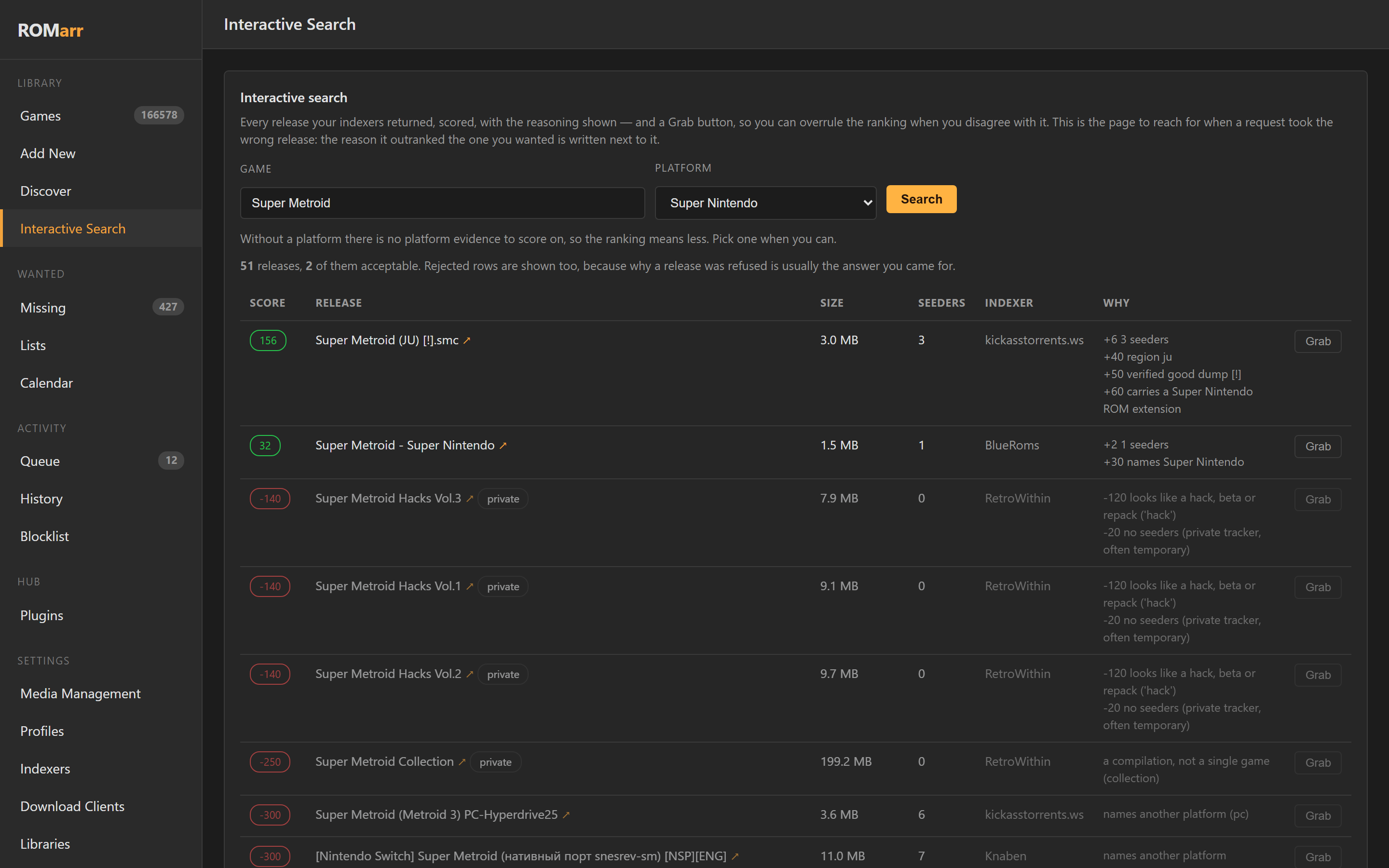
Want automatic downloads? Add a library, a download client and a search source in Setup Guide. Use Interactive Search for your first game so you can inspect the results before grabbing one. Follow it through Queue and History. Walkthrough.
Want plugins? Open Hub → Plugins, choose a plugin, click Install, and add a ROM Hub download client for searchable plugins. ROM Hub is the plugin host; each plugin adds a particular source or capability. Available examples and exact steps.
What else is included?
- Wanted lists and scheduled searches, with the reason shown when a release is rejected.
- Prowlarr, Torznab/Newznab and torrent RSS sources; torrent, Usenet and plugin download clients.
- DAT collection comparison, region/1G1R selection, and staged acquisition from an existing qBittorrent set torrent.
- Exact duplicate audit, quarantine and restore; a preview comes before any move.
- Preview-first renaming for DAT-verified single files already in a library, with a saved restore journal.
- Multiple library destinations, notifications, import lists and frontend exports.
- PS4, PS5 and PS Vita search/import formats, with explicit playback and installation limits.
Source access, available files, credentials and platform support vary. Check the result and the task history; a configured connection does not guarantee a particular game is available.
Play with Cartridge
Cartridge for Windows and Cartridge for Xbox are optional players for a RomM library. Choose the app for your device. ROMarr manages acquisition and imports; Cartridge connects to RomM to browse and play. You can keep using your existing frontend instead. The Windows app's Cartridge menu and the Setup Guide link to both.
Help and documentation
| Need | Read |
|---|---|
| First setup and a successful import | Getting started |
| Safely rename existing library files | Preview, selection and rollback guide |
| Installation, Windows, backups, updates and environment variables | Install guide |
| Plugin availability and installation | ROM Hub guide |
| API, library routing, players and browser downloads | Feature reference |
| Current work and requested features | Roadmap |
| Test evidence and known validation gaps | Proof notes — dated records, not a guarantee for every integration |
If something fails, open an issue with your ROMarr version, install method, the action you tried, and the relevant error or log. Remove passwords, API keys and webhook URLs. Existing-install settings are changed in the UI; most connection environment variables only seed the first run.
Contribute
Bug reports, documentation fixes and integration field reports are welcome. For code changes, install the source environment, install pytest, and run python -m pytest tests/ -q. The CI workflow runs the suite and image smoke checks.
Source plugins live in ROM Hub; see its contribution guide. ROMarr's API schema is available at /api/v1/openapi.json on your own install.
Thanks to the library, emulator and preservation projects ROMarr works with, and to Radarr, Sonarr, Questarr and gamarr for ideas and familiar workflows.
MIT — LICENSE. ROMarr is an independent project and is not endorsed by its integrations.
Media gallery
1 / 5Requirements
A running Prowlarr, at least one download client (qBittorrent, SABnzbd or NZBGet), and somewhere to put the ROMs -- either RomM, Gaseous or Retrom, or a plain folder.
At least one download client is genuinely required, not merely recommended: a release found with no client that speaks its protocol is ranked and then refused.
Categories
Related apps
Explore more like this
Explore allDetails
ghcr.io/blizzhacker/romarr:latestRuntime arguments
- Web UI
http://[IP]:[PORT:6868]- Network
bridge- Shell
sh- Privileged
- false
Template configuration
Port for ROMarr's web interface.
- Target
- 6868
- Default
- 6868
- Value
- 6868
ROMarr's settings, history and indexer configuration. Keep this.
- Target
- /config
- Default
- /mnt/user/appdata/romarr
- Value
- /mnt/user/appdata/romarr
Where finished ROMs are filed. Point the left-hand side at the same share your library app reads. The right-hand side must match the Library path variable below.
- Target
- /roms
- Default
- /mnt/user/roms
- Value
- /mnt/user/roms
Your download client's completed folder. The RIGHT-hand side must be the path your client reports, character for character -- ROMarr asks the client where a finished download is and then opens that path itself. qBittorrent shows it under Options - Downloads as Save path; SABnzbd under Config - Folders as Completed Download Folder. If they cannot be made to agree, add a remap under Settings - Media Management instead.
- Target
- /downloads
- Default
- /mnt/user/downloads
- Value
- /mnt/user/downloads
How ROMarr finds releases. Use your server's LAN address, not localhost -- localhost inside this container is this container. Example: http://192.168.1.10:9696
- Target
- PROWLARR_URL
Prowlarr - Settings - General - API Key.
- Target
- PROWLARR_API_KEY
Which game library to file into: romm, gaseous, retrom, or folder. Use folder for Batocera, RetroPie, ES-DE, EmuDeck, Pegasus, Lakka, muOS or LaunchBox -- those read a plain directory tree and need no URL or account.
- Target
- LIBRARY_KIND
- Default
- romm
- Value
- romm
Your library server's address. Leave empty when Library kind is folder. Example: http://192.168.1.10:8080
- Target
- LIBRARY_URL
Where ROMs are written, as seen INSIDE this container. This is the right-hand side of the ROM library mount above, not the host path. Leave it as /roms unless you changed that mount.
- Target
- LIBRARY_PATH
- Default
- /roms
- Value
- /roms
Use a dedicated account, not your admin one. All ROMarr needs is permission to trigger a rescan. Leave empty when Library kind is folder.
- Target
- LIBRARY_USERNAME
Password for the library account. Leave empty when Library kind is folder.
- Target
- LIBRARY_PASSWORD
Your qBittorrent WebUI address, for example http://192.168.1.10:8080 . At least one download client is required.
- Target
- QBITTORRENT_URL
qBittorrent WebUI username.
- Target
- QBITTORRENT_USER
qBittorrent WebUI password.
- Target
- QBITTORRENT_PASS
Optional usenet client. Example: http://192.168.1.10:8080
- Target
- SABNZBD_URL
SABnzbd - Config - General - API Key.
- Target
- SABNZBD_API_KEY
Optional usenet client. Example: http://192.168.1.10:6789
- Target
- NZBGET_URL
NZBGet control username.
- Target
- NZBGET_USER
NZBGet control password.
- Target
- NZBGET_PASS
What ROMarr labels its own downloads with, so they stay distinguishable in a client you also use for other things. The category does not have to exist in the client beforehand.
- Target
- QBITTORRENT_CATEGORY
- Default
- romarr
- Value
- romarr
User ID that owns the ROMs ROMarr writes. 99 is Unraid's nobody. Match whatever your library app uses.
- Default
- 99
- Value
- 99
Group ID that owns the ROMs ROMarr writes. 100 is Unraid's users. Match whatever your library app uses.
- Default
- 100
- Value
- 100
Timezone, used for timestamps in history and logs. For example America/Chicago.
- Default
- Etc/UTC
- Value
- Etc/UTC
INFO, or DEBUG when you are filing a bug report.
- Target
- LOG_LEVEL
- Default
- INFO
- Value
- INFO