

reostream
Docker app from reostream's Repository
Overview
Readme
View on GitHubreostream
A camera proxy for Reolink cameras. It sits between your cameras and Frigate (or any NVR), pulls video over Reolink's own Baichuan protocol, and serves it as RTSP and HTTP MPEG-TS.
It does not replace Frigate. Frigate still does detection and recording; reostream only changes where Frigate gets the video from.
Reolink cameras --Baichuan--> reostream --RTSP--> go2rtc / Frigate / Blue Iris
                                        --HTTP--> mpv / VLC / scripts
Why
Reolink's RTSP server is broken on some models. On a Duo 3 it gave green blocks, grey frames and smearing. Same camera, same encoder, same thirty minutes, both transports:
| transport | segments | segments with bitstream errors |
|---|---|---|
| Baichuan | 184 | 0 |
| RTSP | 178 | 147 |
Reolink's own NVR looks fine because it uses Baichuan, not RTSP. A fisheye here also loses
about 21% of its frames over RTSP. Method in docs/measurements.md.
Neolink did this first and made the protocol understandable. It has had no commits since January 2025. reostream is a new implementation, not a fork.
Quickstart
docker run -d --name reostream --restart unless-stopped \
  -v reostream-data:/data \
  -p 8560:8560 -p 8561:8561 -p 8562:8562 \
  ghcr.io/volttech21/reostream:latest

docker logs reostream
- The log prints a one-time token. Open
http://<host>:8562/claimand paste it. - Keep the password it gives you.
- Add a camera: its IP,
admin, and its password. Port 9000 on the camera must be reachable; it is on by default.
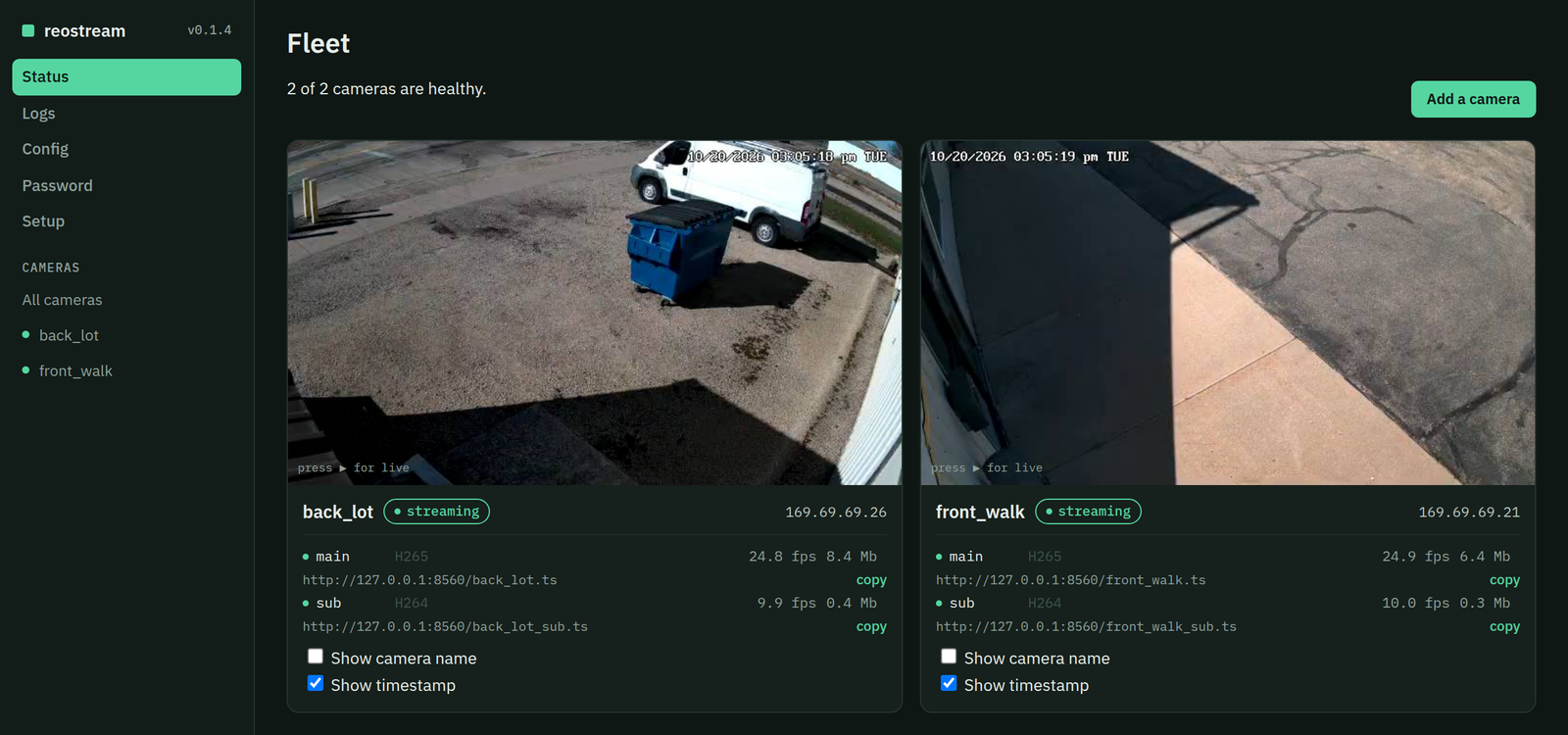
Your streams are at rtsp://<host>:8561/<camera> and http://<host>:8560/<camera>.ts.
Prefer compose, Unraid, a plain binary or systemd? See docs/setup.md.
Using it with Frigate
Feed go2rtc from reostream's RTSP, and point Frigate at go2rtc. One camera connection then serves detect, record and live view.
go2rtc:
  streams:
    driveway:
      - rtsp://reostream:8561/driveway
      - ffmpeg:driveway#audio=opus
    driveway_sub:
      - rtsp://reostream:8561/driveway_sub

cameras:
  driveway:
    ffmpeg:
      inputs:
        - path: rtsp://127.0.0.1:8554/driveway_sub
          input_args: preset-rtsp-restream
          roles: [detect]
        - path: rtsp://127.0.0.1:8554/driveway
          input_args: preset-rtsp-restream
          roles: [record, audio]
The #audio=opus line is optional; it gives browsers and apps audio in live view.
Without go2rtc, Frigate can read http://reostream:8560/driveway.ts directly.
Endpoints
| RTSP, port 8561 | HTTP, port 8560 | |
|---|---|---|
/<cam> |
/<cam>.ts |
main stream |
/<cam>_sub |
/<cam>_sub.ts |
sub stream |
/<cam>_extern |
/<cam>_extern.ts |
extern: the middle stream (about 896x512 H.264) most clients never offer |
Also on port 8560:
/<cam>.keyframe |
latest keyframe, raw |
/<cam>.frames |
raw access units with a small header, for your own decoder; see docs/setup.md |
/api/status |
per-stream JSON: connected, fps, bitrate, clients, reconnects, last error |
/metrics |
the same for Prometheus |
What it does
- One connection per stream, held open whether anyone is watching or not.
- Timestamps from the camera's own clock, so frame rates come out right.
- A slow client is disconnected, never buffered. No client can stall a camera.
- New clients start at a keyframe. Audio is carried when the camera sends it.
- Two-way audio: on cameras with a speaker, Frigate's talk button works through it.
- Sessions are closed cleanly. A camera left with an open session refuses connections for minutes.
- A web page on port 8562 for status, live view, config, logs and camera settings.
No ffmpeg, GStreamer or RTSP server in the serving path.
Tested on
| Model | Count | Firmware |
|---|---|---|
| RLC-810A (8 MP bullet) | 6 | v3.1.0.956_24022103 |
| FE-P (fisheye) | 1 | v3.0.0.5336_2509021915 |
| Duo 3 PoE (dual lens panorama) | 1 | v3.0.0.5049_2506302188 |
reostream has been the only video path for this fleet's Frigate since September: 23
streams, 69 Mbps, about 60% of one CPU core, 29-59 MB of memory. Numbers in
docs/measurements.md.
Not yet tested:
- Battery cameras. They sleep and wake, and the protocol client has not seen them yet. Reports welcome.
- Other models and firmware.
Camera control
The web page has a settings page for each camera: image, overlay, IR, status LED, floodlight, time and accounts.
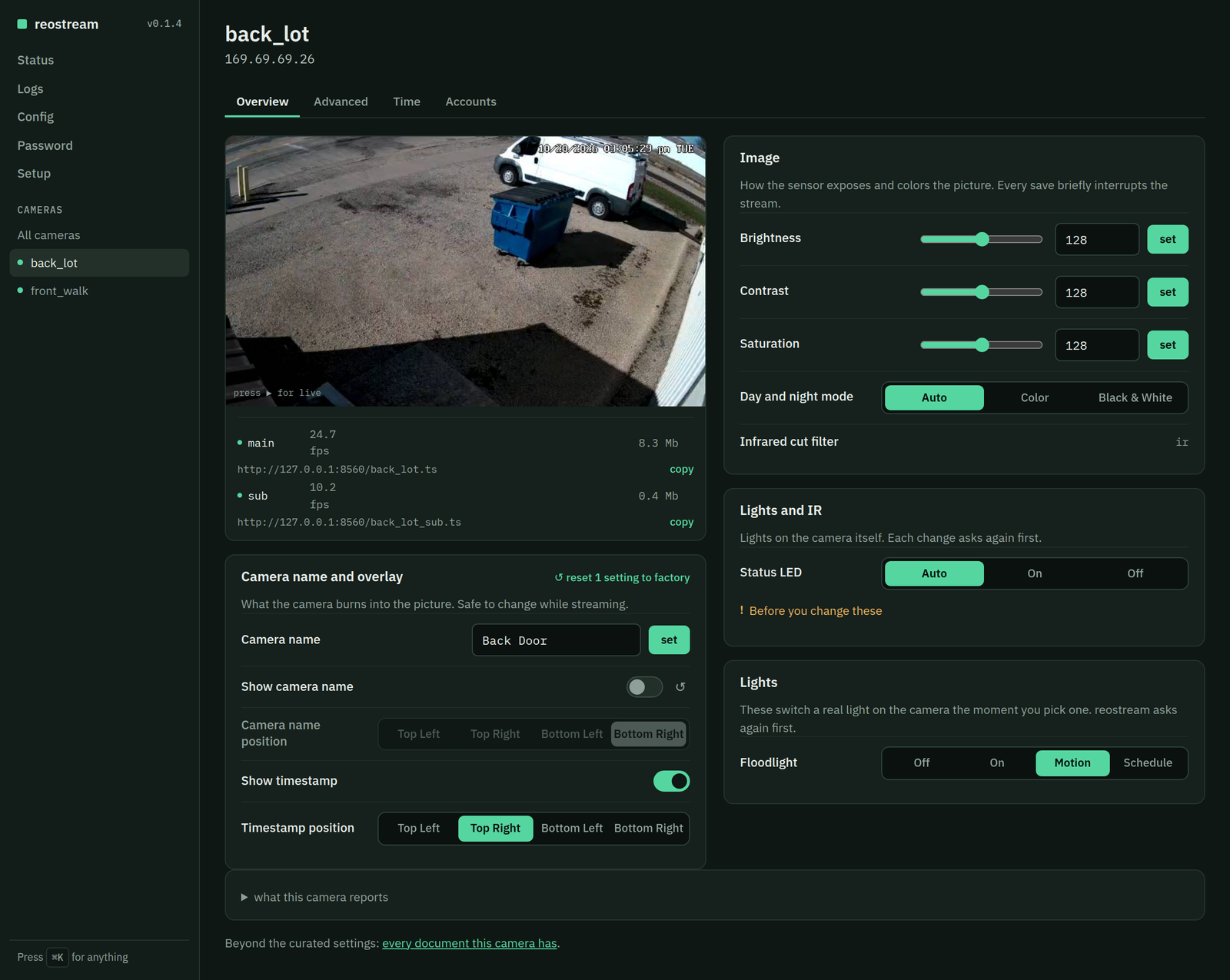
reocam, a separate command line tool, reads and changes camera settings over the same protocol. Streaming does not
need it.
reocam -address 192.0.2.50 -password secret probe
probe reports which messages the camera answers. See docs/control.md for reading
and writing settings and what to watch out for.
More
docs/setup.md: other ways to run it, the config file, the control page, RTSP, the frames feeddocs/control.md: camera control withreocamdocs/protocol.md: what the Baichuan wire actually doesdocs/measurements.md: how every number above was measured
License
AGPL v3. Free to use, run and modify. If you distribute a modified version or run one as a service for others, you must publish your changes.
A commercial license without that obligation is available. See COPYRIGHT.
Requirements
Related apps
Explore more like this
Explore allDetails
ghcr.io/volttech21/reostream:latestRuntime arguments
- Web UI
http://[IP]:[PORT:8562]/- Network
bridge- Privileged
- false
Template configuration
MPEG-TS streams, http://[IP]:8560/camera.ts
- Target
- 8560
- Default
- 8560
- Value
- 8560
RTSP streams for go2rtc or Frigate, rtsp://[IP]:8561/camera
- Target
- 8561
- Default
- 8561
- Value
- 8561
Control page: claim, cameras, settings, logs
- Target
- 8562
- Default
- 8562
- Value
- 8562
Holds config.toml. Must be owned by 65532:65532.
- Target
- /data
- Default
- /mnt/user/appdata/reostream
- Value
- /mnt/user/appdata/reostream