

ReelExporter
Docker app from SuFxUR's Repository
Overview
Readme
View on GitHub

Reel Exporter

A small, self-hosted, Plex-style video player for grabbing full-quality screenshots and trimming clips from your media library.
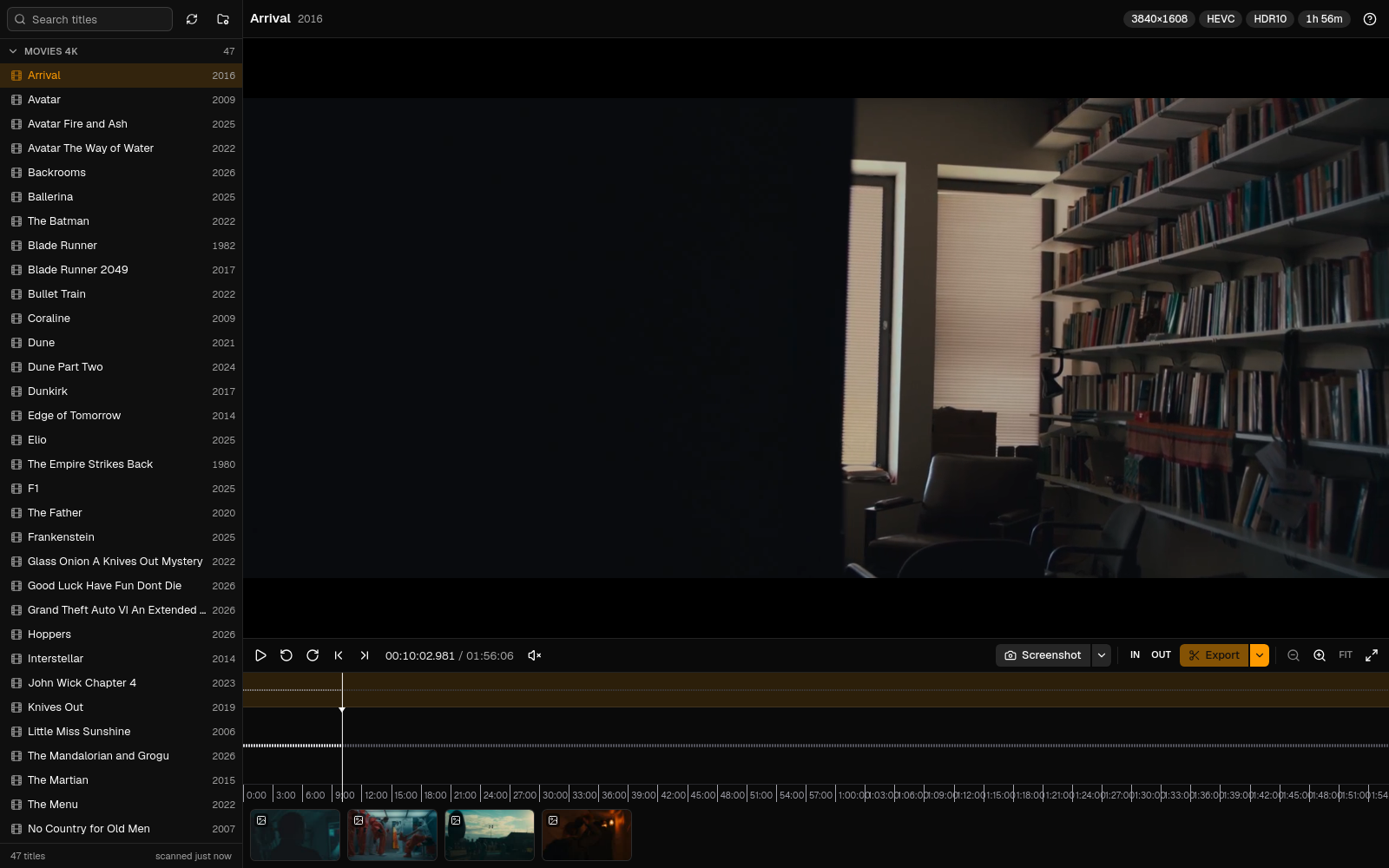
Reel Exporter points at a read-only media share, shows your movies and shows in a compact sidebar, and plays anything in the browser through a lightweight preview transcode. Every capture is cut from the original file, never from the preview, and lands in an output folder named after the movie or show. No GPU, no database, no accounts. It runs on port 7727.
Features
- Plays everything. MKV, MP4, AVI, TS and friends with H.264, HEVC, AV1, 10-bit and HDR video and AC3, DTS, TrueHD or AAC audio all stream as an on-the-fly HLS preview (H.264 and AAC, up to 1080p). Seeking anywhere in a 60 GB remux starts within a couple of seconds.
- Frame-accurate screenshots as PNG, JPEG or WebP (with a quality slider for the lossy formats) at the source resolution or scaled to 1080p, 720p or any width. HDR10, HLG and Dolby Vision (profiles 7 and 8) are tone-mapped to SDR so grabs look right.
- Clip trimming. Set in and out points on the timeline, then export the range cut precisely from the original: a Video (MP4, H.264 and AAC) at source resolution or 1080p/720p in three quality levels, kept at the source aspect or placed in a 9:16, 4:5, 1:1, 4:3 or 16:9 frame with zoom, width and a black or blurred background, or a GIF up to 30 seconds. Black bars baked into the picture are always trimmed. All with progress and cancel.
- A timeline built for precision. Waveform, ruler, minimap, drag-to-select, draggable in and out handles, zoom at the pointer with Ctrl and the mouse wheel, frame stepping, and hover thumbnails.
- Your folders, your libraries. Mount one or more media shares read-only, browse them in the app and tick exactly which folders become libraries (a whole
movies 4kshare or a single sub-folder). Unticked folders are never scanned. Search, lazy-loaded seasons and episodes, and periodic rescans included.
Quick start
docker run -d --name reel-exporter \
  -p 7727:7727 \
  -v /path/to/media:/media:ro \
  -v /path/to/captures:/output \
  -v /path/to/appdata/reel-exporter:/config \
  -e PUID=99 -e PGID=100 -e TZ=Europe/London \
  --restart unless-stopped \
  ghcr.io/sufxgit/reel-exporter:latest
Or with Compose: edit the paths in docker-compose.yml and run docker compose up -d. Then open http://<host>:7727.
Install on Unraid
The template lives at unraid/reel-exporter.xml. Unraid 7 has no field for pasting a template URL, so drop the file on the flash drive:
- Open Tools > Terminal and run:
wget -O /boot/config/plugins/dockerMan/templates-user/my-ReelExporter.xml \ https://raw.githubusercontent.com/SuFxGIT/reel-exporter/main/unraid/reel-exporter.xml - Go to Docker > Add Container, open the Template dropdown and pick ReelExporter under User templates.
- Check the three paths (the media library is mounted read-only, captures go to the output path, config holds caches) and click Apply.
- Optionally switch on Autostart in the Docker tab.
The timezone is picked up from Unraid automatically. PUID and PGID default to 99 and 100 (nobody:users) so captures are readable over your shares. The image is published on GitHub Container Registry; if the package is private, log in first with docker login ghcr.io.
Developing on the Unraid box itself? node scripts/unraid-run.mjs --install-template --recreate builds the same docker run command Unraid would, registers the template and icon, and starts the container.
Media sources
Reel Exporter does not scan a mount blindly. Each mounted folder is a source, and inside a source you choose which folders become libraries:
- Mount your media into the container read-only (
/mediain the template; add/media2,/media3or any other container path for more shares). - Open Media sources (the folder icon at the top of the sidebar). Mounted folders that are not added yet appear as one-click suggestions; you can also type a container path.
- Browse the source and tick the folders to import. A folder at any depth can be a library, including the source root itself, but libraries cannot nest. Click a library chip to rename it.
- Save. Only the ticked folders are scanned; everything else stays hidden. Each ticked folder shows up as its own library in the sidebar.
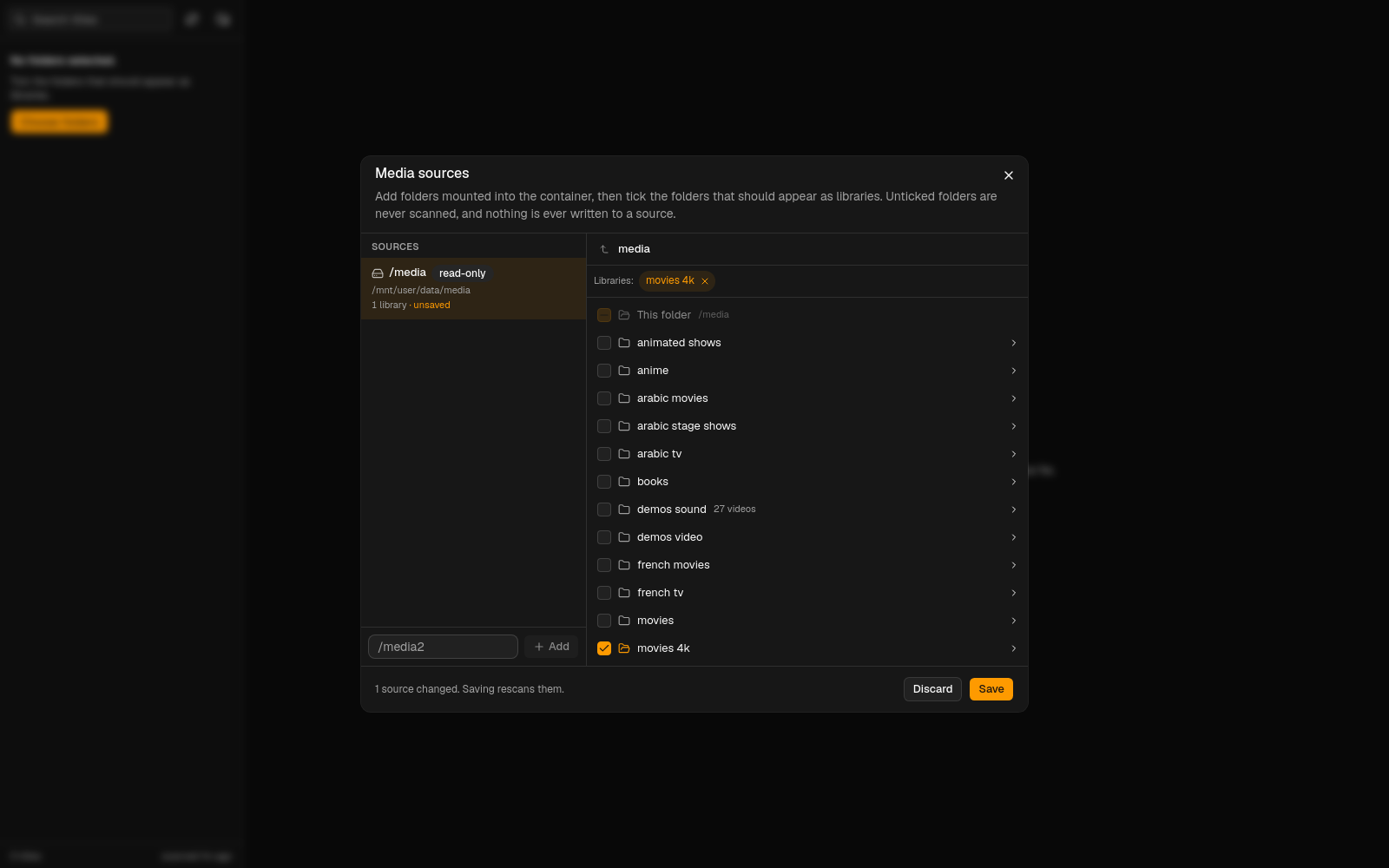
Sources are stored in /config/sources.json. On first start, /media is registered automatically but nothing is imported until you pick folders. The app only ever reads from a source: it never renames, moves, deletes or writes media files, and the dialog warns when a source is mounted read-write.
The same operations are available over the API: GET /api/sources, POST /api/sources {"path":"/media2"}, GET /api/sources/:id/browse?path=movies, PUT /api/sources/:id/libraries {"libraries":[{"relPath":"movies 4k"},{"relPath":"demos video","name":"Demos"}]}, DELETE /api/sources/:id.
Paths and environment
| Path | Mode | Purpose |
|---|---|---|
/media |
read-only | Your main media share. Pick the folders to import under Media sources. Never written to. |
/media2, /media3, ... |
read-only | Optional extra shares. Any container path works; add it under Media sources. |
/output |
read-write | Screenshots, clips and GIFs, numbered 1, 2, 3 ... in one folder per movie or episode. |
/config |
read-write | Library index, probe and waveform caches, and the temporary transcode segments. Safe to delete. |
| Variable | Default | Purpose |
|---|---|---|
PUID / PGID |
99 / 100 |
User and group the app runs as; captures are owned by them. |
TZ |
UTC |
Timezone for logs (Unraid sets it for you). |
LOG_LEVEL |
info |
trace, debug, info, warn or error. debug logs every ffmpeg command line. |
SCAN_INTERVAL_MINUTES |
60 |
How often the selected folders are rescanned. 0 disables periodic scans. |
MEDIA_PATH |
/media |
The mount registered as the first source on first start. |
CLIP_MAX_SECONDS |
1800 |
Longest clip the export accepts. |
PORT |
7727 |
Container port. Change the host side of the mapping instead. |
How it works
- Library. Only the folders you ticked are walked (a 1,500 movie folder takes a couple of seconds) and the result is cached in
/config/library.json, so restarts are instant. Movies and shows are recognised from their folder structure, not from the library name:Show (2022)/Season 01/Show - S01E01 - Title.mkvis a show,Movie (1999)/Movie (1999).mkvis a movie. Episode names likeS01E01,S01E01-E02,21x1088,Ep14and bare numbers inside a season folder all work. - Preview. The server runs ffmpeg per title, producing a 4 second fragmented-MP4 HLS stream (H.264 and AAC, at most 1080p) that hls.js feeds to the browser. Seeking outside the buffered range restarts ffmpeg at that exact segment, so any codec plays and only the part you watch is transcoded. Idle transcodes stop after a minute.
- Captures use the original file. A screenshot decodes the exact frame at the timestamp and writes it at source resolution unless you asked for a smaller size. A clip re-encodes the selected range from the source into an MP4 that plays anywhere. HDR sources go through
zscaleandtonemapto BT.709 for both, and any downscale happens before tone-mapping. - Output layout. Every capture takes the next free number in its title's folder, whatever its kind:
/output/<Title (Year)>/1.png,2.mp4,3.gif,4.webp... for movies and/output/<Show (Year)>/S01E02/1.pngfor episodes. Nothing is ever renamed automatically: deleting a file leaves the others as they are, and the counter simply continues after the highest number. Rename a capture from the strip under the timeline (click its name or the pen icon; the extension is kept). Drag tiles to change their order; that order is remembered in/config/captures.json, not in the file names. Each tile also has download and delete buttons. Unicode titles are kept as they are.
Export options
The small arrow next to Screenshot and Export opens the options for that capture. They are remembered per browser, and the S and E shortcuts reuse the last choices.
| Screenshot | Choices |
|---|---|
| Format | PNG (lossless), JPEG or WebP |
| Quality | 50 to 100 for JPEG and WebP (default 90); WebP at 100 is lossless |
| Size | Source, 1080p, 720p, or a custom maximum width |
| Export | Choices |
|---|---|
| Format | Video (MP4) or GIF |
| Aspect (Video) | Source (the picture's own aspect) or a 9:16, 4:5, 1:1, 4:3 or 16:9 frame |
| Size (Video) | Source, 1080p or 720p. For the Source aspect this is a width limit (1920 or 1280). For a fixed aspect it is the short side (1080×1920, 1920×1080, 1080×1080, ...), and Source cuts the crop at native resolution with no scaling |
| Quality (Video) | High (CRF 18), Balanced (CRF 20) or Small (CRF 24, faster) |
| Position (fixed aspects) | Drag the window over the preview to choose what stays. The two lock toggles keep it centred left to right or top to bottom so a drag only moves the other axis. Fit zooms out until the whole picture is inside the frame; Reset restores the defaults |
| Zoom (fixed aspects) | 0.25× to 2.5×, with the slider, the wheel or + and -. 1× just covers the frame; above it crops tighter, below it the picture shrinks and the background shows |
| Width (fixed aspects) | 50% to 150%: squeeze or stretch the picture horizontally before it is placed, so a wide picture can fit a tall frame |
| Background (fixed aspects) | Black, or a blurred and enlarged copy of the picture, behind whatever the picture does not cover |
| Black bars (Video) | Always trimmed: bars baked into the picture are detected with ffmpeg's cropdetect on a few frames of the range and left out of the export (pass "trimBars":false to the API to keep them) |
| Width and frame rate (GIF) | 320, 480 or 640 px wide at 10, 15 or 20 fps; GIFs are limited to 30 seconds |
| Audio (Video) | The track selected in the header, or none |
A 2.39:1 film at "1080p" comes out 1920×804 with its bars trimmed. GIFs use a palette built from the clip itself. The API accepts the same fields: POST /api/items/:id/screenshot {"t":600,"format":"webp","quality":80,"maxWidth":1920}, POST /api/items/:id/clip {"start":60,"end":70,"quality":"small","maxWidth":1280,"audio":-1}, {"start":60,"end":70,"aspect":"4:5","shortSide":1080,"focus":{"x":0.3,"y":0.5},"zoom":0.8,"widthScale":0.9,"background":"blur"} (omit shortSide to crop at native resolution) and {"start":60,"end":65,"format":"gif","fps":15,"width":480}.
Keyboard shortcuts
| Key | Action |
|---|---|
Space |
Play or pause |
← → |
Back or forward 5 seconds |
Shift + ← → |
Back or forward 1 second |
, . |
Previous or next frame |
I O |
Set the in or out point at the playhead |
Backspace |
Clear the selection |
S |
Save a screenshot of the current frame |
E |
Export the selection with the chosen format (Video or GIF) |
+ - 0 |
Zoom the timeline in, out, or to fit |
Ctrl + wheel |
Zoom the timeline at the pointer (plain wheel scrolls) |
F |
Fullscreen |
M |
Mute |
/ |
Focus the library search |
Dragging on the waveform creates a selection; the amber handles adjust it. Clicking the minimap or the waveform seeks.
Development
npm install && npm --prefix web install   # server and web dependencies
npm test                                  # naming rules against real-world file names
npm run dev                               # Express server with tsx watch on :7727 (needs ffmpeg on PATH)
npm --prefix web run dev                  # Vite dev server on :5173, proxies /api to :7727
docker compose -f docker-compose.dev.yml up   # the server inside an Alpine container with ffmpeg, against real paths
npm --prefix web run build && npm run build   # production bundles
docker build -t ghcr.io/sufxgit/reel-exporter:latest .
npm run icons                             # re-render the PNG icons from logo.svg
node scripts/smoke-browser.mjs --probe    # headless Chrome playback check (see the script header)
The server is Node 24 and Express 5 in TypeScript; the web app is React 19, Vite, Tailwind CSS 4 and shadcn/ui, with hls.js for playback and wavesurfer.js for the timeline. ffmpeg comes from Alpine 3.24.
License
MIT
Categories
Related apps
Explore more like this
Explore allDetails
ghcr.io/sufxgit/reel-exporter:latestRuntime arguments
- Web UI
http://[IP]:[PORT:7727]/- Network
bridge- Shell
sh- Privileged
- false
Template configuration
Host port for the Reel Exporter web interface. The container always listens on 7727; change only the host side.
- Target
- 7727
- Default
- 7727
- Value
- 7727
Your main media share (Plex or TRaSH layout). Mounted read-only: Reel Exporter never writes here. Open Sources in the app to pick which folders inside it become libraries; unpicked folders are never scanned.
- Target
- /media
- Default
- /mnt/user/data/media
- Value
- /mnt/user/data/media
Optional second media root, for example a share on another pool. Leave empty if unused. Add it under Sources in the app and pick its folders. Need more? Use Add another Path with container paths like /media3.
- Target
- /media2
Optional third media root. Leave empty if unused.
- Target
- /media3
Where screenshots (PNG) and clips (MP4) are written, one sub-folder per movie or show. Must be writable by PUID:PGID.
- Target
- /output
- Default
- /mnt/user/data/reel-exporter
- Value
- /mnt/user/data/reel-exporter
Library index, probe and waveform caches, and the temporary transcode segments for playback. Safe to delete; it is rebuilt on the next scan. Keep it on your cache pool.
- Target
- /config
- Default
- /mnt/user/appdata/reel-exporter
- Value
- /mnt/user/appdata/reel-exporter
User ID the app runs as (Unraid default 99 = nobody). Captures are owned by this user.
- Default
- 99
- Value
- 99
Group ID the app runs as (Unraid default 100 = users).
- Default
- 100
- Value
- 100
Logging verbosity: trace, debug, info, warn or error. debug also logs every ffmpeg command line.
- Target
- LOG_LEVEL
- Default
- info
- Value
- info
How often the library is rescanned for new files. 0 disables periodic scans (the refresh button in the app still works).
- Target
- SCAN_INTERVAL_MINUTES
- Default
- 60
- Value
- 60