

Reaper
Docker app from Scythe Labs' Repository
Overview
Readme
View on GitHub






Grave decisions, clearly explained.
Reaper finds media nobody watches: things requested and never played, shows whose old seasons no one returns to, and low-rated files quietly eating disk. It explains why it thinks each item is expendable, and removes it safely through Sonarr and Radarr. It reads watch history from Tautulli, requests from Seerr, and refreshes Plex when it is done.
📖 Read the manual for install, configuration, policy tuning, and the safety model in full.
Status: in development. Deletion is implemented and tested, but it ships off: a new install can only scan, score and explain until you deliberately arm it. Expect rough edges, and read the install guide before you point it at a library you care about.
Current features
- Per-season TV decisions, never a whole show in one action. It keeps the newest seasons, the first season, specials, and the season each viewer is partway through, moving that hold forward the moment they finish one. Ask it to also keep N seasons ahead and every binge carries a cushion in front of it, so someone on season 1 keeps what they are about to reach.
- A score that shows its work. Not just which rules matched, but every protection that
was checked and didn't fire, with the actual numbers:
✓ Unwatched for 5 years, 7 months, past the 3 years Reaper waits.It explains the keeps as well as the deletes. - Curated lists as protection. Never reap anything in the IMDb Top 250.
- Keep tags in Sonarr and Radarr, or a Plex collection you curate from your phone.
- A countdown your users can see, surfaced as a Leaving Soon collection and label in Plex. Watching a title keeps it, and so does sparing it by hand.
- A simulator that re-decides your last scan under a draft policy with no calls to your services, so you can move a number and watch the outcome change.
- A test file first. The smallest item goes alone and is verified before anything else is touched. If it misbehaves, the run halts.
- Sensible defaults, and deletion logic pinned by tests. Every shipped default errs toward keeping. The scoring and the protections are pinned by tests that fail the moment a verdict changes, and the season rules, the caps and the live checks each have their own.
- Installs as a container, a desktop app, or a snap, with no access to your media and one small data folder.
What makes it different covers these in full, including the ones that ship switched off.
Getting started
Read the documentation to install and run Reaper:
https://docs.scythelabs.dev/getting-started/install
Preview
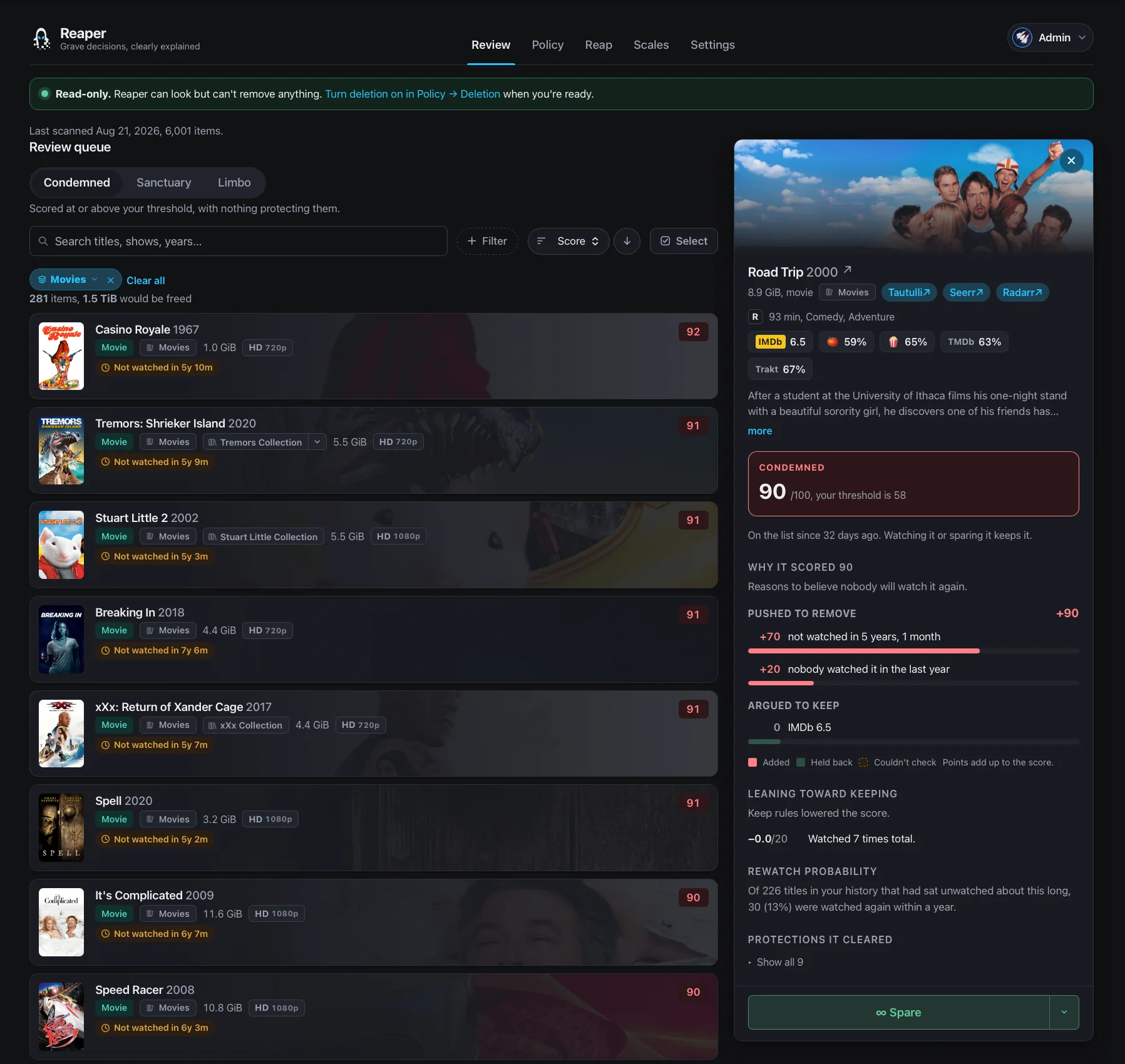
Safety
Reaper deletes irreplaceable data from a server other people depend on. Every ambiguity resolves toward keeping the file.
- Off until you turn it on. A new install starts read-only. It can scan, score and explain, and nothing else. The refusal lives at the HTTP transport. While deletion is off, a mutating request is blocked before it is sent, whatever the calling code believes it is doing.
- Unknown never condemns. A missing rating, an unmappable user, or a degraded data source can only ever protect an item. This is enforced by the type system.
- Nothing is deleted while it is being streamed. The active-session veto is re-checked immediately before every single delete.
- Reaper only acts through Sonarr and Radarr. It has no filesystem delete path. Media that no *arr manages cannot be deleted, only reported.
The Plex token Reaper stores grants full administrative control of your Plex account, including permanent deletion. Treat Reaper's database as equivalent to your Plex password. It's encrypted at rest and redacted from logs.
How a delete is kept safe walks the whole path through.
How Reaper is built
This is a hobby project. Know that before you point it at a library you care about.
I work in tech and I've been writing Python for over ten years. Software engineering isn't my job title. Reaper exists because I wanted it and had the evenings to build it.
A lot of this codebase was written with AI assistance. I steer the work, read what comes back, and decide what ships. The architecture, the safety model, and the bar for what's good enough are all mine.
You're trusting this program with files you can't get back. Safety comes first here, and the design choices that follow from that are on purpose. If you think one of them is wrong or you see a better way, tell me. I'd rather hear it so we can make Reaper better.
Contributing
Setup instructions, the verification gates, commit conventions, and the AI policy are in CONTRIBUTING.md.
Translations happen on Weblate, which opens the pull requests here. No git needed.
Bug reports and questions are welcome: open an issue or start a discussion. Security problems go through SECURITY.md, which opens a private report.
The manual's pages live in manual/; the ones under Policy and Safety are
generated from the app's own help pages, so edit those in
frontend/src/docs/content/ and run
npm --prefix frontend run gen-manual.
License
AGPL-3.0-or-later.
Categories
Related apps
Explore more like this
Explore allDetails
ghcr.io/scythe-labs/reaper:latestRuntime arguments
- Web UI
http://[IP]:[PORT:8420]/- Network
bridge- Shell
bash- Privileged
- false
Template configuration
The port you reach Reaper's web interface on. Running a second copy beside this one? Give that one a different port here.
- Target
- 8420
- Default
- 8420
- Value
- 8420
Reaper's database, its encryption key, and the cached data it scans. Back this folder up. Its ownership is fixed automatically on start, so you do not need to chown it. Running a second copy beside this one? Give that one its own folder here.
- Target
- /data
- Default
- /mnt/user/appdata/reaper
- Value
- /mnt/user/appdata/reaper
The user id Reaper runs as. The container fixes the data folder to this user on start, then drops to it before opening the database. The default 99 is Unraid's nobody, so your appdata stays owned the usual way.
- Default
- 99
- Value
- 99
The group id Reaper runs as, paired with PUID. The default 100 is Unraid's users group.
- Default
- 100
- Value
- 100
The starting state for deletion, used on the first run only. Leave it false. After the first run Reaper remembers your choice and this field is ignored: you turn deletion on in the web interface under Policy, which asks for your password. Set it true only if you want a fresh install to come up ready to delete.
- Target
- REAPER_DESTRUCTIVE_ACTIONS_ENABLED
- Default
- false
- Value
- false
Optional. Encrypts your stored API keys. Leave it empty and Reaper makes one on first start and saves it to the data folder as secret.key, which you back up with the database. Fill it in only if you would rather hold the key yourself, for example from a password manager. Generate one with: python -c "import secrets; print(secrets.token_urlsafe(32))"
- Target
- REAPER_SECRET_KEY
Set true and restart to print a single-use login link to this container's log, good for 15 minutes. Use it if you are locked out, then set it back to false.
- Target
- REAPER_RECOVERY
- Default
- false
- Value
- false
Set true to let Reaper add the Leaving Soon label in Plex while deletion is still off, so your users see the warning during the countdown rather than after you turn deletion on. The label is reversible and touches no files, and this can never permit a deletion.
- Target
- REAPER_ALLOW_UNARMED_LEAVING_SOON
- Default
- false
- Value
- false
How much detail goes to the log: DEBUG, INFO, WARNING or ERROR. Change it later in the web interface, under Settings, Logs, and Reaper remembers that choice and ignores this field. ERROR is the one level that picker does not offer, so set it here before you pick a level in the web interface.
- Target
- REAPER_LOG_LEVEL
- Default
- INFO
- Value
- INFO
Set true to write the log as one JSON object per line, for a log collector. Leave false for logs meant to be read by a person.
- Target
- REAPER_LOG_JSON
- Default
- false
- Value
- false
Optional, and used on the first start only. It tells your users what is leaving soon. The whole URL is a secret. After the first start the web interface is where you change it, and a value left here is ignored, so removing it later does not turn notifications off.
- Target
- REAPER_DISCORD_WEBHOOK