
All apps · 0 apps
ralph
Docker app from UnraidUser-8841757726's Repository
Overview
Readme
View on GitHubRalph

Ralph is an autonomous AI agent loop that runs AI coding tools (Amp or Claude Code) repeatedly until all PRD items are complete. Each iteration is a fresh instance with clean context. Memory persists via git history, progress.txt, and prd.json.
Based on Geoffrey Huntley's Ralph pattern.
Read my in-depth article on how I use Ralph
Prerequisites
- One of the following AI coding tools installed and authenticated:
- Amp CLI (default)
- Claude Code (
npm install -g @anthropic-ai/claude-code)
jqinstalled (brew install jqon macOS)- A git repository for your project
Setup
Option 1: Copy to your project
Copy the ralph files into your project:
# From your project root
mkdir -p scripts/ralph
cp /path/to/ralph/ralph.sh scripts/ralph/

# Copy the prompt template for your AI tool of choice:
cp /path/to/ralph/prompt.md scripts/ralph/prompt.md    # For Amp
# OR
cp /path/to/ralph/CLAUDE.md scripts/ralph/CLAUDE.md    # For Claude Code

chmod +x scripts/ralph/ralph.sh
Option 2: Install skills globally (Amp)
Copy the skills to your Amp or Claude config for use across all projects:
For AMP
cp -r skills/prd ~/.config/amp/skills/
cp -r skills/ralph ~/.config/amp/skills/
For Claude Code (manual)
cp -r skills/prd ~/.claude/skills/
cp -r skills/ralph ~/.claude/skills/
Option 3: Use as Claude Code Marketplace
Add the Ralph marketplace to Claude Code:
/plugin marketplace add snarktank/ralph
Then install the skills:
/plugin install ralph-skills@ralph-marketplace
Available skills after installation:
/prd- Generate Product Requirements Documents/ralph- Convert PRDs to prd.json format
Skills are automatically invoked when you ask Claude to:
- "create a prd", "write prd for", "plan this feature"
- "convert this prd", "turn into ralph format", "create prd.json"
Configure Amp auto-handoff (recommended)
Add to ~/.config/amp/settings.json:
{
  "amp.experimental.autoHandoff": { "context": 90 }
}
This enables automatic handoff when context fills up, allowing Ralph to handle large stories that exceed a single context window.
Workflow
1. Create a PRD
Use the PRD skill to generate a detailed requirements document:
Load the prd skill and create a PRD for [your feature description]
Answer the clarifying questions. The skill saves output to tasks/prd-[feature-name].md.
2. Convert PRD to Ralph format
Use the Ralph skill to convert the markdown PRD to JSON:
Load the ralph skill and convert tasks/prd-[feature-name].md to prd.json
This creates prd.json with user stories structured for autonomous execution.
3. Run Ralph
# Using Amp (default)
./scripts/ralph/ralph.sh [max_iterations]

# Using Claude Code
./scripts/ralph/ralph.sh --tool claude [max_iterations]
Default is 10 iterations. Use --tool amp or --tool claude to select your AI coding tool.
Ralph will:
- Create a feature branch (from PRD
branchName) - Pick the highest priority story where
passes: false - Implement that single story
- Run quality checks (typecheck, tests)
- Commit if checks pass
- Update
prd.jsonto mark story aspasses: true - Append learnings to
progress.txt - Repeat until all stories pass or max iterations reached
Key Files
| File | Purpose |
|---|---|
ralph.sh |
The bash loop that spawns fresh AI instances (supports --tool amp or --tool claude) |
prompt.md |
Prompt template for Amp |
CLAUDE.md |
Prompt template for Claude Code |
prd.json |
User stories with passes status (the task list) |
prd.json.example |
Example PRD format for reference |
progress.txt |
Append-only learnings for future iterations |
skills/prd/ |
Skill for generating PRDs (works with Amp and Claude Code) |
skills/ralph/ |
Skill for converting PRDs to JSON (works with Amp and Claude Code) |
.claude-plugin/ |
Plugin manifest for Claude Code marketplace discovery |
flowchart/ |
Interactive visualization of how Ralph works |
Flowchart
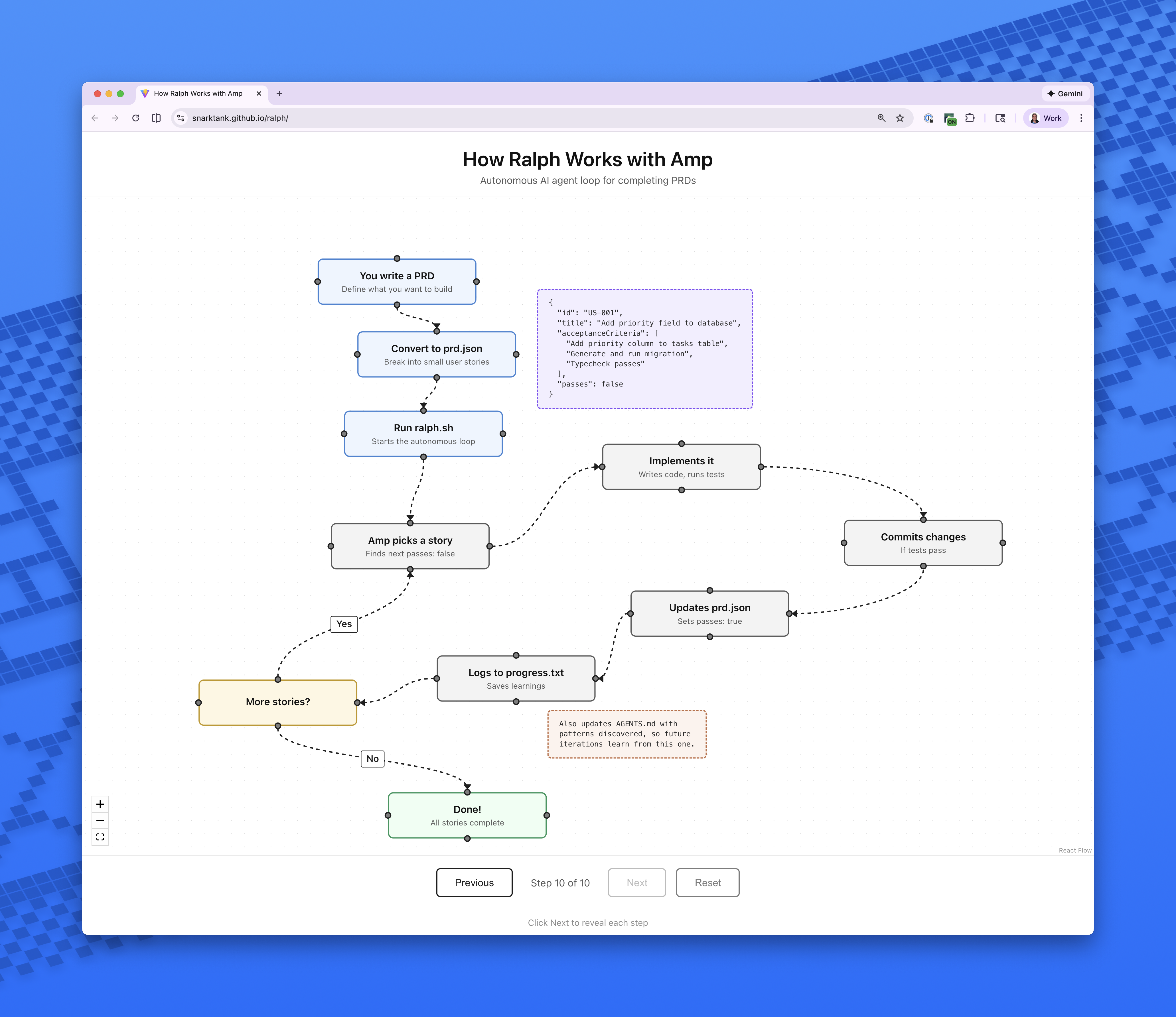
View Interactive Flowchart - Click through to see each step with animations.
The flowchart/ directory contains the source code. To run locally:
cd flowchart
npm install
npm run dev
Critical Concepts
Each Iteration = Fresh Context
Each iteration spawns a new AI instance (Amp or Claude Code) with clean context. The only memory between iterations is:
- Git history (commits from previous iterations)
progress.txt(learnings and context)prd.json(which stories are done)
Small Tasks
Each PRD item should be small enough to complete in one context window. If a task is too big, the LLM runs out of context before finishing and produces poor code.
Right-sized stories:
- Add a database column and migration
- Add a UI component to an existing page
- Update a server action with new logic
- Add a filter dropdown to a list
Too big (split these):
- "Build the entire dashboard"
- "Add authentication"
- "Refactor the API"
AGENTS.md Updates Are Critical
After each iteration, Ralph updates the relevant AGENTS.md files with learnings. This is key because AI coding tools automatically read these files, so future iterations (and future human developers) benefit from discovered patterns, gotchas, and conventions.
Examples of what to add to AGENTS.md:
- Patterns discovered ("this codebase uses X for Y")
- Gotchas ("do not forget to update Z when changing W")
- Useful context ("the settings panel is in component X")
Feedback Loops
Ralph only works if there are feedback loops:
- Typecheck catches type errors
- Tests verify behavior
- CI must stay green (broken code compounds across iterations)
Browser Verification for UI Stories
Frontend stories must include "Verify in browser using dev-browser skill" in acceptance criteria. Ralph will use the dev-browser skill to navigate to the page, interact with the UI, and confirm changes work.
Stop Condition
When all stories have passes: true, Ralph outputs <promise>COMPLETE</promise> and the loop exits.
Debugging
Check current state:
# See which stories are done
cat prd.json | jq '.userStories[] | {id, title, passes}'

# See learnings from previous iterations
cat progress.txt

# Check git history
git log --oneline -10
Customizing the Prompt
After copying prompt.md (for Amp) or CLAUDE.md (for Claude Code) to your project, customize it for your project:
- Add project-specific quality check commands
- Include codebase conventions
- Add common gotchas for your stack
Archiving
Ralph automatically archives previous runs when you start a new feature (different branchName). Archives are saved to archive/YYYY-MM-DD-feature-name/.
References
Categories
Related apps
Explore more like this
Explore allDetails
snarktank/ralph:latestRuntime arguments
- Web UI
http://[IP]:[PORT:3000]- Network
bridge- Shell
bash- Privileged
- false
Template configuration
Path to your project codebase directory (source code, tests, etc.) on Unraid
- Target
- /workspace/project
- Default
- /mnt/user/appdata/ralph/project
- Value
- /mnt/user/appdata/ralph/project
Select the specific prd.json file on your host system to be mounted for this run (like selecting an ISO for a VM)
- Target
- /workspace/project/prd.json
Host port to map for the Ralph Dashboard Web UI
- Target
- 3000
- Default
- 3000
- Value
- 3000
Comma-separated list of accounts to use and rotate (e.g. claude-1,antigravity-1,claude-2)
- Target
- AGENT_ACCOUNTS
- Default
- claude-1,antigravity-1
- Value
- claude-1,antigravity-1
Maximum loop iterations to run before stopping if stories aren't completed
- Target
- MAX_ITERATIONS
- Default
- 10
- Value
- 10
Anthropic API Key for claude-1 account
- Target
- ANTHROPIC_API_KEY_1
Anthropic API Key for claude-2 account
- Target
- ANTHROPIC_API_KEY_2
Google API Key for antigravity-1 account
- Target
- GOOGLE_API_KEY_1
Google API Key for antigravity-2 account
- Target
- GOOGLE_API_KEY_2
Alternative key for antigravity-1 (leave blank if GOOGLE_API_KEY_1 is set)
- Target
- ANTIGRAVITY_API_KEY_1
Alternative key for antigravity-2 (leave blank if GOOGLE_API_KEY_2 is set)
- Target
- ANTIGRAVITY_API_KEY_2
Fallback default agent tool if AGENT_ACCOUNTS is empty (amp or claude)
- Target
- AGENT_TOOL
- Default
- amp
- Value
- amp
Fallback default Anthropic Key if AGENT_ACCOUNTS is empty
- Target
- ANTHROPIC_API_KEY
Fallback default Google Key if AGENT_ACCOUNTS is empty
- Target
- GOOGLE_API_KEY
Any additional command-line parameters to pass to ralph.sh (e.g. --input-method file)
- Target
- RALPH_ARGS
Set to true to keep the container running after ralph completes, allowing shell inspection
- Target
- KEEP_ALIVE
- Default
- false
- Value
- false
Container timezone
- Target
- TZ
- Default
- Europe/Berlin
- Value
- Europe/Berlin
Persistence folder for Amp credentials and settings
- Target
- /root/.config/amp
- Default
- /mnt/user/appdata/ralph/amp-config
- Value
- /mnt/user/appdata/ralph/amp-config
Persistence folder for Claude Code credentials
- Target
- /root/.claude
- Default
- /mnt/user/appdata/ralph/claude-config
- Value
- /mnt/user/appdata/ralph/claude-config
Persistence folder for agy credentials
- Target
- /root/.config/agy
- Default
- /mnt/user/appdata/ralph/agy-config
- Value
- /mnt/user/appdata/ralph/agy-config