

quickdaw
Docker app from Stoatworks Labs' Repository
Overview
Readme
View on GitHubQuickDaw
AI-assisted project. This codebase was created with Claude Code (Anthropic), directed and reviewed by a human author. The buffer arithmetic and the file format are well covered by tests, and both AudioWorklets have been driven in a real browser from a synthetic source; the details are under Development, at the bottom. It has not been run against a real multichannel interface, or against a microphone at all. The channel mapping, the sample-rate matching, the disk throughput and the long-take behaviour are correct by construction and by test, and unproven against hardware.
QuickDaw is a multitrack audio recorder that runs entirely in a browser tab. Pick an interface and you get one track per input, mapped 1:1, each streamed straight to a folder on your disk as WAV.
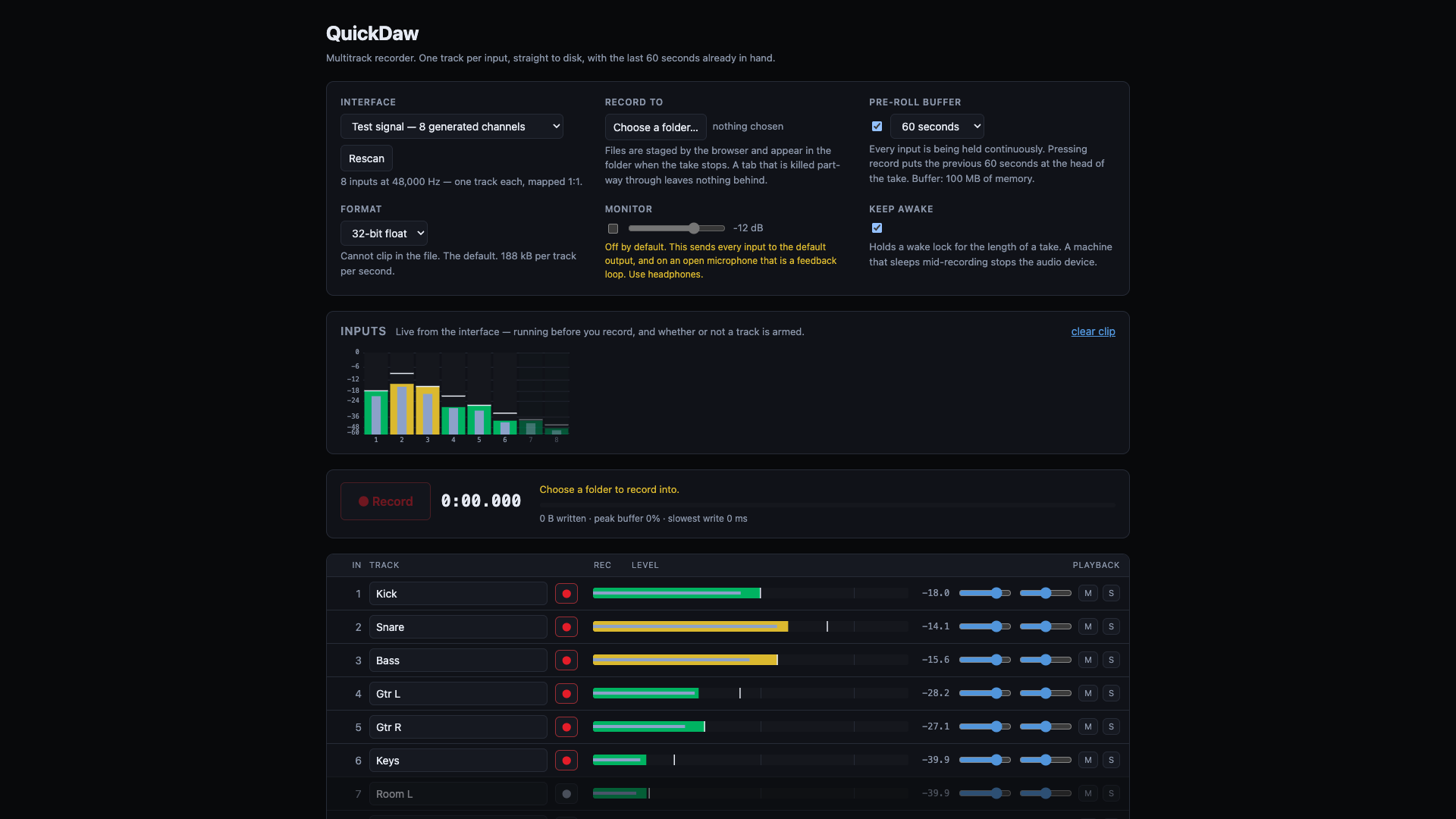
This is the built-in test signal, so the app is metering audio it made itself, through the same worklet, ring and writer a live interface uses. Input 1 is the 1 kHz reference and reads -18.0, which is worth checking before you trust any of it.
- One track per input. The interface's channel count is read from the device and the track list is built from it. Name the tracks, and disarm the ones you don't want.
- Pre-roll buffer. With it on, every input is held continuously (30 seconds by default, up to two minutes). Pressing record puts the audio from before you pressed it at the head of the take.
- Straight to disk. Takes stream to a folder you choose, one mono WAV per track plus a
take.json. Nothing is held in memory waiting for a stop. - 32-bit float or 24-bit, at the interface's own sample rate, with no resampling and none of the browser's voice processing.
- A test signal, generated in the page. Eight channels, with no interface and no microphone permission needed, so you can prove the recorder before a session rather than during one. Input 1 is a steady 1 kHz tone at precisely -18 dBFS, so the meters can be checked against a number. It runs through the same worklet, ring, writer and files as a live interface, so a take made from it exercises everything a real take does.
- Metering before you commit to anything. A meter bridge across every input, live from the moment the interface opens (before arming, before recording), with peak, RMS, peak hold, a latching clip flag and a dB scale. Each track row carries its own meter and numeric readout for setting a level on one input.
- Playback of any take in the session, streamed from the files, with per-track gain, pan, mute and solo.
It doesn't have a backend or accounts, and it doesn't collect telemetry. The audio goes from the interface to your folder and never leaves the machine.
The pre-roll
The thing a recorder is for is the take you didn't press record in time for.
With the pre-roll on, every input is captured from the moment the device opens. The buffer holds the last N seconds, and when you press record, the take begins N seconds ago. There's no arming step and no copy: the writer just starts reading at a position that's already in the past, and chases forward from there.
The cost is memory, and it isn't small. One second of held audio is sample rate × channels × 4
bytes, so 30 seconds of a 16-input interface at 48 kHz is 92 MB, and two minutes of 32 inputs at
96 kHz is 1.5 GB. The figure for your interface is shown next to the control before you commit to
it.
If you press record before the buffer has filled, the take starts at the earliest audio that exists rather than padding the difference with silence, so the file's start time stays true.
What lands on disk
QuickDaw 2026-08-28 14-32-05/
  01 Kick.wav
  02 Snare.wav
  03 Room L.wav
  take.json
One mono WAV per track, which every DAW imports without asking questions, and which lets you
disarm a single track without disturbing the others. take.json records the sample rate, the
format, the length, how much of the head is pre-roll, and where the gaps are, if there were any.
Files appear when the take stops. The browser stages a streamed write and moves it into place at close. The take is on disk the whole time but isn't visible as the file until then, and a tab that's killed mid-take leaves nothing behind. That's the price of the single-pass write, and it's the same for every browser-based recorder that streams to a folder.
Gaps, and why they are silence rather than nothing
If the disk stalls for longer than the buffer holds, frames are lost, and nothing can prevent that. What QuickDaw does is refuse to hide it:
- the lost frames are replaced by the same number of frames of silence, so the take keeps its length and everything after the gap stays where it belongs;
- the position and size of each gap goes into
take.jsonand is shown on the take in the app.
The alternative, writing the surviving frames end to end, shortens the take and drags everything after the gap early. It does that identically on every track, so the result stays perfectly in sync with itself while being wrong against the world, and that's the kind of fault you can't find afterwards.
The buffer readout during a take shows how full the ring is, the worst it's been, the slowest single disk write, and the frame count if anything has been lost. If that bar isn't near the bottom, the disk is the problem.
Requirements
Chrome or Edge, on a desktop. Two things decide it:
- The File System Access API, for streaming a take into a folder you choose. Firefox and Safari don't have it.
- Cross-origin isolation, which a browser requires before it'll hand out a
SharedArrayBuffer. Every buffer here is one (the audio thread writes into shared memory and a worker reads it), so without it the app says so and stops, rather than falling back to something that glitches. The deployed site sends the headers, and so donpm run devandnpm run preview.
Multichannel input above two channels is a Chrome capability, and how many channels a given interface offers a browser is up to the driver. QuickDaw asks for everything and reports what it was given.
What it is not
- Not a DAW. No editing, no arrangement, no plugins, no overdubbing to an existing take. It records and it plays back, despite the name.
- No punch-in, no loop recording, no track arming during a take. The armed set is fixed at the moment record is pressed, because changing it means opening a file mid-recording, with that track starting late against every other one.
- No 16-bit. Truncating to 16 bits properly needs dither, and dither at record time is a decision that belongs at the end of a chain rather than the start.
- Not low-latency. Quite the opposite, on purpose: the audio context asks for the largest buffers the browser will give, because nothing is waiting on the input and a bigger buffer is a bigger margin. You can monitor through the app, but it isn't the way to monitor a live source.
Development
npm install
npm run dev          # vite dev server, with the isolation headers
npm test             # vitest — 80 tests
npm run build        # tsc -b && vite build -> dist/
npm run lint         # oxlint
The buffer arithmetic is verified numerically. 80 tests pin the ring's behaviour across its 32-bit wrap and through an overrun, the WAV headers byte by byte, the 24-bit conversion against its own quantisation step, and the mixer's solo and pan rules. The central invariant, that a take is the same length as the time it covers with every sample at the position it was captured at, is tested by driving a producer and a consumer against each other through forced stalls. Both AudioWorklets have been driven in a real browser from a synthetic source, which is how a bug that would have capped every interface at two inputs was found, and the header-patching the file format depends on has been checked against the real filesystem API, coming back bit-exact and readable by the browser's own decoder.
AGENTS.md explains the model and the traps; docs/NOTES.md carries the working notes.
Run your own copy
QuickDaw is a static page, so hosting it yourself is one container serving the built files — the same files the hosted copy serves, running somewhere that still works when the venue has no internet.
Docker. The image is built by this repo's docker.yml workflow on every
push and published as ghcr.io/stoatworks-labs/quickdaw:
docker run -d --name quickdaw --restart unless-stopped -p 8542:80 ghcr.io/stoatworks-labs/quickdaw:latest
Or docker compose up -d with the docker-compose.yml
in this repo, which maps the same port. Either way it is then at
http://localhost:8542/.
Unraid. Search Community Applications for QuickDaw — the template is
templates/quickdaw.xml
in stoatworks-unraid, which is what the CA feed reads.
Stoatworks Burrow lists it under Self-hosted, with the compose file a click away.
Note: Recording needs the browser's audio-input and file-system-access APIs, which are only available in a secure context. Served over plain http at a LAN address there is no navigator.mediaDevices at all, so open the container at http://localhost:PORT on the machine with the audio interface, or put a TLS terminator in front of it.
The Dockerfile, docker-compose.yml, docker/ and the workflow are
generated from fleet.json in stoatworks-unraid. Change them there and
regenerate rather than editing them here.
This project is built on other people's work — see ATTRIBUTIONS.md.
Licence
MIT.
Categories
Related apps
Explore more like this
Explore allDetails
ghcr.io/stoatworks-labs/quickdaw:latestRuntime arguments
- Web UI
http://[IP]:[PORT:80]/- Network
bridge- Shell
sh- Privileged
- false
Template configuration
Host port for the web interface.
- Target
- 80
- Default
- 8542
- Value
- 8542