
All apps · 0 apps

purgebot
Docker app from ProphetSe7en's Repository
Overview
Readme
View on GitHubPurgeBot
Automated message cleanup for Discord servers. Define retention policies per category and channel, and let PurgeBot handle the rest - on a schedule or on-demand via the built-in Web UI.
Built for servers with many channels (media automation, homelab, development) where messages pile up across dozens of categories and manual cleanup is impractical.
Warning: PurgeBot permanently deletes Discord messages. Deleted messages cannot be recovered - Discord does not have a recycle bin or undo function. Always start with
dryRun: true(the default) and verify the dry-run output before enabling live deletion. Only channels explicitly listed in your config are processed (allow-list safety), but misconfiguration can still lead to unintended data loss. Use at your own risk. The authors are not responsible for any lost messages.
Screenshots
| Overview | Cleanup |
|---|---|
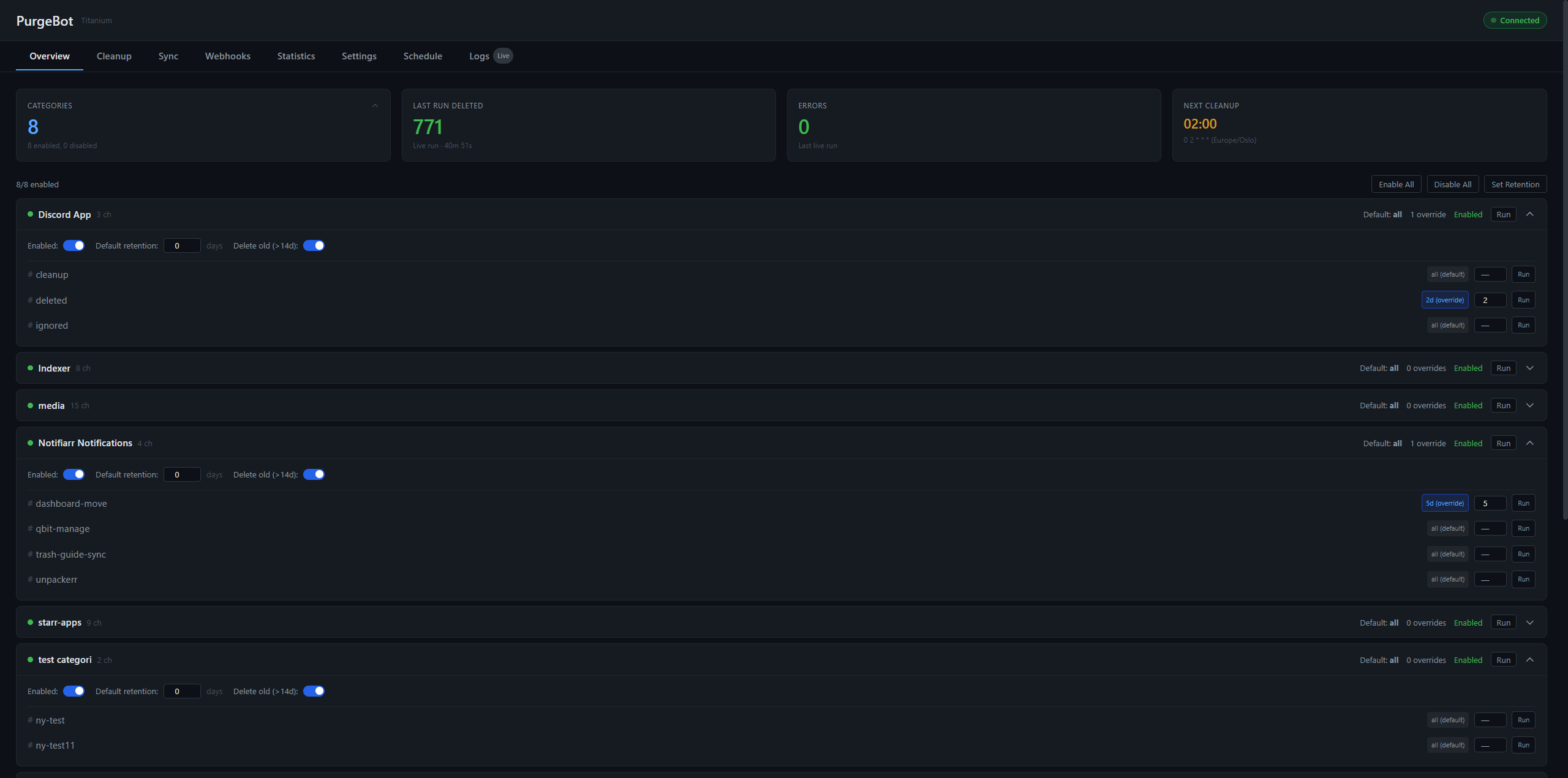 |
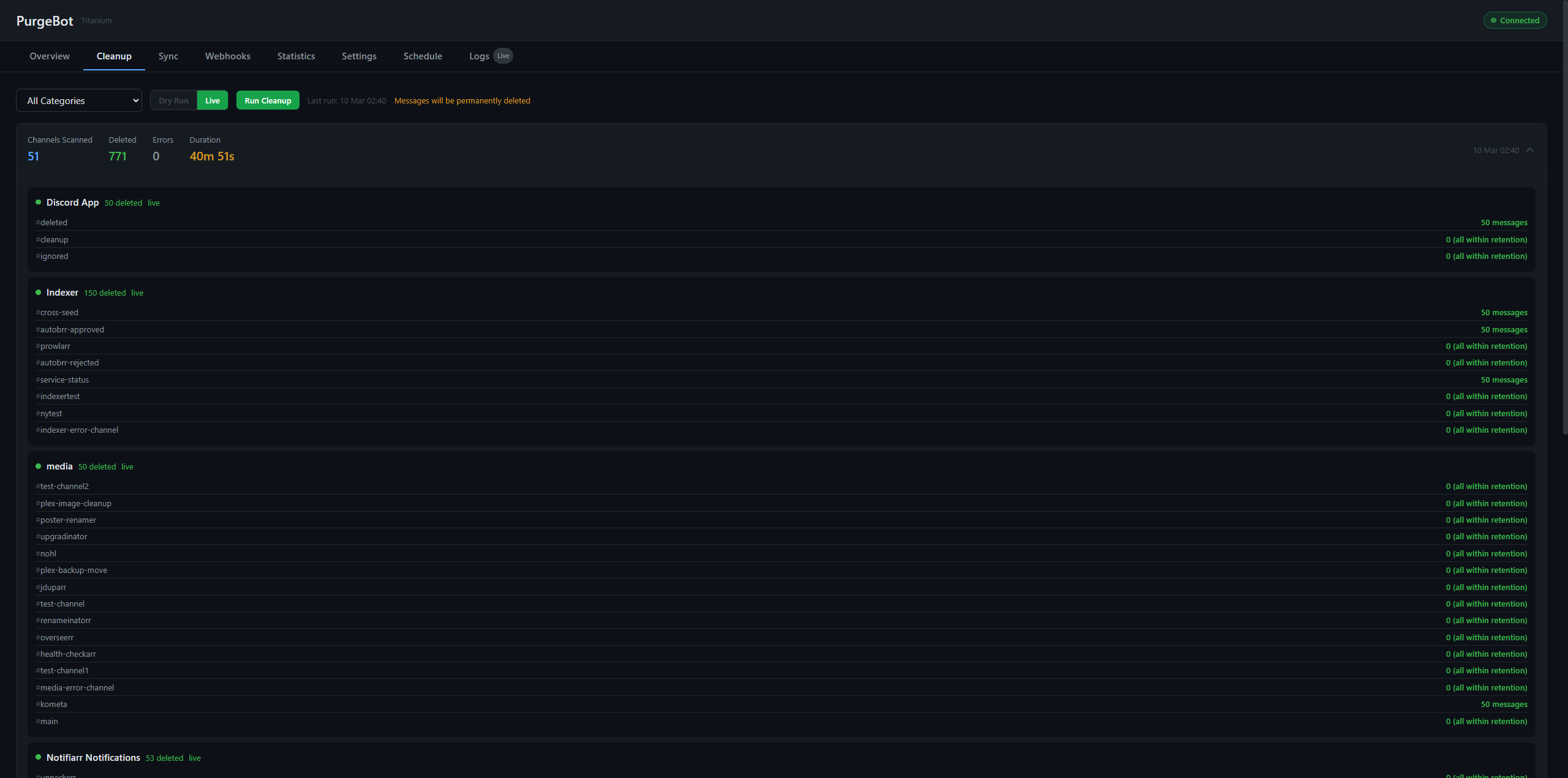 |
| Sync | Statistics |
|---|---|
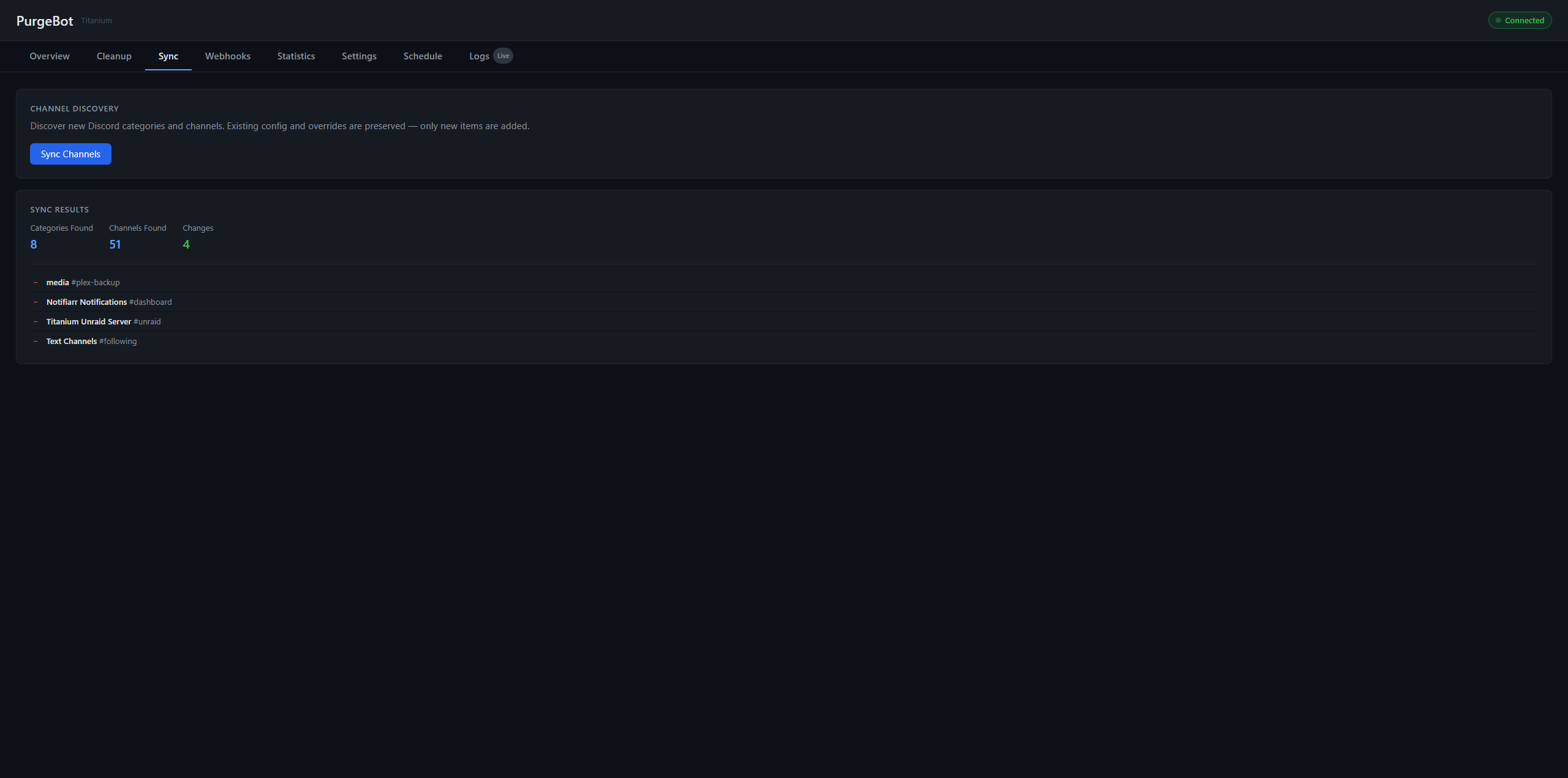 |
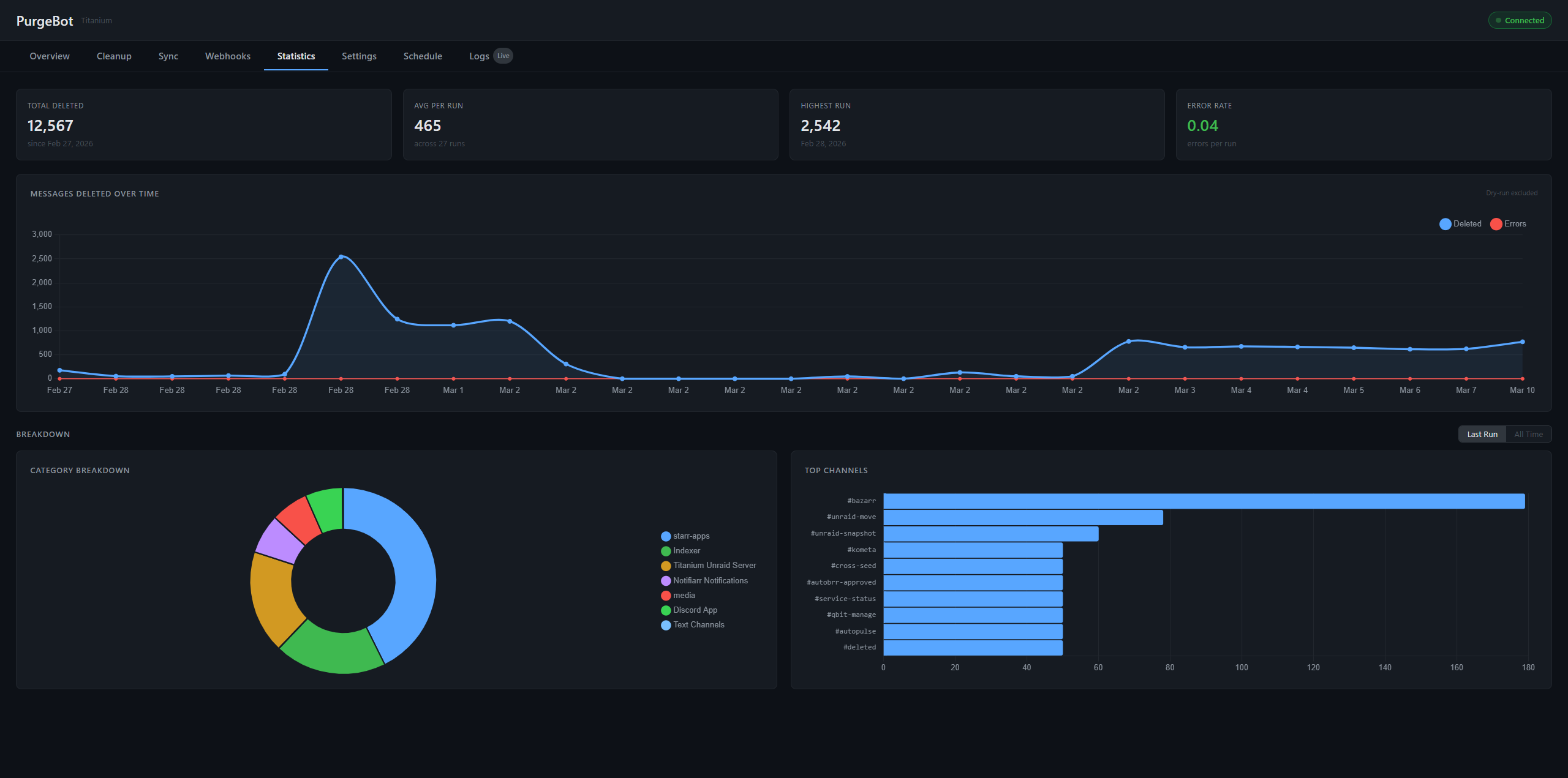 |
| Schedule |
|---|
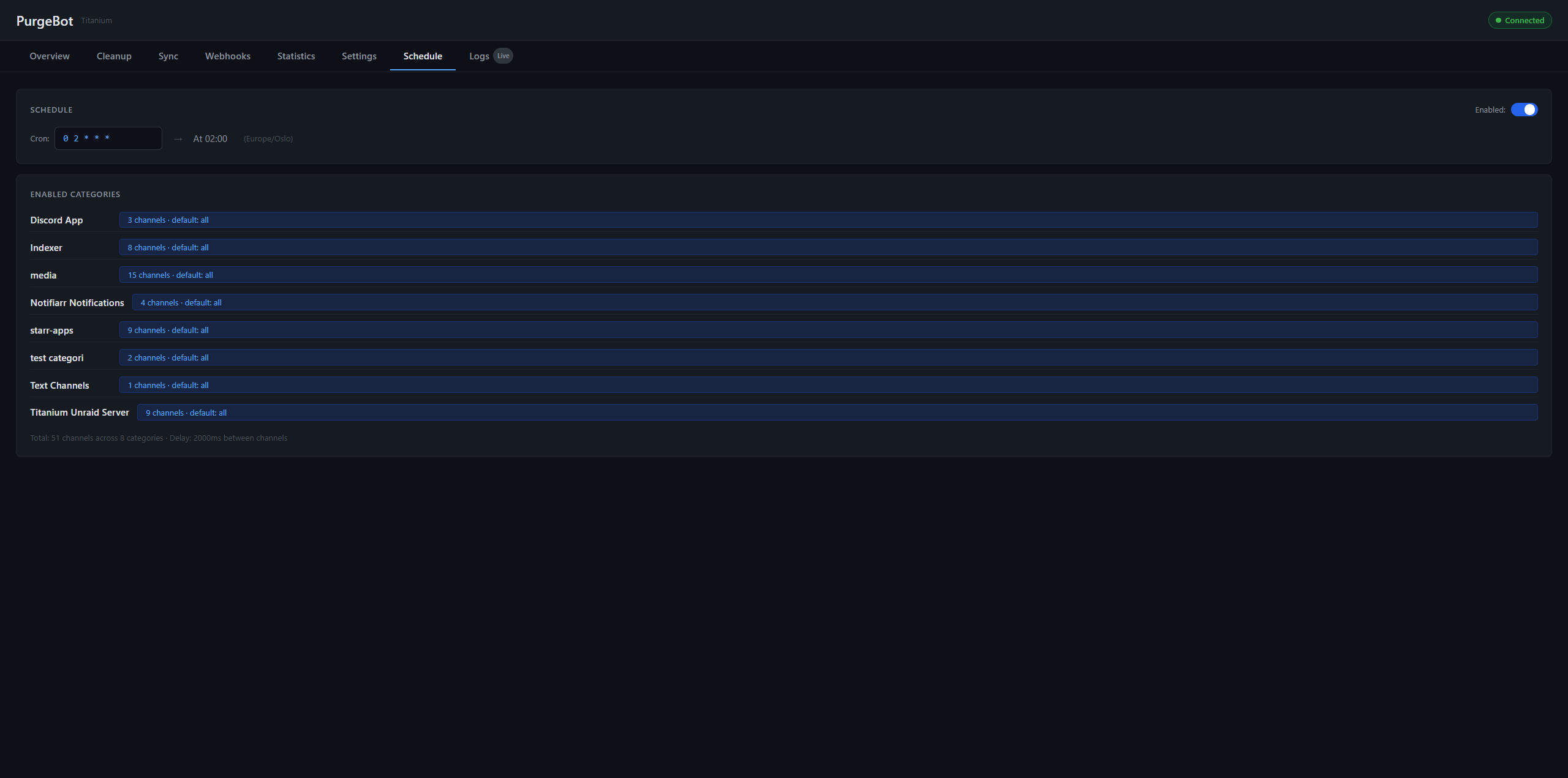 |
Features
Cleanup
- Hierarchical retention - channel override > category default > global default
- Per-channel retention dropdown - Default (inherit category), Skip (never delete), or Custom days. Shows effective delete range (>7d, 7-14d, etc.)
- Auto-discovery - new channels and categories detected automatically after each scheduled run
- Allow-list safety - only channels explicitly listed in config are processed
- Dry-run mode - see what would be deleted before enabling live cleanup
- Purge All - delete and recreate a channel to instantly clear all history, with webhook recreation and recovery safety net
- >14-day delete support - individually deletes messages older than Discord's bulk-delete limit
- Cancel cleanup - stop a running cleanup from any tab via the header Stop button
Discord Tools
- Channel & Category Sorting - sort Discord server categories and channels alphabetically. Manual via Sort Now or automatic after scheduled cleanup. Per-category opt-in with pinned positions (lock to first, last, or specific position)
- Webhook Discovery - browse all server webhooks grouped by category and channel, with optional scheduled scanning
Web UI
- Centered layout - clean, readable interface with sidebar Settings navigation
- Category grid overview - fixed columns (Category, Deletes, Overrides, Cleanup, Sort, Pin) show feature status at a glance
- Settings sidebar - Cleanup, Notifications, Schedule, Discord Tools, General
- Inline results - run results appear directly in the UI
- Live log streaming - SSE-based real-time log viewer with level filtering
- Statistics - deletion history charts, category breakdown, top channels
Infrastructure
- Scheduled cleanup - cron-based scheduling with timezone support. Post-cleanup: auto-sync → webhook discovery → auto-sort
- Webhook notifications - cleanup summaries, discovery alerts, and sort results to Discord + Gotify
- Hot-reload config - edit config.yaml or use the Web UI - changes take effect on next run
- Atomic config writes - write-to-temp then rename prevents corruption
- Docker-native - PUID/PGID/UMASK, healthcheck, Alpine-based (~45 MB)
Quick Start
1. Create a Discord Bot
- Go to the Discord Developer Portal
- Click New Application, give it a name (e.g. "PurgeBot"), and create it
- Go to the Bot tab:
- Click Reset Token and copy the token - you'll need this as
DISCORD_TOKEN - Under Privileged Gateway Intents: leave them all OFF. PurgeBot does NOT need
Message Content Intent,Server Members Intent, orPresence Intent. Message bodies are read via REST when the bot scans channels, which requires only the Read Message History permission.
- Click Reset Token and copy the token - you'll need this as
- Go to OAuth2 > URL Generator:
- Scopes: select
bot - Bot Permissions: pick only the permissions you need (see the table below). Avoid granting
Administrator- least-privilege keeps blast radius small if the token ever leaks.
- Scopes: select
- Copy the generated URL, open it in your browser, select your server, and authorize
Gateway intents (what PurgeBot uses)
| Intent | Privileged? | PurgeBot uses it? | Why |
|---|---|---|---|
Guilds |
No | Yes | Tracks the configured guild, channels, categories |
GuildMessages |
No | Yes | Receives message metadata for live cleanup awareness |
MessageContent |
Yes | No | Not required - PurgeBot reads message content via REST during scheduled scans, gated by Read Message History |
GuildMembers |
Yes | No | Not needed |
GuildPresences |
Yes | No | Not needed |
Leaving privileged intents off lets the bot stay below Discord's 75-server verification threshold without ever requesting them.
Permissions by Feature
Pick individual permissions based on which features you use. View Channels is required for everything:
| Feature | View Channels | Read Message History | Manage Messages | Manage Channels | Manage Webhooks | Manage Roles |
|---|---|---|---|---|---|---|
| Cleanup | ✓ | ✓ | ✓ | |||
| Sync / Discovery | ✓ | |||||
| Purge All | ✓ | ✓ | ✓ | ✓ | ||
| Webhook Discovery | ✓ | ✓ | ||||
| Channel & Category Sorting | ✓ | ✓ |
Notes:
Manage Rolesis only needed if Purge All should recreate permission overwrites on the new channel.- Do not grant
Administrator. It's wider than anything PurgeBot ever uses, and the bot also auto-leaves any guild it gets added to outside the configuredGUILD_ID- Administrator on the wrong guild magnifies that risk window.
Finding your Guild ID: Enable Developer Mode in Discord (Settings > Advanced > Developer Mode), then right-click your server name and click "Copy Server ID". This is your
GUILD_ID.
2. Run with Docker
docker run -d \
  --name purgebot \
  --restart unless-stopped \
  -p 3050:3050 \
  -e DISCORD_TOKEN=your_bot_token \
  -e GUILD_ID=your_server_id \
  -v /path/to/config:/config \
  ghcr.io/prophetse7en/purgebot:latest
On first run, a default config.yaml is created in the config volume. Open the Web UI at http://your-host:3050 to configure everything.
3. Initial Setup
- Open
http://your-host:3050- the Web UI is available immediately - Wait for the bot to connect to Discord (green "Connected" badge in the header)
- Click Sync Channels in the Overview tab - this discovers all your categories and channels
- Enable the categories you want cleaned and set retention periods
- Run a Dry Run to preview what would be deleted
- When satisfied, set
dryRun: falsein the Configuration tab
Web UI
The built-in Web UI runs on port 3050 (same container, no separate service).
Overview Tab
Dashboard with stat cards (categories, last run, errors, next cleanup) and a full Category Manager:
- Click the Categories card to expand the management panel
- Enable All / Disable All buttons for quick bulk toggling
- Each category is collapsible with enable/disable toggle, default retention editor, and channel list
- Per-channel retention overrides with inline editing
- Run Now / Dry Run buttons on both category and individual channel level
- Results appear inline (channels scanned, messages deleted, per-channel breakdown)
Cleanup Tab
Unified dry-run/live toggle with cancel support. Select a category or run all, switch between Dry Run and Live mode, and see results inline. A global Stop button in the header lets you cancel from any tab.
Sync Tab
Channel discovery - detects new categories and channels on your Discord server. Shows per-change details with add/remove indicators. Existing config and overrides are preserved.
Statistics Tab
Lifetime stats, per-run history, messages-over-time chart, category breakdown (doughnut), and top channels (bar chart). Toggle between "Last Run" and "All Time" views.
Settings Tab
Sidebar-organised settings:
- Cleanup - retention defaults, dry-run toggle, skip pinned, message rules (advanced), rate-limit knobs.
- Notifications - Discord webhook URLs (cleanup + info) and Gotify push.
- Schedule - cron expression with human-readable preview.
- Discord Tools - webhook discovery, alphabetical sorting, permission checker.
- General - time format, log retention.
- Security - current auth posture, API key (Show/Hide/Copy/Rotate), change password. See the Security section below.
Schedule Tab
Enable/disable scheduled cleanup and edit the cron expression with a human-readable preview. Timezone is read-only (set via the TZ environment variable). Changes apply immediately (no restart needed).
Logs Tab
Real-time runtime log streaming via Server-Sent Events. Filter by level (INFO/WARN/ERROR), search text, or browse historical log files by date. Newest entries appear first.
The separate audit log (/config/logs/audit-*.log) records security-relevant events as JSON-lines for forensic review - see Audit log under Security.
Configuration
Configuration lives in /config/config.yaml (inside the Docker volume). You can edit it manually or use the Web UI - the bot re-reads config before each cleanup run.
Retention Hierarchy
Retention is resolved per-channel using the first match:
- Inline override on the channel entry (e.g.,
- noisy-channel: 3) - Category default (e.g.,
default: 7) - Global default (
globalDefault: 7)
Retention Values
| Value | Meaning |
|---|---|
-1 |
Never delete (keep forever) |
0 |
Delete all messages |
N |
Keep messages newer than N days, delete older |
Example Config
schedule: "0 2 * * *"    # Daily at 02:00
globalDefault: 7          # 7-day fallback
dryRun: true              # Start with true, set false when ready
# Timezone is set via the TZ environment variable in Docker

webhooks:
  cleanup: "https://discord.com/api/webhooks/..."   # Cleanup summaries
  info: "https://discord.com/api/webhooks/..."      # Auto-discovery alerts

discord:
  maxMessagesPerChannel: 500
  maxOldDeletesPerChannel: 50    # Cap for >14-day individual deletes
  delayBetweenChannels: 2000     # Rate limit protection (ms)
  skipPinned: true

logging:
  maxDays: 30

categories:
  Radarr:
    enabled: true
    default: 7
    _channels:
      - grab                     # Uses category default (7 days)
      - imported                 # Uses category default (7 days)
      - upgrade: 3              # Override: 3 days
      - corruption: -1          # Override: never delete
  Sonarr:
    enabled: true
    default: 14
    _channels:
      - grab
      - imported
  NewCategory:
    enabled: false              # Discovered but not yet activated
    default: 7
    _channels:
      - some-channel
Inline Overrides
Channels in _channels can be plain strings (inherit category/global default) or key-value pairs for per-channel overrides:
_channels:
  - general              # plain string -> uses default
  - noisy-channel: 3     # override -> 3 days
  - archive: -1          # override -> never delete
Webhook Notifications (Optional)
PurgeBot can send cleanup summaries and auto-discovery alerts to Discord via webhooks:
- In Discord, right-click a channel > Edit Channel > Integrations > Webhooks > New Webhook
- Copy the webhook URL
- Add it to config:
webhooks.cleanup- receives an embed per category after each cleanup run (shows channels processed and messages deleted)webhooks.info- receives notifications when new categories or channels are discovered on your server
You can use the same webhook URL for both, or separate channels for different notification types.
Auto-Discovery
Before each scheduled cleanup, PurgeBot scans Discord for new categories and channels:
- New categories are added as
enabled: falsewith the global default retention - New channels in existing categories are added to
_channels(inheriting the category default) - Discovery notifications are sent to the
webhooks.infowebhook (after the first run) - Config is written atomically only when changes are detected
Use Sync Channels in the Web UI or run --sync from the CLI for a full reconciliation that also removes categories/channels no longer on Discord.
Docker
Environment Variables
| Variable | Required | Default | Description |
|---|---|---|---|
DISCORD_TOKEN |
Yes | - | Bot token from Discord Developer Portal |
GUILD_ID |
Yes | - | Discord server (guild) ID |
TZ |
No | UTC |
Container timezone |
PUID |
No | 99 |
User ID for file ownership |
PGID |
No | 100 |
Group ID for file ownership |
UMASK |
No | 002 |
File creation mask |
AUTH_REQUIRED |
No | disabled_for_local_addresses |
enabled forces login for every visitor. disabled_for_local_addresses lets LAN IPs through without login. |
TRUSTED_NETWORKS |
No | loopback + RFC1918 + link-local + ULA | Comma-separated CIDRs that bypass auth in the default mode. Setting this env var locks the value (UI cannot change it). |
TRUSTED_PROXIES |
No | - | Comma-separated CIDRs whose X-Forwarded-For headers are honoured. Set this if PurgeBot sits behind a reverse proxy. Env-set values are locked from UI edits. |
Volumes
| Container Path | Purpose |
|---|---|
/config |
Config file, logs, and stats persistence |
Ports
| Port | Purpose |
|---|---|
3050 |
Web UI |
Docker Compose
services:
  purgebot:
    image: ghcr.io/prophetse7en/purgebot:latest
    container_name: purgebot
    restart: unless-stopped
    ports:
      - "3050:3050"
    environment:
      - DISCORD_TOKEN=your_bot_token
      - GUILD_ID=your_server_id
      - TZ=America/New_York
      - PUID=1000
      - PGID=1000
      - UMASK=002
    volumes:
      - ./purgebot-config:/config
Building from Source
git clone https://github.com/prophetse7en/purgebot.git
cd purgebot
docker build -t purgebot .
docker run -d --name purgebot -p 3050:3050 \
  -e DISCORD_TOKEN=... -e GUILD_ID=... \
  -v ./config:/config purgebot
Healthcheck
The container includes a built-in healthcheck that verifies the bot has run successfully within the last 28 hours. Docker (and platforms like Unraid/Portainer) will show the container as unhealthy if no cleanup has completed in that window.
Unraid
Install via Community Apps: Search for purgebot in the Apps tab - click Install and configure your settings.
Or install manually: Go to Docker → Add Container, set Repository to ghcr.io/prophetse7en/purgebot:latest, and add the required paths, ports, and variables (see above).
The Web UI is available at http://your-unraid-ip:3050. Config, logs, and stats are stored in /mnt/user/appdata/purgebot by default.
Updating: Click the PurgeBot icon in the Docker tab and select Force Update to pull the latest image.
CLI Commands
# Discover channels and sync config
docker exec purgebot node src/bot.js --sync

# Run cleanup immediately
docker exec purgebot node src/bot.js --now
These are useful for initial setup. For ongoing use, the Web UI provides the same functionality.
API Reference
The Web UI communicates via a REST API. All state-changing requests require the X-Requested-With: XMLHttpRequest header.
| Method | Path | Description |
|---|---|---|
GET |
/api/config |
Full config as JSON |
PUT |
/api/config |
Replace full config |
PATCH |
/api/config/global |
Update global settings |
PATCH |
/api/config/category/:name |
Update single category |
GET |
/api/stats |
Last run stats + history (30 runs) |
GET |
/api/stats/status |
Live bot status (connected, running, next run) |
POST |
/api/cleanup/run |
Trigger cleanup ({category, channel} optional) |
POST |
/api/cleanup/sync |
Trigger channel sync (returns result) |
POST |
/api/cleanup/dryrun |
Force dry-run ({category, channel} optional) |
POST |
/api/cleanup/cancel |
Cancel a running cleanup |
POST |
/api/cleanup/purge-all |
Delete and recreate a channel |
GET |
/api/cleanup/resolve-channels?category= |
List channels with Discord IDs |
GET |
/api/cleanup/recovery |
List recovery snapshots |
POST |
/api/cleanup/recover |
Restore a channel from recovery snapshot |
GET |
/api/logs?date=&level=&search=&limit= |
Read log files |
GET |
/api/logs/stream |
SSE endpoint for live logs |
Architecture
Single Node.js process - Express runs in the same process as the Discord bot, sharing the live config object and Discord client directly.
src/
├── bot.js                      # Bot core: config, cleanup logic, cron, Discord client
└── ui/
    ├── server.js               # Express setup, middleware, route mounting
    ├── public/
    │   └── index.html          # Single-page app (Alpine.js + Tailwind CSS)
    └── routes/
        ├── config.js           # Config CRUD with validation
        ├── control.js          # Run/sync/dryrun/purge-all/recovery triggers
        ├── logs.js             # Log file reader + SSE streaming
        └── stats.js            # Stats from stats.json + live status
Frontend: Alpine.js + Tailwind CSS (bundled locally in Docker image for offline support). No build step.
Key design decisions:
- Express starts before Discord login (UI available immediately, API returns 503 if not connected)
- Config reference stability - clear+assign pattern keeps exported object reference valid across reloads
- Atomic writes - all config changes write to
.tmpthen rename - SSE with EventEmitter bridge for real-time log streaming
- Stats persisted to
/config/stats.json(last 90 runs)
Security
PurgeBot ships with a Radarr-style auth posture: LAN visitors pass through without login by default, external visitors must sign in. Override the trust list or force-login mode via env vars (see Environment Variables).
Web UI authentication
- First-run setup. When no admin account exists, visiting the UI from outside LAN bypass redirects to
/setup. From inside LAN bypass, visit/setupmanually to opt in. - Login. Bcrypt-hashed password, session cookie signed with a per-install secret. Sessions persist across container restarts. 30-day TTL.
- Brute-force protection. Token-bucket rate-limit on
/login,/setup,/api/auth/api-key/rotate, and/api/auth/change-password- 5 attempts then 1 attempt per minute. - CSRF protection. Per-session token verified via
X-CSRF-Tokenheader on every state-changing request. Anonymous flows use cookie double-submit. - Credential masking. Webhook URLs and Gotify token are masked in
/api/configresponses; saving them back unchanged keeps the stored value.
API key for headless clients
Each install gets a randomly generated 32-byte API key shown in Settings → Security. Send it as X-API-Key: <key> header (or ?apiKey=<key> query string) to bypass session auth for scripts, Homepage widgets, or other automation. Rotate from the same panel.
Audit log
Every security-relevant event is written as JSON-lines to /config/logs/audit-YYYY-MM-DD.log (mode 600). Includes login attempts, config writes, manual cleanup triggers, Discord deletes per channel, sort moves, and guild-allowlist violations.
# Recent auth events
tail /config/logs/audit-$(date +%Y-%m-%d).log | jq 'select(.event | startswith("auth."))'

# What got deleted today
jq 'select(.event == "discord.delete_batch")' /config/logs/audit-$(date +%Y-%m-%d).log
Audit log rotation follows logging.maxDays (default 30 days).
Discord-side safety
Administratorpermission is NOT required (see Permissions by Feature).- The bot leaves any guild it gets added to outside the configured
GUILD_IDimmediately. - Outbound webhook URLs are validated against
discord.com/discordapp.comon every send. Gotify URLs are validated ashttp(s)://. - Discord bot token is read from
DISCORD_TOKENenv and never written toconfig.yamlor any API response.
What lives in /config
| Path | Mode | What |
|---|---|---|
/config/config.yaml |
0644 | Categories, retention, schedule, webhooks (URLs masked when returned by API) |
/config/auth.json |
0600 | Username, bcrypt password hash, API key |
/config/sessions.json |
0600 | Active session cookies (regenerated on logout) |
/config/session-secret |
0600 | Per-install HMAC secret for cookie signing |
/config/logs/purgebot-*.log |
umask default | Runtime log |
/config/logs/audit-*.log |
0600 | Security audit log |
If you mount /config as an SMB share, set it to Secure or Private - file modes don't protect against an SMB client running as the share's superuser.
Disclaimer
This software is provided "as is", without warranty of any kind. PurgeBot permanently deletes Discord messages, which cannot be recovered. By using this software, you accept full responsibility for any data loss. Always test with dryRun: true before enabling live deletion, and verify your configuration carefully.
See the MIT License for full terms.
Support
For questions, help, or bug reports:
- Discord:
#prophetse7en-appson the TRaSH Guides Discord (under Community Apps) - GitHub: prophetse7en/purgebot/issues
Development
PurgeBot is developed with active AI assistance (Claude, Anthropic) under human direction. Architectural decisions, code review, testing on a real Unraid + Radarr/Sonarr stack, and releases are done by ProphetSe7en. Issues and PRs go through a human review.
License
MIT
Requirements
Categories
Related apps
Explore more like this
Explore allDetails
ghcr.io/prophetse7en/purgebot:latestRuntime arguments
- Web UI
http://[IP]:[PORT:3050]- Network
bridge- Shell
sh- Privileged
- false
Template configuration
Web UI port
- Target
- 3050
- Default
- 3050
- Value
- 3050
Config, logs, and stats storage
- Target
- /config
- Default
- /mnt/user/appdata/purgebot
- Value
- /mnt/user/appdata/purgebot
Bot token from Discord Developer Portal
- Target
- DISCORD_TOKEN
Discord server (guild) ID
- Target
- GUILD_ID
User ID for file ownership
- Default
- 99
- Value
- 99
Group ID for file ownership
- Default
- 100
- Value
- 100
File creation mask
- Default
- 002
- Value
- 002