

Pulsarr
Docker app from sp00ks' Repository
Pulsarr is a real-time Plex watchlist monitoring, routing, and notification center that bridges Plex watchlists with Sonarr and Radarr.
Requirements
Overview
Readme
View on GitHub
Pulsarr
Pulsarr turns Plex watchlists into Sonarr and Radarr requests
Version License Bun Discord Docker Pulls Docker Image Size GitHub Stars
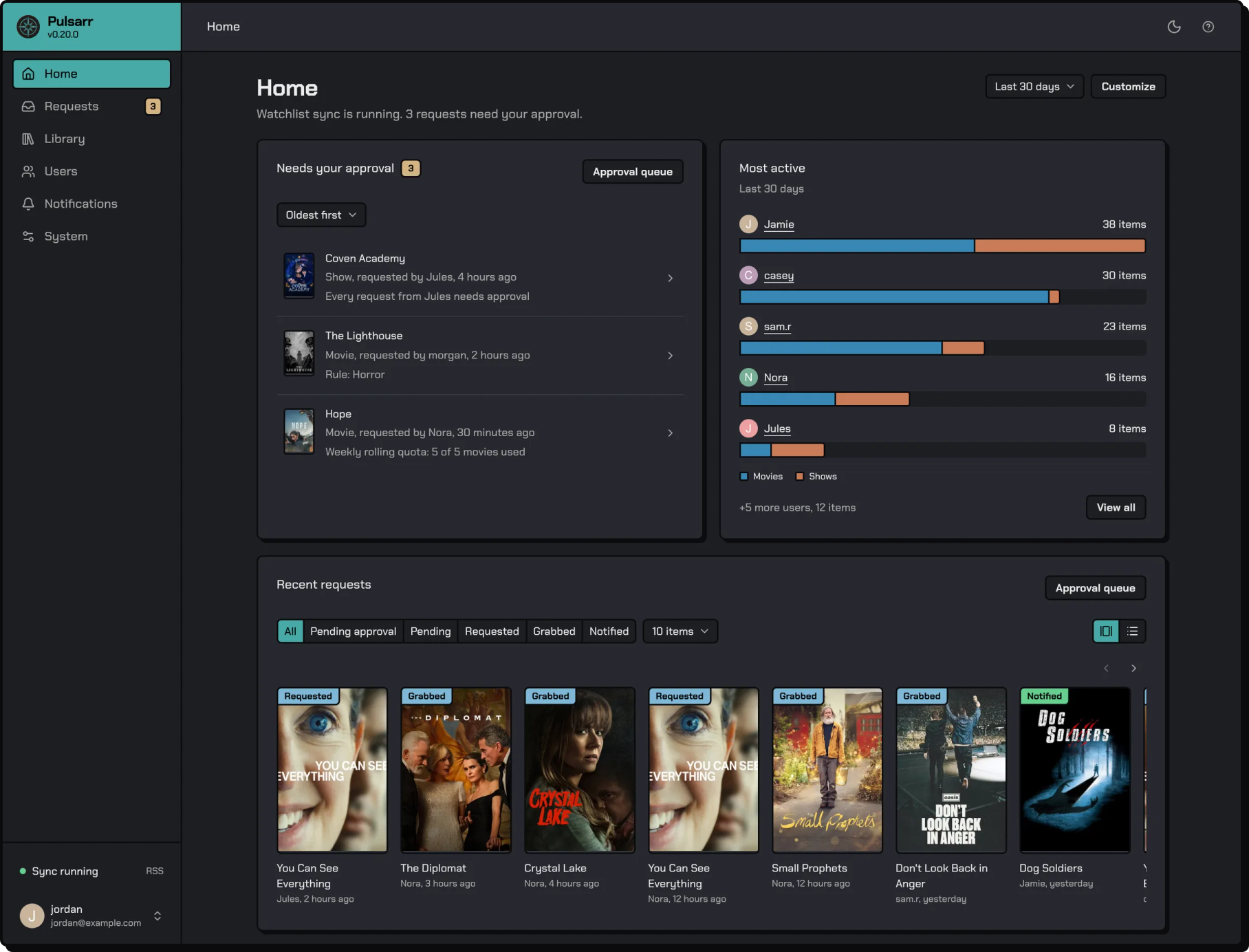
Pulsarr is a Plex watchlist monitor for Sonarr and Radarr. It watches the watchlists of your Plex account and your Plex friends, sends new titles to a Sonarr or Radarr instance, and notifies the people who added them when they're available. Users do all of it from the Plex app, with no separate account to log into.
Pulsarr works through Plex friendship. It can only read the watchlists of people who are friends of the Plex account that owns the server, and each friend's watchlist has to be visible to friends in their Plex privacy settings. A private watchlist looks empty.
Quick start
Create a .env with your time zone and a docker-compose.yml next to it, then run docker compose up -d and open http://<your-server>:3003.
TZ=America/Los_Angeles
services:
  pulsarr:
    image: lakker/pulsarr:latest
    container_name: pulsarr
    ports:
      - "3003:3003"
    volumes:
      - ./data:/app/data
    environment:
      - PUID=1000
      - PGID=1000
    restart: unless-stopped
    env_file:
      - .env
The image is also published as ghcr.io/jamcalli/pulsarr.
Other settings go in .env or under environment:. The time zone is all first-run setup needs. The quick start guide covers the rest, including the Plex privacy setting.
Features
- Watchlist sync. New items are picked up within seconds with Plex Pass, and about every five minutes without it.
- Multi-user. Your friends' watchlists too, with per-user sync, approval, notification and quota settings.
- Content routing. A predicate rule builder with nested all/any/not groups. Conditions: Genres, User, Plex list, Year, Language, Certification, Streaming services, IMDb rating, IMDb votes, RT critic score, RT audience score, TMDB rating, Season, Series status and Movie status. Each route picks the instance, root folder, quality profile, monitoring and tags, or skips the title, and can require approval or bypass quotas. One request can go to several instances.
- Multiple Sonarr and Radarr instances. Connect as many as you like and copy content between them.
- Approvals and quotas. Hold requests for your decision and cap how much each user can request, from the web UI or Discord.
- Delete sync. Remove content once nobody wants it, by watchlist or by tag, with playlist protection.
- Exclusions. Block titles from being requested, for one user or everyone.
- Session monitoring. Grow rolling shows in Sonarr as people watch them.
- User tags and Plex labels. Mark content in Sonarr, Radarr and Plex by who has it on their watchlist.
- Notifications. Discord bot and channels, Plex mobile push, webhooks, and anything Apprise reaches.
- REST API. Everything the web UI does, with API keys and interactive docs at
/api/docs.
Documentation
Everything is at jamcalli.github.io/Pulsarr. Start with how Pulsarr works, then installation for Docker, the native installers for Linux, Windows and macOS, and PostgreSQL.
Hosted option
ElfHosted offers managed Pulsarr hosting with pre-configured media server bundles. 33% of every Pulsarr subscription supports the project.
Community integrations
- Home Assistant integration, community maintained, manages Pulsarr requests from Home Assistant.
- Pulsarr card, the companion card for that integration.
Transparency
Pulsarr began as a TypeScript rewrite of Watchlistarr and has grown with contributions from the community. It's developed with AI assistance. Every decision about architecture, features and direction is made by a person, and every change is reviewed before it ships.
Security is a priority. Renovate keeps dependencies current, auth follows Fastify best practices, and every endpoint is protected by default. To report a security concern, see SECURITY.md.
Contributing
Pull requests are welcome. Fork the repo, branch from develop, and open the PR against develop.
Support
- Discord for help, discussion and updates.
- GitHub issues for bug reports and feature requests.
Acknowledgements
- Plex • Sonarr • Radarr • Fastify • Discord.js • Watchlistarr
License
Pulsarr is licensed under the GPL. See the LICENSE file for details.
Repository activity
Repobeats analytics
Star history
Star History ChartContributors
ContributorsCategories
Download Statistics
Total Downloads Over Time
Related apps
Explore more like this
Explore allLinks
Details
lakker/pulsarr:latestRuntime arguments
- Web UI
http://[IP]:[PORT:3003]/- Network
bridge- Shell
sh- Privileged
- false
Template configuration
User ID the container runs as
- Default
- 99
- Value
- 99
Group ID the container runs as
- Default
- 100
- Value
- 100
Port to access the web UI
- Target
- 3003
- Default
- 3003
- Value
- 3003
Path for configuration files, database, and logs
- Target
- /app/data
- Default
- /mnt/user/appdata/pulsarr
- Value
- /mnt/user/appdata/pulsarr
Timezone in TZ format (e.g., America/New_York, Europe/London)
- Target
- TZ
- Default
- America/Los_Angeles
- Value
- America/Los_Angeles
Set to true if accessing Pulsarr through HTTPS (reverse proxy)
- Target
- cookieSecured
- Default
- false
- Value
- false
URL subpath when behind a reverse proxy (e.g., /pulsarr)
- Target
- basePath
- Default
- /
- Value
- /
Authentication mode: required, requiredExceptLocal, or disabled
- Target
- authenticationMethod
- Default
- required
- Value
- required
Allow embedding in Organizr, Homarr, Homepage, etc.
- Target
- allowIframes
- Default
- false
- Value
- false
Apprise API server URL (e.g., http://apprise:8000). Enables Apprise notifications when set.
- Target
- appriseUrl
Log all HTTP requests - useful for debugging reverse proxy issues
- Target
- enableRequestLogging
- Default
- false
- Value
- false
Database type: sqlite or postgres
- Target
- dbType
- Default
- sqlite
- Value
- sqlite
Full connection string (e.g., postgres://user:pass@host:5432/pulsarr). Supersedes host, port, database, user, and password options if set.
- Target
- dbConnectionString
PostgreSQL server hostname (only if dbType=postgres)
- Target
- dbHost
- Default
- localhost
- Value
- localhost
PostgreSQL server port (only if dbType=postgres)
- Target
- dbPort
- Default
- 5432
- Value
- 5432
PostgreSQL database name (only if dbType=postgres)
- Target
- dbName
- Default
- pulsarr
- Value
- pulsarr
PostgreSQL username (only if dbType=postgres)
- Target
- dbUser
- Default
- postgres
- Value
- postgres
PostgreSQL password (only if dbType=postgres)
- Target
- dbPassword