
All apps · 0 apps

psitransfer
Docker app from A75G's Repository
Overview
Simple open source self-hosted file sharing solution.
To access Admin Page add /admin at the end of the URL
Run
chown -R 1000 /mnt/user/appdata/psitransfer/
After install in Unraid CLI
Readme
View on GitHubPsiTransfer









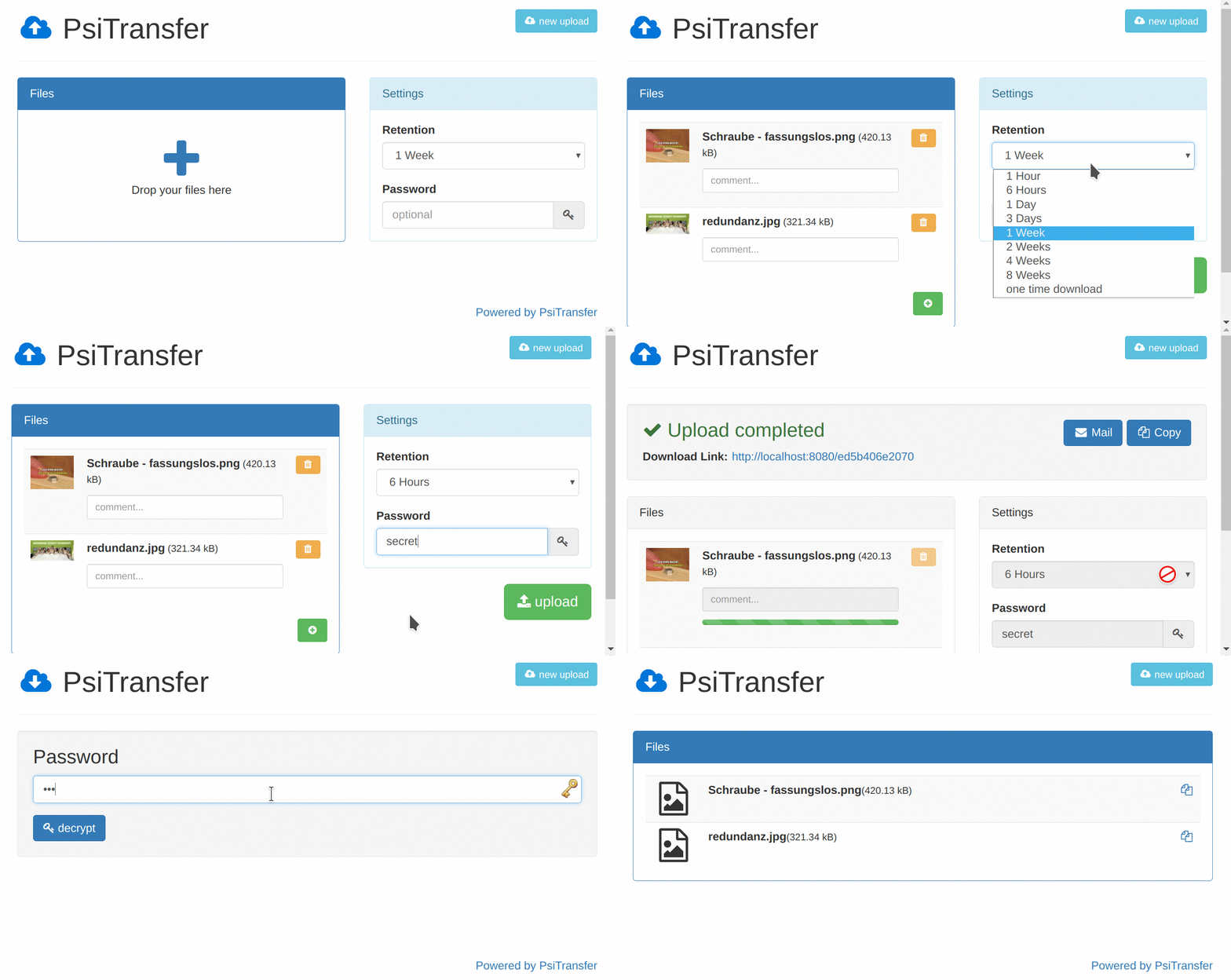
Simple open source self-hosted file sharing solution. It's an alternative to paid services like Dropbox, WeTransfer.
- No accounts, no logins
- Mobile friendly responsive interface
- Supports many and very big files (Streams ftw)
- Resumable up- and downloads (tus.io)
- Set an expire-time for your upload bucket
- One-time downloads
- Download all files as zip/tar.gz archive
- Modal-style file preview
- Requires Node >=7.4 or use
--harmony-async-awaitflag - Password protected download list (AES)
/adminPage lists bucket information, Screenshot (disabled until you setadminPassconfig value)- Lightweight Vue based frontend apps. Gzipped (on by default) less than 100k
- Explicit named bucket IDs with query param
sid=<myBucketID>
See the blog posts about PsiTransfer: https://psi.cx/tags/PsiTransfer/ and checkout the Documentation
Quickstart
Docker
$ docker run -p 0.0.0.0:3000:3000 -e PSITRANSFER_ADMIN_PASS=secret -v $PWD/data:/data psitrax/psitransfer
# data volume needs UID 1000
$ sudo chown -R 1000 $PWD/data
Specify the version by using image tags e.g.:
latest: corresponds to master branch2: latest stable2.x.x1.1: latest stable1.1.x1.0.0: exact version
Manual, precompiled
# Be sure to have NodeJS >= 12
$ node -v
v12.4.0

# Download and extract latest release package from
# https://github.com/psi-4ward/psitransfer/releases

# Install dependencies and start the app
$ NODE_ENV=production npm install
$ npm start
Manual, from source
# Compile the frontend apps
$ cd app
$ npm install
$ npm run build

# Install dependencies
$ cd ..
$ npm install
$ npm start
Configuration
There are some configs in config.js like port and data-dir.
You can:
- Edit the
config.js(not recommend) - Add a
config.production.jswhereproductionis the value fromNODE_ENVSeeconfig.dev.js - Define environment Variables like
PSITRANSFER_UPLOAD_DIRto set the upload directory - To secure your PsiTransfer if exposed to the internet from unwanted, non authorized uploads use the
PSITRANSFER_UPLOAD_PASSenvironment variable
Customization
public/pug/upload.pug and download.pug are kept simple.
You can alter these files and add your logo and styles.
Please keep a footnote like Powered by PsiTransfer :)
Debug
Psitransfer uses debug:
DEBUG=psitransfer:* npm start
Side notes
- There is no (end-to-end) payload encryption (yet).
Download all as ZIPdoes not support resuming the download.
:star2: Contribution is highly welcome :metal:
Want to say thanks and buy me a beer?
License
Categories
Download Statistics
5,450,268
Total Downloads
25,491
This Month
33,197
Avg / Month
Total Downloads Over Time
Loading chart...
Related apps
Explore more like this
Explore allLinks
Details
Repository
psitrax/psitransfer:latestLast Updated2026-06-02
First Seen2020-04-19
Runtime arguments
- Web UI
http://[IP]:[PORT:3000]/- Network
bridge- Shell
sh- Privileged
- false
Template configuration
PortPorttcp
Port
- Target
- 3000
- Default
- 3000
- Value
- 3000
Admin PasswordVariable
Admin Password
- Target
- PSITRANSFER_ADMIN_PASS
- Default
- secret
- Value
- secret
DataPathrw
Data
- Target
- /data
- Default
- /mnt/user/appdata/psitransfer/
- Value
- /mnt/user/appdata/psitransfer/