
All apps · 0 apps

prometheus-qbittorrent-exporter
Docker app from SmithyNithy's Repository
Overview
Get metrics from a qBittorrent server and offers them in a prometheus format.
Readme
View on GitHubPrometheus qBittorrent exporter

A prometheus exporter for qBittorrent. Get metrics from a server and offers them in a prometheus format.







How to use it
You can install this exporter with the following command:
pip3 install prometheus-qbittorrent-exporter
Then you can run it with
qbittorrent-exporter
Another option is run it in a docker container.
docker run \
    -e QBITTORRENT_PORT=8080 \
    -e QBITTORRENT_HOST=myserver.local \
    -p 8000:8000 \
    ghcr.io/esanchezm/prometheus-qbittorrent-exporter
Add this to your prometheus.yml
  - job_name: "qbittorrent_exporter"
    static_configs:
        - targets: ['yourqbittorrentexporter:port']
The application reads configuration using environment variables:
| Environment variable | Default | Description |
|---|---|---|
QBITTORRENT_HOST |
qbittorrent server hostname | |
QBITTORRENT_PORT |
qbittorrent server port | |
QBITTORRENT_SSL |
False |
Whether to use SSL to connect or not. Will be forced to True when using port 443 |
QBITTORRENT_URL_BASE |
"" |
qbittorrent server path or base URL |
QBITTORRENT_USER |
"" |
qbittorrent username |
QBITTORRENT_PASS |
"" |
qbittorrent password |
QBITTORRENT_API_KEY |
"" |
qBittorrent API key for qBittorrent >= 5.2. When set, it overrides QBITTORRENT_USER/QBITTORRENT_PASS. |
EXPORTER_ADDRESS |
0.0.0.0 |
Exporter listening IP address |
EXPORTER_PORT |
8000 |
Exporter listening port |
EXPORTER_LOG_LEVEL |
INFO |
Log level. One of: DEBUG, INFO, WARNING, ERROR, CRITICAL |
METRICS_PREFIX |
qbittorrent |
Prefix to add to all the metrics |
VERIFY_WEBUI_CERTIFICATE |
True |
Whether to verify SSL certificate when connecting to the qbittorrent server. Any other value but True will disable the verification |
Metrics
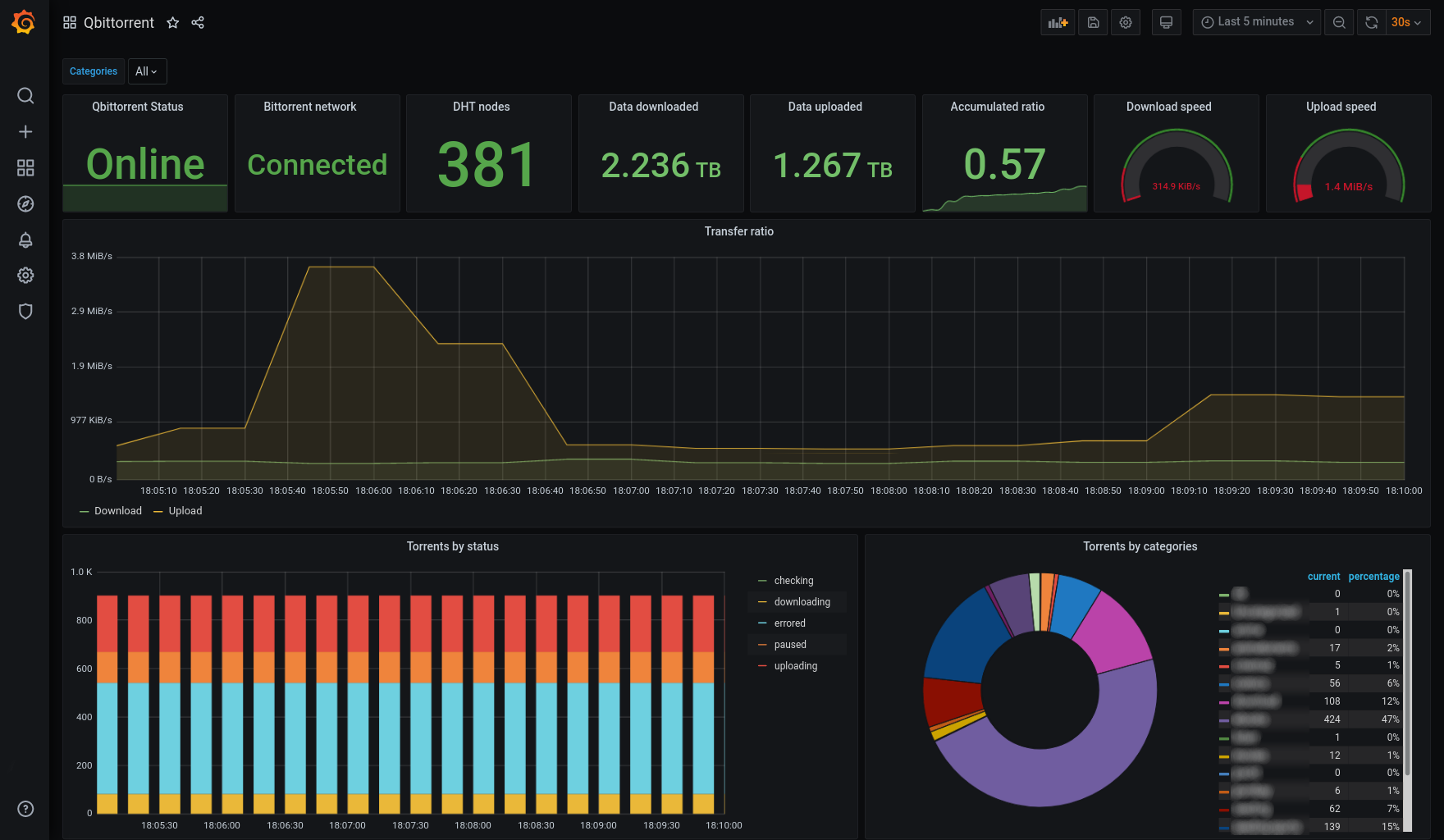
These are the metrics this program exports, assuming the METRICS_PREFIX is qbittorrent:
| Metric name | Type | Description |
|---|---|---|
qbittorrent_up |
gauge | Whether the qBittorrent server is answering requests from this exporter. A version label with the server version is added. |
qbittorrent_connected |
gauge | Whether the qBittorrent server is connected to the Bittorrent network. |
qbittorrent_firewalled |
gauge | Whether the qBittorrent server is connected to the Bittorrent network but is behind a firewall. |
qbittorrent_dht_nodes |
gauge | Number of DHT nodes connected to. |
qbittorrent_total_peer_connections |
gauge | Total number of peer connections. |
qbittorrent_dl_info_data |
counter | Data downloaded since the server started, in bytes. |
qbittorrent_up_info_data |
counter | Data uploaded since the server started, in bytes. |
qbittorrent_alltime_dl_total |
counter | Total historical data downloaded, in bytes. |
qbittorrent_alltime_ul_total |
counter | Total historical data uploaded, in bytes. |
qbittorrent_torrents_count |
gauge | Number of torrents for each category and status. Example: qbittorrent_torrents_count |
Screenshot
License
This software is released under the GPLv3 license.
Categories
Download Statistics
687,933
Total Downloads
24,724
This Month
17,480
Avg / Month
Total Downloads Over Time
Loading chart...
Related apps
Explore more like this
Explore allLinks
Details
Repository
esanchezm/prometheus-qbittorrent-exporterLast Updated2026-05-27
First Seen2022-03-13
Runtime arguments
- Network
bridge- Shell
sh- Privileged
- false
Template configuration
qBittorrent PortVariable
Port of your qBittorrent instance
- Target
- QBITTORRENT_PORT
qBittorrent HostVariable
Hostname/IP of your qBittorrent instance
- Target
- QBITTORRENT_HOST
qBittorrent UserVariable
Username to your qBittorrent instance
- Target
- QBITTORRENT_USER
qBittorrent PasswordVariable
Password to your qBittorrent instance
- Target
- QBITTORRENT_PASS
Host Port 1Porttcp
Container Port: 8000
- Target
- 8000