
All apps · 0 apps

Profilarr
Docker app from santiagosayshey's Repository
Overview
Readme
View on GitHub

Build, test, and deploy configurations across your media stack






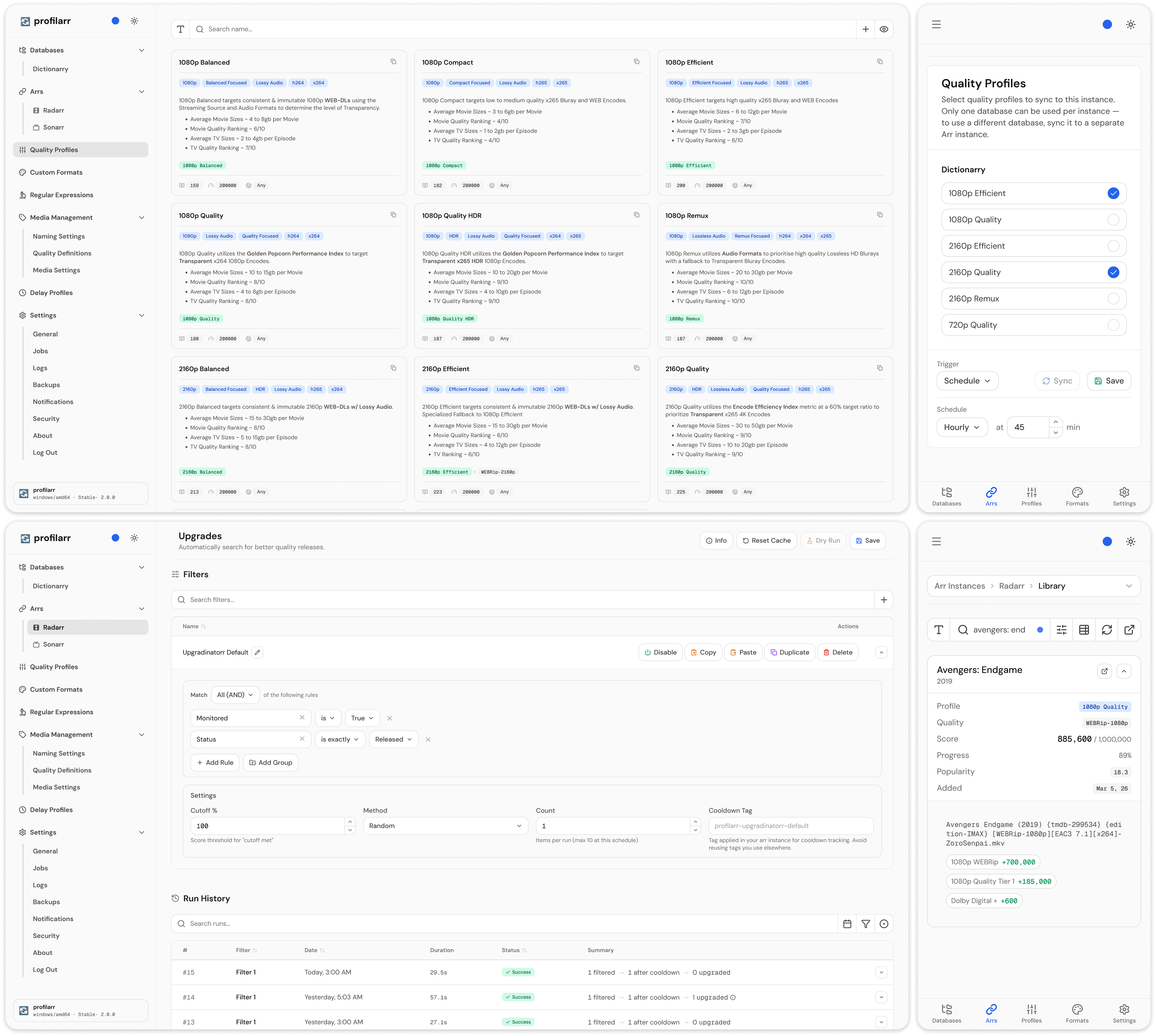
🌍 Overview
If you manage a media server, you've probably spent hours configuring quality profiles, piecing together custom formats from forum posts, and hoping nothing drifts between instances. Profilarr tries to make that easier.
✨ Features
🔨 Build
- Link databases - connect to curated databases like Dictionarry, TRaSH Guides, or Dumpstarr
- Build your own - create and share your own database using the PCD template
- Quality profiles - group and order qualities, score custom formats per app
- Custom formats - match releases by resolution, source, release group, size, language, and more
- Regular expressions - reusable patterns shared across custom formats
- Media management - naming conventions, media settings, and quality definitions
- Delay profiles - protocol preferences, delays, and score gates
- Local tweaks - your changes persist across upstream updates with smart conflict handling
🧪 Test
- Regular expressions - validate patterns with embedded Regex101 test cases
- Custom formats - test releases against conditions with a full breakdown of how each passes or fails, with match visualization. Powered by a C# parser that matches Radarr and Sonarr's own parsing logic
- Quality profiles - simulate how a profile scores and ranks releases for a given movie or series
🚀 Deploy
- Sync - push configurations to any number of Arr instances
- Upgrades - automated searches with configurable filters, selectors, and cooldowns
- Rename - bulk rename files and folders with dry-run previews
- Jobs - scheduled automation for sync, upgrades, renames, backups, and cleanup
- Notifications - Discord, Telegram, Slack, ntfy, Pushover, Gotify, Apprise, and generic webhooks
📦 Getting Started
Requirements
- Docker host with Linux kernel
3.17+. Older kernels, including Synology DSM installs on kernel3.10, are not supported by Profilarr v2. - Docker platform
linux/amd64orlinux/arm64 - Sonarr
v4andv5(v5 is experimental while Sonarr v5 is in beta) - Radarr
v5andv6
Production
services:
  profilarr:
    # See "Release channels" below for available tags.
    image: ghcr.io/dictionarry-hub/profilarr:latest
    container_name: profilarr
    ports:
      - '6868:6868'
    volumes:
      - ./config:/config
    environment:
      - PUID=1000
      - PGID=1000
      - TZ=Etc/UTC
      # Uncomment ORIGIN if you use a reverse proxy to access your containers.
      #- ORIGIN=https://profilarr.yourdomain.com
      - PARSER_HOST=parser
      - PARSER_PORT=5000
    depends_on:
      parser:
        condition: service_healthy

  # Optional - only needed for CF/QP testing
  parser:
    image: ghcr.io/dictionarry-hub/profilarr-parser:latest
    container_name: profilarr-parser
    expose:
      - '5000'
[!NOTE] The parser service is only required for custom format and quality profile testing. Linking, syncing, and all other features work without it. Remove the
parserservice and related environment variables if you don't need it.
Release channels
New features are tested on the develop image by beta testers first. Once a
batch is verified, it becomes a stable release.
Choose an image tag based on how you want to receive these releases:
| Type | Tag | Description |
|---|---|---|
| Latest | latest |
Newest stable release, including future major versions |
| Develop | develop |
Pre-release builds under testing; not guaranteed stable |
| Exact | 2.1.0 |
A specific release; never updates |
| Major | 2 |
Newest stable release within v2; never updates to a new major version |
Both the profilarr and profilarr-parser images publish the same tags; keep
them on the same channel.
| Variable | Default | Description |
|---|---|---|
PUID |
1000 |
User ID for file permissions |
PGID |
1000 |
Group ID for file permissions |
UMASK |
022 |
File creation mask |
TZ |
Etc/UTC |
Timezone for scheduling |
PORT |
6868 |
Web UI port |
HOST |
0.0.0.0 |
Bind address |
AUTH |
on |
Login on or off (oidc is a deprecated alias for on) |
OIDC_CLIENT_SECRET |
- | OIDC client secret (set all three OIDC values to enable SSO) |
OIDC_CLIENT_ID |
- | OIDC client ID (set all three OIDC values to enable SSO) |
OIDC_DISCOVERY_URL |
- | OIDC discovery URL (set all three OIDC values to enable SSO) |
ORIGIN |
- | Public URL when running behind a reverse proxy (e.g. https://profilarr.example.com) |
PARSER_HOST |
localhost |
Parser service host |
PARSER_PORT |
5000 |
Parser service port |
PROFILARR_API_KEY |
- | Plaintext runtime secret for X-Api-Key auth |
PROFILARR_BULLETIN_URL |
https://raw.githubusercontent.com/Dictionarry-Hub/bulletin/main |
Override for the announcement feed + release manifest base URL |
HTTPS_PROXY |
- | Proxy for outbound https:// requests |
HTTP_PROXY |
- | Proxy for outbound http:// requests |
ALL_PROXY |
- | Proxy for both http:// and https:// requests |
NO_PROXY |
- | Comma-separated hosts, IPs or ranges that bypass the proxy |
PROFILARR_API_KEY must be at least 32 characters long. It is not persisted to
SQLite or bcrypt-hashed. It always has full access and works alongside any keys
created in Settings > Security.
[!NOTE] When using OIDC
ORIGIN=must be set to your Profilarr URL, and Profilarr expects{ORIGIN}/auth/oidc/callbackfor the redirect URL (e.g.https://profilarr.example.com/auth/oidc/callback). Many IdPs will infer this automatically.
To route outbound requests through an HTTP or SOCKS5 proxy, see Outbound Proxy.
See the documentation for full setup and configuration guides.
Development
Prerequisites
git clone https://github.com/Dictionarry-Hub/profilarr.git
cd profilarr
deno task dev
This runs the parser service and Vite dev server concurrently.
Contributions are welcome! For anything beyond small fixes, please open an issue or reach out on Discord first so we can discuss the approach. See CONTRIBUTING.md for the full development workflow.
❤️ Support
Every feature in Profilarr is free for everyone, and development will continue with or without donations. If you'd like to show support, you can, but it's in no way necessary.
- :coffee: Buy Me A Coffee
- :cat: GitHub Sponsors
🤝 License
Profilarr is free and open source. You do not need to pay anyone to use it. If someone is charging you for access to Profilarr, they are violating the spirit of this project.
Related apps
Explore more like this
Explore allDetails
ghcr.io/dictionarry-hub/profilarr:latestRuntime arguments
- Web UI
http://[IP]:[PORT:6868]- Network
bridge- Shell
sh- Privileged
- false
Template configuration
- Target
- 6868
- Default
- 6868
- Target
- /config
- Value
- 99
- Value
- 100
- Value
- 022