
All apps · 0 apps
PrintLab
Docker app from techpunk's repo
Overview
Readme
View on GitHubPrintLab
Standalone Docker app for Bambu printers that uses pybambu from
greghesp/ha-bambulab.
This is not Home Assistant. It runs as a direct web/API service.
Suite demo walkthrough
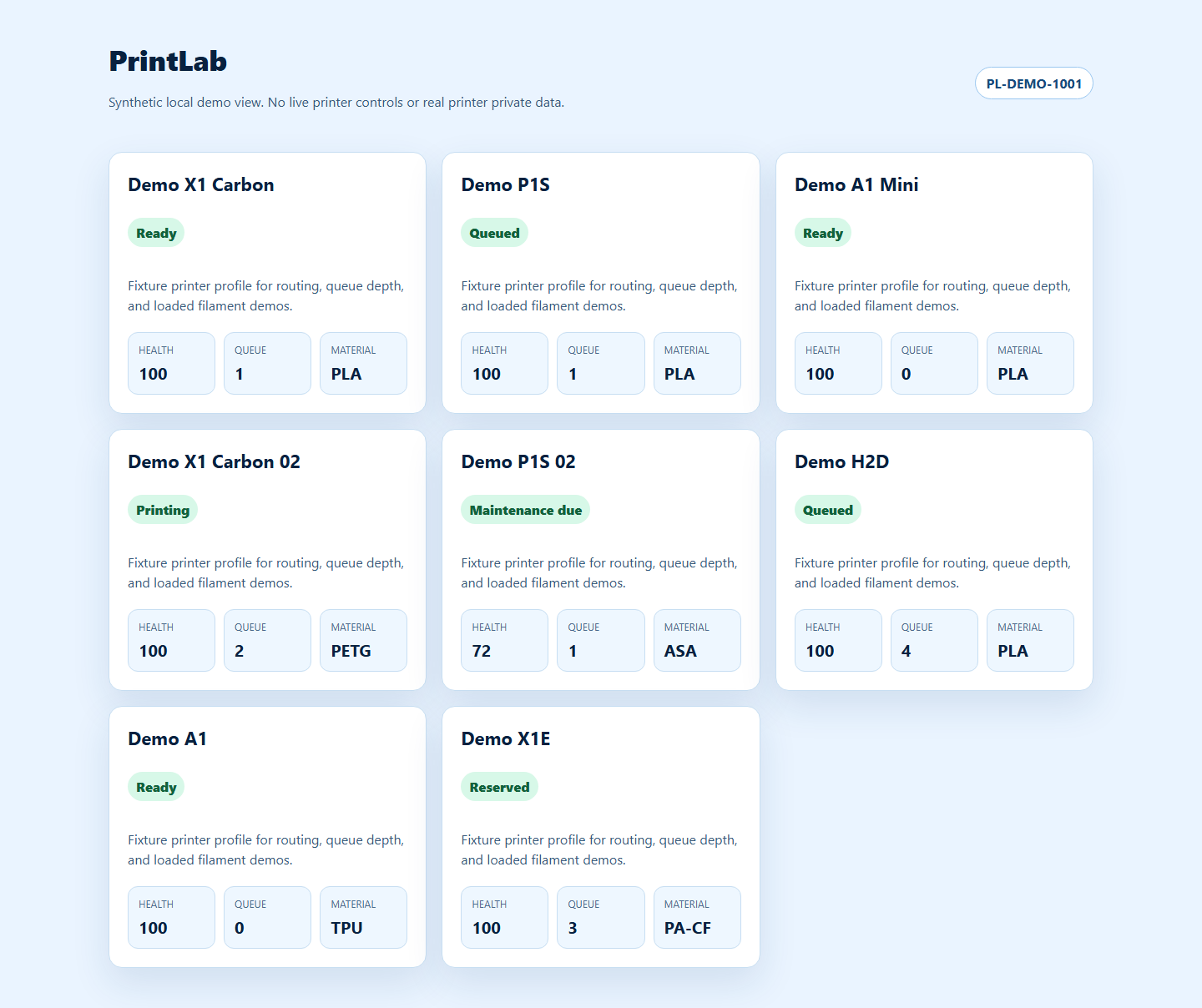
PrintLab participates in the MakerWorks suite demo as the printer routing and production-handoff app. The public screenshot below uses synthetic fixture printers only, so it does not expose live printer serials, camera views, access codes, private job state, or real printer controls.
Synthetic printer fleet
What it provides
- Direct MQTT connection to your printer (LAN mode / local MQTT by default).
- Multi-printer gallery dashboard at
http://localhost:8080. - Printer detail dashboard at
http://localhost:8080/printer/{printer_id}. - Required auth by default in container images, with signed cookie sessions for the web UI.
- REST API for status and control actions.
- Pause / resume / stop, refresh state, chamber light control, fan and temperature control.
Quick start
- Copy
.env.exampleto.envand fill in either:- single-printer
PRINTER_HOST/PRINTER_SERIAL/PRINTER_ACCESS_CODE - or
PRINTERS_JSONwith multiple printers
- single-printer
- Set admin credentials:
REQUIRE_AUTH=trueis the image default and startup fails if credentials are missingADMIN_USERNAME(default:admin)ADMIN_PASSWORD_HASHgenerated withpython scripts/hash_password.pySESSION_SECRETset to a random long secret
- If using single-printer mode, fill in:
PRINTER_HOSTPRINTER_SERIALPRINTER_ACCESS_CODE
- Build and run:
docker compose up -d --build
- Open:
http://localhost:8080
API endpoints
Interactive API docs are published at:
GET /docsGET /redocGET /openapi.jsonGET /openapi.json/exportto persist the current schema todata/openapi.jsonGET /loginPOST /auth/loginPOST /auth/logoutGET /auth/sessionGET /healthGET /api/printersPOST /api/printerswith:{"name":"X1C-002","host":"192.168.1.67","serial":"SERIAL","access_code":"CODE","id":"x1c-002"}GET /api/stateGET /api/printers/{printer_id}/statePOST /api/actions/pausePOST /api/actions/resumePOST /api/actions/stopPOST /api/actions/refreshPOST /api/actions/chamber-lightwith{"on": true|false}POST /api/actions/fanwith{"fan":"part_cooling|auxiliary|chamber|heatbreak|secondary_auxiliary","percent":0-100}POST /api/actions/temperaturewith{"target":"heatbed|nozzle","value":0-320}POST /api/printers/{printer_id}/actions/...(printer-scoped equivalents for all action endpoints)GET /api/works/servicesGET /api/works/{makerworks|stockworks}/health?path=/healthGET /api/works/makerworks/libraryGET /api/works/makerworks/library/{model_id}POST /api/works/makerworks/preflightPOST /api/works/makerworks/jobswith:{"model_id":"widget-1","printer_id":"printer-1","idempotency_key":"mw-job-123","source_job_id":"makerworks-123","metadata":{"priority":"rush"}}GET /api/jobsGET /api/jobs/{job_id}POST /api/jobs/{job_id}/sync-makerworksPOST /api/jobs/{job_id}/connect-current-printconnects a MakerWorks queued job to the print already running on the selected printer after manual slicing/start.GET /api/printers/{printer_id}/jobsGET /api/printers/{printer_id}/jobs/{job_id}POST /api/printers/{printer_id}/jobs/{job_id}/sync-makerworksPOST /api/works/{makerworks|stockworks}/requestwith:{"method":"GET|POST|PUT|PATCH|DELETE","path":"/v1/resource","query":{},"body":{},"headers":{},"timeout_seconds":20}POST /api/print-jobwith:{"file_path":"/cache/model.3mf","plate_gcode":"Metadata/plate_1.gcode","use_ams":true,"ams_mapping":[0]}(optional query:?printer_id={printer_id})GET /api/printers/{printer_id}/works/...printer-scoped equivalents forhealth,request, and MakerWorks library browsingPOST /api/printers/{printer_id}/print-jobprinter-scoped print submission for an already sliced/staged file.GET /api/successful-gcodesGET /api/printers/{printer_id}/successful-gcodesPOST /api/successful-gcodes/{record_id}/sync-makerworksPOST /api/printers/{printer_id}/successful-gcodes/{record_id}/sync-makerworks
Works integration config
Minimal boot environment stays in .env: admin/session secrets, printer access, storage paths, and any values needed before the app can start. Configure MakerWorks, StockWorks, YouTube upload, callback, and allowlist settings from the authenticated Settings -> Suite Integrations screen wherever possible.
Environment variables remain supported as legacy overrides and still win over /data/config.json or /config/config.json. Remove an env value only after saving and testing the matching in-app setting.
Runtime settings that can be configured in app:
MAKERWORKS_BASE_URL,MAKERWORKS_API_KEY,MAKERWORKS_BEARER_TOKEN,MAKERWORKS_ADMIN_USERNAME,MAKERWORKS_ADMIN_PASSWORD,MAKERWORKS_AUTH_HEADER,MAKERWORKS_VERIFY_SSL,MAKERWORKS_ALLOWED_PATHS,MAKERWORKS_ALLOWED_METHODS- Optional MakerWorks job callbacks:
MAKERWORKS_JOB_CALLBACK_ENABLED,MAKERWORKS_JOB_CALLBACK_METHOD,MAKERWORKS_JOB_CALLBACK_PATH_TEMPLATE - Optional YouTube timelapse uploads:
YOUTUBE_UPLOAD_ENABLED,YOUTUBE_CLIENT_ID,YOUTUBE_CLIENT_SECRET,YOUTUBE_REFRESH_TOKEN,YOUTUBE_PRIVACY_STATUS,YOUTUBE_CATEGORY_ID,YOUTUBE_TITLE_TEMPLATE,YOUTUBE_DESCRIPTION_TEMPLATE,YOUTUBE_TAGS,YOUTUBE_NOTIFY_SUBSCRIBERS,YOUTUBE_MADE_FOR_KIDS,YOUTUBE_EMBEDDABLE,YOUTUBE_LICENSE,YOUTUBE_PUBLIC_STATS_VIEWABLE,YOUTUBE_TIMELAPSE_WAIT_SECONDS,YOUTUBE_TIMELAPSE_POLL_INTERVAL_SECONDS,YOUTUBE_UPLOAD_TIMEOUT_SECONDS - Conversion uploads:
CONVERSION_MAX_UPLOAD_MBcontrols the per-file upload limit for the conversion page and API. Default:200. - MakerWorks library normalization:
MAKERWORKS_LIBRARY_LIST_PATH,MAKERWORKS_LIBRARY_DETAIL_PATH_TEMPLATE,MAKERWORKS_LIBRARY_SEARCH_PARAM,MAKERWORKS_LIBRARY_PAGE_PARAM,MAKERWORKS_LIBRARY_PAGE_SIZE_PARAM,MAKERWORKS_LIBRARY_PAGE_SIZE,MAKERWORKS_LIBRARY_ITEMS_PATH,MAKERWORKS_LIBRARY_TOTAL_PATH,MAKERWORKS_LIBRARY_ID_PATH,MAKERWORKS_LIBRARY_NAME_PATH,MAKERWORKS_LIBRARY_SUMMARY_PATH,MAKERWORKS_LIBRARY_DESCRIPTION_PATH,MAKERWORKS_LIBRARY_THUMBNAIL_PATH,MAKERWORKS_LIBRARY_THUMBS_PATH,MAKERWORKS_LIBRARY_MODEL_URL_PATH,MAKERWORKS_LIBRARY_DOWNLOAD_URL_PATH,MAKERWORKS_LIBRARY_AUTHOR_PATH,MAKERWORKS_LIBRARY_TAGS_PATH,MAKERWORKS_LIBRARY_FILES_PATH,MAKERWORKS_LIBRARY_CREATED_AT_PATH,MAKERWORKS_LIBRARY_UPDATED_AT_PATH STOCKWORKS_BASE_URL,STOCKWORKS_API_KEY,STOCKWORKS_BEARER_TOKEN,STOCKWORKS_AUTH_HEADER,STOCKWORKS_VERIFY_SSL,STOCKWORKS_ALLOWED_PATHS,STOCKWORKS_ALLOWED_METHODS
Auth behavior:
- Browser UI auth uses
POST /auth/login, an HttpOnly signed session cookie, a non-HttpOnly CSRF cookie, andX-CSRF-Tokenon mutating requests. - Basic Auth still works for API clients.
- If
*_API_KEYis set, it is sent as*_AUTH_HEADER(defaultX-API-Key). - If
*_BEARER_TOKENis set, it is sent asAuthorization: Bearer .... - If
*_ADMIN_USERNAMEand*_ADMIN_PASSWORDare set, PrintLab can log into that service to fetch protected assets such as MakerWorks preview meshes and thumbnails. *_ALLOWED_PATHSis a comma-separated prefix allowlist. Requests outside the list are rejected.*_ALLOWED_METHODSis optional. If set, only those methods are proxied.- All env vars also support Docker-style file-based secrets via
*_FILE. - If
/data/config.jsonor/config/config.jsonexists, env values can also be supplied there using either env-style keys likeYOUTUBE_UPLOAD_ENABLEDor section objects like"youtube": {"upload_enabled": true}. Direct env vars still win.
MakerWorks library notes:
- The dashboard now has a
MakerWorkstab inside the model library modal. - Responses are normalized into a stable shape (
id,name,summary,thumbnail_url,model_url,download_url,author,tags,printer_handoff_ready,materials,colors,printer_profiles,estimated_print_minutes) so the UI does not need to match your upstream schema exactly. - The MakerWorks search page now supports one-click handoff into the PrintLab queue. PrintLab runs preflight checks before queueing and only auto-selects a printer when exactly one printer qualifies.
- When multiple printers qualify, PrintLab stops for approval and shows ranked candidates with compatibility, filament, and wait-time checks instead of guessing.
MakerWorks job intake:
POST /api/works/makerworks/jobsis the new PrintLab-native submission path for MakerWorks.POST /api/works/makerworks/preflightreturns policy checks and ranked printer candidates before queueing.- PrintLab stages the asset to printer storage, creates a queue entry, and persists a submitted-job ledger in
/data/submitted_jobs_{printer_id}.json. - Use
idempotency_keywhen MakerWorks may retry the same submission; PrintLab will return the existing job record instead of queueing a duplicate. - Preflight checks cover printer compatibility, filament availability, and queue-aware time estimates. Routing prefers connected printers that pass compatibility, have matching filament, and minimize wait time.
- Job status currently advances through
queued,started,completed,failed,cancelled, andsubmit_failed. - If
MAKERWORKS_JOB_CALLBACK_ENABLED=true, each new status is pushed back to MakerWorks once usingMAKERWORKS_JOB_CALLBACK_PATH_TEMPLATE.
MakerWorks callback contract:
- Recommended callback path template:
/api/printlab/jobs/{job_id}or/api/printlab/jobs/{job_id}/status. - Default method:
POST. - Template variables available in
MAKERWORKS_JOB_CALLBACK_PATH_TEMPLATE:{job_id},{printer_id},{model_id},{source_job_id},{source_order_id},{status}. - Callback payload shape:
{"job_id":"...","status":"queued|started|completed|failed|cancelled|submit_failed","printer_id":"...","printer_name":"...","queue_item_id":"...","successful_gcode_id":"...","idempotency_key":"...","source":"makerworks","source_job_id":"...","source_order_id":"...","model_id":"...","model_name":"...","model_url":"...","download_url":"...","file_path":"...","file_name":"...","plate_gcode":"...","start_at":"...","started_at":"...","completed_at":"...","last_error":"...","metadata":{},"history":[],"updated_at":"...","created_at":"..."}
Successful G-code tracking:
- Every completed print that reaches
FINISHorCOMPLETEis persisted to/data/successful_gcodes_{printer_id}.json. - SD-card model listings are enriched with successful G-code counts and latest MakerWorks sync status.
- Optional automatic MakerWorks attachment can be enabled with:
MAKERWORKS_ATTACH_GCODE_ENABLED=trueMAKERWORKS_ATTACH_GCODE_METHOD=POSTMAKERWORKS_ATTACH_GCODE_PATH_TEMPLATE=/models/{model_id}/gcodes
- The attachment payload includes printer, model, file, plate, AMS, and completion metadata.
model_idis inferred from a leading numeric filename prefix such as20906356-widget_plate_1.3mf. - Optional automatic YouTube upload can be enabled with:
TIMELAPSE_CACHE_COUNT=1or higher so the printer timelapse is downloaded into cacheYOUTUBE_UPLOAD_ENABLED=trueorYOUTUBE_UPLOAD_ENABLED=autoto enable once OAuth credentials are configuredYOUTUBE_CLIENT_ID=...YOUTUBE_CLIENT_SECRET=...YOUTUBE_REFRESH_TOKEN=...- Optional:
YOUTUBE_UPLOAD_STAGING_DIR=/tmp/printlab-youtubeto force uploads to use local container storage before sending to YouTube
- To generate a YouTube refresh token locally, run:
python scripts/get_youtube_refresh_token.py --client-id YOUR_CLIENT_ID --client-secret YOUR_CLIENT_SECRET- Add
http://127.0.0.1:8080/callbackas an authorized redirect URI in your Google OAuth client before running it.
- The YouTube uploader waits for the newest cached timelapse in
{FILE_CACHE_PATH}/timelapse, stages a verified local copy in temporary storage, uploads that staged file with the configured title/description templates, and stores status back into each successful G-code record under theyoutubekey.
Stockworks enrichment:
- Responses from
GET /api/works/stockworks/healthandPOST /api/works/stockworks/requestincludeprinter_filamentwith:loaded_filament(active AMS slot/type/color/remaining_percent)remaining_filament(all visible AMS slots + remaining percentages)
Quality and SDK workflow
- Install dev tooling with
pip install -r requirements.txt -r requirements-dev.txt - Run
ruff check app tests scripts - Run
mypy - Run
pytest - Export the schema with
python scripts/export_openapi.py - Optionally generate a typed client with
pwsh scripts/generate_client.ps1
Notes
- Image build pulls
pybambufromha-bambulabat build time. - The UI is intentionally minimal; use the API for automation and advanced control.
- Printers added from the UI/API are persisted to
/data/printers_added.json.
Requirements
Categories
Related apps
Explore more like this
Explore allDetails
ghcr.io/schartrand77/printlab:latestRuntime arguments
- Web UI
http://[IP]:[PORT:8080]/- Network
makerworks-net- Shell
bash- Privileged
- false
- Extra Params
--restart unless-stopped
Template configuration
Host port for the PrintLab web UI.
- Target
- 8080
- Default
- 8983
- Value
- 8983
Persistent PrintLab data, cache, submitted jobs, and successful G-code records.
- Target
- /data
- Default
- /mnt/user/appdata/printlab/data
- Value
- /mnt/user/appdata/printlab/data
Optional PrintLab config.json and file-based secret directory.
- Target
- /config
- Default
- /mnt/user/appdata/printlab/config
- Value
- /mnt/user/appdata/printlab/config
Container timezone.
- Target
- TZ
- Default
- Etc/UTC
- Value
- Etc/UTC
Application log level.
- Target
- LOG_LEVEL
- Default
- INFO
- Value
- INFO
Optional multi-printer JSON array. If set, overrides single PRINTER_* values.
Friendly name for single-printer mode.
- Target
- PRINTER_NAME
Single-printer LAN IP or hostname.
- Target
- PRINTER_HOST
Single-printer serial number.
- Target
- PRINTER_SERIAL
Single-printer LAN access code.
- Target
- PRINTER_ACCESS_CODE
Printer device type override.
- Target
- PRINTER_DEVICE_TYPE
- Default
- unknown
- Value
- unknown
Use local MQTT mode.
- Target
- PRINTER_LOCAL_MQTT
- Default
- true
- Value
- true
Enable camera retrieval.
- Target
- PRINTER_ENABLE_CAMERA
- Default
- true
- Value
- true
Disable SSL verification for printer/cloud calls.
- Target
- PRINTER_DISABLE_SSL_VERIFY
- Default
- false
- Value
- false
Internal cache path.
- Target
- FILE_CACHE_PATH
- Default
- /data/cache
- Value
- /data/cache
Cached print records count.
- Target
- PRINT_CACHE_COUNT
- Default
- 1
- Value
- 1
Cached timelapse records count.
- Target
- TIMELAPSE_CACHE_COUNT
- Default
- 1
- Value
- 1
Optional Bambu cloud region.
- Target
- BAMBU_REGION
Optional Bambu cloud email.
- Target
- BAMBU_EMAIL
Optional Bambu cloud username.
- Target
- BAMBU_USERNAME
Optional Bambu cloud auth token.
- Target
- BAMBU_AUTH_TOKEN
Require login for UI and API access.
- Target
- REQUIRE_AUTH
- Default
- true
- Value
- true
Admin login username.
- Target
- ADMIN_USERNAME
- Default
- admin
- Value
- admin
Optional admin login email.
- Target
- ADMIN_EMAIL
Required hashed admin password. Generate with PrintLab scripts/hash_password.py.
- Target
- ADMIN_PASSWORD_HASH
Required long random secret used to sign session cookies.
- Target
- SESSION_SECRET
Set true when serving behind HTTPS.
- Target
- SESSION_COOKIE_SECURE
- Default
- false
- Value
- false
MakerWorks API base URL on makerworks-net.
- Target
- MAKERWORKS_BASE_URL
- Default
- http://MakerWorks-v2:3000
- Value
- http://MakerWorks-v2:3000
Optional MakerWorks API key.
- Target
- MAKERWORKS_API_KEY
Optional MakerWorks bearer token.
- Target
- MAKERWORKS_BEARER_TOKEN
Header used for MakerWorks API key.
- Target
- MAKERWORKS_AUTH_HEADER
- Default
- X-API-Key
- Value
- X-API-Key
Shared secret for callbacks sent to MakerWorks.
- Target
- MAKERWORKS_WEBHOOK_SECRET
API key accepted for MakerWorks submit boundary routes.
- Target
- MAKERWORKS_SUBMIT_API_KEY
Comma-separated allowlist for MakerWorks proxy paths.
- Target
- MAKERWORKS_ALLOWED_PATHS
- Default
- /health,/api/models
- Value
- /health,/api/models
Send job status callbacks to MakerWorks.
- Target
- MAKERWORKS_JOB_CALLBACK_ENABLED
- Default
- false
- Value
- false
Callback path, e.g. /api/printlab/jobs/{job_id}.
- Target
- MAKERWORKS_JOB_CALLBACK_PATH_TEMPLATE
Optional StockWorks API base URL.
- Target
- STOCKWORKS_BASE_URL
- Default
- http://StockWorks:8000
- Value
- http://StockWorks:8000
Optional StockWorks API key.
- Target
- STOCKWORKS_API_KEY
Enable automatic timelapse uploads to YouTube.
- Target
- YOUTUBE_UPLOAD_ENABLED
- Default
- false
- Value
- false
OAuth client ID for YouTube uploads.
- Target
- YOUTUBE_CLIENT_ID
OAuth client secret for YouTube uploads.
- Target
- YOUTUBE_CLIENT_SECRET
OAuth refresh token for YouTube uploads.
- Target
- YOUTUBE_REFRESH_TOKEN