

Preludarr
Docker app from animeking1987's Repository
Overview
Readme
View on GitHub

THEME YOUR LIBRARY
Preludarr
Theme songs for your media library. Preludarr finds the opening or theme song of each anime, TV show and movie in your library and saves it as theme.mp3 in the title's folder, where Plex, Jellyfin and Emby play it.




Status: stable.
1.12.0is the first stable release:ghcr.io/shedman214/preludarr:latest. Make a backup (System → Backup & Restore) before each update.
| Library | Theme review |
|---|---|
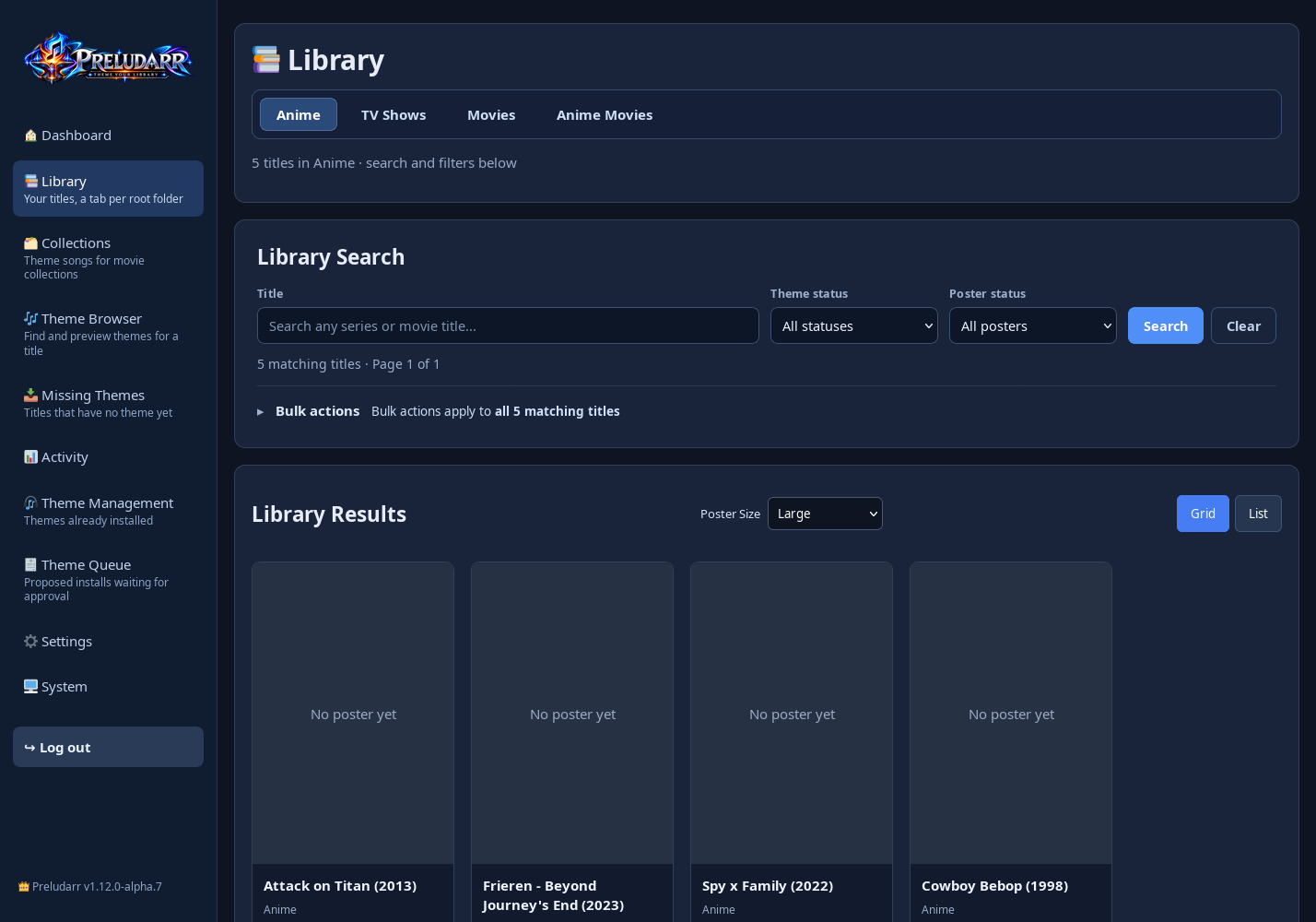 |
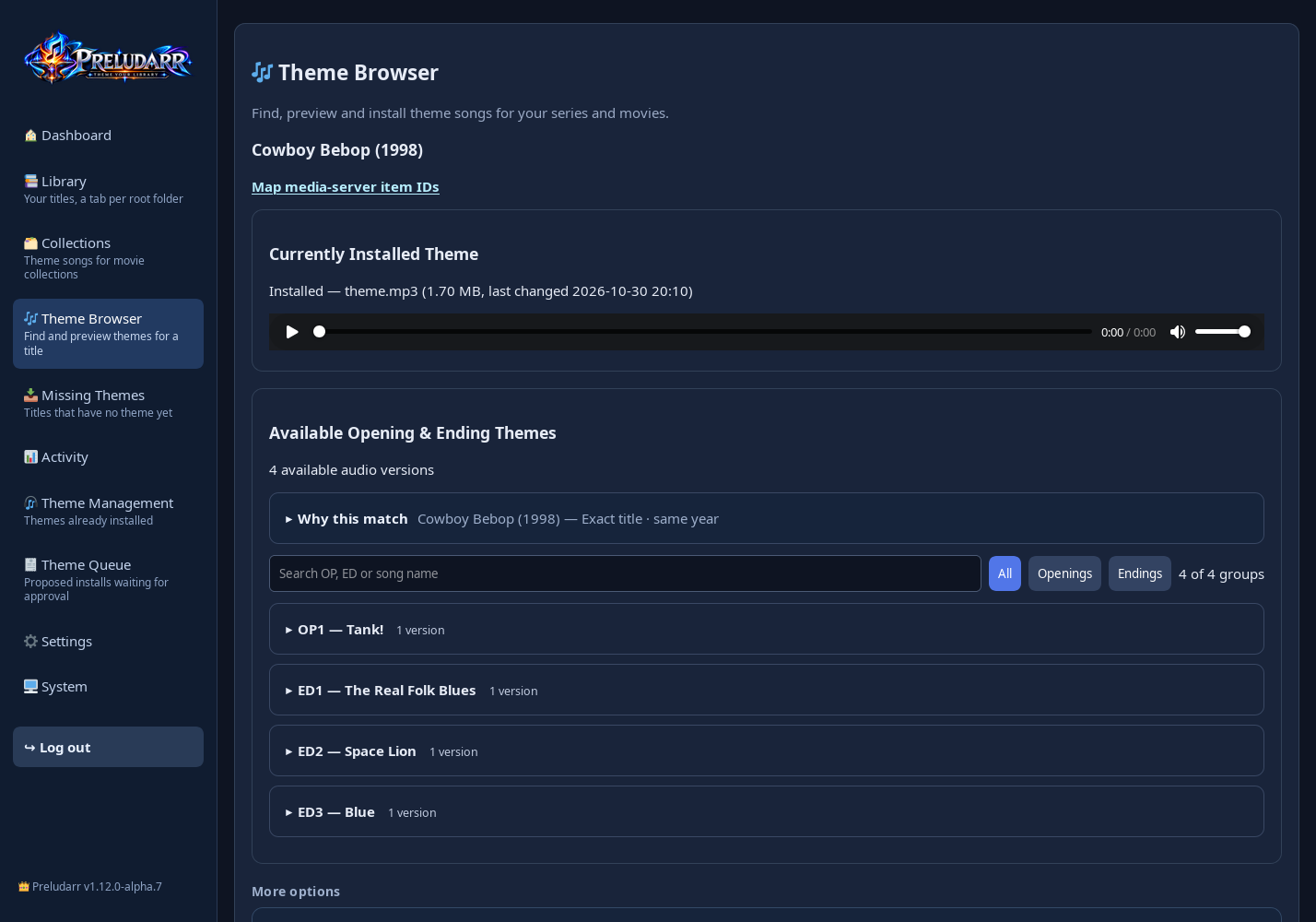 |
| Dashboard | Settings → Media Management |
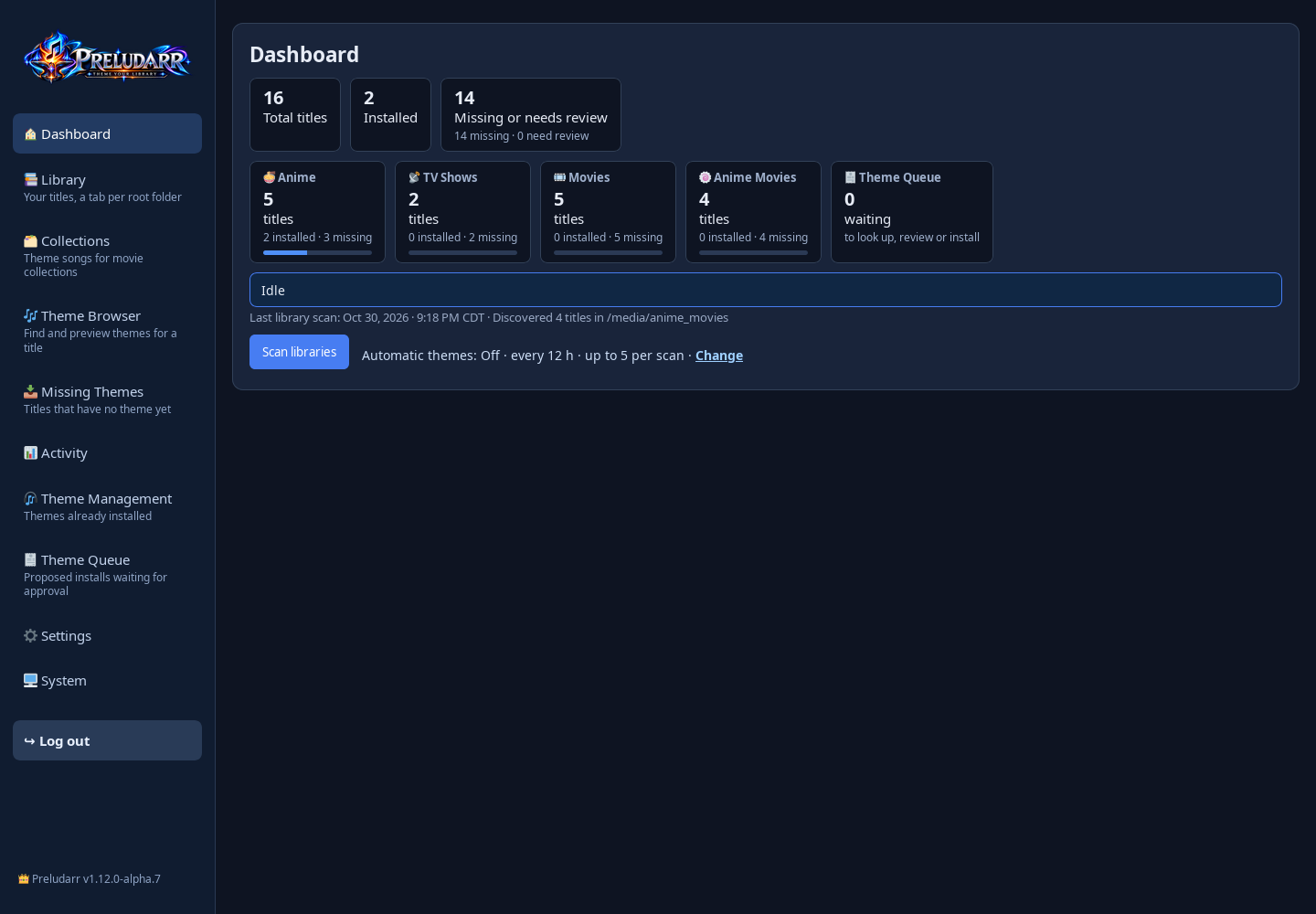 |
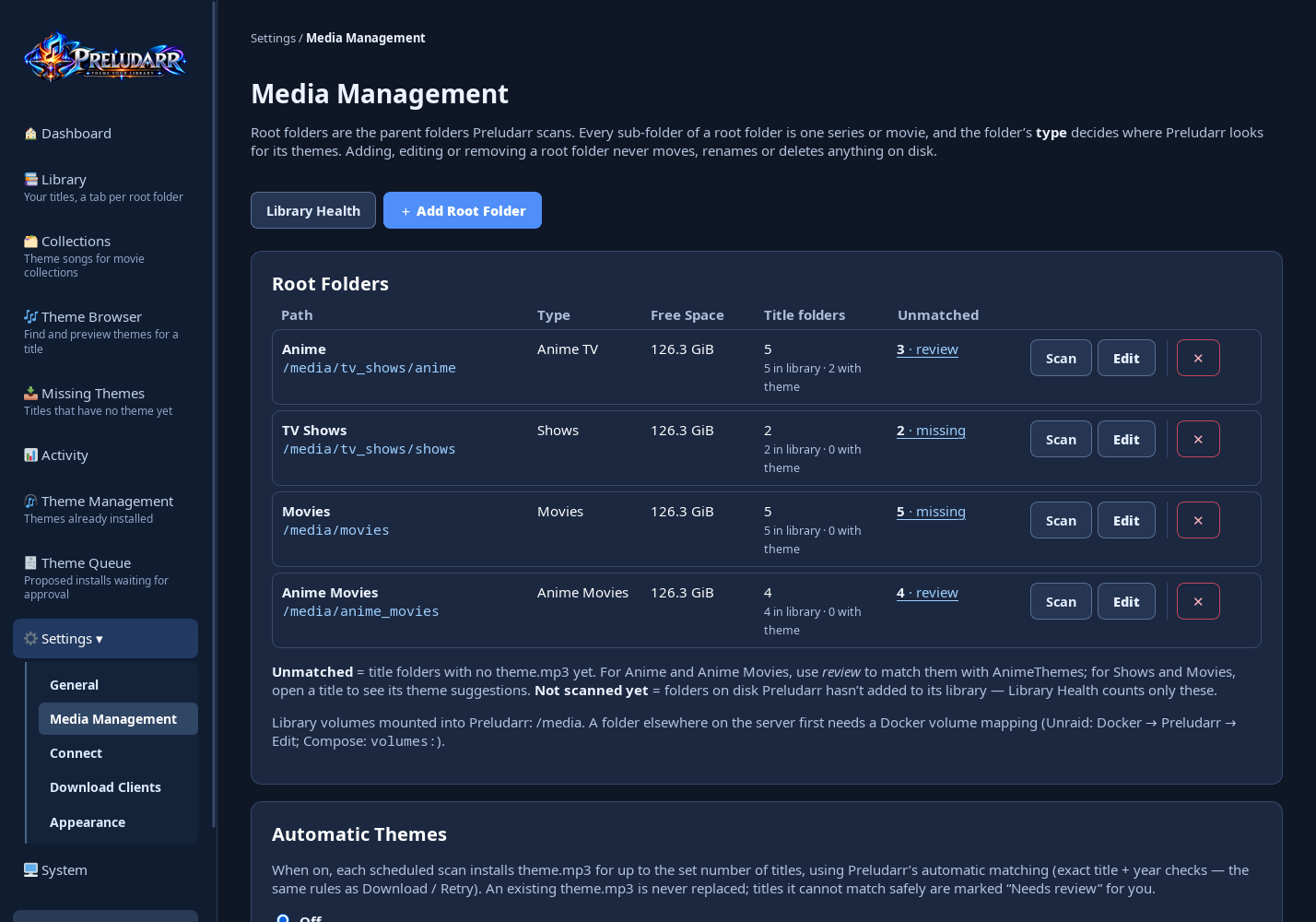 |
| Collections | Settings → Appearance |
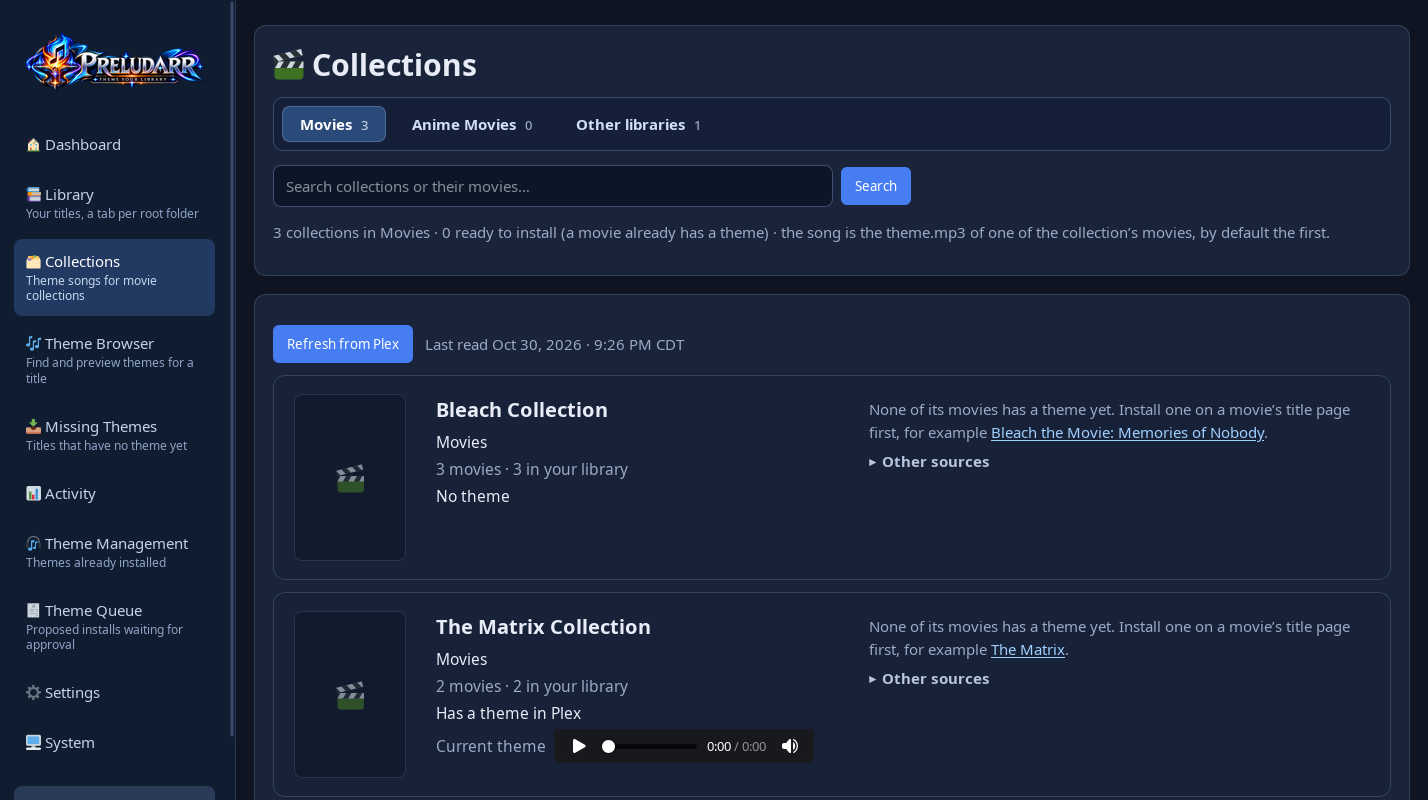 |
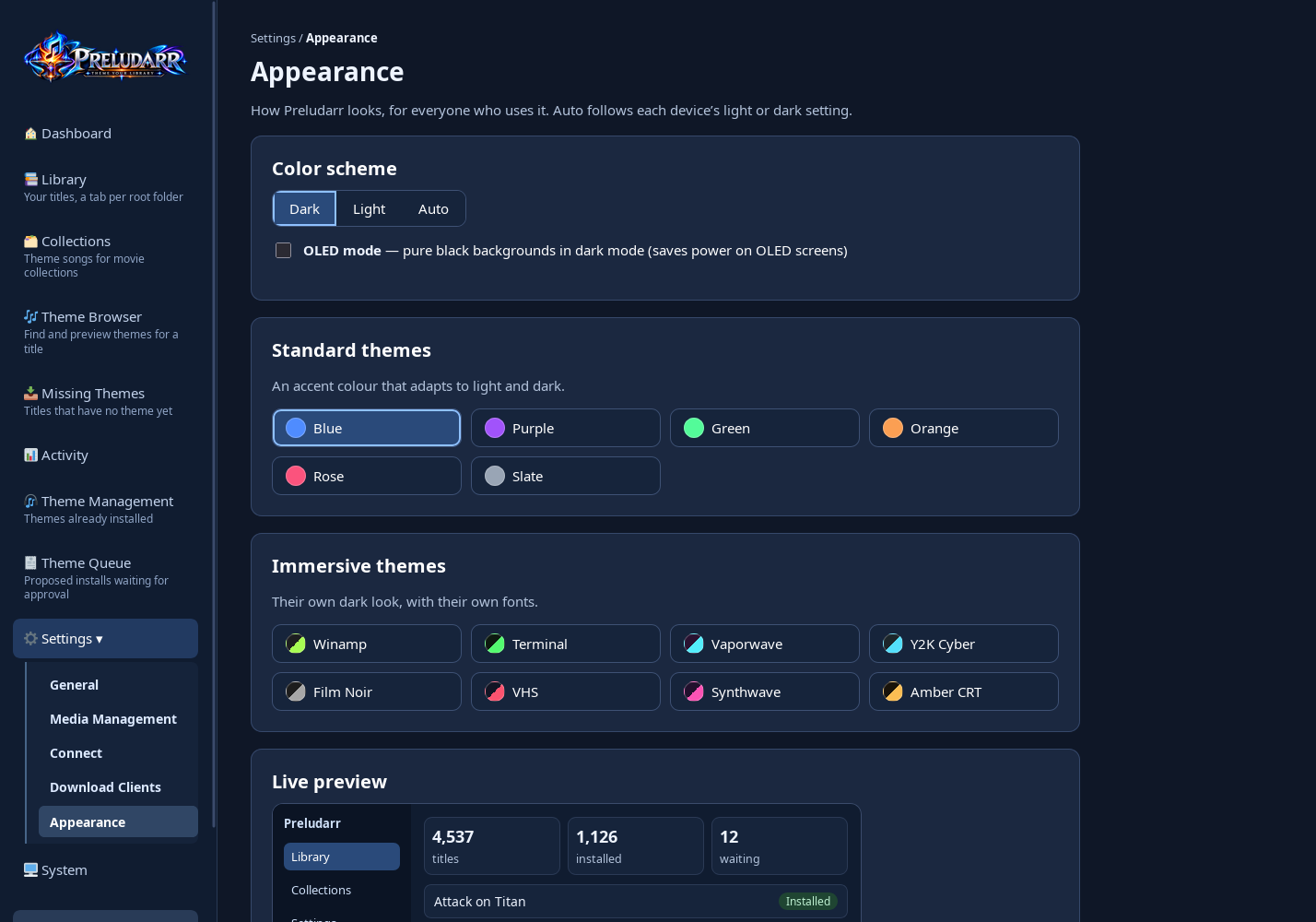 |
Screenshots from a demo library of empty folders and a test Plex server; no real media or posters.
Features
Available in 1.13
- Anime TV and anime movies: openings and endings from AnimeThemes, matched by title and year through AniList and the AniDB title list. Preview every version, then install the one you choose.
- TV shows and movies: suggestions from Plex TV Themes and ThemerrDB. Optional YouTube search (your own API key and cookies; preview only until you install). For shows and movies it looks on the MainThemeSoundtracks channel first, which costs none of your daily searches, then searches all of YouTube.
- Library: a tab per root folder, search and filters, a Theme Queue for reviewing many titles at once, automatic installs for anime (off by default), and Library Health (folders Preludarr cannot write to, extra theme files).
- Connect (optional): Sonarr, Radarr, Plex, Jellyfin and Emby, to match titles by their ids and refresh the media server after an install.
- Sign in with Plex: connect Plex without copying a token. Sign in in Plex's own window, approve Preludarr, and pick your server (local address first). Several Plex servers can be connected; one is the main server (title links, refresh after installs), and every server gets its own Collections tab. Your Plex account token is used only to list your servers and is never saved.
- Jellyfin Quick Connect: enter your Jellyfin address, then approve the code Preludarr shows in Jellyfin (profile → Quick Connect, as an administrator). Quick Connect must be turned on in Jellyfin (Dashboard → General).
- Sign in to Emby: enter your Emby address, username and password once. The password goes only to your Emby server and is not saved; Preludarr keeps the access token Emby returns.
- Collections: a theme for each movie collection, using the theme of one of its movies (the first movie by default). Instead of a movie's theme you can also use a YouTube link, your own audio file (with manual installs on), or Smart YouTube search suggestions (your API key; preview first, you choose). The Collections page has a tab per movie root folder, like the Library, and shows only collections from your root folders (others sit under "Other libraries"). A search bar finds collections by their name or their movies' names. Collections show their own artwork from Plex, Jellyfin or Emby. Plex: uploaded to the collection, and removable. Jellyfin and Emby: experimental, written into the server's own collection folder, which you map into Preludarr; those servers do not officially support collection themes, so some apps may not play them.
- Backups: manual and scheduled backups of the database and settings, and a guarded restore with automatic rollback.
- Language & Region: Settings → General — choose English, Spanish, French, German, Portuguese (Brazil), Japanese, Simplified Chinese, or Arabic for core navigation and common controls. Other text falls back to English. Choose short/long date formats, 12/24-hour time, a display time zone, and Today/Yesterday labels. Preferences apply to the whole instance; schedules keep using server time. An English recovery link and button help you switch back.
- Appearance: Settings → Appearance — Dark, Light or Auto (follows each device), OLED mode, six accent colours and eight immersive themes (Winamp, Terminal, Vaporwave, Y2K Cyber, Film Noir, VHS, Synthwave, Amber CRT), with a live preview. Text stays readable (WCAG AA contrast) in every theme.
- Safety: first-run account setup, sign-in on every page, protection against cross-site requests, a read-only API key by default, and a container that runs as a normal user.
Current limitations
- Posters for shows and movies need your own TMDB (or TheTVDB) API key.
- YouTube search needs your own YouTube Data API key and a cookies.txt file, and has a daily quota.
- One user account. There are no separate users or roles.
- Tested mainly on Unraid with Plex. Jellyfin and Emby connections are less tested.
- Images are planned for amd64 and arm64. The arm64 build has not been tested on real ARM hardware yet.
Install
Docker Compose
services:
  preludarr:
    image: ghcr.io/shedman214/preludarr:latest
    container_name: preludarr
    restart: unless-stopped
    ports:
      - "8788:8787"            # open http://<server-ip>:8788
    environment:
      - PUID=1000              # user and group that own your media (`id youruser`)
      - PGID=1000
      - TZ=America/Chicago     # your time zone: https://en.wikipedia.org/wiki/List_of_tz_database_time_zones
    volumes:
      - ./preludarr-config:/config            # settings, database, backups
      - /path/to/tv:/media/tv_shows           # your libraries; read/write so theme.mp3 can be saved
      - /path/to/movies:/media/movies
Then run docker compose up -d.
docker run
docker run -d --name preludarr --restart unless-stopped \
  -p 8788:8787 -e PUID=1000 -e PGID=1000 -e TZ=America/Chicago \
  -v /path/to/preludarr-config:/config \
  -v /path/to/tv:/media/tv_shows \
  -v /path/to/movies:/media/movies \
  ghcr.io/shedman214/preludarr:latest
Unraid
Preludarr is on its way to Community Applications. Until it is listed there, add it from the template:
- Open the Unraid terminal and run:
wget -O /boot/config/plugins/dockerMan/templates-user/my-Preludarr.xml \ https://raw.githubusercontent.com/shedman214/preludarr/main/templates/my-preludarr.xml - Docker → Add Container → Template: Preludarr.
- Set TV shows and Movies to your shares (for example
/mnt/user/tvand/mnt/user/movies), keep PUID 99 / PGID 100, and click Apply.
Image tags
| Tag | Contents |
|---|---|
latest |
The newest stable release. Recommended. |
1.12, 1.12.0, … |
A release line or one exact version. Use it to stay on a version or to go back. |
beta |
The newest beta, or the newest stable release if that is newer. A beta never changes latest. |
Build it yourself
git clone https://github.com/shedman214/preludarr.git
cd preludarr
docker build -t preludarr:local .
Then use preludarr:local as the image in the examples above.
First start
- Open the container log (Unraid: Docker → Preludarr → Logs; elsewhere
docker logs preludarr). It shows a setup code such asK7QM-3XRP. - Open
http://<server-ip>:8788, enter the code, and create your account (password: 16 characters or more). - Go to Settings → Media Management and add your library folders as root folders. Choose a type for each: Anime TV, Anime Movies, Shows or Movies.
- Preludarr scans them. Open a title to review its themes, use the Theme Queue for many titles, or choose Automatic Themes (Settings → Media Management) to install anime themes automatically.
The setup code changes every time the container restarts, and it is only ever shown in the log.
What Preludarr changes on disk
Inside /config (Preludarr's own data): the database, settings files, logs, poster cache, backups (system_backups/), the theme recycle bin (theme-trash/) and the YouTube cookies file. On first start Preludarr changes the owner of /config and everything in it to PUID:PGID.
Inside your library folders, only these actions write anything, and only in title folders under the root folders you added:
| Action | What it changes |
|---|---|
| Install a theme (Theme Browser, Theme Queue, Automatic Themes, custom upload, YouTube) | Writes theme.mp3 in the title folder. The file is prepared under a temporary hidden name in the same folder, then put in place in one step. It gets owner PUID:PGID and mode 664. Automatic Themes and the Theme Queue never replace an existing theme.mp3. |
| Replace a theme (you confirm "replace" in the Theme Browser, custom upload or YouTube) | The existing theme.mp3 is first copied into the recycle bin in /config/theme-trash (checked by fingerprint), then replaced. Undo in the recycle bin puts it back. If the copy cannot be made, nothing is replaced. |
| Remove (Theme Management) | Moves theme.mp3 into a hidden .themearr-recovery folder inside the same title folder. |
| Restore (Theme Management) | Moves a file from .themearr-recovery back to theme.mp3. |
| Extra theme files (Library Health → review) | Moves the extra theme files you do not keep into the recycle bin in /config/theme-trash; Undo puts them back. |
| Permissions (Settings → Media Management, off by default) | When on: sets the chosen mode and owner on each theme.mp3 Preludarr installs. The one-time Fix existing theme.mp3 files tool changes only the mode and owner of theme.mp3 files in title folders, after a preview, and writes an undo list to /config/logs. |
| Collections | Plex: uploads the chosen movie's theme.mp3 to the collection in Plex (nothing is written on disk); Remove deletes it from Plex again. Jellyfin/Emby (experimental): writes theme.mp3 into the collection's folder in the server's config, which you map into Preludarr; a previous file there is copied to /config/collection_theme_backups first, and Remove puts it back. |
| Root folders (add, edit, move, remove) | Change only Preludarr's database. Nothing on disk is moved, renamed or deleted. |
| Restore a backup | Replaces Preludarr's database and settings in /config on the next start, after saving a safety copy. Media folders are not touched. |
Preludarr never deletes or renames videos or other media files.
Settings (environment variables)
Most settings live in the web interface. These optional variables are read at start-up:
| Variable | Default | Meaning |
|---|---|---|
PUID, PGID |
1000 |
User and group Preludarr runs as. Use the owner of your media (Unraid: 99 and 100). On first start Preludarr gives its /config folder to this user; media folders are not changed. PUID=0 runs as root (not recommended). |
UMASK |
002 |
Permissions for new files and folders. |
TZ |
UTC | Time zone for schedules and times shown, for example America/Chicago or Europe/London. Use a name from the TZ identifier column of the list of time zones. Unraid sets this for you. |
PRELUDARR_LIBRARY_MOUNTS |
/media |
Comma-separated folders the folder picker may browse. |
AUTO_DOWNLOAD, SCAN_INTERVAL_HOURS, MAX_DOWNLOADS_PER_SCAN |
false, 12, 5 |
Starting values for Automatic Themes (on/off, hours between scans, installs per scan). After the first start, change them in Settings → Media Management. |
TMDB_API_KEY |
– | Your own TMDB key, for movie and show posters and ids. Can also be set in Settings → Connect. |
TVDB_API_KEY, TVDB_SUBSCRIBER_PIN |
– | Your own TheTVDB key (optional). |
POSTER_BACKGROUND_ENABLED |
false |
true: fetch missing posters in the background. |
PRELUDARR_EXTRA_ALLOWED_HOSTS |
– | Host names you open Preludarr by, e.g. preludarr.lan:8788. Private IP addresses always work. Also in Settings → General. |
PRELUDARR_PUBLIC_URL |
– | The HTTPS address when you use a reverse proxy or tunnel. Also in Settings → General. |
PRELUDARR_MANUAL_INSTALL_ENABLED |
0 |
1: allow installing your own uploaded audio and YouTube links. |
PRELUDARR_UPDATE_CHECK |
on | 0: never check GitHub for new versions. |
PRELUDARR_HTTP_MAX_CONNECTIONS, PRELUDARR_HTTP_MAX_PER_CLIENT |
64, 16 |
Most requests handled at once, overall and per client address. |
Older THEMEARR_* and SPLICARR_* names of the PRELUDARR_* settings still work.
API
GET /api/v1/status and GET /api/v1/activity with the key from Settings → General in the X-Api-Key header. POST /api/v1/command/scan starts a library scan (at most once every 5 minutes) only if you allow it under Settings → General → API key & security. Requests are limited to 60 per minute.
Since 1.12 a new install's API key is read-only. An install from before 1.12 keeps the behaviour it had (the key may start scans), and that choice is saved once so it appears in Settings; a choice you saved yourself is never changed.
Backups and updates
- System → Backup & Restore makes backups of the database and settings (manual, or automatic on a schedule). They are stored in
/config/system_backupsand contain your saved API keys and tokens, so keep downloads private. - Restore: verify a backup, confirm, then restart the container. Preludarr keeps a safety copy of your current data and puts it back automatically if the restore fails.
- Update: make a backup, then pull the new image (or change the tag) and restart. Preludarr never updates itself; System → Releases shows when a new version is out.
- Go back: use the previous version's tag. If the newer version changed your data, restore the backup you made first.
Security
- Every page needs your sign-in. Forms are protected against cross-site requests. The API key is accepted only in a header, and is read-only unless you allow scans.
- The web server limits slow and oversized requests and how many connections it handles at once.
- Do not open the port directly to the internet. For remote access, use a reverse proxy or tunnel with HTTPS and set the public address in Settings → General.
- Report vulnerabilities privately, as described in SECURITY.md. Do not use public Issues for security problems.
Preludarr has not had an independent security audit.
Contributing
See CONTRIBUTING.md. Bug reports: use the issue form and remove passwords, API keys, tokens and private paths first.
Credits and licence
Preludarr uses data from AnimeThemes, AniList, AniDB, TMDB, TheTVDB, Plex TV Themes, ThemerrDB and, optionally, YouTube. This product uses the TMDB API but is not endorsed or certified by TMDB. Preludarr is not affiliated with any of these services. Finding a song through a source does not mean you are allowed to download it; download only what you have the right to use.
Preludarr was previously named Splicarr, and before that Themearr.
Preludarr is free software: GNU General Public License, version 3 or later (GPL-3.0-or-later), with no warranty. See LICENSE, NOTICE.md and docker/THIRD_PARTY_PACKAGES.txt.
Media gallery
1 / 4Requirements
Categories
Related apps
Explore more like this
Explore allDetails
ghcr.io/shedman214/preludarr:latestRuntime arguments
- Web UI
http://[IP]:[PORT:8787]/- Network
bridge- Shell
sh- Privileged
- false
Template configuration
Port for the web interface.
- Target
- 8787
- Default
- 8788
- Value
- 8788
Database, settings, backups and logs. Back up this folder.
- Target
- /config
- Default
- /mnt/user/appdata/preludarr
- Value
- /mnt/user/appdata/preludarr
Your TV and anime TV share. Read/write so Preludarr can save theme.mp3 in title folders. Add root folders inside it in Settings, Media Management.
- Target
- /media/tv_shows
Your movies and anime movies share. Read/write so Preludarr can save theme.mp3 in title folders.
- Target
- /media/movies
User Preludarr runs as. 99 = nobody, the owner of Unraid shares.
- Default
- 99
- Value
- 99
Group Preludarr runs as. 100 = users.
- Default
- 100
- Value
- 100
Permissions for new files (002 = group can write).
- Default
- 002
- Value
- 002
Optional: your own TMDB API key (themoviedb.org, Settings, API) for posters and movie ids. Can also be set in Settings, Connect.
- Target
- TMDB_API_KEY
Optional: host names you open Preludarr by, e.g. preludarr.lan:8788. Private IP addresses always work.
- Target
- PRELUDARR_EXTRA_ALLOWED_HOSTS
Optional: the HTTPS address when you use a reverse proxy or tunnel, e.g. https://preludarr.example.com
- Target
- PRELUDARR_PUBLIC_URL
Fetch missing posters in the background.
- Target
- POSTER_BACKGROUND_ENABLED
- Default
- false|true
- Value
- false
1 = allow installing your own uploaded audio and YouTube links.
- Target
- PRELUDARR_MANUAL_INSTALL_ENABLED
- Default
- 0|1
- Value
- 0
0 = never check GitHub for new versions.
- Target
- PRELUDARR_UPDATE_CHECK
- Default
- 1|0
- Value
- 1