

pptx-font-manager
Docker app from Stoatworks Labs' Repository
Overview
Readme
View on GitHubPowerPoint Font Manager
AI-assisted project. This codebase was created with Claude (Anthropic), directed and reviewed by a human author. I've checked the scanner against three real presentations from different places (one from Canva, one from Office with embedded fonts, and a 316 MB deck that names almost no fonts explicitly), and checked its installed/missing verdicts font by font against CoreText's own list on macOS. The bundle's Windows installer has been run end to end on Windows 11 and that's how I caught it unregistering every other per-user font on the machine (fixed since). The macOS and Linux installers are syntax-checked but haven't been run against a real font install. Check the bundle on a spare machine before you rely on it in front of a client.
Drop in a .pptx and it tells you which fonts the deck actually uses and which of
those are installed here, then hands you a sidecar .zip that installs the rest on
the machine that needs them.
Everything happens in the browser. The deck is never uploaded anywhere.
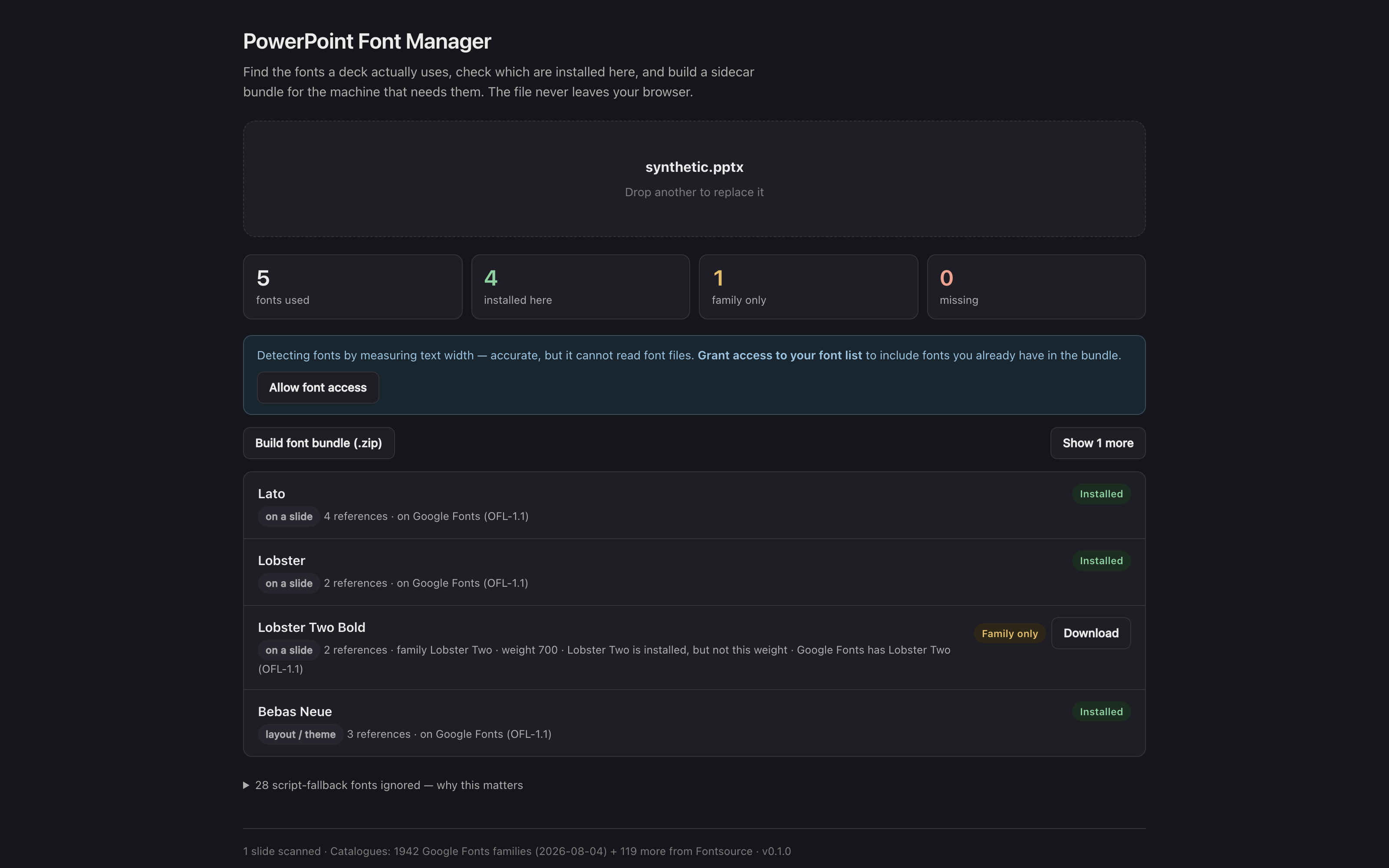
The hosted tool with the repo's synthetic test deck (test/fixtures/synthetic.pptx) loaded: five fonts found, four installed on the machine that took the picture, one family present but not at the weight the deck asks for, and the bundle ready to build. The deck never left the browser.
Why not just search the file for font names
Because you get a wrong answer that looks right. Every PowerPoint theme carries a script fallback table, a list of fonts to reach for if the deck ever contains Japanese, Devanagari, Khmer, Syriac and so on. It's there whether or not a single such character exists in the presentation.
Searching a real deck for typeface= finds 39 fonts. It uses two. The
other 37 are that table, and a tool that lists them will send you off to install
Mongolian Baiti and DokChampa for a slide that says "Welcome" in Calibri.
The second half of the problem is that decks name faces, not families:
| The deck asks for | A naive check says | Actually |
|---|---|---|
Helvetica Neue Medium |
missing | you have it |
Poppins Regular |
missing | you have it |
Times Roman |
missing | that's Times New Roman |
Garamond |
missing | genuinely missing |
Three false alarms out of four. This tool resolves the names first, so "missing" means missing.
What it does
Scans slides, layouts, masters, notes, charts and SmartArt, resolves theme
references (+mn-lt and friends) through the theme the slide actually
inherits, and sorts what it finds by how much it matters: used on a slide,
inherited from a layout or theme, or only present somewhere incidental.
Checks what's installed, using the Local Font Access API where the browser has it, and text-width measurement everywhere else. The fallback was checked against CoreText on macOS across nine fonts and agreed on all nine.
Finds replacements across two catalogues (1,942 Google Fonts families, plus
119 more from Fontsource that Google doesn't carry), matched after the name is
normalised, with near-matches offered when there isn't an exact one (a missing
Garamond suggests EB Garamond and Cormorant Garamond).
Substitutes what can't be shared. The fonts most often missing are the ones a deck picks up just by being written on Windows or a Mac: Calibri, Cambria, Arial, Times New Roman, Courier New, Georgia. None of them may be redistributed and none are on Google Fonts, so the app offers metric-compatible stand-ins instead: Carlito for Calibri, Caladea for Cambria, Arimo for Arial, Tinos for Times New Roman. These have the same advance widths as the original, so line breaks hold and text stays inside its box.
Where there's only a visually similar face (Open Sans for Segoe UI), it tells you so. That swap will move your line breaks, and being told the deck is fixed when it isn't is worse than being told the font is missing.
Recognises Adobe Fonts. These can never be bundled. Adobe's terms say the fonts "are not compatible with packaging workflows that involve transferring font files to another user or computer", and there's no API that serves the files anyway. So for a missing one the app gives the reason and links straight to the family page, where anyone with a Creative Cloud subscription can activate it.
The desktop app also catches the version of this that looks fine: a font Creative Cloud syncs onto your machine is installed here and nowhere else, so the deck looks perfect for you and breaks at the venue. The app tells it apart from an ordinary installed font by where the file lives (Adobe keeps synced faces in its own CoreSync folder), which is why Times New Roman doesn't get the warning just for being sold on Adobe Fonts too.
Reports embedded fonts, the ones that travel inside the deck and need no installing at all. Where the format allows, it extracts them as proper installable files (see below).
Builds a sidecar .zip containing the fonts, a manifest saying where each
came from and under what licence, and an installer for macOS, Windows and Linux
that writes to the per-user font directory with no administrator password.
Embedded fonts
PowerPoint's "embed fonts in the file" doesn't store a TTF. It stores EOT, and what happens next depends on who wrote the file:
| Written by | Format | Can it be recovered? |
|---|---|---|
| PowerPoint | EOT + MicroType Express | No — the glyph data is compressed |
| Canva, LibreOffice | EOT, uncompressed | Yes — extracted as a valid TTF |
Either way the font travels with the deck, so it'll render wherever the
.pptx goes. The distinction only matters for what can go in the bundle.
Embedded, but can the other end edit it?
PowerPoint offers two kinds of embedding, and they promise different things:
| Saved as | The recipient can |
|---|---|
| Embed all characters | view, print and edit |
| Embed only the characters used | view and print only |
The second one ships just the glyphs this deck happened to need, so PowerPoint stops anyone without the font from editing that text. The app reads the setting and labels each embedded font editable or read-only.
It also checks the setting against the file, because the setting is a claim rather than a fact. A Canva deck declares "characters used only" and then embeds a complete Latin face, so it's marked read-only, with a note that the face will in fact render anything you add. The reverse happens too, and matters more: a deck that declares every character while carrying a face cut down to 5 of the 95 printable ASCII characters will let you type and then show you nothing. That one gets a warning.
PowerPoint's own embedder compresses its payload, so for decks written by PowerPoint the setting is the only evidence there'll ever be, and the app says so rather than guessing.
If a cut-down face ends up in a bundle, MANIFEST.txt says which characters
it actually has before it lists the filename, because a subsetted font installs
perfectly and then fails on the first character nobody had typed yet.
The bundle, and two traps it works around
There's no such thing as a single self-extracting archive that runs on every
OS (a Windows .exe won't run on a Mac). So the bundle is a plain .zip
with one small script per platform, and a README that heads off the two ways
these usually go wrong:
- macOS Gatekeeper. Anything extracted from a downloaded zip inherits a quarantine flag, and double-clicking the installer gets "cannot be opened because it is from an unidentified developer". That doesn't mean the script's broken. The README gives both ways through, plus the no-script route of dropping the fonts on Font Book.
- Windows Mark-of-the-Web. PowerShell refuses to run a
.ps1that came out of a downloaded zip. The bundle ships a.cmdwrapper that unblocks it, so run that one, not the.ps1.
Fonts already installed are skipped, never overwritten.
Licensing
The manifest splits the bundle in two. Fonts from Google Fonts carry OFL-1.1, Apache-2.0 or UFL-1.0 and are marked free to pass on. Anything taken off your own machine or extracted from the deck is marked RESTRICTED, because font licences almost never allow redistribution, and permission to embed a font in a document isn't permission to extract it and install it somewhere else. The bundle is built for moving your own deck between your own machines. Read the manifest before you send it to anyone.
Video and audio
Fonts aren't the only thing that goes wrong when a deck gets to the venue. The same scan lists every video and sound in the deck too, and answers the three questions an operator asks before a show:
Will it play? The file extension tells you next to nothing: .mp4 can hold
H.264 that plays everywhere, HEVC that needs a codec pack on Windows, or 10-bit
H.264 that plays nowhere. The app reads the container and the codec
configuration (profile, bit depth, chroma, resolution, frame rate) and gives a
separate verdict for PowerPoint on Windows and on the Mac, with the
reason when either is in doubt:
| Found | Windows | Mac |
|---|---|---|
| MP4 / MOV, H.264 8-bit 4:2:0, AAC | plays | plays |
| H.264 High 10, 4:2:2 or 4:4:4 | will not play | will not play |
| H.264 wider than 4096 or taller than 2304 | check it | plays |
HEVC tagged hvc1 |
needs codec pack | plays |
HEVC tagged hev1 |
needs codec pack | will not play |
| ProRes | will not play | plays |
| HAP, DNxHD / DNxHR | will not play | — |
| WMV / ASF, AVI | plays | will not play |
PowerPoint doesn't decode video itself (it hands the file to Media Foundation on Windows and AVFoundation on the Mac), so these verdicts are what those frameworks can decode, cross-checked against Microsoft's list of supported formats. They come from documentation and the frameworks' known decoders, not from playing every combination on both platforms.
What needs the internet? Online videos (YouTube, Vimeo, Microsoft Stream, SharePoint, OneDrive), web add-ins that load a page, old Flash objects, and hyperlinks to video sites. SharePoint, Stream and OneDrive for work also need PowerPoint signed in to an account that can see the file, which is a second way to come unstuck on a borrowed laptop. Stream (Classic) and Flash are reported as dead, because they are. Videos linked from the author's disk rather than embedded are listed too: they aren't in the file at all.
Can I have the files? Each embedded file can be saved on its own, or all of
them as one zip, named after the slide and shape they came from (Slide 12 - Walk-in loop.mp4) with a MEDIA.txt that says which slide each belongs to
and how PowerPoint played it (start mode, loop, volume, trim). The files are the
bytes PowerPoint stored, untouched; a PowerPoint trim isn't applied to them,
and MEDIA.txt says so.
And take them out of the show. For a show where video runs from a media server rather than PowerPoint, pick the slides (it pre-selects the ones with video) and download a copy of the deck with those slides hidden. Hidden, not deleted: they stay in the deck and the slideshow steps over them. Only those slides' XML changes. Every other byte, the media included, is copied straight across, so a 458 MB deck comes back 150 bytes larger. I checked it by opening the result in PowerPoint for Mac: no repair prompt, and the chosen slides hidden, no more and no fewer. Your original file is never modified.
Video on a slide layout or master plays on every slide built from it, and is reported against each of those slides.
The desktop app
The browser version can tell you a font's missing and hand you a zip. It can't put the font where the OS looks for it (no browser can). The desktop build is the same app with that last step joined up: find the missing fonts, fetch them and install them, in one press.
It's also more accurate. It reads the platform's own font registry rather than
measuring text widths, so it resolves faces and not just families:
Helvetica Neue Medium comes back as installed rather than "the family is
there, the weight might not be".
Fonts go to your own account (~/Library/Fonts,
%LOCALAPPDATA%\Microsoft\Windows\Fonts, ~/.local/share/fonts), so no
administrator password is needed, and anything already installed is skipped
rather than overwritten.
npm run desktop:dev      # run it
npm run desktop:build    # .app / .dmg / NSIS .exe / .deb / .AppImage
Tested on macOS only, so far. The Windows and Linux install paths are written but have never been run. See AGENTS.md §9 for what is and isn't verified.
Development
npm install
npm run dev
npm test
Fixtures: the real decks I test with are private and gitignored. Two synthetic ones are generated and committed, so the suite has something to test on a clean clone:
node scripts/make-test-deck.mjs     # fonts
node scripts/make-media-deck.mjs    # video and audio (needs ffmpeg)
See CLAUDE.md for the full command reference and AGENTS.md for the design notes and traps.
Run your own copy
PowerPoint Font Manager is a static page, so hosting it yourself is one container serving the built files — the same files the hosted copy serves, running somewhere that still works when the venue has no internet.
Docker. The image is built by this repo's docker.yml workflow on every
push and published as ghcr.io/stoatworks-labs/pptx-font-manager:
docker run -d --name pptx-font-manager --restart unless-stopped -p 8538:80 ghcr.io/stoatworks-labs/pptx-font-manager:latest
Or docker compose up -d with the docker-compose.yml
in this repo, which maps the same port. Either way it is then at
http://localhost:8538/.
Unraid. Search Community Applications for PowerPoint Font Manager — the template is
templates/pptx-font-manager.xml
in stoatworks-unraid, which is what the CA feed reads.
Stoatworks Burrow lists it under Self-hosted, with the compose file a click away.
The Dockerfile, docker-compose.yml, docker/ and the workflow are
generated from fleet.json in stoatworks-unraid. Change them there and
regenerate rather than editing them here.
This project is built on other people's work — see ATTRIBUTIONS.md.
Licence
MIT. Part of Stoatworks Labs.
Categories
Related apps
Explore more like this
Explore allDetails
ghcr.io/stoatworks-labs/pptx-font-manager:latestRuntime arguments
- Web UI
http://[IP]:[PORT:80]/- Network
bridge- Shell
sh- Privileged
- false
Template configuration
Host port for the web interface.
- Target
- 80
- Default
- 8538
- Value
- 8538