

Posteryard
Docker app from Posteryard's Repository
Overview
Posteryard gives every movie, show, season and episode the same calm look: clean art without printed text, the title logo in one fixed spot, a soft fade, and small badges for 4K, Dolby Vision, Dolby Atmos and the streaming service. It finds the art on TMDB, checks it, renders it, uploads it and keeps it up to date. With Live TV on, it does the same for the shows and movies in the Plex or Jellyfin guide.
It starts with Dry Run on: images go to the previews folder in Data and the server is not touched. Set Dry Run to false when you like them.
For new titles right away, add the webhook http://Unraid-IP:8098/webhook/YOUR-WEBHOOK-SECRET in Plex under Settings, Webhooks. For Jellyfin and Emby, see the README. Without it, new titles get posters within 15 minutes.
Readme
View on GitHub
Posteryard
Clean, consistent posters for Plex, Jellyfin and Emby, picked, rendered and kept current automatically.



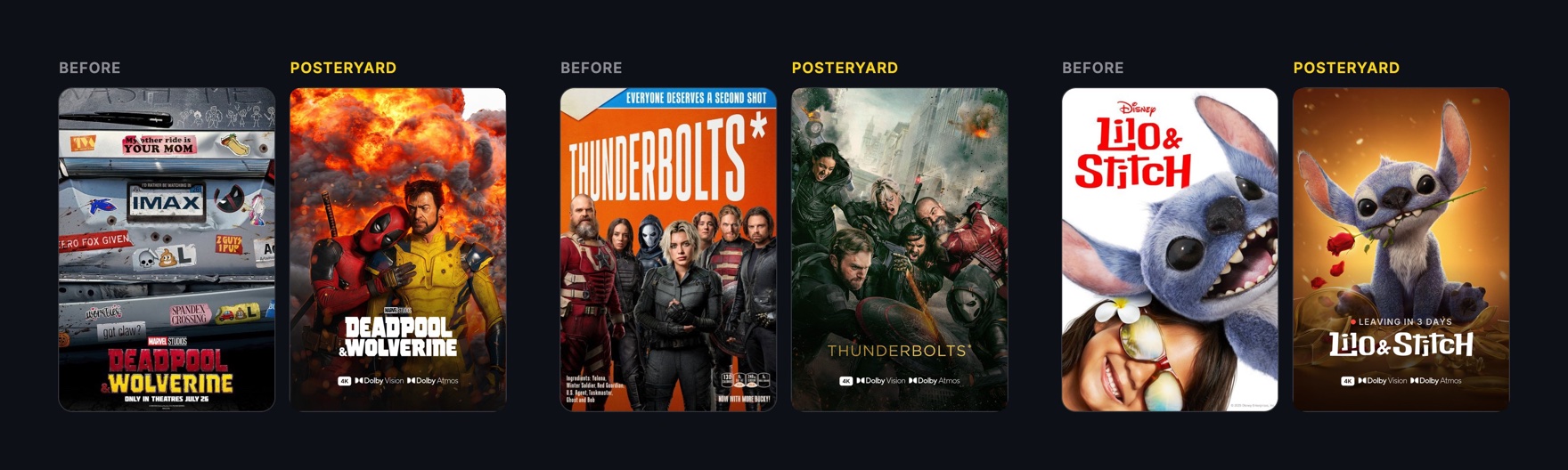
Studio posters come in every font, tagline and layout. Posteryard swaps them for textless art with the title in the same spot on every poster. It then renders, uploads and refreshes them on its own as your library grows. You only step in when you want a different picture.
What you get
- Clean art. Textless art from TMDB, with the title logo in one spot at one size. Art with a printed title is skipped.
- Where it streams. Shows get the mark of the service they stream on.
- Quality badges. 4K, HDR, Dolby Vision and Atmos badges, read from your files.
- Status labels.
JUST ADDED,NEW EPISODEandNEW SEASON, plus a red countdown before Maintainerr deletes a title. - Seasons, episodes and collections. Each season gets its own art and number. Collections can get a tile too.
- Safe to try. It starts in preview mode and changes nothing until you say so. Everything it uploads can be undone.
Getting started
You need Docker on a 64-bit Intel, AMD or ARM machine, a free TMDB API key and your Plex token. Using Jellyfin or Emby? See Jellyfin and Emby.
1. Create the compose file
Save this as compose.yml and replace the example values. The same image is on Docker Hub as sandobserver/posteryard.
services:
  posteryard:
    image: ghcr.io/sandobserver/posteryard:latest
    container_name: posteryard
    restart: unless-stopped
    init: true
    read_only: true
    tmpfs:
      - /tmp
    cap_drop:
      - ALL
    security_opt:
      - no-new-privileges:true
    environment:
      # TMDB API Key or API Read Access Token
      - TMDB_API_KEY=your-tmdb-api-key
      # Plex's network address. Not localhost.
      - PLEX_URL=http://192.168.1.10:32400
      - PLEX_TOKEN=your-plex-token
      # Any long random text: openssl rand -hex 16
      - WEBHOOK_SECRET=any-long-random-text
      # The daily pass runs at DAILY_AT in this time zone
      - TZ=America/New_York
      - DRY_RUN=true
    volumes:
      - ./data:/data
    ports:
      - "8000:8000"
./data is the folder on your server where Posteryard keeps its files. If Plex runs in Docker on the same network, set PLEX_URL to its container name, such as http://plex:32400.
2. Start it
In the folder with compose.yml:
mkdir -p ./data && sudo chown 1000:1000 ./data
docker compose up -d
Posteryard runs as user 1000 and writes only to ./data and /tmp.
Without Compose
mkdir -p ./data && sudo chown 1000:1000 ./data
docker run -d --name posteryard --restart unless-stopped \
  --init --read-only --tmpfs /tmp --cap-drop ALL \
  --security-opt no-new-privileges:true \
  -e TMDB_API_KEY=your-tmdb-api-key \
  -e PLEX_URL=http://192.168.1.10:32400 \
  -e PLEX_TOKEN=your-plex-token \
  -e WEBHOOK_SECRET=any-long-random-text \
  -e TZ=America/New_York -e DRY_RUN=true \
  -v ./data:/data -p 8000:8000 \
  ghcr.io/sandobserver/posteryard:latest
To go live, run docker rm -f posteryard and the same command with DRY_RUN=false.
3. Check the preview
Plex is not changed yet. Posteryard saves each poster to data/previews, such as 5646-poster.jpg. Open a few to check them. docker logs -f posteryard shows progress.
4. Go live
When you like them, change DRY_RUN=true to false in compose.yml and run docker compose up -d again. Posteryard uploads the images and locks them, so a Plex refresh keeps them.
Two more steps are worth it:
- New titles right away. With Plex Pass, add
http://SERVER-IP:8000/webhook/YOUR-WEBHOOK-SECRETunder Settings > Webhooks. Without it, new titles get posters within 15 minutes. - One poster tool at a time. Turn off poster overlays in other tools, such as Kometa, or the two overwrite each other.
Unraid
Open Apps, search for Posteryard and choose Install. Fill in the TMDB API key, the Plex URL and token, and a webhook secret. Previews land in /mnt/user/appdata/posteryard/previews. The webhook port is 8098. Use it in place of 8000 in every webhook address, such as http://UNRAID-IP:8098/webhook/YOUR-WEBHOOK-SECRET for Plex. The template runs as Unraid's nobody user (--user=99:100) with the same lockdown as the compose file, and restarts the container after a crash.
To go live, open the container's Edit screen, set Dry Run to false and choose Apply. The container's Logs show progress.
If Apps does not list Posteryard yet, save the template from the Unraid terminal, then pick Posteryard under Docker, Add Container, Template:
curl -fsSL -o /boot/config/plugins/dockerMan/templates-user/my-Posteryard.xml \
  https://raw.githubusercontent.com/SandObserver/Posteryard/main/templates/posteryard.xml
Settings
Every setting except the first four has a default. Add a line under environment: only to change one. The landing page builds these lines for you.
| Setting | What it does | Default |
|---|---|---|
TMDB_API_KEY |
A free key from TMDB, under Settings, API. The API Read Access Token works too. | |
PLEX_URL |
Your Plex server's address on the network, such as http://192.168.1.10:32400. Not localhost. Leave it empty for Jellyfin or Emby. |
|
PLEX_TOKEN |
Your Plex token. Leave it empty for Jellyfin or Emby. | |
WEBHOOK_SECRET |
Any long random text, such as the output of openssl rand -hex 16. It is part of the webhook address. |
|
DRY_RUN |
true saves previews and changes nothing on your server. false uploads the images and locks them. |
true |
LIBRARIES |
Libraries to manage, separated by commas, named as your server shows them. Movie and TV libraries only. PLEX_LIBRARIES works too. |
Movies,TV Shows |
ONLY_RATING_KEYS |
Limit Posteryard to a few titles, for a first test. Rating keys separated by commas. A show includes its seasons and episodes. | |
JELLYFIN_URL |
Your Jellyfin server's address. Use it instead of PLEX_URL and PLEX_TOKEN. See Jellyfin and Emby. |
|
JELLYFIN_API_KEY |
A Jellyfin API key, from API Keys in the Jellyfin dashboard. | |
EMBY_URL |
Your Emby server's address. Use it instead of PLEX_URL and PLEX_TOKEN. See Jellyfin and Emby. |
|
EMBY_API_KEY |
An Emby API key, from API Keys in the Emby dashboard. | |
QUALITY_MIN_VIDEO |
Lowest resolution that gets a badge: off, 720, 1080 or 2160. |
2160 |
QUALITY_MIN_HDR |
Lowest HDR format that gets a badge: off, hdr10, hdr10plus or dolbyvision. |
hdr10 |
QUALITY_MIN_AUDIO |
Lowest audio that gets a badge: off, 5.1, 7.1 or atmos. DTS:X counts as atmos. |
atmos |
QUALITY_ACCESSIBILITY |
Subtitle and audio description badges on movies: any of sdh, cc and ad, separated by commas. Read from the track flags, or from track names such as "English (SDH)". |
|
STATUS_LABELS |
JUST ADDED, NEW EPISODE and NEW SEASON labels. false turns them off. |
true |
MAINTAINERR_URL |
Your Maintainerr address, for the LEAVING IN 5 DAYS countdown. |
|
STREAMING_REGIONS |
Countries to look up a show's streaming service in, in order. Outside the US, put yours first, such as GB,US. |
US |
FANART_API_KEY |
Your fanart.tv API key. A second art source when TMDB has nothing clean. | |
APPLE_ART |
Use Apple TV's key art when TMDB has no textless poster. See Where the art comes from. | false |
TEXT_CHECK |
Check art for printed titles and skip it. false saves about 350 MB of memory on small machines, but a few posters may show the title twice. |
true |
LOGO_LANGUAGES |
Title logo languages in order, such as fr,en. |
en |
PREFER_WORDMARK |
Prefer a wide logo with the name written out. false allows tall or square logos. |
true |
EPISODE_THUMBNAILS |
plain adds a light shade, titled adds the episode number and title, off gives episodes back their server thumbnails. |
plain |
COLLECTION_POSTERS |
Give every collection a poster. See Collections. | false |
SERVICE_COLLECTIONS |
Keep one collection per streaming service with at least 3 shows. See Collections. | false |
LIVE_TV |
Posters for the shows and movies in the Live TV guide, on Plex and Jellyfin. See Live TV. | false |
NOTIFY_URLS |
Where alerts go: Apprise addresses separated by spaces or commas, for Discord, Telegram, ntfy, email and about 100 more. See Alerts. | |
NOTIFY_EVENTS |
Which alerts are sent: problems, new and summary. |
problems |
HEARTBEAT_URL |
An address Posteryard calls every minute while healthy, such as an Uptime Kuma push URL. | |
SWEEP_MINUTES |
Minutes between checks for new and changed titles. | 15 |
DAILY_AT |
Time of the daily full pass, as HH:MM in your TZ. |
04:15 |
LOG_LEVEL |
debug, info, warning or error. |
info |
LISTEN_PORT |
Port inside the container. If you change it, change the right side of ports: too. |
8000 |
DATA_DIR |
Folder inside the container for the database, previews and custom art. Keep the default. | /data |
..._FILE |
Read a secret from a file, such as a Docker secret: PLEX_TOKEN_FILE=/run/secrets/plex_token. Works for TMDB_API_KEY, FANART_API_KEY, PLEX_TOKEN, JELLYFIN_API_KEY, EMBY_API_KEY, WEBHOOK_SECRET, NOTIFY_URLS and HEARTBEAT_URL. |
Change a poster
Run a command in the container, naming the title the way Plex shows it:
docker exec posteryard posteryard art next The Office
art next switches to the next best art. art set uses your own image, and why shows why a picture was picked. You can also add a label in Plex, such as posteryard-ignore. See Commands and labels.
Documentation
- Commands and labels: change, reset or skip a poster.
- Jellyfin and Emby: setup and differences from Plex.
- How it works: what each image looks like, where the art comes from, when it runs, and what it changes.
- Alerts and monitoring: notifications, health check and Uptime Kuma.
- Troubleshooting: log messages and what to do.
- Upgrade, back up, uninstall
Contributing
See CONTRIBUTING.md for setup, checks and releases. Changes are listed in CHANGELOG.md.
Credits

Artwork and metadata come from TMDB, and with FANART_API_KEY also from fanart.tv. Posteryard uses TMDB and the TMDB APIs but is not endorsed, certified, or otherwise approved by TMDB. Streaming availability comes from JustWatch through TMDB. Service and Dolby marks: see assets/marks-src/SOURCES.md. Fonts, all under the SIL Open Font License: Inter, and for other scripts Vazirmatn (Persian, Arabic), Pretendard (Korean, Japanese) and Noto Sans (Chinese, Hebrew, Thai, Devanagari); licences in src/posteryard/assets/fonts/.
License
Apache License 2.0. See NOTICE for the name, the logo and third-party assets.
Media gallery
Requirements
Categories
Related apps
Explore more like this
Explore allDetails
ghcr.io/sandobserver/posteryard:latestRuntime arguments
- Network
bridge- Privileged
- false
- Extra Params
--user=99:100 --restart=unless-stopped --init --read-only --tmpfs=/tmp --cap-drop=ALL --security-opt=no-new-privileges:true --memory=1536m
Template configuration
Port for the Plex, Jellyfin or Emby webhook and the /healthz check.
- Target
- 8000
- Default
- 8098
- Value
- 8098
Database, previews and custom art. Keep this, or every image is rendered and uploaded again.
- Target
- /data
- Default
- /mnt/user/appdata/posteryard
- Value
- /mnt/user/appdata/posteryard
A free key from TMDB, under Settings, API. The API Read Access Token works too.
- Target
- TMDB_API_KEY
Your Plex server's address on the network, such as http://192.168.1.10:32400. Not localhost. Leave it empty for Jellyfin or Emby.
- Target
- PLEX_URL
Your Plex token. Leave it empty for Jellyfin or Emby.
- Target
- PLEX_TOKEN
Any long random text, such as the output of openssl rand -hex 16. It is part of the webhook address.
- Target
- WEBHOOK_SECRET
true saves previews and changes nothing on your server. false uploads the images and locks them.
- Target
- DRY_RUN
- Default
- true
- Value
- true
Libraries to manage, separated by commas, named as your server shows them. Movie and TV libraries only. PLEX_LIBRARIES works too.
- Target
- LIBRARIES
- Default
- Movies,TV Shows
- Value
- Movies,TV Shows
Countries to look up a show's streaming service in, in order. Outside the US, put yours first, such as GB,US.
- Target
- STREAMING_REGIONS
- Default
- US
- Value
- US
Where alerts go: Apprise addresses separated by spaces or commas, for Discord, Telegram, ntfy, email and about 100 more.
- Target
- NOTIFY_URLS
Which alerts are sent: problems, new and summary.
- Target
- NOTIFY_EVENTS
- Default
- problems
- Value
- problems
Your Jellyfin server's address. Use it instead of PLEX_URL and PLEX_TOKEN.
- Target
- JELLYFIN_URL
A Jellyfin API key, from API Keys in the Jellyfin dashboard.
- Target
- JELLYFIN_API_KEY
Your Emby server's address. Use it instead of PLEX_URL and PLEX_TOKEN.
- Target
- EMBY_URL
An Emby API key, from API Keys in the Emby dashboard.
- Target
- EMBY_API_KEY
Your Maintainerr address, for the LEAVING IN 5 DAYS countdown.
- Target
- MAINTAINERR_URL
Your fanart.tv API key. A second art source when TMDB has nothing clean.
- Target
- FANART_API_KEY
Use Apple TV's key art when TMDB has no textless poster.
- Target
- APPLE_ART
- Default
- false
- Value
- false
Check art for printed titles and skip it. false saves about 350 MB of memory on small machines, but a few posters may show the title twice.
- Target
- TEXT_CHECK
- Default
- true
- Value
- true
Limit Posteryard to a few titles, for a first test. Rating keys separated by commas. A show includes its seasons and episodes.
- Target
- ONLY_RATING_KEYS
Lowest resolution that gets a badge: off, 720, 1080 or 2160.
- Target
- QUALITY_MIN_VIDEO
- Default
- 2160
- Value
- 2160
Lowest HDR format that gets a badge: off, hdr10, hdr10plus or dolbyvision.
- Target
- QUALITY_MIN_HDR
- Default
- hdr10
- Value
- hdr10
Lowest audio that gets a badge: off, 5.1, 7.1 or atmos. DTS:X counts as atmos.
- Target
- QUALITY_MIN_AUDIO
- Default
- atmos
- Value
- atmos
Subtitle and audio description badges on movies: any of sdh, cc and ad, separated by commas. Read from the track flags, or from track names such as "English (SDH)".
- Target
- QUALITY_ACCESSIBILITY
JUST ADDED, NEW EPISODE and NEW SEASON labels. false turns them off.
- Target
- STATUS_LABELS
- Default
- true
- Value
- true
plain adds a light shade, titled adds the episode number and title, off gives episodes back their server thumbnails.
- Target
- EPISODE_THUMBNAILS
- Default
- plain
- Value
- plain
Title logo languages in order, such as fr,en.
- Target
- LOGO_LANGUAGES
- Default
- en
- Value
- en
Prefer a wide logo with the name written out. false allows tall or square logos.
- Target
- PREFER_WORDMARK
- Default
- true
- Value
- true
Give every collection a poster.
- Target
- COLLECTION_POSTERS
- Default
- false
- Value
- false
Posters for the shows and movies in the Live TV guide, on Plex and Jellyfin.
- Target
- LIVE_TV
- Default
- false
- Value
- false
Keep one collection per streaming service with at least 3 shows.
- Target
- SERVICE_COLLECTIONS
- Default
- false
- Value
- false
Minutes between checks for new and changed titles.
- Target
- SWEEP_MINUTES
- Default
- 15
- Value
- 15
Time of the daily full pass, as HH:MM in your TZ.
- Target
- DAILY_AT
- Default
- 04:15
- Value
- 04:15
An address Posteryard calls every minute while healthy, such as an Uptime Kuma push URL.
- Target
- HEARTBEAT_URL
debug, info, warning or error.
- Target
- LOG_LEVEL
- Default
- info
- Value
- info