
All apps · 0 apps

posterizarr
Docker app from grtgbln's Repository
Overview
Readme
View on GitHub
Automate the creation of beautiful assets for your Plex, Jellyfin, or Emby library.



About The Project
Posterizarr is a PowerShell script with a full Web UI that automates generating images for your media library. It fetches artwork from Fanart.tv, TMDB, TVDB, Plex, and IMDb, focusing on textless images and applying your own custom overlays and text.
- User-Friendly Web UI: Manage settings, monitor activity, and trigger runs from a browser.
- Logo Management: Search, preview, and manually replace clearlogos directly from the Web UI.
- Multiple Media Servers: Supports Plex, Jellyfin, and Emby.
- Kometa Integration: Organizes assets in a Kometa-compatible folder structure.
- Smart Integration: Trigger runs from Tautulli, Sonarr, and Radarr.

🚀 Get Started
All installation instructions, configuration guides, and advanced tutorials have been moved to our dedicated documentation site.
Click Here to Read the Full Documentation
Supported Platforms 💻


Sponsors ❤️
Check out our awesome sponsors!
Privacy & Telemetry
Starting with v2.2.50, Posterizarr collects completely anonymous, basic usage stats to help guide development (e.g., knowing whether to prioritize Docker vs. Bare-Metal, or Plex vs. Jellyfin).
NO IP addresses, NO personal data, and NO file paths are collected or stored.
The telemetry payload contains exactly:
- Anonymous GUID
- OS
- Target Media Server
- App Version
You can opt-out at any time by setting "telemetry": false in your config.json.
Enjoy
Feel free to customize the script further to meet your specific preferences or automation requirements.
I'm open about the fact that I use AI as a coding assistant, for the UI and Web components since I’m not a web dev by trade. It helps me handle boilerplate and refactoring at a speed I couldn't achieve alone. I review and test every line before it’s committed.
PR Rules
[!IMPORTANT]
- Please review our full Contributing Guidelines and Code of Conduct before submitting a pull request.
- Adjust on each PR the version number in script on Line 78
$CurrentScriptVersion = "3.0.0"- Adjust the version number in Release.txt to match the one in script.
- this is required because the script checks against this file if a newer version is available.
- Do not include images on a PR.
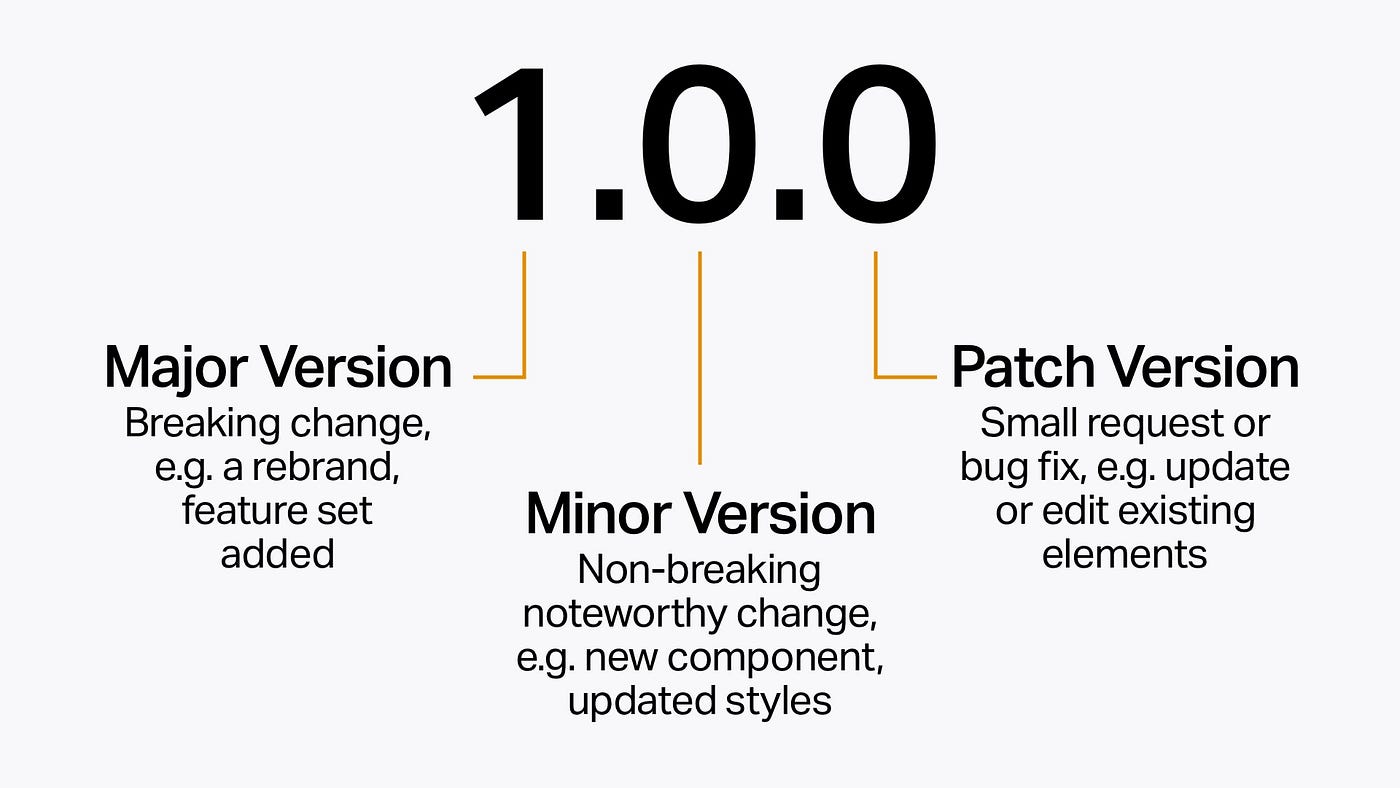
Version synchronization is critical for update detection
⭐ Star this repo if Posterizarr helps organize your media library!
Categories
Related apps
Explore more like this
Explore allDetails
ghcr.io/fscorrupt/posterizarr:latestRuntime arguments
- Web UI
http://[IP]:[PORT:8000]/- Network
bridge- Shell
bash- Privileged
- false
- Extra Params
--user 099:100
Template configuration
Port for the Web UI. Container Port: 8000
- Target
- 8000
- Default
- 8000
- Value
- 8000
[Advanced] Set the run time (e.g., 00:00) or set to 'disabled' to use the Web UI scheduler (recommended).
- Target
- RUN_TIME
- Default
- disabled
- Value
- disabled
- Default
- 002
- Value
- 002
- Default
- xterm
- Value
- xterm
Wait time for Arr services (optional).
Storage for config files
- Target
- /config
- Default
- /mnt/user/appdata/posterizarr
- Value
- /mnt/user/appdata/posterizarr
Storage for assets
- Target
- /assets
- Default
- /mnt/user/appdata/posterizarr/assets
- Value
- /mnt/user/appdata/posterizarr/assets
Storage for manual assets
- Target
- /manualassets
- Default
- /mnt/user/appdata/posterizarr/manualassets
- Value
- /mnt/user/appdata/posterizarr/manualassets
Storage for asset backups
- Target
- /assetsbackup
- Default
- /mnt/user/appdata/posterizarr/assetsbackup
- Value
- /mnt/user/appdata/posterizarr/assetsbackup
The internal port the Web UI listens on. Default is 8000. Change this to a different port (e.g. 9000) if you are routing this container through a VPN like Gluetun, as Gluetun already uses port 8000 internally.
- Target
- APP_PORT
- Default
- 8000
- Value
- 8000