

PosterFlow
Docker app from dweagle's Repository
PosterFlow is a self-hosted poster management system that syncs and manages movie and TV show posters across Google Drive using rclone.
Overview
Readme
View on GitHubPosterFlow
A self-hosted poster management system that syncs and manages movie and TV show posters across Google Drive using rclone. Includes a FastAPI backend and React/TypeScript frontend, packaged as a single Docker container.
PosterFlow is heavily inspired by DAPS by Drazzilb
See the Wiki for more information. Every page of the app has its own wiki page with screenshots.
Community drive recommendations — poster drives, artwork drives and the priority baseline: Google Drives (source)
Dashboard
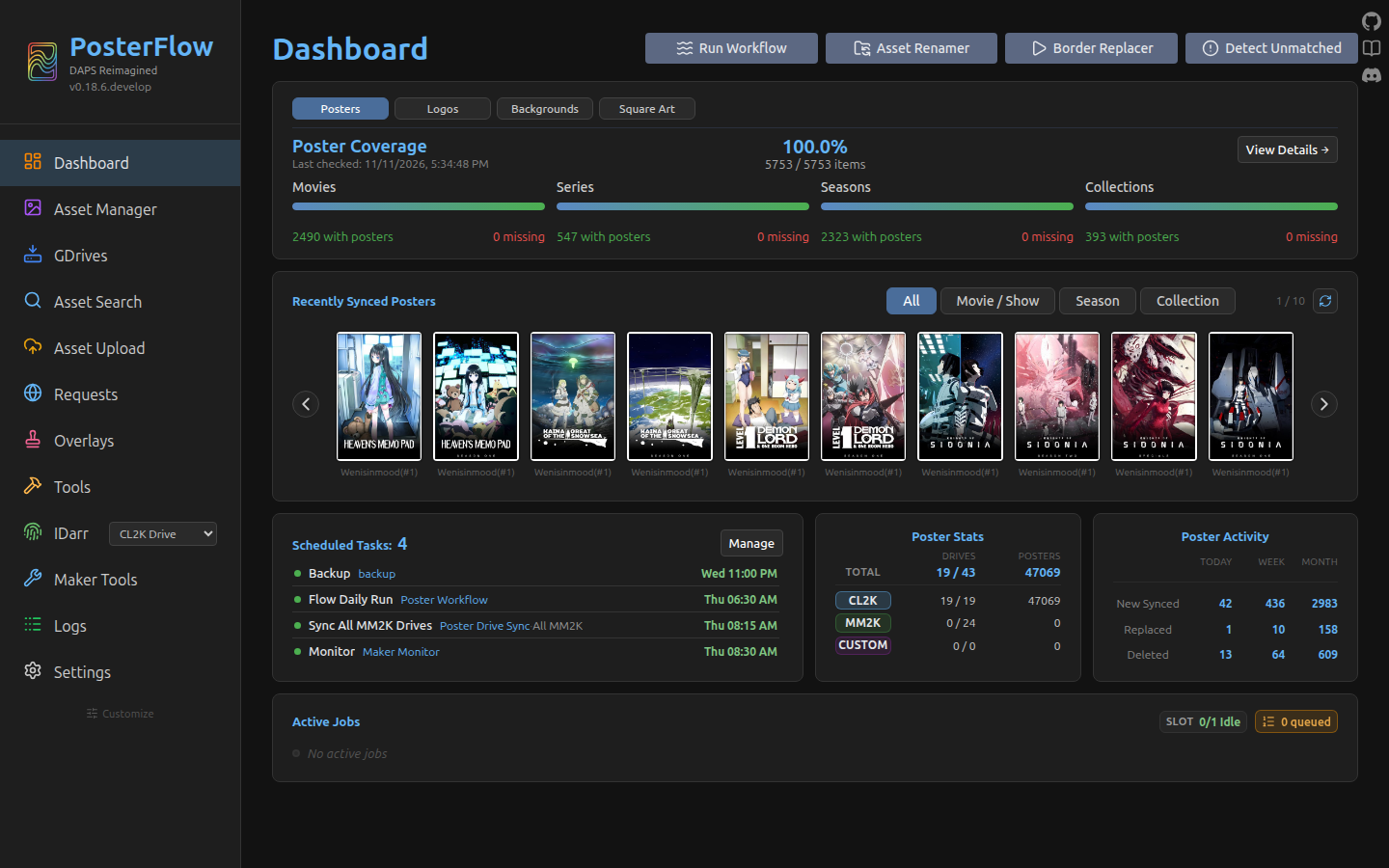 The dashboard is the top landing spot when accessing the app. The sidebar exposes every top-level surface.
Features
- Drive Syncing — Subscribe to community preset drives (MM2K, CL2K, etc.) or add your own custom Google Drive sources, for posters and for artwork (logos, backgrounds, square art)
- Asset Renamer — Automatically renames downloaded posters and artwork to match your Plex/Jellyfin/Radarr/Sonarr library
- Border Replacer — Replaces poster borders in bulk, with holiday schedules and rules by label, genre or collection
- Unmatched Assets — Detects and reports assets in your library that are missing posters. TMDB links for missing items
- Asset Search — Search the synced drives to see what each one offers for a title, and pin a specific file to a library item
- Asset Upload — Upload posters and artwork directly to your Plex and Jellyfin libraries, on demand or by webhook
- Overlays — Badges drawn onto posters as they are uploaded: airing status, rating, content rating, streaming service, resolution, audio and edition
- Tools — Clean up old Plex uploads, reset server images, and keep Sonarr and Radarr tidy with the Arr Renamer and the Arr Upgrader
- IDarr — Metadata enrichment pipeline for poster-maker assets (TMDB/TVDB/IMDB ID assignment and rename normalization)
- Community Requests — Shared request board where users submit missing posters for makers to claim and fulfill. Discord integration auto-fills your username and unlocks an upload button for verified poster makers
- Maker Tools — Poster-makers can monitor upcoming movie and TV releases to track missing posters
- Scheduler — Automate any job on a recurring schedule
- Live Job Status — WebSocket-powered real-time job progress and log streaming
- After Job Scripts — Autorun a custom script after a completed job
- Notifications — Optional Discord and Apprise notifications on job completion
Quick Start
The setup wizard runs on first launch to configure your media server connections and Google Drive credentials.
Access
| URL | Description |
|---|---|
http://localhost:8357 |
Main application |
Install
Docker is the recommended and most-tested route; an Unraid template is available in CA. Prefer no Docker? PosterFlow also runs natively - see docs/native-install.md.
Docker Compose
Currently only a develop tag exists
| Tag | Source branch | Updated |
|---|---|---|
develop |
develop |
When a maintainer runs the workflow against develop. |
docker-compose.yml
The canonical compose file. Every key is explained inline.
services:
  posterflow:
    image: dweagle/posterflow:develop
    container_name: posterflow
    ports:
      - "8357:8000"
    volumes:
      # The only required mount. Holds posterflow.db, rclone.conf, drives_cache.json,
      # the default poster cache (/config/posters/gdrive/), /config/logs/,
      # /config/scripts/ and /config/idarr/. Back this directory up.
      - ./config:/config

      # Optional. Mount your Kometa assets directory here (or anywhere) and point
      # the renamer's "Destination" setting at it. Without this mount, PosterFlow
      # writes its organized output under /config/posters/assets/ and you have
      # to copy it out yourself.
      - /path/to/kometa/assets:/assets

      # Optional, poster-makers only. Mount the directory where you stage posters
      # you intend to upload to your personal Google Drive via IDarr.
      - /path/to/idarr/staging:/idarr

      # Optional. Plex's "Plex Media Server" folder (or just its Metadata folder).
      # Needed by Tools > Clean up Plex uploads, and used by Overlays to tidy up
      # after each badge. Enter the container path (/plex) on the Tools page.
      - "/path/to/Plex Media Server:/plex"

    environment:
      - PUID=1000        # Host UID that owns the mount points above.
      - PGID=1000        # Host GID. Both default to 1000 if unset.
      - EXTRA_GROUPS=    # Optional. Extra group ids, comma-separated (e.g. 999). Give the Plex user's group so PosterFlow can delete files in Plex's Metadata folder.
      - UMASK=022        # Optional. Mode mask for files the app creates. 002 makes them group-writable.
      - TZ=America/New_York   # Host timezone for logs and schedule times. Settings > Scheduling can override it for schedules.
      - DEBUG=false      # Optional. true forces file logging to DEBUG on startup.
      - LOG_LEVEL=INFO   # Optional. File log level when DEBUG=false.
      - ALLOWED_FRAME_ORIGINS=  # Optional. Comma-separated origins allowed to embed the app in an iframe (e.g. http://organizr.local:8080).
    restart: unless-stopped
Equivalent docker run
docker run -d \
  --name posterflow \
  -p 8357:8000 \
  -v /srv/posterflow/config:/config \
  -v /srv/kometa/assets:/assets \
  -e PUID=1000 -e PGID=1000 \
  -e TZ=America/New_York \
  --restart unless-stopped \
  dweagle/posterflow:develop
Volumes
| Container path | Required? | Created by | Purpose |
|---|---|---|---|
/config |
Yes | The entrypoint chowns this and the app mkdirs /config/logs, /config/idarr and /config/scripts on every boot (see backend/core/config.py). |
SQLite DB at /config/posterflow.db, WAL/SHM sidecars next to it, rclone.conf, drives_cache.json, the default GDrive cache at /config/posters/gdrive/, logs at /config/logs/posterflow.log (plus per-job log dirs), after-job scripts at /config/scripts/, IDarr working dir at /config/idarr/. |
/assets (or anywhere) |
No | You. | Destination for organized, renamed, bordered posters. Point Kometa's asset_directory at the same host path. |
/idarr (or anywhere) |
No | You. | Poster-maker staging area for IDarr. Used only if you operate the IDarr workflow. |
/plex (or anywhere) |
No | You. | Plex's Plex Media Server folder, or just its Metadata folder. Needed by Tools → Clean up Plex uploads, and used by Overlays to tidy up after each badge. PosterFlow has to be able to delete files in it: see EXTRA_GROUPS below. |
Environment Variables
| Variable | Default | Description |
|---|---|---|
PUID |
1000 |
User ID for file ownership |
PGID |
1000 |
Group ID for file ownership |
EXTRA_GROUPS |
(none) | Extra group ids, comma-separated. Give the Plex user's group so Clean up Plex uploads can delete superseded uploads in Plex's Metadata folder |
UMASK |
022 |
Permission mask for files and folders the container creates (posters, PSD exports, synced drive files). 022 gives 644/755. Set 002 when other users in the PGID group need to save into those files over SMB, e.g. Photoshop on macOS writing in place. Applies to new files only; existing files keep their mode. |
TZ |
UTC |
Timezone for log timestamps and schedule times. Settings → Scheduling can set a different timezone for schedules. |
DEBUG |
false |
Enable debug logging on startup (can be toggled in-app) |
LOG_LEVEL |
INFO |
File log verbosity when debug mode is off |
ALLOWED_FRAME_ORIGINS |
(empty) | Comma-separated origins allowed to embed the app in an iframe (e.g. an Organizr/Homarr dashboard). Format http(s)://host[:port] — no paths or wildcards; invalid entries are ignored with a startup warning. Empty keeps embedding blocked for all other sites. |
Debug mode state is persisted in the database and restored on restart. You can toggle it from Settings without restarting the container.
EXTRA_GROUPS and Plex's Metadata folder
Plex keeps every image ever uploaded to an item and has no API to remove the old ones. PosterFlow can delete them itself (Tools → Clean up Plex uploads, and Overlays after each badge), but those files belong to the Plex user, so the PosterFlow user needs write access to them:
- Mount Plex's
Plex Media Serverfolder (or itsMetadatafolder) into the container and enter the container path on the Tools page. - Set
EXTRA_GROUPSto the Plex user's group id and recreate the container. On a Linux package installid -g plexprints it; for Plex in Docker it is the group that container runs Plex as (itsPGIDorPLEX_GID). Several ids are separated by commas. - Plex creates its folders without group write, so the existing ones may need it once:
chmod -R g+w "/path/to/Plex Media Server/Metadata". Setting Plex's umask to002keeps new folders writable. - Press Check on the Tools page to confirm, and run a dry run first.
Without this, everything else works; only the clean-up of old Plex uploads is unavailable.
License
PosterFlow is released under the MIT License.
Bundled third-party files keep their own licenses, and each license sits beside the files it covers:
- Fonts in
backend/assets/fonts: Albert Sans, Bebas Neue, Liberation Sans and Noto Serif (SIL OFL 1.1), Roboto Condensed (Apache 2.0), DejaVu Sans (Bitstream Vera license). - Badge images in
backend/assets/overlays: Kometa's default overlay images are MIT (LICENSE-Kometa.txt). A folder'sCREDITS.txtsays which images those are.
Categories
Download Statistics
Total Downloads Over Time
Related apps
Explore more like this
Explore allLinks
Details
dweagle/posterflow:developRuntime arguments
- Web UI
http://[IP]:[PORT:8000]/- Network
bridge- Shell
bash- Privileged
- false
Template configuration
Web UI port for PosterFlow
- Target
- 8000
- Default
- 8357
- Value
- 8357
Stores the database, rclone config, logs, default poster storage, and idarr working directory.
- Target
- /config
- Default
- /mnt/user/appdata/posterflow
- Value
- /mnt/user/appdata/posterflow
Optional: custom destination/asset storage location (e.g. Kometa assets folder). Configure the path in Settings after setup.
- Target
- /assets
Optional: custom poster storage location. Configure the path in subscribed drives after setup.
- Target
- /posters
Optional: for poster maker's storage location (e.g. poster folder for sync to gdrive). Configure the path in Idarr after setup.
- Target
- /idarr
Optional: for poster maker's storage location for PSD files. Configure the path in Maker Tools > TMDB Search settings after setup.
- Target
- /posterPSDs
User ID for file ownership
- Default
- 99
- Value
- 99
Group ID for file ownership
- Default
- 100
- Value
- 100
Permission mask for files and folders the container creates (posters, PSD exports, synced drive files). 022 gives 644/755. Set 002 when other users in the PGID group need to save into those files over SMB, e.g. Photoshop on macOS writing in place. Applies to new files only.
- Default
- 022
- Value
- 022
Timezone (e.g. America/New_York)
- Default
- UTC
- Value
- UTC
Enable debug logging on startup. Can also be toggled in-app Settings.
- Default
- false
- Value
- false
File log verbosity when debug mode is off (DEBUG, INFO, WARNING, ERROR)
- Default
- INFO
- Value
- INFO