

poptonium
Docker app from Benjavin's Repository
Companion backend for the Poptonium Plex client.
Overview
Readme
View on GitHub

Shape the Plex app everyone on your server sees.
The self-hosted companion server for Poptonium, a Plex client for
iOS and
Android.
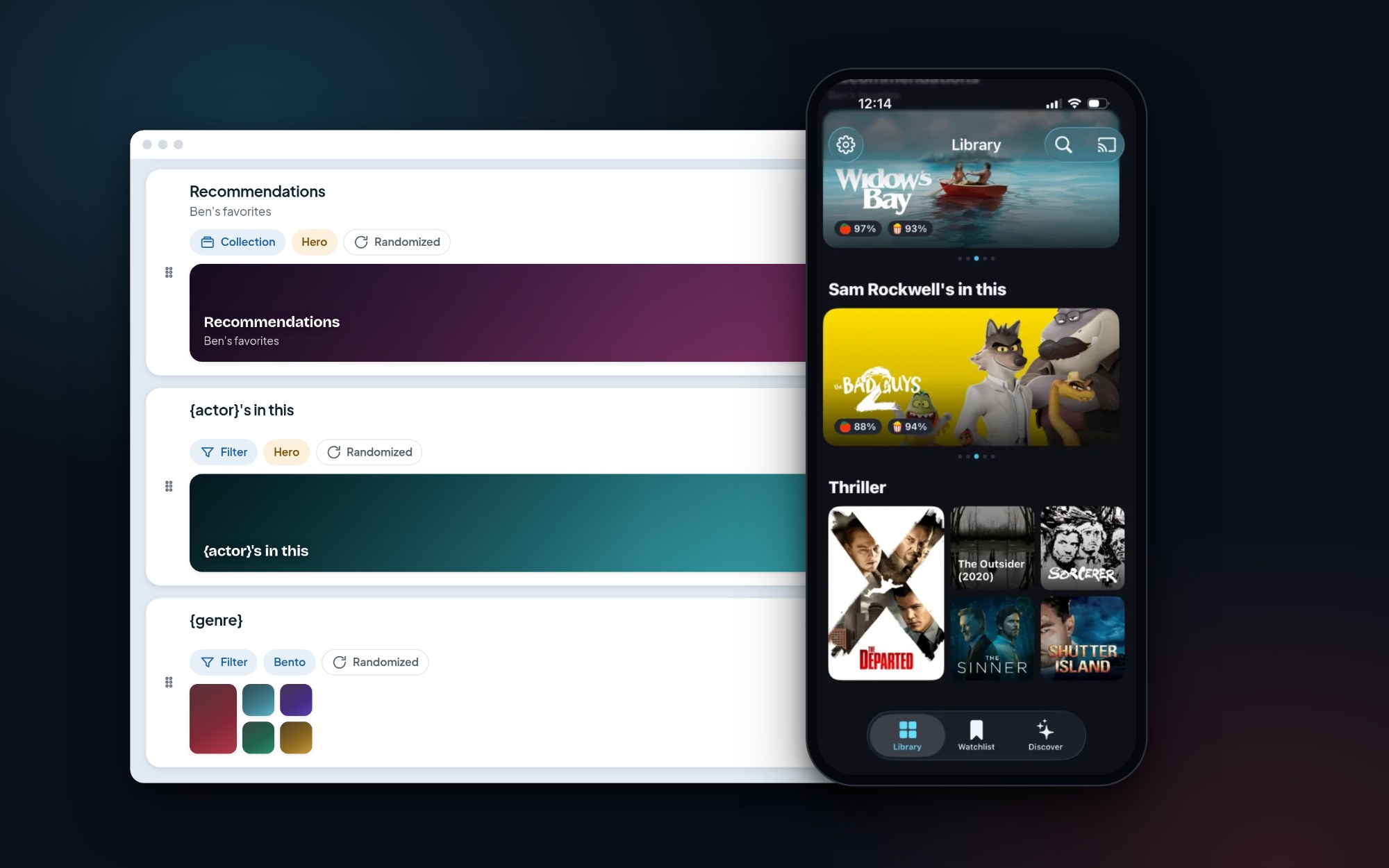
Build rows and heroes in the admin. They appear on everyone's Library page.
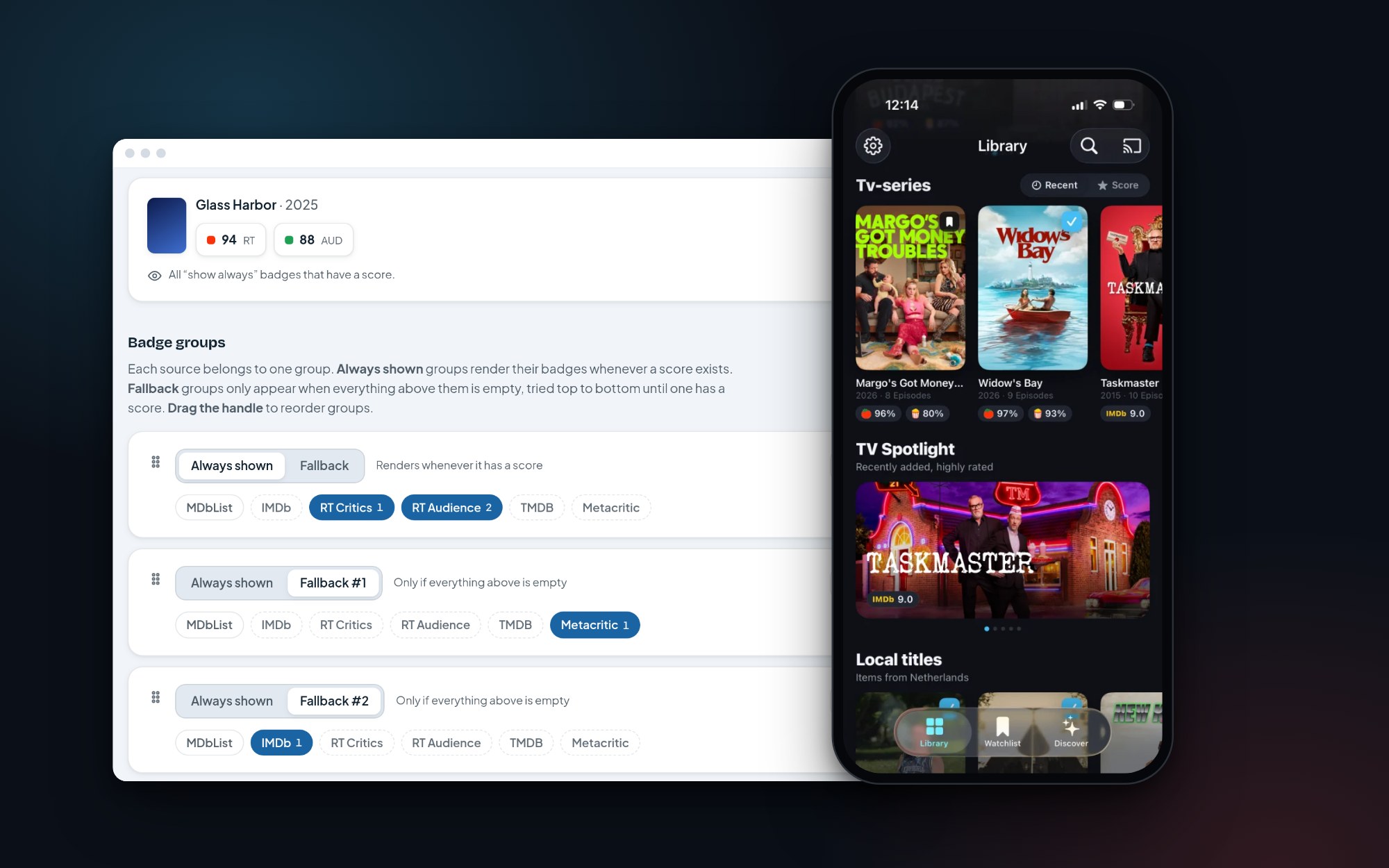
Pick which scores show, with fallbacks when a title has none.
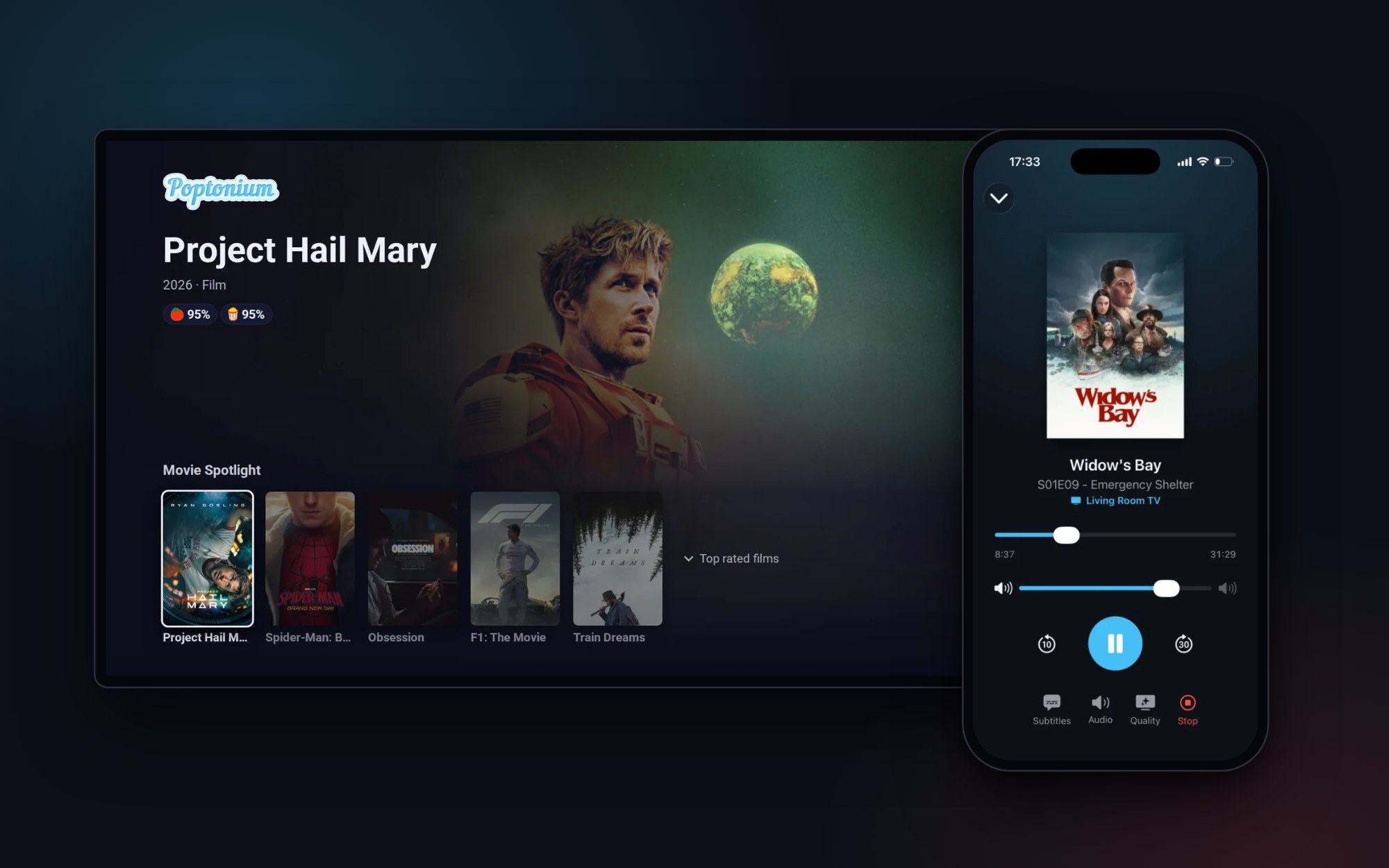
Poptonium's own Cast receiver, with a Spotlight of your library while nothing plays.
Poptonium
Always, with or without the server
- Google Cast done properly. Poptonium has its own receiver: styled ASS/SSA subtitles are never burned in, and switching subtitles doesn't restart the video. Controls live in a Live Activity on iPhone and a media notification on Android.
- Plays almost anything. An mpv-based player on iPhone direct-plays nearly every container and codec. Android transcodes only when the device can't decode.
With this server
- Your library, laid out your way. Rows, heroes and bento grids from Plex collections or filters. No streaming, Discover or live TV shelves.
- Ratings you choose. IMDb, Rotten Tomatoes, TMDB and Metacritic, with your own display and weighting (via MDbList).
- Subtitles without accounts. Viewers search and download in-app through your OpenSubtitles connection.
- Discover and requests. A nightly popular feed, with requests routed to your Overseerr.
- TV Spotlight. The Cast receiver shows your sections while nothing plays.
- Share links with rich previews.
Feature details and guides: poptonium.app.
Install
| Image | ghcr.io/benjafin/poptonium:latest (stable), :dev (develop) |
| Port | container 8085, published on host port 3654 |
| Volumes | /data for config, DB and caches. Optionally your media, read-only (below) |
Unraid: install Poptonium from Community Applications.
Docker:
docker run -d --name poptonium --restart unless-stopped \
  -p 3654:8085 \
  -v /path/to/appdata/poptonium:/data \
  ghcr.io/benjafin/poptonium:latest
Compose: the included docker-compose.yml builds from source.
[!IMPORTANT] Publish on host port 3654, ideally on the same host as Plex. Without a proxy, the app probes
http://<plex-host>:3654.
Configure
Open http://<host>:3654/admin, create the admin account, and run the setup wizard. It tests every connection before saving:
| Integration | Enables | Credentials |
|---|---|---|
| Plex (required) | Everything | Server URL (e.g. http://plex:32400) and token |
| MDbList | Ratings, popular feed | API key |
| Overseerr | Requests | URL and API key |
| OpenSubtitles | Subtitle search and download | Consumer API key and an account (20 downloads/day free) |
Every optional integration can be left out, which disables only its feature. The wizard then offers starter sections based on your libraries.
Reverse proxy
The proxy is what makes the server reachable outside your LAN and from the Cast receiver. Set it up after the server is running.
How the app finds the server
There is no address to enter in the app. It reads the connections plex.tv advertises for your Plex server and probes two candidates for each one, LAN connections first:
<connection>/poptonium/capabilities(reverse proxy)http://<connection host>:3654/capabilities(direct)
The highest-priority candidate that answers wins. This means:
- LAN, no proxy: works through (2) when Poptonium is published on port 3654 of the Plex host.
- Remote: needs (1). Your proxied URL must be one of the connections Plex advertises.
- Cast receiver: it runs on
https://poptonium.app/cast/, so it can only reach an https backend. Spotlight and fast Cast subtitles need the https proxy, even on your LAN.
Steps
Advertise the proxied Plex URL. In Plex, go to Settings > Network > Custom server access URLs and add your proxied domain, e.g.
https://plex.example.com:443. Skip this if it's already listed.Proxy
/poptonium/to the container, without a path rewrite. The server serves every route under both/and/poptonium.Keep
/poptonium/adminLAN-only. The app never calls it, and the admin stays reachable directly on:3654.If you geo-block or LAN-restrict the domain, exempt
/poptonium/s/. Share pages are public, and link-preview crawlers need to reach them.Verify from outside your LAN:
# expect {"service":"poptonium",...}
curl -s https://plex.example.com/poptonium/capabilities
# expect 403 (404 with SWAG)
curl -sI https://plex.example.com/poptonium/admin
Then sign out and back in to the app, or relaunch it, so discovery runs again.
nginx
Add these blocks inside the server { } of your existing Plex proxy. The regex location is matched before the prefix location, and both win over Plex's location /.
location ~ ^/poptonium/admin(/|$) {
    allow 10.0.0.0/8;
    allow 172.16.0.0/12;
    allow 192.168.0.0/16;
    deny all;
    proxy_pass http://poptonium:8085;    # no URI part: path is preserved
}

location /poptonium/ {
    proxy_pass http://poptonium:8085;
    proxy_set_header Host $host;
    proxy_set_header X-Forwarded-For $proxy_add_x_forwarded_for;
    proxy_set_header X-Forwarded-Proto $scheme;
}
Use poptonium:8085 when the proxy shares a Docker network with the container, and <host-ip>:3654 otherwise.
SWAG: use swag/poptonium.subdomain.conf. It restricts the admin with SWAG's $lan-ip and includes proxy.conf/resolver.conf.
Caddy, Traefik and others: the requirements are the same. Forward /poptonium/* unchanged, restrict /poptonium/admin* to private ranges (remote_ip private_ranges in Caddy, an ipAllowList middleware in Traefik), and keep the Plex route as the catch-all.
Optional
Share links
Set Integrations > Share links to the public base URL, e.g. https://plex.example.com/poptonium. Leaving it blank keeps sharing off, and the app hides its Share button.
Media mount
Mount your media read-only at the same container paths Plex uses:
-v /mnt/user/media/Movies:/movies:ro -v "/mnt/user/media/TV Shows:/tv:ro"
The server then extracts embedded subtitle tracks for the Cast receiver straight from the file (ffmpeg is bundled). They arrive in under a second, with ASS styling kept. The mount also enables phone audio while casting: the TV plays muted, and the app streams a synced Opus track from /cast/audio.
If the paths can't match, map them with SUBTITLE_PATH_MAP=/plex/path=/container/path;.... The dashboard's Cast subtitles tile shows which Plex library folders are visible. Without the mount, subtitles go through Plex.
Environment variables
Configuration lives in /data/config.json and is managed in the admin. These variables only seed it on first start, which is useful for scripted deploys:
| Variable | |
|---|---|
PLEX_URL, PLEX_TOKEN |
Plex |
MDBLIST_API_KEY |
MDbList |
OVERSEERR_URL, OVERSEERR_API_KEY |
Overseerr |
OPENSUBTITLES_API_KEY, OPENSUBTITLES_USERNAME, OPENSUBTITLES_PASSWORD |
OpenSubtitles |
PUBLIC_URL |
Share links base URL |
SUBTITLE_PATH_MAP |
Media path mapping (read on every start) |
TZ |
Timezone for the nightly jobs |
License
Categories
Related apps
Explore more like this
Explore allLinks
Details
ghcr.io/benjafin/poptonium:latestRuntime arguments
- Web UI
http://[IP]:[PORT:8085]/admin- Network
bridge- Shell
sh- Privileged
- false
Template configuration
Host port for the web admin UI and API. Keep it at 3654: without a reverse proxy the app probes http://[Plex host]:3654.
- Target
- 8085
- Default
- 3654
- Value
- 3654
Persistent data: SQLite cache DB and custom sections.
- Target
- /data
- Default
- /mnt/user/appdata/poptonium
- Value
- /mnt/user/appdata/poptonium
Optional, for fast subtitles on the Poptonium Cast receiver: your media, read-only. Set the Container Path to the path Plex itself uses for this folder (copy it from your Plex container's own path mappings; add one mapping per Plex media path), or keep /media and set SUBTITLE_PATH_MAP. The dashboard shows whether every Plex library folder is visible. Without it, subtitles still work through Plex, just slower.
- Target
- /media
- Default
- /mnt/user/media
- Value
- /mnt/user/media
REQUIRED. Internal Plex URL (e.g. http://plex:32400).
REQUIRED. Plex server token (X-Plex-Token).
Optional. mdblist.com API key: the source for all ratings (IMDb/RT/TMDB/Metacritic/MDbList) plus the Discover feed. Blank disables ratings and the popular feed; the rest still works.
Optional. Overseerr base URL (e.g. http://overseerr:5055) for request/search proxy.
Optional. Overseerr API key. Blank disables the Overseerr proxy.
Optional. OpenSubtitles app API key (opensubtitles.com, Profile, API Consumers). Required for online subtitle search/download.
Optional. OpenSubtitles account username; its daily download quota (20/day free) is used for downloads.
Optional. OpenSubtitles account password.
Optional. This server's internet address through your reverse proxy (e.g. https://plex.example.com/poptonium). Enables share links; blank keeps sharing off. Editable later in the admin under Share links.
Optional. Only if the media is mounted at a different path than Plex uses: Plex path=container path, separated by ';' (e.g. /data/movies=/media/Movies;/data/tv=/media/TV Shows). Blank when the paths match.
Optional. Container timezone (e.g. Europe/Berlin). Sets the 'server time' used by the nightly ratings-sync schedule.