
All apps · 0 apps

PocketID-App-Launcher
Docker app from kc9wwh's Repository
Overview
Readme
View on GitHubPocket ID App Launcher
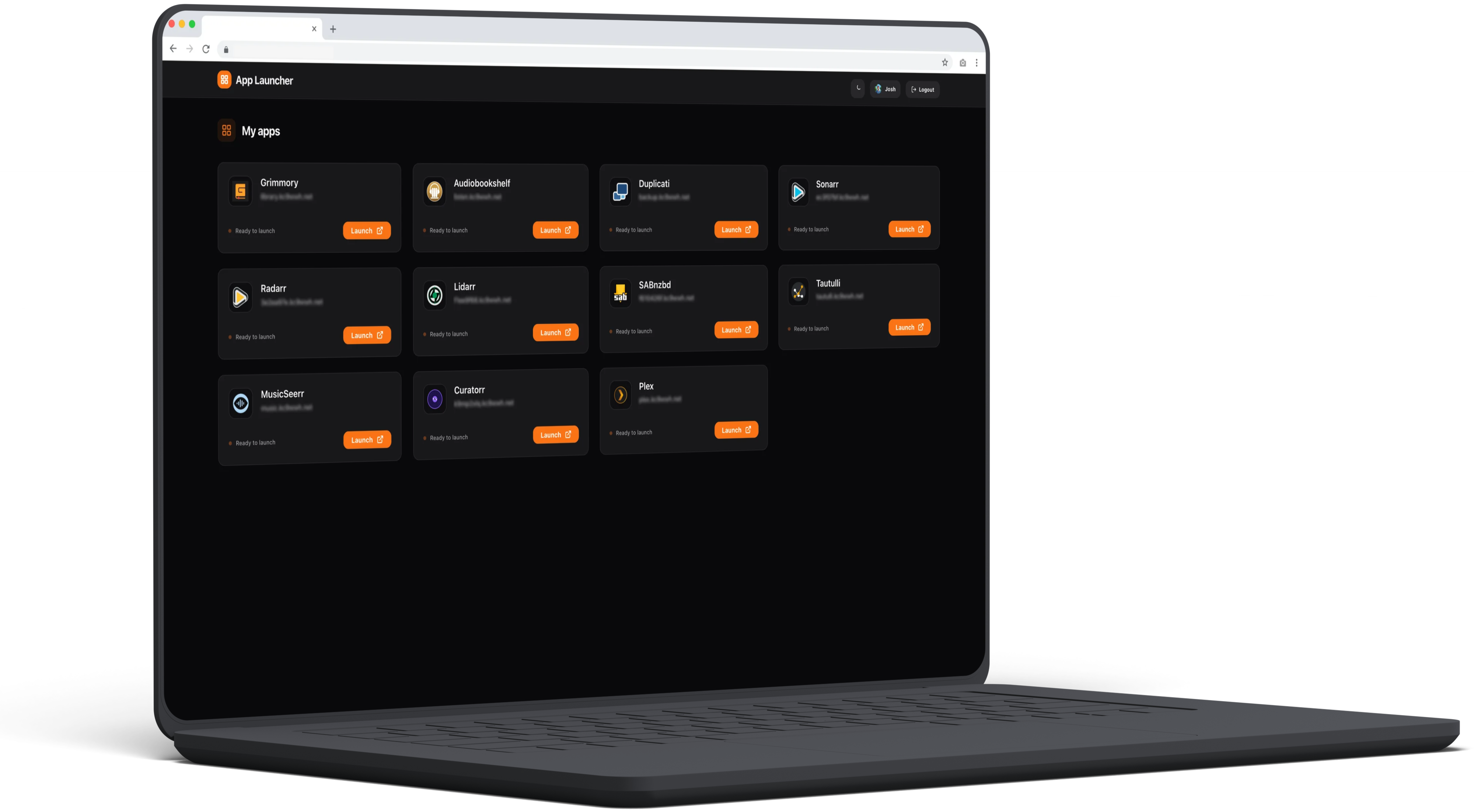
A clean, simple, and aesthetically pleasing application launcher designed for families and friends. It integrates directly with your self-hosted Pocket ID instance to fetch applications and handle authentication.
Features
- OIDC Authentication: Secured by your own Pocket ID instance.
- Dynamic App List: Automatically fetches applications you have access to via the Pocket ID API.
- Light & Dark Mode: Matches the official Pocket ID Zinc-style themes with a manual toggle.
- Clean UI: Responsive grid that automatically adjusts based on screen width.
- Customizable: Change titles and descriptions via environment variables.
- Unraid Optimized: Structured JSON logging designed for RAM-based log protection and persistent file storage.
🚀 Setup Instructions
1. Pocket ID Configuration
Before deploying the launcher, you need to configure two things in your Pocket ID administration panel:
A. Create an OIDC Client
- Go to Administration > OIDC Clients > Add Client.
- Name:
App Launcher(or whatever you prefer). - Callback URLs:
https://launcher.yourdomain.com/callback(Replace with your actual URL). - Client ID & Secret: Note these down; you'll need them for the environment variables.
B. Generate an API Key
- Go to Administration > API Tokens.
- Create a new token with at least
readaccess to clients. - Note this token down.
Discord Webhook Setup
- Go to your Discord server Server Settings > Integrations > Webhooks.
- Click New Webhook and copy the Webhook URL.
- Paste the URL into the
DISCORD_WEBHOOK_URLenvironment variable. - (Optional) Add a
DISCORD_USER_IDto ping a specific user when tickets are submitted.
2. Environment Variables
| Variable | Requirement | Description | Example |
|---|---|---|---|
POCKET_ID_URL |
Required | The URL of your Pocket ID instance | https://auth.example.com |
POCKET_ID_API_KEY |
Required | The API Token from step 1B | pid_xxxx... |
OIDC_CLIENT_ID |
Required | Client ID from step 1A | ... |
OIDC_CLIENT_SECRET |
Required | Client Secret from step 1A | ... |
AUTH_SECRET |
Required | Secret for signing session cookies | (Run: openssl rand -hex 32) |
PUBLIC_APP_URL |
Required | The public URL of this launcher | https://launcher.example.com |
PUBLIC_LAUNCHER_TITLE |
Optional | Custom title shown in header | Family Apps |
PUBLIC_LAUNCHER_DESCRIPTION |
Optional | Custom welcome message | Access our services below |
CUSTOM_LOGO_DARK |
Optional | Logo for dark theme (URL or local path) | /app/logo-dark.png |
CUSTOM_LOGO_LIGHT |
Optional | Logo for light theme (URL or local path) | /app/logo-light.png |
UPTIME_KUMA_URL |
Optional | Public URL of your Uptime Kuma instance | status.example.com |
UPTIME_KUMA_SLUG |
Optional | The 'Slug' from Status Page settings | default |
DISCORD_WEBHOOK_URL |
Optional | Discord Webhook URL for support tickets | https://discord.com/api/... |
DISCORD_USER_ID |
Optional | Optional Discord User ID to ping on new tickets | 123456789012345678 |
LOG_LEVEL |
Optional | Logging verbosity (debug, info, warn, error) | info |
LOG_PATH |
Optional | Path for persistent JSON log file | /app/logs/launcher.log |
🐳 Docker Deployment
Unraid Installation
- Go to the Docker tab in Unraid.
- Click Add Container.
- Name:
pocket-id-launcher - Repository:
ghcr.io/kc9wwh/app-launcher:latest - Network Type:
Bridge. - Port 3000: Map to your desired host port.
- Volume Mapping (Optional for persistence):
- Container Path:
/app/logs/ - Host Path:
/mnt/user/appdata/app-launcher/ - Access Mode: Read/Write
- Container Path:
- Environment Variables: Add the variables listed above.
Docker Compose
services:
  app-launcher:
    image: ghcr.io/kc9wwh/app-launcher:latest
    container_name: app-launcher
    ports:
      - "3000:3000"
    environment:
      - POCKET_ID_URL=https://auth.example.com
      - POCKET_ID_API_KEY=pid_xxxx...
      - OIDC_CLIENT_ID=...
      - OIDC_CLIENT_SECRET=...
      - AUTH_SECRET=...
      - PUBLIC_APP_URL=https://launcher.example.com
      - CUSTOM_LOGO_DARK=/app/logo-dark.png # Optional: Theme specific logos
      - CUSTOM_LOGO_LIGHT=/app/logo-light.png
    volumes:
      - /path/to/logs:/app/logs
      - /path/to/logo-dark.png:/app/logo-dark.png:ro
      - /path/to/logo-light.png:/app/logo-light.png:ro
    restart: unless-stopped
Cloudflare Tunnel
If using a Cloudflare Tunnel:
- Point your public hostname (e.g.,
launcher.example.com) to the local IP and port of this container (e.g.,http://192.168.1.10:3000). - Ensure your
PUBLIC_APP_URLmatches the Cloudflare hostname exactly.
3. Global Health Header (Optional)
To enable the health status pill in the header, integrate it with an Uptime Kuma Status Page.
Finding your Slug
- Log in to your Uptime Kuma instance.
- Navigate to Status Pages in the top menu.
- Select your desired status page and click Edit.
- The Slug is found in the 'Slug' field (e.g.,
defaultormain). This corresponds to the URL path:your-kuma-url.com/status/slug.
Security & Cloudflare Tunnels
If your Uptime Kuma instance is behind a Cloudflare Tunnel, the launcher requires client-side access to the Heartbeat API.
- CORS Configuration: You must handle CORS if the launcher and Uptime Kuma are on different domains. In Cloudflare, create a Response Header Transform Rule to add
Access-Control-Allow-Originfor your launcher's domain. - WebSocket Enablement: While the status pill uses the JSON Heartbeat API, ensure WebSockets are enabled in your Cloudflare Tunnel settings if you plan to use other Uptime Kuma features that depend on them.
Troubleshooting & Debugging
If the health pill is not appearing or showing 'Status Unknown':
- Check Server Logs: Look at your Docker/container logs. Upon page load, the server logs its configuration status:
kuma_integration_active: Config is correctly detected and passed to the client.kuma_integration_inactive: One or both environment variables are missing.
- Check Browser Console: Open your browser's Developer Tools (
F12) and check the Console:- Look for
Starting health status polling: [URL]. Verify this URL is reachable from your browser. - Check for
Status fetch error. This often indicates a CORS issue if the domains differ.
- Look for
- Verify Slug: Ensure your
UPTIME_KUMA_SLUGmatches the 'Slug' in Uptime Kuma, not the page title.
🛠️ Local Development
# Install dependencies
npm install

# Run in development mode
npm run dev
📝 License
MIT
Requirements
Related apps
Explore more like this
Explore allDetails
ghcr.io/kc9wwh/app-launcher:latestRuntime arguments
- Web UI
http://[IP]:[PORT:3000]- Network
bridge- Shell
sh- Privileged
- false
Template configuration
- Target
- 3000
- Default
- 3000
- Value
- 3000
The public URL of this launcher
Execute: openssl rand -hex 32
Path for persistent logs
- Target
- /app/logs/
- Value
- /mnt/user/appdata/app-launcher/
The Discord Webhook URL to send support tickets to.
- Target
- DISCORD_WEBHOOK_URL
Optional: The Discord User ID to ping when a ticket is submitted (e.g., 123456789012345678).
- Target
- DISCORD_USER_ID