
All apps · 0 apps

PlexMind
Docker app from grtgbln's Repository
Overview
Readme
View on GitHub🧠 PlexMind Suite
A local AI command center for Plex: taste-aware recommendations, Whisper subtitle backfills, llama.cpp translation, and library hygiene from one dashboard.






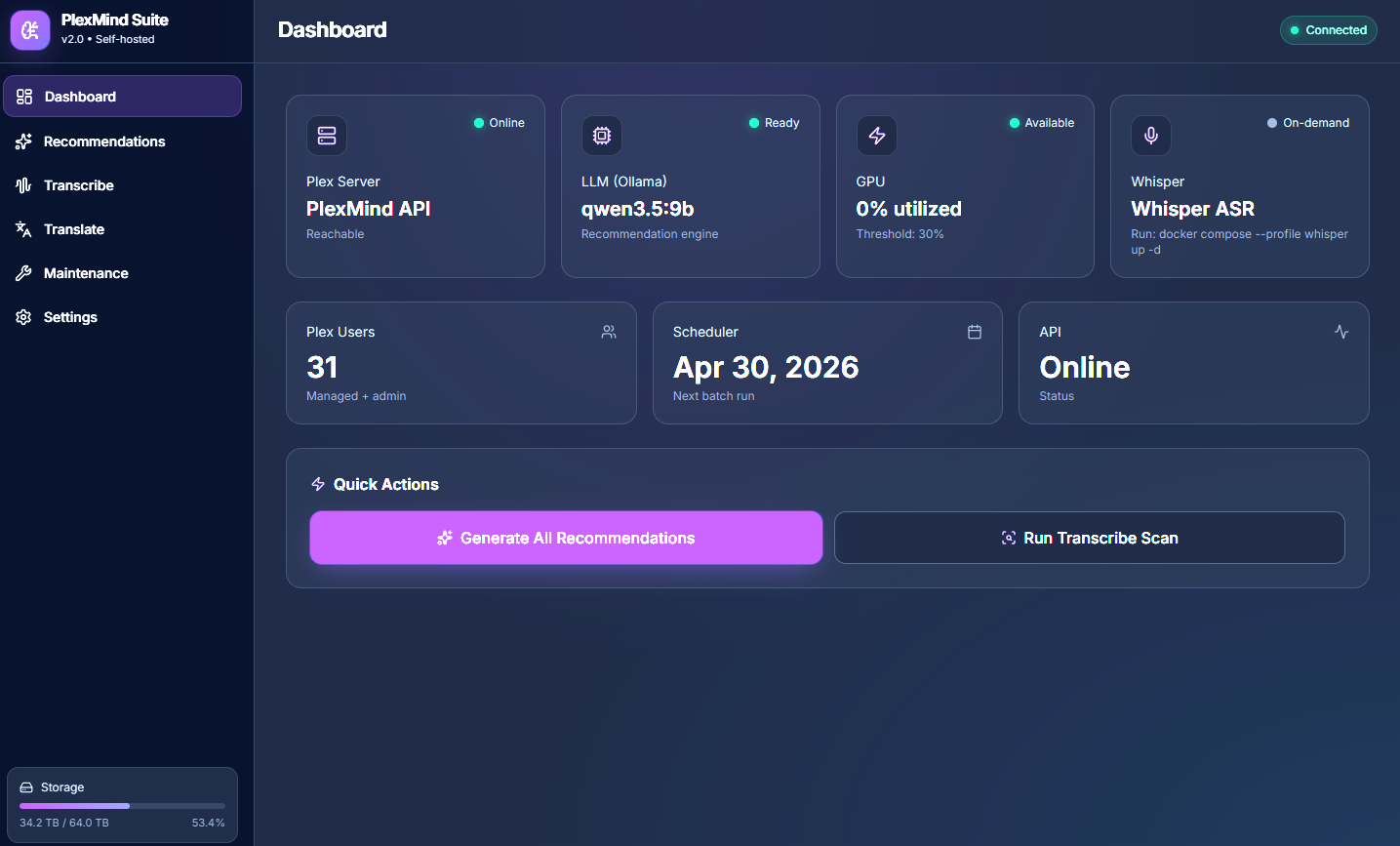
PlexMind turns a Plex library into an active, private recommendation and subtitle automation system. It reads Plex watch history, asks a local llama.cpp model for explainable picks, syncs those picks back into Plex, and gives you a dashboard for health, users, schedules, GPU load, storage, current-session logs, and background jobs. The PlexMind app now owns the subtitle script schedule.
It also handles the work that usually gets ignored until it becomes a mess: missing subtitles, multilingual libraries, duplicate SRTs, image-based PGS tracks, and broken subtitle encodings. The heavy AI work stays local. Your Plex history and media paths do not need to leave your server.
Live demo: https://finechainesium.github.io/PlexMind/
The demo uses mock browser data. A real install connects to your Plex server, llama.cpp, Whisper ASR, and mounted media folders.
✨ What PlexMind Does
🎯 Local Plex Recommendations
Find watchable picks without sending viewing history to a cloud recommender.
- Reads Plex users and deduplicated watch history.
- Builds a candidate pool from your own library.
- Uses a local llama.cpp model to generate explainable recommendations.
- Syncs admin picks to the Plex Watchlist.
- Creates managed-user playlists named
PlexMind MoviesandPlexMind TV Pilots. - Recommends TV pilot episodes so users can sample shows without queueing whole seasons.
- Tracks shown recommendations and suppresses repeats for the configured window.
🎙️ Whisper Subtitle Backfill
Fill missing subtitles with local speech-to-text.
- Uses
onerahmet/openai-whisper-asr-webserviceas the ASR API. - Defaults to Whisper
turboon CUDA in Docker Compose. - Detects primary audio language metadata before falling back to ASR profiling.
- Handles foreign-language and bilingual cases more carefully than a blind English-only pass.
- Writes SRTs beside the media files mounted into the container.
- Shows only the current job session in dashboard progress logs while retaining full dated logs on disk.
🌍 llama.cpp Subtitle Translation
Translate existing or newly generated SRTs with the same local LLM stack.
- Uses llama.cpp OpenAI-compatible chat API through
LLAMA_CPP_API_URL. - Defaults to
qwen3.5-9b-q5_k_min Docker Compose. - Targets
TARGET_LANGUAGES, defaultzh,es-MX. - Uses the authenticated, allowlisted Docker broker when a dedicated sidecar must be started or stopped.
🧹 Library Maintenance
Keep subtitle folders predictable and client-friendly.
- Audit missing subtitle coverage.
- Remove duplicate subtitles.
- Clean PGS/image subtitle files when usable SRT files exist.
- Repair subtitle encoding where possible.
- Run maintenance from the dashboard or CLI helpers.
📊 Dashboard Control Plane
A FastAPI dashboard gives you one place to run and observe the system.
- API, LLM, storage, and scheduler health.
- GPU vendor/utilization and busy-threshold backoff.
- Editable monthly recommendation schedule.
- Per-user recommendation generation and sync controls.
- Server-Sent Events progress for all-user recommendation runs.
- Start/Stop controls for transcription, translation, and maintenance jobs.
- Current-session script logs for sidebar jobs, with full retained logs still stored under
data/.
🧩 AI Runtime & Model Dependencies
PlexMind is a coordinator. The best results come from giving it the right local AI services.
| Component | Used For | Default / Recommended |
|---|---|---|
| Plex Media Server | Library metadata, users, watch history, Watchlist/playlists | PLEX_URL + admin PLEX_TOKEN |
| llama.cpp | Recommendations and subtitle translation | Compose default: qwen3.5-9b-q5_k_m |
| Whisper ASR webservice | Speech-to-text subtitle generation | Digest-pinned in Compose and .env.example |
| Whisper model | Transcription model loaded by the ASR service | WHISPER_MODEL=turbo |
| FFmpeg / ffprobe | Audio extraction and media inspection | included in the PlexMind script images |
| Docker broker | Allowlisted inspect/start/stop and fixed GPU telemetry | only the broker mounts /var/run/docker.sock |
| Optional metadata APIs | TMDB/TVDB/OMDB enrichment | leave blank if you want Plex-only metadata |
llama.cpp Models
Docker Compose wires PlexMind to http://llama-cpp:8080 and sets:
LLAMA_CPP_MODEL_ALIAS=qwen3.5-9b-q5_k_m
Place the configured GGUF model before expecting recommendation or translation work to succeed:
# place a GGUF model at LLAMA_CPP_MODEL_PATH
Suggested model sizing:
| Hardware | Suggested GGUF model |
|---|---|
| 16GB+ VRAM | a larger Qwen GGUF |
| 12GB+ VRAM | qwen3.5-9b-q5_k_m or another compatible GGUF alias |
| 4-7GB VRAM | a 4B-class GGUF |
| Low VRAM / CPU-only | a 1B-4B GGUF, depending on RAM |
Set LLAMA_CPP_MODEL_PATH to a GGUF file and keep LLAMA_CPP_MODEL_ALIAS aligned with the llama.cpp --alias value.
Whisper ASR Webservice
Docker Compose includes an optional Whisper service:
image: ${WHISPER_IMAGE:-onerahmet/openai-whisper-asr-webservice@sha256:3deb30cfd3d5614fd3885e6dfbef7dfcf95fe897300ecc703f7f3b3682b717ae}
environment:
  - ASR_MODEL=${WHISPER_MODEL:-turbo}
  - ASR_DEVICE=${WHISPER_DEVICE:-cuda}
For CPU-only hosts, use:
WHISPER_IMAGE=onerahmet/openai-whisper-asr-webservice@sha256:3deb30cfd3d5614fd3885e6dfbef7dfcf95fe897300ecc703f7f3b3682b717ae
WHISPER_DEVICE=cpu
WHISPER_MODEL=small
Transcription jobs call:
http://whisper:9000/asr
The dashboard-owned script runner can start whisper-asr-webservice before transcription and stops it only when that job started it. The shared llama.cpp recommendation service stays externally managed by default.
🚀 Quick Start: Docker Compose
git clone https://github.com/FineChAInesium/PlexMind.git
cd PlexMind
cp .env.example .env
Edit .env with your Plex and media paths:
PLEX_URL=http://192.168.1.10:32400
PLEX_TOKEN=your_plex_token
PLEXMIND_API_KEY=$(openssl rand -hex 32)
MOVIES_HOST_PATH=/mnt/media/Movies
TV_HOST_PATH=/mnt/media/TV
LLAMA_CPP_MODEL_ALIAS=qwen3.5-9b-q5_k_m
WHISPER_MODEL=turbo
TARGET_LANGUAGES=zh,es-MX
Start the stack:
./setup.sh
Or use Compose directly:
docker compose up -d --build plexmind
If you plan to use transcription, create the profiled Whisper sidecar at least once so PlexMind can start and stop it by container name:
docker compose --profile whisper create whisper
Place the configured GGUF model before starting recommendations or translation:
# place a GGUF model at LLAMA_CPP_MODEL_PATH
Open:
http://localhost:8000
🚀 Quick Start: Unraid
Community Applications submission is still pending. Manual template install:
https://raw.githubusercontent.com/FineChAInesium/PlexMind/main/templates/PlexMind.xml
- Open Community Applications.
- Use the template URL/folder option.
- Paste the template URL above.
- Deploy the repository Compose stack first; the safe API template intentionally does not recreate the worker and broker services.
- Set
PLEX_URL,PLEX_TOKEN, andLLAMA_CPP_URL. - Generate four distinct
PLEXMIND_API_KEY,PLEXMIND_CONTROL_TOKEN,PLEXMIND_BROKER_TOKEN, andPLEXMIND_WEBHOOK_SECRETvalues. - Start the stack and open
http://[unraid-ip]:8000.
The API template mounts neither media nor the Docker socket. Media is writable only in the scripts worker; the raw Docker socket is mounted only in the narrow broker.
🏗️ Architecture
Browser Dashboard
  -> FastAPI app (:8000)
      -> Plex API for users, history, Watchlist, and playlists
      -> Durable recommendation queue and SSE status
      -> Authenticated scripts worker for media jobs
      -> Authenticated Docker broker for sidecar state and GPU telemetry

Recommendation Worker
  -> Claims durable jobs from /app/data
  -> llama.cpp for recommendation generation
  -> Plex API for one explicit transactional sync per user

Scripts Worker
  -> Owns writable /media/movies and /media/tv mounts
  -> Serializes media/GPU writers with shared locks

Docker Broker
  -> Owns the only raw Docker socket mount
  -> Allows only named llama.cpp/Whisper inspect, start, stop, and fixed GPU probe

AI Sidecars
  -> llama.cpp (:8080 internal, :11435 host)
      -> local recommendation and translation model
  -> Whisper ASR webservice (:9000 internal, :9001 host)
      -> Whisper model, default turbo

Mounted Media + Data
  -> /media/movies
  -> /media/tv
  -> /app/data for caches, history, feedback, and logs
Runtime state lives under data/. Secrets belong in .env. Neither should be committed.
📍 Where Picks Show Up in Plex
| Plex account | Destination |
|---|---|
| Server admin | Plex Watchlist |
| Managed users | PlexMind Movies playlist |
| Managed users | PlexMind TV Pilots playlist |
PlexMind uses pilot episodes for TV recommendations so a user can try a show without cluttering Plex with a full season.
⚙️ Configuration
The dashboard reads its Whisper model inventory from the cache mounted read-only at
/whisper-cache. Only downloaded models are displayed; transcription is disabled
when WHISPER_MODEL does not match a cached model artifact.
| Variable | Description | Default |
|---|---|---|
PLEX_URL |
Plex server URL. Use a LAN address reachable from Docker. | http://host.docker.internal:32400 |
PLEX_TOKEN |
Plex admin token. | required |
PLEXMIND_API_KEY |
Protects non-health endpoints. Strongly recommended. | unset |
CORS_ORIGINS |
Comma-separated browser origins. Use your HTTPS origin behind a proxy. | blank / allow all |
TMDB_API_KEY |
Optional metadata enrichment. | unset |
TVDB_API_KEY |
Optional TV metadata fallback. | unset |
OMDB_API_KEY |
Optional IMDb/OMDB enrichment. | unset |
LLAMA_CPP_URL |
llama.cpp base URL for recommendations. | http://llama-cpp:8080 |
LLAMA_CPP_API_URL |
Optional explicit script endpoint; otherwise derived from LLAMA_CPP_URL. |
derived |
MOVIES_HOST_PATH / TV_HOST_PATH |
Host directories bind-mounted into the containers. | platform-specific |
MOVIE_DIR / TV_DIR |
Internal scan roots; normally /media/movies and /media/tv. |
fixed in Compose/template |
LLAMA_CPP_MODEL_ALIAS |
Recommendation and translation model alias. Must match llama.cpp --alias. |
qwen3.5-9b-q5_k_m in Compose |
LLAMA_CPP_HOST_PORT |
Host port for the bundled llama.cpp sidecar. Keep 8080 free for Chip Hedge Bot. |
11435 |
WHISPER_API_URL |
Whisper ASR endpoint used by scripts. | http://whisper:9000/asr |
WHISPER_IMAGE |
Whisper ASR Docker image. | Digest-pinned; see .env.example |
WHISPER_MODEL |
Whisper model: tiny, base, small, medium, large, turbo. |
turbo |
WHISPER_DEVICE |
Whisper device. Use cuda or cpu. |
cuda |
WHISPER_HOST_PORT |
Host port for the bundled Whisper sidecar. | 9001 |
TARGET_LANGUAGES |
Comma-separated subtitle translation targets. | zh,es-MX |
MAX_RECOMMENDATIONS |
Picks per user. | 10 |
CANDIDATE_POOL_SIZE |
Prefiltered candidate count before LLM. | 40 |
MIN_HISTORY_ITEMS |
Minimum watch history before batch generation. | 3 |
SUPPRESSION_DAYS |
Days before a shown recommendation can return. | 60 |
GPU_THRESHOLD_PCT |
Pause batch work at or above this GPU utilization. | 30 |
GPU_BACKOFF_MINUTES |
Wait time before checking a busy GPU again. | 30 in Compose, 5 in .env.example |
PLEXMIND_SCRIPT_MODE |
remote routes scripts through the authenticated worker. |
remote |
PLEXMIND_CONTROL_TOKEN |
Distinct API-to-scripts-worker secret. | required |
PLEXMIND_BROKER_TOKEN |
Distinct client-to-Docker-broker secret. | required |
PLEXMIND_WEBHOOK_SECRET |
Distinct Plex webhook secret. | required |
SCRIPT_START_RATE_LIMIT |
Rate limit for script Start buttons. | 60/hour |
WHISPER_CONTAINER_NAME |
Exact dedicated Whisper container to manage. | whisper-asr-webservice in Compose |
LLAMA_CPP_CONTAINER_NAME |
Exact llama.cpp container identity when lifecycle management is enabled. | llama-cpp |
MANAGE_LLAMA_CPP_CONTAINER |
Manage llama.cpp per translation job. Keep 0 for the shared recommendation service. |
0 |
START_SIDECAR_CONTAINERS |
Start AI sidecars before script jobs. | 1 |
STOP_SIDECAR_CONTAINERS |
Stop AI sidecars when script jobs exit. | 1 |
ALLOW_EMPTY_MEDIA_ROOTS |
Permit intentionally empty media roots. Leave disabled in production. | 0 |
LOG_RETENTION_DAYS |
Retain dated script logs under /app/data/logs. |
7 |
MAX_RUNTIME_MINUTES |
Optional per-run cap for scripts. 0 means no cap. |
0 |
TRANSCRIBE_START_HOUR / TRANSCRIBE_END_HOUR |
PlexMind launch window for transcription jobs. | 5 / 12 |
TRANSLATE_START_HOUR / TRANSLATE_END_HOUR |
PlexMind launch window for translation jobs. | 23 / 3 |
TZ |
Timezone used by the PlexMind script scheduler and logs. | UTC |
🖥️ Dashboard Build
The production UI is served by FastAPI with compiled Tailwind CSS. Rebuild CSS after changing Tailwind classes:
cd plexmind
npm install
npm run build:css
For local Python/API iteration:
cd plexmind
pip install -r requirements.txt
uvicorn app.main:app --reload
For production image changes:
docker compose build plexmind
docker compose up -d plexmind recommendation-worker scripts docker-broker
For rapid local API iteration without rebuilding the image, bind-mount the app and run uvicorn with reload. Do not add media or Docker-socket mounts to the API:
services:
  plexmind:
    volumes:
      - ./plexmind/app:/app/app
      - ./data:/app/data
    command: uvicorn app.main:app --host 0.0.0.0 --port 8000 --reload
🔌 API Reference
Interactive docs:
http://<server>:8000/docs
| Endpoint | Method | Purpose |
|---|---|---|
/health |
GET | API and LLM readiness. |
/api/users |
GET | Plex users visible to the configured token. |
/api/users/{id}/history |
GET | Deduplicated watch history. |
/api/users/{id}/recommendations?force=true |
GET | Generate or fetch recommendations. |
/api/users/{id}/feedback |
GET/POST | Read or record like/dislike/watched feedback. |
/api/users/{id}/sync |
POST/DELETE | Sync or remove PlexMind Plex destinations. |
/api/run-all |
POST | Start all-user batch recommendation job. |
/api/jobs/{job_id}/status |
GET | Poll recommendation batch status. |
/api/jobs/{job_id}/events |
GET | SSE stream for live batch progress. |
/api/scheduler/status |
GET | Next run, cron values, GPU vendor/utilization, busy threshold. |
/api/scheduler/configure |
POST | Update monthly recommendation schedule. |
/api/storage |
GET | Disk usage for the data volume. |
/api/trending |
GET | TMDB trending data when configured. |
/api/scripts/health |
GET | Script runner availability and mode. |
/api/scripts/{job}/status |
GET | Current script job state. |
/api/scripts/{job}/log |
GET | Current-session script log view. |
/api/scripts/{job}/start |
POST | Start transcription, translation, or maintenance. |
/api/scripts/{job}/stop |
POST | Stop a running script job. |
/webhook |
POST | Plex webhook handler for cache invalidation. |
Examples:
curl -H "X-API-Key: $PLEXMIND_API_KEY" \
  http://192.168.1.10:8000/api/scheduler/status

curl -X POST -H "X-API-Key: $PLEXMIND_API_KEY" \
  http://192.168.1.10:8000/api/run-all

curl -X POST -H "Content-Type: application/json" \
  -H "X-API-Key: $PLEXMIND_API_KEY" \
  --data '{"run_now":true,"max_runtime_minutes":60}' \
  http://192.168.1.10:8000/api/scripts/transcribe/start
🛠️ CLI Helpers
The dashboard owns script jobs by default, but the shell scripts can still be run directly.
# Transcribe missing subtitles during the configured window, default 05:00-12:00 local
docker exec plexmind-scripts /app/transcribe.sh

# Run transcription immediately with a 60-minute cap
docker exec -e RUN_NOW=1 -e MAX_RUNTIME_MINUTES=60 plexmind-scripts /app/transcribe.sh

# Stop an active transcription run
docker exec plexmind-scripts /app/stop-job.sh transcribe

# Translate SRTs to TARGET_LANGUAGES during the configured window, default 23:00-03:00 local
docker exec plexmind-scripts /app/translate.sh

# Run translation immediately with a 60-minute cap
docker exec -e RUN_NOW=1 -e MAX_RUNTIME_MINUTES=60 plexmind-scripts /app/translate.sh

# Stop an active translation run
docker exec plexmind-scripts /app/stop-job.sh translate

# Maintenance jobs
docker exec plexmind-scripts /app/maintenance.sh audit
docker exec plexmind-scripts /app/maintenance.sh dedup
docker exec plexmind-scripts /app/maintenance.sh pgs-cleanup
docker exec plexmind-scripts /app/maintenance.sh all
Script logs are written as dated files under /app/data/logs and retained for LOG_RETENTION_DAYS. Compatibility log paths such as /app/data/transcription.log, /app/data/translation.log, and /app/data/maintenance.log point at the current day.
🔐 Security Notes
PlexMind is designed for trusted home networks, but it has real write access to Plex destinations and mounted subtitle folders.
Minimum hardening:
PLEXMIND_API_KEY=$(openssl rand -hex 32)
CORS_ORIGINS=https://plexmind.example.com
chmod 600 .env
Important details:
- No endpoint returns
.env, Plex tokens, API keys, or app settings. - API key comparison uses constant-time comparison.
/api/run-all, recommendation generation, script starts, and webhooks are rate-limited./webhookrejects non-LAN clients, but reverse proxies can make internet traffic appear local. UsePLEXMIND_API_KEYif proxied.- Only the allowlisted Docker broker mounts
/var/run/docker.sock; script jobs use its authenticated start/stop API. - Subtitle maintenance modes can delete
.sup,.sub/.idx, and duplicate.srtfiles from mounted media folders. Run audits first and keep backups if your media library is not disposable. - The dashboard exchanges the API key for a persistent same-origin HttpOnly session cookie and never stores the raw key in browser storage. Session digests survive API restarts under the persistent data directory; the default lifetime is 30 days (
PLEXMIND_SESSION_DAYS). Use HTTPS when accessing it through a reverse proxy.
See SECURITY.md for the full security model and audit notes.
📌 Versioning Note
PlexMind is on the v0.8.x release line. The project briefly published v2.1.0 and v2.1.1 tags while the dashboard and container workflow were still being hardened; those numbers overstated the maturity of the project. The line was reset to a more honest pre-1.0 sequence.
| Former tag | Replacement tag | What it represents |
|---|---|---|
v2.1.0 |
v0.7.0 |
GUI-owned script jobs, compiled Tailwind, local script execution, recommendation history, and CORS hardening. |
v2.1.1 |
v0.7.1 |
Script log polling resilience and already-running job handling. |
unpublished v2.1.2 work |
v0.8.0 |
Live Whisper ASR dashboard status wiring. |
script 2.0 labels |
v0.8.1 |
Script headers and runtime banners aligned with the app release line. |
This was a version-number correction, not a code rollback.
👤 Maintainer
Built and maintained by @FineChAInesium, with AI-assisted iteration.
License
MIT.
Categories
Related apps
Explore more like this
Explore allDetails
ghcr.io/finechainesium/plexmind:latestRuntime arguments
- Web UI
http://[IP]:[PORT:8000]/- Network
bridge- Shell
bash- Privileged
- false
- Extra Params
--gpus all --group-add 281