
All apps · 0 apps

Plexbie
Docker app from NovaOra's Repository
Overview
Setup: install, then press WebUI (or open http://[your server]:7979). The setup page asks for the setup code from Plexbie's log (Docker tab, Plexbie icon, Logs), then walks you through each key, with where to find it and a Test button: your Discord bot, Sign in with Plex, and optionally Seerr, Sonarr, Radarr, SABnzbd, Tautulli and TMDB. Press Finish and Plexbie starts. Everything is saved to config/.env in the appdata folder.
Readme
View on GitHub

Plexbie
Your household’s Plex, on air.
A Discord bot, a website and a phone app that look after a home Plex server: requests,
invites, who’s watching, and all the quiet housekeeping in between.





Features · See it in action · Demo · The website · The app · Plugins · Get started · plexbie.com · Support its development
https://github.com/user-attachments/assets/b5409525-02c4-48ea-bc10-70a2202e68a6
A 73-second look, made with invented titles and people. For the full three-minute tour, tune to channel 05 on plexbie.com.
Try the website yourself at demo.plexbie.com
A pretend household: click around as a member, someone not on Plex yet, or logged out. Nothing you do there goes anywhere.
Tonight’s line-up
Plexbie is built like a TV schedule: four channels, each doing one job well, and every one of them reachable from Discord, the website or the phone app.
RequestsAsk for it, follow it. Shows, films, audiobooks and ebooks, season by season. One admin approval queue, then live progress all the way from searching to downloading, unpacking and On Plex. |
Plex accessInvites, minus the chores./join-plex and one Approve button, or a single-use invite link
for family who don’t use Discord. Accounts stay linked even when the names differ.
|
WatchingWho’s watching what. A self-updating now-playing board, an all-time leaderboard, daily streaks, and watch-party credit for Discord Go Live. |
HousekeepingThe quiet jobs, done. Arrival announcements, a 90-day countdown on unwatched media (with a practice mode), books filed into a library, inactivity reminders, and service health alerts. |
See it in action
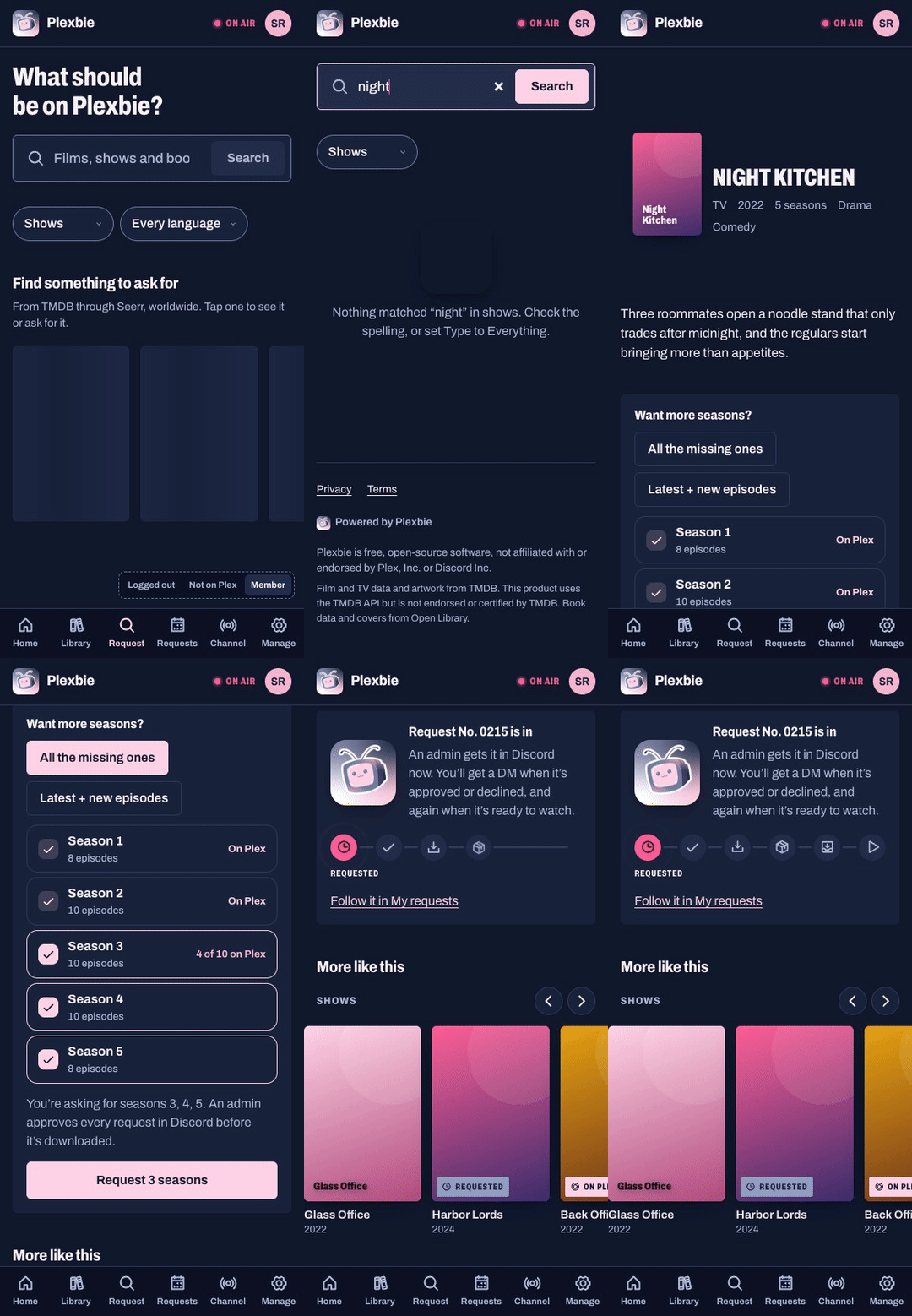 Ask for it Search as you type, see which seasons are already on Plex, pick the rest. |
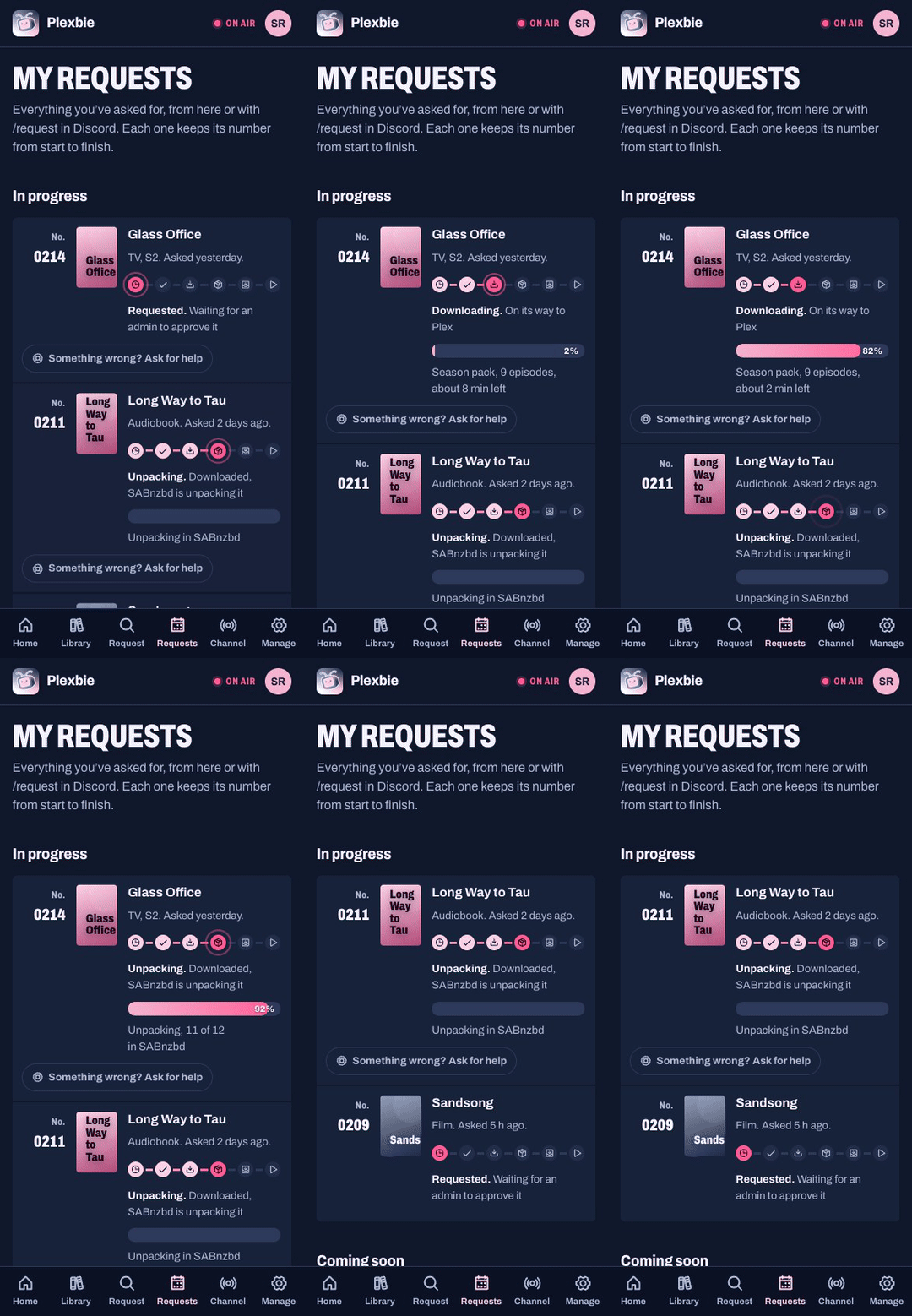 Follow it Live SABnzbd progress, Unpacking, Adding to Plex, then On Plex. |
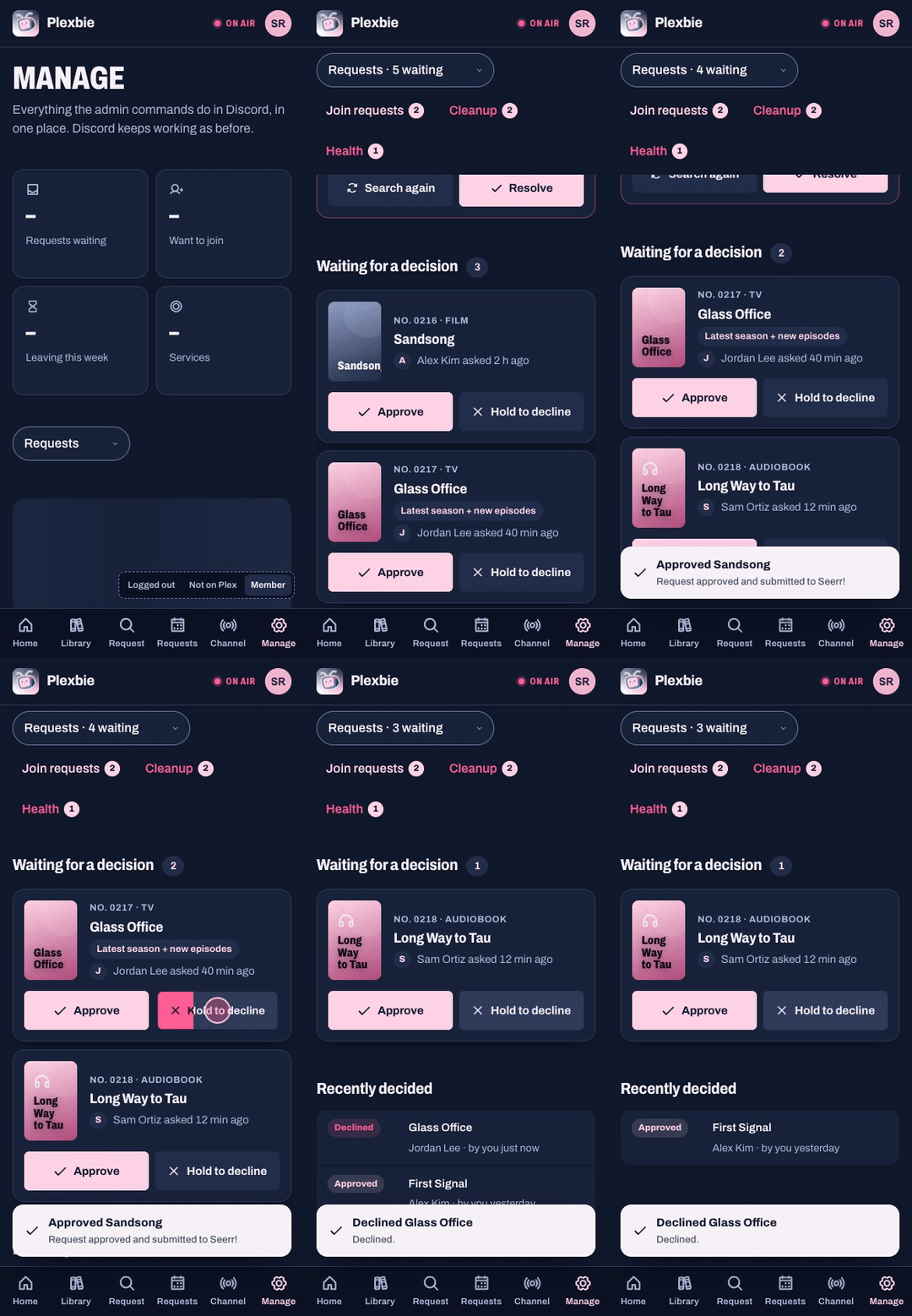 Decide it Swipe right to approve, hold to decline. Discord’s card updates too. |
All made up. Every title, cover, name and message in the video, these recordings and the screenshots below comes from Plexbie’s demo mode (the app’s sample household, for the app). None of it is a real library, household or person.
The website, built in
The bot serves its own website from the same container, on port 7979 out of the box. Members sign in with Discord or Plex; admins get a Manage page that does everything the Discord admin commands do.
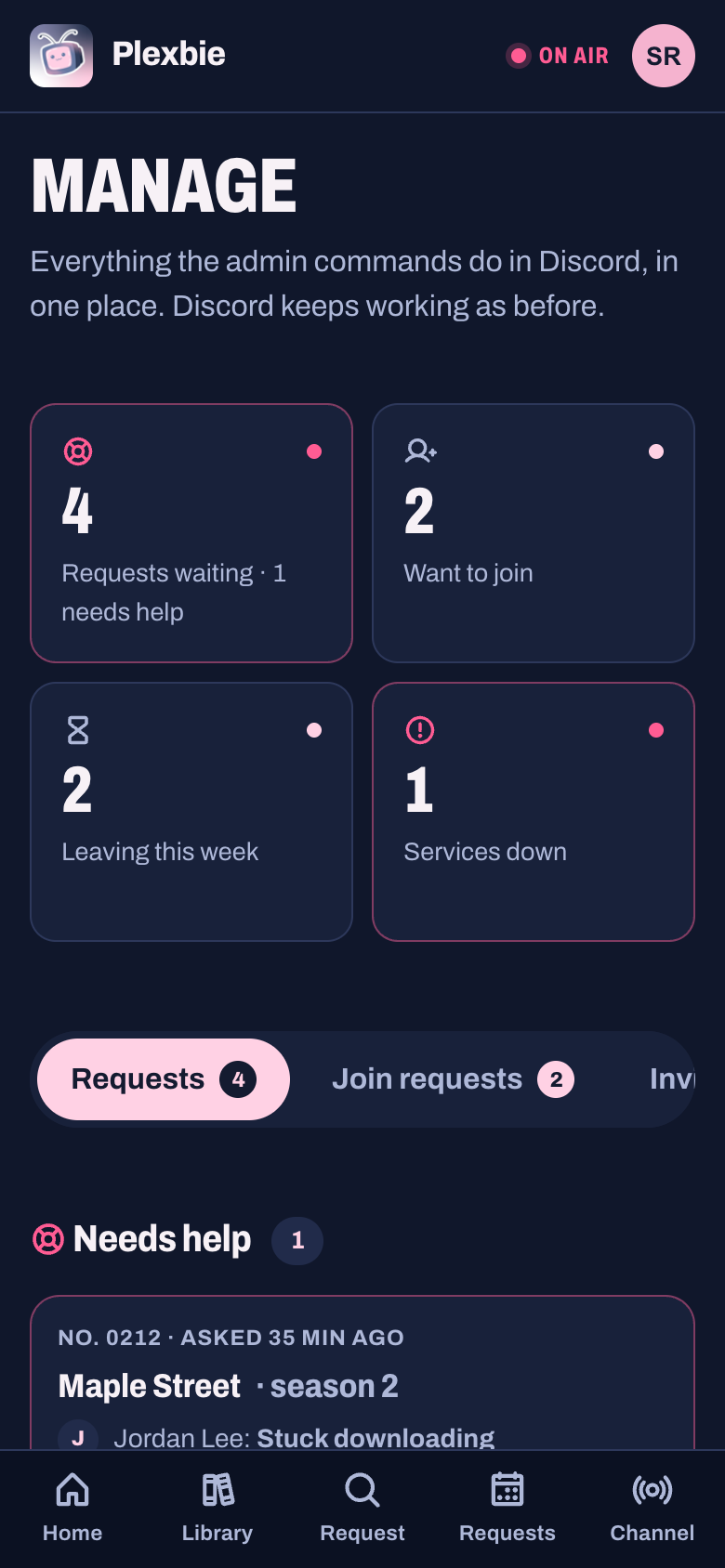 Manage, at a glance |
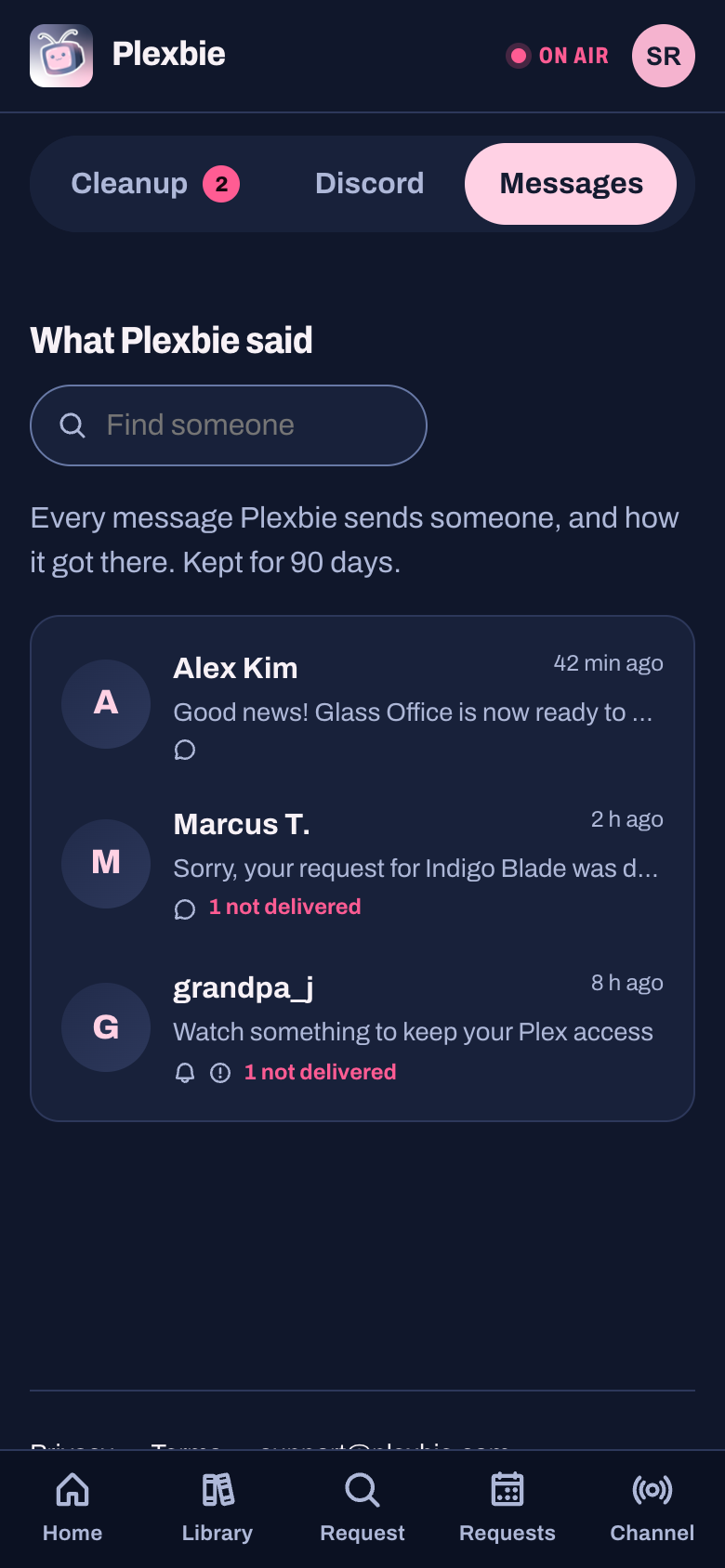 Messages, Discord style |
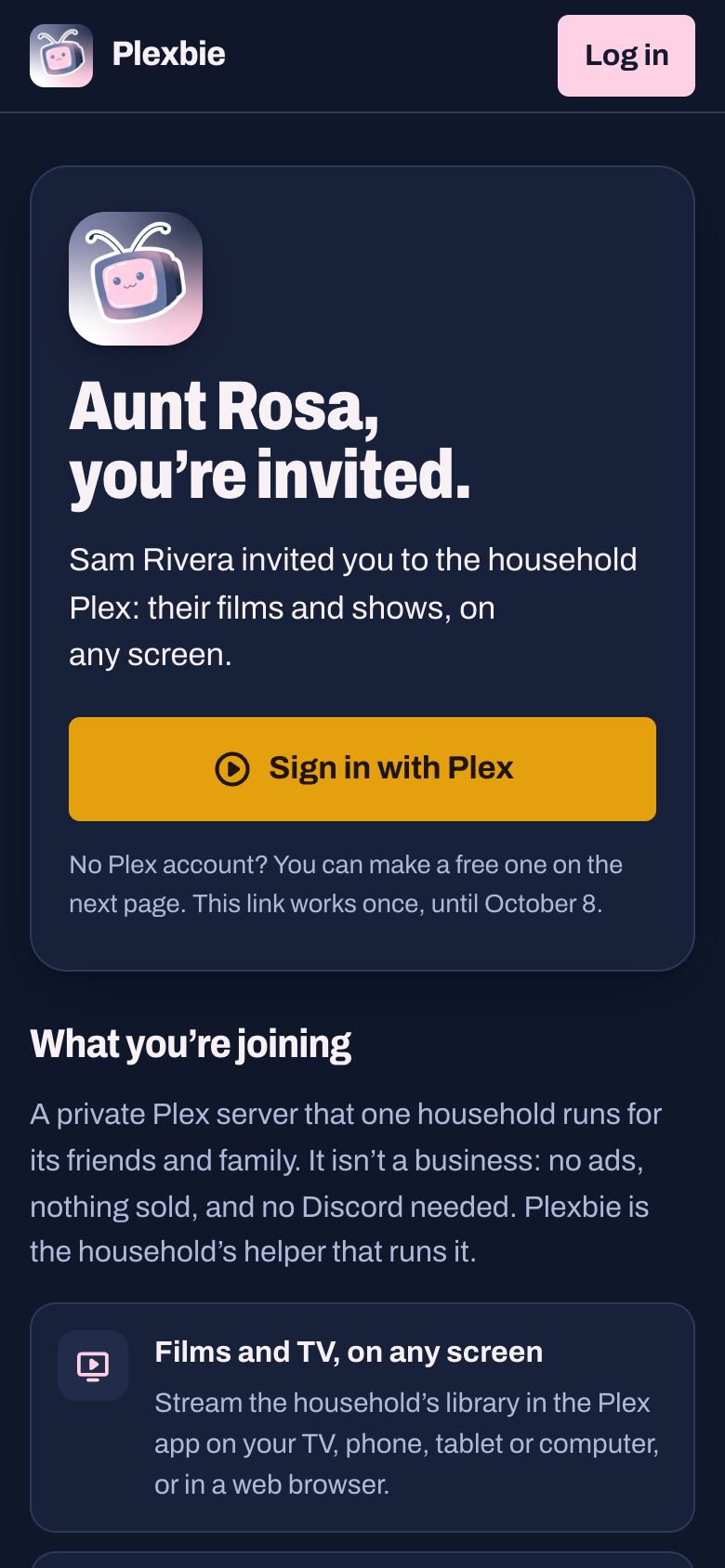 Invite links for family |
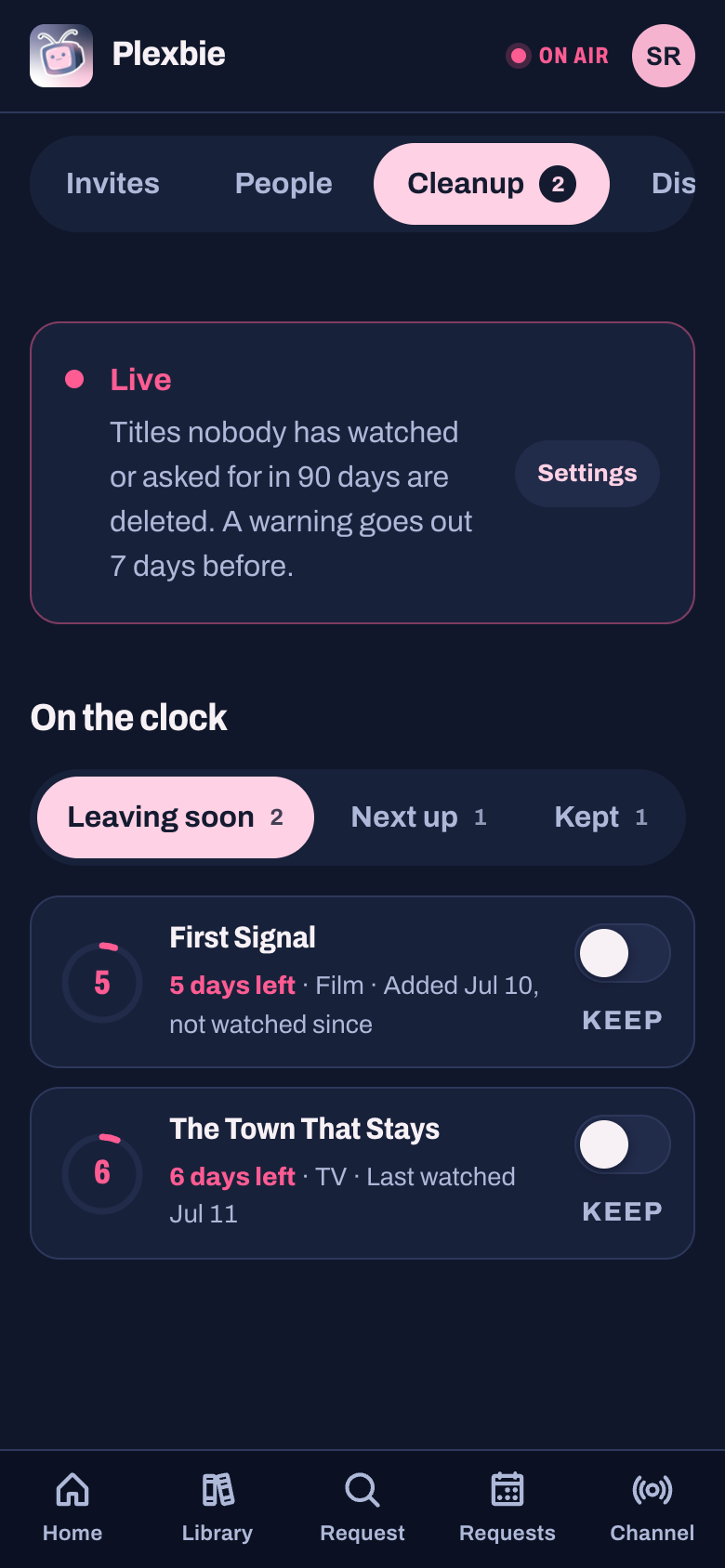 Cleanup, from your phone |
- Requests that tell you what’s happening: live SABnzbd progress, an Unpacking step, and season-by-season status so people can ask for the seasons that are still missing.
- Trending right now: the top 15 films and shows this week, with On Plex on anything you already have.
- Something wrong? Ask for help: a member flags a stuck request and the admins get the details, plus Search again and Resolve, on Discord and the website.
- No Discord? No problem: invite links, Sign in with Plex, and phone alerts (or email) for everything Discord members are DMed, including the heads-up before an account would lapse.
- Phone first: installable, tactile (swipe to approve, hold to confirm), and checked for accessibility.
In your pocket
A native app for Android and iPhone, NovaOra/plexbie-app. It works with any Plexbie: members type your address when they sign in, and nothing goes through anyone else’s server. Requests, their progress, the library and, for admins, the whole Manage page, with Liquid Glass on iOS 26.
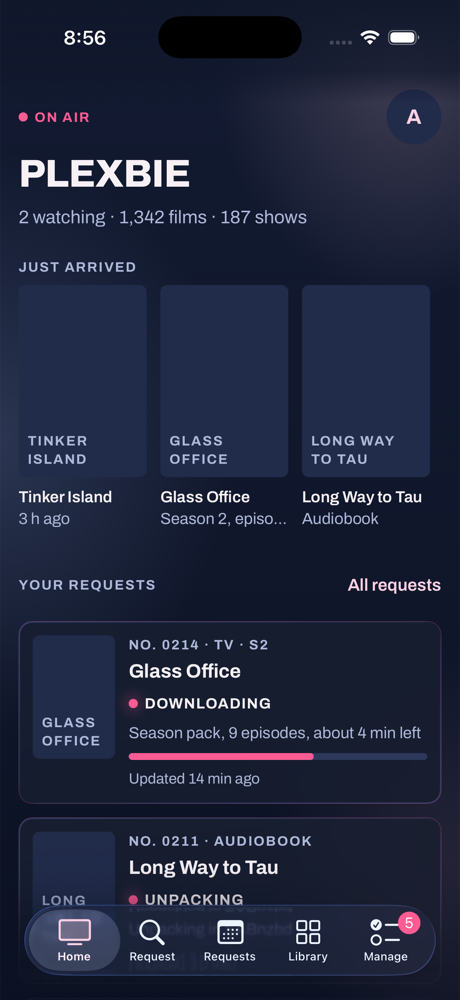 Home, iPhone |
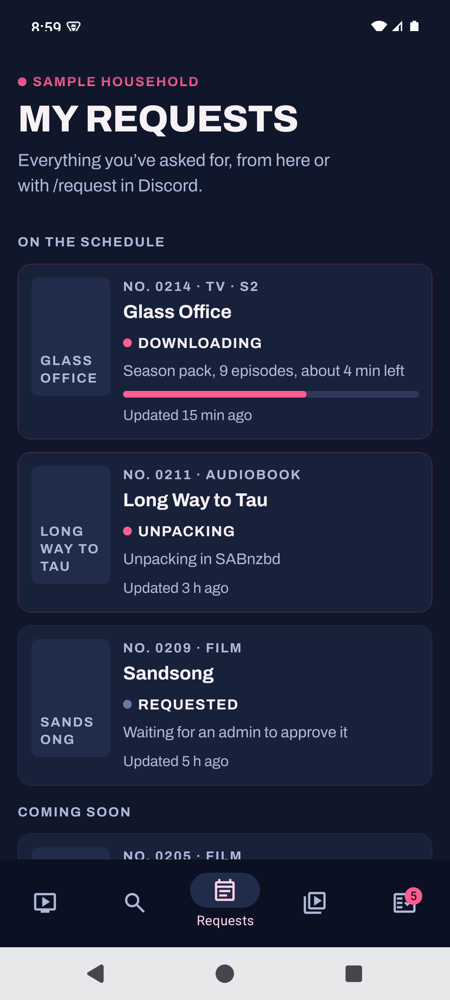 My requests, Android |
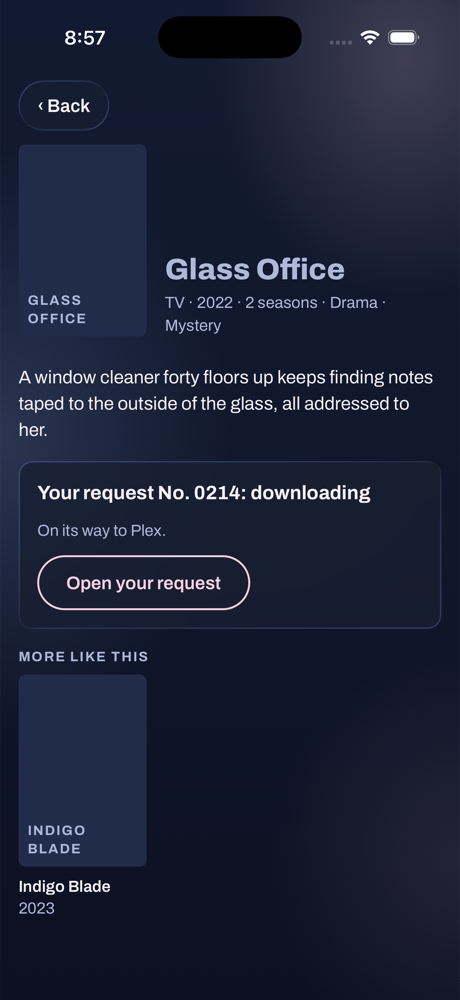 A title, iPhone |
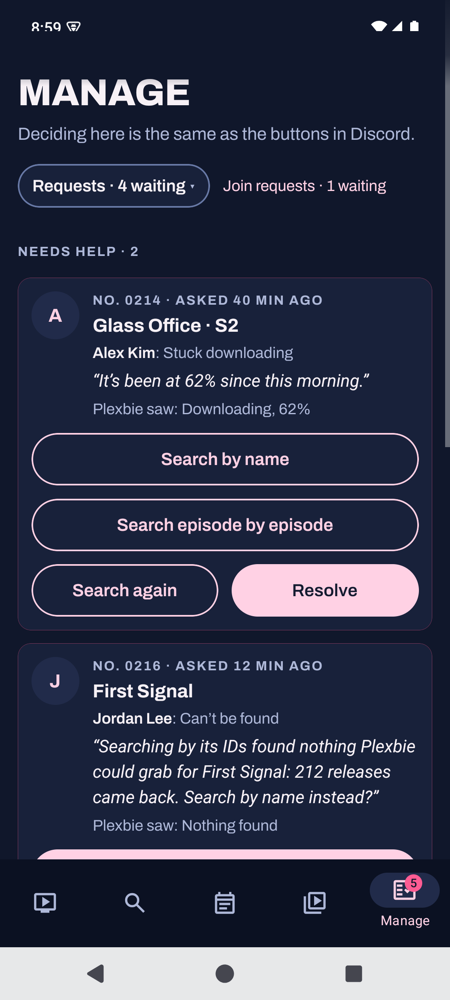 Manage, Android |
- Android: the APK from the app’s releases, or the download card on your Plexbie’s Alerts page.
- iPhone: through SideStore or AltStore, with each member’s own free Apple ID. Your Plexbie gives every member a personal source, so updates arrive there too.
- Offering it to your household takes three files in
config/app/; see The phone app.
Eleven plugins. Keep the ones you like.
Every feature lives in its own folder under plugins/, declares itself in a plugin.json, and can be switched off
without touching anything else.
| Plugin | What it does |
|---|---|
user_invites |
/join-plex and the approval flow |
user_mgmt |
Account linking, inactivity tracking, removal |
media_requests |
/request for TV, film, audiobook and ebook |
media_cleanup |
Report and optionally delete unwatched media |
new_media_added |
Announce additions from Plex webhooks |
watch_tracking |
Now watching, leaderboard and streaks |
watch_party |
Watch credit for Discord Go Live streams |
bookshelf_processor |
File audiobooks and ebooks into a library |
service_health |
Probe Plex and Tautulli, alert on failure |
status |
/say, a message from Plexbie in any channel (admins) |
invite_tracker |
Who invited whom to the Discord server |
On air in six commands
You’ll need Docker, a Discord bot token, and a Plex server with its token. Sonarr, Radarr, Seerr, Tautulli and SABnzbd are optional and add more features. Use it with media you own or are entitled to use.
git clone https://github.com/NovaOra/plexbie.git
cd plexbie
cp config/.env.example config/.env
# fill in DISCORD_BOT_TOKEN, GUILD_ID, PLEX_URL and PLEX_TOKEN
docker build -t plexbie:latest .
docker compose up -d
Then open http://<your host>:7979 and sign in with the Plex account that owns the server: you’re the admin. The details are below.
Contents
- What it does
- Requirements
- Quick start
- Configuration
- Commands
- Web portal
- Webhooks
- Plugins
- Architecture
- Development
- Operations
- Security
- Limitations
- How Plexbie is built (AI use)
What it does
Plexbie is the front end that ties a home Plex stack together. You already run Plex, Seerr for requests, Tautulli for watch stats, and probably Sonarr, Radarr and SABnzbd. Plexbie doesn't replace any of them: it connects them and puts one face on the whole thing, in Discord and on the website, so your household requests media, gets invited, follows downloads and sees who's watching from one place instead of five.
Plex access
/join-plexcollects an email and raises an approval request in an admin channel. Approving it invites the account and DMs the user.- Linked accounts are tracked in a local database, so Discord members and Plex accounts stay associated even when the display names differ.
- Accounts are warned after a configurable period of inactivity and removed later, with the warning always delivered a full pass before any removal.
Watching
- A stats channel carries three self-updating messages: who is watching right now, an all-time leaderboard, and daily watch streaks.
- Watch parties: when someone streams Plex over Discord Go Live, everyone in the voice channel accrues watch credit, which folds into the leaderboard.
Media
/requestwalks a user through requesting a TV show, film, audiobook or ebook.- New additions are announced from Plex webhooks, enriched with TMDB metadata, and episodes arriving in a batch are collapsed into a single updating message.
- Unwatched media can be reported and, optionally, deleted after a configurable period, with an exemption list and a dry-run mode.
- Audiobook and ebook downloads are watched, waited on until they stop changing, then renamed and filed into an Audiobookshelf-shaped library.
Housekeeping
- Plex and Tautulli are health-checked on a timer, with alerts and recovery notices to an admin channel.
- Discord API usage is sampled and logged, per route.
- Invite attribution is recorded, so you can see who brought whom.
Requirements
| Python | 3.11 |
| Discord | A bot application with the Server Members privileged intent |
| Plex | A server plus an auth token |
| Optional | Tautulli, Seerr, a TMDB API key |
Seerr: Seerr handles requests (it replaced
Overseerr and Jellyseerr). Set SEERR_URL and SEERR_TOKEN; Connect live updates sets
its webhook up. An .env that still says OVERSEERR_URL and OVERSEERR_TOKEN keeps
working, and Plexbie renames those settings on its next start.
Python dependencies are pinned exactly in requirements.txt (and what they pull
in, in constraints.txt): discord.py, PlexAPI, SQLAlchemy (asyncio) with
aiosqlite, aiohttp, pydantic, python-dotenv, mutagen, pywebpush.
Quick start
Docker (recommended)
git clone https://github.com/NovaOra/plexbie.git
cd plexbie
cp config/.env.example config/.env
Fill in config/.env — at minimum DISCORD_BOT_TOKEN, GUILD_ID, PLEX_URL
and PLEX_TOKEN. Then:
docker build -t plexbie:latest .
The committed docker-compose.yml uses relative paths, so it works from a fresh
clone as-is:
docker compose up -d
docker compose logs -f plexbie
The website comes up with it at http://<your host>:7979: sign in with the Plex account that owns the server and you're the admin. It needs no extra setup; see Web portal for putting it on your own domain and adding "Log in with Discord".
It mounts ./config (your .env and the SQLite database) and ./logs. The four
media mounts are only needed for the bookshelf_processor plugin — point them at
your download client's completed directories and the library you want built, or
delete them if you do not use it.
network_mode: host is deliberate: the webhook listener binds to 127.0.0.1 by
default, which only keeps it off the network if the container shares the host's
network namespace. See Security if you change this.
Unraid
Plexbie publishes a ready-made image (ghcr.io/novaora/plexbie) and an Unraid template
(NovaOra/unraid-templates).
There's nothing to edit by hand:
- In Unraid's Apps tab, search Plexbie and press Install. (No Apps tab? Or
want the template before Community Applications has it? Open Unraid's terminal and run
wget -O /boot/config/plugins/dockerMan/templates-user/my-Plexbie.xml https://raw.githubusercontent.com/NovaOra/unraid-templates/main/templates/plexbie.xml, then Docker → Add Container and pick Plexbie under Template.) - Keep the defaults and Apply.
- Press WebUI (or open
http://<your server>:7979). The page first asks for the setup code Plexbie printed in its log (click Plexbie's icon on the Docker tab → Logs, the line startingSetup code:), so only you can set it up. Then it walks you through each key, shows where to find it and tests it:- your Discord bot: paste the token, then pick your server, channels and roles from lists
- Sign in with Plex
- optionally Seerr, Sonarr, Radarr, SABnzbd, Tautulli and TMDB
- Press Finish. Plexbie starts and the page turns into the website.
Everything is saved to appdata/plexbie/config/.env, which you can still edit later. It
uses host networking: the website is on 7979 and webhooks on 127.0.0.1:7980. If something
else already uses those ports, change WEB_PORT and WEBHOOK_PORT in that file. If Discord
later turns the token down, the setup page comes back to ask for a new one, with a new
setup code in the log.
Without Docker
python -m venv .venv && source .venv/bin/activate
pip install -r requirements.txt -c constraints.txt
cp config/.env.example config/.env   # then edit it
python -u bot.py
The bot reads config/.env relative to its working directory, so run it from the
repository root.
First run
On startup you should see:
Plex: Connected to http://...
Plugins: Loaded 11/11 available plugins
Webhook server listening on 127.0.0.1:7980
Commands: 12 synced to guild ...
PLEXBIE DISCORD BOT - READY
Slash commands are synced to the guild named by GUILD_ID, which takes effect
immediately. If GUILD_ID is unset they are registered globally instead, which
can take up to an hour to appear.
Configuration
Everything is read from environment variables, usually via config/.env. The
full list lives in config/.env.example; this section covers what matters.
Required
| Variable | Notes |
|---|---|
DISCORD_BOT_TOKEN |
Bot token |
PLEX_URL |
e.g. http://192.168.1.50:32400. Default http://localhost:32400 |
PLEX_TOKEN |
Plex auth token |
GUILD_ID |
Without it, commands register globally |
Strongly recommended
| Variable | Why |
|---|---|
BOT_OWNER_ID |
Always counts as an administrator |
ADMIN_ROLE_ID |
A role that counts as an administrator |
ADMIN_CHANNEL_ID |
Where approval requests and health alerts go |
PLEX_USERNAME, PLEX_PASSWORD |
Required to remove Plex users; invites and reads work without them |
Authorization accepts any of: the Discord administrator permission, the
ADMIN_ROLE_ID role, or BOT_OWNER_ID.
Behaviour
| Variable | Default | Meaning |
|---|---|---|
INACTIVITY_WARNING_DAYS |
25 |
Days idle before a warning DM |
INACTIVITY_REMOVAL_DAYS |
30 |
Days idle before removal |
HEALTH_CHECK_INTERVAL |
300 |
Seconds between service probes |
HEALTH_MAX_FAILURES |
3 |
Consecutive failures before alerting |
HEALTH_ALERT_COOLDOWN |
1800 |
Seconds between repeat alerts |
WATCH_PARTY_CREDIT_INTERVAL |
300 |
Seconds per credit tick |
BOOKSHELF_SETTLE_SECONDS |
120 |
How long a download must stop changing before processing |
LOG_LEVEL |
INFO |
|
DB_URL |
sqlite:///config/plexbie.db |
The
@tasks.loop(...)decorators in the source are not the effective intervals for the health check or watch party loops — both are overridden from config at startup. Read the values above, not the decorators.
Channels, roles and messages
Many plugins need a channel, role, or the ID of an existing message to keep updating. Each is optional; the plugin that needs it logs a warning and stands down if it is missing. The ones you are most likely to want:
STATS_CHANNEL_ID, NOW_WATCHING_MESSAGE_ID, LEADERBOARD_MESSAGE_ID,
WATCH_STREAK_MESSAGE_ID, UPDATES_CHANNEL_ID, PLEX_MEMBER_ROLE_ID,
WATCH_PARTY_CHANNEL_ID, TMDB_API_KEY.
The three stats messages must already exist — post a placeholder in the channel and put its ID in the matching variable. The bot only ever edits them; it never creates them, so it cannot litter the channel if a variable is wrong.
A malformed numeric setting is logged and ignored rather than crashing the bot:
Ignoring invalid integer for BOT_OWNER_ID: 'novaora' - expected a numeric ID.
This setting is now INACTIVE.
Commands
12 commands are live with the default plugin set (/cleanup is one of them, with
five subcommands). 9 are for administrators and hidden from ordinary members
by Discord itself, so a regular user sees 3. Every command is guild-only and every
reply is ephemeral unless stated otherwise.
Everyone
| Command | Arguments | Description |
|---|---|---|
/join-plex |
Request access to the Plex server | |
/request |
Request a TV show, film, audiobook or ebook | |
/watchparty-stats |
Your own watch party credit |
Administrators
| Command | Arguments | Description |
|---|---|---|
/cleanup panel |
Interactive cleanup control panel | |
/cleanup config |
inactivity_days? notification_channel? |
Change cleanup thresholds |
/cleanup exempt add |
title media_type? |
Never clean up this title |
/cleanup exempt remove |
title |
Drop an exemption |
/cleanup exempt list |
Show the exemption list | |
/list-plex-users |
show? |
Plex accounts; show: Only malformed accounts filters to those needing removal |
/list-tracked-users |
Database view, flagging accounts no longer on Plex | |
/manage-links |
Link or unlink a Discord member and a Plex account | |
/requests |
Requests still awaiting a decision, newest first | |
/remove-user |
plex_username |
Remove from Plex, notify, and drop the tracking row |
/who-invited |
member |
Who invited this member |
/watchparty-active |
The watch party in progress | |
/say |
channel message |
Send a message as the bot (logged) |
Admin visibility is enforced twice: default_member_permissions keeps the
command out of the picker, and the handler re-checks at runtime. The second check
is the one that matters — a guild administrator can override the first in server
settings.
Web portal
On by default: the bot serves a website on port 7979 (WEB_PORT; 0 turns it
off) from the same process and container
(portal/ for the API, web/ for the React front end, built into the image),
so the household can do everything above without Discord:
- Sign in with Discord (the
identifyscope only) or with Plex. A Plex sign-in's token is used once and Plexbie then removes itself from that account's authorized devices; sessions are a signed cookie holding no tokens. - Members: request films, TV and books through the same admin approval
cards as
/request, follow each request with live Sonarr/Radarr/SABnzbd progress, see what arrived and what's leaving under the cleanup countdown, and turn on phone alerts. - Admins (Manage): approve and decline requests and join requests, make invite links, manage people and Discord links, change cleanup settings and keep titles forever, post as Plexbie, see who brought whom and the live watch party, and check service health. Each command above has its counterpart there, and both sides run the same code.
- Invite links let someone without Discord join: single use, expiring, optionally locked to an email, stored only as a SHA-256. Without one, a Plex sign-in cannot ask to join.
- Members without Discord are told what Discord members are DMed (request
decisions, arrivals, inactivity warnings, removal) by phone/browser alerts
from the site, or by email when
SMTP_*is set.
Your address. The household's Plexbie is the whole site, at the root of its
own address. The usual name is plexbie.<your domain> (for example
https://plexbie.example.com), pointed at port 7979 by your Cloudflare tunnel or
reverse proxy. Setup suggests it from your domain, and Check this address
proves it reaches this Plexbie (it fetches a one-time path through the name, the
way a visitor would). Any other name works too: a Tailscale address, a
dynamic-DNS name, or one you already use. Save it as WEB_PUBLIC_URL; moved?
List the old one in WEB_ALIASES and signed-in phones follow you.
Logging in with Discord is optional ("Sign in with Plex" works without it), and needs three things that must agree:
- In the Discord Developer Portal, open your Plexbie app, then OAuth2.
- Under Redirects, add your address followed by
/auth/discord/callback, exactly: forhttps://plexbie.example.com, that'shttps://plexbie.example.com/auth/discord/callback. Discord compares it character for character, sohttpvshttps,www.or a trailing/all count as different. - Copy the Client Secret into
DISCORD_CLIENT_SECRET. The app's ID isDISCORD_CLIENT_ID, which setup fills in for you.
Plexbie builds the return address from WEB_PUBLIC_URL, so it can't drift from
your site. If Discord doesn't list it, Discord refuses the sign-in before it
reaches Plexbie, with "Invalid OAuth2 redirect_uri". Manage → Health checks
this for you and names the exact address to add. Without a public address,
DISCORD_CALLBACK_URL sets it by hand.
Changing your address later:
- Point the new name at port 7979 in your tunnel or proxy, then press Check this address in setup.
- Set
WEB_PUBLIC_URLto it, and put the old one inWEB_ALIASES. Phones that signed in through the old address keep working, and the app moves itself over. - Add the new
…/auth/discord/callbackunder OAuth2 → Redirects in the Discord Developer Portal. Keep the old one until you've restarted Plexbie. - Restart Plexbie. Visitors sign in again once on the new address, because login cookies belong to one name.
Plex sign-in needs nothing registered, so it follows the address on its own.
The phone app
The app (Android and iPhone, NovaOra/plexbie-app) works with any Plexbie: members type your address when they sign in.
- Offering it from your Plexbie: copy the three files from the app's latest
GitHub release (
plexbie-<version>.apk,plexbie-<version>.ipaandlatest.json) intoconfig/app/. That gives your members:- a download card on the website's Alerts page, and an update card in the app;
- one alert to app users per new version;
- a personal SideStore/AltStore source for iPhones. iPhones install the app that way, signed with each member's own free Apple ID, so the iPhone app has no alerts of its own; members turn on the website's alerts from Safari instead.
- Alerts: members turn on the website's alerts (on Android, and on iPhone from
Safari with the site on the Home Screen), which your install sends itself. The
app's own alerts go through the Plexbie project's Expo account, so they're off
unless you set
APP_PUSH=expo. The app then points members to the website. - Links to your Plexbie open the website, not the app. Signing in returns to the app on its own.
Your pages. The site's Privacy and Terms name whoever runs it
(SITE_OPERATOR, SITE_CONTACT), never the Plexbie project. Every page carries
a small "Powered by Plexbie" link to plexbie.com, the
project's own site, which is separate (web/project, served by Cloudflare). The
whole site stays out of search engines; shared links still show a preview card.
Discord permissions
The Add Plexbie to my server link on the setup page asks for exactly these, so the bot doesn't need Administrator:
| Permission | Why |
|---|---|
| View Channels, Send Messages, Embed Links, Read Message History | Every card, board and announcement is an embed; the boards are found again by reading the channel |
| Attach Files | Book covers |
| Manage Messages | Tidying its own admin cards |
| Manage Roles | Handing out Plex Member and New on Plex, and making its roles during setup |
| Manage Channels | Set up this server for me makes its category and channels |
| Manage Server | Reading the server's invites, to see who brought whom |
| Create Invite | Invite links for people approved to join |
In Discord's developer portal, the bot also needs the Server Members and Message Content intents turned on; the setup page checks both. For handing out roles, Plexbie's own role must sit above them in Server Settings → Roles. Roles Plexbie creates start out below it.
Set up this server for me
After you pick your server on the setup page, one button sets it up:
- A Plexbie category with these channels:
- #new-on-plex: read-only arrivals, with a "🔔 Ping me for new arrivals" button.
- #plex-stats: read-only, with the three stats boards.
- #plexbie-admin: private, for join requests, approvals, help requests and health alerts.
- A Watch Party voice channel.
- The Plexbie Admin, Plex Member and New on Plex roles.
Every setting is filled in from those. Anything that already exists by those names is reused, so pressing it again changes nothing. Afterwards, give yourself the Plexbie Admin role to see #plexbie-admin.
Webhooks
Live updates from Seerr and Tautulli
On the setup page, Connect live updates on the Seerr and Tautulli cards sets up each
app's webhook through its own API. Nothing needs copying by hand. Connecting gives every webhook
route a secret and opens the listener to your network (WEBHOOK_BIND=0.0.0.0).
Seerr:
- Requests made in Seerr's own site or app become Plexbie requests, with live progress, the help button and arrival DMs.
- Decisions made there reach the requester.
- A failed download opens a help request for the admins.
Tautulli:
- Now Watching updates the moment someone presses play.
- The leaderboard and streaks refresh after a stop.
- Someone warned for not watching is told they're fine right away.
- A new viewer is linked at once.
- Plex going down reaches the admins within seconds.
Once events arrive, Plexbie checks far less often: Now Watching every minute instead of every 10 seconds, the boards and account linking hourly instead of every 5 minutes. Those checks stay as a safety net.
Season searches
A season is searched as one release first. When nothing turns up, Plexbie searches the first two missing episodes on their own. If those are found, it searches the rest episode by episode; plenty of seasons only exist that way. If even single episodes turn up nothing, a "Can't be found" help request tells the admins. On the website, Search episode by episode on a TV help request skips straight to that.
An aiohttp listener serves these routes:
| Route | Source | Secret |
|---|---|---|
POST /webhook/plex |
Plex | PLEX_WEBHOOK_SECRET |
POST /webhook/sonarr |
Sonarr | SONARR_WEBHOOK_SECRET |
POST /webhook/radarr |
Radarr | RADARR_WEBHOOK_SECRET |
POST /webhook/tautulli |
Tautulli | TAUTULLI_WEBHOOK_SECRET |
POST /webhook/seerr |
Seerr | SEERR_WEBHOOK_SECRET |
GET /health |
Liveness probe, no auth |
WEBHOOK_BIND defaults to 127.0.0.1 and WEBHOOK_PORT to 7980.
Every route needs its secret. A route without one refuses every request,
loopback included (a tunnel or proxy on the same machine forwards strangers from
127.0.0.1 too). Plexbie makes any missing secret when it starts and saves it in
config/.env; Connect live updates on the setup page hands them to Seerr
and Tautulli.
How each secret is presented differs by what the service can send:
- Sonarr / Radarr send
X-Api-Key; the value must equal the secret. - Tautulli accepts either an
Authorization: Bearer <secret>header or?secret=<secret>on the URL. - Plex sends no auth of its own, so append
?token=<secret>to the webhook URL you configure in Plex. - Seerr must send
Authorization.
Validation fails closed: an unrecognised service with a secret configured is rejected rather than waved through.
Plugins
A plugin is a directory under plugins/ containing cog.py and plugin.json:
{
    "name": "my_plugin",
    "version": "1.0.0",
    "description": "What it does",
    "author": "You",
    "enabled": true,
    "dependencies": [],
    "commands": ["/my-command - What it does"]
}
cog.py must define a class named from the directory in PascalCase plus Cog
(my_plugin → MyPluginCog) taking (bot, services). The loader imports the
module, instantiates that class and registers it — it does not call a
setup() function, so anything a discord.py extension would put there belongs in
__init__ or cog_load instead.
Persistent views must be registered in cog_load, not setup.
To turn a plugin off, set "enabled": false and restart. Top-level command names
must be unique across all plugins, enabled or not; if two collide, one fails
to load and the log names the command.
Active by default
| Plugin | Purpose |
|---|---|
user_invites |
/join-plex and the approval flow |
user_mgmt |
Account linking, inactivity tracking, removal |
media_requests |
/request for TV, film, audiobook, ebook |
media_cleanup |
Report and optionally delete unwatched media |
new_media_added |
Announce additions from Plex webhooks, with TMDB metadata |
watch_tracking |
Now Watching, leaderboard and streak displays |
watch_party |
Credit for Discord Go Live streams |
bookshelf_processor |
File audiobook and ebook downloads into a library |
service_health |
Probe Plex and Tautulli, alert on failure |
status |
/say, a message from Plexbie in any channel (admins) |
invite_tracker |
Who invited whom to the Discord server |
Architecture
bot.py                 entry point, command sync, global error handling
core/
  services.py          dependency container; shared Plex, HTTP and DB access
  config.py            environment to typed settings
  plugin_manager.py    discovery, load, unload, reload
  permissions.py       is_bot_admin / require_admin / AdminOnlyView
  blocking.py          run_blocking() - the only sanctioned way to call sync I/O
  webhooks.py          aiohttp listener
  webhook_security.py  per-service request validation
  logging.py           JSON logging with size-based rotation
  rate_limit.py        token buckets per external service
  security.py          redaction for logs
database/
  models.py session.py kv_store.py
utils/
  embeds.py formatting.py validators.py
plugins/<name>/        cog.py + plugin.json
webhooks/              Sonarr, Radarr, Seerr and Tautulli webhook handlers
tests/                 over 600 tests, standard library only (plus pywebpush for one)
Three conventions matter if you contribute:
1. Nothing blocking on the event loop. plexapi is entirely synchronous, and
some of its attributes perform HTTP on access — LibrarySection.totalSize is a
cached property that issues a request. Wrap a coarse unit of work in
run_blocking() and return plain data from it; returning a lazy plexapi object
just moves the blocking call back onto the loop. tests/test_no_blocking_plex_calls.py
enforces this.
2. No database transaction across network I/O. The SQLite database runs in
delete journal mode, so a read transaction holds a shared lock for its whole
lifetime and blocks every other writer. Read, close, do the slow work, then write.
tests/test_efficiency.py enforces this.
3. tasks.loop stops forever on an unhandled exception. A loop that watches
something must guard each step, or the first error silently ends the monitoring.
Shared state uses database/kv_store.py, a namespaced key-value store with an
atomic upsert. Use kv_set_many for more than one key — each kv_set is its own
transaction, and a commit on SQLite is an fsync.
Development
pip install -r requirements-dev.txt -c constraints.txt
python tests/run_all.py                 # everything
python tests/run_all.py config kv       # only matching modules
pytest tests/                           # also works
tests/run_all.py uses only the standard library, so the suite runs inside the
production image with no dev dependencies:
docker run --rm -v "$PWD:/src" -w /src -e PYTHONDONTWRITEBYTECODE=1 \
  plexbie:latest python tests/run_all.py
The README's GIFs and screenshots come from the website's demo mode (invented
titles, code-drawn covers). To re-record them, run npm run dev in web/, then
node scripts/demo-gifs.mjs (prints the ffmpeg command for the GIFs) and
node scripts/readme-shots.mjs. The same demo mode, built with npm run build:demo,
is what runs at demo.plexbie.com (web/cloudflare/demo/).
Over 600 tests. A good number are pattern tests rather than tests of one function: they assert a property of the whole codebase, because several bugs here recurred by being fixed in one place and missed in its siblings. Those will fail if you reintroduce the shape:
| Module | Asserts |
|---|---|
test_codebase_patterns |
Views are gated; DMs are sent in the right order |
test_no_blocking_plex_calls |
Synchronous Plex calls go through run_blocking |
test_efficiency |
No fetch-then-overwrite, no transaction across network I/O, no per-key bulk writes |
test_commands |
Command names are unique, admin commands are hidden, plugin.json matches reality |
Tests read the real discord.py objects off each Cog where they can, rather than parsing source, so they describe what Discord would actually be sent.
Operations
Logs are JSON, one object per line, to stdout and logs/plexbie.log, rotated
at 20 MB with 5 backups (LOG_MAX_BYTES, LOG_BACKUP_COUNT).
docker logs -f plexbie
docker exec plexbie sh -c 'grep "\"level\": \"ERROR\"" /app/logs/plexbie.log | tail'
Health: curl http://127.0.0.1:7980/health
Deploying a change: rebuild the image and recreate the container. Tag the previous image first so there is a way back.
docker tag plexbie:latest plexbie:rollback
docker build -t plexbie:latest .
docker compose up -d --no-deps --force-recreate plexbie
Stale global commands: if commands ever appear twice in the picker, they are
registered in both the global and guild scopes and Discord merges the two. The
bot clears the global scope on startup when GUILD_ID is set, logging
removing N stale global command(s).
Security
- The webhook listener binds to loopback by default, and every route needs its secret wherever it listens; missing secrets are made on start.
- Secrets are compared with
hmac.compare_digeston UTF-8 bytes, so a non-ASCII secret cannot crash the comparison. - Tokens are redacted from log output, including nested structures.
- Authorization is checked in the handler, not inferred from an ephemeral reply or from a button being hidden. Persistent views outlive their message and re-check on every interaction.
- Never commit
config/.env. It is gitignored, along withconfig/*.dbandlogs/. /saylets an administrator send a message as the bot. Every use is logged with the invoking user and target channel. Remove the plugin if you would rather not have it.
Limitations
Worth knowing before you rely on this:
- Single guild. Commands sync to one
GUILD_ID, and channel and role settings are single-valued. It is not built to be a multi-server bot. - SQLite only.
DB_URLis passed to SQLAlchemy, but the schema migration and the upsert path are written against SQLite. Keep the database off any file-syncing tool — syncing a live SQLite file can corrupt it. - Removing a Plex user needs
PLEX_USERNAMEandPLEX_PASSWORD, because it goes through plex.tv rather than the local server. Without them the bot keeps the tracking row and retries, rather than dropping a user it could not remove. - Some Plex system accounts cannot be deleted through the API at all.
/list-plex-users show: Only malformed accountsreports them with manual removal steps. - Signing in from outside your home needs a public HTTPS address of your own
(a reverse proxy or tunnel), such as
plexbie.<your domain>, for Discord and Plex sign-in to come back to. On your home network the website works as it is.
How Plexbie is built (AI use)
Plexbie is a one-person project, and most of its code, tests and documentation were written with an AI assistant (Anthropic's Claude), working from my direction. I decide what Plexbie does and how it should feel, try the changes, and run it on my own Unraid server, where it looks after my household's Plex every day. The phone app was built the same way.
What keeps that in check:
- Tests: over 600 automated tests run on every change, including pattern tests that check the whole codebase for mistakes that came back before.
- Security reviews: before going public the code went through static analysis (Semgrep), dependency audits and a focused review of sign-in, sessions and everything that touches the network. The fixes are in the code.
If something looks wrong, please open an issue.
Licence
Copyright © 2026 NovaOra. Licensed under the GNU Affero General Public License, version 3 or (at your option) any later version: see LICENSE.
Use it, change it and share it freely. If you share a changed version, or run one as a website or service for other people, you must make your version's source code available under the same licence. There is no warranty.
Plexbie uses Plex's, Discord's and TMDB's public APIs under their own terms, and is not affiliated with or endorsed by Plex, Inc., Discord Inc. or TMDB.
Contributing
Pull requests are welcome. Please:
- Run
python tests/run_all.py; everything should pass. - Add a test that fails before your change and passes after.
- Respect the three conventions in Architecture. The pattern tests will tell you if you have not.
- Explain why in comments where the reason is not obvious from the code. Much of this codebase carries notes about the failure that motivated a given shape; keeping those is more useful than tidying them away.
Support Plexbie’s development
Plexbie is free, open source (AGPL-3.0), and built by one person in spare evenings. If it takes some of the admin off your household, you can chip in toward its development: new features, fixes, keeping up with Plex, Discord and the *arr apps, and the hours that go into all of it.
- Ko-fi: https://ko-fi.com/novaora
- Buy Me a Coffee: https://buymeacoffee.com/novaora
Tips support Plexbie, the open-source software, and nothing else. They don’t buy access to anyone’s Plex server or media, and Plexbie has no paid features: every part of it is in this repository for anyone to run.
Requirements
Categories
Related apps
Explore more like this
Explore allDetails
ghcr.io/novaora/plexbie:latestRuntime arguments
- Web UI
http://[IP]:7979/- Network
host- Shell
bash- Privileged
- false
- Extra Params
--restart unless-stopped
Template configuration
Settings (.env, made for you on first start) and the database. The only folder you need to touch.
- Target
- /app/config
- Default
- /mnt/user/appdata/plexbie/config
- Value
- /mnt/user/appdata/plexbie/config
Log files.
- Target
- /app/logs
- Default
- /mnt/user/appdata/plexbie/logs
- Value
- /mnt/user/appdata/plexbie/logs
User Plexbie runs as (99 = nobody, Unraid's default owner of shares). It never runs as root: 0 is refused (99 is used) unless PLEXBIE_ALLOW_ROOT=1.
- Default
- 99
- Value
- 99
Group Plexbie runs as (100 = users).
- Default
- 100
- Value
- 100
Optional, for filing audiobooks and ebooks. Plexbie can change anything you mount here, so mount only the folder that holds your book downloads and book library (for example /mnt/user/data/books), not a whole share. For separate folders, add one path per folder at the same place under /data.
- Target
- /data