
All apps · 0 apps

Plex-TVTime
Docker app from Zggis' Repository
Overview
Readme
View on GitHub

Description
Plex-TVTime is a Plex webhook handler that automatically updates your TVTime watch history. TV episodes are automatically marked as watched once you complete them on Plex.
Requirements
The Plex server owner must have an active Plex Pass subscription for webhooks to be enabled.
Installing
Unraid
To install Plex-TVTime on Unraid you can install the docker container through the community applications.
Docker Desktop
You can run Plex-TVTime on Docker locally by using the following command. Replace CONFIG with the directory you want the database to be saved to, and any other directories that contain your log files.
$ docker run -e TVTIME_USER={Your TVTime username} -e TVTIME_PASSWORD={Your TVTime password} -e PLEX_USERS={Plex username(s) to link} -p 8080:8080 zggis/plex-tvtime:latest
Docker Compose
Example compose and env files can be found here.
$ docker compose up
Usage
Navigating to the home page http://[host]:[port] in your browser will display the webhook URL you can enter in Plex > Settings > Webhooks. It should be http://[host]:[port]/webhook/plex You may need to restart your Plex media server for these changes to take effect.
Plex-TVTime will mark episodes as watched on your TVTime profile once you have watched them passed the configured 'Video played threshold' in Plex (You can adjust this % in Plex Settings > Library). Plex does not send webhooks when episodes are manaully marked as watched.
Watching an episode for a show that has not been added to you TVTime profile will automatically add the show. If this behavior is undesired, you can make use of the Excluded/Included configuration parameters below to restrict which shows are sent to TVTime.
By default watching an episode of a show you have already marked as watched in TVTime has no effect, the episode is not marked as 'rewatched' in TVTime, nor is the time you first marked the episode as watched updated. If the episode has a rewatch counter in TVTime it will be reset to 0. If you set MARK_REWATCH_EPISODES to true, previously watched episodes will be marked as rewatched and increment the counter in TVTime, the watch time displayed in TVTime will be the date you first watched the episode.
As of v1.1.0 Plex-TVTime supports linking multiple TVTime accounts through advanced configuration. See details below.
Basic Configuration
Required Variables
| Name | Description |
|---|---|
| TVTIME_USER | The username you use to login to TVTime. |
| TVTIME_PASSWORD | The password you use to login to TVTime. |
| PLEX_USERS | Single Plex user or comma separated list of users whoes watch events will be sent to TVTime. |
Optional Variables
| Container Variable | Default Value | Description |
|---|---|---|
| TRACK_MOVIES | false | Set to true to track movies in TVTime. |
| MARK_PREVIOUS_EPISODES | false | Set to true to mark all previous episodes of a TV show as watched when you watch a episode. |
| MARK_REWATCH_EPISODES | false | Set to true to automatically mark a previously watched episode as rewatched and increment the counter in TVTime. |
| PLEX_SHOWS_EXCLUDE | Undefined | A comma separated list of TV show titles that will not be sent to TVTime. TVShow title should be identicle to how it appears in your Plex library. If the title includes a comma in it replace it with %2C to avoid conflicting with the comma delimeters in the list. |
| PLEX_SHOWS_INCLUDE | Undefined | Overridden and ignored if PLEX_SHOWS_EXCLUDE is set, otherwise only shows that appear in this list will be sent to TVTime. |
| LOGGING_LEVEL | INFO | Set to TRACE or DEBUG for additional logging. |
| SERVER_PORT | 8080 | Set to change the port the application will use within the docker container. |
Optional Mappings
| Container Path | Description |
|---|---|
| /logs | As of v2.0.1 You can map the /logs container directory to a host directory to expose the plex-tvtime.log file. If you wanted to setup notifications you can use this feature along with my other app Howler to configure notification events. |
Linking Multiple TVTime Accounts (Only available in v1.1.0+)
To link multiple TVTime accounts you can create a YAML configuration file following the template here. YAML files are very sensitive to format so make sure you use a text editor that can preserve tabs, spaces, and line endings.
You will need to mount the directory location of your YAML file to the docker container. In Unraid you can add a Path to the configuration, on docker command line you can follow the example below.
Lastly you will need to pass in a environment variable SPRING_CONFIG_LOCATION with the container relevant path of the YAML.
$ docker run -e SPRING_CONFIG_LOCATION=/config/application.yaml -v "C:/absolute/path/to/yaml/":/config -p 8080:8080 zggis/plex-tvtime:latest
For unraid, your advanced configuration would look like this:
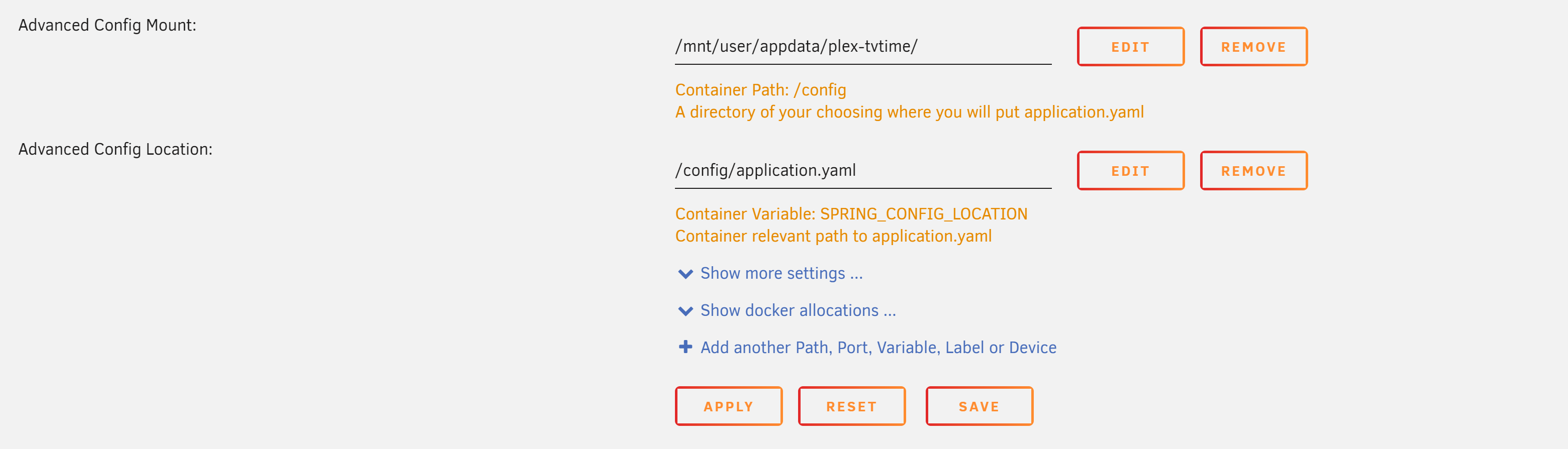
The application.yaml file replaces all other configuration, so you no longer need to pass in any of the basic configuration as environment variables, you can set them directly in application.yaml. If you still want to use enviornment variables you can reference them in application.yaml with ${YOUR_ENVIRONMENT_VAR}
If you are using the docker compose file, you will need to specify SPRING_CONFIG_LOCATION in your .env file and the needed mount in your compose file.
Jellyfin Support
As of v2.4.0 Plex-TVTime supports Jellyfin integration for TV Shows. See this page to configure it.
Troubleshooting
Please check the logs, as described above many webhook events are intentionally ignored depending on configuration. If you can't resolve on your own open an issue and I will help. If you open an issue please set the LOGGING_LEVEL to TRACE and include the relevant logs in your issue, the app does not create its own logfile, so you can just copy them from the console logs.
If you get an error such as 'Unable to process webhook message: Cannot invoke "java.util.ArrayList.iterator()" because "webhook.metadata.guid" is null' this likely means the Plex TV Show episode does not have metadata, refreshing the metadata of the episode on your Plex server should resolve the issue.
If you do not see the media.scrobble event in the plex-tvtime logs you may need to restart your Plex media server for the webhook changes to fully take effect.
FAQ
Question: What about movies?
Answer: Movie support is available as of v2.1.0. To enable movie tracking set TRACK_MOVIES environment variable to true.
Download Statistics
Total Downloads Over Time
Related apps
Explore more like this
Explore allLinks
Details
zggis/plex-tvtimeRuntime arguments
- Web UI
http://[IP]:[PORT:8080]- Network
bridge- Shell
sh- Privileged
- false
Template configuration
tvtime.com username
- Target
- TVTIME_USER
tvtime.com password
- Target
- TVTIME_PASSWORD
Single Plex user or comma separated list of Plex users to send events for
- Target
- PLEX_USERS
- Target
- 8080
- Value
- 3365
Leave blank for no restrictions. A comma separated list of TV show titles that will not be sent to TVTime. TVShow title should be identicle to how it appears in your Plex library. If the title includes a comma in it replace it with %2C to avoid conflicting with the comma delimeters in the list
- Target
- PLEX_SHOWS_EXCLUDE
Leave blank for no restrictions. Overridden and ignored if PLEX_SHOWS_EXCLUDE is set, otherwise only shows that appear in this list will be sent to TVTime
- Target
- PLEX_SHOWS_INCLUDE
Set to TRACE or DEBUG for additional logging
- Target
- LOGGING_LEVEL
- Default
- INFO
- Value
- INFO