
All apps · 0 apps

plex
Docker app from hotio's Repository
Overview
Readme
View on GitHub| Tags | Description | Commit | Last Updated |
|---|---|---|---|
latest release release-bc6cf82 release-1.43.4.10903-e5521bd8c | Stable | Modified: meta.json | 2026-10-15 01:21:54 |
Starting the container
cli
docker run --rm \
    --name="plex" \
    -p 32400:32400 \
    -e PUID=1000 \
    -e PGID=1000 \
    -e UMASK=002 \
    -e TZ="Etc/UTC" \
    -e WEBUI_PORTS="32400/tcp" \ #(3)!
    -e PLEX_CLAIM_TOKEN="" \
    -e PLEX_ADVERTISE_URL="" \
    -e PLEX_NO_AUTH_NETWORKS="" \
    -e PLEX_BETA_INSTALL="false" \
    -e PLEX_PURGE_CODECS="false" \
    -v /<host_folder_config>:/config \
    -v /<host_folder_data>:/data \
    ghcr.io/hotio/plex
compose
services:
  plex:
    container_name: plex
    image: ghcr.io/hotio/plex
    ports:
      - "32400:32400"
    environment:
      - PUID=1000
      - PGID=1000
      - UMASK=002
      - TZ=Etc/UTC
      - WEBUI_PORTS=32400/tcp #(3)!
      - PLEX_CLAIM_TOKEN
      - PLEX_ADVERTISE_URL
      - PLEX_NO_AUTH_NETWORKS
      - PLEX_BETA_INSTALL=false
      - PLEX_PURGE_CODECS=false
    volumes:
      - /<host_folder_config>:/config
      - /<host_folder_data>:/data
Claim your server
When running Plex on a docker bridge network, you can't just get to the webui and start configuring it, you'll need to claim it first. Go to plex.tv/claim and login with your account, copy the claim token and add it to the environment variable like this -e PLEX_CLAIM_TOKEN="claim-xxxxxxxxxxxxxxxxxxxx". When starting the new plex server for the first time, the server will be added to your account.
Plex Beta
If you are a Plex Pass subscriber, you can enable the install of beta builds with -e PLEX_BETA_INSTALL="true". When the container starts, a version check is done for the latest beta and installed if a newer version is found.
Environment variables PLEX_ADVERTISE_URL and PLEX_NO_AUTH_NETWORKS
The variables correspond to the below plex network settings.
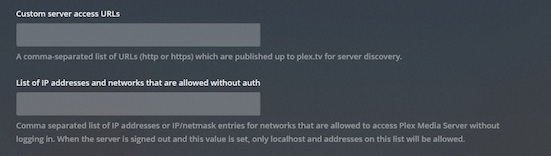
The variable PLEX_ADVERTISE_URL is useful to aid your local clients in discovering your plex server when running in the bridge network mode. Most likely you would use something like http://192.168.0.10:32400. You could use PLEX_NO_AUTH_NETWORKS when you're locked out and need to regain access without providing credentials.
Hardware Transcoding
All the usual hardware accelerated transcoding is supported.
Getting a token
The following command will interactively ask for your credentials and give you a token. If you don't use 2FA, just press enter.
docker run --rm -it --entrypoint="" hotio/plex bash /app/get-token.sh
TOP secret stuff
If you do -e PLEX_BETA_INSTALL="https://...", stuff happens for which no support will be given.
Requirements
Related apps
Explore more like this
Explore allDetails
ghcr.io/hotio/plex:latestRuntime arguments
- Web UI
http://[IP]:[PORT:32400]/web- Network
bridge- Shell
bash- Privileged
- false
- Extra Params
--hostname=plex.internal --cap-add=NET_ADMIN
Template configuration
Container Port: 32400
- Target
- 32400
- Default
- 32400
Container Path: /config
- Target
- /config
Container Path: /data
- Target
- /data
Container Variable: PLEX_CLAIM_TOKEN<br>Example: claim-xxxxxxxxxxxxxxxxxxxx<br>Visit plex.tv/claim in your browser to get your claim code.
Container Variable: PLEX_ADVERTISE_URL
Container Variable: PLEX_NO_AUTH_NETWORKS
Container Variable: PLEX_BETA_INSTALL
- Default
- false|true
Container Variable: PLEX_PURGE_CODECS
- Default
- false|true
Container Variable: PRIVOXY_ENABLED
- Default
- false|true
Container Variable: UNBOUND_ENABLED
- Default
- false|true
Container Variable: UNBOUND_NAMESERVERS
Container Variable: VPN_ENABLED
- Default
- false|true
Container Variable: VPN_CONF
- Default
- wg0
Container Variable: VPN_PROVIDER
- Default
- generic|proton|pia
Container Variable: VPN_LAN_NETWORK
Container Variable: VPN_LAN_LEAK_ENABLED
- Default
- false|true
Container Variable: VPN_EXPOSE_PORTS_ON_LAN
Container Variable: VPN_AUTO_PORT_FORWARD
- Default
- false
Container Variable: VPN_PORT_REDIRECTS
Container Variable: VPN_HEALTHCHECK_ENABLED
- Default
- false|true
Container Variable: VPN_NAMESERVERS
Container Variable: VPN_PIA_USER
Container Variable: VPN_PIA_PASS
Container Variable: VPN_PIA_PREFERRED_REGION
Container Variable: VPN_PIA_DIP_TOKEN
Container Variable: VPN_PIA_PORT_FORWARD_PERSIST
- Default
- false|true
Container Variable: PUID
- Default
- 99
Container Variable: PGID
- Default
- 100
Container Variable: UMASK
- Default
- 002